Introduction
Capturing every important detail from a meeting can be exhausting. As teams become more distributed and multilingual, manual note‑taking quickly falls short. You may find yourself replaying recordings, juggling multiple note documents, or simply missing key action items because you were too busy focusing on the conversation. AI meeting assistants like Notta promise to solve these challenges by transcribing conversations in real time, summarizing key points, and making information easy to access and share. In this guide, you will learn what Notta does well, where it struggles, and whether it is the right fit for your workflow.
What Is Notta?
Notta is an AI‑powered SaaS platform designed to transform spoken words into structured meeting notes. Founded by a Tokyo‑based team, Notta has grown popular among remote teams, educators, journalists, and multilingual businesses. It captures audio from online meetings or uploaded files, transcribes the conversation, generates summaries and action items, and provides tools for scheduling and collaboration. Its mission is to reduce the friction of taking notes so you can stay fully engaged during calls.
A Brief History and Purpose
The company behind Notta began as a research project focused on Japanese speech recognition. The founders soon realized that global teams needed accurate transcription across multiple languages. They expanded Notta to support 58 languages and added features like bilingual transcription, mindmaps, and an AI chatbot. Today, it serves more than ten million users worldwide. Its core promise is simple: spend less time taking notes and more time focusing on the conversation.
Core Features of Notta
Main Features Breakdown
Notta offers a robust suite of capabilities that go beyond basic transcription. Understanding these features helps you decide if the platform can match your workflow.
AI Transcription & Multi‑Language Support
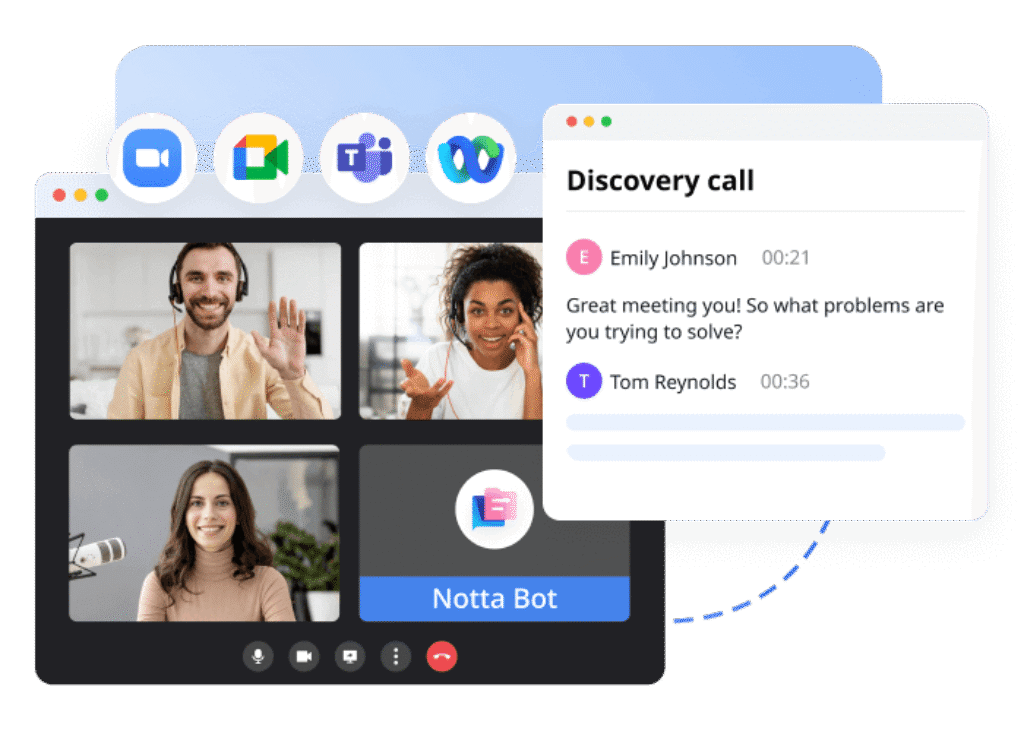
One of Notta’s standout strengths is its real‑time transcription engine. When you invite the Notta bot to your meeting, it immediately captures speech and converts it into text on a shared timeline. With support for 58 languages, you can host multilingual meetings without worrying about language barriers. If two participants speak different languages, Notta can transcribe each speaker and provide translations simultaneously. This bilingual capability is especially useful for cross‑border teams and client calls.
- Real‑time transcription for live meetings – Notta starts transcribing as soon as the call begins, so you can see notes as the conversation unfolds.
- File transcription for uploaded media – Upload audio or video files in formats like MP3, WAV, MP4 or M4A and get a transcript in minutes.
- Multilingual support – Choose from 58 languages and multiple dialects. Notta automatically detects language and can switch mid‑conversation.
Speaker Identification & Mindmaps
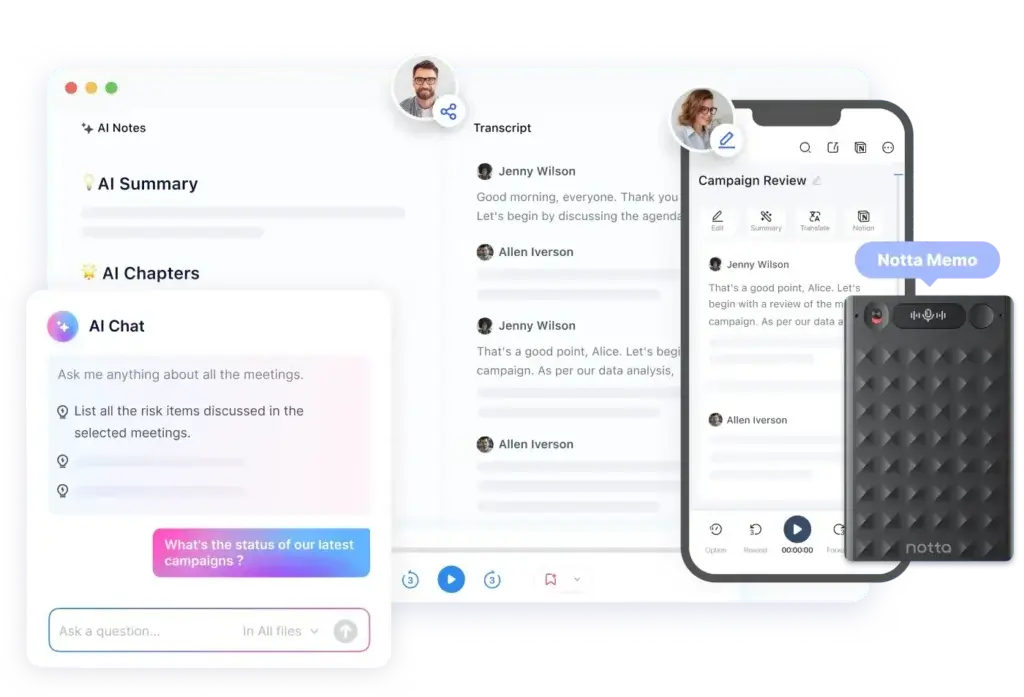
Notta separates individual speakers during conversations and displays their names next to their dialogue. You can edit speaker names after the meeting to ensure accuracy. This feature makes it easy to follow who said what without confusion. Notta also offers a mindmap view that transforms complex discussions into visual hierarchies. Mindmaps help you connect ideas, track decision paths, and navigate long conversations quickly.
- Automatic speaker labeling – The transcript highlights each participant and allows you to correct misidentified speakers.
- Mindmap visualization – Convert meeting transcripts into interactive mindmaps for brainstorming and project planning.
AI Notes & Summaries
Instead of reading through lengthy transcripts, Notta generates concise AI‑powered summaries. These summaries break down the meeting into chapters, list action items, and highlight important decisions. You can customize templates for different meeting types, such as sales calls, interviews, or project updates. Editing the summary is simple; just click on text to adjust wording or add context.
- Chaptered summaries – Divide discussions into sections like agenda items, decisions and next steps.
- Action item extraction – Automatically pull out tasks and assign them to team members with due dates.
- Customizable templates – Choose from built‑in templates or create your own for recurring meeting formats.
Translation & Bilingual Meetings
Beyond transcription, Notta excels at translation. You can translate both live meetings and uploaded files into more than fifty languages. Bilingual meetings allow participants to speak in their native tongue while the tool provides real‑time translations. This feature is crucial for international teams and client relations.
- Live translation – Hear one language, read another. Notta presents both original speech and translated text side by side.
- File translation – Upload recorded content and translate it into multiple languages at once.
- Bilingual mode – Host meetings where participants switch languages and still receive coherent notes and summaries.
Meeting Scheduler & Collaboration
Unlike many note‑taking tools, Notta includes a built‑in meeting scheduler. You can create booking links, specify availability, and let attendees choose times. The scheduler automatically updates your calendar, sends confirmation emails, and reminds participants before the call. Once a meeting ends, collaboration tools let you share transcripts, summaries, and recordings with colleagues.
- Booking links and calendar sync – Generate personalized scheduling links and avoid back‑and‑forth emails.
- Shared workspaces – Organize transcripts into folders, set permissions and collaborate inside Notta’s workspace.
- Bookmarks and comments – Highlight key moments in the transcript and discuss them directly with your team.
AI Chat & Conversation Insights
For deeper analysis, Notta offers an AI‑powered chatbot. This tool lets you ask questions about your meetings and receive answers based on the transcript. You can quickly generate follow‑up emails, identify action items, or search for specific information. Conversation insights provide analytics such as speaker time, silence duration, and sentiment. These metrics help teams understand meeting dynamics and refine communication.
- AI chatbot assistance – Ask questions like “What decisions were made?” or “Summarize action items” and get immediate responses.
- Meeting analytics – View metrics on who spoke most, how long pauses lasted, and overall sentiment trends.
Notta Memo & Mobile Use
Many users attend in‑person meetings or work on the go. Notta’s mobile app for iOS and Android allows you to record and transcribe conversations offline, then sync them later. The company also offers Notta Memo, a handheld device that captures audio in offline environments. Once connected to the internet, the device uploads recordings to your Notta account for transcription and analysis.
- Mobile app – Record conversations, interviews or lectures from your phone and access transcripts on the web.
- Handheld device – Use Notta Memo to capture offline meetings without needing a laptop or smartphone.
- Offline to online sync – Upload files later and receive transcripts and summaries once you reconnect.
Integrations & Export Options
Notta integrates with a wide range of third‑party tools, helping you streamline your workflow. Connect with ClickUp, Notion, Salesforce, Pipedrive, Slack, and more. Use Zapier to build custom workflows across thousands of apps. You can export transcripts and summaries in multiple formats, making it easy to share notes with your team or store them in other systems.
- Direct integrations – Connect Notta with your CRM, project management or collaboration tools to automatically sync notes.
- Zapier support – Build custom automations and integrate Notta with over 7,000 additional apps.
- Flexible export formats – Download transcripts as TXT, SRT, PDF or DOCX, or export audio recordings as MP3.
User Experience and Interface
How Does Everyday Work with Notta Look?
A strong meeting assistant is not only about accurate transcription. You also need a workspace that feels intuitive, fast to navigate, and easy to use throughout your day. Notta performs well here, offering a clean and organized interface designed to help you move quickly between transcripts, summaries, files, and team collaboration tools.
Clean Layout That Reduces Friction
Notta’s layout focuses on clarity. The main dashboard displays your recordings, transcripts, summaries, and folders in a simple structure that is easy to navigate. You can jump between different meetings, filter by file type, or open AI notes with just a few clicks.
This simplicity makes the learning curve short, even for users adopting AI note-taking tools for the first time.
Fast Access to Transcripts, Summaries, and Tools
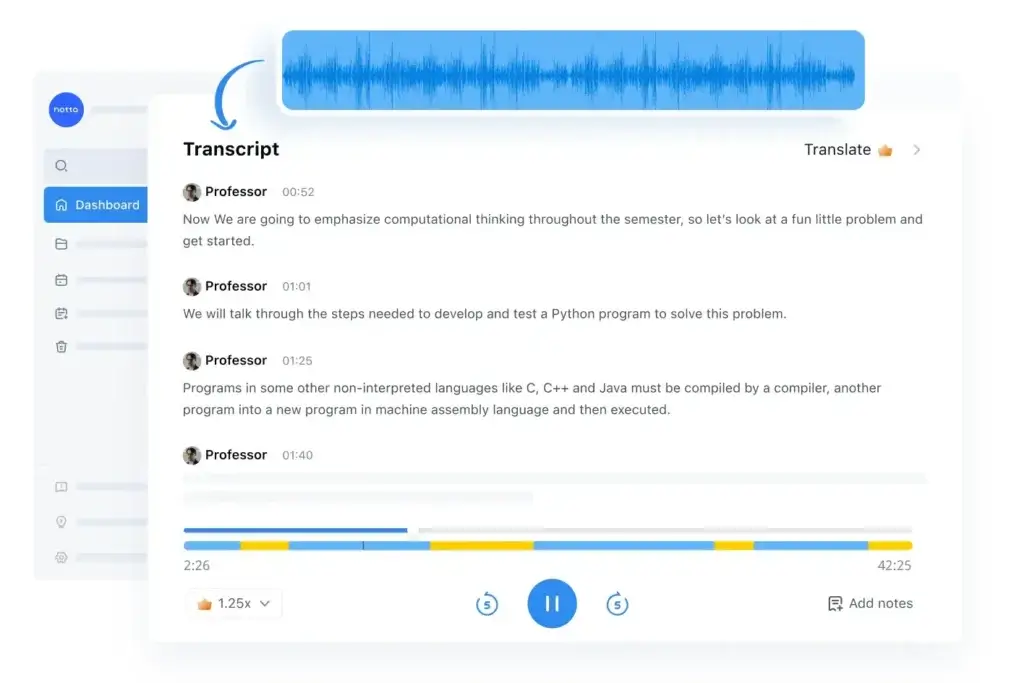
When you open a meeting file, the interface immediately displays key information like transcript blocks, speaker labels, timestamps, and AI summaries.
Each section is separated with clear spacing, so you can skim through the meeting or jump to specific moments instantly.
A few standout elements include:
- Easy editing tools for correcting speaker names or transcript errors
- A smooth playback timeline with color segments
- Quick options to summarize, translate, or export notes
These small but thoughtful interactions make the daily workflow feel faster and more organized.
Responsive Across Desktop and Mobile
Whether you are using Notta on the desktop app, web app, or mobile device, the experience stays consistent. The design adapts well to smaller screens, which is useful when you need to review transcripts or capture in-person conversations on the go.
This is especially helpful for field interviews, sales calls, or one-on-one meetings where carrying a laptop is not practical.
Smooth Collaboration for Teams
Notta also provides a straightforward system for sharing transcripts and AI notes with colleagues. You can add comments, bookmarks, or send files directly to team members.
On the Business plan, the shared workspace helps teams stay aligned, offering permission controls, analytics, and a unified library of meeting content.
Minimal Distractions While Working
One of the biggest strengths of the user experience is how little Notta interrupts your workflow. The meeting bot joins calls automatically if enabled, the interface loads quickly, and the AI summaries appear without requiring manual prompts.
The tool stays out of your way, allowing you to stay focused on the conversation instead of managing the software.
Pros And Cons
Advantages and Disadvantages
Positive
✅ Multilingual and bilingual transcription
✅ Mindmap and visualization tools
✅ Built‑in meeting scheduler
✅ Robust integrations
Negative
❌ Limited free plan
❌ Privacy concerns
❌ Bot dependence
❌ Paywalled features
Every tool has advantages and drawbacks. Understanding both sides helps you make an informed decision.
✅Pros
• Multilingual and bilingual transcription – Support for 58 languages and real‑time translation sets Notta apart from many competitors.
• Mindmap and visualization tools – Visual summaries help teams brainstorm and understand complex conversations.
• Built‑in meeting scheduler – Eliminate the need for separate scheduling tools and reduce email back‑and‑forth.
• Robust integrations – Connect directly with CRM, project management and collaboration platforms, or use Zapier for custom workflows.
• Mobile and offline options – Notta Memo and mobile apps allow you to capture in‑person meetings and sync transcripts later.
• Customizable templates – Tailor AI summaries to the type of meeting you’re running and edit summaries easily.
• AI chatbot and conversation insights – Ask questions about your meetings and view analytics on speaker time and sentiment.
⚠️Cons
• Limited free plan – The free tier offers 120 minutes per month and only three minutes per recording, which is restrictive for meaningful testing.
• Privacy concerns – Some reports indicate that Notta may use conversation data for training its AI models. Full opt‑out requires higher‑tier plans.
• Bot dependence – The requirement to invite a bot may feel intrusive and raise trust issues, especially in privacy‑sensitive environments.
• Paywalled features – Features like video recording, AI chat and advanced analytics are locked behind Pro or Business plans.
• Japanese market focus – While Notta supports many languages, its strongest accuracy and offline tools cater to Japanese users.
• Upsell pressure – Users sometimes experience aggressive upsell prompts during onboarding or plan upgrades.
Pricing and Tiers
How Much Does Notta Cost?
Pricing and Plans
Notta offers several pricing tiers. Each plan is billed monthly or annually, with discounts for annual commitments. Below is a simplified comparison of the main tiers using the requested table format:
| Plan | Monthly Price (annual) | Transcription Minutes | Key Features |
| Free | $0 | 120 min/month, 3 min per recording | Basic transcription, limited translation, 10 AI summaries, 4 bilingual meetings |
| Pro | $8.17 per seat | 1,800 min/month, 90 min per recording | Custom templates, AI chatbot, file transcription, translation, editing and playback |
| Business | $16.67 per seat | Unlimited minutes, 5 hours per call | Collaboration workspace, advanced analytics, roles & permissions, 50 AI summaries |
| Enterprise | Custom | Custom allotments | Enhanced security, dedicated support, data controls, optional privacy options |
Add‑on services include monolingual translation (around $6 per month) and bilingual transcription add‑ons ($9 per month). The Pro and Business plans provide the best value for users needing more than basic transcription.
Who Is It Best For?
Is Notta The Right Fit For Your Workflow?
Notta works well for many types of professionals, but it shines the most when you need accurate transcription, multilingual support, and fast AI summaries without added complexity. Its ease of use and automation make it a strong fit for individuals and teams who want to reduce manual note-taking and organize meeting insights more efficiently.
Best Fit Profiles
Notta is ideal for the following types of users:
- Remote teams that rely on Zoom, Google Meet, Teams, or Webex
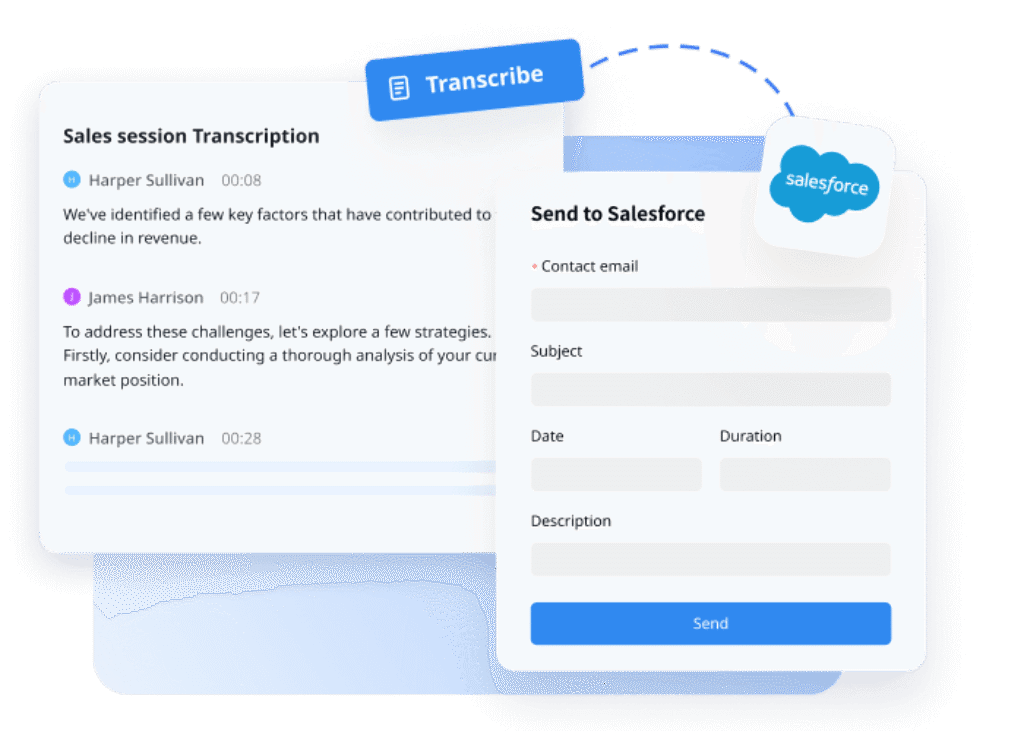
- Sales reps who need transcripts and summaries synced into CRM tools
- Consultants and agencies who handle frequent client calls
- Recruiters who conduct interviews and rely on structured notes
- Students and educators capturing lectures and discussions
- Multinational teams that need bilingual or multilingual transcription
- Professionals who want an AI assistant to analyze conversations and generate follow-up actions
Why These Users Benefit Most
You benefit from Notta the most if your role involves heavy meeting volume or requires detailed documentation. The combination of real-time transcription, AI summaries, translation, and CRM integrations makes it easy to move from conversation to actionable insights with minimal friction.
For multilingual teams, Notta’s bilingual transcription becomes a major advantage. If you work in a customer-facing role, the one-click export to systems like Salesforce eliminates manual data entry and helps maintain accurate records.
Where It May Not Be the Best Fit
If you require unlimited recording minutes on a free plan, strict on-device processing, or advanced enterprise-level analytics, you may prefer a more specialized tool. Notta is strongest in usability and language flexibility, but not all premium features are available in the lower tiers.
Notta VS Alternatives
Comparison With Other AI Note Takers
If you like the idea of AI-powered meeting notes but are unsure whether Notta is the perfect fit, several strong alternatives offer different strengths. Some focus on free transcription, some offer deeper meeting analytics, and others shine in all-in-one productivity workflows.
Below are the top Notta alternatives worth exploring.
Top Alternatives to Notta
You can consider the following tools if you want different pricing, features, or workflows:
- Fireflies AI – Great for automatic meeting capture and team collaboration
- Fathom – Strong free plan with fast summaries for individuals
- ClickUp Note Taker – Ideal if you want AI notes built directly into a full work management platform
- Granola AI – Excellent for lightweight, real-time note-taking with a focus on simplicity
Each tool has a slightly different use case, so the best option depends on your workflow needs, meeting volume, and whether you want a standalone note-taker or an integrated productivity suite.
Notta vs Competitors: Comparison Table
Below is an SEO-friendly comparison table, formatted according to your required WordPress table style.
| Tool | Best For | Key Strength | Free Plan |
| Notta | Multilingual teams and high transcription accuracy | Bilingual and multilingual transcription with strong AI summaries | 120 minutes per month |
| Fireflies AI | Teams needing searchable transcripts and integrations | Extensive collaboration features and strong meeting bot | Limited free plan |
| Fathom | Individuals wanting fast, free AI summaries | Generous free plan with accurate summary generation | Yes, unlimited use for individuals |
| ClickUp Note Taker | Users wanting AI notes inside a project management tool | Integrated into ClickUp tasks, docs, and workflows | Included in free ClickUp account |
| Granola AI | Lightweight note-taking with minimal setup | Real-time notes, clean UI, very easy to use | Free basic usage |
Setup Guide
Getting Started with Notta
If you decide to try Notta, the following steps will help you get started efficiently.
- Sign up and onboard – Create an account on Notta’s website or mobile app. Connect your Google Calendar or other calendars during setup to allow the scheduler and meeting bot to sync your events.
- Invite the meeting bot – For online meetings, copy your meeting link (Zoom, Teams, Google Meet, etc.) and paste it into Notta’s “Record online meeting” field. The Notta bot will automatically join at the scheduled time.
- Upload files – Click “Upload and transcribe file” on the dashboard. Drag audio or video files into the window and select the language(s) for transcription. You’ll receive transcripts and summaries shortly.
- Use the mobile app or Notta Memo – For in‑person meetings, open the mobile app, tap record, and start capturing. With Notta Memo, press the record button on the device. After the session, connect to Wi‑Fi or your smartphone to upload files.
- Export and share – Once transcription is complete, edit any speaker labels or summary sections as needed. Then export your transcript in your preferred format or share it with colleagues through a private link. You can also add bookmarks, comments or assign action items directly from within Notta.
Tips & Best Practices for Using
How To Get The Most Out of Notta
Adopting a few habits will help you get the most value from Notta.
- Prepare your audio environment – Make sure speakers are clear, and background noise is minimal. If possible, use an external microphone to improve transcription accuracy.
- Define meeting goals – Before you start, decide what outcomes you expect. Choosing the right summary template (sales call, interview, team meeting) helps the AI extract meaningful action items.
- Leverage bilingual mode strategically – If participants speak multiple languages, enable bilingual transcription and translation to ensure clarity and reduce misunderstandings.
- Review and edit quickly – After the meeting, skim the transcript and summary to correct speaker labels and refine the AI‑generated notes. Early editing prevents confusion later.
- Utilize mindmaps and templates – During brainstorming sessions, switch to the mindmap view to visualize ideas. For recurring meeting types, create custom summary templates to standardize notes across your team.
- Integrate with your workflow – Connect Notta to your project management tools, CRM, or knowledge base so transcripts and action items flow naturally into your existing processes.
- Be cautious with sensitive data – If privacy is a concern, consider using the Enterprise plan to opt out of data training or explore alternatives with on‑device processing. Notify meeting participants that a bot will join and obtain consent before recording.
Conclusion
Final Thoughts – Is Notta Worth It in 2025?
Choosing the right AI note-taking tool can significantly improve how you capture, organize, and act on meeting insights. Notta stands out for its accurate transcription, multilingual support, and clear AI summaries that help you stay focused without manually tracking every detail. If your workflow involves frequent online calls, client meetings, or global collaboration, Notta gives you a reliable way to manage conversations and turn them into structured, actionable notes.
Notta also works well for users who want a simple interface, fast onboarding, and features like mindmaps, translation, and CRM exports. These strengths make it a versatile choice for professionals across sales, consulting, HR, education, and remote teamwork.
While the free plan is limited and some advanced capabilities require an upgrade, Notta remains one of the most well-rounded tools in the AI note-taking market. If you value accuracy, multilingual transcription, and a clean user experience, it is a strong option to consider.
If you are still evaluating your options, reviewing alternatives like ClickUp Note Taker, Granola AI, Fireflies, and Fathom can help you determine which tool aligns best with your workflow and budget.
Have more questions?
Frequently Asked Questions
1. What does Notta’s free plan include?
Notta’s free plan offers 120 minutes of transcription per month with a three‑minute limit per recording, 10 AI summaries, and limited bilingual and translation usage. It’s a good way to test the interface, but you’ll need a paid plan for longer meetings or advanced features.
2. How does Notta handle privacy and data security?
Notta uses encryption to protect your data, but some reports suggest that conversation data may be used to train its AI models. Enterprise customers can opt out of data training and receive enhanced security controls. If privacy is critical, consider plans with these protections or explore on‑device alternatives.
3. Which languages does Notta support?
Notta supports 58 languages for transcription and more than 50 for translation, including English, Spanish, French, German, Japanese, Arabic, Chinese, and many others. The bilingual mode allows two languages in the same meeting.
4. Does Notta integrate with my other tools?
Yes. You can connect Notta directly with platforms like ClickUp, Notion, Salesforce, Pipedrive, Slack, and Google Calendar. Through Zapier, you can integrate with thousands of additional apps.
5. Can I use Notta offline?
The mobile app and Notta Memo device allow you to record meetings offline. Once you reconnect to the internet, the recordings upload to your account for transcription and analysis. Live meeting transcription, however, requires an active internet connection.
6. In which formats can I export transcripts?
Notta lets you download transcripts in TXT, SRT, PDF and DOCX formats. You can also export audio recordings as MP3 files, making it easy to repurpose content or archive your meetings.
7. How customizable are Notta’s AI summaries?
You can select from various built‑in templates or create your own. After the AI generates a summary, you can edit any section to refine the text, adjust tone, or highlight specific decisions. Custom templates ensure consistency across recurring meeting types.
8. What does the meeting scheduler do?
Notta’s scheduler lets you create booking links, set available time slots, send confirmation emails, and automatically add meetings to your calendar. It removes the back‑and‑forth often associated with scheduling and integrates directly with your Notta account.
9. Are there credible alternatives to Notta?
Yes. Otter.ai, Fireflies.ai, Krisp, Jamie, Fathom, and Radiant are popular alternatives. Each has different strengths: Otter.ai offers meeting management features, Fireflies.ai integrates deeply with CRMs, Krisp focuses on privacy and noise cancellation, and Jamie provides offline recording without meeting bots. Choose based on your priorities.
10. Does Notta comply with GDPR and other regulations?
Notta claims compliance with SOC‑2, GDPR and other privacy regulations. However, if your industry requires strict data handling (e.g., legal or healthcare), verify compliance and consider purchasing the Enterprise plan for enhanced controls or selecting an alternative with on‑device processing.