
Introduction
Efficient resource management is vital in project‑driven organizations. When your teams are juggling multiple projects with limited budgets and deadlines, it becomes difficult to know who is available, which skills are needed and how to prioritize the work. PDWare’s ResourceFirst platform tackles these challenges by focusing on resource planning as the foundation for portfolio success. This comprehensive review will guide you through PDWare’s features, pricing, pros and cons, and help you decide whether it is the right choice for your business.
What is PDWare?
Background and ResourceFirst Platform
PDWare, short for Portfolio Decisionware, has been around since the early 2000s. The company pioneered the idea of building a portfolio management solution around resource planning rather than treating it as an add‑on module. Its flagship product, ResourceFirst, centres on the principle that people are your most valuable asset. By starting with an accurate picture of workforce capacity and demand, you can build realistic portfolios and align projects with organizational goals. ResourceFirst is available as a cloud‑based SaaS solution with optional on‑premise deployment. It is built on Microsoft Azure and leverages Qlik‑powered dashboards for real‑time insights. An open architecture and fully documented API make it easy to integrate with other systems.
Who Should Use PDWare?
PDWare is designed for project‑driven organizations with complex resourcing needs. Typical users include:
- Marketing agencies and creative teams that need to allocate designers and content creators across multiple campaigns.
- Engineering firms and construction companies balancing labour and equipment across long‑term projects.
- Software development and technology companies juggling product roadmaps, sprints and backlog management.
- Professional services firms such as consultancies and law firms that bill clients for time and need to forecast capacity.
- Project management offices (PMOs) responsible for prioritizing and staffing portfolios.
Small startups may find PDWare’s enterprise‑grade feature set and custom pricing excessive. However, mid‑sized and large enterprises facing resource bottlenecks will appreciate the depth and configurability of the platform.
Software Specification
Key Features of PDWare
PDWare offers an extensive suite of capabilities that revolve around planning capacity and aligning resources with strategic priorities. Below are the most notable features, organized into functional categories.
Resource Capacity Planning
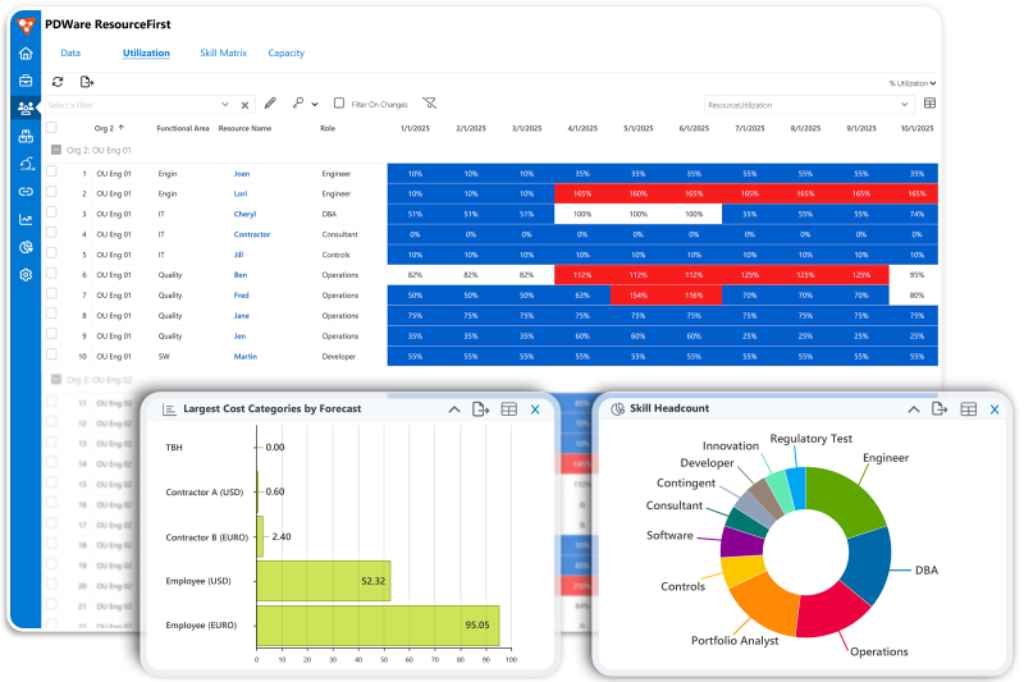
At its core, PDWare helps you determine whether you have the right people, skills, and budget to meet upcoming demand. The capacity planning module lets you capture employee skills, proficiency levels, cost centres, and availability. Interactive dashboards show capacity versus demand across the organization, enabling you to:
- Forecast staffing needs: Calculate the number of people and skills required for upcoming projects and identify gaps early.
- Understand true cost: Compare the cost of employees, contractors, and blended teams to make budget‑aware decisions.
- Plan sourcing strategies: Evaluate whether to hire, train or contract out based on future demand curves.
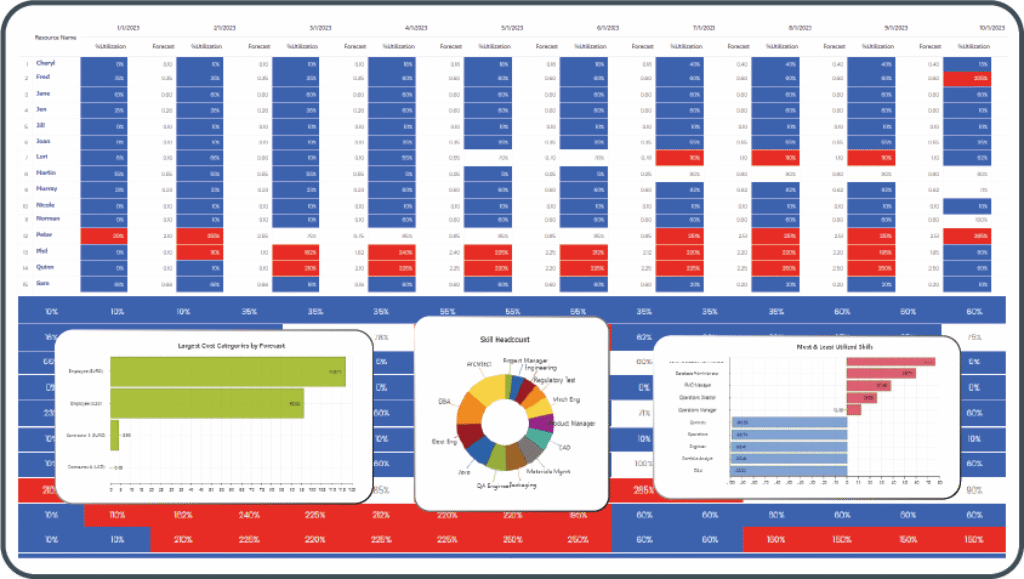
PDWare’s capacity planning encourages proactive decision‑making. Instead of reacting to resource shortfalls, you can plan workforce growth or contraction with confidence. A visual representation of capacity thresholds makes it easy to spot over‑commitment and avoid burnout.
Strategic Resource Allocation
Once you know your supply, the next challenge is assigning people to the most important work. PDWare’s strategic resource allocation tools help you decide which projects deserve your limited resources. The platform guides you through:
- Assigning the right people: Match people and teams to projects based on skills, availability and priority.
- Addressing demand shortfall: Identify tasks that cannot be staffed and adjust schedules or scope accordingly.
- Managing workload: Balance assignments across teams and individuals to prevent bottlenecks.
PDWare supports project scoring models so you can rank initiatives based on strategic fit, risks, and expected benefits. Projects competing for the same resources are automatically compared using prioritization algorithms or manual ranking. Decision makers get a transparent view of trade‑offs, ensuring feasible portfolios.
Real‑Time Dashboards & Scenario Planning
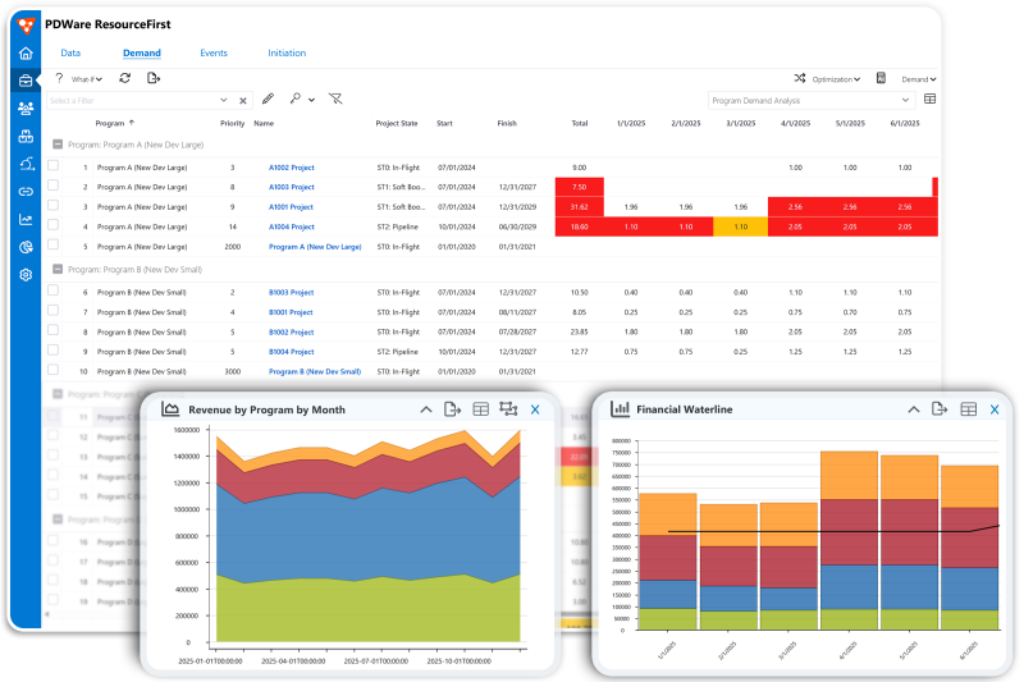
ResourceFirst provides real‑time dashboards powered by Qlik to visualize data at a glance. These dashboards show project timelines, utilization rates, budget consumption, and risk indicators. Scenario planning tools allow you to perform what‑if analysis before making commitments. For example, you can:
- Model different scenarios by including or excluding projects, adjusting budgets or changing resource availability.
- Move projects on the timeline to see if starting sooner or later will free up resources.
- Identify conflict zones where multiple projects compete for the same skills and adjust assignments accordingly.
The scenario planning engine makes PDWare ideal for portfolio optimization. Executives can review multiple scenarios, compare projected outcomes, and choose the one that best supports strategic objectives.
Agile & Hybrid Support
PDWare recognizes that organizations often run a mix of traditional and Agile projects. The platform supports team‑based and individual forecasting, enabling you to allocate team members by percentage and assign entire teams to projects. It accommodates five common phases of Agile planning: Envision, Speculate, Explore, Adapt, and Close, while maintaining a unified capacity forecast across all work types. You can allocate resources to sprints, track user stories, and combine Agile and waterfall work in a single view. This flexibility makes ResourceFirst suitable for organizations that operate in Scrum, Kanban, SAFe, or hybrid environments.
Integration, API & Open Architecture
Integration is critical in modern enterprise software, and PDWare excels in this area. The platform is built on Microsoft Azure and offers an open architecture with a comprehensive API. Out‑of‑the‑box connectors and custom integrations enable you to link ResourceFirst with tools like:
- CRM and ERP systems (e.g., Salesforce, SAP, Oracle) to pull in project financials, customer contracts and revenue forecasts.
- HR and payroll systems to synchronize employee data and cost rates.
- PM and collaboration tools (e.g., Jira, Trello, Microsoft Project) to import tasks, epics, and milestones for consolidated capacity planning.
Because ResourceFirst is integration‑ready, you avoid double data entry and maintain a single source of truth across departments. For organizations following a best‑of‑breed strategy, the API ensures PDWare can slot into your existing ecosystem.
Portfolio Optimization & Financial Management
Beyond managing people, PDWare helps align projects with strategic goals and budgets. Portfolio optimization features include:
- Prioritized planning: Set business objectives and automatically rank projects according to strategic alignment and expected benefits.
- Budget and cost tracking: Integrate financial data to monitor project costs, forecast expenditures and compare against budgets.
- Waterline analysis: Visualize which projects fall above or below the funding “waterline” and adjust your portfolio accordingly.
- Risk and performance analysis: Evaluate project risks and track performance metrics to support informed decision‑making.
By bringing financials into the same platform as resource planning, PDWare ensures that you not only have enough people but also enough budget to deliver. Decision makers can see how shifting priorities affects both capacity and cost.
Additional Resource Management Features
PDWare’s feature set extends beyond the headline capabilities. Other useful functions include:
- Skills tracking: Catalogue employee competencies, certifications, and proficiency levels to match the right people to tasks.
- Time and expense tracking: Log hours worked and costs incurred to improve billing accuracy and workforce utilization reporting.
- Reporting and analytics: Generate customizable reports on capacity, utilization, project status and financial performance.
- Drag‑and‑drop scheduling: Adjust assignments quickly using intuitive drag‑and‑drop interfaces.
- Utilization reporting: Track how frequently assets—human or otherwise—are used to inform hiring and procurement decisions.
These additional features make ResourceFirst a full‑fledged resource management suite rather than a simple scheduling tool.
User Experience
User Interface & Ease of Use
Implementation & Onboarding
PDWare prides itself on rapid implementation. The vendor claims you can be up and running in weeks rather than months. During onboarding, consultants help you configure the system to mirror your organizational structure, define project categories, and import resource data. Because ResourceFirst is available as a SaaS platform, there is no need for infrastructure investment. For organizations with strict security requirements, a thin‑client on‑premise option is available.
Training resources include video tutorials, guided walkthroughs, and extensive documentation. PDWare’s support team consists of resource management subject‑matter experts who guide you through best practices. Many reviews highlight the vendor’s partnership mentality, and clients feel supported beyond the initial deployment.
Navigation & Customization
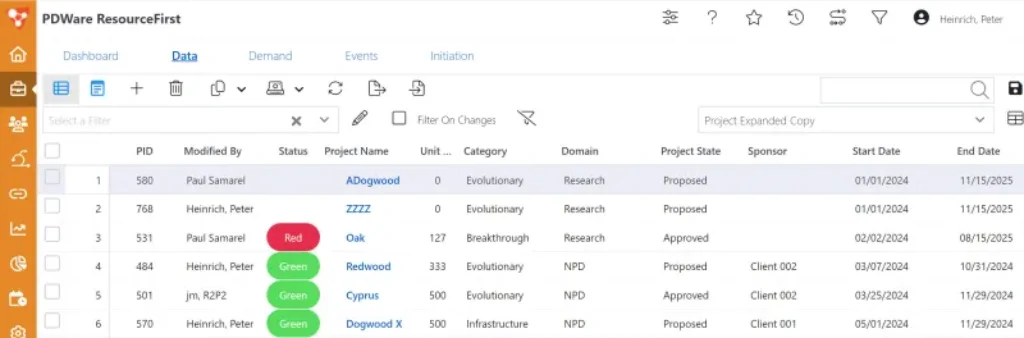
ResourceFirst offers a clean, Excel‑like interface. The dashboards are customizable, allowing you to build views tailored to different stakeholders, executives, resource managers, project managers, and team members. Personalized views minimize navigation by surfacing only the information relevant to each role. Color‑coded indicators show conflict areas and over‑allocation, while filter options make it easy to drill down into departments, teams, or individual employees.
The initial learning curve can feel steep due to the breadth of functionality. However, once you familiarize yourself with the navigation and start with the core modules, the interface becomes intuitive. Users often begin with capacity planning and gradually adopt advanced features like scenario planning and financial analysis.
Pros and Cons
Advantages and Disadvantages
Positive
✅ True resource management
✅ Configurable and flexible
✅ Strong capacity planning and scenario analysis
✅ Integration ready
Negative
❌ Steep learning curve
❌ Custom pricing
❌ Infrequent updates
❌ Technical support variations
Every platform has strengths and weaknesses. Here are the notable pros and cons of PDWare based on research and user feedback:
✅ Pros
- True resource management: Unlike many project portfolio tools that tack on resource modules, PDWare is built around resource planning from the ground up.
- Configurable and flexible: Highly adaptable to different industries, methodologies and organizational structures.
- Strong capacity planning and scenario analysis: Real‑time dashboards and what‑if planning provide deep insights.
- Integration ready: Open architecture and API allow seamless data exchange with other systems.
- Expert support: Implementation and ongoing support are delivered by subject‑matter experts who act as partners.
❌ Cons
- Steep learning curve: The broad feature set can feel overwhelming until users become comfortable with the interface.
- Custom pricing: Lack of transparent pricing makes budgeting difficult for smaller organizations.
- Infrequent updates: Some reviews mention slower release cycles, leading to occasional feature lag.
- Technical support variations: While many users praise support, others cite inconsistent technical response times.
Pricing
How Much Does PDWare Cost?
PDWare does not publish standard pricing tiers. Instead, the vendor offers custom quotes tailored to your organization’s size and requirements. According to information from independent review sites, ResourceFirst’s basic pricing starts around $50,000 per user as a one‑time licensing fee, with additional costs for support and configuration. Enterprise pricing scales based on the number of users, modules, and integrations required. There is no free plan, but PDWare may provide a limited trial or demo on request.
When evaluating PDWare’s price, consider the value of accurate capacity planning and portfolio optimization. For small businesses or single‑project teams, the investment may be hard to justify. Mid‑sized and large enterprises, particularly those managing hundreds of projects and complex portfolios, can realize substantial returns through avoided over‑staffing, improved utilization and better project selection.
Integrations & API
How PDWare Integrates With Other Tools
PDWare’s integration capabilities are one of its standout features. Built on Microsoft Azure, ResourceFirst can connect with enterprise systems via its API. Prebuilt connectors are available for popular platforms, and custom connectors can be created with the vendor’s support. Common integration scenarios include:
- Syncing employee and contractor data from HRIS platforms to keep resource profiles up to date.
- Importing project financials from ERP systems to reconcile budgets and actual costs.
- Pulling issue and task data from project management tools like Jira or Azure DevOps to update resource allocations automatically.
- Exporting reporting dashboards to business intelligence platforms for executive summaries.
Because the API is REST‑based, developers can integrate PDWare with virtually any system that supports API calls. Organizations using Microsoft’s ecosystem benefit from tight Azure integration and Qlik dashboards out of the box.
Alternatives
PDWare vs Competitors
Resource management software comes in many flavours. If PDWare feels overly complex or expensive, consider these alternatives:
- Smartsheet Resource Management – A flexible work management platform with built‑in resource scheduling and collaboration features. Ideal for teams that need broad project management and simpler capacity planning.
- Resource Guru – A lightweight scheduling tool that excels at assigning people and equipment across short‑term projects. It offers a visual calendar and drag‑and‑drop scheduling at an affordable subscription price.
- Hub Planner – Provides resource scheduling, timesheets, and reporting with a user‑friendly interface. It suits agencies and consultancies seeking intuitive resource booking.
- monday.com Work Management – Offers customizable boards for task tracking with resource workload charts. It is great for small teams needing a combination of task management and basic capacity planning.
- Microsoft Project with Project for the web – A familiar project management suite that includes resource management features when paired with Project for the web and Power BI integrations. Suitable for organizations already invested in Microsoft’s ecosystem.
Each alternative has its own strengths. Evaluate your budget, desired feature depth, and integration requirements when selecting a resource management solution.
PDWare sits in a crowded landscape of resource management and project portfolio tools. To illustrate how it compares, the table below contrasts PDWare with a well‑known alternative, Smartsheet Resource Management. Smartsheet is a popular work management platform that offers resource and portfolio capabilities. The comparison highlights how PDWare’s strengths lie in deep capacity planning and scenario analysis, while Smartsheet focuses more broadly on project collaboration.
| Feature | PDWare (ResourceFirst) | Smartsheet Resource Management |
| Core Focus | Resource capacity planning and portfolio optimization | General project management with resource scheduling module |
| Scenario Planning | Extensive what‑if analysis and waterline tools | Basic resource leveling, limited scenario modelling |
| Pricing Model | Custom quotes, one‑time licensing plus support | Subscription tiers starting per user/month |
| Integration Strategy | Open API built on Microsoft Azure with Qlik dashboards | Native integrations with Microsoft 365, Google Workspace and third‑party apps |
| Agile & Hybrid Support | Team‑ and individual‑based allocation, supports Agile and hybrid methods | Primarily supports traditional project workflows, limited Agile support |
| Ideal Audience | Mid‑sized to large enterprises with complex resource constraints | Teams seeking broad project management and collaboration capabilities |
| Unique Strength | Deep capacity planning, prioritization and financial alignment | User‑friendly interface and flexible collaboration features |
When choosing between PDWare and a competitor, consider your priorities. If accurate capacity forecasting and portfolio optimization are paramount, PDWare’s ResourceFirst excels. If you need a broader work management platform with lighter resource scheduling, a tool like Smartsheet may suffice.
Use Cases & Industry Suitability
Who is PDWare Best For
Implementation & Support
Tips for Maximizing PDWare’s Value
Deploying PDWare typically involves three phases: planning, configuration, and rollout. During planning, you work with PDWare’s consultants to map your organizational structure, define project categories, and identify integration points. The configuration phase involves importing data, setting up custom fields, and building dashboards tailored to various stakeholders. Rollout includes training sessions, pilot usage, and organization‑wide adoption.
PDWare’s support extends beyond initial implementation. Subscription packages may include phone and email support, access to a knowledge base, regular check‑ins, and optional managed services. Because ResourceFirst is an enterprise solution, dedicated customer success managers help ensure your deployment evolves with your organization’s needs. Keep in mind that some users report inconsistent response times from technical support, so clarify service level agreements during contract negotiations.
Tips for Maximizing PDWare’s Value
To get the most from PDWare, consider these best practices:
- Start with accurate data: Invest time in capturing complete resource profiles: skills, availability and cost rates. Garbage in yields garbage out.
- Define governance processes: Establish clear intake, prioritization and review procedures so ResourceFirst becomes the single source of truth.
- Train stakeholders: Provide training for executives, resource managers, and project managers, focusing on the modules they will use most.
- Leverage scenario planning: Don’t just build one plan. Model different scenarios and use waterline analysis to decide which projects to fund.
- Integrate systems: Connect PDWare with HRIS, ERP, and project management tools to avoid duplicate data entry and maintain data accuracy.
- Iterate adoption: Roll out core modules first (e.g., capacity planning), then gradually introduce advanced features like financial management and Agile planning.
By following these tips, you can accelerate time to value and ensure your organization fully benefits from PDWare’s capabilities.
Conclusion
Final Thoughts
PDWare’s ResourceFirst platform stands out for its relentless focus on resource capacity and portfolio optimization. Instead of tacking resource planning onto project management, PDWare flips the equation: start with the people, then build your portfolio. For mid‑sized and large enterprises juggling complex portfolios and constrained resources, this approach can pay dividends. You gain visibility into capacity, align projects with strategic priorities, and make informed trade‑offs using scenario planning. The learning curve and custom pricing may deter smaller organizations, but those who invest in PDWare often cite improved portfolio feasibility, reduced over‑commitment, and better decision-making.
Have more questions?
Frequently Asked Questions
1. What is PDWare?
PDWare is a resource management and portfolio optimization platform. Its ResourceFirst product emphasizes planning and assigning the right people to the right projects based on capacity, priority, and financial constraints.
2. How does PDWare differ from other project management tools?
While many tools start with tasks and then attempt to fit resources around them, PDWare starts with resource capacity. It integrates capacity planning, strategic allocation, and scenario analysis, offering deeper insights into whether projects are feasible before committing.
3. Does PDWare support Agile methodologies?
Yes. You can assign individuals to Agile teams by percentage and forecast their combined effort across sprints. ResourceFirst supports hybrid environments, combining Agile and waterfall work in a single capacity model.
4. How much does PDWare cost?
Pricing is customized. Independent sources suggest a starting point around $50,000 per user as a one‑time license, with additional costs for support and configuration. Contact PDWare for a tailored quote.
5. Can PDWare integrate with my existing systems?
Yes. The platform provides an open API and connectors for HR, ERP, CRM, and project management systems. This allows you to synchronize data and avoid duplicate entries.
6. What industries use PDWare?
PDWare serves engineering, manufacturing, life sciences, professional services, marketing agencies, and technology companies, any environment where resource constraints impact project success.
7. Is PDWare cloud‑based or on‑premise?
ResourceFirst is offered as a cloud‑based SaaS solution on Microsoft Azure. A thin‑client on‑premise option is available for organizations with specific security or regulatory requirements.
8. How quickly can we implement PDWare?
Implementation typically takes a few weeks, depending on the complexity of your organization. PDWare provides onboarding assistance, configuration services, and training to accelerate adoption.
9. Does PDWare offer reporting and analytics?
Yes. The platform includes Qlik‑powered dashboards, custom reports, and analytics on capacity, utilization, budgets, and project performance. You can export data to BI tools if needed.
10. What support does PDWare provide?
Support includes access to a knowledge base, training resources, and subject‑matter experts. Customers can purchase ongoing support packages with defined response times. Be sure to discuss service levels during contract negotiations to ensure they meet your needs.