
Introduction
Tired of complex coding? You’re not alone.
Whether you’re a solo entrepreneur, a startup founder, or a product manager juggling multiple hats, building an app often feels like climbing a mountain. That’s where Lovable comes in – an AI-driven, no-code platform that’s designed to turn your ideas into powerful web apps using just a few sentences of plain English. Yep, no technical jargon needed!
In an era where speed and simplicity define productivity, Lovable is stepping up to revolutionize how software is made. As more professionals like you search for faster, cost-effective ways to build digital products, Lovable’s rise is no surprise. 🌱
In this detailed review, you’ll discover:
- What Lovable actually is and how it works
- Which powerful features make it stand out
- How its pricing compares to similar tools
- What real users are saying about it
- How it compares to Base44 and other competitors
- Whether it’s the right tool for your project or business
By the end of this article, you’ll have a crystal-clear understanding of whether Lovable fits your workflow or if you should explore alternatives.
Let’s jump right in and explore what Lovable is all about
What Is Lovable?
Overview of this AI-powered application development platform
Imagine building a full-stack app just by talking to your computer… That’s exactly what Lovable lets you do.
Lovable is an AI-powered no-code development platform that helps you build entire applications using simple text prompts. Instead of manually coding the frontend, backend, database, and deployment setup, Lovable does it for you – almost instantly.
✨ Core Concept
At its heart, Lovable is all about translating your ideas into working apps. Whether you say “Create a to-do list app with user login and dark mode” or “Build a CRM tool with Stripe integration”, Lovable understands and builds the framework behind the scenes.
👩💻 Built for Non-Developers (and Developers Too!)
Lovable makes tech more accessible. If you’ve never touched a line of code, no problem! You’ll be able to create MVPs, internal tools, or full web apps without needing to hire a dev team.
And if you are a developer? Lovable still shines.
You can extend, tweak, and export code, or jump into the editor for more control. It’s a productivity booster rather than a code replacer.
🧱 Compared to Traditional Development
Let’s break it down visually:
| Aspect | Traditional Development | Lovable |
| Time to Prototype | Days to weeks | Minutes to hours ⏱️ |
| Code Requirements | 100% custom code | No code required ✨ |
| Tools Needed | Multiple tools for frontend, backend, and hosting | All-in-one platform 🧰 |
| Learning Curve | Steep (especially for non-devs) | Beginner-friendly 📘 |
| Cost | High (developer fees, tools) | Budget-friendly 💸 |
This makes Lovable a solid choice for:
- Rapid prototyping
- Building internal tools
- Testing product-market fit
- Launching MVPs without delays
It’s not just another website builder. It’s a full-stack AI assistant that takes care of the heavy lifting while keeping you in control.
Key Features
Lovable Features and Capabilities
Lovable AI gives you a powerful mix of speed, automation, and full-stack generation, helping you turn ideas into working applications with minimal friction. You’re able to build frontends, backends, databases, and deployment pipelines from a single prompt, making it one of the fastest AI app builders available in 2025.
Full-Stack App Generation From a Single Prompt
Lovable creates complete React + Tailwind applications based on natural language instructions. You describe what you want, and the platform instantly generates pages, components, routes, logic, and styling. This makes it easier to launch working prototypes or MVPs without writing manual boilerplate code.
Built-In Backend with Lovable Cloud
You don’t need to wire up external services to get your app online. Lovable Cloud automatically provides backend functions, hosting, API routes, environment variables, and server logic. This integrated infrastructure reduces setup time and lets you focus on refining features instead of configuring servers.
Seamless Supabase Integration
Lovable includes native connectivity with Supabase for authentication, storage, and database management. You can create tables, link data models, and generate CRUD functionality directly via prompts. This turns complex backend workflows into a few lines of natural-language instructions, ideal for fast database-driven app development.
Real-Time Visual Editor and UI Controls
You have the option to refine layouts using Lovable’s visual editing tools. The system lets you click any element, request design changes, adjust styling, move components, and apply new layouts without manually editing code. This saves considerable time when fine-tuning UI and improves overall user experience.
GitHub Sync and Code Export
For users who want ownership and flexibility, Lovable offers full bidirectional sync with GitHub. You can export the generated React/Vite codebase, modify it locally, and push updates back into Lovable. This gives you the benefits of AI generation while maintaining complete control over your code.
Drag-and-Drop Components (Evolving Feature)
Lovable is expanding toward a hybrid no-code/AI experience. Its evolving drag-and-drop interface allows you to place layout containers, buttons, lists, and pages visually, then let AI finish the logic. This combination empowers both beginners and experienced developers to work efficiently.
Built-In Publishing and Custom Domains
You can deploy your project directly from Lovable with one click. Whether you use a Lovable subdomain or connect a custom domain, the platform handles all deployment, hosting, and SSL setup automatically. This makes it easier to launch production-ready apps without DevOps knowledge.
AI Debugging and Smart Error Fixes
Lovable includes an AI-powered troubleshooting system. When errors occur, you can click “Try to Fix” or ask the assistant to debug the issue. It analyzes logs, identifies problematic components, and attempts corrections automatically. This is especially useful when iterating quickly or testing complex flows.
Workflow Automation with Chat-Driven Iteration
Everything in Lovable runs through conversational prompts. You can request new features, refactor logic, reorganize pages, connect APIs, update styling, or generate documentation—all inside the chat interface. This reduces context switching and speeds up iterative development.
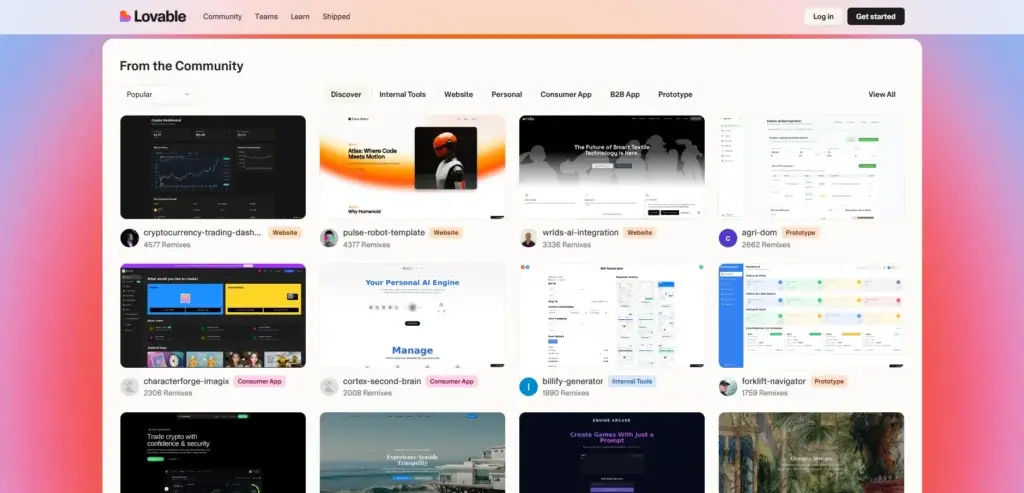
🌟 Benefits of Using Lovable
Lovable is more than just a trendy AI tool – it’s a game-changer for productivity and app development workflows. Whether you’re building a quick MVP or launching a full product, these are the top benefits you’ll notice:
Speed & Simplicity
- Create full-stack apps in minutes, not weeks
- Skip the setup process – no more configuring databases, hosting, or APIs
- AI helps you build faster by understanding natural language prompts
Beginner-Friendly
- Designed for non-developers and product-minded teams
- No coding experience required
- Clean, intuitive UI with helpful documentation and onboarding tips
All-in-One Platform
- Everything in one place: frontend, backend, hosting, and deployment
- No need to juggle tools like Heroku, Firebase, or GitHub Actions separately
Developer-Friendly Options
- Export code anytime and extend it outside the platform
- Use advanced features like Supabase, Git integrations, and third-party APIs
Great for MVPs & Internal Tools
- Perfect for startups, solo founders, or product teams
- Quickly validate ideas or build tools for internal use
Pros and Cons
Advantages and Limitations
To help you make an informed decision, here’s a quick overview of where Lovable shines – and where it might fall short:
Positive
✅ Extremely intuitive and fast to learn
✅ AI prompt builder is surprisingly accurate
✅ All-in-one development stack
✅ Exportable code for developers
Negative
❌ Limited customization for complex apps
❌ Advanced users may find it too abstract
❌ Premium features behind paywalls
❌ Not ideal for massive enterprise projects (yet)
✅ Pros
- Extremely intuitive and fast to learn
You’ll be up and running in minutes, even if you’ve never built an app before. The UI is clean, simple, and welcoming for beginners. - AI prompt builder is surprisingly accurate
Just type in what you want (like “Create a booking app with calendar view”), and Lovable builds it! The AI understands natural language and delivers solid results fast. - All-in-one development stack
No need to stitch together separate tools. Lovable handles frontend, backend, hosting, and deployment – all in one seamless flow. - Exportable code for developers
Want to scale up or hand off to your dev team? You can export clean code anytime, making it great for hybrid workflows. - Perfect for MVPs and internal tools
Whether you’re testing an idea, building a tool for your team, or launching a side project, Lovable helps you go from concept to reality fast.
⚠️ Cons
- Limited customization for complex apps
Lovable is awesome for simple to mid-tier apps, but building enterprise-grade solutions or advanced UIs may feel restrictive. - Advanced users may find it too abstract
Developers used to full control might feel limited by the visual workflows and predefined structures. - Premium features behind paywalls
While the Free and Starter plans are solid, features like custom domains, advanced analytics, or role-based access require upgrading. - Heavy reliance on AI prompts
Sometimes the AI needs a few tries to get things right. You might need to refine your prompts or adjust layouts manually. - Not ideal for massive enterprise projects (yet)
Large-scale projects may require custom integrations, security layers, or infrastructure that Lovable doesn’t fully support (for now).
Speed and Quality
Performance and Accuracy
Lovable AI is designed for exceptional speed, and in most cases, you’ll see your first fully functional app skeleton generated within seconds. This fast turnaround makes it ideal when you need to validate an idea, test a concept, or build an MVP without wasting hours on setup or boilerplate code.
Fast Generation Speeds for MVPs and Prototypes
One of the strongest advantages Lovable offers is the ability to go from a prompt to a working full-stack app faster than most other AI app builders. Many users report building usable prototypes in minutes rather than days. Because Lovable handles routing, database setup, UI components, and hosting automatically, you spend far less time on repetitive tasks and more time refining your product.
High Accuracy for Common Web App Patterns
Lovable performs best when you’re building apps that follow standard web patterns—dashboards, internal tools, CRUD apps, client portals, or lightweight SaaS products. In these cases, the platform produces reliable, predictable results with clean React/Tailwind code and well-structured backend logic. You can adjust details through prompts or the visual editor, making it easier to get the output you want.
Performance Under Load
While Lovable excels during rapid prototyping, accuracy can vary during complex iterations or large-scale updates. The platform may occasionally produce UI inconsistencies, mismatched components, or small logic errors when handling complicated workflows. These issues are usually corrected through iterative prompting or AI-assisted debugging, but they can slow down advanced builds.
Accuracy Limits on Complex Features
For highly specialized apps, advanced analytics, multi-layered permissions, deep third-party API integrations, or apps requiring custom business logic, Lovable may require more manual refinement. The AI handles the frontend exceptionally well, but can sometimes produce incomplete or buggy code for backend-heavy features. Developers with technical knowledge will benefit from GitHub sync to correct and extend code manually.
Real-World Testing and Reliability
During real-world testing, Lovable performs well for small and medium-sized applications. Apps built with Lovable Cloud load quickly, respond smoothly, and handle basic interactions reliably. For apps with more intensive real-time operations or high traffic, users may need to optimize parts of the codebase or pair Lovable with additional hosting resources.
User Experience
Ease of Use
Lovable AI focuses on giving you a smooth, intuitive experience from the moment you enter your first prompt. The interface is clean, minimalistic, and designed to help you build quickly without feeling overwhelmed. You interact with the platform through a chat-based workflow, making the entire development process feel natural, even if you’re not a developer.
Clean, Beginner-Friendly Interface
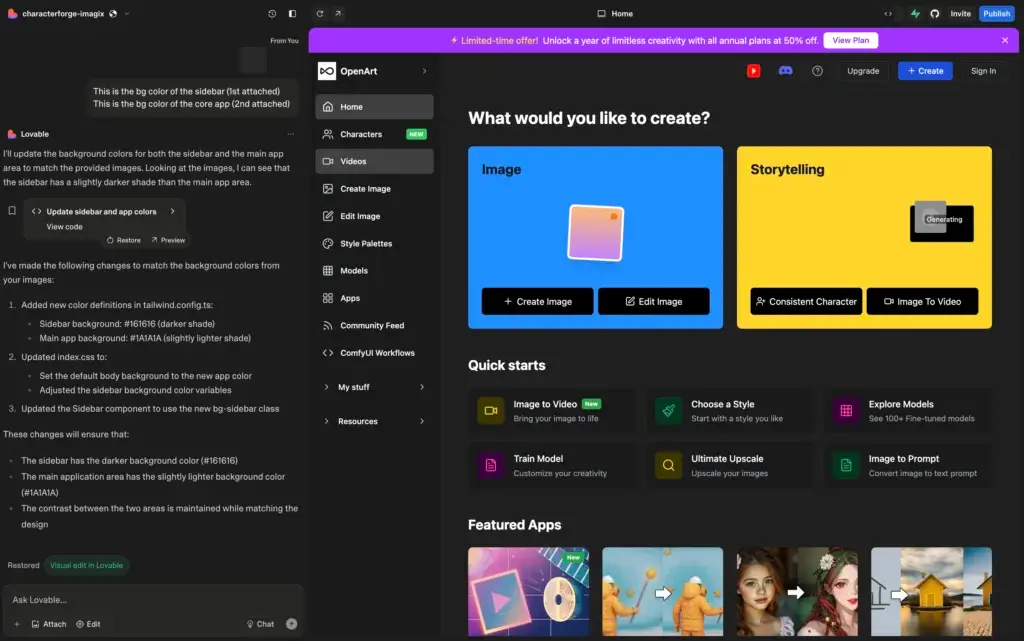
The dashboard is intentionally simple. You see your app preview on the right and your chat-based editor on the left. This layout helps you understand what’s happening at every step. You don’t need to dig through complex menus, and the platform guides you into building your app piece by piece.
Chat-Driven Workflow
Most of your actions happen in the chat panel. You type what you want, new features, UI changes, bug fixes, and Lovable updates your project automatically. This approach feels familiar, especially if you’ve used other AI tools, and gives you a more conversational, less technical development experience.
Real-Time Preview
Every change appears instantly in the live preview. This immediate feedback loop helps you iterate quickly, making it easier to adjust layouts, test new ideas, and catch design issues before they become problems.
Visual Editing for Precise Control
Beyond chat instructions, Lovable includes a visual editing mode. You can click any element of your app, buttons, containers, text, components, and request edits directly. This feature bridges the gap between no-code builders and AI-assisted development, helping you fine-tune the UI without touching code.
Fast Learning Curve
Since you aren’t dealing with traditional coding tools, onboarding is fast. You understand the basics in minutes, and Lovable provides hints along the way. For beginners, it removes the fear of coding; for developers, it eliminates repetitive setup tasks.
Helpful Debugging Tools
Lovable includes AI-powered suggestions when mistakes happen. If something breaks, you can use the “Try to Fix” option or ask the assistant to troubleshoot. While not perfect, the debugging experience is much more accessible than working in a traditional code editor.
Smooth Deployment Experience
Publishing your app is straightforward. You click “Publish,” choose a domain, and Lovable handles the infrastructure. For users who normally struggle with hosting and DevOps, this creates a smoother, more enjoyable end-to-end experience.
Pricing and Plans
Lovable Pricing in 2025
Lovable AI uses a credit-based pricing model that scales with your usage. You can start for free, experiment with basic projects, and upgrade only when you need more credits, private projects, or custom domains. The paid tiers unlock more control, faster iteration, and production-ready features, making them a better fit for founders and teams building real applications.
Lovable AI Pricing Breakdown
| Plan | Price (per month) | Key Features |
| Free | $0 | Limited monthly credits, public projects, basic app generation, publishing to Lovable subdomain |
| Pro | ~$25 | Extra monthly credits, custom domains, private projects, remove Lovable branding, GitHub sync |
| Business | ~$50 | Increased credits, team collaboration, advanced controls, priority iterations, improved scalability |
Which Plan Should You Choose?
- Start with Free if you’re testing an idea or building small prototypes.
- Choose Pro if you want custom domains, private projects, or faster iteration.
- Select Business if you’re building a SaaS project with multiple stakeholders or require higher credit limits.
Is Lovable Worth the Investment?
If you’re focused on speed, Lovable’s pricing is competitive. Compared to traditional development costs, even the paid plans provide excellent value—especially when launching MVPs or internal tools. Early testing and real-world feedback show that the time saved during development far outweighs the subscription cost for most users.
Alternatives
Lovable vs Competitors
Lovable AI is one of the fastest ways to build full-stack applications with natural language, but it’s not the only strong option in this space. Depending on your technical background, use case, and level of control you want over the code, you may find a different tool that fits your workflow even better. Below are the top alternatives to consider, along with how they compare in speed, flexibility, and development style.
🔁 Quick Comparison Table
| Feature | Lovable | Cursor | Base44 | Emergent |
| Best For | No-code founders, fast full-stack MVPs | Developers who want AI inside their IDE | Rapid prototyping with clean UI | AI-assisted coding for complex apps |
| AI Capabilities | Full-stack generation, UI edits, builtin backend | AI pair programmer inside VS Code-like editor | App builder with structured templates | Advanced agents for multi-step coding tasks |
| Speed of Development | Fastest for full working MVPs | Fast for code completion and refactoring | Very fast for UI-first apps | Fast, but depends on task complexity |
| Code Ownership | Exportable React + Vite code, GitHub sync | Full control, edits made directly in code | Export options vary based on build | Full code control through AI agents |
| Backend | Lovable Cloud + Supabase integration | User manages backend manually | Basic backend logic, lighter infrastructure | Strong AI support for backend and logic |
| Learning Curve | Very easy, chat-based workflow | Moderate, requires coding experience | Beginner-friendly | Moderate, suited for technical users |
| Ideal Use Cases | Dashboards, SaaS MVPs, internal tools | Complex apps, production code, debugging | Landing pages, prototypes, simple apps | Apps with advanced logic or integrations |
| Pricing | Free, Pro, Business (credit-based) | Subscription (varies by tier) | Subscription (simple tiering) | Subscription (usage-based + agents) |
Base44
Base44 shines when you care about UI quality and want a fast, clean prototype without heavy setup. It generates structured interfaces and intuitive layouts that look good immediately, which is perfect when you need to validate ideas quickly or present something visually polished.
When to pick Base44 over Lovable:
- You need excellent UI output with minimal effort
- You’re building prototypes, landing pages, or simple apps
- You prefer predictable, structured layouts
- You want a lighter, less overwhelming tool
When Lovable is better:
- You need full-stack capabilities, not just UI
- Your project requires backend logic or databases
- You want built-in hosting and real-time preview
Cursor
Cursor is the right choice if you prefer staying close to the code. Instead of a no-code or low-code approach, Cursor gives you an AI-powered development environment designed for technical users. You get intelligent code generation, debugging assistance, refactoring tools, and agent-driven coding support.
When to pick Cursor over Lovable:
- You want full control over your codebase
- You’re building complex logic or custom architectures
- You need advanced debugging, testing, or integrations
- You already know React, Node, Python or another framework
When Lovable is better:
- You want the app scaffold built instantly
- You’re focusing on speed rather than granular control
- You’re not comfortable working inside a traditional code editor
Emergent
Emergent is the choice for technical founders or teams who want more AI power under the hood. Its agents handle multi-step coding tasks, complex logic, and tricky backend operations. If you’re building something more advanced than a standard dashboard or MVP, Emergent gives you the flexibility you need.
When to pick Emergent over Lovable:
- You’re building a complex SaaS product
- You rely on custom API integrations or heavy backend logic
- You want AI to help with advanced workflows, not just UI
- You need deeper, more flexible control over your architecture
When Lovable is better:
- You want a simpler, guided workflow
- You’re building an MVP that doesn’t require advanced systems
- You prefer a visual and conversational development experience
Quick Comparison: Which One Should You Choose?
-
Choose Lovable if you want the fastest way to build a full-stack MVP with minimal effort.
-
Choose Cursor if you’re a developer who wants granular control and production-level code.
-
Choose Base44 if you want beautiful prototypes and UI-focused apps generated quickly.
-
Choose Emergent if your project requires advanced logic, deep integrations, or complex workflows.
Getting Started Guide
How to Get Started With Lovable
Lovable AI is built to help you go from idea to working full-stack app in minutes. The workflow is centered around prompts, visual edits, and built-in hosting, so you can move quickly without getting lost in configuration.
Step 1: Create Your Account and Start a New Project
Go to the Lovable website and sign up with your email or existing account.
Once you are in the dashboard, click to create a new project and give it a clear, descriptive name that reflects the app you want to build.
If you are just testing, you can stay on the free tier and explore the core features before upgrading.
Step 2: Describe Your App in Natural Language
Lovable starts with a prompt.
In the chat panel, describe your app in plain English as clearly as possible – for example, “Create a customer feedback dashboard with user login, ratings, and export to CSV”.
The more specific you are about pages, roles, data, and actions, the better the initial result will be.
Step 3: Let Lovable Generate the First Version
After you send your prompt, Lovable generates a full-stack React app with a connected backend and database.
You will see a live preview on the right and the generated structure on the left.
At this stage, focus on checking whether the main flows and screens are in place rather than tiny details.
Step 4: Refine the UI with Chat and Visual Edits
Once the base app is generated, you can start improving the design.
Use the chat to ask for changes like “Make the sidebar darker”, “Add a statistics card with weekly signups”, or “Move the filters to the top of the table”.
For finer control, switch to the visual editor. Click on specific buttons, sections, or components and request layout or style changes. This gives you a mix of no-code editing and AI-assisted development.
Step 5: Configure Data and Backend Logic
If your app needs real data, relationships, or authentication, add those through prompts.
You can ask Lovable to create tables, fields, and CRUD operations, or to connect to a Supabase backend if you want more advanced data handling.
Use the chat to define business rules, validations, and conditional logic, then test them directly in the preview.
Step 6: Use Chat Mode for Debugging and Iteration
When you hit an error or something does not behave as expected, you can use Lovable’s debugging tools.
Ask the assistant what went wrong, use the “try to fix” style commands, or request explanations of error messages.
This makes debugging less intimidating, especially if you are not a full-time developer, and speeds up the loop between idea, change, and fix.
Step 7: Collaborate, Commit, and Export Code
If you are working in a team, invite collaborators into your workspace so they can review, comment, or request changes.
For more technical workflows, connect Lovable to GitHub so that every change is committed as code. You can then edit the project in your own editor or export the codebase to host it elsewhere.
This hybrid approach gives you both the speed of AI generation and the control of traditional development.
Step 8: Publish and Connect a Custom Domain
When the app is ready, publish it directly from Lovable.
You can ship it using a Lovable URL or connect your own custom domain to create a branded experience.
After deployment, test the app across devices, gather user feedback, and come back to Lovable to iterate further through prompts and visual edits.
How to Get the Most Out of Lovable (Best Practices)
Lovable becomes significantly more powerful when you approach it with the right workflow. Here are a few practical ways to get better results, save time, and avoid common mistakes.
Start with a Clear, Detailed Prompt
The first prompt shapes your entire project. Be specific about pages, features, and data structures. Clear instructions lead to cleaner output and fewer revisions later.
Iterate in Small Steps
Avoid asking for multiple major changes at once. Break updates into smaller requests, such as “Add login page,” then “Connect login to Supabase.” This helps Lovable execute with higher accuracy.
Use Visual Editing for Layout Precision
Chat prompts are great for big adjustments, but the visual editor helps you tune spacing, alignment, colors, and component placement with more accuracy.
Test Early and Often
Interact with your app as soon as the preview loads. Try every button, flow, and form. The faster you catch issues, the easier they are to fix while the project is still simple.
Save Changes to GitHub for Safety
If you’re working on an important project, sync to GitHub. This gives you version control and protects your work from accidental oversights.
Combine Lovable with Human Input
Lovable is powerful, but it’s still AI. For complex business logic or deep integrations, pair AI-driven generation with manual refinement to achieve stronger, production-ready results.
Keep Prompts Short, Direct, and Actionable
Lovable works best when instructions are concise, such as:
- “Add a search bar above the table.”
- “Convert this page to a two-column layout.”
- “Color-code the status field.”
These micro-requests produce more predictable outcomes.
Who is lovable Best For
Best Use Cases to use Lovable
Lovable’s strength is speed and simplicity, making it a strong choice for both non-technical users and experienced developers who want to move faster. Here’s who will benefit the most from the platform.
Entrepreneurs and Startup Founders
If you want to validate an idea quickly, launch an MVP, or present something to investors, Lovable is a great fit. You can build impressive prototypes without waiting weeks for development.
Non-Technical Creators
Coaches, marketers, educators, consultants, and creators can turn ideas into working tools without needing to learn React or backend frameworks. Lovable removes the technical barrier completely.
Product Managers
If you need internal tools, dashboards, or quick prototypes to test user flows, Lovable lets you create and iterate fast without relying on engineering resources.
Agencies and Freelancers
Digital agencies can use Lovable to deliver quick prototypes or simple apps for clients at a fraction of the time. It’s ideal for early-phase work, mockups, and internal systems.
Developers Who Want to Move Faster
Developers who already know React, JavaScript, or backend development can use Lovable to skip repetitive setup, generate boilerplate, and let AI handle UI scaffolding. You still maintain full control with code export and GitHub sync.
Teams That Need Internal Tools
If you need lightweight business apps like reporting dashboards, CRM-like interfaces, or workflow tools, Lovable is fast, flexible, and simple to manage.
When Lovable Is Not the Best Fit
Lovable is less suitable when you’re building:
- Very complex applications with deep backend logic
- Highly customized architectures
- Apps requiring heavy real-time collaboration or niche frameworks
- Systems with strict enterprise compliance needs
In those cases, tools like Cursor or Emergent may fit better.
Conclusion
Final Thoughts
If you’re looking to build apps quickly, without writing code, Lovable is an outstanding choice. It blends the power of AI with a beautifully simple no-code experience, letting you turn ideas into real, working apps in minutes. Whether you’re an entrepreneur launching an MVP, a team building internal tools, or a solo creator testing a concept, Lovable can save you time, effort, and cost. 💡
Its biggest strengths lie in speed, simplicity, and accessibility, making software creation possible for people who’ve never touched code. Of course, it’s not built for everything. Complex enterprise systems and ultra-custom apps may still need a traditional development approach.
But for 90% of fast-moving projects? Lovable delivers.
If you’re ready to bring your ideas to life with minimal friction, give Lovable a try and see just how far a smart, no-code assistant can take you.
Have more questions?
Frequently Asked Questions
What is Lovable?
Lovable is an AI-powered no-code platform that lets you build full-stack apps using natural language prompts.
Do I need coding skills to use Lovable?
Nope! Lovable is designed for non-developers and works through a user-friendly visual interface.
What kind of apps can I build with Lovable?
You can create MVPs, dashboards, CRMs, landing pages, and internal tools.
Is Lovable really free to use?
Yes! There’s a Free plan with basic features, perfect for exploring and small projects.
Can I export my code from Lovable?
Yes, paid tiers allow you to export the generated code for further development.
Does Lovable include backend functionality?
Yes! It includes backend services like databases, user auth, and analytics.
How fast can I build an app?
Most users can build and deploy a basic app in under an hour.
Can I connect Lovable to other tools like Stripe or Slack?
Yes, Lovable supports API and third-party tool integrations.
Is Lovable safe for business use?
It’s great for startups and internal tools, but large enterprises may need custom security setups.
How does Lovable compare to Base44?
Lovable is faster and more conversational. Base44 offers more structured workflows and is ideal for more complex backend logic (read the Base44 review).