

Introduction
Managing customer relationships should make your work easier, not heavier. Capsule CRM is built around that idea: a clean, simple CRM that helps you manage contacts, opportunities, tasks, and customer history without overwhelming your team.
In this Capsule CRM review, you’ll get a practical look at its features, pricing, pros, cons, user experience, security, and best-fit use cases. The goal is simple: to help you decide whether Capsule is the right CRM for your business.
If you’re moving away from spreadsheets, shared inboxes, or an overly complex CRM, Capsule is one of the most approachable options on the market. But it is not perfect for every team, especially if you need advanced analytics, deep marketing automation, or enterprise-grade customization.
Quick summary
Capsule CRM is best for small businesses, consultants, agencies, freelancers, and B2B teams that want a simple CRM for contact management, sales pipelines, and post-sale project tracking. It is easy to use, fast to set up, and flexible enough for growing teams that do not want the complexity of an enterprise CRM.
The main trade-off is depth. Capsule gives you the essentials very well, but it is not the strongest option for advanced marketing automation, detailed revenue analytics, complex territories, or heavily customized enterprise workflows.
| Category | Capsule CRM Review Summary |
| Best for | Small businesses, consultants, agencies, and B2B sales teams |
| Not ideal for | Large enterprises, advanced marketing teams, and complex sales operations |
| Main strength | Ease of use, clean contact management, and practical sales pipeline tracking |
| Main weakness | Limited advanced reporting and no native full marketing automation suite |
| Best-value plan | Growth, because it unlocks automation, multiple pipelines, and stronger team workflows |
| Expert recommendation | Choose Capsule if CRM adoption and simplicity matter more than enterprise customization |
Key Features
Capsule CRM’s Software Specification
Capsule is designed with one clear goal: to help you manage relationships without getting buried in the software. It gives you practical CRM tools for sales, contact management, task follow-ups, and project tracking, while keeping the interface clean and approachable.
Here are the key features that matter most when deciding whether Capsule fits your workflow.
Contact Management That Keeps Context in One Place
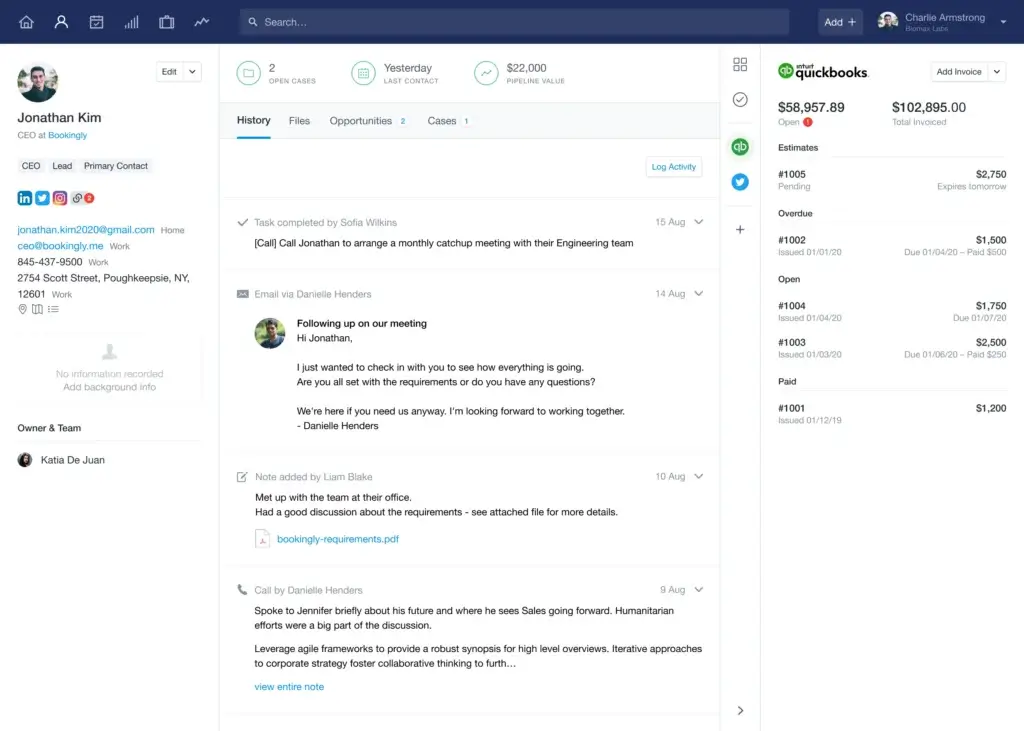
Capsule gives you a clear view of every person, company, opportunity, task, note, and email linked to a relationship. This is useful because your team does not have to search across inboxes, spreadsheets, or messaging apps to understand what happened with a customer.
You can add tags, custom fields, notes, files, activity history, and linked organizations. This makes Capsule especially helpful for relationship-led businesses where context matters as much as pipeline value.
Visual Sales Pipelines That Are Easy to Manage
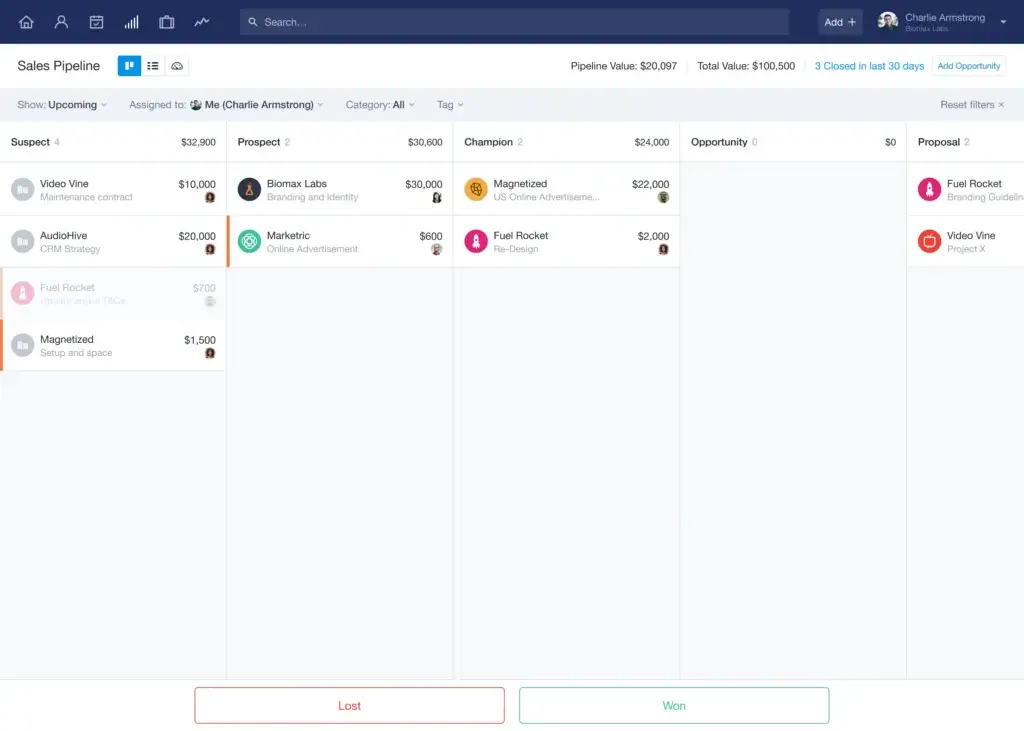
Capsule’s sales pipeline is simple, visual, and easy to adjust. You can create deal stages, move opportunities through a Kanban-style board, set expected values, assign owners, and track next steps.
This is one of the platform’s strongest areas. It gives small teams enough structure to manage sales properly, without forcing them into the complexity of a larger enterprise CRM.
- Customize sales stages to match your process
- Track opportunity value, owner, and close probability
- View pipelines visually with drag-and-drop movement
- Monitor deal progress without complicated reporting setup
Project Boards for Post-Sale Work
One of Capsule’s underrated strengths is that it does not stop when a deal is won. With Project Boards, you can manage onboarding, delivery, renewals, and account management after the sale.
This is valuable for agencies, consultants, accountants, and service-based businesses. You can keep the full customer journey connected, from first conversation to delivery and ongoing support.
Custom Fields, Tags, and Lists
You can customize Capsule around your own workflow with fields, tags, lists, and pipeline settings. For example, you can track lead source, renewal date, account type, subscription tier, service package, or any other data that matters to your process.
This gives you flexibility without turning setup into a technical project. For small teams, that balance is important because the CRM needs to be useful immediately.
Workflow Automation and AI Assistance
Capsule includes workflow automation on higher plans, helping you reduce repetitive admin work. You can create automated actions when a deal moves stage, a task is created, or a contact meets specific criteria.
Capsule also includes AI features designed for practical CRM tasks, such as writing faster follow-ups, preparing for calls, and assisting with pipeline-related work. This is useful, but it should be seen as a productivity layer, not a replacement for a full AI sales intelligence platform.
Shared Mailboxes and Email Integration
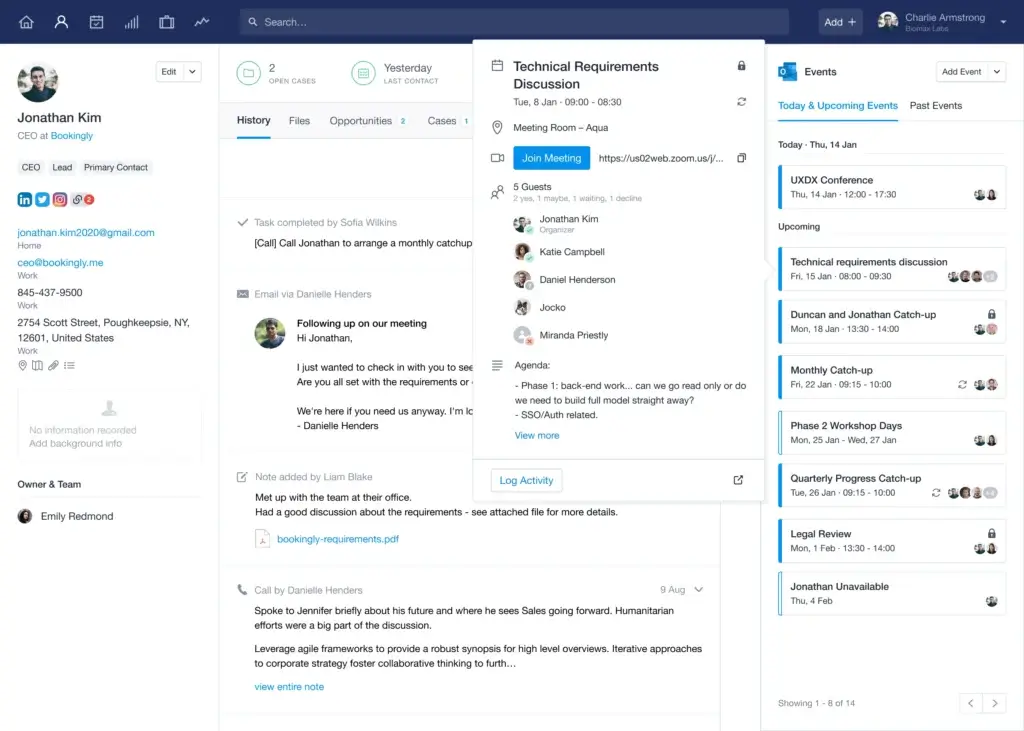
Capsule connects with Gmail and Outlook, allowing you to keep important communication linked to customer records. Shared mailboxes also help sales and account teams manage common addresses like sales@ or support@ without losing visibility.
This is especially helpful if your team often struggles with customer information being trapped inside individual inboxes.
Mobile Apps for iOS and Android
Capsule’s mobile app is practical for salespeople, consultants, and business owners who work away from their desk. You can check contact records, add notes after meetings, complete tasks, and update opportunities from your phone.
The mobile experience feels aligned with the desktop product: clean, lightweight, and focused on core CRM actions.
Integrations and Marketplace
Capsule connects with popular business tools across email, finance, marketing, support, and automation. Common integrations include Google Workspace, Microsoft 365, Mailchimp, Xero, QuickBooks, Zapier, Help Scout, Zendesk, and Transpond.
This makes Capsule more flexible than it first appears. If you need marketing campaigns, customer support workflows, or accounting syncs, integrations can extend its capabilities without forcing you to switch CRMs.
Key Benefits
Benefits of Using Capsule CRM
🧠 You Get Better Customer Context
When every call, note, task, file, and opportunity is linked to the right contact, your team works with more confidence. You avoid repeated questions, missed follow-ups, and scattered customer history.
📈 You Can Manage Sales Without Overcomplication
Capsule makes pipelines easy to review and update. You can see which deals are moving, which need attention, and which team members own each opportunity.
🔁 You Reduce Manual Follow-Up Work
Workflow automation helps your team create repeatable sales and service processes. That means fewer forgotten tasks and more consistent customer engagement.
📬 Your Team Collaborates With Less Confusion
Shared communication, contact timelines, and linked tasks make it easier for team members to support each other. This is especially valuable when accounts change hands or multiple people manage the same customer.
Pros and Cons
Advantages and Limitations of Using Capsule CRM
Positive
✅ Very easy to learn
✅ Strong contact and pipeline management
✅ Useful project boards for post-sale work
✅ Good value for small teams
Negative
❌ Reporting is not enterprise-level
❌ No native full marketing automation
❌ Not ideal for complex sales operations
❌ Support is more self-serve than instant
Capsule works best when your team needs a CRM that people will actually use. It keeps the core parts of customer management simple: contacts, communication, deals, tasks, and follow-ups.
That simplicity is also the main reason to choose it. You are not paying for an oversized system that requires months of configuration before it becomes useful.
✅ Pros
1. Very Easy to Learn
Capsule has a short learning curve. Most users can understand the basics quickly because the interface is clean and the terminology is easy to follow.
2. Strong Contact and Relationship Management
You can see the full relationship history in one place. This helps your team stay informed before calls, follow-ups, renewals, and handovers.
3. Practical Pipeline and Project Tracking
Capsule is useful for both pre-sale and post-sale work. You can track opportunities in the sales pipeline and then manage delivery through project boards.
4. Affordable for Small and Mid-Sized Teams
The pricing is transparent, and the plans scale gradually. For many small teams, Capsule offers enough CRM functionality without the higher cost of enterprise systems.
❌ Cons
1. Reporting Is Useful, but Not Deep
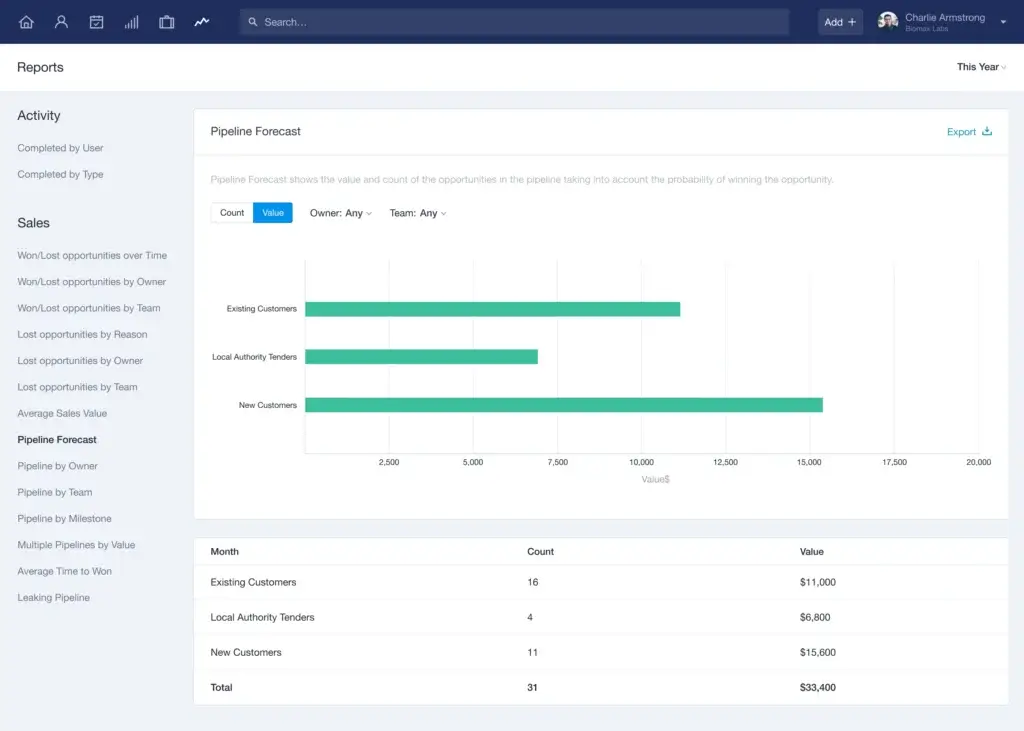
You get pipeline forecasts, activity reports, and useful sales visibility. However, Capsule is not built for advanced revenue analytics, complex dashboards, or predictive sales intelligence.
2. Marketing Automation Requires Integrations
Capsule does not include a full native marketing automation suite. If you want campaigns, landing pages, forms, or drip sequences, you will likely need tools like Transpond, Mailchimp, or Zapier.
3. Enterprise Teams May Outgrow It
Large companies with complex permissions, territories, approval flows, and multi-department CRM requirements may need a more advanced system.
4. Support Is Not Built Around Phone or Live Chat
Capsule offers helpful documentation and email support, but teams that expect instant phone or live chat support may find the support model limiting.
User Experience
User Interface and Experience
Capsule feels like a CRM designed for daily use, not just for management reporting. The interface is calm, fast, and easy to understand, which matters because CRM value depends on adoption.
If your team avoids the CRM, your data becomes unreliable. Capsule reduces that risk by making core actions easy: adding contacts, logging notes, updating deals, and completing tasks.
Navigation: Clean, Calm, and Click-Efficient
The main menu gives you quick access to People, Organizations, Sales Pipeline, Projects, Tasks, and Reports. Each section is simple enough for beginners but structured enough for serious sales work.
You can scan customer records quickly, review upcoming tasks, and move between contacts and opportunities without feeling buried in menus.
Mobile Experience: Useful on the Go
The mobile app is a strong fit for salespeople, consultants, field teams, and business owners who meet clients outside the office. You can check records, add notes, update deals, and manage tasks directly from your phone.
- View full contact history before a meeting
- Add notes after calls or site visits
- Update opportunity stages from mobile
- Complete follow-up tasks on the go
Customer Support: Good, but Not Instant
Capsule offers a detailed help center, setup guides, tutorials, and responsive email support. For most small teams, that will be enough because the product is easy to understand.
The limitation is that Capsule is not built around instant phone or live chat support. If your team expects real-time support during setup or daily operations, this is worth considering before you choose it.
Reliability and Performance
Capsule is cloud-based, so there is no desktop software to maintain. Updates happen in the background, and the system is generally fast and lightweight.
The experience remains smooth even when managing larger contact lists, which is important for growing teams that do not want their CRM to slow down as their database expands.
Real-World User Feedback
Users often praise Capsule for its ease of use, clean design, contact management, and value for money. These are exactly the areas where the platform is strongest.
The common complaints are also consistent: reporting is not deeply advanced, marketing automation depends on integrations, and larger teams may eventually need more sophisticated controls.
Where Users May Get Stuck
The most common issues usually appear during setup or scaling. Importing messy data from another CRM can require cleanup, reporting may feel light for data-heavy teams, and marketing campaigns need connected tools.
That said, once the system is configured, Capsule is one of the easier CRMs to keep clean and usable over time.
Business size fit
Capsule CRM for Different Business Sizes
Capsule is strongest for small and mid-sized businesses that need a CRM with enough structure to support growth, but not so much complexity that users avoid it.
It can work for larger organizations in specific teams or departments, but it is not the best match for enterprise-wide CRM deployments with complex governance, analytics, and approval workflows.
| Business Size | Use Case Fit | Strengths | Limitations |
| Freelancers / Solopreneurs | Great for tracking clients, tasks, and simple sales opportunities. | Easy setup, clean interface, affordable entry point. | Free plan limits may become restrictive quickly. |
| Small Businesses | Ideal for teams moving from spreadsheets or shared inboxes. | Contact history, pipelines, tasks, and basic automation. | Advanced reporting and marketing workflows require extra tools. |
| Mid-Sized Businesses | Useful for structured sales teams with moderate CRM needs. | Multiple pipelines, project boards, roles, and integrations. | May need stronger analytics or process automation as complexity grows. |
| Large Organizations | Best as a simple CRM for a department or smaller business unit. | Easy adoption and strong relationship tracking. | Not built for complex enterprise CRM administration. |
Best-fit users – Who Should Use Capsule CRM?
✅ Best for Small Businesses That Want Less CRM Friction
If your team is still using spreadsheets, shared inboxes, or manual reminders, Capsule gives you a much cleaner way to manage customer relationships. You can centralize contact history, organize follow-ups, and track deals without building a complicated system from scratch.
✅ Best for Consultants, Agencies, and Client-Based Businesses
Capsule works especially well when your business depends on long-term relationships. You can track prospects, clients, projects, notes, files, and tasks from one contact record, which makes it easier to keep context across the full customer journey.
✅ Best for B2B Sales Teams With Simple to Moderate Pipelines
If your sales process is structured but not overly complex, Capsule is a strong fit. You can create custom pipeline stages, assign opportunities, track expected value, and keep follow-ups visible to the whole team.
❌ Who Should Skip Capsule?
Capsule is not the best match if you need enterprise sales forecasting, advanced territory management, deep revenue intelligence, or built-in marketing automation. In those cases, platforms like HubSpot CRM, Zoho CRM, or Salesforce may be better options.
Pricing and Plans
How Much Does Capsule CRM Cost?
Capsule has a clear pricing structure with a free plan and paid plans that increase by contact limits, storage, automation, reporting, AI access, and support level. This makes it easy to understand what you are paying for.
For most active sales teams, the Growth plan is the best value because it unlocks workflow automation, multiple pipelines, more project boards, and stronger team workflows.
| Plan | Price | Best For | Key Features |
| Free | $0 | Solo users and very small teams testing CRM basics | Up to 250 contacts, basic CRM features, and limited customization |
| Starter | $18/user/month | Small teams that need organized contact and pipeline management | Higher contact limit, one sales pipeline, one project board, email integration, and custom fields |
| Growth | $36/user/month | Sales teams that need automation and more structured workflows | Multiple pipelines, workflow automation, AI features, more project boards, and stronger sales visibility |
| Advanced | $54/user/month | Growing teams that need more control and reporting | More contacts, more storage, teams, roles, reporting, and advanced customization options |
| Ultimate | $72/user/month | Scaling businesses that want more support and capacity | Highest limits, priority support, onboarding support, and expanded AI/content assistance |
💡 Which Plan Should You Choose?
If you only need basic contact management, the Free or Starter plan can be enough. However, if you are serious about sales process management, the Growth plan is the more practical choice because automation and multiple pipelines make the CRM much more scalable.
Advanced and Ultimate are better for teams with larger databases, more users, and stronger support requirements. If you are still deciding between Capsule and other tools, compare it with our full best CRM software guide.
Integrations
Extending the platform
Capsule is intentionally lightweight, so integrations matter. Instead of trying to include every sales, marketing, finance, and support feature natively, it connects with other tools that many businesses already use.
This approach is good if you prefer a flexible tech stack. It is less ideal if you want one all-in-one CRM suite with built-in marketing, service, sales, reporting, and automation under one roof.
Popular Capsule CRM Integrations
- Google Workspace and Microsoft 365 for email and calendar workflows
- Mailchimp and Transpond for email marketing and campaign management
- Xero, QuickBooks, and FreshBooks for accounting and invoicing workflows
- Zapier and Make for custom automation between apps
- Zendesk and Help Scout for customer support workflows
- Slack for internal notifications and team updates
Capsule and Transpond
Transpond is important because it helps fill one of Capsule’s biggest gaps: marketing automation. With Transpond, you can manage email campaigns, forms, landing pages, and audience segmentation alongside your CRM data.
This combination can work well for small businesses that want simple CRM plus lightweight marketing. However, if marketing automation is central to your growth strategy, compare the total cost and workflow against platforms like HubSpot or Zoho CRM.
Security and Compliance
Protection for Your Data
When you manage customer data, security is not optional. Capsule covers the core protections most small and mid-sized businesses expect, including encryption, access controls, backups, and privacy-focused data practices.
You should still check your own compliance requirements before choosing any CRM, especially if you operate in healthcare, finance, legal services, or another heavily regulated sector.
✅ Security Features You Can Rely On
- Encryption in transit and at rest to protect customer information
- Multi-factor authentication for stronger account protection
- Role-based access controls to limit unnecessary data exposure
- Data backups to reduce the risk of business-critical data loss
- Secure cloud infrastructure designed for reliable access and data protection
📜 Compliance and Privacy
- GDPR-focused practices for handling personal data responsibly
- Data export options so you can keep control over your information
- Privacy documentation to help businesses understand data processing terms
- Access management to support safer internal CRM usage
🛡️ Capsule vs Enterprise CRMs
Capsule offers strong baseline security for typical CRM use cases. However, it is not positioned as a highly specialized compliance platform for industries that require frameworks like HIPAA-specific workflows or deep enterprise audit programs.
For most small and mid-sized businesses, Capsule gives you a practical security foundation. For regulated industries, verify requirements with Capsule directly before making a final decision.
Competitor comparison
Capsule CRM Alternatives
Capsule is a strong simple CRM, but it is not the only option. The right alternative depends on whether you prioritize simplicity, automation, marketing, pipeline management, or enterprise customization.
| CRM | Best For | Where It Beats Capsule | Where Capsule Wins |
| HubSpot CRM | Inbound sales and marketing teams | Stronger marketing automation, lead capture, and all-in-one growth tools | Simpler setup and less complexity for basic CRM needs |
| Pipedrive | Sales teams focused on pipeline velocity | More sales-focused pipeline workflows and deal management depth | Better relationship tracking and post-sale project context |
| Zoho CRM | Teams that want deep customization at a reasonable cost | More automation, modules, and advanced CRM configuration | Easier to learn and less overwhelming for small teams |
| Salesforce | Large enterprises with complex CRM requirements | Enterprise customization, analytics, integrations, and ecosystem depth | Much simpler, faster to adopt, and more affordable for SMBs |
Capsule CRM vs HubSpot
Choose Capsule if you want a simpler CRM for contact management and sales tracking. Choose HubSpot if you need stronger marketing automation, lead capture, landing pages, and a broader customer platform.
Read HubSpot CRM full review
Capsule CRM vs Pipedrive
Choose Capsule if relationship history and post-sale work matter. Choose Pipedrive if your main priority is managing a high-activity sales pipeline with deeper sales-focused functionality.
Read Pipedrive CRM full review
Capsule CRM vs Zoho CRM
Choose Capsule if your team values simplicity. Choose Zoho CRM if you want more customization, more automation, and a broader CRM suite.
Read Zoho CRM full review
Capsule CRM vs Salesforce
Choose Capsule if you are a small or mid-sized team that wants a lightweight CRM. Choose Salesforce if you are a large organization with complex sales operations and dedicated CRM administration resources.
Read Salesforce CRM full review
Conclusion
Final Thoughts
⭐ Overall Rating: 8.2/10
Choosing a CRM like Capsule is not just about storing contacts. It is about building a simple, reliable system your team can use every day to manage relationships, track opportunities, and keep follow-ups under control.
🔍 What You’re Really Getting
Here’s a quick recap of what Capsule CRM offers:
- A clean customer database for contacts, organizations, notes, and communication history
- Visual sales pipelines that help you track opportunities without complexity
- Project boards for managing onboarding, delivery, and post-sale work
- Workflow automation that reduces repetitive admin tasks
- Integrations with email, finance, marketing, and support tools
- A lightweight CRM experience that is easy for small teams to adopt
If you take the time to set up your fields, tags, pipelines, and follow-up processes properly, Capsule becomes more than a contact database. It becomes a practical operating system for customer relationships.
👥 Is It the Right Fit?
If you are a freelancer, consultant, agency, or small business that wants a CRM your team will actually use, Capsule is one of the best lightweight CRM options available. It keeps things simple while still giving you enough structure to manage sales and customer relationships professionally.
If you need advanced marketing automation, complex analytics, or enterprise-level customization, Capsule may feel limited. In that case, you should compare it with broader CRM platforms before committing.
Still deciding? Explore how Capsule compares with other top CRM tools in our in-depth guide to the best CRM software.
🧠 Final Word from a CRM Expert
After reviewing many CRM platforms, here is the most important point: the best CRM is not always the most powerful one. It is the one your team updates consistently, understands quickly, and uses without resistance.
That is where Capsule performs very well. It may not be the most advanced CRM on the market, but for small and mid-sized teams that value simplicity, clarity, and adoption, Capsule CRM is a smart and dependable choice.
Frequently Asked Questions
Have more questions?
Is Capsule CRM good for small businesses?
Yes. Capsule CRM is a strong choice for small businesses that need simple contact management, visual sales pipelines, task tracking, and basic automation. It is especially useful if your team wants to move away from spreadsheets without adopting a complex enterprise CRM.
Does Capsule CRM have a free plan?
Yes. Capsule offers a free plan for very small teams that want to manage basic contacts and opportunities. It is useful for testing the platform, but growing teams will likely need a paid plan to unlock higher limits, automation, AI features, and stronger workflow options.
What is the best Capsule CRM plan for most teams?
For most active sales teams, the Growth plan is the best value because it unlocks workflow automation, multiple pipelines, more project boards, and stronger team workflows. The Starter plan works for basic CRM needs, but it can feel limited once your sales process becomes more structured.
Can Capsule CRM replace email marketing software?
Not completely. Capsule can connect with tools like Transpond and Mailchimp, but it does not provide a full native email marketing automation suite. If campaigns, landing pages, email sequences, and lead nurturing are central to your strategy, you should factor in an additional marketing tool.
Is Capsule CRM suitable for agencies and consultants?
Yes. Capsule works well for agencies and consultants because it combines contact history, opportunities, tasks, and project boards. This makes it easier to manage both the sales process and the client delivery process after a deal is won.
Does Capsule CRM offer sales automation?
Yes, but the automation is best suited for simple and moderate workflows. You can automate repetitive follow-ups, task creation, and pipeline-related actions. However, it is not as advanced as the automation engines found in enterprise CRM platforms.
Can Capsule CRM be used for customer support?
Capsule can help you log customer interactions and manage follow-up tasks, but it is not a dedicated help desk or ticketing platform. For support workflows, it is better to integrate it with tools like Help Scout or Zendesk.
How easy is it to migrate data into Capsule CRM?
Capsule allows you to import data using CSV files, which is helpful when moving from spreadsheets or another CRM. The main challenge is data cleanup. Before importing, you should review duplicate contacts, inconsistent fields, and old records to avoid creating a messy CRM database.
Is Capsule CRM secure enough for customer data?
Capsule includes core security protections such as encryption, access controls, backups, and privacy-focused data handling. For most small and mid-sized businesses, this is a solid foundation. If you operate in a heavily regulated industry, confirm your specific compliance needs before choosing it.
What are the main alternatives to Capsule CRM?
The main alternatives include HubSpot CRM, Pipedrive, Zoho CRM, and Salesforce. HubSpot is stronger for marketing, Pipedrive is more sales-pipeline focused, Zoho offers deeper customization, and Salesforce is better for enterprise-level CRM requirements.









