Introduction
Running a service‑based business requires juggling schedules, managing estimates, dispatching crews, sending invoices, and maintaining communication with customers. Jobber is a cloud‑based work management and field service platform designed to simplify these administrative tasks so you can focus on delivering quality service. You can access Jobber through a web browser or mobile app, making it convenient for both office staff and field technicians. The software is particularly popular among home services providers such as lawn care, landscaping, cleaning, HVAC, plumbing, electrical, painting, and pest control companies.
Jobber’s mission is to help small and mid‑sized service businesses operate more efficiently. It offers tools to streamline booking, quoting, job scheduling, dispatching, invoicing, payment collection, and client follow‑ups. While larger enterprise solutions, such as ServiceTitan, cater to companies with complex, multi-location operations, Jobber focuses on ease of use and affordability for businesses that want to look professional without spending months on setup and training.
Software Specification
Core Features of Jobber
Quoting and estimating
Jobber helps you create professional quotes that convert prospects into paying clients. Using templates and service libraries, you can populate line items, offer optional add‑ons, and display images to illustrate your services. The software supports deposits, attachments (photos, documents or terms), and signatures so clients can approve quotes online. Automated follow‑ups remind clients about pending quotes, increasing your conversion rate. For larger jobs, you can collect progressive payments by setting billing milestones.
An AI‑powered quote drafting tool can generate draft quotes based on similar past jobs, reducing manual data entry. You can also build multiple options within a single quote to let clients choose from different packages. Upcoming enhancements include integration with supplier catalogs (The Home Depot in beta) so you can pull real‑time pricing and stock availability directly into quotes.
Scheduling and dispatching
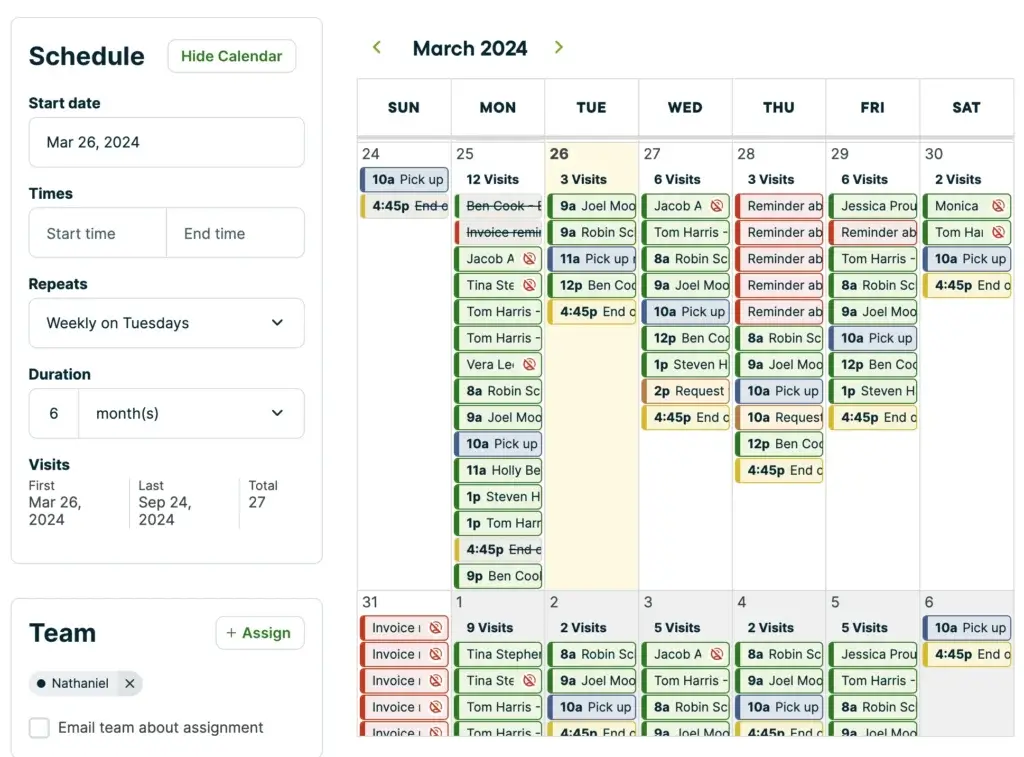
Efficient scheduling is a core strength of Jobber. The drag‑and‑drop calendar provides day, week, month, list, and map views. Color coding and filters help you see which team members are available and what type of work is scheduled. Route optimization suggests the most efficient routes to minimize travel time and fuel costs, and “Find a Time” highlights open slots on the calendar for new jobs.
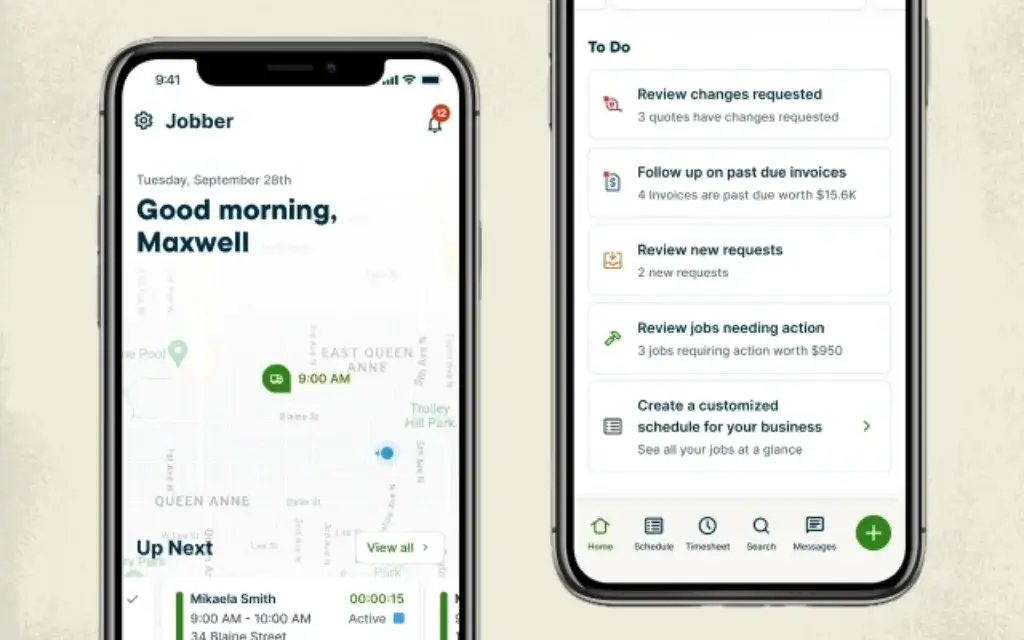
Dispatching features include assigning jobs to technicians, sending route sheets and directions, and tracking vehicle locations via GPS. Crew members receive notifications on their mobile app with job details, customer notes, and checklists. Real‑time updates, such as new bookings, changes or cancellations, sync across devices so the office and field stay aligned. A new route optimization engine introduced in 2026 allows you to reoptimize routes on the fly as plans change.
Invoicing and payments
Jobber streamlines invoicing with professional templates that automatically pull in job details. You can generate invoices on-site or batch‑send them from the office. Automated invoice reminders and follow‑ups reduce late payments. Progress invoicing lets you bill in stages for large projects, and you can accept tips when clients pay online or in person.
Jobber Payments allows clients to pay via credit card, debit card or bank transfer. Stored payment information supports automatic payments and reduces the need to chase down clients. Tap‑to‑pay functionality (available in the U.S.) turns a mobile phone into a payment terminal so clients can pay on the spot. Instant payouts help improve cash flow by transferring funds within minutes (on eligible plans), although the Lite plan does not support this feature.
Customer relationship management (CRM)
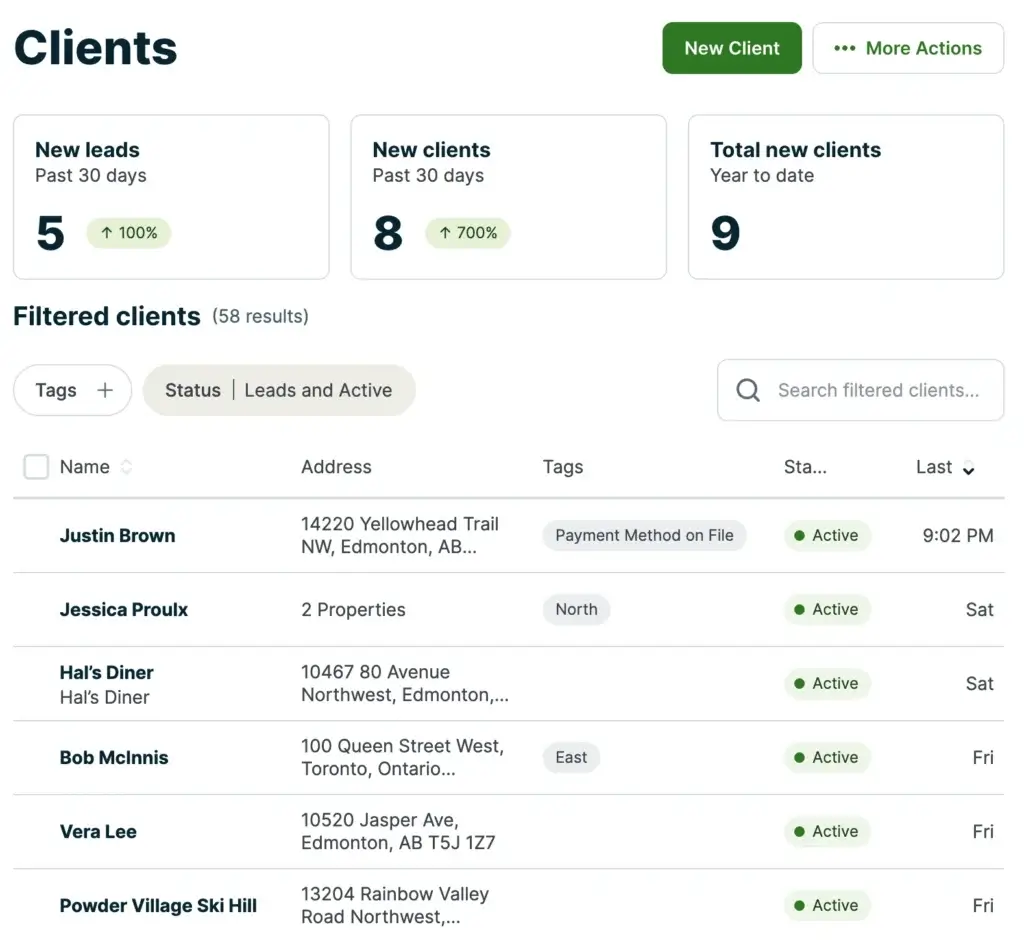
Jobber includes a built‑in CRM to keep all client information organized. Each client file stores contact details, service history, notes, attachments, and communication logs. You can segment customers using tags, track leads separately from active clients, and quickly view job history when a customer calls. The CRM links directly to quoting, scheduling, and invoicing modules so you always have context when working with a client. Automated messages, such as appointment reminders, booking confirmations and follow‑ups, help deliver a professional customer experience.
Communication and marketing tools
Keeping in touch with customers is essential for retention. Jobber automates many common communications:
- Appointment reminders & on‑my‑way texts: Automatically notify clients before visits and when technicians are en route.
- Two‑way texting: Chat with clients from within Jobber without revealing your personal phone number, keeping conversations organized.
- Client hub: A self‑service portal where clients can approve quotes, view scheduled jobs, make payments and download receipts.
- AI Receptionist: A virtual receptionist (included on Plus or as an add‑on) that answers calls after hours, gathers lead details, and books jobs.
Jobber’s Marketing Suite expands your reach. You can collect Google reviews with one‑click requests, launch email or SMS campaigns from prompts, and set up referral programs that reward customers for recommending your services. A new website builder allows you to create a multi‑page, mobile‑friendly site with SEO‑optimized copy in minutes. The site integrates a chat widget powered by the AI Receptionist to capture leads even when you’re offline.
Time tracking and team management
Field teams can use Jobber’s mobile app to clock in and out, record notes, and attach photos. Location timers automatically start when a technician arrives at a job site and stop when they leave, ensuring accurate time and mileage tracking. You can create job forms and checklists for technicians to complete specific tasks or collect signatures before marking a job as complete. Role‑based permissions let you control which staff members can access schedules, client details, financial data, or job costing.
Offline functionality means your crew can view schedules, record work, and complete forms even without internet. All data syncs automatically when the device reconnects, ensuring nothing is lost.
Reporting and analytics
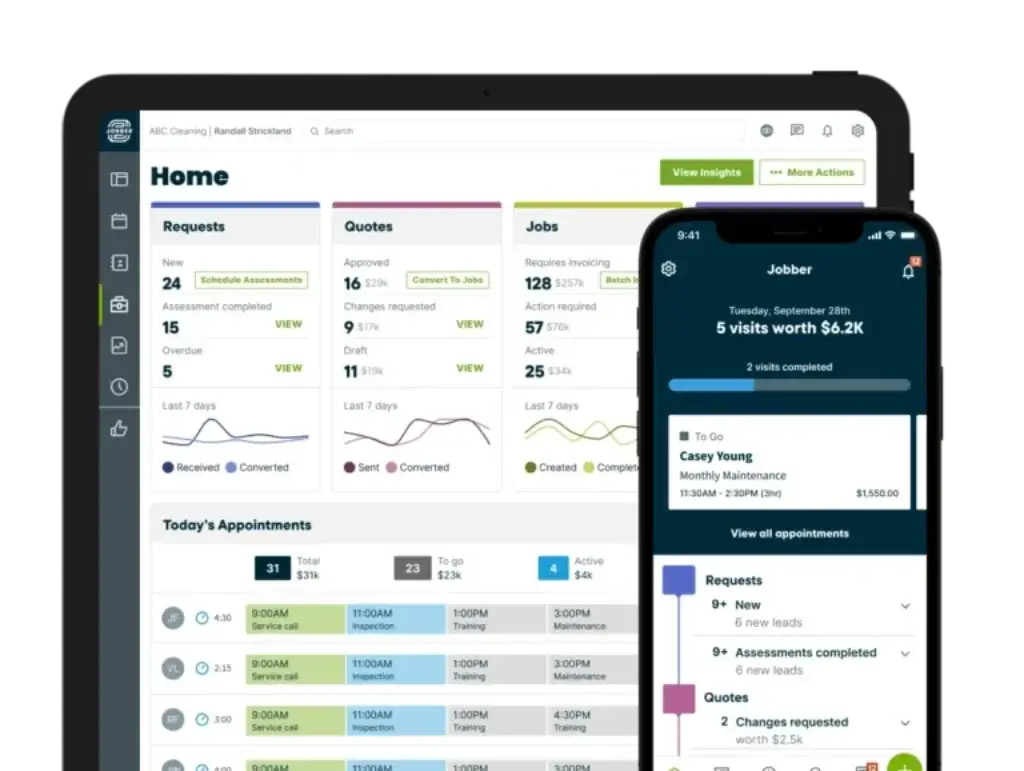
Knowing your numbers helps you make informed decisions. Jobber’s dashboards provide snapshots of revenue, outstanding invoices, lead pipeline, and upcoming visits. Prebuilt financial reports show sales by service or technician, tax summaries, profit margins and expense tracking. Work reports track job progress, completion times, and quality ratings. Team reports summarize employee productivity and billable hours, while client reports highlight top customers and service history.
You can schedule reports to be delivered automatically to your inbox. While Jobber lacks advanced predictive analytics or AI forecasting, the built‑in dashboards and exportable data offer sufficient insights for most small businesses. Third‑party integrations with accounting and analytics tools can further enhance reporting capabilities.
AI and automation capabilities
Jobber is increasingly incorporating artificial intelligence to reduce manual tasks. The AI‑powered quote drafting tool suggests line items based on previous jobs. Automation triggers let you automatically send reminders, follow up on quotes, invoice after a job is marked complete, or notify technicians of schedule changes. You can build custom automations using triggers (e.g., job status changed), conditions (e.g., job value above a threshold), and actions (e.g., send text or generate a task). Advanced automations such as drafting quotes from requests or flagging high‑value leads help ensure nothing slips through the cracks.
A voice assistant (beta) allows you to use voice commands in the mobile app to create quotes, update schedules or find client details hands‑free. The upcoming Business Goals module will provide personalized coaching and recommendations based on your data, helping you set targets and track progress.
Integrations and Add‑Ons
Jobber integrates with many popular business tools to streamline workflows. Accounting integrations include QuickBooks Online and Xero for synchronized invoices, expenses, and tax reporting. Payroll integration with Gusto makes it easy to pay your team. Payment processors such as Stripe and Square connect if you prefer to use an external gateway. Marketing integrations include Mailchimp and NiceJob for email campaigns and reputation management. Zapier support enables connections with thousands of other apps, and calendar sync keeps Google Calendar aligned with your Jobber schedule.
Add‑ons beyond the Marketing Suite include Jobber Capital (business financing), Jobber Franchise accounts, and an open API for custom integrations (included on Plus). Some features, like AI Receptionist, website builder or advanced automations, may incur additional fees or require a higher tier. When evaluating add‑ons, consider the total cost of ownership, including transaction fees and any per‑user charges.
Pros and Cons
Advantages and Disadvantages
Positive
✅ User‑friendly interface
✅ Comprehensive workflow management
✅ Powerful automation
✅ Robust mobile app
Negative
❌ Higher cost for larger teams
❌ Add‑on fees
❌ Limited advanced customization
❌ Payment gateway restrictions
Jobber offers many benefits to small service businesses, but it isn’t perfect. Here is a balanced overview:
✅ Pros
- User‑friendly interface: The dashboard and mobile app are intuitive, making it easy to onboard staff without extensive training.
- Comprehensive workflow management: Jobber covers quoting, scheduling, dispatching, invoicing, payments, CRM and communication in one system.
- Powerful automation: Automated reminders, follow‑ups, invoicing and custom workflows reduce administrative workload.
- Robust mobile app: Technicians can view schedules, capture photos, complete forms and collect payments in the field, even offline.
- Scalable plans: Individual and team tiers allow businesses to start small and upgrade as they grow; annual billing offers significant savings.
- Excellent support: Jobber provides phone, chat, and email support with fast response times and personalized coaching on all plans.
- AI‑powered features: Marketing Suite, AI receptionist and voice commands introduce modern capabilities that differentiate Jobber from older field service systems.
❌ Cons
- Higher cost for larger teams: Per‑user pricing can become expensive as you add technicians; additional users cost extra on team plans.
- Add‑on fees: Essential tools like the Marketing Suite and AI receptionist are only included on Plus; otherwise, they cost additional monthly fees.
- Limited advanced customization: Invoice and quote templates offer basic branding but lack deep customization options. Some businesses might desire more control over design and layout.
- Payment gateway restrictions: Jobber Payments is available only in the U.S., Canada, and UK; outside these regions you must use third‑party processors.
- Missing advanced features: There is no native overtime tracking, geofencing or detailed inventory management, which some field service companies require. You may need separate software for these functions.
- Lite plan limitations: The entry‑level Lite plan does not include automation, instant payouts or marketing tools, so very small businesses may quickly outgrow it.
Pricing
Jobber Pricing and Plan Breakdown
Jobber offers several subscription tiers tailored to different business sizes. A 14‑day free trial lets you test any plan before committing. Discounts are available when you pay annually rather than monthly.
| Plan | Price | User Limit | Key Features |
| Lite | Starts around $19–$21/month (discounted when paid annually) | 1 user | Basic job scheduling, quoting and invoicing; limited automation; entry‑level access for very small operations |
| Core | $39/month (or $29/month when billed annually) | 1 user | Online booking, drag‑and‑drop scheduling, professional quotes, invoicing and payments, client manager, basic reporting |
| Connect (Individual) | $119/month (or $89/month annually) | 1 user | Everything in Core plus QuickBooks integration, GPS tracking, job forms and checklists, automated reminders, route optimization, time tracking |
| Connect (Teams) | $169/month (or $129/month annually) | Up to 5 users | All Connect features for small crews; add extra users for a per‑user fee |
| Grow (Individual) | $199/month (or $149/month annually) | 1 user | All Connect features plus job costing, two‑way SMS, automatic quote follow‑ups, markup controls, advanced reporting, custom automations |
| Grow (Teams) | $349/month (or $249/month annually) | Up to 10 users | Expanded Grow features for larger teams; location‑based time tracking and advanced sales tools |
| Plus | $599/month (or $449/month annually) | Up to 15 users | All Grow features plus Marketing Suite (email campaigns, review requests and referral programs), AI receptionist, premium support, dedicated onboarding and API access |
Payment processing fees and add‑ons
Jobber integrates its own payment gateway for credit card and ACH transactions. Credit card payments are charged at roughly 2.9% + $0.30 per transaction, while ACH (bank transfer) fees are about 1%. These costs are standard for online payment processors, but can add up for businesses processing high volumes. Instant payouts, which deposit funds to your bank in minutes, incur an extra 1% fee and are not available on the Lite plan.
Add‑ons such as the Marketing Suite ($79/month) can be layered onto most plans except Lite. You can also subscribe to individual tools within the suite. Reviews ($39/month), Campaigns ($29/month), and Referrals ($29/month), to automate review requests, email or SMS marketing, and customer referral programs. Additional users beyond plan limits cost around $29 per user per month on team tiers.
Common Use Cases
Who Should Use Jobber?
Jobber is best suited for small to medium field service businesses that want to modernize their operations without managing complex enterprise software. Industries that benefit most include lawn care, landscaping, residential and commercial cleaning, HVAC, plumbing, electrical work, pest control, painting, roofing, and tree care. Solo operators or small crews appreciate the ease of use and ability to start on the Core or Connect plans. Larger teams up to 15 users can move to the Grow or Plus plans for advanced automation and marketing tools.
You might look elsewhere if you manage multi‑phase construction projects, require detailed material takeoffs or need specialized workflows for asphalt, concrete or roofing; other platforms like ServiceTitan or OneCrew may suit those needs better. Likewise, if you require a low‑cost option with advanced geofencing or inventory management, consider exploring alternatives such as Kickserv or JobNimbus.
Latest Updates
Recent Updates and Roadmap Highlights
Jobber continuously rolls out new features. The Jobber Now event in 2026 announced several enhancements:
- AI‑powered Marketing Suite: Generate review requests, email and SMS campaigns, and referral programs from simple prompts. This helps you build your reputation and win repeat business without manual effort.
- Website builder: Create a multi‑page, SEO‑optimized website with image galleries and your own domain. A chat widget powered by the AI receptionist engages visitors and books jobs even when you’re unavailable.
- Multiple request forms: Build customized request forms for different services and match them to your brand colors, improving lead capture.
- Automated workflow recommendations: Jobber suggests automations like drafting quotes from requests or flagging high‑value leads so nothing gets missed.
- Quote options and sales pipeline (beta): Create quotes with multiple service options and view your entire sales pipeline in one place to track leads and conversions.
- Supplier catalog integration: Pull real‑time pricing and stock data from suppliers like The Home Depot directly into quotes (U.S. beta).
- Enhanced route optimization: Quickly generate efficient routes for your team and reoptimize as schedules change, saving time and fuel.
- Tap‑to‑pay and progress invoicing: Collect payments instantly in person via tap‑to‑pay and bill projects at milestones to maintain healthy cash flow.
- AI voice assistant: Use voice commands within the mobile app to create quotes, update schedules, add notes or find client details hands‑free (beta).
- Business goals module: Receive personalized coaching and recommendations based on your data to set targets and grow your business (coming soon).
These updates illustrate Jobber’s focus on AI, automation, and ease of use. Keeping an eye on product announcements ensures you take advantage of new tools that can give your business a competitive edge.
Compare with Others
Competitor Comparison and Alternatives
Jobber competes with other field service management platforms, each with its own strengths. Here is a high‑level look at popular alternatives:
- Housecall Pro: Known for strong dispatching and service agreements. Pricing starts around $79/month per user. Offers a built‑in phone system, marketing features and advanced automations, but lacks a free plan.
- ServiceTitan: A powerful enterprise platform for large HVAC and plumbing businesses. Pricing is custom and typically over $200 per technician. It offers deep reporting, multi‑location support, and extensive marketing tools but requires significant onboarding.
- Workiz: Designed for trades like locksmiths, electricians, and junk removal. It includes a built‑in phone and AI answering. Pricing is competitive, but some users find the interface less polished than Jobber.
- OneCrew: Targeted at paving and construction contractors needing detailed takeoff and project management. It offers seat‑based pricing and specialized estimating tools that Jobber lacks.
- Kickserv, JobNimbus and ServiceM8: These platforms appeal to small teams with lower pricing. Kickserv offers a free plan with limited features; JobNimbus focuses on roofing and construction; ServiceM8 is popular with Australian businesses due to its Apple‑centric ecosystem.
When choosing between Jobber and alternatives, consider your team size, industry, and whether you need specialized features like detailed estimating, inventory management, multi‑location support, or deep analytics. Jobber is ideal for general home services requiring streamlined scheduling, quoting, and invoicing without heavy customization.
Tips for Best Use
Tips for Getting the Most Out of Jobber
Implementing new software successfully requires planning. Here are some best practices to ensure Jobber delivers maximum value:
- Choose the right plan: Start with a plan that matches your team size and workflow complexity. Solo operators typically begin with Core or Connect Individual, while larger crews may jump directly to team plans.
- Set up service libraries and templates: Create standardized services, pricing and quote templates so you can build estimates quickly and consistently.
- Use automations wisely: Take advantage of automatic reminders, follow‑ups and invoicing to reduce manual tasks. Experiment with custom automations to tailor workflows to your business.
- Train your team: Provide short onboarding sessions for technicians to understand the mobile app, time tracking and job forms. Encourage them to add notes and photos for better documentation.
- Integrate accounting: Connect Jobber to QuickBooks or Xero to eliminate duplicate data entry. Reconcile payments regularly to keep your books accurate.
- Monitor key metrics: Use the dashboards and reports to track revenue, average job value, outstanding invoices and customer retention. Schedule regular reporting to stay on top of trends.
- Gather feedback: Ask clients to use the client hub for approvals and payments. Collect reviews through the Marketing Suite to boost your online reputation. Use automated surveys to understand customer satisfaction.
Conclusion
Final Thoughts
Jobber has earned its reputation as a user‑friendly field service platform that helps small and mid‑sized businesses look professional, stay organized, and get paid faster. The combination of quoting, scheduling, dispatching, invoicing, payments and CRM tools in one place streamlines operations and reduces administrative overhead. With modern AI features, customizable automations, and continual product enhancements, Jobber keeps pace with changing industry demands.
The platform isn’t the cheapest on the market, and some advanced features require higher tiers or add‑ons. However, for many service providers, the time saved and improved customer experience justify the investment. If you run a home service business and need an all‑in‑one solution that scales with you, Jobber is a strong contender worth exploring. Take advantage of the free trial, explore the available plans, and decide whether Jobber aligns with your workflow, budget and growth goals.
Have more questions?
Frequently Asked Questions
1. What is Jobber?
Jobber is a cloud‑based field service management platform designed for small and mid‑sized service businesses. It combines scheduling, quoting, dispatching, invoicing, payments, client management, and marketing tools into a single system to simplify operations.
2. How much does Jobber cost?
Pricing varies by plan. The Core plan starts at $39 per month (or $29 when billed annually) for one user. Connect plans start at $119/month for an individual or $169/month for up to five users. Grow plans begin at $199/month for individuals or $349/month for teams up to ten users. The Plus plan, which includes marketing tools and premium support, is $599/month. A Lite plan is available for around $19–$21/month for basic needs.
3. Is there a free version of Jobber?
Jobber does not offer a permanently free plan, but it provides a 14‑day free trial with full access to features. During the trial, you can test the platform and decide which plan suits your business.
4. What are Jobber’s payment processing fees?
When using Jobber Payments, credit card transactions incur a fee of about 2.9% plus $0.30. ACH (bank transfer) payments cost approximately 1%. Instant payouts – available on eligible plans – add an extra 1% fee. External payment processors have their own fee structures.
5. Does Jobber integrate with accounting software?
Yes. Jobber integrates with QuickBooks Online and Xero, allowing invoices, payments, and expenses to sync automatically between systems. Payroll integration with Gusto is also available, helping you manage team compensation within your existing workflow.
6. Can technicians use Jobber without internet access?
Yes. Jobber’s mobile app works offline. Technicians can view their schedules, record notes, complete job forms, and capture time on site. When the device reconnects to the internet, the data automatically syncs with the main system.
7. What industries use Jobber?
Jobber is popular with home service industries such as lawn care, landscaping, cleaning, HVAC, plumbing, electrical, painting, pest control, tree care, roofing, and other trade services that require on‑site work and frequent scheduling.
8. How does Jobber’s Marketing Suite work?
The Marketing Suite is an add‑on (included in the Plus plan) that provides three tools: Reviews, Campaigns, and Referrals. Reviews help you request and manage online reviews. Campaigns lets you create email or SMS marketing campaigns from simple prompts. Referrals enables customer referral programs with automated rewards. These tools help build your reputation and drive repeat business.
9. Are there any contract commitments?
Jobber subscriptions are month‑to‑month or annual. You can cancel at any time from your account settings, and there are no long‑term contracts. Annual plans offer significant discounts but require payment up front.
10. What are some alternatives to Jobber?
Alternatives include Housecall Pro (strong dispatching and service agreements), ServiceTitan (enterprise‑level features for large companies), Workiz (built‑in phone and AI tools), OneCrew (paving and construction workflows), Kickserv (free plan and low entry cost), and JobNimbus (roofing and construction focus). Each platform has its own strengths and pricing structure, so evaluate your business requirements carefully before choosing.