Introduction
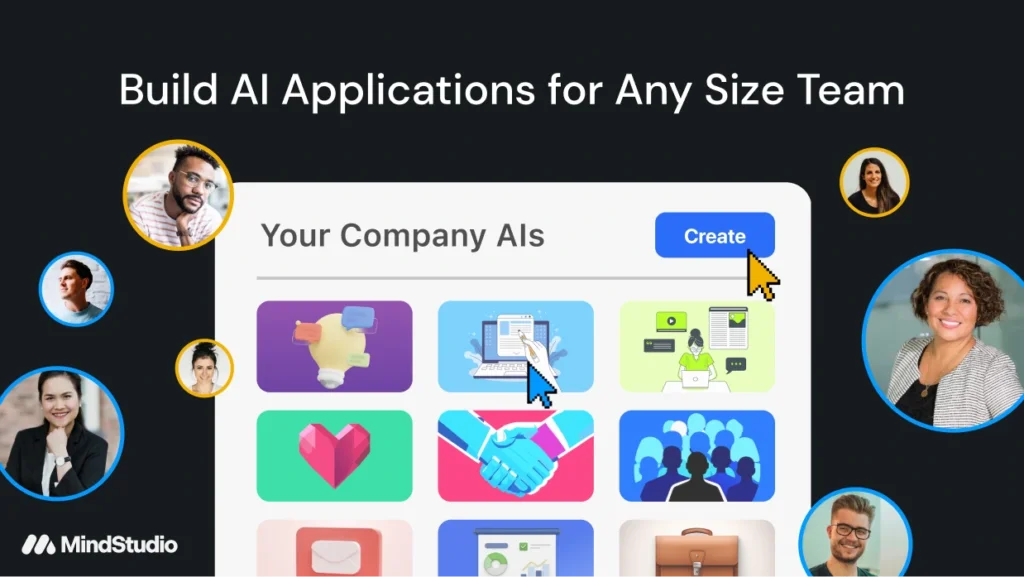
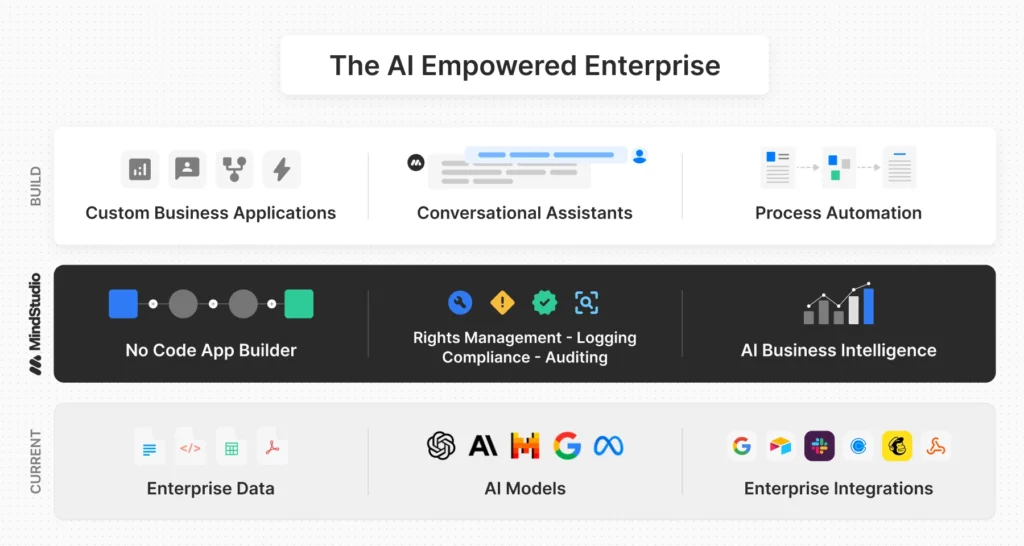
Creating AI‑powered applications once required deep programming knowledge and multiple subscriptions to third‑party models. MindStudio changes that by letting you build, deploy, and manage AI agents through a visual interface. Founded in 2022 to democratize AI, the platform has quickly attracted freelancers, small businesses, and enterprises seeking to automate workflows without hiring developers. You can drag and drop components, connect your data, and deploy functional agents in minutes, making it an attractive alternative to traditional software development.
MindStudio sits at the intersection of AI work management and no‑code application development. As AI models proliferate and usage costs rise, organisations need unified tools to orchestrate workflows and maintain control. MindStudio answers this challenge by bundling model access, workflow logic, and deployment in a single platform. Whether you need a simple content generator or a multi-step customer service agent, it promises to reduce build time while providing flexibility and transparency.
Overview
How MindStudio Works
Overview and Mission
The company’s mission is to make advanced AI accessible to everyone, regardless of coding skills. Instead of forcing users to learn multiple APIs or manage separate billing for models such as GPT‑4o, Claude 4, and Gemini, MindStudio provides unified access to over 200 models and charges the same base rates as the providers. Its interface is designed for both technical and non‑technical users and includes features like version control, live testing, and analytics. Businesses can scale from a single agent to enterprise‑level deployments without migrating to another system.
How MindStudio Fits Into AI Work Management
AI work management tools automate repetitive tasks, coordinate data flows, and assist employees in decision‑making. MindStudio builds on this by letting you create custom agents that interact with external APIs, run multi‑model chains, and integrate with your existing tools. Instead of using a generic chatbot, you design bespoke workflows tailored to your processes. For example, you can build an agent that gathers leads from your website, scores them with an AI model, and updates your CRM – all without writing code. This flexibility makes MindStudio a compelling option for teams wanting to experiment with AI and gradually replace manual workflows with intelligent automation.
How MindStudio Works: Visual AI Agent Builder
MindStudio’s core innovation lies in its visual workflow builder. When you log in, you’re greeted with a canvas where you can add blocks representing inputs, AI models, functions, and outputs. Each block connects to the next via arrows, forming a logical chain of actions. Instead of writing code, you configure each block’s settings and MindStudio handles the underlying orchestration.
Drag‑and‑Drop Workflow Builder
At the heart of MindStudio is a drag‑and‑drop interface. You start by adding a Start block and finish with an End block. Between them, you can insert pre‑built modules such as:
- User Input: collect text, images, files or structured data from users via forms.
- Generate Text/Image: call one of the integrated AI models to produce copy or visuals.
- Query Data Source: fetch information from spreadsheets, databases or APIs.
- Run Function: extend capabilities with custom JavaScript or Python snippets.
- Scrape URL: pull content from web pages to feed into the agent.
Each block contains parameters you configure in plain language. For example, when using Generate Text, you choose a model (e.g., GPT‑4o), set temperature, and specify the prompt. Conditional logic is available via branches, loop,s and error handlers. A live preview panel lets you test the agent without publishing, ensuring that your workflow behaves as expected before you deploy it.
AI Model Library and Data Inputs
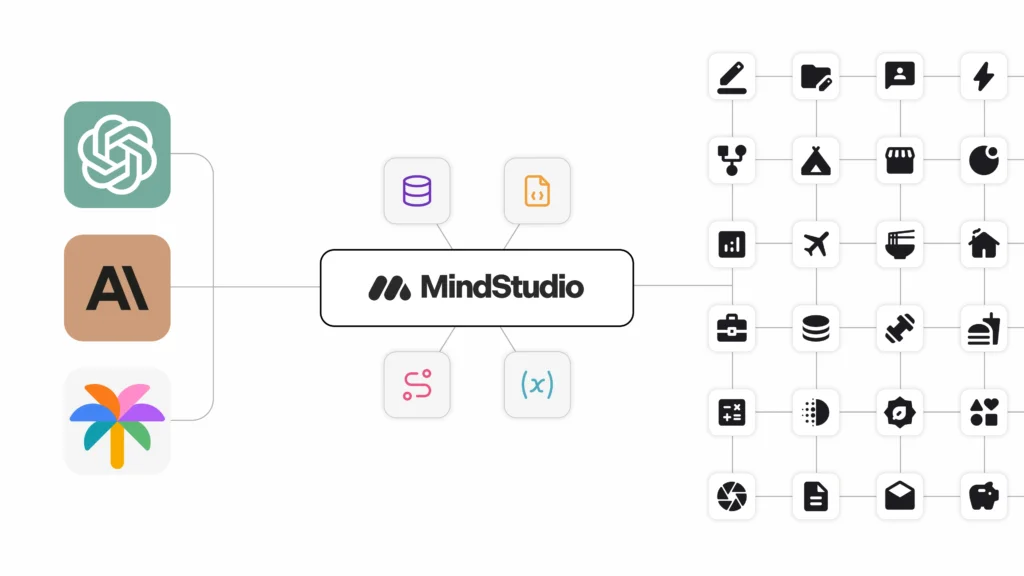
One of MindStudio’s strongest differentiators is its model library. The platform offers direct access to more than 200 state‑of‑the‑art models from providers like OpenAI, Anthropic, Google, Meta, and Mistral. Text, image, audio, and multimodal models are all available, allowing you to build agents that handle tasks ranging from writing blog posts to summarising audio recordings. Because the models are integrated into MindStudio, you don’t need to manage separate API keys or worry about vendor lock‑in; you pay the same price as if you used the models directly.
In addition to model inputs, MindStudio supports numerous data ingestion methods. You can connect to Google Sheets, Airtable, SQL databases, Notion pages or custom REST APIs. Uploaded files become part of your agent’s knowledge base, enabling personalised outputs such as custom reports or targeted marketing messages. Data sources can be reused across multiple agents, helping you maintain a single source of truth for your information.
MindStudio Architect and Dynamic Tool Use
To reduce setup time, MindStudio introduced MindStudio Architect, an AI feature that auto‑scaffolds your agent based on a textual description. Describe your desired workflow (e.g., “qualify leads from website forms, summarise responses and send them to Salesforce”) and the Architect builds an initial agent with the required blocks, models, and logic. You can then refine the design using the visual builder. This feature is particularly helpful for beginners who aren’t sure which models or blocks to choose.
Another advanced capability is dynamic tool use, which allows agents to decide which tools or models to call at runtime. Instead of predefining every step, you can create agents that evaluate context and choose the appropriate action. For instance, a sales agent might look up a customer’s history, decide whether to call an external CRM or search the web, then craft a personalised email. Dynamic tool use blurs the line between static workflows and fully autonomous agents, giving you more flexibility in complex scenarios.
Key Features & Benefits
Software Specifications
MindStudio combines a broad feature set with strong usability. Below is an overview of the functions that make it stand out.
Core Capabilities: No‑Code Builder, AI Workers, API Dashboard
- No‑Code Builder: The visual interface lets you build sophisticated AI agents without programming. Beginners can start with templates while experienced users can customise workflows with conditions, loops, and custom code.
- AI Workers: MindStudio lets you create agents that operate autonomously. These “workers” handle tasks such as data extraction, content generation, analytics and decision‑making. You define the workflow, and the worker executes it repeatedly, saving significant time.
- API Dashboard: An intuitive dashboard centralises the management of third‑party integrations. You can monitor API usage, observe performance metrics, and modify connections without diving into settings on external platforms. Enterprise users benefit from advanced monitoring and observability features.
Automation, Data Ingestion & Content Generation
MindStudio streamlines repetitive tasks through automation. Agents can run on schedules, respond to triggers like form submissions or webhook events, and notify you of important events via Slack or email. Integration with Zapier and Make extends automation possibilities further by connecting MindStudio to thousands of apps.
The data ingestion capabilities allow you to feed information from spreadsheets, databases, PDFs, websites, and SaaS platforms into your agents. This is essential for building personalised experiences or for analyses that rely on private datasets. The platform also features a “Knowledge Builder” that ingests unstructured data (documents, wikis, emails) and converts it into an AI‑readable format.
On the output side, MindStudio excels at content generation. Agents can create blog articles, reports, social media posts, emails, images, and audio files. Because you can chain multiple models together, you might generate text with GPT‑4o, illustrate it with a diffusion model and then compile the results into a formatted document.
Security, Scalability & Analytics
For enterprise users, security is non‑negotiable. MindStudio is SOC 2 Type I and II certified and complies with GDPR. It offers role‑based access control, single sign‑on (SSO), SCIM provisioning, and self‑hosted deployment options. Data residency controls allow organisations to choose where their information is stored. Audit logs and automated alerts provide transparency into agent activity.
Scalability is another benefit. Agents run on serverless infrastructure that automatically scales with demand. Whether you have a handful of daily runs or hundreds of thousands, the platform handles load balancing behind the scenes. This scalability extends to multi‑tenant setups for agencies managing dozens of clients.
MindStudio includes analytics tools that track performance, usage and costs. You can see how many runs each agent has, monitor response times, and identify bottlenecks. Real‑time logging helps debug errors, while A/B testing features enable you to compare different workflows and models.
Integrations and Ecosystem
A good AI tool doesn’t operate in isolation. MindStudio integrates with over 1,000 apps via native connectors and thousands more through Zapier and Make. Popular integrations include:
- CRMs: Salesforce, HubSpot, Pipedrive
- Communication: Slack, Discord, Gmail, Outlook
- Data & Knowledge: Google Sheets, Airtable, Notion, SQL databases
- Payments & E‑Commerce: Stripe, PayPal, Shopify
- Productivity & Marketing: Trello, Asana, Mailchimp, WordPress
You can embed MindStudio agents directly on your website or access them via API endpoints. Embedding provides end users with a branded experience while still benefiting from MindStudio’s backend. API access enables you to integrate agents into existing apps, mobile interfaces, or custom dashboards. The platform also supports email‑based workflows and scheduled runs, giving you flexibility in how you deploy solutions.
Pros and Cons
Advantages and Disadvantages
Positive
✅ Truly no‑code
✅ Access to 200+ AI models
✅ Transparent pricing
✅ Enterprise‑grade security
Negative
❌ Starter limits
❌ Learning curve for advanced features
❌ Model selection overload
❌ Integration gaps
MindStudio has many strengths, but it isn’t perfect. Below is a balanced view of its advantages and limitations.
✅ Pros
- Truly no‑code: Even non‑technical users can build sophisticated AI workflows thanks to the intuitive drag‑and‑drop canvas. Video tutorials and templates accelerate learning.
- Access to 200+ AI models: You get unified access to state‑of‑the‑art models across providers without managing separate API keys or subscriptions. This variety enables flexible and innovative use cases.
- Transparent pricing: There’s no markup on model usage; you pay the same rates the providers charge. Plans are clearly defined and scale with your needs.
- Enterprise‑grade security: SOC 2 and GDPR compliance, role‑based controls, audit logging and self‑hosting options make MindStudio suitable for sensitive industries.
- Dynamic tool use: Agents can decide which tools to call based on context, enabling more autonomous behaviours and reducing the need for rigid workflow definitions.
- Ongoing innovation: MindStudio regularly adds features like the Architect auto‑scaffolding and expands its model library, indicating an active roadmap.
❌ Cons
- Pricing escalation: Because pricing is task‑based, costs can rise quickly as workflows become more complex or run frequently. Teams processing hundreds of tasks per day may outgrow the Professional plan and face steep monthly bills.
- Free plan limitations: The free tier allows only 100 tasks per month and two‑step Zaps with 15‑minute update intervals. For anything beyond basic experimentation, you’ll likely need a paid plan.
- Integration variability: While Zapier supports thousands of apps, not every integration offers the same depth. Some applications expose only basic triggers or actions, requiring workarounds or custom webhooks to achieve desired functionality.
- Complexity for advanced workflows: Multi‑step Zaps with conditional logic can become tedious to configure, especially when referencing fields across steps. The interface can feel cluttered when managing dozens of Zaps, and there’s limited organization beyond folders.
- Billing and support complaints: Some users report issues with billing transparency and difficulty canceling plans. While support resources are robust, live chat is limited to higher tiers, and phone support is not universally available.
- Update delays on free plan: The 15‑minute polling interval on the free plan can be problematic for time‑sensitive automations, leading to delays in notifications or data synchronization.
Pricing
Pricing and Plans 2025
MindStudio offers several plans to accommodate individuals, small teams, and enterprises. Pricing is transparent and usage‑based, meaning you pay exactly what the underlying AI models cost without additional markup. Below is a summary of the main plans available at the time of writing.
Free and Starter Plans
The Free tier is ideal for learning and experimentation. It includes 1,000 runs per month, unlimited draft agents, and basic access to the model library. You can test workflows, build prototypes, and explore templates. However, published agents are limited, and integrations are restricted.
The Starter plan costs around $20 per month when paid monthly or $16 per month billed annually. It allows you to publish up to five agents and run 5,000 workflow executions per month. This tier is aimed at small teams or consultants who need production‑ready agents but don’t yet require advanced features like API access. At this level, you can connect your agents to popular SaaS tools, embed them in websites, and receive basic analytics.
Pro, Unlimited and Enterprise Plans
For growing businesses, the Pro plan is priced at about $60 per month or $48 per month annually. It includes 25,000 runs, up to 15 published agents, and API access. This plan is popular among marketing agencies, operations teams, and startups that build multiple workflows. With the Pro tier you can add collaborators, integrate custom functions, and access advanced analytics.
The Unlimited plan costs $500 per month (or $400 on annual billing) and removes limits on runs and the number of agents. It’s designed for power users, agencies managing dozens of client solutions or internal teams with high automation volumes. This tier includes premium support, role‑based access control, and priority feature requests.
Finally, Enterprise pricing is custom and tailored to large organisations requiring self‑hosting, dedicated infrastructure, enhanced security, and service‑level agreements (SLAs). Features include SSO, SCIM provisioning, compliance support, and optional on‑premises deployment. Companies can negotiate pricing based on expected usage and required support.
Here’s an at‑a‑glance comparison of the plans:
| Plan | Monthly Price | Runs / Agents Included | Ideal For |
| Free | $0 | 1,000 runs, unlimited drafts | Testing & learning |
| Starter | $20 (or $16 annually) | 5,000 runs, 5 agents | Small teams |
| Pro | $60 (or $48 annually) | 25,000 runs, 15 agents | Growing businesses |
| Unlimited | $500 (or $400 annually) | Unlimited runs & agents | Power users |
| Enterprise | Custom | Unlimited, self‑hosted | Large organisations |
Value Analysis
Compared to traditional software development, MindStudio’s pricing is attractive. Hiring developers to build a custom AI agent can cost thousands of dollars and take weeks of work. With MindStudio, you can pay a modest monthly fee and create multiple agents in a few hours. However, pay‑as‑you‑go usage still matters: advanced models like GPT‑4o and Claude Opus have per‑token costs, so heavy usage can increase expenses. Assess your workload, set run limits, and monitor usage with the analytics dashboard to avoid surprises.
Common Use Cases
Use Cases and Who MindStudio Is For
MindStudio’s versatility means it can serve a variety of industries and roles. Understanding where it excels helps you determine if it’s a good match for your organisation.
Ideal Users and Industries
- Business analysts & operations teams: Build data pipelines, automated reports, and process flows without relying on IT. MindStudio reduces time spent on manual analysis and lets analysts focus on strategy.
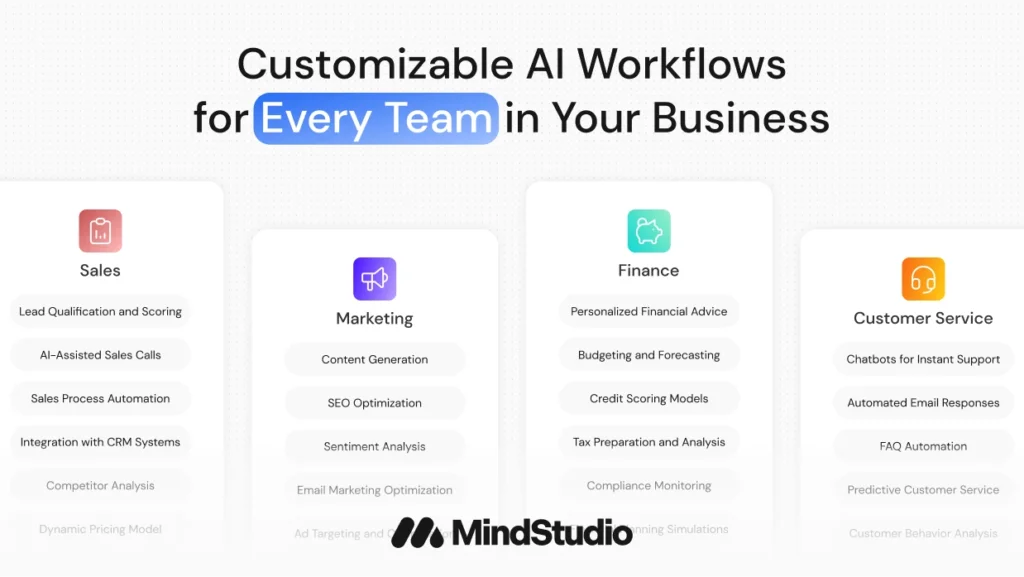
- Marketing teams & agencies: Create AI assistants that generate blog posts, social media content, and personalised emails. Multi‑model workflows enable sophisticated content automation.
- Customer service departments: Deploy intelligent chatbots that route tickets, summarise issues, and respond using natural language. Integration with helpdesk software ensures seamless handoff to human agents when necessary.
- Sales teams: Build lead scoring agents that qualify prospects, schedule follow‑ups, and update CRMs. AI models can evaluate customer intent and tailor communications.
- Consultants & freelancers: Offer bespoke AI solutions to clients without writing code. White‑label options and embed features allow consultants to deliver branded products.
- Education & training: Design personalised tutoring agents that adapt content based on student progress. Use data ingestion to feed curricula and use models to generate exercises and feedback.
When MindStudio Might Not Be the Best Fit
- Simple app‑to‑app automation: If you only need to move data from one app to another (e.g., new email triggers a Trello card), simpler tools like Zapier or Make may be more cost‑effective and easier to use.
- Developers seeking full control: Programmers who want to write custom code and manage every aspect of the stack might prefer frameworks like n8n or direct API development.
- Very tight budgets: The free tier is limited, and the jump to Pro can be costly for small businesses that don’t yet need advanced features. Low‑cost alternatives may suffice for basic tasks.
- Real‑time or high‑frequency operations: MindStudio is optimised for business processes, not real‑time trading or ultra‑low‑latency applications. Use specialised platforms for such needs.
Setup Guide
Step‑by‑Step Guide to Building an AI Agent
Building an AI agent in MindStudio involves a series of straightforward steps. Here’s a simplified process to help you get started quickly:
Defining Purpose and Selecting Models
- Define your goal: Determine what problem the agent will solve. Examples include generating weekly marketing reports, answering customer queries, or analysing survey results.
- Choose a starting point: Use MindStudio Architect to describe your agent and auto‑generate a template, or select from the library of ready‑made templates.
- Select AI models: Decide which models to use for each step. For text generation, consider GPT‑4o or Claude; for data analysis, choose models suited to classification or summarisation; for image creation, pick a diffusion model. MindStudio lets you mix models in a single workflow.
Building the Workflow
- Open the visual builder: After starting your project, you’ll see the canvas with Start and End blocks. Use the “+” icon to add new blocks.
- Add input blocks: Define how users or systems will provide information. Options include text fields, file uploads, API calls, or scheduled triggers.
- Insert processing blocks: Add AI blocks to generate text, images, or audio; query data; run custom functions; or scrape web pages. Configure each block’s parameters in plain language.
- Configure logic: Use conditional branches, loops, and error handling to guide the agent’s behaviour. For example, if a user’s query relates to support, route it to a customer service workflow; otherwise, send it to sales.
- Add output blocks: Decide how the agent will deliver results, display on a web page, send an email, update a spreadsheet, or call another API.
Deployment & Iteration
- Preview and test: Use the live preview to run the agent and check its output. Adjust parameters and logic until the workflow behaves as intended.
- Publish the agent: Deploy as a web app with a custom URL, embed it on your site, or expose it as an API. You can also schedule runs or trigger them via emails and webhooks.
- Monitor performance: Use MindStudio’s analytics to track run counts, response times, and error rates. Make iterative improvements by refining prompts, adjusting model choices, or adding new blocks.
- Scale and collaborate: Invite team members to collaborate on the agent. Use version control and role‑based permissions to manage changes. As needs grow, upgrade your plan or enable self‑hosting.
By following these steps, you can build a functional AI agent in as little as 15–60 minutes, depending on complexity. Starting with templates and using MindStudio Architect can significantly reduce the learning curve.
Alternatives
Comparisons With Competitors
Understanding how MindStudio stacks up against other automation platforms helps you choose the right tool for your needs.
MindStudio vs Zapier and Make
Zapier and Make (formerly Integromat) are well‑known for connecting apps and automating simple workflows. While they offer some AI integrations, they focus on moving data between services rather than orchestrating AI models. MindStudio differentiates itself by providing built‑in access to hundreds of AI models, a visual agent builder, and dynamic tool use. Zapier offers more integrations (over 6,000) and may be cheaper for basic tasks, but it doesn’t provide unified AI model management. Make is known for complex data manipulation and may be better for ETL‑style operations, whereas MindStudio excels at AI‑driven workflows.
MindStudio vs n8n and Relevance AI
n8n is an open‑source automation framework that provides code‑level control and self‑hosting. It’s powerful for developers who need custom logic and unlimited integrations. However, n8n lacks built‑in access to large language models; users must connect models manually via API keys. MindStudio prioritises ease of use, packaging AI and infrastructure together, but you sacrifice some control and flexibility. Relevance AI focuses on multi‑agent workforces and may offer deeper agent collaboration features, yet it doesn’t provide the same breadth of model access or the polished user interface found in MindStudio.
Feature Comparison Table
The table below summarises key differences between MindStudio and its competitors:
| Feature | MindStudio | Zapier | Make | n8n |
| AI Models | 200+ built‑in | Limited AI | Basic AI | Manual setup |
| Visual Builder | ★★★★★ | ★★★★ | ★★★★★ | ★★★ |
| Starting Price | $20/mo | $29.99/mo | $9/mo | Free (self‑host) |
| Learning Curve | Moderate | Easy | Moderate | Steep |
| Integrations | 1,000+ | 6,000+ | 1,700+ | 350+ |
| Self‑Hosting | Enterprise | No | No | Yes |
| Best For | AI workflows | Simple automation | Data workflows | Technical teams |
MindStudio wins for AI‑heavy applications, while Zapier is better for basic automations and n8n is suited to developers wanting custom control. Your choice should depend on whether AI orchestration or simple app connectivity is your priority.
Future Plans
Latest Updates & Future Roadmap
Getting Started Tips
Make the most of MindStudio
To make the most of MindStudio, follow these best practices:
Learning Resources and Community
- Take advantage of tutorials and webinars: MindStudio offers an extensive library of videos, guides, and live training sessions. These resources walk you through basics and advanced techniques.
- Participate in the community: Join the MindStudio forum to ask questions, share workflows, and learn from other users. Communities often provide insights not found in official documentation.
- Explore the knowledge base: Documentation covers topics from building agents to managing security settings. Reference it when experimenting with new features.
Best Practices for Beginners
- Start with templates: Templates provide a solid foundation for common tasks like lead qualification or content creation. Modify them rather than building from scratch to save time.
- Use MindStudio Architect: Describing your agent in plain English and letting the platform scaffold a workflow reduces intimidation and ensures you include necessary components.
- Test early and often: The live preview feature helps you catch issues before publishing. Run small experiments to understand how different models behave.
- Keep workflows modular: Break complex tasks into smaller sub‑agents. This makes debugging easier and allows you to reuse blocks across projects.
Managing Costs and Optimizing Workflows
- Monitor usage: Check the analytics dashboard to track runs and token consumption. Set alerts for high usage to avoid unexpected charges.
- Choose models wisely: Not all tasks require the most powerful model. Use smaller or task‑specific models when appropriate to save money without sacrificing quality.
- Optimize prompts: Clear, concise prompts reduce the number of tokens consumed and improve output quality. Iteratively refine prompts based on results.
- Schedule tasks strategically: Instead of triggering agents immediately upon every event, batch processing can lower costs and improve performance. For example, run a report generator daily rather than on every data update.
Conclusion
Final Thoughts
MindStudio succeeds in making AI development accessible to non‑coders while still offering enough depth for sophisticated workflows. Its intuitive visual builder, expansive model library and transparent pricing make it an attractive choice for businesses looking to automate content creation, analysis, customer interactions, and more. The platform’s unified approach saves time and money compared to hiring developers or managing multiple AI subscriptions.
However, it’s not a one‑size‑fits‑all solution. Beginners must navigate a learning curve, and heavy usage of premium models can become expensive. MindStudio also lacks the extensive integration libraries of general automation tools like Zapier. For organisations that need simple app‑to‑app workflows or full control over code, other solutions may be a better fit.
If your goal is to build AI‑powered agents quickly and you value access to cutting‑edge models, MindStudio is worth considering. Its ongoing innovation, enterprise‑grade security, and growing community suggest a promising future. Evaluate your use cases, plan your budget, and leverage the platform’s resources to decide whether MindStudio aligns with your automation strategy.
Have more questions?
Frequently Asked Questions
1. What is MindStudio used for?
MindStudio is a no‑code platform for building AI agents that automate tasks like content generation, data analysis, customer support, and lead management. Users can design workflows visually, choose from over 200 AI models, and integrate their agents with popular business tools.
2. How much does MindStudio cost?
Pricing depends on the plan and usage. As of 2025, the Free plan provides 1,000 runs per month. Starter is around $20/month (or $16/month annually) and includes 5,000 runs. Pro costs about $60/month ($48 annually) for 25,000 runs and API access. Unlimited costs $500/month ($400 annually) with unlimited runs, and Enterprise offers custom pricing.
3. Does MindStudio require coding skills?
No. MindStudio is designed for non‑coders. Its drag‑and‑drop interface, templates, and auto‑scaffolding feature allow users to build agents without writing code. Developers can extend functionality with custom JavaScript or Python blocks if needed.
4. Which AI models are available in MindStudio?
MindStudio offers access to more than 200 models, including GPT‑4o, Claude 4, Gemini 2.5, Mistral, and various diffusion and audio models. Users can mix multiple models within a single workflow and don’t need separate API keys for each provider.
5. Can I integrate MindStudio with my existing tools?
Yes. MindStudio integrates with over 1,000 apps natively and thousands more through Zapier and Make. Popular integrations include Salesforce, Slack, Gmail, Google Sheets, Airtable, Stripe and Notion. Agents can also be embedded on your website or accessed via API.
6. What are the limitations of the Free plan?
The Free tier allows experimentation but is limited to 1,000 runs per month and unlimited drafts. It doesn’t support published agents with custom URLs, and integrations are restricted. Users who want to deploy production agents typically need to upgrade.
7. Is MindStudio secure enough for enterprise use?
Yes. MindStudio is SOC 2 certified and GDPR compliant. It offers role‑based access control, single sign‑on, audit logging and self‑hosted deployment options. These features make it suitable for industries with strict security and compliance requirements.
8. How long does it take to build an agent?
Most users can build functional agents in 15–60 minutes, depending on complexity. Templates and the MindStudio Architect feature significantly reduce setup time by auto‑generating workflow scaffolding from a simple description.
9. Does MindStudio support dynamic decision‑making?
Yes. The platform’s dynamic tool use allows agents to choose which actions or models to invoke based on context. This capability enables more autonomous workflows, where the agent can decide how to handle different inputs or situations.
10. What are some alternatives to MindStudio?
Alternatives include Zapier and Make for basic app automation, n8n for developer‑friendly self‑hosted workflows, and Relevance AI for multi‑agent workforces. Each has its strengths: Zapier offers the largest integration library; n8n provides full control and self‑hosting; Relevance AI focuses on collaborative AI teams; while MindStudio excels at no‑code AI agent building with a vast model library.