Introduction
If you’re responsible for people operations, you know how quickly a patchwork of disconnected tools can spiral into chaos. Onboarding lives in spreadsheets, engagement surveys happen once a year, and performance reviews are rushed afterthoughts. That’s the context behind Workleap – a modular, AI‑powered people‑management platform designed to connect every step of the employee journey. In this comprehensive Workleap review, you’ll explore what makes the suite stand out, where it fits best, and how its pricing and modules compare to other human resources software. You’ll also gain insight into real customer experiences so you can decide whether Workleap is the right fit for your team.
Overview
Workleap overview and company background
History and rebranding
Workleap grew out of Montréal‑based GSoft, the company behind Officevibe and Softstart. In 2006, GSoft focused on improving workplace culture through software. Officevibe launched in 2013 to simplify employee engagement surveys, followed by Softstart in 2021 to streamline onboarding. Recognizing how fragmented the HR tech stack had become, the company unified these products under a single brand, Workleap, in 2025 to offer a cohesive experience. That rebrand also introduced new modules for performance management, skills development, and learning, and later added an AI‑powered compensation solution. As of 2025, Workleap counts more than 20,000 managers worldwide among its customers.
Modular, people‑first architecture
At its core, Workleap is not a monolithic HRIS. Instead, it is built around modular products that address specific moments in the employee life cycle. You can adopt one or several modules, and they all connect through a unified dashboard. The main products include:
- Officevibe – Employee engagement surveys and continuous feedback.
- Performance – Ongoing performance reviews, OKRs and one‑on‑ones.
- Pingboard – Visual organization charts and employee directory.
- Onboarding (formerly Softstart) – Task automation and new‑hire journeys.
- LMS & Learning Hub – Course creation and learning path management.
- Skills – Competency mapping and career development.
- Compensation – Pay band management, compensation reviews and benchmarking.
- Workleap AI – Generative and predictive AI that surfaces insights and assists with feedback and review cycles.
Because each module can be activated individually, small teams can start with a single solution and expand when needs grow. The suite integrates with popular HRIS platforms (Workday, BambooHR, ADP), collaboration apps (Slack, Microsoft Teams), and productivity tools (Google Workspace, Microsoft 365) to minimize data silos. This architecture is designed to be people‑centric rather than process‑centric, encouraging continuous engagement rather than annual check‑ins.
Breakdown Analysis
Module‑by‑module breakdown
Workleap’s strength lies in the depth of each module and how they complement each other. Below you’ll find a closer look at the individual products and their standout features.
Officevibe: engagement and feedback
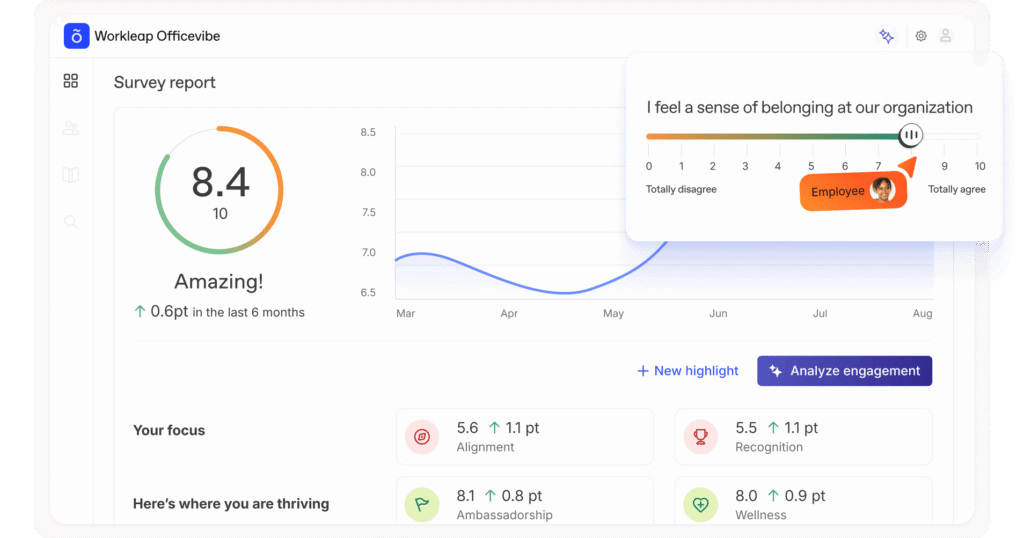
Officevibe helps you collect and act on employee sentiment through pulse surveys, anonymous feedback channels, and recognition tools. The surveys cover ten science‑backed engagement metrics such as recognition, wellness, and manager relationships. Questions are customizable, and you can send short, regular surveys to avoid fatigue. A data‑driven dashboard visualizes engagement scores and trending issues, while Good Vibes cards let peers acknowledge each other’s contributions. Officevibe integrates with Slack and Microsoft Teams, so feedback requests appear where your employees are already working. AI reporting summarises key themes and suggests actions for managers, encouraging quick follow‑up.
Performance: goal tracking and continuous reviews
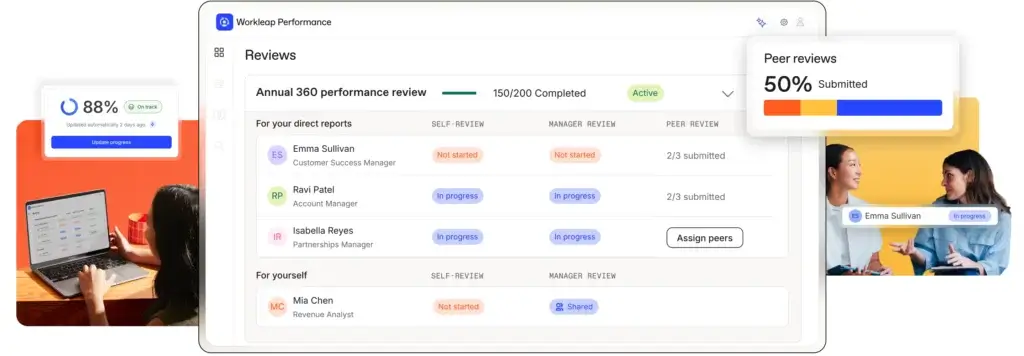
Workleap’s Performance module shifts the focus from annual appraisals to ongoing development. Managers can set up review cycles with self‑assessments, 360‑degree feedback, and peer reviews, all documented in one place. Templates, question banks, and nudges help managers prepare thoughtful conversations. Goal tracking aligns with OKRs so employees can see how their work contributes to larger objectives. Real‑time dashboards surface progress and highlight overdue reviews. AI assistance summarises feedback and generates performance summaries to save time while keeping reviews structured. For teams without dedicated HR analysts, this module brings just enough structure without being overly complex.
Pingboard: organizational clarity and connection
Remote and scaling teams often lose visibility into who’s who. Pingboard solves this by providing a dynamic org chart and employee directory. You can create private planning charts for workforce changes and publish public charts for everyone to browse. Each profile includes role, skills, interests, and contact information, and you can highlight birthdays, work anniversaries, and other milestones to build camaraderie. A “Who’s Who” quiz helps new hires learn names and roles faster. While Pingboard doesn’t replace an HRIS, it sits on top of your existing system to make organizational information accessible to all employees.
Onboarding: streamlined new‑hire journeys
For many teams, the onboarding experience is inconsistent and manual. Workleap’s Onboarding module allows you to design repeatable journeys using drag‑and‑drop templates. You can assign tasks, schedule meetings, link training materials, and set up automated reminders. Managers get a real‑time view of each new hire’s progress, while new employees have access to a self‑service portal with forms, resources, and milestones. Electronic document signing and secure storage reduce paperwork, and compliance features track required training and certifications. Integration with HRIS and hiring platforms like BambooHR, Workday, or Greenhouse ensures that employee data syncs automatically, minimizing duplicate entry.
LMS & Learning Hub: internal learning at scale
Workleap’s LMS supports lightweight learning programs without the complexity of a full learning experience platform. You can build courses using drag‑and‑drop tools, upload SCORM files, or let the AI generate course outlines. Courses can be assigned by role or department, and automated enrollments keep learners on track. Progress dashboards show completions and quiz results so you can measure effectiveness. The LMS also feeds into the Skills module, allowing you to map learning activities to development plans.
Skills: career development and growth planning
Career progression often suffers when there is no clear path. The Skills module lets HR teams define custom skill frameworks aligned to roles or departments. Employees can self‑assess their capabilities, view expectations for current or future positions, and request mentoring. Managers can evaluate team members’ skills and highlight gaps or strengths. AI suggestions propose relevant courses and development actions. The module also supports internal mobility by making open roles and required competencies visible to all employees. This transparency helps employees understand how to advance and encourages cross‑departmental movement.
Compensation: pay bands and rewards management
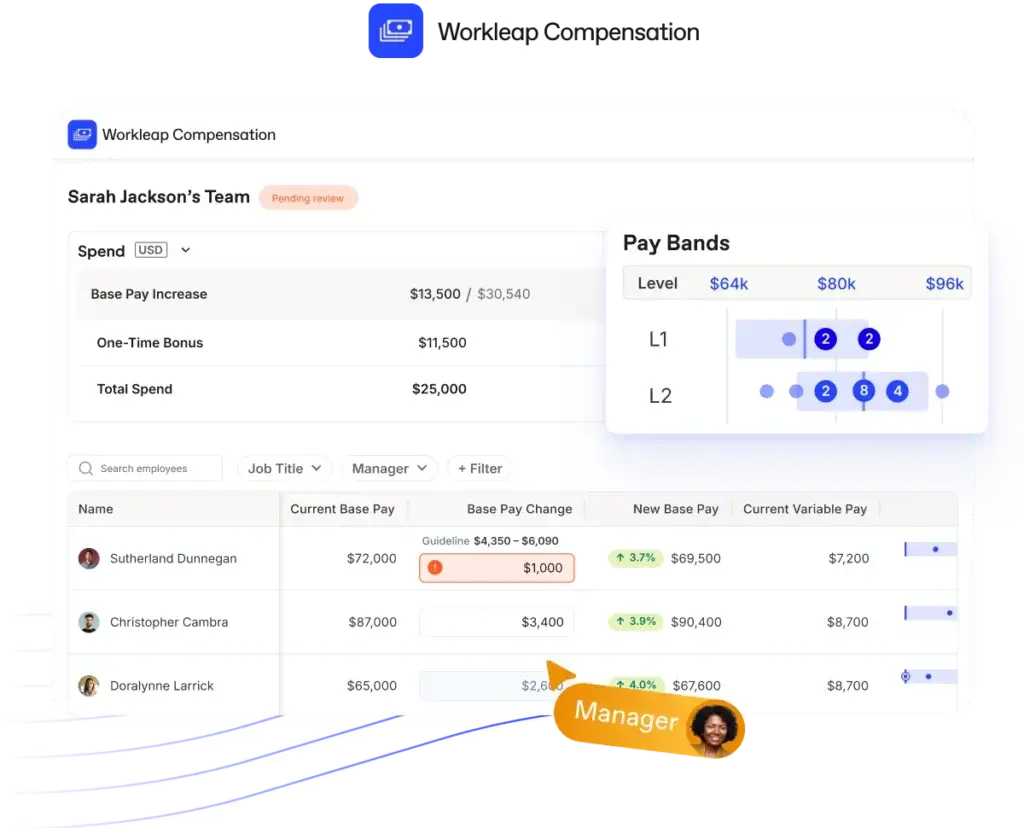
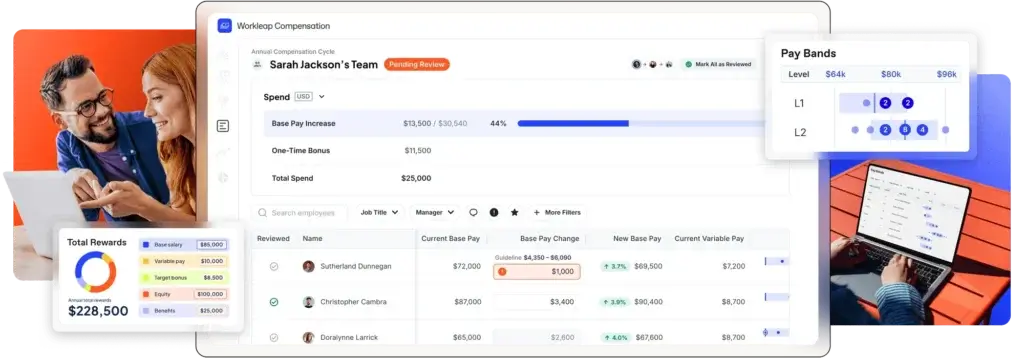
Workleap added compensation management after acquiring Barley. This module helps HR and Finance teams manage pay bands, plan compensation reviews, and benchmark salaries against market data. You can create equitable pay structures, set geographic pay zones, and track compensation analytics. Configurable compensation cycles replace spreadsheets with a structured workflow that includes budgeting, manager guidelines, and automated offer letters. Benchmarking data from Mercer and the ability to import third‑party surveys allow you to compare your pay ranges to the market. Integration with performance data ensures that pay decisions align with employee achievements, while integrations with Workday, ADP, UKG and BambooHR eliminate manual file exports.
Workleap AI: insights and assistance
Across modules, Workleap AI supports managers and employees with context‑aware assistance. It summarises survey responses, drafts performance review comments, and suggests engagement strategies based on feedback. AI features include sentiment analysis of open‑ended responses, tone checking for feedback messages, and personalized chat assistance. With the AI+ add‑on, you can upload your own documents, train the assistant on your policies and customize its voice. These AI tools aim to reduce administrative overhead so leaders can focus on coaching and decision-making.
Pricing
How much does Workleap cost?
Workleap uses modular pricing, meaning you only pay for the products you need. Prices are billed per user per month, with a discount for annual billing. All modules require a minimum number of users (typically 10 for engagement and performance and 100 for compensation). A free trial is available for most modules, and Officevibe offers a free starter tier for small teams.
Module‑specific pricing
Below is a summary of annual versus monthly pricing per user:
- Officevibe – $5.00/user/month (annual) or $6.25/user/month (monthly); 10‑user minimum. Includes pulse surveys, Good Vibes recognition, AI reporting, engagement metrics and integrations.
- Performance – $5.00/user/month (annual) or $6.25/user/month (monthly); 10‑user minimum. Includes review cycle builder, 360 feedback, AI‑guided writing and analytics.
- Pingboard – $4.00/user/month (annual) or $5.00/user/month (monthly) according to third‑party pricing analysis. Workleap’s site references org charts and directories bundled into the suite; contact sales for exact pricing.
- Onboarding – Starts at $2.00/user/month (annual) or $2.50/user/month (monthly). Pricing depends on the features you activate.
- LMS – $4.00/user/month (annual) or $5.00/user/month (monthly). Includes course creation tools and learning paths.
- Skills – $2.00/user/month (annual) or $2.50/user/month (monthly). Includes skill frameworks and career mapping.
- Compensation – $5.00/user/month (annual) with a 100‑user minimum. Pricing for monthly billing and larger deployments is custom.
Workleap also offers bundles such as the Total Experience Bundle (Engagement + Performance + Onboarding + LMS + Skills) for around $12/user/month when billed annually. Temporary promotions sometimes package Officevibe and Performance for $8/user/month. The modular approach allows you to pick and choose, but it can feel complex for first‑time buyers. Consider starting with Officevibe to evaluate engagement, then layer other modules as your needs expand.
AI+ add‑on
Workleap AI is included in all products, but the AI+ add‑on unlocks advanced capabilities. It allows you to train the assistant on up to ten uploaded files, set custom voice and tone, and connect to Slack and Teams for real‑time chat. Pricing for AI+ is not publicly listed; you’ll need to contact sales. If you rely heavily on AI assistance, factor this into your budgeting.
Workleap Pricing Table
| Product / Module | Main Features | Pricing |
| Officevibe Engagement | Surveys, eNPS, feedback, insights | Free plan available; Paid plans start at ~$5/user/month (annual billing) |
| Performance | 1:1s, goals, OKRs, reviews, feedback | Starts around ~$8/user/month when bundled; standalone pricing varies |
| Onboarding | Automated workflows, tasks, documentation | Custom pricing; requires contacting Workleap sales |
| Learning (LMS) | Course creation, training, dashboards | Starting at ~$4–$6/user/month depending on usage |
| Skills | Skills mapping, career frameworks, growth paths | Custom pricing; varies by organization size |
| Pingboard Org Chart | Org charts, directories, org planning | From ~$3–$5/user/month |
| Compensation | Pay bands, comp cycles, benchmarking | Custom pricing; depends on team size and HRIS integrations |
| Workleap AI Add-On | AI insights, summaries, analytics | + Additional cost per user; consumption-based |
Key features and benefits
Software specification
Engagement and feedback tools
Pulse surveys, anonymous feedback channels, and peer recognition form the backbone of Officevibe. By collecting short, frequent check‑ins, you maintain a real‑time pulse on morale rather than waiting for yearly engagement surveys. This continuous dialogue encourages honesty and fosters a culture where concerns are surfaced early. Good Vibes cards and customizable question templates let you tailor recognition and feedback to your culture. AI summaries make it easier for managers to digest survey results and act quickly.
Performance management and 360 feedback
Instead of static annual reviews, Workleap Performance provides flexible review cycles, OKR tracking, and one‑on‑one documentation. Templates, suggested questions, and automated reminders keep everyone on schedule. You can gather self‑reviews, peer feedback and manager evaluations, then use AI to synthesise comments and ratings into a cohesive summary. Real‑time dashboards highlight progress against goals and identify top performers or those needing support. This holistic view aligns performance conversations with career development and compensation decisions.
Onboarding efficiency and automation
New hires often judge a company by their first weeks. Workleap Onboarding offers structured journeys that combine tasks, content, and milestones. Drag‑and‑drop builders let you create templates for different roles. You can schedule welcome meetings, assign buddies, embed training videos, and send automatic reminders. Real‑time tracking shows where each new hire stands and what tasks remain. Electronic signatures speed up paperwork, and compliance tracking ensures mandatory forms and certifications are completed on time. By automating administrative steps, you free managers to focus on building relationships and cultural integration.
Skills development and learning
Workleap’s Skills and LMS modules encourage continuous learning. The LMS provides simple course authoring, SCORM support, and AI‑generated outlines. You can organize courses into learning paths and assign them based on roles or skill gaps. The Skills module lets you define competencies for each role, assess employees’ proficiency, and generate development plans. Employees can self‑assess and explore career paths, while managers receive suggestions for coaching and training. Together, these tools make career development visible and actionable, supporting retention and internal mobility.
Compensation and benchmarking
Compensation decisions often rely on disjointed spreadsheets. Workleap’s Compensation module streamlines the process by centralizing pay bands, global pay zones, and compensation reviews. You can set compensation guidelines by role and location, monitor pay gaps, and create compensation cycles with built‑in budgets and automated approval workflows. Benchmarking data from Mercer and imported market surveys help you compare your pay structure to industry standards. Automated comp letters ensure consistent and confidential communication with employees. By linking performance data to compensation, you can make fairer pay decisions and demonstrate transparency.
Analytics, reporting and security
Across modules, Workleap offers real‑time dashboards and exportable reports. Engagement metrics, performance scores, onboarding progress, and skills assessments are displayed through interactive graphs. HR teams can segment data by department, location or role to spot trends and drill down into areas needing improvement. Workleap complies with SOC 2 and other data‑privacy standards, uses encryption and role‑based access controls, and offers anonymized feedback options to protect employee privacy. These security measures are especially important when collecting sensitive feedback or compensation data.
User experience
User experience and ease of use
Setup and implementation
Workleap aims for fast time‑to‑value. Most modules require little configuration: templates and onboarding checklists are pre‑built, and integrations with HRIS and collaboration apps reduce manual setup. On average, customer reviews report implementation times around one month. A dedicated support team can assist with data migration, and the knowledge base includes step‑by‑step guides. However, some users note that customizing workflows beyond the out‑of‑the‑box templates can be challenging and may require administrative effort.
Interface and navigation
The platform uses a tile‑based dashboard with a consistent left‑hand navigation menu. Each module appears as a tab, and color‑coded metrics provide visual cues. Managers receive in‑app coaching tips when preparing surveys or reviews, and employees view their tasks and feedback in a simplified portal. In user reviews, the interface is often praised as intuitive and modern, though some find the sheer number of features overwhelming at first. Mobile‑friendly web pages allow employees to complete surveys and training on the go, but the mobile app’s functionality is more limited than the desktop version.
Integrations and ecosystem
To avoid duplicate data entry, Workleap integrates with popular HRIS (Workday, BambooHR, ADP, UKG), payroll systems, applicant tracking systems (Greenhouse, Lever), and productivity suites (Google Workspace, Microsoft 365). Slack and Microsoft Teams integrations allow surveys and reminders to appear in chat, and single sign‑on (SSO) is available through standard identity providers. Webhooks and an API enable custom integrations. Customers who heavily use other SaaS platforms generally find the ecosystem robust, though some advanced workflows may require middleware or engineering support.
Support and community
Workleap provides live chat support, a help center, and email assistance Monday through Friday (9 a.m.–5 p.m. Eastern). Response times typically fall within 24–48 hours. Users appreciate the comprehensive knowledge base and templates but sometimes cite slow responses for urgent issues. A community forum and Slack workspace allow customers to share best practices. Customer success managers are available for enterprise plans, while smaller teams rely on self‑service resources.
Pros and Cons
Advantages and Disadvantages
Positive
✅ Modular and scalable
✅ User‑friendly interface
✅ Data‑driven insights
✅ Affordable entry points
Negative
❌ Not a full HRIS
❌ Pricing complexity
❌ Limited customization
❌ Mobile app limitations
✅ Pros
- Modular and scalable – Start with a single product and add more as your organization grows.
- User‑friendly interface – Minimal training required; managers and employees can get up to speed quickly.
- Data‑driven insights – Real‑time dashboards, sentiment analysis, and AI suggestions highlight trends and action items.
- Affordable entry points – Free tier for engagement and low per‑user pricing for other modules.
- Strong integrations – Connects seamlessly with HRIS, Slack, Teams, and productivity suites.
- AI assistance – Automates survey analysis, review summaries and tone checks to save time.
- Comprehensive compensation management – Pay bands, reviews, and benchmarking simplify pay decisions.
- Continuous learning and development – Skills and LMS modules encourage career growth and internal mobility.
❌ Cons
- Not a full HRIS – Workleap handles engagement, performance, and compensation but not core HR functions like payroll or benefits administration.
- Pricing complexity – Modular pricing can be confusing; you’ll need to map out which modules you need.
- Limited customization – Some users find survey templates, workflows and reports less flexible than they’d like.
- Mobile app limitations – The mobile experience is more basic than the desktop version.
- Support availability – Support hours are limited to business days in North America, which may be challenging for global teams.
- AI still maturing – AI summaries occasionally miss nuances in feedback and may overgeneralize.
Best use cases
Cases you should consider Workloeap
Workleap isn’t a universal solution for every organization; it excels in specific scenarios. Common use cases include:
- Startups and fast‑scaling companies – Automate onboarding and performance reviews without hiring more HR staff.
- Remote‑first and hybrid teams – Maintain visibility and engagement across locations with pulse surveys, org charts and Slack/Teams integrations.
- Agencies and creative firms – Focus on culture and retention metrics clients expect, while providing clear career paths for specialists.
- People‑centric SMBs – Adopt learning and manager support tools to reduce turnover and foster internal growth.
- Industries with dispersed workforces – Healthcare, retail, manufacturing and consulting benefit from mobile‑friendly surveys and real‑time insights.
- Organizations prioritizing pay equity – Use compensation analytics and benchmarking to ensure consistent and fair rewards.
Comparisons and alternatives
Alternatives to Workleap
Several HR platforms overlap with Workleap’s functionality. The table below compares key features between Workleap and two common competitors, Lattice and BambooHR. Lattice focuses on performance and engagement, while BambooHR is a full HRIS with employee records and payroll. Use this comparison to understand where Workleap fits.
| Feature Type | Workleap | Lattice |
| Engagement & Surveys | Pulse surveys, anonymous feedback, Good Vibes recognition | Pulse surveys and OKR‑aligned engagement tools |
| Performance Reviews | Continuous cycles, OKRs, AI‑summarized 360 feedback | Structured review cycles, peer feedback and growth plans |
| Org Chart & Directory | Interactive org chart (Pingboard) | Basic employee directory only |
| Onboarding Automation | Templates, task lists and self‑service portal | Not included (requires integration) |
| LMS & Skills | Course creation, learning paths and skill frameworks | Not offered (requires third‑party integration) |
| Compensation Management | Pay bands, compensation reviews, benchmarking | Limited; compensation module available on enterprise plan |
| HRIS/Payroll | Integrates with HRIS but does not handle payroll | Native HRIS with payroll and benefits administration |
| Pricing (approx.) | Starts at $5/user/mo per module with bundle discounts | Starts around $11/user/mo for performance and engagement |
When to choose Workleap over competitors
- Choose Workleap if you need a lightweight, modular platform focused on engagement, performance and compensation but don’t require a full HRIS.
- Choose Lattice if you have a larger budget and want robust people analytics and structured growth plans without needing learning or onboarding tools.
- Choose BambooHR when you need an all‑in‑one HRIS with employee records, payroll and time off tracking; you can integrate Workleap modules for engagement and performance if BambooHR’s own features aren’t enough.
Users’ feedback
Customer feedback and real‑world experiences
AI
Future outlook and AI roadmap
Workleap continues to expand its platform. The acquisition of Barley added a robust compensation module, and 2025 saw the rollout of AI‑powered features across engagement and performance. Future updates are expected to deepen AI capabilities, such as predictive attrition analytics, personalized learning recommendations and generative feedback assistants. Integrations will likely grow to include more ERP systems and vertical‑specific tools. If your organization values innovation and wants to be on the cutting edge of HR tech, Workleap’s roadmap signals a commitment to continuous improvement.
Conclusion
Final Thoughts
Workleap offers a refreshing approach to HR software by focusing on the employee experience. Instead of forcing organizations into a single monolithic system, it provides a suite of connected modules that you can adopt at your own pace. Its pulse surveys, performance reviews, org charts, onboarding journeys, learning paths, skills frameworks, and compensation tools work together to support engagement and growth. The pricing model, while sometimes confusing, allows you to start small and scale. With strong integrations and an evolving AI engine, Workleap is well suited for small to mid‑sized teams that prioritize culture, development and fairness. If you’re searching for a people‑first platform that brings clarity and structure without overwhelming bureaucracy, Workleap deserves a close look.
Have more questions?
Frequently Asked Questions
1. What is Workleap and how does it differ from a traditional HRIS?
Workleap is a modular people‑management suite focusing on engagement, performance, onboarding, learning, and compensation. Unlike a traditional HRIS, it doesn’t handle core HR records, payroll, or benefits. Instead, it integrates with your existing HRIS to fill gaps in employee experience, making it ideal for organizations that need to improve culture and development without replacing their entire system.
2. How much does Workleap cost?
Pricing depends on the modules you choose. For example, Officevibe and Performance start at about $5 per user per month when billed annually, while Onboarding starts at $2 per user per month. A free starter tier is available for Officevibe, and bundle discounts are offered when you combine multiple products. Large organizations should contact Workleap for custom quotes and AI+ pricing.
3. Can I use only one Workleap module?
Yes. One of Workleap’s strengths is its modular design. You can start with a single product like Officevibe for engagement or Performance for reviews and add others later. Each module integrates with your HRIS and other Workleap tools, so you can expand as your needs evolve.
4. Is there a free trial or free plan?
Workleap offers a 28‑day free trial for most modules. Officevibe has a free starter plan that includes basic surveys and feedback tools for small teams. During the trial you can explore features, invite colleagues and evaluate whether the platform meets your needs.
5. How does Workleap integrate with Slack and Microsoft Teams?
Workleap’s Slack and Teams integrations allow you to send surveys, reminders and recognition directly in your team’s chat channels. Managers receive notifications when surveys go out or reviews are due, and employees can respond without leaving the chat app. Integration setup requires a simple authorization process, and advanced workflows can be configured via the API or webhooks.
6. What industries benefit most from Workleap?
While Workleap is industry‑agnostic, it is especially popular with technology companies, remote‑first organizations, healthcare providers, retailers with frontline staff, educational institutions and professional services firms. Its mobile‑friendly surveys and modular pricing appeal to businesses with dispersed teams and tight budgets.
7. Does Workleap support mobile devices?
Yes. Workleap’s web interface is mobile‑responsive, allowing employees to complete surveys, access onboarding tasks and view org charts on their phones. However, the mobile app currently offers fewer features than the desktop version, focusing mainly on responding to surveys and viewing tasks. Full admin functionality is available on desktop.
8. How secure is Workleap?
Workleap complies with industry standards such as SOC 2 and uses encryption to protect data in transit and at rest. Role‑based access controls limit who can view sensitive information. Anonymous feedback options protect employees’ identities, and compensation data is kept confidential with audit trails and secure hosting. If your organization has specific compliance requirements, Workleap’s sales team can provide documentation.
9. Can Workleap handle performance reviews and compensation together?
Yes. Workleap’s Compensation module links directly to Performance data. Managers can view goal progress, feedback summaries and ratings when making compensation recommendations. Automated guidelines and benchmarking data ensure pay decisions are aligned with performance, reducing bias and supporting pay equity.
10. How does Workleap support career development and internal mobility?
The Skills and LMS modules allow you to define skill frameworks, map career paths and assign learning activities. Employees can self‑assess their skills, view gaps and explore required competencies for new roles. Managers receive AI‑generated suggestions for development opportunities and can track progress over time. This transparency encourages internal mobility and helps employees understand how to grow within your organization.