
Introduction
Shipping and fulfilment can make or break a growing business. As an e‑commerce seller or office manager, you already know that late shipments, high postage costs, and messy return processes hurt your reputation and profits. Even sending letters and certified documents can become a headache when rates change or you need to track delivery status. That’s where shipping management software shines. Instead of juggling carrier websites and manual tracking, you log into one platform, compare discounted rates, print labels, and monitor everything from a single dashboard.
PitneyShip, the cloud‑based shipping tool from Pitney Bowes, is designed specifically for small and mid‑sized businesses. It brings decades of mailing expertise into a modern SaaS product that works from any browser or mobile device. In this review, you’ll learn how PitneyShip works, which features are included in each plan, what integrations are available, and how it stacks up against competitors. By the end, you’ll know whether PitneyShip fits your shipping and mailing needs.
PitneyShip Overview & Evolution
Pitney Bowes launched PitneyShip as the online successor to its SendPro line of postage meters and desktop software. Originally focused on single‑user mail postage, PitneyShip has rapidly expanded. Over the last few years, the platform added mobile apps, discount carrier partnerships, multi‑user support, and AI‑driven rate shopping.
The company positions PitneyShip as the central hub for all your shipping workflows. With one login, you can:
- Compare rates for USPS, UPS, and FedEx without minimum volume commitments.
- Generate and print shipping labels individually or in batches.
- Access a savings calculator and analytics dashboard to track spending.
- Use mobile apps to manage shipments on the go.
The emphasis on convenience and cost savings makes the platform appealing to SMBs that need enterprise‑grade shipping tools at affordable prices.
Software Specification
Key Features of PitneyShip
Multi‑Carrier Discounts & Rate Shopping
One of PitneyShip’s biggest selling points is access to built‑in discounts from multiple carriers. When you compare services in the dashboard, the platform automatically applies up to 88 % off USPS Priority Mail, 77 % off UPS Ground, and 90 % off FedEx rates. Unlike some competitors, you don’t need to negotiate your own carrier accounts; just enter your shipment details and choose the best option for delivery time and price.
For heavier or international shipments, PitneyShip’s AI‑powered rate shopping tool suggests the most cost‑effective carrier and service level based on package weight, destination, and delivery speed. You can even view a calendar of carrier pick‑up schedules inside the dashboard to plan shipments around pickup windows, ensuring that you avoid unexpected surcharges.
Label Management & Batch Shipping
Printing labels manually wastes time and introduces errors. PitneyShip offers robust label generation tools that let you:
- Create single labels by entering address details and package dimensions.
- Batch‑process up to 500 labels via CSV upload or direct marketplace syncs.
- Print stamps for letters and certified mail, including electronic return receipts when needed.
Every label comes with a tracking number that feeds into your dashboard, so you can monitor delivery status without leaving the platform. For companies that send hundreds of packages at once, batch processing saves hours of manual data entry and reduces the risk of mislabelled parcels.
Mobile App & Accessibility
Remote teams and on‑the‑go sellers appreciate PitneyShip’s fully‑featured mobile app. Available on iOS and Android, the app mirrors the web dashboard — you can generate labels, scan barcodes, schedule pick‑ups, and view tracking history from your phone. The mobile interface uses dropdowns and templates to minimize typing; plus, address verification prevents typos.
Mobile access isn’t restricted to label printing. You can also check carrier rates, access the analytics dashboard, and contact support. For small businesses without dedicated shipping staff, the ability to manage shipments from anywhere is a huge productivity boost.
Automation, Analytics & Savings Calculator
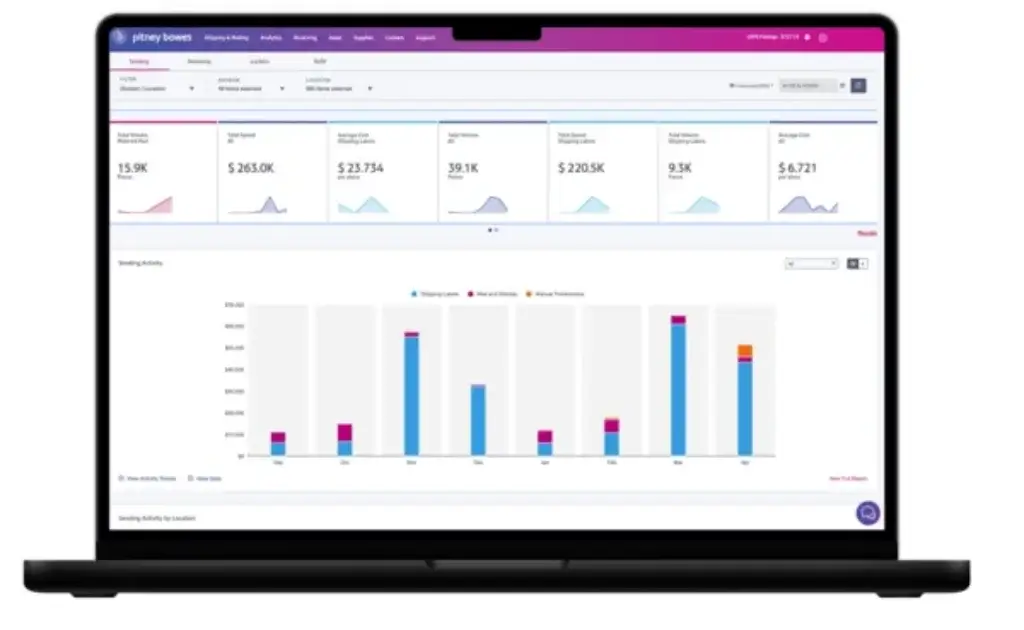
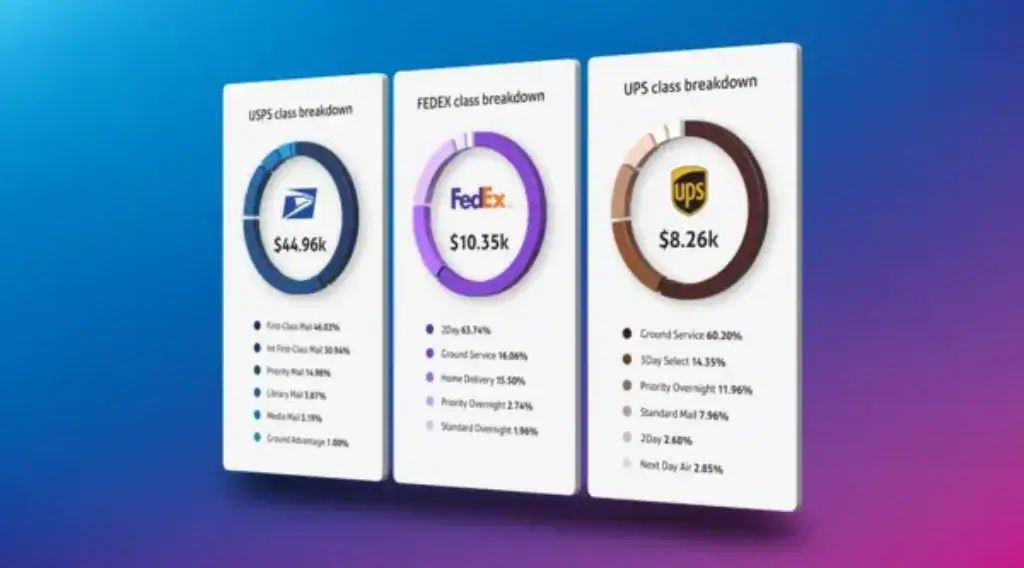
Data‑driven insights set PitneyShip apart. The platform includes a built‑in savings calculator that estimates how much money you’re saving through negotiated rates based on your shipping volume. Real‑time analytics display spend by carrier, average delivery time, and number of shipments, allowing you to identify trends and adjust your shipping strategy.
Other automation features include:
- Shipment presets: Save package dimensions, weight, and carrier preferences for recurring shipments to speed up label creation.
- Address book & autofill: Store contact addresses and avoid retyping details.
- Automated rate updates: PitneyShip automatically applies current postage rates and surcharges, ensuring compliance without manual calculation.
For enterprises, the platform offers API access to embed PitneyShip functions into your own systems and create custom automations.
Security & Compliance
Shipping can involve sensitive information, especially for legal, healthcare, or financial documents. PitneyShip is committed to data protection. The platform maintains HIPAA and GDPR compliance, with regular security updates and privacy controls. Enterprise plans include role‑based permissions, allowing administrators to restrict who can view, create, or cancel shipments. All users benefit from SSL encryption and secure servers.
Workflow & User Experience
Ease of Use and Support Options
Onboarding & Setup
Signing up for PitneyShip is straightforward. You can start with a 30‑day free trial, during which a guided wizard helps you connect your carrier accounts (if you have them), set up return addresses, and import contacts. The interface offers video tutorials, live webinars, and a knowledge base accessible from the dashboard. Plan upgrades and cancellations are managed from the same account page.
Label Creation & Rate Comparison
Once your account is set up, creating a label takes only a few steps:
- Enter or select the recipient address from your saved contacts.
- Choose the package type and enter weight and dimensions.
- View side‑by‑side rates from available carriers, including delivery dates and costs.
- Select your preferred option and print or email the label.
You can save shipping presets for recurring orders and even schedule pick‑ups during label creation. The rate comparison engine ensures you always select the most cost‑effective service without leaving the page.
Tracking & Notifications
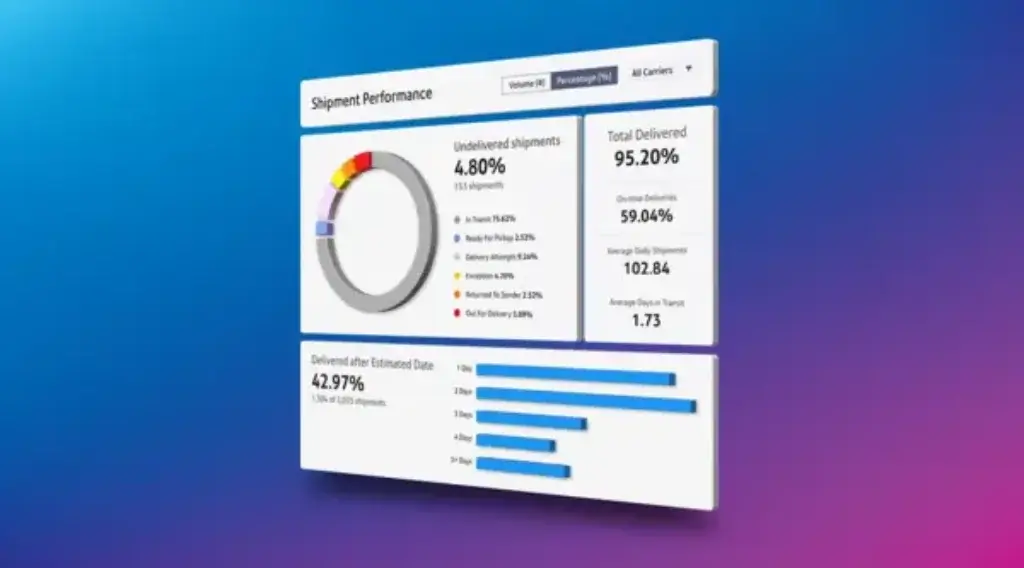
After you print a label, PitneyShip automatically assigns a tracking number and adds it to your dashboard. You can monitor status at a glance, view delivery dates, and receive email notifications for key events. Customers or recipients can also receive tracking updates if you choose to share the link. The unified tracking view reduces the need to visit multiple carrier websites and provides better visibility across shipments.
User Interface & Ease of Use
The platform’s interface emphasises simplicity. Menus are logically grouped (Shipping, History, Reports, Settings), and the dashboard shows your recent shipments and spending. Drag‑and‑drop file upload simplifies batch orders, and the mobile app uses a responsive design for easy navigation. Overall, PitneyShip scores high on ease of use (4.6/5) and value for money (4.5/5) according to verified user reviews
Expert Tips to Maximise Your PitneyShip Experience
To get the most value from PitneyShip, consider the following best practices:
- Set up shipping presets: Save dimensions, weights, and carrier choices for your most common packages. This drastically reduces label creation time.
- Connect your marketplaces: Integrate Shopify, Etsy or WooCommerce so orders automatically flow into PitneyShip. This prevents manual data entry and ensures accurate addresses.
- Use the savings calculator: Regularly check the analytics dashboard to see how much you’re saving. If your monthly savings exceed the Premium subscription cost, upgrading from the Starter plan makes sense.
- Schedule regular pick‑ups: Take advantage of the built‑in calendar view to schedule carrier pick‑ups in advance. This prevents last‑minute trips to drop boxes and ensures timely deliveries.
- Leverage mobile capabilities: Install the mobile app to print labels and track shipments when you’re away from your desk. Field teams can ship on the go without returning to the office.
- Monitor support channels: If you encounter technical issues, use the live chat feature for quick answers. For complex questions, attend one of the free webinars offered with every plan.
- Review your plan regularly: As your business grows, evaluate whether additional users, carrier accounts, or API access justify a move to Premium or Enterprise. PitneyShip allows plan changes without penalty, so you can adapt as needed.

Pros and Cons
Advantages and Disadvantages
Positive
✅ Deep carrier discounts
✅ Unified dashboard
✅ Mobile and web access
✅ Transparent pricing
Negative
❌ Advanced integrations
❌ Enterprise features
❌ Phone support
❌ Label refunds
Before you commit to any software, it’s wise to weigh the strengths and weaknesses. Here’s a concise overview:
✅ Pros
- Deep carrier discounts on USPS, UPS, and FedEx, no volume commitments required.
- Unified dashboard for comparing rates, printing labels, and tracking shipments.
- Mobile and web access allow you to manage shipping from anywhere.
- Transparent pricing with a free trial and scalable plans.
- Live training and support via webinars and chat, included with all plans.
- Strong security and compliance with HIPAA and GDPR support.
❌ Cons
- Advanced integrations (APIs, multi‑location management) require higher‑tier plans.
- Enterprise features like custom branding and automation presets may require a quoted plan and dedicated onboarding.
- Phone support is limited to business hours; some users prefer 24/7 assistance.
- Label refunds can be difficult to process, according to some user reviews.
Pricing
How Much Does PitneyShip Cost
PitneyShip offers three main subscription tiers. Each includes access to USPS and UPS discounts; higher tiers add more users, carriers, and advanced features. Every plan begins with a 30‑day free trial.
| Plan | Monthly Price | Key Features |
| Pay‑as‑you‑go (Starter) | $0 + 3 % usage fee | 1 user, single location; USPS & UPS labels; discounted rates; print stamps; multi‑carrier rate shopping; consolidated billing; basic reporting. |
| Premium | $34.99/month | Up to 10 users; 1 location; up to 50 certified mailings with electronic return receipts; rate shopping calendar view; “ship request” workflows; all Starter features. |
| Enterprise | Custom/quote | Unlimited users and locations; unlimited certified mailings with electronic return receipts; single sign‑on; API access and integrations; automation presets; bring your own carrier accounts; advanced customization. |
In addition to the subscription fee, the Pay‑as‑you‑go plan charges a 3 % usage fee on each printed label. Premium and Enterprise plans waive the usage fee but require a monthly subscription. Discounts for UPS and FedEx are available to all plans, and there’s no minimum shipping volume requirement.
Pricing Tips
- Start with the free trial: Use the first 30 days to estimate your shipping volume and savings. PitneyShip’s analytics will show whether the Premium plan’s monthly fee offsets the 3 % usage fee in the Starter plan.
- Scale up or down: PitneyShip allows you to upgrade or downgrade plans without penalties. If your team grows or you need API access, you can move to Premium or Enterprise mid‑billing cycle.
- Watch for overage fees: Premium plans include up to 50 certified mailings with electronic return receipts. Additional receipts cost extra. Make sure to factor this into your monthly budget.
Common Use Cases
Who Should Use PitneyShip? Use Cases
PitneyShip suits a wide range of organisations. Based on user reviews and feature coverage, ideal use cases include:
- E‑commerce sellers on platforms like Shopify, Etsy, or WooCommerce who need to manage orders across multiple carriers.
- Offices with hybrid or remote teams that require multi‑location shipping, address book sharing, and unified expense reporting.
- Finance or legal firms needing proof of mailing and secure document tracking.
- Healthcare providers transporting sensitive medical equipment or samples with a secure chain of custody.
- Entrepreneurs and startups looking for an affordable, all‑in‑one shipping solution without long‑term contracts.
If your business primarily uses USPS and sends occasional packages, a postage‑focused tool may suffice. But for multi‑carrier shipments, batch processing, and unified analytics, PitneyShip stands out.
Compare with Others
PitneyShip vs. Competitors
To understand PitneyShip’s value, let’s compare it with popular alternatives like Stamps.com, ShipStation and EasyPost. PitneyShip stands out for multi‑carrier discounts and built‑in analytics, while other platforms may excel in different areas.
| Feature Type | PitneyShip | Stamps.com | ShipStation | EasyPost |
| Starting Price | $0/month (usage fee) or $34.99/month | $19.99/month | $9.99/month | $29/month (API usage) |
| Carrier Discounts | USPS, UPS & FedEx included with no minimum | Primarily USPS; limited UPS discounts | Multi‑carrier; rates vary by plan | Bring your own carrier rates |
| Batch Labeling | Up to 500 labels via CSV or marketplace sync | Batch processing available | Yes, with automation rules | Requires API scripting |
| Mobile App | Fully featured mobile app | Limited mobile functionality | Full mobile support | No native app |
| Analytics & Reporting | Built‑in savings calculator and dashboard | Basic reporting | Advanced automation, some analytics | Custom via API |
| Integration Ease | Native plugins for e‑commerce and accounting | Limited integrations | Extensive marketplace and shipping integrations | Developer‑focused API |
| Ideal Users | SMBs, hybrid teams, e‑commerce sellers | Low‑volume USPS shippers | High‑volume e‑commerce businesses | Developers needing custom shipping logic |
Analysis
PitneyShip delivers a compelling mix of multi‑carrier discounts, ease of use, and scalable plans. Stamps.com focuses on USPS postage and may be cheaper for letter‑only businesses, but lacks multi‑carrier options. ShipStation is highly customizable with extensive automation rules and marketplace integrations; however, pricing scales quickly for large teams. EasyPost provides powerful APIs for developers building custom shipping workflows, though it requires more technical resources and does not offer its own discounts.
For small to mid‑sized businesses that value built‑in discounts, straightforward pricing, and minimal setup, PitneyShip represents a strong balance between simplicity and functionality.
Conclusion
Final Thoughts
PitneyShip has evolved into a mature, cloud‑based shipping platform tailored for small and mid‑sized businesses. By combining deep carrier discounts, intuitive label creation, and robust reporting, it helps you cut costs and save time. Its flexible pricing model, ranging from a pay‑as‑you‑go plan to full enterprise support, ensures there’s an option for nearly every shipping volume. While advanced features and integrations are reserved for higher tiers, the platform’s overall value proposition makes it a top contender for businesses seeking to streamline mailing and parcel workflows.
Whether you run an online store, coordinate shipments across multiple offices, or simply want to avoid the post office queue, PitneyShip provides the tools you need to ship smarter and grow your business with confidence.
Have more questions?
Frequently Asked Questions
1. Can I print shipping labels without a special printer?
Yes. You can use any standard desktop inkjet or laser printer to generate labels on plain letter‑sized paper. For a professional look, adhesive labels that match your printer size are recommended.
2. Do I need a minimum shipping volume to access discounts?
No. PitneyShip’s carrier discounts are available to all users regardless of shipping volume. This is particularly beneficial for small businesses and startups.
3. What carriers are supported?
PitneyShip supports USPS and UPS across all plans. Premium and Enterprise tiers add FedEx and allow you to bring your own carrier accounts, including DHL for global shipping.
4. Does the platform handle international shipping?
Yes. You can create international shipping labels, complete customs forms, and compare rates for cross‑border deliveries. Additional functionality and discounts for international carriers are available on higher‑tier plans.
5. How does PitneyShip compare to Stamps.com?
PitneyShip offers free or low‑cost plans with multi‑carrier discounts, whereas Stamps.com focuses on USPS and charges a monthly fee for postage services. If you need UPS or FedEx integration, PitneyShip is the better choice.
6. Is customer support available 24/7?
PitneyShip provides live chat and email support during business hours, along with webinars and a knowledge base. Phone support is available on premium plans, but may not operate around the clock.
7. Can I use PitneyShip with WooCommerce or Shopify?
Absolutely. PitneyShip offers direct integrations for major e‑commerce platforms, including Shopify, WooCommerce, Etsy and BigCommerce, allowing you to import orders and sync tracking numbers.
8. Does PitneyShip offer HIPAA or GDPR compliance?
Yes. PitneyShip adheres to GDPR requirements and provides HIPAA compliance for organisations handling regulated documents upon request.
9. Can I customise the branding on labels and notifications?
Custom branding and white‑label options are available for enterprise clients. Standard plans use PitneyShip’s branding and portal.
10. What happens after the free trial ends?
If you choose the Starter plan, you can continue using PitneyShip with a 3 % usage fee on each label. Premium and Enterprise users will be billed the monthly subscription rate unless they cancel during the 30‑day trial period.