
Introduction
Automation software is getting easier to use, but that does not always mean it is built for small businesses. Some tools are designed for quick app-to-app workflows, while others are built to help companies discover, manage, and scale automation programs across teams. Turbotic sits in an interesting middle ground.
On the surface, Turbotic now presents itself as an AI-first automation platform that lets you build workflows by chatting in natural language. That makes it sound approachable for no-code users. At the same time, much of its public positioning still points toward enterprise automation orchestration, process discovery, operational control, and value tracking rather than simple plug-and-play workflow automation.
In this Turbotic review, you will get a detailed look at the platform’s core features, pricing, strengths, limitations, user experience, and best-fit use cases. I will also cover where Turbotic stands out, where it feels less SMB-friendly, and whether it is a smart choice if you want no-code automation in 2026.
Key Features
Turbotic’s Software Specification
Turbotic is built around a broader automation model than many no-code workflow tools. Rather than focusing only on simple triggers and actions, the platform aims to help businesses discover automation opportunities, build automations, monitor them, and track their business value over time. That makes the product more strategic than a typical entry-level automation app, but it can also make it feel heavier for small teams that only want fast and simple workflow automation.
AI-First Automation Builder
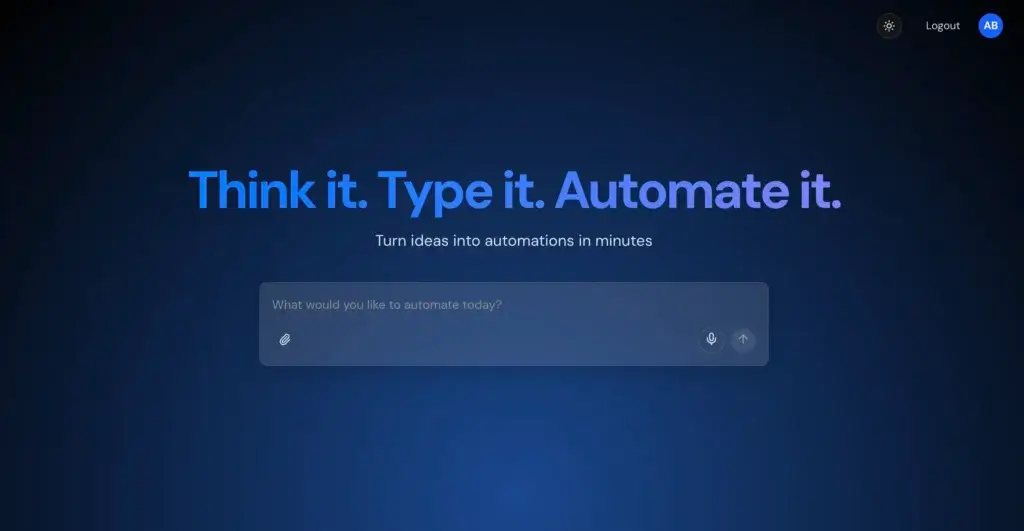
Turbotic’s most visible product angle today is its AI-first automation experience. The platform is designed to let users describe a workflow in natural language and generate automations through a conversational interface. For buyers who like the promise of no-code automation but do not want to learn a traditional builder from scratch, this is one of Turbotic’s most appealing ideas.
- Natural-language workflow creation: Build automations by describing tasks in plain English.
- AI-assisted generation: Reduce some of the manual work involved in workflow setup.
- Less scripting pressure: More approachable than older automation environments.
- Modern interface angle: Better aligned with the way business users now expect AI software to work.
Automation Discovery and Intake
One of Turbotic’s more distinctive capabilities is process discovery and idea intake. Instead of assuming you already know what to automate, the platform also helps organizations collect automation ideas from across the business and identify where automation may deliver the most impact. This is useful for companies that are still maturing their automation strategy and do not want automation efforts to stay trapped inside one technical team.
For SMBs, this can be both a strength and a signal. It is valuable if you are serious about building a structured automation program. It is probably more than you need if you simply want to connect a few apps and save time on repetitive admin work.
Control and Monitoring
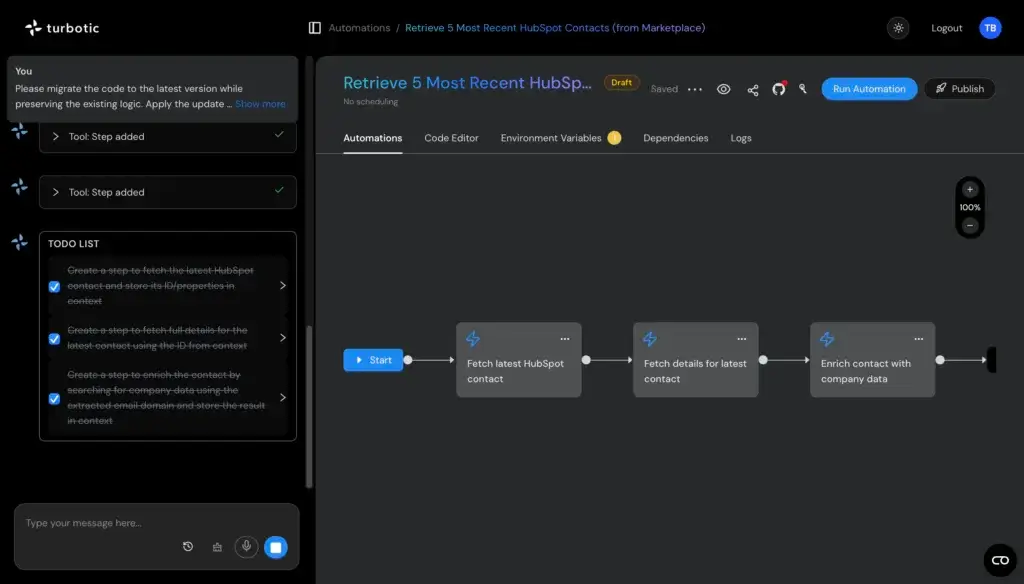
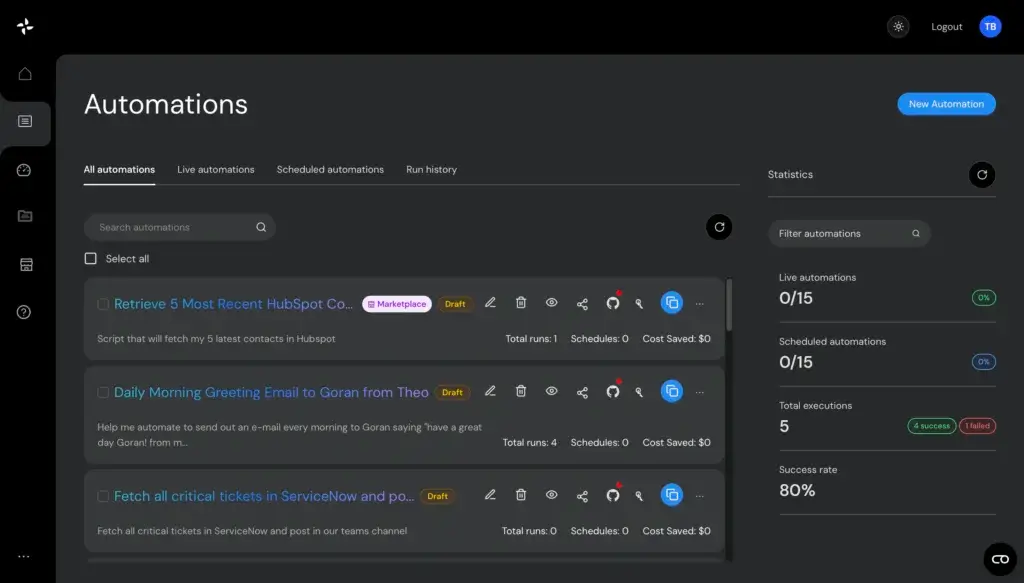
Turbotic also emphasizes operational control. That includes monitoring automations, understanding their status, and keeping visibility into performance after deployment. This matters more than many buyers realize. Building a workflow is only the first step. Once automations are live, you need to know whether they are stable, where they fail, and how much business value they are actually producing.
This is one of the areas where Turbotic looks stronger than many SMB-first automation tools. It feels more serious about operations, not just setup.
Value Tracking and ROI Visibility
Another important part of Turbotic’s positioning is value realization. The platform does not just want to help you automate tasks. It also wants to help you measure the output of your automation initiatives. That is especially relevant for teams that need to justify automation investment internally.
For small businesses, this can be helpful if automation spend needs to be tied back to efficiency gains. For larger organizations, it is often a core requirement. Either way, it gives Turbotic a more business-outcomes-driven profile than many tools that stop at workflow creation.
Multi-Platform Automation Support
Turbotic has also been positioned publicly as a platform that can work alongside broader automation ecosystems rather than functioning as a single isolated builder. That gives it more long-term flexibility, especially for organizations already using or evaluating vendors such as UiPath, Microsoft Power Automate, Automation Anywhere, or Blue Prism.
This is a major advantage if you expect your automation stack to grow more sophisticated. It is less relevant if your only goal is lightweight no-code automation inside a small software stack.
Build, Delivery, and Governance
Turbotic is not just trying to help you create workflows. It also leans into the governance side of automation, including build oversight, delivery structure, and lifecycle visibility. This is where the platform starts to separate itself from simpler no-code tools. It is designed for buyers who care not only about making automation work, but also about managing how automation is rolled out and maintained over time.
- Structured rollout: Better suited to teams that want repeatable automation processes.
- Governance support: Useful when multiple users or departments are involved.
- Lifecycle visibility: Helps you see automation beyond the build phase.
- Less lightweight: May feel more involved than simple DIY workflow tools.
Pros and Cons
Benefits and Limitations of Turbotic
Positive
✅ Modern AI-first workflow creation
✅ Stronger governance than simple SMB tools
✅ Good fit for growing automation programs
✅ Business-outcome framing
✅ Multi-vendor potential
Negative
❌ Public pricing is still unclear
❌ Still feels enterprise-leaning
❌ Positioning can feel mixed
❌ Not the simplest option for beginners
Turbotic’s biggest strength is that it aims to do more than automate a few actions between apps. It tries to bridge the gap between accessible no-code automation and structured automation management. That is a compelling vision, especially for teams that expect automation to become more central to operations over time.
✅ Pros
- Modern AI-first automation creation: The natural-language workflow angle makes the platform feel more accessible than traditional automation software.
- Stronger governance than simple SMB tools: Turbotic is built with discovery, control, and value realization in mind.
- Good fit for growing automation programs: If you expect your needs to expand, Turbotic looks better prepared than entry-level workflow apps.
- Business-outcome framing: The ROI and value tracking angle is useful for teams that need to justify automation investment.
- Multi-vendor potential: The broader ecosystem positioning gives it more strategic flexibility than simpler isolated tools.
❌ Cons
- Public pricing is still unclear: SMB buyers often want clear entry pricing, and Turbotic does not yet make that easy publicly.
- Still feels enterprise-leaning: The product may be more powerful than many small teams actually need.
- Positioning can feel mixed: The product is now marketed as AI-first no-code automation, but much of its visible footprint still aligns with orchestration and RPA program management.
- Not the simplest option for beginners: Teams that want fast, self-serve, lightweight automation may find easier starting points elsewhere.
User Experience
User Interface and Workflow
Onboarding and First Impressions
Turbotic’s modern AI angle helps the product feel less intimidating than older automation platforms. The promise of building workflows by chatting is appealing, especially if you are not technical and do not want to learn a rigid flow builder from day one.
That said, the product’s broader purpose becomes clear quickly. Turbotic is not only about creating automations. It is also about structuring how automation is discovered, controlled, and measured. That means the onboarding experience is likely to feel more strategic than the instant gratification you get from a lighter SMB automation tool.
Ease of Use
Public review feedback suggests that usability is a genuine strength. Users have highlighted ease of use, centralized management, and real-time performance tracking as positive parts of the product experience. That is a good sign, especially for software that is clearly trying to support more than basic automation creation.
Still, ease of use should be understood in context. Turbotic may be easier than legacy enterprise automation tools, but that does not automatically make it the easiest option for very small businesses.
Best Experience for Growing Teams
In my view, Turbotic looks strongest for businesses that want no-code automation but are already thinking one step ahead. If you want to move from ad hoc workflows to a more structured automation capability, the platform has a more credible long-term story than many basic workflow tools. If you only need simple time-saving automations today, it may be more product than you need.
Daily Workflow
In practice, Turbotic appears best suited to teams that think about automation as an ongoing capability rather than a one-off productivity hack. The workflow is not just “connect app A to app B.” It is closer to identifying opportunities, building automations, keeping them under control, and understanding whether they are generating measurable value.
For serious business users, that is a benefit. For smaller teams that only want easy task automation, it may feel like extra structure they did not ask for.
Pricing and Plans
How Much Does Turbotic Cost?
Turbotic’s pricing is not especially transparent in public materials, which is one of the main drawbacks for SMB buyers. Public listings indicate a pay-as-you-go monthly pricing model and mention that pricing depends on the scale of your automation implementation. A free trial is also referenced publicly, but detailed plan breakdowns are not clearly available.
| Pricing Area | What You Can Confirm Publicly | What You Will Likely Need to Ask Sales |
| Entry model | Pay-as-you-go monthly positioning | Minimum commitment, contract structure, and onboarding requirements |
| Pricing transparency | Limited public detail | Seat pricing, workflow limits, and usage thresholds |
| Free trial | Publicly referenced | Trial scope, duration, and product access level |
| Implementation scale | Pricing tied to deployment scale | Whether smaller teams can start cost-effectively |
| Support and services | Not clearly broken out publicly | Implementation help, support tiers, and success services |
This matters because pricing clarity is often a deciding factor for SMB buyers. When a tool does not publish clear tiers, it usually signals one of two things. Either the product is customized for larger implementations, or the company expects a sales-led buying process. In Turbotic’s case, both interpretations seem plausible.
If you are seriously considering the platform, ask about minimum spend, onboarding help, what is included in the trial, and whether the product can realistically support a small team without forcing an enterprise-style purchasing process.
Use Cases & Suitable Users
Who Should Use Turbotic
Turbotic is not the right automation platform for every type of buyer. Its current value depends heavily on how strategic your automation goals are.
- Best for growing SMBs: Good for teams that want no-code automation but also need more visibility and control than simple workflow apps offer.
- Best for operations-minded teams: Stronger fit when automation needs to be tracked, measured, and managed over time.
- Best for multi-team environments: Useful when several departments may contribute automation ideas or rely on shared workflows.
- Best for long-term automation maturity: More compelling if you expect your automation needs to become more complex over time.
- Less ideal for solo users: Probably too involved if you only want a few personal or lightweight business automations.
- Less ideal for price-sensitive beginners: Public pricing opacity makes it harder to recommend as a first-step automation buy.
Turbotic is best for small or mid-sized businesses that are serious about automation as an operational capability, not just as a quick productivity shortcut. It is less ideal for buyers who want the simplest possible setup, the lowest visible entry price, or a tool designed mainly for easy app connections.
Comparison with Alternatives
How Turbotic Compares to Alternatives
Turbotic sits in a slightly unusual category position. It is more modern and conversational than many older automation platforms, but it still looks more structured and enterprise-oriented than most lightweight SMB no-code tools. That creates both its opportunity and its challenge.
Turbotic vs Make
Make is generally easier to understand as an SMB no-code automation tool. It is visual, accessible, and focused on building workflows between apps quickly. Turbotic is more interesting if you care about governance, control, and a broader automation program. If your priority is fast self-serve workflow building, Make is likely the easier fit. If your priority is building automation maturity, Turbotic has the stronger strategic profile.
Turbotic vs Zapier
Zapier remains the safer recommendation for buyers who want straightforward app automation with a large ecosystem and a low-friction learning curve. Turbotic stands out when your needs move beyond basic automation and toward structured automation oversight. In other words, Zapier is usually better for simplicity, while Turbotic is more compelling for buyers who want automation to become a managed business capability.
Turbotic vs Microsoft Power Automate
Power Automate is a strong option for businesses already deep in the Microsoft ecosystem. Turbotic becomes more relevant when you want additional orchestration, broader visibility, or a more platform-level layer around automation strategy and performance. Buyers heavily invested in Microsoft may prefer staying close to Power Automate. Buyers wanting a broader management layer may find Turbotic more compelling.
Turbotic vs UiPath
UiPath is a larger and more established name in enterprise automation, with much deeper market presence and validation. Turbotic’s appeal is that it looks more focused on making automation management and creation feel accessible through a more modern AI-first product experience. If you need proven enterprise depth at scale, UiPath is still the safer benchmark. If you want a newer, more conversational layer around automation, Turbotic is the more interesting challenger.
Turbotic vs Automation Anywhere
Automation Anywhere is another stronger enterprise reference point, especially for buyers who want mature automation capabilities and a larger ecosystem. Turbotic looks more differentiated when the conversation is about combining modern AI-driven workflow creation with oversight and value tracking. For SMBs, though, both may still feel more enterprise-shaped than simpler no-code automation platforms.
Best Use Tips
Tips & Best Practices When Using Turbotic
To get the most value from Turbotic, you should approach it as more than a simple workflow connector. The platform looks strongest when it is used to build a more intentional automation practice rather than as a quick fix for isolated tasks.
- Start with clear business processes: Turbotic is more useful when you know which processes are worth automating first.
- Use discovery before scaling: Do not jump straight into building everything at once. Validate which workflows are truly worth the effort.
- Ask for pricing clarity early: SMB buyers should confirm total cost, onboarding needs, and trial scope before committing time.
- Evaluate governance needs honestly: If your team does not need operational control or value tracking, a simpler tool may be enough.
- Think long term: Turbotic makes more sense when you expect automation to grow across teams and systems.
- Compare against simpler no-code tools: Always benchmark it against lighter alternatives so you do not overbuy.
Conclusion
Final Thoughts
Turbotic is one of the more interesting automation platforms to evaluate right now because it is trying to make automation easier without reducing it to a basic workflow toy. The AI-first interface makes the product feel more modern and more accessible than traditional automation software, while the orchestration, control, and value-tracking side gives it a broader operational role.
That combination is both its strength and its main limitation. If you are a growing business that wants no-code automation but also wants visibility, structure, and room to scale, Turbotic is worth a serious look. If you are a very small business that simply wants the fastest and cheapest way to automate a few repetitive tasks, there are easier starting points.
Overall, Turbotic should not be positioned as the best no-code automation platform for every SMB. It is better positioned as a more strategic choice for buyers who want a platform that can support not only workflow creation, but also automation maturity over time. That makes it promising, but also more demanding than lighter alternatives.
Have more questions
Frequently Asked Questions
What is Turbotic?
Turbotic is an AI-first automation platform that combines no-code workflow creation with broader automation management, including discovery, control, and value tracking.
Is Turbotic a no-code automation tool?
Yes, Turbotic is positioned as a no-code automation platform, especially through its natural-language workflow creation experience. However, it also goes beyond basic no-code automation by emphasizing governance and operational oversight.
Is Turbotic good for small businesses?
It can be a good fit for growing SMBs that want more structure around automation. It is less ideal for very small teams that only need quick and simple app automation at a clear low entry price.
Does Turbotic have transparent pricing?
Not really. Public pricing information is limited, so most buyers will likely need to talk to sales to understand the actual cost and implementation model.
Does Turbotic offer a free trial?
Public third-party listings reference a free trial, but the details are not clearly broken out publicly. You should confirm scope and duration directly with the vendor.
What makes Turbotic different from Zapier or Make?
Turbotic is more focused on automation lifecycle management, operational control, and value realization. Zapier and Make are usually easier for lightweight self-serve workflow automation.
Is Turbotic more like an RPA platform?
Partly. Even though Turbotic now emphasizes AI-first no-code automation, much of its public category placement and market context still align with RPA and enterprise automation orchestration.
Who should avoid Turbotic?
Solo users, very small businesses, and buyers who mainly want a cheap, simple, self-serve automation builder may be better served by lighter alternatives.
What are Turbotic’s biggest strengths?
Its strongest areas appear to be AI-assisted workflow creation, automation visibility, governance, and the ability to connect automation work to measurable business value.
Is Turbotic worth considering in 2026?
Yes, especially if you want a more strategic automation platform rather than a basic workflow tool. It is most worth considering when your business expects automation needs to grow in complexity over time.