Introduction
If you have ever ended a Zoom meeting and thought, “Wait, what were the action items again?” – you are not alone.
Meetings move quickly. Between listening, contributing, presenting, and following the discussion, it is easy to miss important decisions or forget who agreed to do what. That is exactly where AI note taking apps can help.
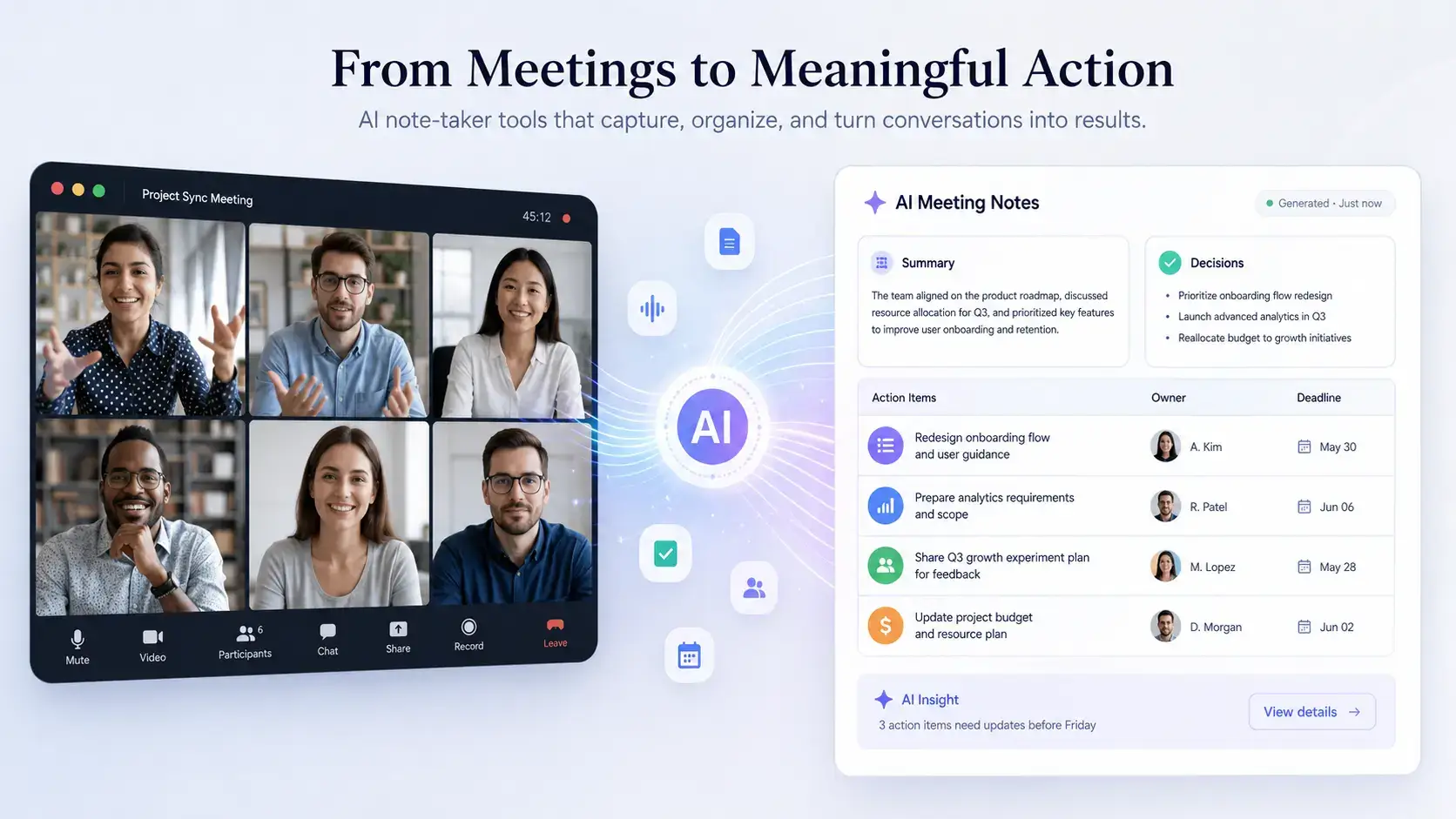
The best AI note-takers for meetings do much more than transcribe conversations. They can summarize key points, identify speakers, extract action items, detect follow-ups, generate searchable transcripts, and share meeting recaps with your team.
For 2026, these tools have become especially useful for sales teams, project managers, recruiters, consultants, founders, customer success teams, and remote teams that spend a large part of the week in calls. Instead of manually writing notes during every meeting, you can stay focused on the conversation while your AI assistant captures what matters.
That said, not every AI note-taker works the same way. Some tools join your meetings as bots. Others work in the background without adding a visible participant. Some are best for CRM syncing, while others are better for multilingual transcription, task creation, meeting summaries, or personal productivity.
In this guide, we compare the best AI note-taker tools for meetings in 2026, including:
- ClickUp Note Taker – best for turning meeting notes into tasks inside ClickUp
- Granola – best for distraction-free, bot-free AI note-taking
- Krisp – best for clean audio, transcription, and bot-free meeting notes
- Notta – best for accurate transcription and multilingual meeting notes
- tl;dv – best for meeting intelligence and cross-meeting insights
- Fireflies – best for AI-powered meeting summaries and integrations
- Fathom – best for sales teams, highlights, and CRM syncing
- Leexi – best for multilingual teams and CRM-connected meeting notes
- Amie – best for calendar-first AI notes and solo professionals
By the end, you should have a clear idea of which AI note-taker fits your workflow, your meeting style, and the tools your team already uses.
What Are AI Note-Taker Tools for Meetings?
AI note-taker tools are meeting assistants that automatically capture, organize, and summarize conversations. They help you turn meetings into structured notes, transcripts, action items, and follow-up workflows.
Some AI note-takers join Zoom, Google Meet, Microsoft Teams, or Webex calls as a visible meeting participant. Others work locally on your device or through a browser extension, which means no bot appears in the meeting room.
Both approaches can work well, but they serve different needs. Bot-based tools are often better for team visibility and scheduled recording. Bot-free tools are often better for sensitive meetings, sales calls, executive conversations, or interviews where you want a less intrusive experience.
Here’s what they typically do:
- Join or capture meetings from Zoom, Google Meet, Microsoft Teams, Webex, or in-person audio
- Transcribe meetings in real time or after the call
- Identify speakers and separate conversations for better clarity
- Summarize long discussions into key takeaways and decisions
- Extract action items, follow-ups, objections, and next steps
- Let you search, share, edit, or export meeting notes after the call
Some advanced tools also let you ask questions about your meeting notes, create tasks from action items, generate sales follow-ups, sync notes to CRMs, or search across your full meeting history.
Why they are more than transcription tools
Traditional transcription tools mainly convert speech into text. Modern AI note-takers go further by interpreting the conversation and organizing it into useful outputs.
For example, an AI note-taker may identify a pricing objection in a sales call, turn a project decision into an assigned task, or highlight a customer concern that should be followed up later.
This makes AI note-takers especially useful for:
- Sales teams capturing objections, buying signals, and CRM updates
- Project managers turning sprint discussions into tasks and decisions
- Executives keeping track of strategic conversations and follow-ups
- Customer success teams summarizing onboarding calls and customer issues
In simple terms, AI note-takers act as a searchable memory bank for your meetings. They help you reduce manual admin, improve follow-up quality, and keep your team aligned.
How to Choose Your AI Note-Taker for Meetings
Choosing the right AI note-taker depends on how your team works, which platforms you use, and what you need to happen after the meeting ends.
If you only need transcripts, a lightweight transcription tool may be enough. If your meetings drive sales, projects, hiring, or customer relationships, you should look for summaries, task creation, CRM sync, search, sharing, and security controls.
Consider These Key Factors:
- Transcription accuracy: Can the tool handle noisy audio, accents, multiple speakers, and industry-specific terms?
- Meeting platform support: Does it work with Zoom, Google Meet, Microsoft Teams, Webex, or in-person meetings?
- Bot-free vs bot-based capture: Do you want a visible meeting bot or a quieter background note-taking experience?
- Summary quality: Does it clearly separate key points, decisions, questions, action items, and next steps?
- Integrations: Can it connect with tools your team already uses, such as Slack, Notion, ClickUp, HubSpot, or Salesforce?
- Real-time vs post-call notes: Do you need live transcripts during the call or polished recaps after the meeting?
- Collaboration features: Can teammates view, edit, comment, share clips, or search a shared meeting library?
- Privacy and compliance: Does the platform provide the controls you need for recordings, sharing, retention, and user access?
💡 Pro tip: If you are already using a productivity suite like ClickUp, consider tools that connect meeting notes directly to tasks and projects. The fewer tools your team needs to switch between, the more likely your meeting notes will actually turn into action.
Quick Comparison
Best AI Note-Takers by Use Case
Before going into the full reviews, here is a quick overview of which tool fits each common use case.
| Use Case | Recommended Tool | Why It Fits |
| Best for ClickUp users | ClickUp Note Taker | Turns meeting notes into tasks and keeps work inside ClickUp |
| Best bot-free AI note-taker | Granola | Creates clean AI notes without adding a visible bot to meetings |
| Best for clean audio and notes | Krisp | Combines noise cancellation with AI notes and action items |
| Best for transcription accuracy | Notta | Strong multilingual transcription and export options |
| Best for meeting intelligence | tl;dv | Searches across meetings and generates cross-call insights |
| Best for integrations | Fireflies | Strong meeting summaries, team workspace, and workflow integrations |
| Best for sales teams | Fathom | Useful highlights, summaries, and CRM syncing |
| Best for multilingual CRM workflows | Leexi | Combines meeting notes, language support, and CRM integrations |
| Best for solo professionals | Amie | Calendar-first AI notes with a clean personal productivity workflow |
ClickUp

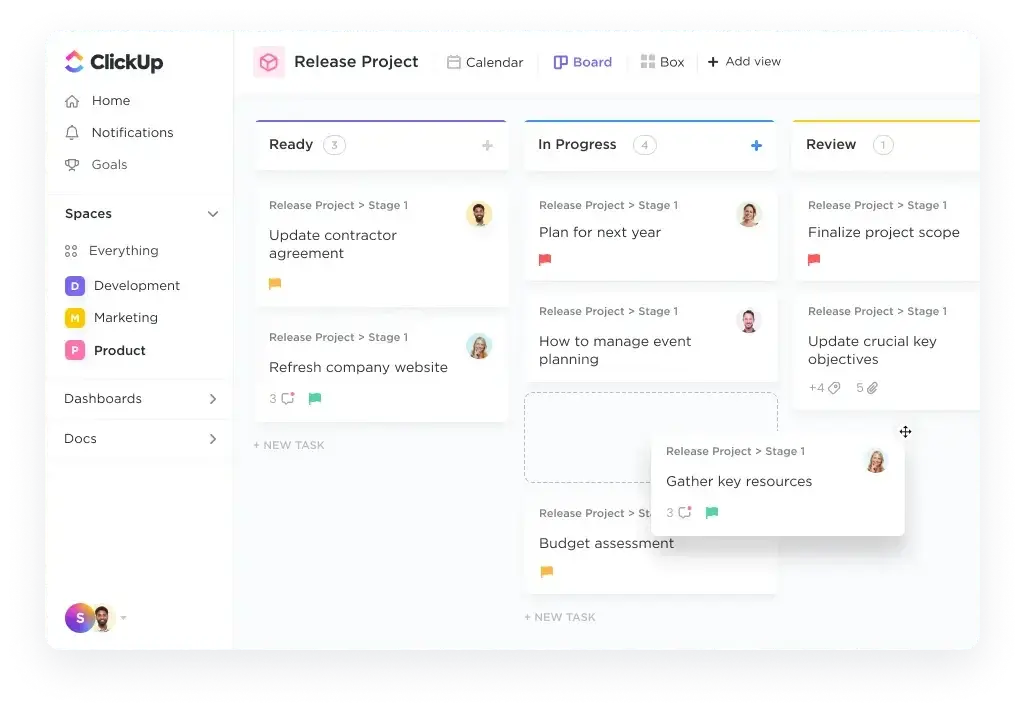
ClickUp Note Taker is built for teams that already manage projects, tasks, docs, and collaboration inside ClickUp. Instead of treating meeting notes as a separate document, it helps connect meeting discussions directly to your work management system.
That makes it especially useful if your team wants AI meeting notes that can become tasks, decisions, owners, and project updates without copying information between tools.
ClickUp is not the most traditional standalone AI transcription tool on this list. Its biggest advantage is workflow context. If your meeting is about a project, sprint, campaign, client deliverable, or internal process, ClickUp can help keep the discussion connected to the actual work.
⚙️ Key Features
- AI-powered meeting notes and summaries for supported meeting workflows
- Meeting notes connected to ClickUp Tasks, Docs, Lists, and projects
- One-click task creation from meeting discussions and action items
- Centralized workspace for meeting notes, documents, and execution
- Helpful for recurring team meetings, sprint planning, reviews, and client updates
- Works best when ClickUp is already your team’s operational hub
💡 Pros & Cons
Positive
✅ Native ClickUp workspace integration
✅ Strong for turning meeting notes into tasks
✅ Keeps notes close to projects and owners
✅ Great for internal team workflows
Negative
❌ Requires a ClickUp workflow to deliver full value
❌ Not the best fit as a standalone transcript tool
❌ Less specialized for sales call intelligence
🎯 Best For
Teams already using ClickUp for project management, task tracking, client work, operations, or internal collaboration.
Summary
If ClickUp is already your team’s workspace, ClickUp Note Taker is one of the most practical options because it helps close the gap between meeting discussion and execution. It is not just about capturing what was said. It is about making sure the right tasks, owners, and next steps live where your team already works.
Granola
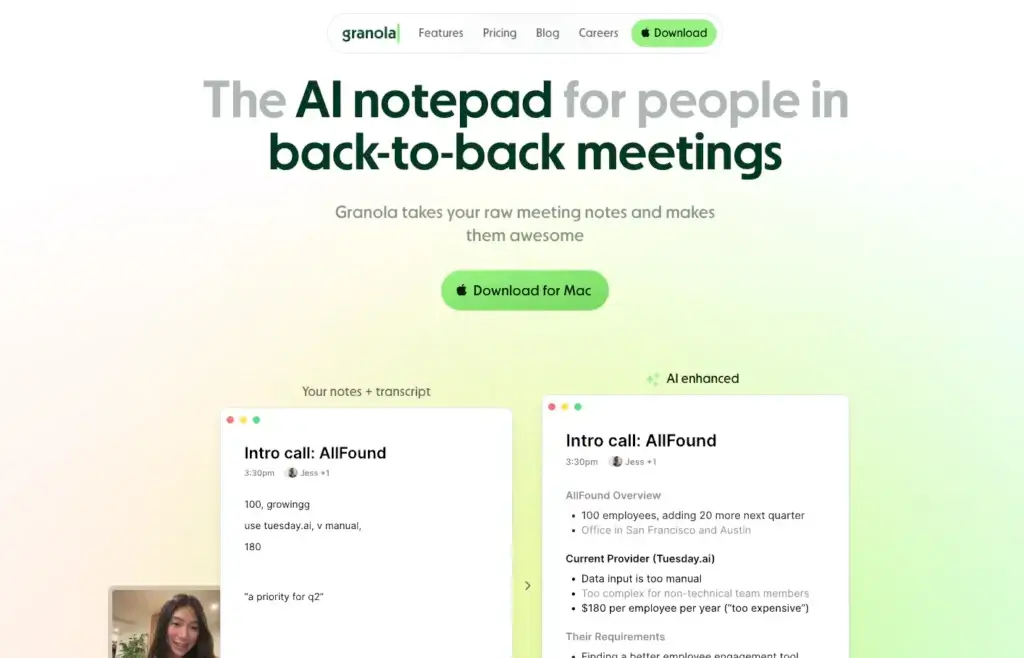
Granola is one of the best AI note-takers if you want a clean, bot-free experience. Instead of sending a visible meeting assistant into your calls, Granola works quietly in the background and helps turn rough notes and meeting audio into polished summaries.
This makes it especially appealing for founders, managers, consultants, product leaders, and executives who want better meeting notes without changing the tone of the conversation.
Granola is not trying to be a heavy CRM automation platform. Its strength is simplicity. You get an AI notepad that helps you stay present, write less, and still leave every meeting with a clear record of what happened.
⚙️ Key Features
- Bot-free AI note-taking for meetings
- AI-enhanced notes based on your writing and meeting context
- Clean summaries, action items, and organized meeting records
- Searchable meeting history on supported plans
- Custom templates for different meeting types
- Integrations with tools like Notion, Slack, HubSpot, and Zapier on paid plans
💡 Pros & Cons
Positive
✅ Clean and distraction-free experience
✅ No visible meeting bot required
✅ Strong AI summaries from rough notes
✅ Great for focused professionals
Negative
❌ Less advanced for CRM automation
❌ Full history and integrations require paid plans
❌ Teams should review sharing and privacy settings carefully
🎯 Best For
Professionals and teams who want high-quality AI meeting notes without adding a visible bot to every call.
Summary
Granola is one of the strongest options for people who want AI assistance without meeting clutter. It is simple, fast, and focused on helping you capture better notes while staying engaged in the conversation. If you want deep CRM workflows, look elsewhere. If you want a polished AI notepad for meetings, Granola is excellent.
Krisp
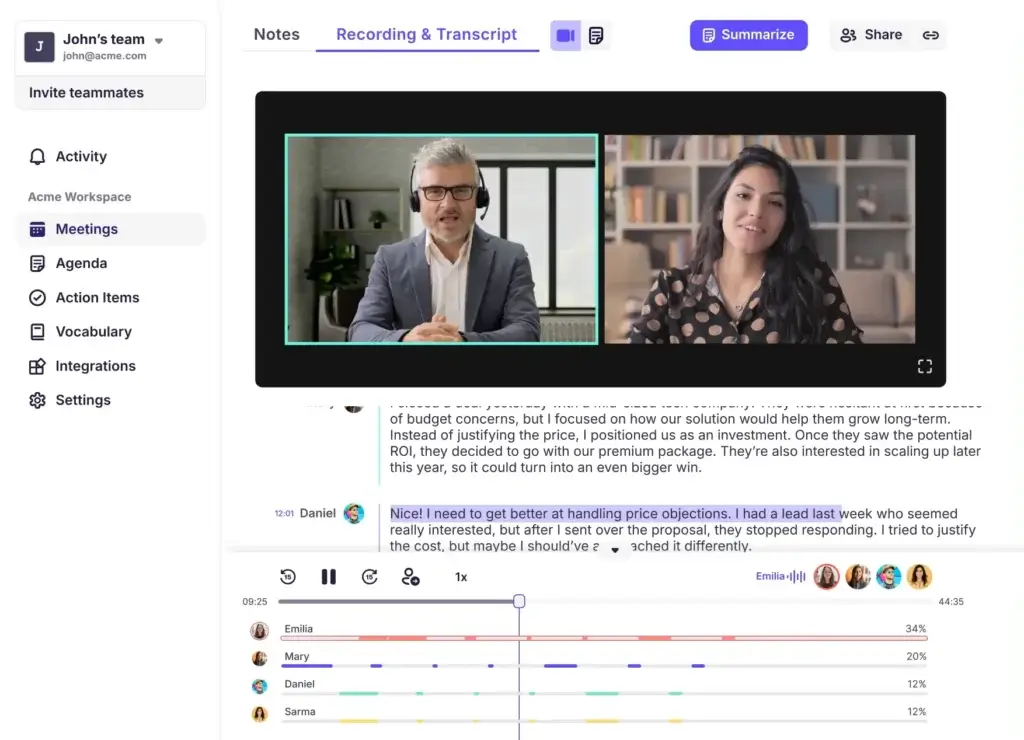
Krisp made its name with AI-powered noise cancellation, but it has become increasingly relevant as a bot-free AI note-taker for meetings.
Instead of adding a meeting bot to your calls, Krisp can capture meetings from your device, clean the audio, transcribe the conversation, and generate notes, summaries, and action items.
This makes Krisp especially useful if you work in noisy environments, take a lot of remote calls, or want a lightweight meeting assistant that does not visibly join every conversation.
⚙️ Key Features
- No meeting bot required
- Bot-free transcription, notes, and action items
- Audio and video recording for meetings
- In-person meeting notes and uploaded file support
- Noise cancellation and voice clarity tools
- Integrations with Zapier, HubSpot, Slack, Pipedrive, webhooks, and more
💡 Pros & Cons
Positive
✅ No recording bot needed
✅ Strong combination of clean audio and notes
✅ Works across many meeting apps
✅ Useful for remote workers and small teams
Negative
❌ Deeper AI note features are stronger on paid plans
❌ Less advanced for team meeting libraries
❌ Not as CRM-focused as sales-specific tools
🎯 Best For
Remote workers, freelancers, students, sales reps, and small teams that want clean audio, bot-free transcription, and practical meeting summaries.
Summary
Krisp is a strong choice if you want AI meeting notes and better audio in one tool. It is not the deepest meeting intelligence platform, but it is practical, lightweight, and especially useful for users who want notes without adding a bot to the call.
Notta

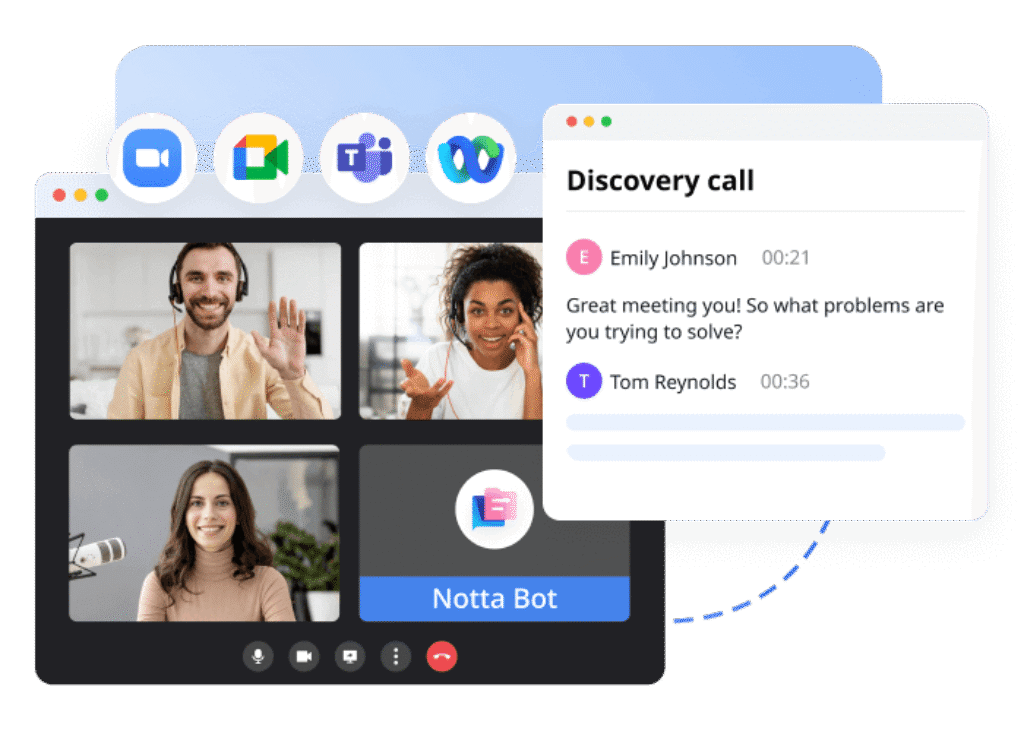
Notta is an AI transcription and meeting note-taking platform built for users who need accurate records of conversations. It works well for meetings, interviews, lectures, webinars, and uploaded audio or video files.
Its biggest strength is transcription quality and multilingual support. If your team works across regions or needs reliable written records from meetings, Notta is a strong option.
Notta also generates AI summaries, action plans, and searchable transcripts, helping you review long conversations faster.
⚙️ Key Features
- Real-time transcription for online meetings
- AI-generated summaries, chapters, and action plans
- Support for Zoom, Google Meet, Microsoft Teams, Webex, and file uploads
- Multilingual transcription and translation options
- Searchable meeting transcripts and keyword highlights
- Export options for transcripts and summaries
💡 Pros & Cons
Positive
✅ Strong transcription quality
✅ Good multilingual support
✅ Works for meetings and uploaded files
✅ Useful export and search options
Negative
❌ Free plan has strict usage limits
❌ Less focused on task automation
❌ Advanced collaboration features require paid plans
🎯 Best For
Teams that need accurate transcription, multilingual meeting documentation, interviews, research calls, or reliable meeting archives.
Summary
Notta is one of the better choices if your main priority is accurate transcription rather than deep sales automation. It is especially useful for international teams, educators, researchers, and organizations that need clean meeting records across languages.
tl;dv
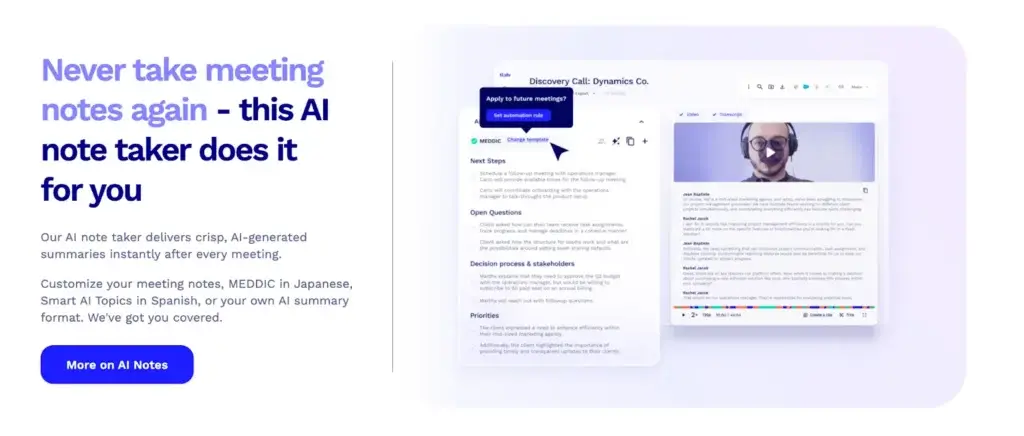
tl;dv goes beyond basic AI notes. It is a meeting intelligence platform built for teams that want to capture, search, share, and analyze conversations across many meetings.
It records, transcribes, and summarizes meetings across Zoom, Google Meet, and Microsoft Teams. From there, it helps you create clips, search across calls, generate recurring reports, and extract insights from your meeting history.
This makes tl;dv especially useful for sales, customer success, product research, user interviews, and leadership teams that want to learn from meetings over time.
⚙️ Key Features
- Records and transcribes meetings across Zoom, Google Meet, and Microsoft Teams
- AI summaries with action items, decisions, and follow-ups
- Search and ask AI across a single meeting or your meeting library
- Shareable clips for important customer or team moments
- Recurring AI reports for patterns across meetings
- Sales coaching and playbook monitoring features
- Integrations with Salesforce, HubSpot, Slack, Notion, Zapier, and more
💡 Pros & Cons
Positive
✅ Generous free plan for meeting capture
✅ Strong cross-meeting AI intelligence
✅ Excellent for sales and customer calls
✅ Useful clips, reports, and integrations
Negative
❌ Can be more than simple note-takers need
❌ Accuracy still depends on audio quality
❌ Advanced workflows require paid plans
🎯 Best For
Sales teams, customer success managers, product teams, researchers, and revenue leaders who want insights across many meetings, not just summaries of individual calls.
Summary
tl;dv is one of the strongest options if your team wants to turn meeting history into business intelligence. It is particularly useful when you want to search across calls, share short clips, identify recurring themes, and coach teams based on real conversations.
Fireflies AI

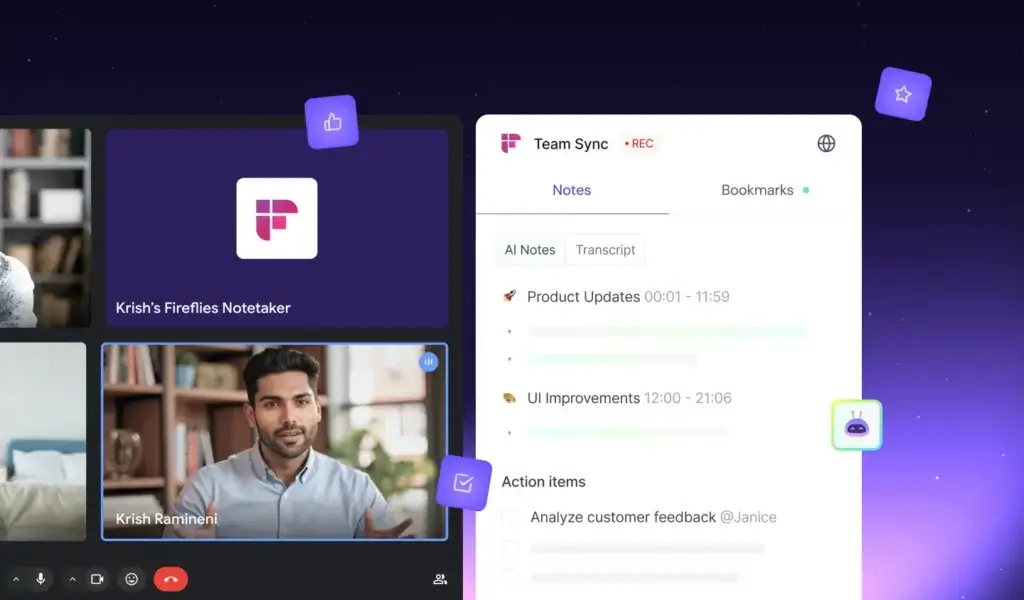
Fireflies is one of the most popular AI meeting assistants for teams that want automated meeting notes, transcripts, summaries, action items, and integrations.
It can join meetings, transcribe conversations, generate AI summaries, and organize notes in a shared team workspace. It is particularly useful for teams that want every meeting to become searchable and easier to follow up on.
Fireflies also integrates with tools like Slack, Notion, HubSpot, Salesforce, and other business apps, making it a strong option for sales, marketing, customer success, and operations teams.
⚙️ Key Features
- Auto-joins meetings from your calendar
- Transcription and AI summaries for major meeting platforms
- Action items, questions, topics, and meeting highlights
- Team workspace for shared meeting notes
- Searchable meeting library and AI assistant features
- Integrations with CRM, project management, chat, and collaboration tools
💡 Pros & Cons
Positive
✅ Strong AI summaries and action items
✅ Useful team meeting workspace
✅ Deep integration ecosystem
✅ Strong fit for sales and customer teams
Negative
❌ Meeting bot joins calls
❌ Storage and advanced AI features vary by plan
❌ Summaries may still need review for sensitive details
🎯 Best For
Sales teams, customer success, agencies, marketers, operations teams, and managers who want searchable meeting notes and automated follow-ups.
Summary
Fireflies is one of the best all-around AI note-takers for business teams. It is strong because it combines meeting capture, summaries, action items, search, collaboration, and integrations in one platform. If your team wants a reliable meeting knowledge base, Fireflies is one of the first tools worth testing.
Fathom

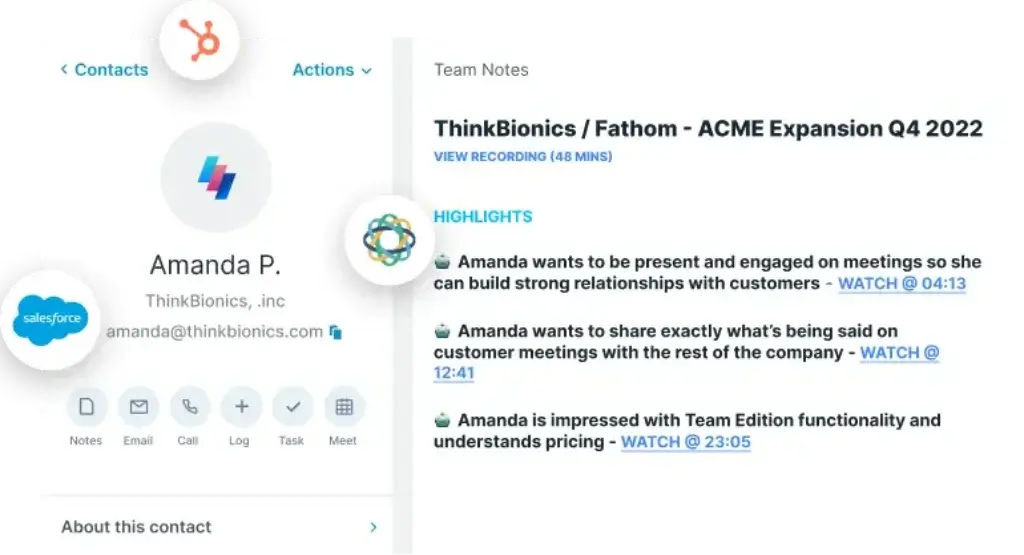
Fathom is one of the strongest AI note-takers for sales teams, recruiters, consultants, executives, and client-facing professionals.
It captures meetings, creates summaries, identifies action items, and lets you create highlights from important moments. Its CRM integrations with tools like HubSpot and Salesforce make it especially useful for revenue teams.
Fathom also stands out because its free individual plan is unusually useful for people who want unlimited recordings, transcripts, summaries, clips, playlists, and search across calls. Its bot-free capture is currently offered as an option in beta, so you should check availability inside your account before relying on it for every meeting.
⚙️ Key Features
- Meeting recording, transcription, and instant AI summaries
- Highlights, clips, playlists, and searchable meeting history
- CRM sync with Salesforce, HubSpot, Close, and other tools
- Useful for sales calls, demos, recruiting calls, and client meetings
- Choice of bot capture or bot-free capture where available
- Team plans for shared workflows, libraries, and collaboration
💡 Pros & Cons
Positive
✅ Excellent free individual plan
✅ Strong CRM sync for sales teams
✅ Fast summaries and meeting highlights
✅ Useful clips and searchable call history
Negative
❌ Advanced team features require paid plans
❌ Bot-free mode may depend on eligibility or beta access
❌ Less focused on project management than ClickUp
🎯 Best For
Sales reps, managers, recruiters, executives, and client-facing teams that want summaries, highlights, searchable transcripts, and CRM sync.
Summary
Fathom is one of the easiest AI note-takers to recommend for sales and client-facing work. It helps you capture the details of a call, turn important moments into highlights, and sync meeting context into your CRM. If you want a strong free plan and a polished meeting workflow, Fathom is a top option.
Leexi
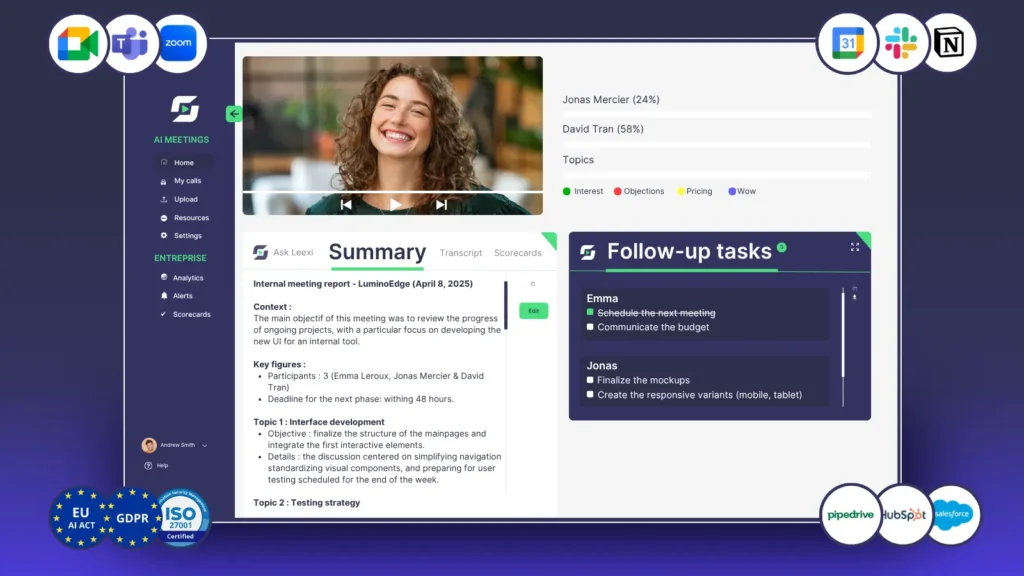
Leexi is an AI note-taker and conversation intelligence tool built for teams that need multilingual meeting notes, structured summaries, and CRM-connected follow-up workflows.
It is particularly useful for sales teams, recruiters, consultants, and international teams that run calls across multiple languages or need clear meeting records connected to customer workflows.
Leexi can capture meetings, generate summaries, identify action items, and connect meeting notes to tools like HubSpot, Salesforce, Pipedrive, Zoho, and other business systems.
⚙️ Key Features
- Automatic meeting transcription and AI summaries
- Multilingual support for international teams
- Speaker identification and meeting chapters
- Action items, follow-ups, and next steps
- CRM integrations with HubSpot, Salesforce, Pipedrive, Zoho, Odoo, and more
- Useful for sales calls, recruiting interviews, customer calls, and internal meetings
💡 Pros & Cons
Positive
✅ Strong multilingual meeting support
✅ Useful CRM integrations
✅ Good fit for sales and recruiting teams
✅ Helps structure follow-ups after calls
Negative
❌ May take more setup than simpler note tools
❌ Pricing can be less transparent than some competitors
❌ Better suited to business teams than casual users
🎯 Best For
Global companies, sales teams, recruiters, consultants, and customer-facing teams that need multilingual notes and CRM-connected meeting workflows.
Summary
Leexi is a strong option if you need more than a transcript. Its value is strongest when multilingual conversations, speaker clarity, summaries, and CRM follow-ups all matter. It is not the simplest tool in the list, but it is practical for teams that rely on international calls and structured post-meeting work.
Amie

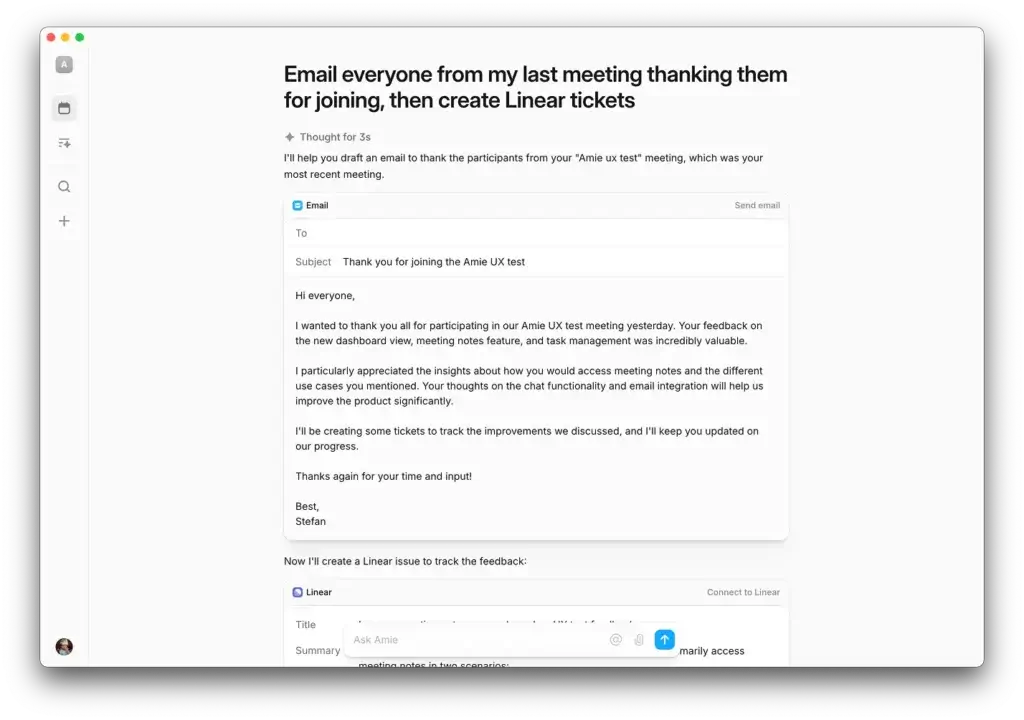
Amie is a calendar-first productivity app with AI meeting notes built into the daily workflow. It is designed for people who want meeting capture, summaries, todos, and follow-ups without adopting a heavy meeting intelligence platform.
Amie’s AI Meeting Notes can automatically transcribe calls, generate summaries, and extract action items without a bot joining the meeting. That makes it appealing if you prefer a lighter, more personal productivity experience.
Compared with tools like Fireflies or tl;dv, Amie is less focused on team analytics and CRM automation. Its strength is simplicity, design, and keeping meetings connected to your schedule.
⚙️ Key Features
- Calendar-connected AI meeting notes
- Automatic transcription, summaries, and action items
- No meeting bot required
- Ad-hoc recording for spontaneous meetings or voice notes
- Clean productivity interface for solo users
- Helps turn meeting notes into todos and follow-up workflows
💡 Pros & Cons
Positive
✅ Seamless calendar-first workflow
✅ Simple and elegant interface
✅ No bot needed for meeting notes
✅ Great for solo productivity
Negative
❌ Not built for large team meeting libraries
❌ Less advanced CRM automation
❌ Better for individuals than complex sales teams
🎯 Best For
Freelancers, founders, creators, consultants, and solo professionals who want a simple AI note-taker connected to their calendar.
Summary
Amie is best when you want a calmer, lighter way to manage meetings. It will not replace a full team meeting intelligence platform, but it is a strong choice if you want AI notes, summaries, and todos inside a clean personal productivity workflow.
Side-by-Side Comparison Table
Here is a practical comparison of the top AI note-takers by free plan, bot style, transcription, integrations, action items, and best-fit audience.
| Tool | Free Plan | Bot-Free | Real-Time Transcription | CRM / Workflow Integrations | Action Items | Best For |
| ClickUp Note Taker | Depends on ClickUp plan and AI access | ❌ | ✅ | ✅ ClickUp tasks, docs, and projects | ✅ | ClickUp users and project teams |
| Granola | ✅ Free plan with limits | ✅ | ✅ | ✅ Notion, Slack, HubSpot, Zapier on paid plans | ✅ | Professionals who want bot-free notes |
| Krisp | ✅ Limited free access | ✅ | ✅ | ✅ Zapier, HubSpot, Slack, Pipedrive, webhooks | ✅ | Clean audio and bot-free meeting notes |
| Notta | ✅ 120 transcription minutes/month | ❌ | ✅ | Limited workflow integrations and exports | ✅ | Transcription-focused and multilingual teams |
| tl;dv | ✅ Free forever plan | ❌ | ✅ | ✅ Salesforce, HubSpot, Slack, Notion, Zapier | ✅ | Sales, CS, and product teams |
| Fireflies | ✅ Free plan with storage limits | ❌ | ✅ | ✅ Salesforce, HubSpot, Slack, Notion, and more | ✅ | Team meeting summaries and integrations |
| Fathom | ✅ Strong free individual plan | ✅ Beta option where available | ✅ | ✅ Salesforce, HubSpot, Close, and more | ✅ | Sales reps, recruiters, and executives |
| Leexi | Plan-dependent | ❌ | ✅ | ✅ Salesforce, HubSpot, Pipedrive, Zoho, Odoo | ✅ | Global teams and CRM workflows |
| Amie | Plan-dependent | ✅ | ✅ | Limited compared with sales tools | ✅ | Solo professionals and calendar-first users |
Note: Pricing, free plan limits, integrations, storage, AI credits, and bot-free availability can change. Always check each vendor’s current plan page before purchasing.
Bot-Free vs Bot-Based AI Note-Takers
One of the most important differences between AI note-takers is whether the tool joins your meeting as a visible bot.
A bot-based AI note-taker joins the call as a participant. This can be useful for transparency because everyone can see that a meeting assistant is present. Tools like Fireflies, Notta, tl;dv, and Leexi generally follow this model.
A bot-free AI note-taker captures audio or meeting context without adding a visible participant. This can feel more natural for sales calls, executive meetings, interviews, or sensitive discussions. Granola, Krisp, Amie, and supported Fathom workflows are examples of this approach.
| Type | Advantages | Limitations | Examples |
| Bot-based AI note-taker | Clear meeting visibility, easier calendar auto-join, good for shared team recording | Can feel intrusive in external or sensitive meetings | Fireflies, Notta, tl;dv, Leexi |
| Bot-free AI note-taker | Cleaner meeting experience, no visible bot, more natural for sensitive calls | Still requires responsible disclosure and consent where applicable | Granola, Krisp, Amie, Fathom beta option |
Neither option is automatically better. For internal meetings, a bot-based tool may be completely fine. For external meetings, a bot-free tool may feel more professional. In both cases, you should follow recording consent laws, company policies, and client confidentiality requirements.
Conclusion
Which AI Note-Taker Should You Choose?
The best AI note-taker depends on how you work, who you meet with, and what should happen after the meeting ends.
Here is a quick breakdown to help you decide:
- Use ClickUp Note Taker if your team already runs on ClickUp and wants meeting notes connected directly to tasks, docs, and projects.
- Use Granola if you want a clean, bot-free AI note-taking experience that helps you stay present during meetings.
- Go with Krisp if you want clean audio, bot-free transcription, AI notes, and action items in one lightweight tool.
- Choose Notta if accurate transcription, multilingual support, exports, and searchable records are your top priorities.
- Go with tl;dv if you want meeting intelligence, searchable transcripts, clips, recurring reports, and insights across multiple calls.
- Pick Fireflies if you need AI summaries, action items, team workspaces, and deep integrations with your business tools.
- Choose Fathom if you want strong free meeting notes, CRM syncing, call highlights, and fast follow-up workflows.
- Opt for Leexi if your team works across languages and needs CRM-connected notes for sales, recruiting, or client calls.
- Try Amie if you want a simple, calendar-first AI note-taker for personal productivity and lightweight meeting follow-ups.
💡 Pro tip: Test two or three tools with real meetings before committing. Feature pages can look similar, but the right AI note-taker becomes clear when you compare summary quality, workflow fit, and how easily notes turn into action.
Frequently Asked Questions
What is the best AI note-taker tool in 2026?
The best AI note-taker depends on your workflow. Fireflies is one of the best overall options for teams, Fathom is excellent for sales and CRM syncing, Granola is best for bot-free notes, and ClickUp Note Taker is best for teams already using ClickUp.
Can AI note-takers join Zoom, Teams, or Google Meet?
Yes. Many AI note-takers support major meeting platforms like Zoom, Google Meet, and Microsoft Teams. Some tools join as a bot, while others capture notes in the background without adding a visible participant.
Do AI note-takers work in real time?
Many AI note-takers offer real-time transcription or near-instant post-meeting summaries. Tools like Fireflies, Fathom, Krisp, Notta, tl;dv, and Leexi can help capture meetings and generate summaries quickly after the call.
Are meeting bots required for AI note-taking?
No. Some AI note-takers use meeting bots, while others are bot-free. Granola, Krisp, and Amie are strong options if you want AI meeting notes without adding a visible bot to the call. Fathom also offers bot-free capture as an option where available.
How accurate are AI-generated meeting transcripts?
Accuracy depends on the tool, audio quality, accents, speaker overlap, and background noise. Tools like Notta, Krisp, Fathom, and Leexi can perform well, but you should still review important transcripts before sending them to clients or using them for formal records.
Are AI meeting notes secure?
AI meeting notes can be secure when the vendor provides encryption, access controls, admin settings, retention controls, and compliance documentation. However, you should always review each vendor’s security policy and avoid recording sensitive meetings without proper approval.
Can I edit AI-generated meeting notes?
Yes. Most AI note-takers let you edit summaries, transcripts, notes, or action items after the meeting. This is useful because AI summaries can occasionally miss context or phrase details in a way that needs human review.
What is the best free AI note-taker?
Fathom has one of the strongest free plans for individual users. Fireflies, tl;dv, Notta, Granola, and Krisp also offer free or limited free access, but storage, transcription minutes, AI credits, meeting history, and integrations vary by tool.
Can AI tools detect action items from meetings?
Yes. Many AI note-takers can identify action items, decisions, questions, and next steps. Tools like Fireflies, ClickUp Note Taker, Fathom, Notta, tl;dv, Krisp, Leexi, and Amie can help turn meeting conversations into follow-up work.
Do AI note-takers integrate with CRMs?
Some AI note-takers integrate with CRMs. Fathom, Fireflies, tl;dv, and Leexi are especially relevant for CRM-connected workflows because they can help sales and customer-facing teams push meeting notes, summaries, and follow-ups into systems like HubSpot or Salesforce.