
Introduction
If you’re looking for an email marketing platform, chances are you’ve already come across Mailchimp. It is one of the most recognized names in email marketing, especially for small businesses, creators, ecommerce stores, and marketing teams that want a polished campaign builder without a steep learning curve.
But is Mailchimp still worth using in 2026?
The answer depends on what you need. Mailchimp is still excellent for email design, templates, beginner-friendly campaign creation, reporting, and integrations. However, its free plan is now much more limited than it used to be, and pricing can rise quickly as your contact list grows.
In this Mailchimp review, you’ll learn how the platform works, what features matter most, how pricing is structured, where it performs well, and where alternatives like Brevo, Klaviyo, ActiveCampaign, and Campaigner may be a better fit.
| Category | Mailchimp Rating |
| Ease of Use | Excellent |
| Email Builder | Very strong |
| Templates | Strong |
| Automation | Strong on paid plans |
| AI Features | Strong for Standard and Premium users |
| Free Plan | Limited |
| Pricing Value | Good at entry level, expensive at scale |
| Best For | Small businesses, creators, newsletters, and ecommerce starters |
Quick recommendation: Mailchimp is best if you want a user-friendly email marketing platform with strong templates, reliable automation, useful reporting, and a large integration ecosystem. If your priority is budget-friendly scaling, unlimited contacts, ecommerce revenue automation, or advanced CRM-style workflows, you should compare it with other email marketing tools before choosing.
What Is Mailchimp?
Mailchimp is an email marketing and marketing automation platform that helps you build audiences, create email campaigns, automate customer journeys, design landing pages, manage contacts, and analyze campaign performance.
The platform started as an email newsletter tool, but it has grown into a broader marketing platform with email, automation, segmentation, analytics, forms, landing pages, ecommerce integrations, SMS add-ons, and AI-supported campaign features.
Mailchimp is especially popular because it is easy to use. You do not need advanced technical knowledge to design emails, import contacts, create signup forms, or send campaigns. The drag-and-drop builder, ready-made templates, and guided workflows make it approachable for beginners, while paid plans add stronger automation and optimization tools for growing teams.
A Quick Snapshot
- Founded: 2001
- Parent company: Intuit
- Primary use case: Email marketing, automation, audience management, and campaign reporting
- Best for: Small businesses, ecommerce sellers, creators, newsletters, and growing marketing teams
- Main limitation: Pricing scales with contacts, and the Free plan is more limited than before
How We Evaluated Mailchimp
For this Mailchimp review, we focused on the criteria that matter most when choosing email marketing software: usability, campaign creation, automation depth, pricing, list management, reporting, integrations, AI capabilities, support, and overall value compared with other tools.
| Review Area | What We Checked |
| Ease of Use | Dashboard clarity, campaign setup, email editor, and onboarding |
| Email Marketing | Templates, personalization, scheduling, testing, and design flexibility |
| Automation | Triggers, journey steps, ecommerce workflows, and segmentation logic |
| Pricing | Free plan limits, paid plan costs, contact-based scaling, and add-ons |
| AI Features | Content tools, optimization, predictive features, and plan availability |
| Alternatives | Value compared with Brevo, Klaviyo, ActiveCampaign, Campaigner, and MailerLite |
How Does It Work?
Key Features of Mailchimp
Mailchimp offers a broad toolkit for creating, sending, automating, and measuring email campaigns. It is not the deepest platform in every category, but it does a strong job combining usability with enough power for most small and midsize marketing teams.
Email Campaign Creation
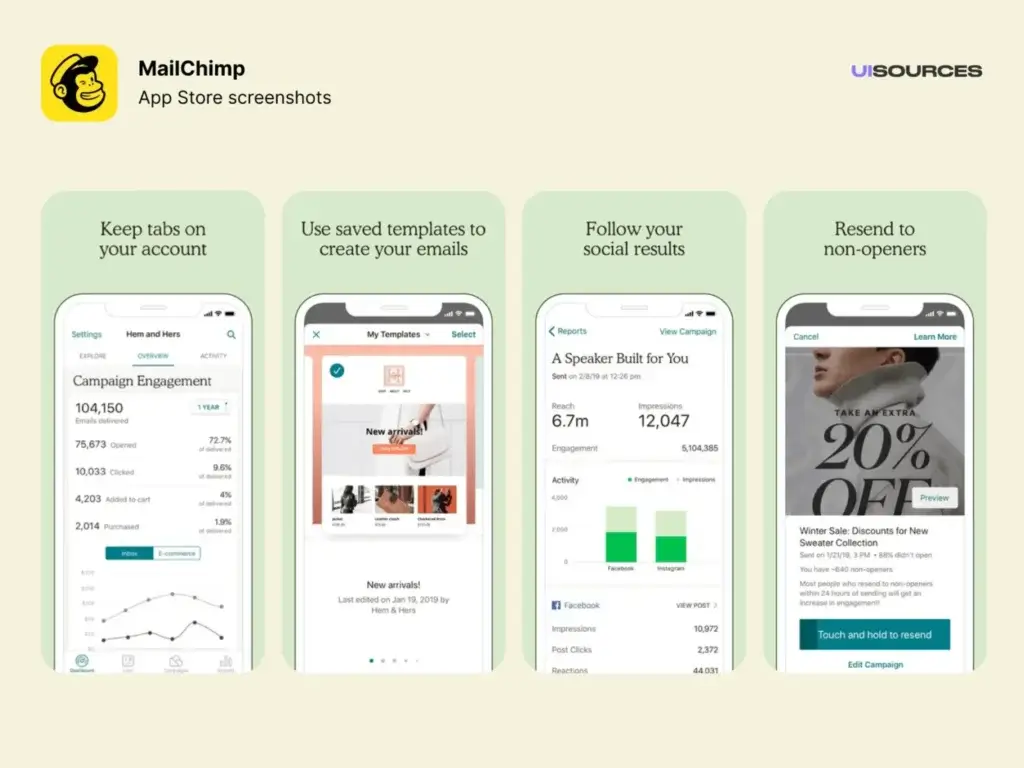
Mailchimp’s email campaign builder is one of its biggest strengths. You can create newsletters, promotional emails, product updates, event announcements, customer follow-ups, and ecommerce campaigns without needing a developer.
- Drag-and-Drop Email Editor: The visual editor lets you build emails using content blocks for text, buttons, images, product recommendations, dividers, and more. This makes it easy to create clean, branded campaigns even if you do not have design experience.
- Responsive Email Templates: Mailchimp includes professionally designed email templates for newsletters, ecommerce promotions, announcements, events, product updates, and lifecycle campaigns. Templates are mobile-responsive and can be customized to match your brand.
- Personalization and Dynamic Content: You can personalize campaigns using subscriber information such as name, location, tags, purchase activity, and audience fields. On higher plans, dynamic content gives you more control over which message different audience segments see.
Marketing Automation Flows
Mailchimp’s automation features help you send the right message based on customer behavior, signup activity, purchase history, and campaign engagement.
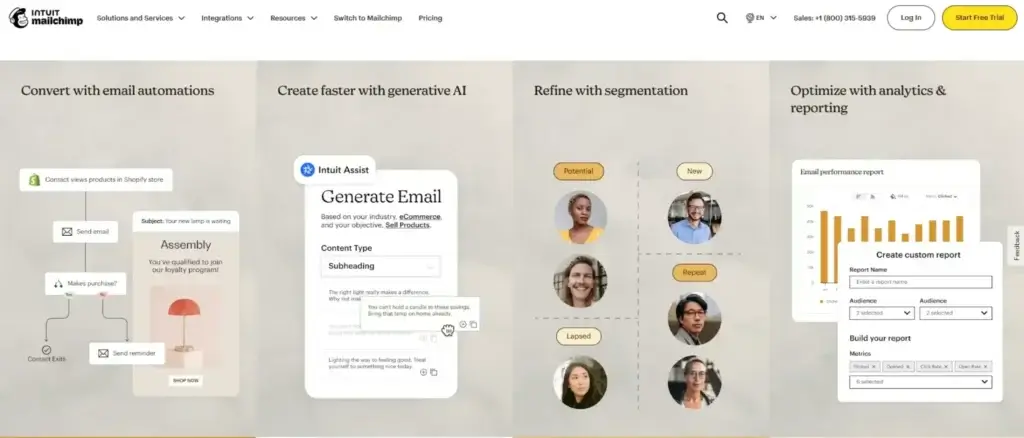
- Visual Automation Builder: Marketing Automation Flows let you create multi-step journeys using triggers, rules, delays, and actions. This is useful for welcome sequences, lead nurturing, abandoned cart reminders, birthday emails, win-back campaigns, and post-purchase follow-ups.
- Pre-Built Automation Templates: Mailchimp includes ready-made automation templates for common marketing workflows. These can save time if you want to launch faster without building every step from scratch.
- Welcome new subscribers
- Recover abandoned carts
- Re-engage inactive contacts
- Recommend products after purchase
- Send birthday or anniversary emails
- Automation Limits by Plan: This is where you need to pay attention. Mailchimp’s Free and Essentials plans are useful for basic automation, but more advanced automation depth, branching, optimization, and personalization are stronger on the Standard and Premium plans.
Audience Segmentation
Segmentation is one of the most important parts of successful email marketing, and Mailchimp gives you several ways to organize and target contacts.
Behavioral Segmentation
You can segment audiences based on email engagement, purchase activity, signup source, location, tags, and ecommerce behavior. This helps you avoid sending the same message to every subscriber.
Tags, Groups, and Custom Fields
Tags and custom fields help you organize subscribers by interest, lifecycle stage, customer type, campaign source, product interest, or other business-specific categories.
Predictive Segmentation
On more advanced plans, Mailchimp can help identify contacts based on predicted behavior, such as likelihood to buy or customer lifetime value. This is especially useful for ecommerce brands that want to prioritize higher-value customers.
AI Features and Intuit Assist
Mailchimp has been adding more AI-assisted features to help users create campaigns faster and improve performance. Depending on your plan and availability, these tools may help with campaign content, design recommendations, send-time optimization, segmentation, and automation suggestions.
AI is a meaningful advantage for Mailchimp compared with some simpler newsletter tools. However, you should not choose Mailchimp only because of AI. The best AI features are more valuable when you already have audience data, campaign history, ecommerce activity, and enough volume to make optimization useful.
SMS Marketing Add-On
Mailchimp now supports SMS marketing as an add-on for certain paid plans and countries. This can be useful if you want to combine email and text-message campaigns from one platform.
However, SMS availability, MMS support, pricing, and country coverage can vary. If SMS is a major part of your strategy, compare Mailchimp carefully with tools like Brevo, Omnisend, Klaviyo, or Campaigner before deciding.
Analytics and Reporting
Mailchimp gives you practical reporting tools for measuring campaign performance. You can track opens, clicks, unsubscribes, bounces, revenue, ecommerce activity, audience growth, and engagement trends.
Campaign Reports
You can see how each email performs and identify which subject lines, links, templates, or audience segments generate better engagement.
A/B Testing
Mailchimp supports A/B testing on paid plans, allowing you to test subject lines, content, sender names, and send times. Premium users also get access to more advanced testing capabilities.
Revenue Tracking
If you connect Mailchimp with ecommerce platforms like Shopify, WooCommerce, or BigCommerce, you can connect email campaigns to sales performance. This helps you understand which emails are actually driving revenue.
Integrations
Mailchimp integrates with many popular tools across ecommerce, CRM, design, analytics, forms, payments, and automation.
- Ecommerce Integrations: Mailchimp works with ecommerce platforms such as Shopify, WooCommerce, and BigCommerce. These integrations help you sync customer data, trigger automations, recommend products, and measure revenue from campaigns.
- CRM and Marketing Tools: You can connect Mailchimp with tools like Salesforce, Pipedrive, Canva, Zapier, Stripe, Eventbrite, and monday CRM. This makes it easier to fit Mailchimp into your wider marketing and sales workflow.
- API Access: For custom workflows, Mailchimp offers API access so technical teams can connect data, build custom experiences, or integrate Mailchimp with internal systems.
Compliance and Security
Mailchimp includes tools that help you manage consent, unsubscribe preferences, GDPR-friendly forms, and audience permissions. It also supports security features such as two-factor authentication and role-based access on relevant plans.
You are still responsible for using these tools correctly. If you operate in regulated industries or serve customers in multiple regions, review your compliance obligations before importing or emailing contacts.
Pros and Cons
Benefits and Disadvantages of Mailchimp
No email marketing platform is perfect. Mailchimp is one of the easiest tools to recommend for general email marketing, but it is not always the best option for every budget, list size, or automation strategy.
Pros
Beginner-Friendly Interface
Mailchimp is one of the easiest email marketing platforms to learn. The interface is clear, campaign setup is guided, and the email editor is approachable even if you have never built an email campaign before.
Strong Email Editor and Templates
The drag-and-drop editor and template library make Mailchimp a strong choice for businesses that care about design quality. You can create professional campaigns without custom coding or advanced design skills.
Useful Automation on Paid Plans
Marketing Automation Flows are strong enough for most small and midsize teams. You can build welcome journeys, abandoned cart emails, post-purchase follow-ups, re-engagement campaigns, and personalized customer paths.
AI-Assisted Campaign Features
Mailchimp’s AI direction is useful for teams that want help with content, campaign optimization, send timing, and segmentation. These tools are not a replacement for strategy, but they can reduce manual work.
Solid Analytics and Ecommerce Reporting
Mailchimp gives you the core metrics you need to improve campaigns, including opens, clicks, revenue, audience activity, and ecommerce performance when your store is connected.
Large Integration Ecosystem
Mailchimp connects with many major ecommerce, CRM, analytics, design, and automation tools. This makes it easier to use Mailchimp alongside your existing marketing stack.
Cons
Free Plan Is Now Very Limited
Mailchimp’s Free plan is useful for testing, but it is no longer one of the most generous free email marketing plans. The current limits make it difficult to grow a serious list without moving to a paid plan.
Pricing Increases Quickly with Contact Growth
Mailchimp’s pricing depends heavily on your contact count. As your list grows, costs can rise significantly, especially if you need Standard or Premium features.
Advanced Features Sit Behind Higher Plans
Some of Mailchimp’s most valuable tools, including stronger automation, predictive segmentation, advanced testing, and premium support, require higher-tier plans.
Not a Full CRM Replacement
Mailchimp includes contact profiles, tags, segmentation, and customer activity history, but it does not replace a dedicated CRM. If you need pipelines, deal tracking, sales forecasting, or account management, connect it with a CRM.
Phone Support Is Limited to Premium
Mailchimp offers helpful support options, but phone support is limited to Premium. Smaller teams may need to rely on chat, email, and documentation.
SMS and Transactional Email May Require Add-Ons
If you need SMS marketing or transactional email, check the pricing carefully. These capabilities may involve add-ons or separate products depending on your setup.
Use Cases
Is Mailchimp for You?
Mailchimp works best when you want a reliable, easy-to-use email marketing platform that can support newsletters, promotions, ecommerce emails, automation, and basic audience management.
Best for Small Businesses
Mailchimp is a strong fit for small businesses that need a simple way to collect subscribers, send campaigns, promote offers, and measure engagement.
You can start with basic campaigns and upgrade as your needs grow. The main watchout is cost, since your monthly price can increase as your audience grows.
Best for Newsletter Creators
If you publish regular content and want to keep your audience engaged, Mailchimp gives you templates, signup forms, scheduling, segmentation, and reporting in a simple package.
However, creators with fast-growing lists may want to compare Mailchimp with tools that offer more generous free plans or lower-cost subscriber scaling.
Best for Ecommerce Starters
Mailchimp works well for smaller ecommerce stores that want abandoned cart emails, product recommendations, customer segments, and revenue reporting without using a more complex ecommerce marketing platform.
For advanced ecommerce automation, Klaviyo or Omnisend may be stronger options, especially if you rely heavily on Shopify data, SMS, product feeds, and revenue-based segmentation.
Best for Growing Marketing Teams
The Standard plan is often the most practical Mailchimp plan for growing teams. It gives you stronger automation, optimization, and segmentation than the lower tiers while remaining easier to manage than enterprise-level tools.
Not Ideal for Advanced CRM or Complex Sales Teams
Mailchimp is not the right choice if you need deep CRM functionality, sales pipeline management, complex lead scoring, advanced account-based marketing, or heavy B2B sales workflows.
For that type of use case, you may prefer ActiveCampaign, HubSpot, Salesforce, or a dedicated CRM connected to your email marketing tool.
Pricing Plans
Mailchimp Pricing Plans
Mailchimp pricing is based on your plan, contact count, send volume, and add-ons. The entry-level prices are accessible, but the total cost can rise quickly as your audience grows.
The most important pricing detail is that Mailchimp’s Free plan is now mainly a testing plan. It supports up to 250 contacts and 500 monthly email sends, with a daily send limit of 250.
Plans Overview
| Plan | Starting Price | Contact Limit | Monthly Sends | Best For |
| Free | $0/month | Up to 250 contacts | 500/month or 250/day | Testing Mailchimp with a small list |
| Essentials | From $13/month | Starts at 500 contacts | 10x contact limit | Small teams sending regular campaigns |
| Standard | From $20/month | Starts at 500 contacts | 12x contact limit | Growing teams needing automation and optimization |
| Premium | From $350/month | Higher-volume tiers | 15x contact limit | Larger teams needing advanced testing and support |
Free Plan
Mailchimp’s Free plan is best for testing the platform or running a very small list. It includes core tools such as basic email creation, forms, landing pages, and limited support.
What’s Included
- Up to 250 contacts
- Up to 500 monthly email sends
- Daily send limit of 250
- Basic email creation tools
- Forms and landing pages
- Limited support
Best for: Beginners, personal projects, early testing, and very small lists.
Free Plan Limitations
- Limited contact and send capacity
- Mailchimp branding may apply
- Limited automation and segmentation
- No advanced testing or optimization tools
- Not ideal for fast-growing newsletters
Essentials Plan
The Essentials plan is the first paid tier and is a good fit if you want regular email marketing features without jumping into advanced automation.
It includes features such as more templates, A/B testing, scheduling, and 24/7 email and chat support. It is best for small businesses that send consistent campaigns and need more control than the Free plan offers.
Standard Plan
The Standard plan is the strongest fit for most growing businesses. It adds more useful automation, segmentation, optimization, and personalization features.
If you want Mailchimp for lifecycle campaigns, ecommerce automation, behavioral targeting, and AI-supported optimization, this is usually the plan to evaluate first.
Premium Plan
The Premium plan is built for larger teams, high-volume senders, and businesses that need advanced testing, advanced segmentation, priority support, role-based access, and phone support.
It is powerful, but it is also significantly more expensive. Smaller teams should only consider Premium if they truly need its advanced capabilities.
Mailchimp Free Trial
Mailchimp currently offers a 14-day free trial for paid marketing plans such as Essentials and Standard. This gives you a way to test paid features before committing.
Review the trial terms carefully before upgrading, especially if you add payment details, SMS Marketing, or exceed contact and sending limits.
Is Mailchimp Expensive?
Mailchimp can be affordable at the beginning, but it becomes more expensive as your contact list grows. This is one of the most important things to understand before choosing it.
The platform is still a good value if you use its templates, automation, reporting, and integrations. But if you mainly need simple newsletters, cheaper tools may give you more list capacity for less money.
Pricing Watchouts
- Costs increase as your contact count grows
- Advanced automation usually requires higher plans
- SMS Marketing may require an add-on
- Transactional email may be priced separately
- Premium is expensive for smaller teams
Practical advice: Before choosing Mailchimp, estimate your cost at your current list size and your expected list size 12 months from now. A tool that looks affordable at 500 contacts may feel very different at 10,000 or 25,000 contacts.
How Does Mailchimp Pricing Compare?
| Tool | Free Plan | Starting Paid Plan | Best For |
| Mailchimp | Yes, limited to 250 contacts and 500 monthly sends | From $13/month | General email marketing and ease of use |
| Brevo | Yes, based mainly on daily sending limits | From $25/month | Budget-friendly email, SMS, and transactional campaigns |
| Klaviyo | Yes, limited free tier | From $20/month | Ecommerce automation and revenue attribution |
| ActiveCampaign | No traditional free plan | Varies by plan and contact count | Advanced automation and CRM-style workflows |
| MailerLite | Yes, generous for creators | Low-cost paid plans | Affordable newsletters and simple automations |
Competitors
Mailchimp Alternatives
Mailchimp is a strong general-purpose email marketing platform, but it is not always the best fit. The right alternative depends on whether you care most about price, ecommerce automation, CRM features, SMS, or advanced campaign control.
Mailchimp vs Brevo
Brevo is often a better option if you want affordable email marketing, unlimited contacts on many plans, SMS, transactional email, and sales tools in one platform.
Mailchimp is easier to use and usually stronger for templates and campaign design. Brevo is usually stronger for budget-conscious businesses that want more flexible contact storage.
Mailchimp vs Klaviyo
Klaviyo is better for ecommerce brands that want deep customer segmentation, product-based automations, Shopify workflows, revenue attribution, and customer behavior analysis.
Mailchimp is easier for general small business marketing. Klaviyo is more focused on online stores that need advanced ecommerce growth tools.
Mailchimp vs ActiveCampaign
ActiveCampaign is stronger if you need advanced automation, CRM features, lead scoring, pipeline workflows, and deeper sales-marketing alignment.
Mailchimp is simpler and more beginner-friendly. ActiveCampaign is better when automation complexity is more important than ease of use.
Mailchimp vs Campaigner
Campaigner is a better fit for teams that need advanced testing, deliverability tools, segmentation control, and more sophisticated campaign management.
Mailchimp is better for beginners and smaller teams that want a smoother interface and faster setup.
Mailchimp vs MailerLite
MailerLite is often a better choice for creators, bloggers, and small teams that want simple newsletters, lower pricing, and a cleaner lightweight experience.
Mailchimp is more comprehensive, especially if you need broader integrations, stronger reporting, and more advanced AI-supported features on paid plans.
Mailchimp Alternatives Comparison
| Alternative | Better Than Mailchimp For | Where Mailchimp Wins |
| Brevo | Budget-friendly email, SMS, and transactional campaigns | Easier interface and stronger template experience |
| Klaviyo | Ecommerce automation and revenue attribution | More approachable for general small business marketing |
| ActiveCampaign | Advanced automation and CRM-style workflows | Faster setup and simpler email campaign creation |
| MailerLite | Affordable newsletter marketing | Broader features, integrations, and reporting |
| Campaigner | Advanced testing and high-volume campaign control | Better beginner experience and broader adoption |
My recommendation: Choose Mailchimp if you want the best mix of ease of use, templates, automation, reporting, and integrations. Choose Brevo if cost matters most, Klaviyo if ecommerce automation matters most, ActiveCampaign if automation depth matters most, and MailerLite if you mainly need simple newsletter marketing at a lower cost.
Conclusion
Is Mailchimp the Right Tool for You?
Mailchimp is still one of the best-known and most user-friendly email marketing platforms in 2026. It is easy to set up, pleasant to use, and strong enough for many small businesses, creators, ecommerce starters, and growing marketing teams.
Its biggest strengths are the email builder, templates, automation flows, reporting, integrations, and AI-assisted optimization tools. If you want an email marketing platform that feels polished and approachable, Mailchimp remains a strong choice.
However, it is no longer the obvious budget winner. The Free plan is now limited, pricing scales quickly with contacts, and many of the best automation and AI features are tied to paid plans.
Choose Mailchimp if you:
- Want an easy email marketing platform with strong templates
- Need automation without a steep learning curve
- Value reporting, ecommerce integrations, and a polished editor
- Prefer a well-known platform with broad third-party integrations
Consider another tool if you:
- Need the cheapest way to manage a growing list
- Want advanced ecommerce automation and revenue attribution
- Need full CRM features and sales pipeline workflows
- Rely heavily on SMS or transactional email
Bottom line: Mailchimp is still a strong email marketing platform, especially for ease of use and general campaign management. Just make sure you calculate the real cost at your expected contact size before committing.
Have More Questions?
Frequently Asked Questions
Is Mailchimp still worth it in 2026?
Yes, Mailchimp is still worth it if you want an easy-to-use email marketing platform with strong templates, automation, reporting, and integrations. However, it is less attractive if you need a generous free plan or the lowest possible cost as your list grows.
Is Mailchimp really free?
Mailchimp has a Free plan, but it is limited. The Free plan supports up to 250 contacts and 500 monthly email sends, with a daily send limit of 250. It is best for testing the platform or managing a very small list.
How many contacts can you have on Mailchimp’s Free plan?
Mailchimp’s Free plan currently supports up to 250 contacts. If your audience grows beyond that limit, you will need to move to a paid plan or reduce your contact count.
Can I automate emails with Mailchimp?
Yes, Mailchimp supports email automation through Marketing Automation Flows. You can create welcome emails, abandoned cart reminders, re-engagement campaigns, birthday emails, post-purchase flows, and other automated journeys depending on your plan.
What is the best Mailchimp plan for small businesses?
The Standard plan is usually the best Mailchimp plan for growing small businesses because it includes stronger automation, segmentation, optimization, and personalization features than the Free and Essentials plans.
Does Mailchimp include AI tools?
Yes, Mailchimp includes AI-assisted features such as content support, optimization tools, predictive segmentation, send-time optimization, and Intuit Assist availability for certain users and plans. Feature access can vary by plan, location, language, and availability.
Does Mailchimp support SMS marketing?
Mailchimp supports SMS Marketing as an add-on for certain paid plans and countries. If SMS is central to your strategy, compare availability, pricing, and country support before choosing Mailchimp.
Is Mailchimp good for ecommerce?
Mailchimp is good for small and midsize ecommerce businesses that want abandoned cart emails, product recommendations, ecommerce segmentation, and revenue reporting. For advanced ecommerce automation, Klaviyo or Omnisend may be stronger options.
Can I use Mailchimp as a CRM?
Mailchimp includes light CRM-style features such as contact profiles, tags, customer activity, and segmentation. However, it is not a full CRM. If you need pipelines, deal tracking, lead scoring, or sales forecasting, use a dedicated CRM alongside Mailchimp.
What is the best Mailchimp alternative?
The best Mailchimp alternative depends on your needs. Brevo is strong for affordable email and SMS, Klaviyo is better for ecommerce automation, ActiveCampaign is better for advanced automation and CRM workflows, and MailerLite is a good option for simple newsletters at a lower cost.
Is Mailchimp better than Brevo?
Mailchimp is usually better for ease of use, templates, and general campaign creation. Brevo is often better for budget-conscious users, unlimited contact storage on many plans, transactional email, and SMS-focused workflows.
What are Mailchimp’s biggest limitations?
Mailchimp’s biggest limitations are its restricted Free plan, contact-based pricing increases, advanced features locked behind higher plans, limited CRM depth, and phone support being limited to Premium users.