

Introduction
If you need webinar software built for professional events rather than casual video calls, GoTo Webinar remains one of the more established options in the category. It combines live webinars, branded registration, automated email reminders, audience engagement tools, reporting, and integrations in a platform designed for marketers, trainers, customer education teams, and businesses that run webinars as a repeatable program.
In this GoTo Webinar review, you will get a practical look at what the platform does well, where it falls short, how its pricing works, and who it is best suited for. By the end, you should have a clear understanding of whether GoTo Webinar is the right webinar software for your lead generation, training, product demo, or online event workflow.
What Is GoTo Webinar?
GoTo Webinar is a webinar and virtual event platform from GoTo, the company behind other business communication tools such as GoTo Meeting and GoTo Connect. It is designed specifically for hosting structured online events, with features for registration, reminders, moderation, audience interaction, recording, analytics, and integrations with sales and marketing systems.
Background and Evolution
GoTo Webinar has been on the market for years, which gives it a different position from some newer webinar tools. It is not trying to win on novelty alone. Instead, it focuses on reliability, familiar workflows, and practical webinar management. Over time, the platform has expanded beyond basic live presentations into branded registration, Simulive sessions, integrations, analytics, and AI-powered capabilities such as captions and summaries on higher plans.
Target Users and Use Cases
GoTo Webinar works best when webinars are part of a real business process. It is especially relevant for teams that need a platform they can use repeatedly for external events, education, and demand generation.
- Marketing teams – You can use GoTo Webinar for lead generation, product marketing, webinar funnels, and follow-up campaigns.
- Sales and customer success teams – It works well for demos, onboarding sessions, and customer education webinars.
- Trainers and educators – Polls, Q&A, handouts, and structured moderation help support online learning and workshops.
- Mid-sized and enterprise businesses – GoTo Webinar is particularly appealing for organizations that value reliability, reporting, and integrations.
- Teams already using GoTo products – If your business already uses GoTo’s ecosystem, the fit is more natural.
If you mainly need a quick internal meeting solution, GoTo Webinar may feel more specialized than necessary. But if you run external webinars regularly and need more structure around registration, engagement, and analytics, it is much more compelling.
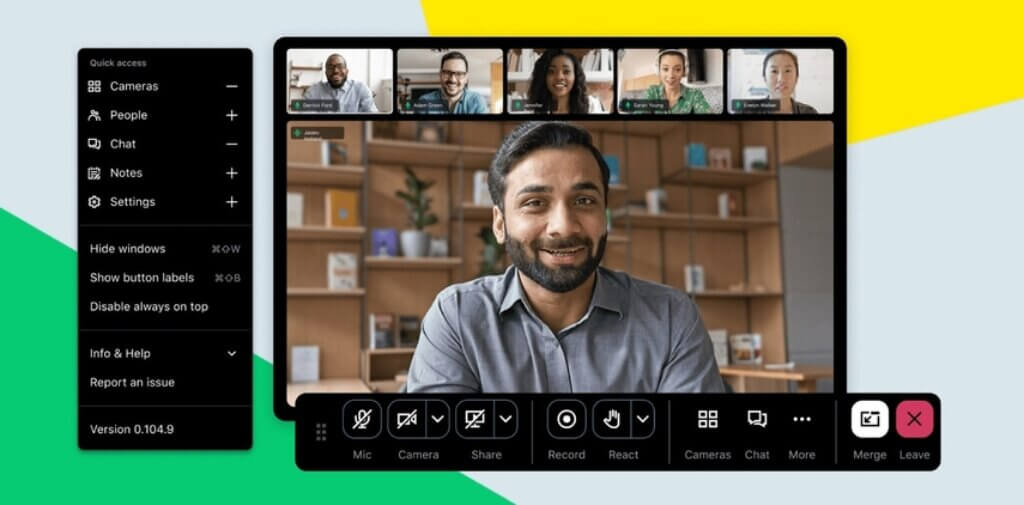
How Does It Work?
Key Features of GoTo Webinar
GoTo Webinar focuses on the full webinar workflow, not just the live session itself. That includes preparation, registration, event delivery, engagement, follow-up, and reporting.
Structured Webinar Setup
One of GoTo Webinar’s main strengths is that it gives hosts a more structured experience than general meeting software. You can configure event pages, registration settings, reminders, handouts, and presenter permissions before the webinar starts. That matters because successful webinars usually depend on more than simply sharing a meeting link.
This also makes the platform attractive for recurring webinar programs. If your team runs demos, training sessions, or educational events every week or every month, GoTo Webinar provides a more organized framework than meeting-first tools.
Registration Pages and Automated Communications
GoTo Webinar includes built-in registration pages and automated email workflows, which is one of its biggest practical advantages. You can collect attendee details, send confirmations, trigger reminders, and support attendance without relying as heavily on third-party tools.
For marketing teams, this is important because it helps connect webinar attendance with a funnel. For training teams, it reduces coordination work. In my view, this area is one of the reasons GoTo Webinar still holds up well against newer webinar platforms.
Live Webinar Delivery and Moderation
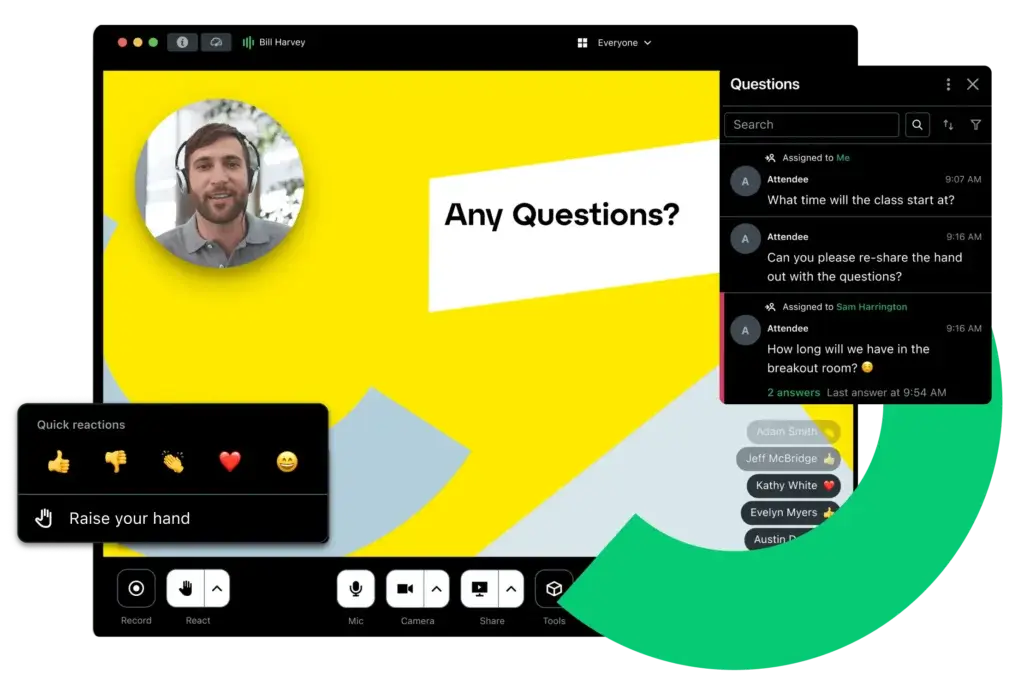
GoTo Webinar is designed for controlled event delivery. Hosts can manage presenters, moderate audience participation, run polls, take questions, and share handouts during the webinar. That makes it better suited for formal webinars than tools that are essentially meetings with webinar labels added on top.
The platform is reliable and familiar, which is especially valuable for organizations that prioritize consistency over experimentation. It may not feel as modern as some newer competitors, but it is usually easier to trust for business-critical sessions.
Audience Engagement Tools
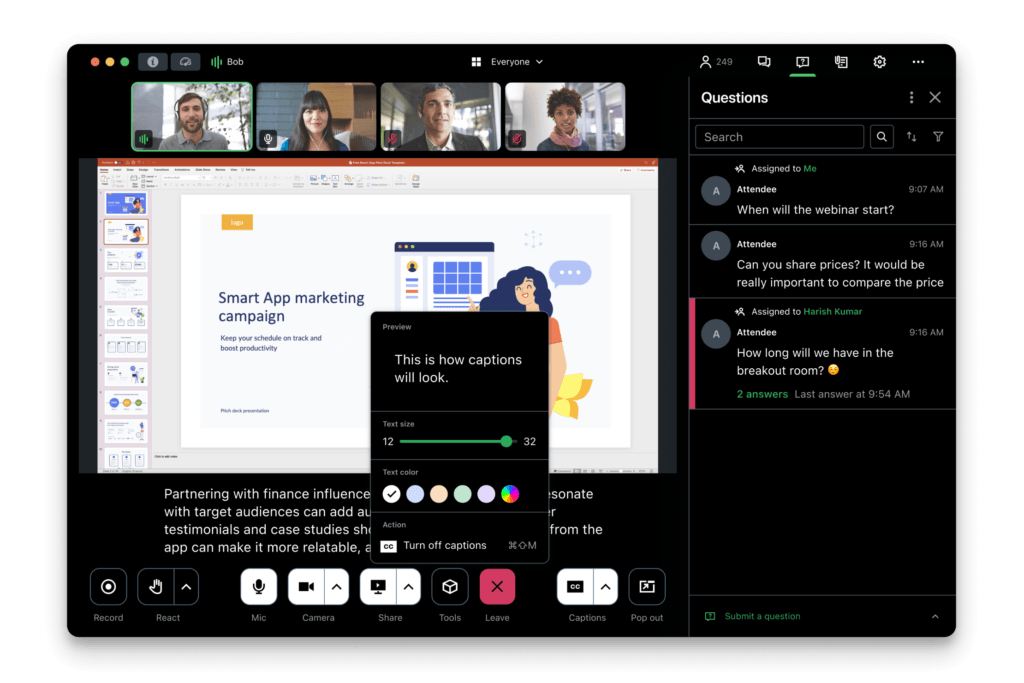
GoTo Webinar includes engagement features such as polls, Q&A, chat, handouts, and attendee interaction controls. These are not flashy extras, they are the tools that help webinars feel active rather than passive.
For demand generation webinars, this can improve participation and insight gathering. For customer education, it helps support understanding. For internal training or partner enablement, it makes the session more structured and measurable.
Simulive, Recording, and Reusability
GoTo Webinar also supports recorded and reusable webinar workflows, including Simulive scenarios where pre-recorded content is delivered with live-style event structure. That is useful when you want more scale without sacrificing consistency.
If your team wants to turn strong sessions into repeatable assets, this capability adds real strategic value. It is not as automation-heavy as some webinar platforms built mainly for evergreen funnels, but it is still strong enough for many business use cases.
Analytics and Reporting
Reporting is another strong area. GoTo Webinar gives you webinar-level analytics that help you measure registrations, attendance, participation, and post-event performance. This is especially valuable when you need to prove webinar ROI rather than just host the event.
Compared with lighter tools, GoTo Webinar feels more business-ready here. The reporting is not just decorative, it supports actual evaluation and optimization.
Integrations
GoTo Webinar integrates with major CRM and marketing tools, which is essential if webinars are part of a larger revenue or customer education process. This makes it easier to sync registration data, connect follow-up workflows, and fit webinars into an existing stack.
If your organization already works with structured sales and marketing systems, this is one of the platform’s more important advantages over simpler webinar tools.
AI and Accessibility Features
GoTo has also added more modern functionality through AI-related capabilities and accessibility improvements. Depending on the plan, that can include features such as captions, transcripts, and AI-generated summaries. These additions make the platform more competitive, even if its overall interface still feels more traditional than newer SaaS products.
Pros and Cons
Benefits and Limitations of Using GoTo Webinar
Positive
✅ Built for formal webinars
✅ Reliable live delivery
✅ Built-in registration tools
✅ Strong reporting
Negative
❌ Interface feels dated in places
❌ Entry cost can be a barrier
❌ Not the best for casual use
❌ Less brand-forward than some rivals
Strengths & Benefits
GoTo Webinar’s biggest strength is that it understands the needs of professional webinars. It handles registration, reminders, moderation, interaction, and analytics in a dependable way. That makes it more complete than tools that are mainly designed for meetings. I would also rate it highly for organizations that care more about operational stability than trendy interface design.
- Built for formal webinars – The structure is better suited for external events than most meeting-first tools.
- Reliable live delivery – Stability and predictability are still major advantages for business webinar programs.
- Built-in registration tools – Built-in forms and reminders reduce friction before the event.
- Strong reporting – Analytics help support performance review and webinar optimization.
Limitations & Drawbacks
GoTo Webinar is a strong platform, but it is not the most modern-looking option in the market. Some newer competitors feel more polished, more marketing-focused, or easier to love immediately. It also becomes easier to justify when webinars are central to your business process. If you only run occasional webinars, the cost can feel harder to defend.
- Interface feels dated in places – It is functional, but not as sleek as platforms like Demio or Livestorm.
- Entry cost can be a barrier – Smaller teams may find it expensive if webinar volume is low.
- Not the best for casual use – If you mainly need simple internal sessions, a lighter tool may be enough.
- Less brand-forward than some rivals – Businesses seeking highly customized virtual event experiences may prefer other tools.
Use Cases
Who Should Use GoTo Webinar?
GoTo Webinar is not the best webinar platform for every buyer. It is strongest when webinars are recurring, structured, and tied to measurable business goals.
Marketing Teams and Demand Generation
This is one of the best fits for GoTo Webinar. Marketing teams that run educational webinars, lead generation campaigns, partner sessions, or product promotion events can benefit from the built-in registration process, reminders, audience engagement, and reporting.
It is particularly useful when you need something dependable and repeatable rather than highly experimental.
Sales, Customer Success, and Product Education
GoTo Webinar works well for demos, onboarding webinars, customer training, and feature education sessions. The ability to create a structured event with registration, presenter controls, and reporting helps these teams deliver a more professional experience.
Mid-Sized and Enterprise Businesses
Organizations that want a mature platform with integrations and a proven reputation are likely to see more value here than very small businesses or solo creators. GoTo Webinar feels most natural in environments where multiple stakeholders are involved and webinar performance needs to be measured.
Trainers and Professional Educators
If your webinars are more instructional than promotional, GoTo Webinar still performs well. Polls, handouts, moderated Q&A, and session structure make it useful for workshops and online learning environments, even if some education-specific tools go deeper.
When GoTo Webinar Might Not Be the Right Fit
GoTo Webinar may not be the right choice if your top priority is a very modern interface, strong visual branding, advanced evergreen webinar automation, or a low-cost starting point. In those cases, Demio, ClickMeeting, Livestorm, or even Zoom Webinars may feel more aligned depending on your priorities.
Competitors
Competitor Alternatives to GoTo Webinar
GoTo Webinar competes with several strong webinar platforms, but the right alternative depends on what you value most. Demio is usually easier and more modern for marketing teams, Zoom Webinars benefits from familiarity and scale, and ClickMeeting is often stronger for automation, training, and monetization. GoTo Webinar stands out most for dependable business webinar workflows, structured registration, and a mature approach to professional event delivery.
| Feature Type | GoTo Webinar | Demio | Zoom Webinars | ClickMeeting |
| Core focus | Business webinars and structured events | Marketing webinars and simplicity | Scale and brand familiarity | Automation, training, monetization |
| User experience | Reliable but more traditional | Modern and clean | Familiar and flexible | Functional, more feature-heavy |
| Registration tools | Strong built-in workflow | Strong | Good | Strong |
| Automated webinars | Moderate via reusable workflows | Yes, plan-dependent | Less webinar-first in this area | Strong |
| Paid webinars | Available on higher plans | Less native emphasis | Possible with added workflow | Built-in strength |
| Reporting | Strong | Good | Good | Good |
| Best for | Reliable recurring business webinars | Marketers who want simplicity | Large audiences and familiarity | Training, evergreen webinars, paid events |
My view is that GoTo Webinar is one of the safer choices if you want stable webinar infrastructure and a professional workflow without moving into a much more complex event platform. Demio is more polished, ClickMeeting is more versatile for automation and monetization, and Zoom Webinars wins on familiarity. But GoTo Webinar still holds an important middle ground, especially for companies that value dependability and structure over novelty.
Pricing
GoTo Webinar Pricing & Plans
GoTo Webinar structures its offer around several business-oriented plans, with pricing mainly tied to attendee capacity and event scale. In recent pricing, the entry point starts at roughly $49 per organizer per month when billed annually, and higher tiers increase based on attendee limits and advanced event needs.
Entry-Level Plan
The starting plan is aimed at smaller webinar programs that still need professional structure. It gives you access to the core webinar workflow, including registration, audience interaction, reminders, and reporting. This plan makes sense if you need webinar software, but do not yet require the largest audiences or more advanced scaling.
Mid-Tier Plans
The middle plans are usually where GoTo Webinar becomes more attractive. They support larger attendee counts and are more realistic for serious marketing, customer education, and training programs. If webinars are becoming a real channel for your business, these plans make more sense than staying at the minimum tier.
Enterprise / High-Capacity Options
For businesses running larger events, GoTo Webinar offers higher-capacity and enterprise-style options. These are better suited for organizations that need more scale, more organizers, and more support around virtual event delivery.
Pricing Table
| Plan Type | Starter | Mid-Tier | Pro | Enterprise |
| Best for | Smaller webinar programs | Growing webinar teams | Larger recurring events | High-capacity business needs |
| Starting price | About $49/month | About $99/month | About $199/month | Custom / higher tier |
| Attendee range | Lower capacity | Mid-range capacity | Higher capacity | Largest scale options |
| Registration tools | Yes | Yes | Yes | Yes |
| Engagement tools | Yes | Yes | Yes | Yes |
| Analytics | Yes | Yes | Yes | More advanced needs supported |
| AI/captions features | Some availability | More included | More included | Best fit for advanced usage |
| Best value | Occasional professional webinars | Recurring business webinars | Larger programs | Enterprise-scale events |
Pricing-wise, GoTo Webinar is not the cheapest way to host an occasional webinar. But it becomes much easier to justify when webinars are important to lead generation, customer education, or external communication. In my opinion, the value is strongest for businesses that care about structure, reporting, and repeatability more than the lowest possible entry cost.
Best Practices
Getting Started with GoTo Webinar
To get the most value from GoTo Webinar, you should treat it like a webinar system rather than a video room. The platform performs best when you use the surrounding workflow properly.
Start with a Clear Webinar Objective
Before setting up the event, decide whether the webinar is meant to generate leads, educate customers, support onboarding, train partners, or present a product. That objective should shape the registration process, agenda, CTA, and follow-up plan.
Optimize the Registration Experience
Use the built-in registration pages and reminder emails strategically. Strong attendance often comes down to how well the pre-event experience is handled. A simple, branded, and well-timed registration flow can improve turnout significantly.
Plan Interaction in Advance
Do not use polls and Q&A randomly. Decide in advance where interaction should happen and why. A good webinar feels designed, not improvised. GoTo Webinar is stronger when you use its structure intentionally.
Use Reporting After Every Webinar
One of the platform’s best strengths is reporting, so use it. Review attendance, engagement, and performance after each webinar to improve your next event. This is one of the easiest ways to make the software more valuable over time.
Reuse High-Performing Content
If a webinar performs well, think about how it can be reused. Recorded sessions, replay workflows, and repeatable event structures can help increase the return on the effort you already invested.
Match the Plan to Your Real Webinar Volume
Do not choose a plan only by price. Choose it based on the size and importance of your webinar program. If webinars are becoming a real acquisition or education channel, it usually makes sense to choose for growth rather than only for current minimum needs.
Conclusion
Final Thoughts
⭐ Overall Rating: 8.1/10
GoTo Webinar remains a strong and dependable webinar platform, especially for businesses that need structured online events rather than lightweight live sessions. It does not try to be the flashiest webinar software in the market, but it still gets many of the fundamentals right: registration, reminders, moderation, audience interaction, reporting, and integrations. That makes it a credible option for marketers, trainers, customer education teams, and companies that run webinars regularly.
The biggest drawbacks are that the interface feels more traditional than some newer competitors, and the pricing can feel harder to justify if your webinar volume is low. But if you want a webinar platform with a mature workflow, proven reliability, and a business-oriented feature set, GoTo Webinar is still a very solid choice. Overall, I would rate it most highly for organizations that value operational consistency and professional webinar structure over sleek design or ultra-lightweight simplicity.
Have more questions?
Frequently Asked Questions
What is GoTo Webinar used for?
GoTo Webinar is used for live webinars, online events, lead generation webinars, product demos, customer education, onboarding, and training sessions. It is best suited for structured business webinars rather than casual video meetings.
Is GoTo Webinar good for marketing teams?
Yes. It is a strong option for marketing teams because it includes registration pages, reminder emails, audience engagement tools, reporting, and integrations that support webinar-driven campaigns.
Does GoTo Webinar support registration pages?
Yes. One of its key strengths is that it includes built-in registration and reminder workflows, which help create a more professional webinar process.
Is GoTo Webinar better than Zoom Webinars?
That depends on your priorities. Zoom Webinars benefits from broader familiarity and large-scale reach, while GoTo Webinar is often better for businesses that want a dependable, structured webinar workflow with strong registration and reporting tools.
Does GoTo Webinar support automated or reusable webinar workflows?
Yes. While it is not the most automation-focused webinar platform in the market, it does support reusable webinar content and structured event workflows, including recorded and Simulive-style use cases.
Is GoTo Webinar easy to use?
Yes, overall. Its interface is not the most modern, but it is generally straightforward and reliable, especially for teams that need a stable platform for recurring business webinars.
Is GoTo Webinar good for training and customer education?
Yes. The platform works well for onboarding, training, and customer education because it supports controlled event delivery, moderation, audience questions, handouts, and post-event analytics.
How much does GoTo Webinar cost?
Pricing starts at roughly $49 per organizer per month on annual billing, with higher tiers increasing based on attendee capacity and business needs.
What are the biggest drawbacks of GoTo Webinar?
The main drawbacks are that the interface feels more traditional than some newer tools, there is no real long-term free plan, and smaller businesses may find the cost harder to justify if webinar volume is low.
Who should choose GoTo Webinar?
GoTo Webinar is best for marketers, trainers, customer success teams, and businesses that run recurring professional webinars and want dependable structure, registration tools, reporting, and integrations.





