

Introduction
If your goal is to run webinars that do more than present slides, WebinarJam is one of the more marketing-focused platforms in this category. Built by the company behind Kartra, WebinarJam is designed for businesses that use webinars for lead generation, product demos, sales presentations, coaching, and customer education. It combines live webinar hosting with registration pages, email and SMS notifications, audience engagement tools, offers, and detailed webinar configuration in one browser-based system.
In this WebinarJam review, you will get a practical look at what the platform does well, where it falls short, how its pricing works, and who it is best suited for. By the end, you should have a clear understanding of whether WebinarJam is the right webinar software for your marketing, training, sales, or audience growth strategy.
What Is WebinarJam?
WebinarJam is a cloud-based webinar platform designed primarily for live webinars. It is built for businesses that want to host presentations, engage attendees in real time, and move prospects toward an action, whether that means booking a call, buying an offer, joining a course, or entering a nurturing funnel. Unlike simple meeting tools, WebinarJam is built around conversion-oriented webinar workflows.
Background and Evolution
WebinarJam comes from Genesis Digital, the same company associated with Kartra and EverWebinar. That matters because the platform has long been positioned as part of a broader marketing and funnel ecosystem rather than just a standalone broadcasting tool. Over time, WebinarJam has expanded from a live webinar platform into a more feature-rich system with registration templates, attendee engagement tools, automated communication, analytics, and integrations with email marketing and CRM platforms.
Its strongest reputation has always been in live sales webinars and marketing-driven webinar funnels. While some competitors focus more on ease of use, WebinarJam has traditionally leaned into flexibility, promotion, and conversion features.
Target Users and Use Cases
WebinarJam works best when webinars are part of a repeatable business process rather than a one-off event.
- Marketers and lead generation teams – You can use WebinarJam to drive registrations, engage prospects live, and move attendees toward offers and follow-up sequences.
- Coaches, consultants, and course creators – The platform is well suited for live training, masterclasses, and pitch webinars.
- Sales teams and SaaS businesses – It works well for live demos, onboarding sessions, and product education webinars.
- Growing online businesses – WebinarJam is a strong fit for businesses that want webinar performance tied directly to revenue and audience growth.
- Users in the Kartra ecosystem – If you already use Kartra, WebinarJam becomes more attractive because of the workflow alignment.
If your primary need is a lightweight internal meeting tool, WebinarJam will probably feel too specialized. But if webinars are part of your acquisition, education, or selling strategy, it is a much more relevant option than a generic conferencing platform.
How Does It Work?
Key Features of WebinarJam
WebinarJam is built around live webinar delivery, but what makes it stand out is how much it tries to support the entire webinar journey, from registration to engagement to follow-up.
Live Webinar Hosting at Scale
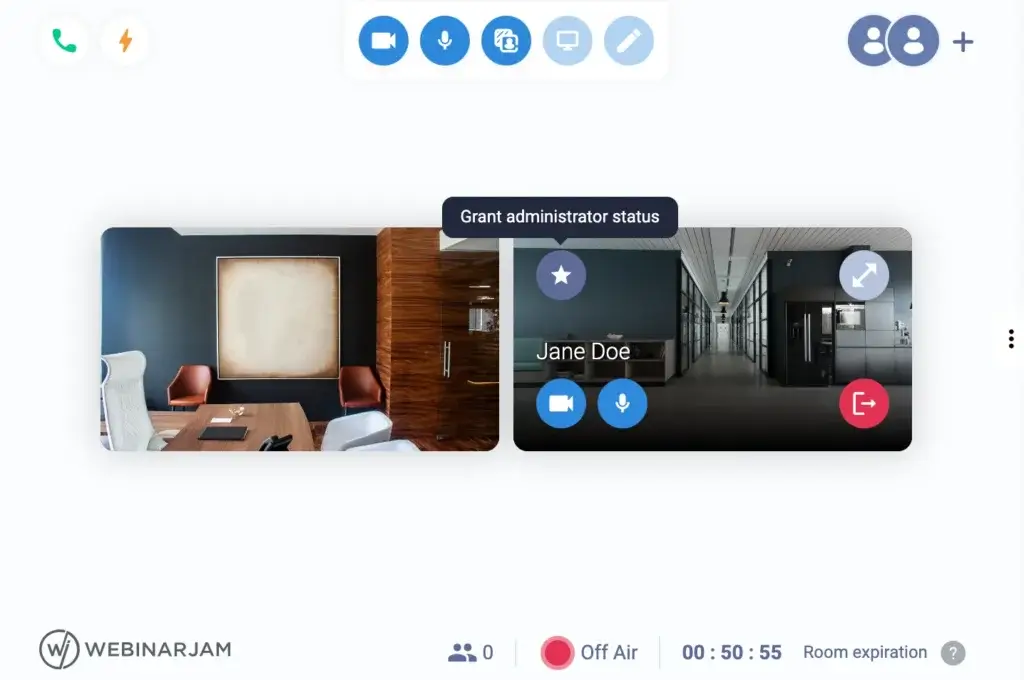
WebinarJam is first and foremost a live webinar platform. Depending on your plan, it supports attendee capacity from smaller sessions up to large live audiences, making it relevant for everything from coaching webinars to bigger launch events. It also supports multiple presenters on screen at once, which is useful for interviews, co-hosted demos, and panel-style webinars.
This is important because not every webinar is a solo presentation. If your format includes guest experts, team demos, or multi-speaker events, WebinarJam gives you more flexibility than simpler tools built for one presenter at a time.
Browser-Based Access
One of WebinarJam’s practical strengths is that attendees can join from their browser rather than dealing with heavy desktop setup. That lower friction matters in public-facing webinars where every extra step can reduce attendance or hurt conversions.
From the host side, WebinarJam is also relatively straightforward to launch from a browser, which helps teams that do not want to depend on a more traditional meeting app installation flow.
Live Chat, Q&A, Polls, and Interaction Tools
WebinarJam includes a solid collection of audience engagement features. These include live chat, moderated questions, polls, surveys, handouts, and presenter interaction options. These are not just nice extras, they are part of what makes the platform useful for webinars that are supposed to convert or educate.
If you are running a sales webinar, live chat and question management help remove objections in real time. If you are teaching, polls and handouts help make the session more active. If you are doing a product demo, live engagement gives you a better sense of audience intent and attention.
Offers and Conversion Elements
This is one of the areas where WebinarJam clearly differentiates itself from more meeting-oriented platforms. You can present time-sensitive offers during the webinar, use calls to action, and structure the session to support conversion rather than just content delivery. That makes it especially useful for marketers, coaches, course creators, and consultants.
In my view, this is one of WebinarJam’s strongest advantages. It is not trying to be a neutral communication tool. It is built to help you move webinar attendees toward an outcome.
Email and SMS Notifications
WebinarJam includes reminder and communication functionality around the webinar registration flow. This matters more than many buyers expect because webinar success depends heavily on getting registrants to actually show up. Reminder sequences, timing, and follow-up communication can make a major difference in attendance rates.
For businesses that are still building their webinar process, having these features closer to the webinar platform itself can reduce workflow complexity.
Landing Pages and Registration Flow
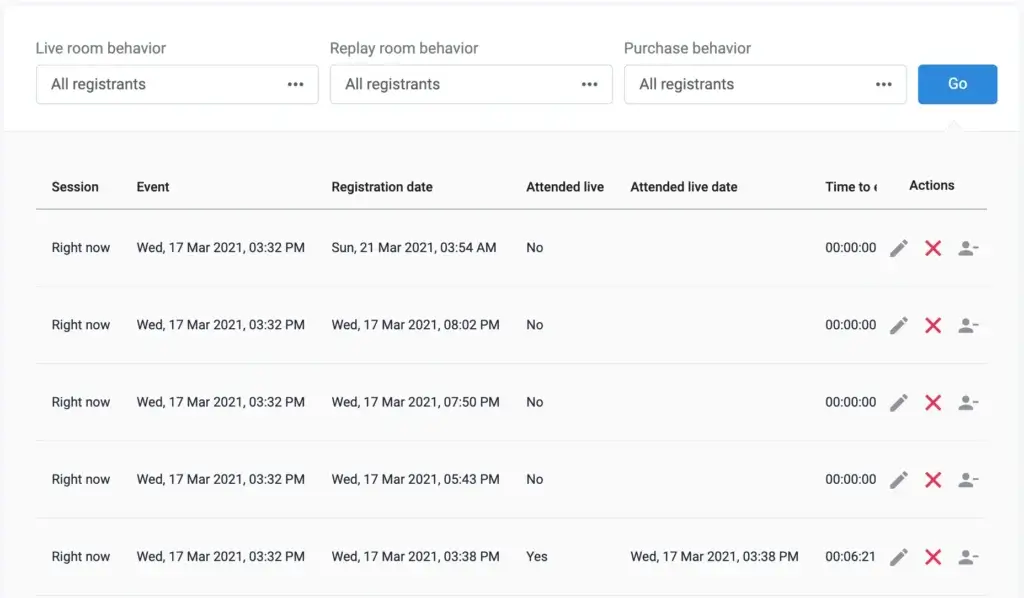
WebinarJam also gives you tools to create registration pages and webinar signup experiences. That helps it function more like a webinar funnel platform than a simple event room. Some users will still prefer dedicated landing page software for design flexibility, but WebinarJam’s built-in options are useful for businesses that want to get campaigns live quickly.
This supports one of the platform’s clearest strengths, it helps connect promotion and webinar delivery more tightly than a generic meeting product usually does.
Automated Webinar Path with EverWebinar
WebinarJam is strongest for live webinars. If your strategy depends on evergreen or automated webinars, that path is usually handled through EverWebinar, its sister product. That distinction matters because some buyers assume WebinarJam alone is the full automated webinar system.
For many businesses this is still a workable setup, especially if you want to turn live webinar content into repeatable evergreen assets. But it is worth understanding upfront, because if fully automated webinars are your top priority, you need to evaluate the WebinarJam and EverWebinar combination rather than WebinarJam in isolation.
Integrations and Workflow Connectivity
WebinarJam integrates with a broad range of email marketing and CRM-related tools, and it is particularly attractive if you already work inside the Kartra ecosystem. It also supports broader connectivity through tools like Zapier, which helps tie webinar registrations and attendee actions into your wider marketing stack.
That makes WebinarJam more useful for businesses that want webinar actions to trigger follow-up sequences, segmentation, or downstream nurture workflows.
Analytics and Webinar Reporting
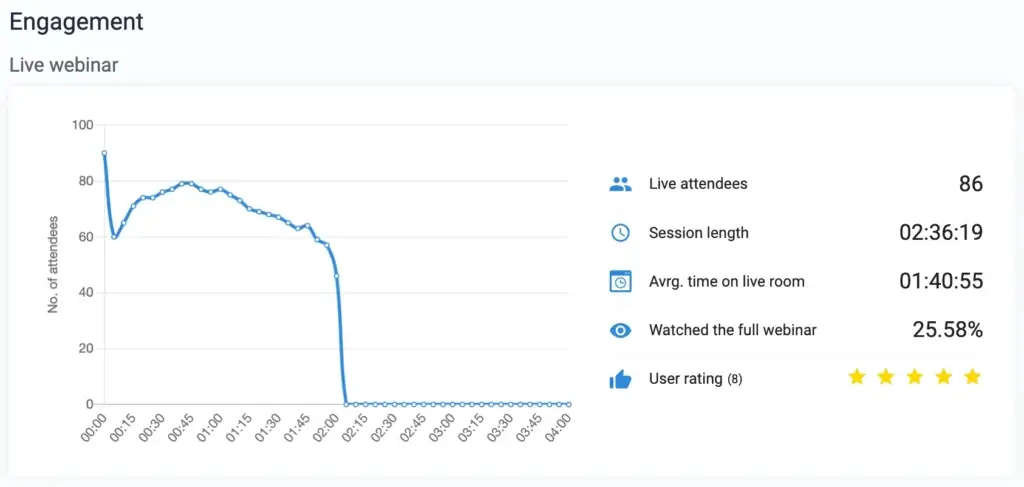
WebinarJam gives you visibility into webinar performance, including registrations, attendance, and engagement-related data. The analytics are not the most enterprise-grade in the webinar market, but they are useful enough for most small and mid-sized businesses that want to improve show-up rates, optimize pitches, or refine webinar content over time.
If your webinars are part of a revenue process, these insights matter. They help you treat webinars as a measurable channel rather than a one-time event.
Pros and Cons
Benefits and Limitations of Using WebinarJam
Positive
✅ Built for conversion-oriented webinars
✅ Useful attendee engagement tools
✅ Browser-based access
✅ Useful Kartra alignment
Negative
❌ Can feel feature-heavy at first
❌ Automated webinars need extra evaluation
❌ Interface is not the sleekest
❌ Less ideal for simple internal meetings
Strengths & Benefits
WebinarJam’s main strength is that it is designed for webinar outcomes, not just live broadcasting. It helps you drive registrations, engage attendees, present offers, and connect webinar activity to your broader marketing stack. That makes it more strategically useful than meeting tools that happen to support larger audiences.
- Built for conversion-oriented webinars – WebinarJam supports calls to action, live offers, and marketing-driven webinar structure.
- Useful attendee engagement tools – Chat, polls, moderated questions, and handouts help make sessions more interactive.
- Browser-based access – That is especially important for external webinars and public registrations.
- Useful Kartra alignment – Kartra alignment and integrations improve its value for funnel-driven teams.
Limitations & Drawbacks
WebinarJam is not the most beginner-friendly platform in this space, and it is not the cleanest from a user experience perspective. It is capable, but that capability comes with more moving parts. Some teams will appreciate the depth, while others will prefer the simplicity of platforms like Demio.
- Can feel feature-heavy at first – New users may need time to understand the platform’s setup options and webinar flow settings.
- Automated webinars need extra evaluation – If evergreen webinars matter most, you need to evaluate the broader EverWebinar path too.
- Interface is not the sleekest – Some newer webinar platforms feel cleaner and simpler.
- Less ideal for simple internal meetings – A meeting-first platform may be simpler for day-to-day collaboration.
Use Cases
Who Should Use WebinarJam?
WebinarJam is not the best webinar software for every buyer. It is strongest when webinars are tied to marketing, product education, selling, or audience growth.
Marketing Teams and Lead Generation Workflows
This is WebinarJam’s clearest use case. If your webinars are part of a lead generation funnel, product launch, or live selling strategy, WebinarJam makes a lot of sense. The platform is built around registration, attendance, engagement, and post-webinar action rather than just streaming.
Coaches, Consultants, and Course Sellers
If you teach, pitch, or sell through live sessions, WebinarJam is a strong option. The platform is well suited for live masterclasses, workshop funnels, coaching webinars, and educational sessions that lead to a paid offer or next-step consultation.
SaaS and Product-Led Businesses
WebinarJam can also work well for product demos, onboarding webinars, and educational sessions aimed at prospects or customers. If you want a webinar platform that can help both explain the product and move viewers toward action, it is a reasonable fit.
Kartra Users
If you already use Kartra, WebinarJam becomes more compelling. The workflow logic is easier to justify when webinars are just one part of a broader campaign or customer journey.
When WebinarJam Might Not Be the Right Fit
WebinarJam may not be ideal if your top priority is a very polished user interface, extremely simple setup, or everyday internal collaboration. It may also be less attractive if you want an all-in-one webinar product centered primarily on automated evergreen webinars without evaluating the broader ecosystem around it.
Competitors
Competitor Alternatives to WebinarJam
WebinarJam competes with several well-known webinar platforms, but the best alternative depends on what you value most. Demio is often easier to use, Zoom Webinars is stronger for familiarity and enterprise comfort, and GoTo Webinar remains a dependable business option. WebinarJam stands out most when your webinars are closely tied to marketing outcomes and you want stronger conversion-oriented features.
| Feature Type | WebinarJam | Demio | Zoom Webinars | GoTo Webinar |
| Core focus | Live webinars for marketing and sales | Simple marketing webinars | Large-scale webinar familiarity | Business webinar programs |
| Access model | Browser-based | Browser-based | Often app-driven | Web and app mix |
| Ease of use | Moderate learning curve | Very approachable | Familiar for many users | Straightforward but traditional |
| Live engagement tools | Strong | Strong | Good | Good |
| Conversion focus | Very strong | Good | Moderate | Moderate |
| Automated webinar path | Via sister product ecosystem | Available on relevant plans | More limited focus | Less automation-focused |
| Best for | Lead gen, sales, live offers | Simplicity and UX | Scale and brand familiarity | Corporate webinar teams |
My view is that WebinarJam is the better choice when webinars are directly tied to selling, funnel performance, or audience growth. Demio is easier to like right away because of its simplicity. Zoom Webinars is hard to ignore because almost everyone knows Zoom. GoTo Webinar is still a solid option for more traditional business webinar programs. But WebinarJam remains especially appealing when your webinar strategy is meant to drive measurable action, not just attendance.
Pricing
WebinarJam Pricing & Plans
WebinarJam structures its pricing primarily around attendee capacity. That means the platform becomes more expensive as your webinar scale increases, which is expected in this category. In practice, the pricing is competitive for businesses that actively use webinars as part of a revenue or lead generation process.
Entry-Level Plan
The entry-level option is designed for smaller webinar programs and lower attendee caps. It is a practical place to start if you are testing WebinarJam for lead generation, live demos, or coaching webinars without needing large event capacity.
Mid-Tier Plans
The mid-tier plans raise attendee limits and make more sense for businesses that run webinars more consistently. If webinars are already working for your business, these plans usually represent the real operating tier rather than just a test environment.
Higher-Tier Plans
The upper plans are designed for larger audiences and more serious webinar operations. These are better suited for businesses with established webinar funnels, bigger launch events, or more ambitious live audience targets.
Automated Webinar Consideration
Pricing discussions around WebinarJam should always include how you plan to handle automated webinars. If evergreen delivery is part of your model, make sure you evaluate the sister-product path and not just the live webinar plan on its own. That gives you a more realistic view of total cost and value.
Pricing Table
| Plan Tier | Starter | Basic | Professional | Enterprise |
| Best for | Smaller webinar programs | Growing webinar teams | Established webinar funnels | Larger-scale webinar operations |
| Approximate attendee cap | 100 attendees | 500 attendees | 2,000 attendees | 5,000 attendees |
| Live webinars | Yes | Yes | Yes | Yes |
| Multiple presenters | Yes | Yes | Yes | Yes |
| Engagement tools | Included | Included | Included | Included |
| Browser-based access | Yes | Yes | Yes | Yes |
| Best value for | Testing live webinar strategy | Regular live webinar use | Serious lead generation at scale | Large audience live events |
Pricing-wise, WebinarJam makes more sense when webinars are part of an ongoing business process. If you only host occasional events, simpler or lower-cost tools may be enough. But if webinars directly support lead generation, demos, launches, or educational selling, WebinarJam’s pricing can be justified more easily because its value is tied to outcomes rather than just event hosting.
Best Practices
Getting Started with WebinarJam
To get the most out of WebinarJam, you should treat it as a webinar system, not just a live room. The more intentional your setup, the stronger your results.
Start with the Webinar Outcome
Before setting up the event, decide what the webinar is supposed to accomplish. Are you generating leads, selling an offer, booking calls, onboarding users, or educating prospects? WebinarJam performs best when the webinar is built around a clear business objective.
Use the Registration Journey Properly
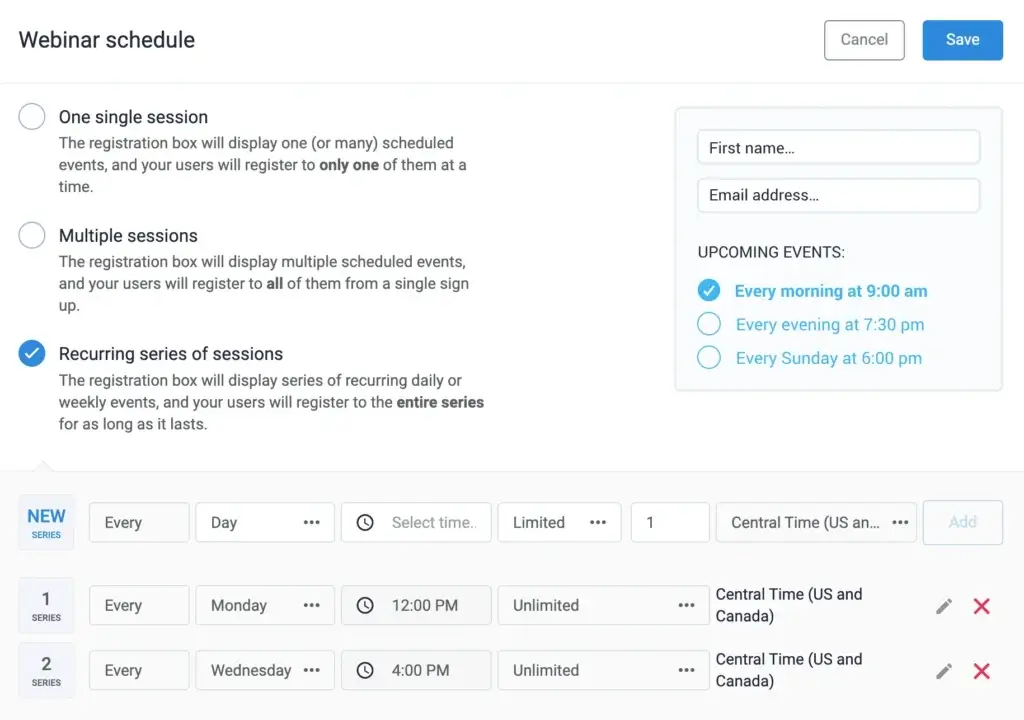
Do not treat the registration page as an afterthought. Use the signup flow, reminders, and messaging sequence to increase attendance. WebinarJam becomes much more valuable when you use the surrounding webinar funnel rather than only the live room.
Plan Interactivity in Advance
Polls, questions, offers, and chat prompts should support the structure of the webinar. The best-performing webinars rarely improvise these elements. Plan them intentionally so attendees stay engaged and know what action to take next.
Keep the Pitch and CTA Aligned
WebinarJam is strong for conversion-oriented sessions, but that only works if the content and the call to action feel connected. The webinar should naturally build toward the next step rather than suddenly switching into a hard sell.
Test the Technical Setup Before Going Live
Even strong webinar tools benefit from rehearsal. Test presenter access, camera and audio, landing page flow, reminder timing, and attendee experience before running an important live event.
Think Beyond the Live Session
One of the smartest ways to use WebinarJam is to treat live webinars as assets. Strong sessions can inform future campaigns, follow-up content, or automated webinar strategies through the broader ecosystem.
Conclusion
Final Thoughts
⭐ Overall Rating: 9.2/10
WebinarJam remains one of the more specialized webinar platforms for marketers, educators, coaches, and businesses that want webinars to produce measurable business outcomes. It is not the simplest tool in the market, and it is not the most modern-looking from a design perspective. But it is one of the more purpose-built options if your webinars are closely tied to lead generation, live selling, product education, or funnel performance.
The platform is especially strong for live webinars that need more than passive presentation tools. Its browser-based access, engagement features, registration workflow, and conversion-oriented structure give it a more business-focused character than many general conferencing tools. It is less compelling if you only need internal meetings or very occasional webinars. But if webinars are part of how you attract, educate, and convert an audience, WebinarJam is absolutely worth serious consideration.
Have more questions?
Frequently Asked Questions
What is WebinarJam used for?
WebinarJam is used for live webinars, product demos, lead generation webinars, training sessions, online workshops, and sales presentations. It is especially useful when webinars are part of a marketing or conversion strategy.
Is WebinarJam a webinar platform or a meeting platform?
It is much better understood as a webinar-first platform. While it can handle live online presentation use cases, its strongest value comes from webinar-focused workflows rather than day-to-day internal meetings.
Does WebinarJam require attendees to download software?
No. One of WebinarJam’s practical advantages is that it supports browser-based access, which helps reduce friction for public-facing webinar attendees.
Is WebinarJam good for lead generation?
Yes. This is one of WebinarJam’s strongest use cases. It is designed to support registrations, live engagement, offers, and follow-up workflows in a way that aligns well with lead generation.
Does WebinarJam support automated webinars?
WebinarJam is strongest for live webinars. Businesses that want evergreen or automated webinar workflows usually need to evaluate the related EverWebinar path as part of the broader ecosystem.
How many attendees can WebinarJam support?
WebinarJam pricing tiers scale by attendee capacity, with options that go from smaller webinars up to large live audiences. The exact capacity depends on the plan you choose.
How does WebinarJam compare with Demio?
Demio is often easier to use and more polished from a UX perspective, while WebinarJam is usually stronger when your webinars are closely tied to marketing, live offers, and conversion-focused webinar structure.
How does WebinarJam compare with Zoom Webinars?
Zoom Webinars benefits from strong brand familiarity and is often preferred by larger organizations that already rely on Zoom. WebinarJam is usually more attractive when the webinar itself is part of a lead generation or selling process.
Who should choose WebinarJam?
WebinarJam is best for marketers, coaches, consultants, course creators, SaaS teams, and businesses that use webinars to drive registrations, educate audiences, and move people toward a clear next step.
What are WebinarJam’s biggest drawbacks?
Its biggest drawbacks are the learning curve, a less polished interface than some newer competitors, and the need to evaluate the broader ecosystem carefully if automated webinars are a major part of your strategy.





