Introduction
Working with images is no longer limited to designers or creative professionals. Product managers, marketers, bloggers, e-commerce sellers, and office teams all rely on visuals as part of their daily workflow. In this environment, image quality is not a cosmetic detail; it directly affects credibility, clarity, and engagement.
One of the most common image-related challenges remains background removal. Even a strong image can lose its impact if the background is distracting, inconsistent, or poorly separated from the subject. This is why online background removal tools have become an essential part of modern digital workflows.
These tools aim to remove friction from image editing and make professional-looking results accessible to users without design expertise.
Why Background Removal Is Still a Common Pain Point
Despite the availability of advanced software, background removal continues to frustrate many users.
Traditional solutions often involve complex desktop tools that require time, training, and manual precision. Tasks such as masking, refining edges, or adjusting layers are powerful, but they are rarely efficient for everyday needs. For users who only want a clean cutout, the effort can feel disproportionate to the result.
The problem becomes more obvious when background removal needs to be done repeatedly. Processing dozens or hundreds of product images, creating visuals for frequent content updates, or preparing presentation assets can quickly turn into a bottleneck.
As a result, many users either settle for inconsistent visuals or delay tasks that depend on clean images. This gap between need and usability is what online background removal tools aim to solve.
Simplicity vs. Feature Overload in Image Editing Tools
One of the most noticeable differences between modern online tools and traditional image editors is the approach to user experience.
Many image editing platforms are built around feature depth. While powerful, this often leads to crowded interfaces filled with buttons, menus, and settings that most users will never touch. For background removal, this complexity rarely translates into better results.
In practice, simplicity matters more than flexibility. A useful background remover should allow users to upload an image and achieve a clean result with minimal input. The fewer decisions required, the faster the workflow becomes.
Online background removal tools that prioritize simplicity lower the barrier to entry. Users do not need design skills or prior experience to achieve acceptable results. This makes them especially suitable for business and productivity use cases, where speed and consistency are more important than artistic control.
Why Accuracy Is the Real Test for Background Removers
While many tools can remove a background from a simple image, accuracy is where meaningful differences appear.
Background removal becomes challenging when images include fine details or complex edges. Hair strands, transparent objects like glass, soft shadows, and irregular outlines are common failure points. Poor handling of these details results in jagged edges, missing parts of the subject, or visible artifacts that make the edit obvious.
Effective AI background removal relies on models that understand image content rather than applying rigid rules. When done well, the tool can distinguish between foreground and background even in visually complex scenes.
A strong background remover produces results that look natural and require little to no manual correction. This is especially important for users who need to process images at scale and cannot afford to fine-tune each one individually.

UltraPic Overview
UltraPic is positioned as an AI-powered online background removal tool built around simplicity and accuracy.
The interface is intentionally minimal. When opening the background remover page, users are not confronted with complex menus or advanced settings. The focus is placed entirely on the core task of removing the background efficiently.
Behind this simplicity is an AI model designed to analyze image content and separate subjects with precision. Whether the image includes detailed hair, transparent materials, pets, or soft contours, the system aims to preserve natural edges and avoid harsh cutouts.
The result is a tool that emphasizes speed and usability while maintaining a level of accuracy suitable for professional use.
Step-by-Step Workflow
The workflow in UltraPic is designed to be predictable and efficient, even for first-time users.
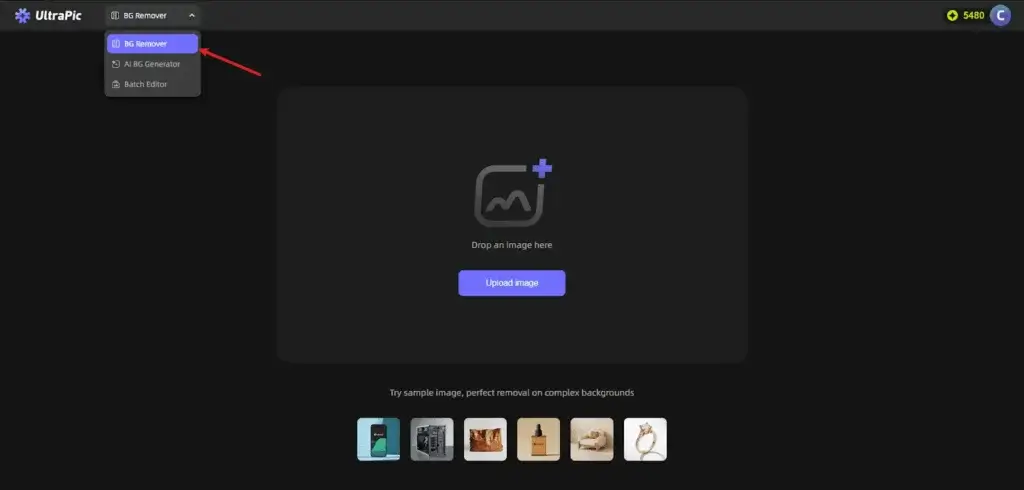
1. Upload images
Users can drag and drop one or multiple images into the background remover page. Batch uploading is supported, which is particularly useful for e-commerce sellers or teams handling large image libraries.
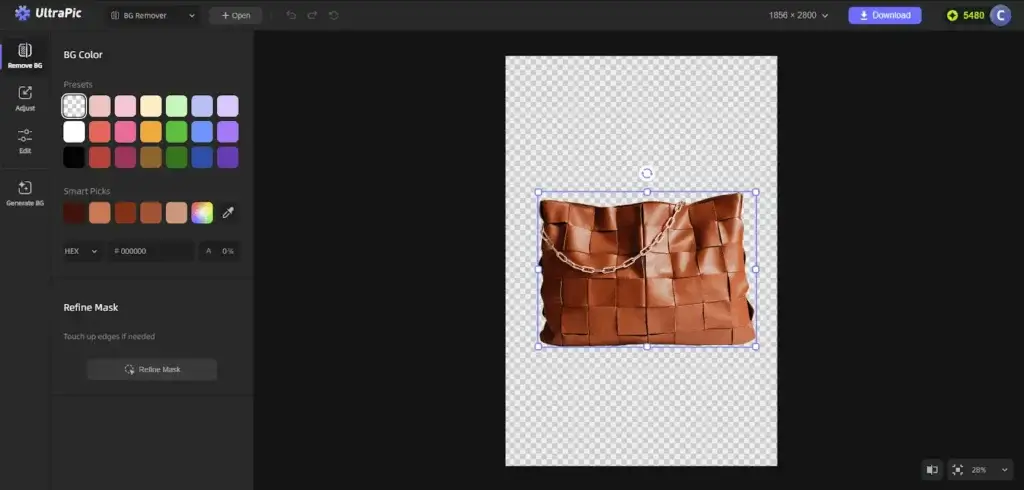
2. Automatic background removal
Once uploaded, the AI background remover starts automatically. The system detects the subject and removes the background without requiring any manual input.
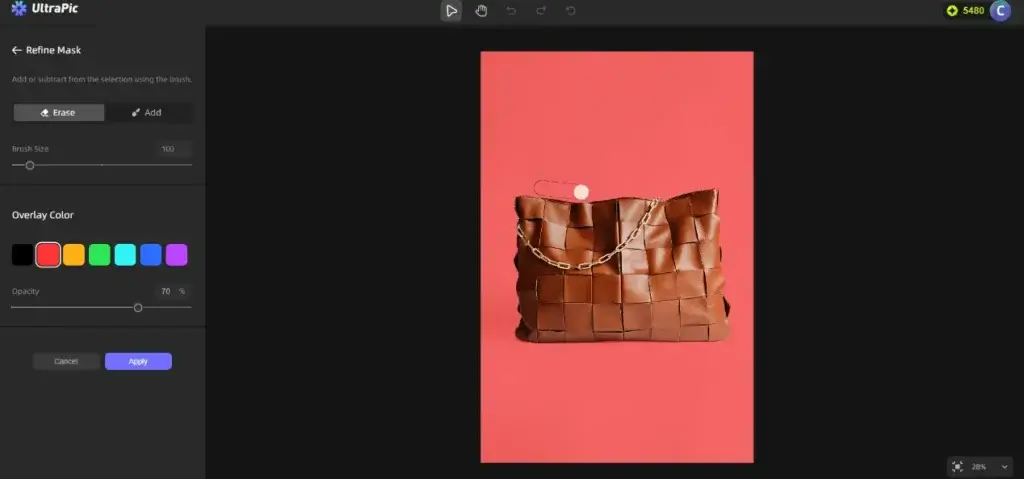
3. Optional fine-tuning
For images that require small adjustments, UltraPic provides Add and Erase brushes. These tools allow users to refine edges or correct minor inaccuracies.
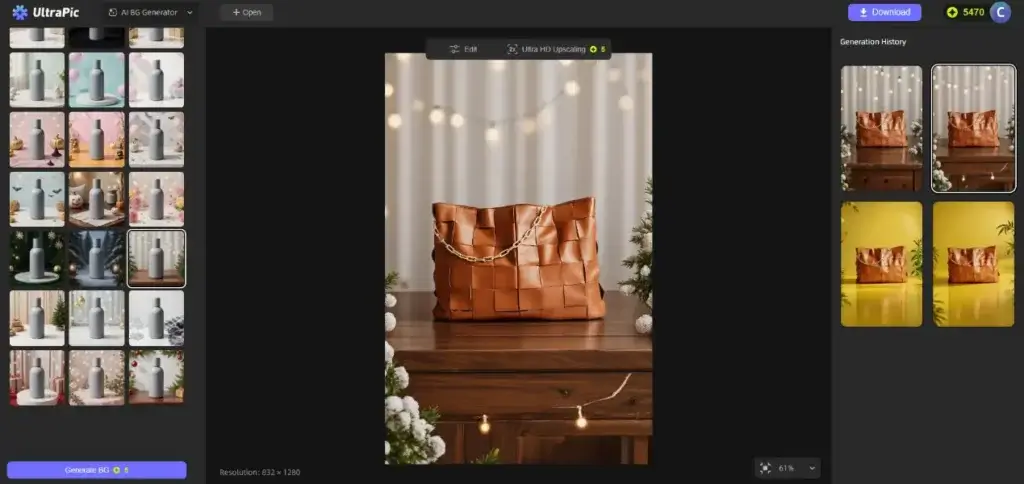
4. Background customization
Users can change background colors or apply scene templates to preview how the subject will look in different contexts. This helps visualize the final result before downloading.
5. Download the final image
The finished image can be downloaded in high-quality PNG format with a transparent background, ready for immediate use in design tools, websites, or documents.
The entire process is optimized to minimize effort and reduce time spent on repetitive tasks.
Who should use UltraPic?
As one of the many online image processing tools on the market, who can benefit from the AI online background removal service mainly provided by UltraPic?
E-commerce:
If you are an online store owner who needs to batch process a large number of standard product images, an ideal background remover can significantly improve the efficiency of basic white background image production and help maintain the basic visual unity of the store.
Designers/ Content creators:
When you need to quickly create images for business use or blog posts, this tool can simplify the process of integrating the main elements into a new background or template, especially for daily content creation with high timeliness requirements.
Daily office work:
When dealing with non-commercial purposes such as presentations, resume illustrations or personal photos, the tool provides a much lower entry threshold than professional software, and can meet the needs of the “enough” level.
The things that used to require a professional can now be done with a few taps of the finger.
Conclusion
AI-powered background removal has shifted image editing from a specialized skill to a practical, everyday capability. Tasks that once required advanced software, time, and manual precision can now be completed quickly and consistently, even by users with no design background.
UltraPic fits well into this shift by focusing on what matters most for most users: ease of use, reliable accuracy, and a streamlined workflow. Instead of overwhelming users with features, it prioritizes fast results and clean cutouts that are ready to use across different scenarios.
In a digital environment where visuals often form the first impression, poorly edited images can quietly undermine otherwise strong content. Using a background removal tool that reduces friction and maintains quality helps ensure that visuals support the message rather than distract from it.
For teams and individuals who work with images regularly, adopting an efficient background removal solution is no longer a nice-to-have. It is simply a more effective way to work.
Frequently Asked Questions
1. What is an online background removal tool?
An online background removal tool is a web-based solution that automatically separates the main subject of an image from its background. Most modern tools use AI to detect edges and details, allowing users to remove backgrounds without manual editing or professional software.
2. How accurate are AI background removers compared to manual editing?
AI background removers have improved significantly and can handle many complex cases such as hair, pets, and transparent objects. While manual editing still offers maximum control, AI tools are often accurate enough for business, e-commerce, and content creation use cases, especially when speed and consistency matter.
3. Do I need design skills to use UltraPic?
No. UltraPic is designed for users without design or photo editing experience. The process is largely automatic, with optional tools available only if minor adjustments are needed.
4. Can UltraPic handle batch image processing?
Yes. UltraPic supports batch uploading, making it suitable for users who need to process multiple images at once, such as online store owners or teams managing large image libraries.
5. What types of images work best with online background removers?
Online background removers work best with clear subjects that contrast reasonably with the background. Product photos, portraits, pets, and everyday objects generally produce strong results, even in images with fine details.