

Introduction
Managing marketing campaigns across disconnected tools can quickly create duplicated data, inconsistent reporting, and unnecessary software costs. Odoo Marketing takes a different approach by connecting campaign execution with the wider Odoo ecosystem, including CRM, Website, eCommerce, Events, Sales, and customer records.
In this Odoo Marketing review, you’ll get a practical look at the platform’s core marketing apps, pricing, strengths, limitations, and best use cases. The goal is to help you decide whether Odoo is the right marketing software for your business in 2026.
What Is Odoo Marketing?
Odoo Marketing is a group of marketing applications inside the broader Odoo business management suite. It includes Social Marketing, Email Marketing, SMS Marketing, Events, Marketing Automation, and Surveys.
Unlike standalone tools that focus on one channel, Odoo Marketing is designed to connect your marketing activity with your operational data. That means campaign performance can be tied to contacts, leads, opportunities, customers, registrations, orders, and feedback inside the same system.
Background and Evolution
Odoo started as an open-source ERP system and evolved into a broad suite of business applications covering sales, finance, inventory, HR, websites, services, productivity, and marketing. Its marketing capabilities are not positioned as a single isolated product, but as a connected set of apps that support the full customer journey.
This is important because Odoo Marketing works best when you use it alongside other Odoo apps. For example, Email Marketing becomes more valuable when connected to CRM. Events become more useful when connected to Website, eCommerce, Surveys, and attendee follow-up. Marketing Automation becomes stronger when it can use real customer and lead data.
Target Users and Use Cases
Odoo Marketing is best suited for businesses that want campaign tools connected to their CRM, sales, website, and operational workflows. It can support small teams, growing companies, and larger organizations that want to reduce tool sprawl.
- B2B teams – Run email, SMS, event, and lead nurturing campaigns connected to CRM.
- eCommerce businesses – Promote products, send campaigns, and connect engagement with orders.
- Event-driven companies – Manage registrations, tickets, sponsors, and attendee follow-up.
- Marketing agencies – Coordinate campaigns across email, social, SMS, and surveys.
- Odoo users – Add marketing tools without moving data to external platforms.
If your marketing strategy depends mainly on standalone newsletter sending, Odoo may feel heavier than necessary. But if your business already uses Odoo or wants one connected system for marketing, sales, events, and customer data, Odoo Marketing becomes much more compelling.
Key Features
How Does It Work?
Odoo Marketing is not one single marketing app. It is a connected collection of marketing tools. The main modules are Social Marketing, Email Marketing, SMS Marketing, Events, Marketing Automation, and Surveys.
This structure gives Odoo a clear advantage if you want one database for contacts, customers, campaigns, registrations, feedback, and sales activity. Instead of sending contacts between several disconnected platforms, you can manage many marketing workflows from the same environment.
Social Marketing
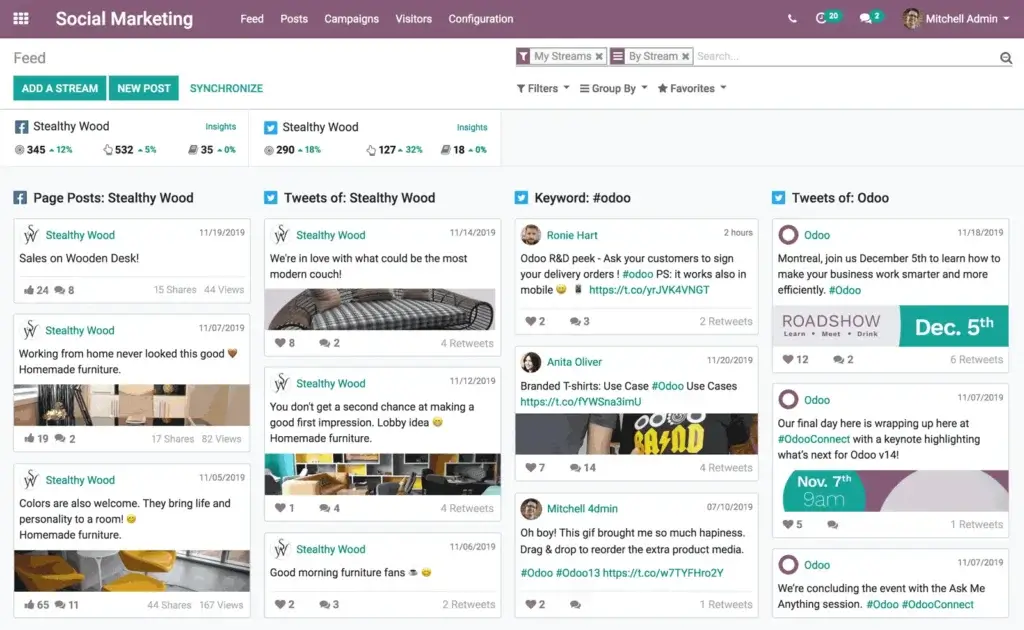
Odoo Social Marketing helps you plan, monitor, and analyze social media activity from one place. It is designed for businesses that want better control over social publishing and campaign coordination without relying on separate social media management software.
You can use the app to manage posts, coordinate social campaigns, monitor activity, and connect social media efforts with other Odoo marketing channels. This is especially helpful when you want social campaigns to support email campaigns, events, product launches, or lead generation campaigns.
One of the more useful aspects of Odoo Social Marketing is its connection to the broader Odoo ecosystem. If social media is only one part of your customer journey, Odoo makes it easier to connect that activity with landing pages, email follow-up, SMS reminders, and CRM records.
SMS Marketing
Odoo SMS Marketing gives you a direct channel for time-sensitive communication. It can be used for promotional messages, appointment reminders, event updates, limited-time offers, and short customer alerts.
SMS works best when it is used selectively. Because it reaches customers directly on their phones, it can be highly effective for urgent or high-intent communication. However, it should be used with clear consent, careful segmentation, and practical message timing.
Odoo’s SMS Marketing app is particularly useful when combined with Events, CRM, and Marketing Automation. For example, you can send reminders before an event, follow up with attendees after registration, or include SMS as one step in a broader nurture workflow.
Events
Odoo Events is one of the stronger areas of the marketing suite because it goes beyond simple event promotion. It helps you create events, manage registrations, sell tickets, organize sponsors, support event websites, and connect event activity with marketing and CRM workflows.
This makes it useful for conferences, webinars, workshops, community events, trade shows, training sessions, and product launch events. You can promote events through other Odoo channels, communicate with registrants, and collect attendee data for follow-up.
The Events app is also valuable because it connects with Website, eCommerce, Email Marketing, CRM, and Surveys. This allows you to build a more complete event journey, from event landing page to registration, ticketing, attendance, feedback, and post-event lead nurturing.
Surveys
Odoo Surveys helps you create, share, and analyze surveys for customers, employees, event attendees, and prospects. You can use it for satisfaction surveys, marketing research, event feedback, customer experience studies, quizzes, and assessments.
The main benefit is that survey results do not have to live outside your business system. You can collect feedback, analyze responses, and use insights to improve campaigns, customer experience, events, or internal processes.
For marketers, Surveys is especially useful after events, purchases, onboarding flows, or support interactions. It helps you turn audience feedback into practical campaign and product insights.
Marketing Automation
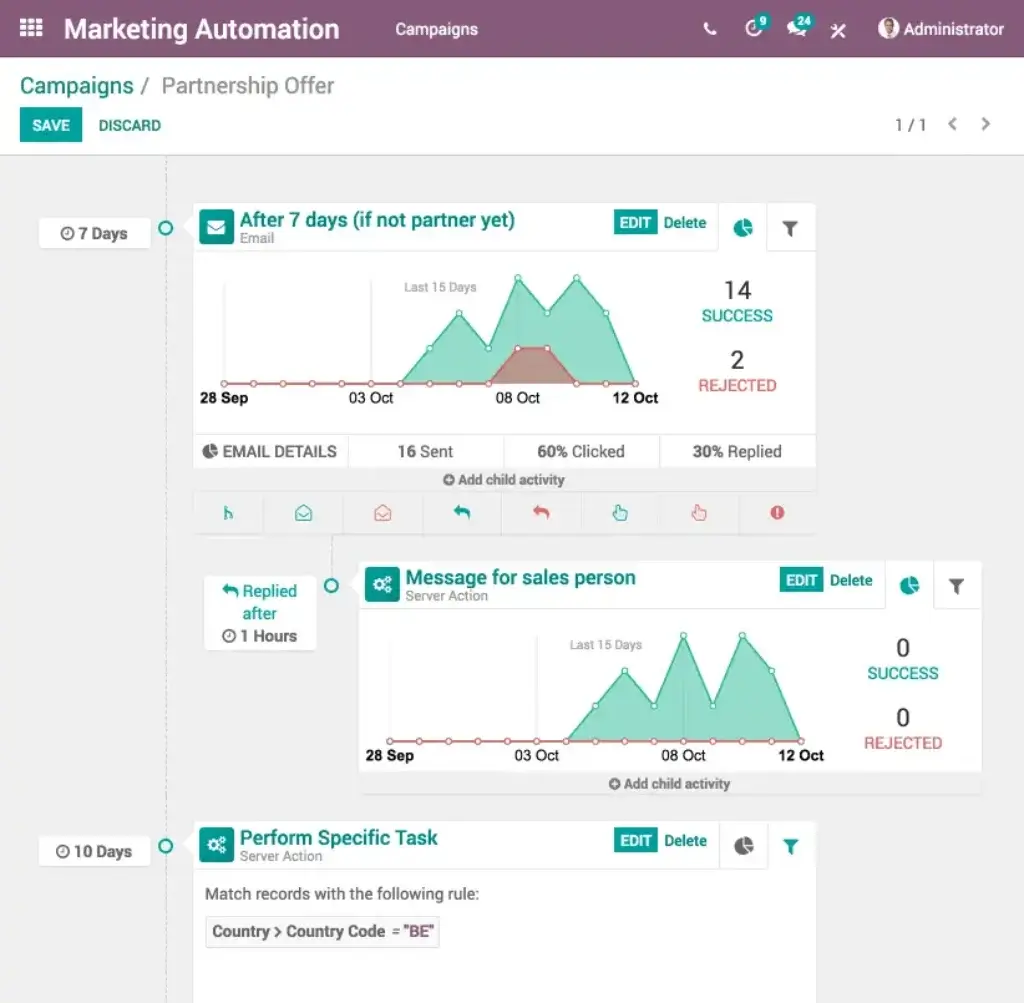
Odoo Marketing Automation lets you build automated customer journeys based on segmentation, timing, and user behavior. It is designed to help you send the right message to the right contact at the right time.
The visual workflow builder is useful for creating multi-step campaigns. You can define actions, delays, conditions, and different paths based on how prospects interact with your campaign. This makes Odoo useful for lead nurturing, onboarding, reactivation, event follow-up, and sales enablement campaigns.
For B2B teams, this is one of the most important reasons to consider Odoo Marketing. When automation is connected to CRM and contact data, you can build workflows that support real sales processes rather than isolated email sequences.
Email Marketing
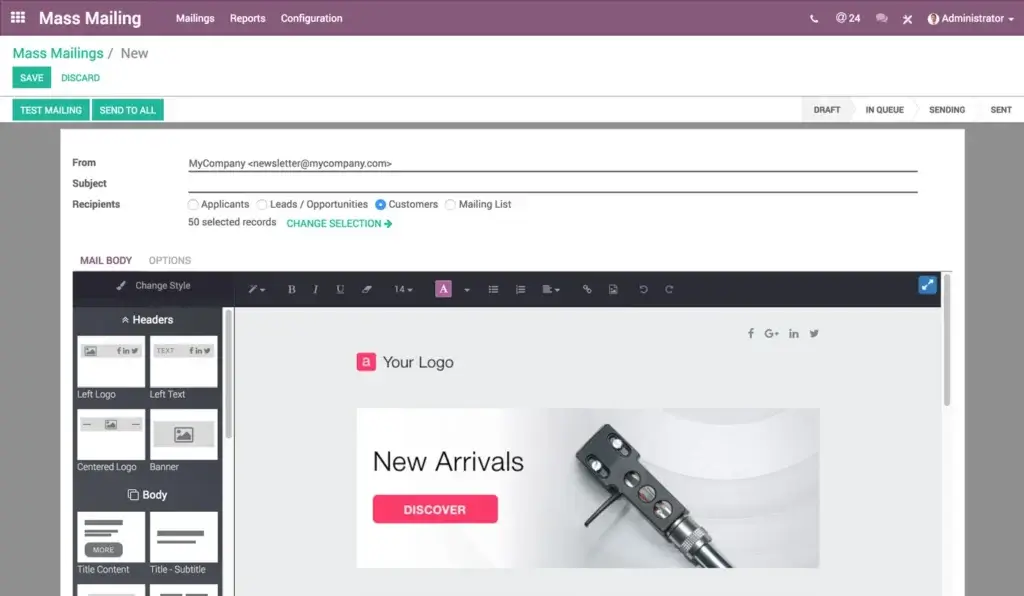
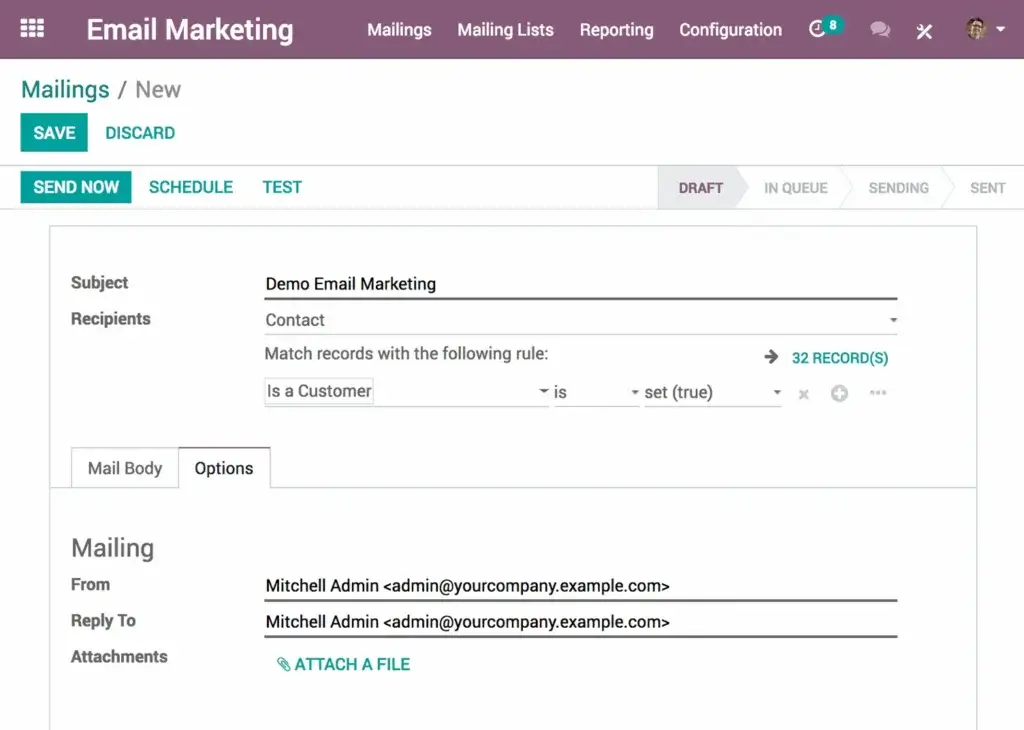
Odoo Email Marketing is one of the most important apps in the marketing suite. It gives you tools to create email campaigns, design messages, target contacts, track results, and analyze campaign performance.
The email builder supports visual campaign creation, so you can create professional emails without heavy technical work. You can start with templates, adjust the layout, add content blocks, and design campaigns for different audiences.
From a strategy perspective, the biggest advantage is not just email design. It is the way Odoo connects email performance with business outcomes. You can track opens, clicks, leads, orders, revenue, bounce rate, click-through rate, and campaign performance. For teams that care about pipeline and revenue attribution, this is more useful than basic newsletter reporting.
Core Capabilities
Odoo Marketing Features by Channel
Odoo’s marketing suite is strongest when each app supports a different part of the customer journey. The table below summarizes the main capabilities by marketing channel.
| Marketing Area | Odoo Capability | Best Use Case |
| Social Marketing | Plan, publish, monitor, and analyze social media activity | Coordinated social campaigns and brand visibility |
| Email Marketing | Create email campaigns, segment audiences, and track performance | Newsletters, promotions, lead nurturing, and customer updates |
| SMS Marketing | Send direct text campaigns and reminders | Urgent messages, event reminders, and time-sensitive offers |
| Events | Manage event pages, registrations, tickets, sponsors, and follow-up | Webinars, conferences, workshops, and training events |
| Marketing Automation | Build visual workflows with triggers, actions, and delays | Lead nurturing, onboarding, reactivation, and post-event campaigns |
| Surveys | Create, distribute, and analyze surveys and forms | Customer feedback, event feedback, research, and satisfaction surveys |
Campaign Planning and Execution
Odoo helps you plan campaigns across multiple channels instead of treating every channel as a separate workflow. You can use social posts for awareness, email for nurturing, SMS for urgent reminders, Events for engagement, Surveys for feedback, and Marketing Automation for follow-up.
This structure is especially valuable for campaigns with several touchpoints. For example, a webinar campaign might include a landing page, registration form, email invitation, SMS reminder, event attendance tracking, survey feedback, and post-event lead follow-up.
Audience Segmentation
Segmentation is one of Odoo’s most important marketing strengths. Because Odoo can connect marketing with CRM, sales, events, and customer data, you can create more relevant campaigns based on real business information.
You can segment audiences by contact details, customer status, campaign behavior, event attendance, geography, lead activity, purchase history, or other available Odoo data. This makes campaigns more targeted and reduces the risk of sending generic messages to everyone.
Campaign Reporting and Analytics
Odoo includes reporting tools that help you measure campaign engagement and business impact. In Email Marketing, for example, you can review open rates, click-through rates, bounces, generated leads, orders, revenue, and other performance data.
This is where Odoo can be more useful than lightweight campaign tools. If you need to understand how marketing contributes to opportunities, sales, registrations, or revenue, Odoo gives you a stronger foundation because marketing data can connect with operational data.
CRM and Sales Integration
Odoo Marketing becomes much more powerful when connected with Odoo CRM. You can use campaign engagement to support sales follow-up, track opportunities generated by campaigns, and keep contact history in one place.
This is useful for B2B teams where marketing and sales need to work from the same customer view. Instead of exporting leads from a marketing platform and importing them into a CRM, Odoo allows teams to work inside one connected system.
Pros and Cons
Benefits and Limitations of Odoo Marketing
Positive
✅ Connected marketing data
✅ Broad channel coverage
✅ Strong CRM alignment
✅ Flexible pricing model
Negative
❌ Setup can take time
❌ Less specialized than niche tools
❌ Requires clean data
❌ Best value inside Odoo
Strengths and Benefits
Odoo Marketing’s biggest strength is integration. It is not just a campaign tool. It is part of a wider business platform where marketing, sales, events, website, eCommerce, and customer records can work together.
- Connected marketing data – Campaigns can use CRM, sales, event, and customer data.
- Broad channel coverage – Email, SMS, social, events, automation, and surveys are included.
- Strong CRM alignment – Sales and marketing teams can work from shared records.
- Flexible pricing model – One App Free and all-app plans create several entry points.
Another major benefit is operational simplicity. If you already use Odoo, adding marketing apps can reduce the need for separate email, survey, event, SMS, and automation tools.
Limitations and Drawbacks
Odoo Marketing is not the best fit for every team. Because it belongs to a wider ERP and business management platform, it can feel more complex than tools built only for email marketing or social media scheduling.
- Setup can take time – Configuration may require planning, especially across multiple apps.
- Less specialized than niche tools – Dedicated tools may offer deeper features in one channel.
- Requires clean data – Automation and segmentation depend on accurate contact data.
- Best value inside Odoo – Standalone users may not benefit from the full ecosystem.
If your business only needs simple newsletters, Odoo may be more platform than you need. But if your marketing activity connects to sales, events, eCommerce, and CRM, the trade-off becomes more attractive.
Use Cases
Who Should Use Odoo Marketing?
Odoo Marketing works best when you need more than isolated campaign execution. It is most valuable for teams that want marketing data connected to business operations.
Businesses Already Using Odoo
If your company already uses Odoo CRM, Website, Sales, eCommerce, Accounting, or Events, Odoo Marketing is a natural extension. You can add marketing capabilities without moving customer data into another platform.
This is the strongest use case. The more Odoo apps you use, the more value you usually get from the marketing suite.
B2B Teams With Sales-Led Marketing
B2B companies can use Odoo Marketing for lead nurturing, event promotion, email campaigns, CRM follow-up, and automated workflows. Because leads and opportunities can live in the same system, sales teams can act on campaign engagement more easily.
This makes Odoo a good fit for companies where marketing is measured by pipeline, not only clicks and opens.
Event-Based Businesses
Odoo is a strong option for businesses that run webinars, training sessions, conferences, workshops, or community events. The Events app can support registrations, tickets, sponsors, attendee communication, and follow-up.
When combined with Email Marketing, SMS Marketing, Surveys, and CRM, it can support the full event lifecycle from promotion to post-event engagement.
eCommerce and Product-Led Businesses
Odoo can also work well for businesses that sell products online and want marketing connected with customer and order data. Campaigns can support product launches, seasonal promotions, reactivation, and customer feedback collection.
However, businesses with advanced eCommerce personalization needs may still prefer specialized lifecycle marketing tools depending on scale and channel complexity.
When Odoo Marketing Might Not Be the Right Fit
Odoo Marketing may not be ideal if you only need a simple email platform, a social scheduler, or a lightweight survey tool. It also may not be the best choice if your team does not plan to use Odoo CRM, Website, Events, or other connected apps.
In those cases, tools like Mailchimp, Brevo, ActiveCampaign, HubSpot Marketing Hub, Buffer, or Typeform may be easier to adopt for a specific purpose.
Pricing
Odoo Marketing Pricing and Plans
Odoo pricing is different from many marketing platforms because it is based around access to Odoo apps rather than separate pricing for each marketing channel. This can make Odoo highly cost-effective if you use multiple apps, but less straightforward if you only want one specific marketing tool.
Odoo currently offers a One App Free option, plus paid Standard and Custom plans. Pricing can vary by country, billing cycle, user count, and current promotions, so you should always confirm final pricing on Odoo’s official pricing page before publishing or purchasing.
One App Free
The One App Free plan gives you access to one Odoo app with unlimited users on Odoo Online. This can be useful if you only want to test or use one specific app, such as Email Marketing, Events, or Surveys.
The limitation is clear: once you need multiple Odoo apps working together, you will usually need a paid plan. For marketing teams, that can happen quickly because the strongest value comes from combining apps.
Standard
The Standard plan gives you access to all Odoo apps on Odoo Online for a per-user monthly price. This is the best starting point for many businesses that want the full Odoo ecosystem without custom development requirements.
For marketing teams, Standard can be attractive because it allows you to use Social Marketing, Email Marketing, SMS Marketing, Events, Marketing Automation, Surveys, CRM, Website, eCommerce, and other apps under one broader subscription model.
Custom
The Custom plan includes all apps and adds options such as Odoo Studio, multi-company support, external API access, and deployment flexibility through Odoo Online, Odoo.sh, or on-premise setups.
This plan is more relevant for companies that need customization, advanced integrations, multi-company structures, or technical flexibility. It may be unnecessary for smaller teams that simply want standard marketing and CRM capabilities.
Pricing Table
| Plan | One App Free | Standard | Custom |
| Starting price | $0 | From Odoo’s listed per-user pricing | Higher per-user pricing than Standard |
| Apps included | One app | All apps | All apps |
| Users | Unlimited users for one app | Per user | Per user |
| Hosting | Odoo Online | Odoo Online | Odoo Online, Odoo.sh, or on-premise |
| Best for | Testing or using one app | Most standard business teams | Companies needing customization |
| Marketing fit | Good for one channel | Best fit for connected marketing | Best for complex setups |
| Customization | Limited | Standard configuration | Odoo Studio, API, and custom deployment options |
For most marketing teams evaluating Odoo seriously, the Standard plan is likely the most practical starting point. It gives you access to multiple marketing apps plus CRM, Website, eCommerce, and other connected tools.
The One App Free option is useful for testing, but it does not show Odoo’s full marketing value unless your needs are limited to one app. The Custom plan makes sense when your organization needs deeper flexibility, integrations, or custom processes.
Competitors
Odoo Marketing Alternatives
Odoo competes with several marketing platforms, but the comparison depends on what you need. Odoo is strongest as a connected business platform with marketing apps. Some alternatives are stronger in specialized campaign execution, automation depth, or enterprise marketing operations.
| Feature Type | Odoo Marketing | HubSpot Marketing Hub | ActiveCampaign | Mailchimp |
| Core focus | Connected marketing inside business suite | Inbound marketing, CRM, and automation | Email automation and customer journeys | Email marketing and simple campaigns |
| Best for | Teams using CRM, events, website, and operations together | B2B teams needing strong marketing and sales alignment | Teams focused on email automation | Small teams and newsletter campaigns |
| Email marketing | Yes | Yes | Yes | Yes |
| SMS marketing | Yes | Available through ecosystem and integrations | Available depending on setup | Limited by market and plan |
| Social marketing | Yes | Yes | Limited | Basic campaign support |
| Events | Strong native event management | Mostly through integrations or landing pages | Mostly through integrations | Mostly through integrations |
| Surveys | Native surveys app | Available through forms and feedback tools | Limited | Basic forms and surveys depending on setup |
| CRM connection | Strong with Odoo CRM | Strong with HubSpot CRM | Good CRM and integrations | More limited CRM depth |
| Ideal buyer | Companies wanting marketing connected to ERP and operations | Growth teams wanting a mature marketing CRM platform | Email-led automation teams | Small businesses starting with email |
Choose Odoo Marketing if you want marketing connected with CRM, events, website, eCommerce, and business operations. Choose HubSpot if you want a mature inbound marketing and CRM platform with a strong ecosystem. Choose ActiveCampaign if email automation is your main priority. Choose Mailchimp if you need a simpler email-first solution.
Best Practices
Getting Started With Odoo Marketing
Odoo Marketing can be powerful, but setup quality matters. The platform works best when you define your customer data, campaign structure, and automation logic before building too many workflows.
Start With Your Main Marketing Goal
Before activating every marketing app, define your main objective. That could be newsletter growth, lead nurturing, event promotion, customer reactivation, product launches, or feedback collection.
Starting with one goal helps you avoid building an overly complex setup before your team understands the system.
Connect CRM and Website Early
If you plan to use Odoo for lead generation, CRM and Website should be part of your early setup. This allows your campaigns, forms, landing pages, and customer records to connect from the beginning.
This step is especially important for B2B teams because campaign engagement becomes more useful when sales teams can see the activity inside CRM.
Use Email Before Expanding to SMS
Email is usually the safest first channel to configure because it supports newsletters, onboarding, nurturing, and post-event communication. Once your segmentation and email workflows are stable, SMS can be added for urgent or high-priority messages.
This approach helps you avoid overusing SMS and keeps the channel reserved for moments where immediacy matters.
Build Simple Automation First
Odoo Marketing Automation can support multi-step workflows, but your first automations should be simple. Start with basic triggers such as form submission, event registration, email engagement, or lead status changes.
After those workflows are performing well, you can add more advanced branching, delays, and behavior-based journeys.
Use Surveys to Improve Campaign Quality
Surveys should not be treated as an afterthought. They can help you learn why people register, buy, unsubscribe, attend events, or become inactive.
Use survey insights to improve your segmentation, messaging, event strategy, and customer experience over time.
Conclusion
Final Thoughts
Odoo Marketing is a strong choice for businesses that want marketing tools connected to CRM, events, website, eCommerce, and customer data. Its biggest advantage is not that it beats every specialized marketing tool feature by feature. Its advantage is that it brings multiple marketing channels into one broader business system.
The platform covers the key capabilities many teams need: Social Marketing, Email Marketing, SMS Marketing, Events, Marketing Automation, and Surveys. When these apps are connected with CRM and other Odoo modules, you can build campaigns that are easier to track, coordinate, and connect to business outcomes.
Odoo is less ideal if you only want the simplest newsletter tool or a dedicated social media scheduler. But if your marketing team needs campaign execution, customer data, event management, feedback, and automation in one connected platform, Odoo Marketing is a serious option to consider in 2026.
Frequently Asked Questions
Have more questions?
What is Odoo Marketing?
Odoo Marketing is a collection of marketing apps inside the Odoo business suite. It includes Social Marketing, Email Marketing, SMS Marketing, Events, Marketing Automation, and Surveys.
Is Odoo Marketing a standalone marketing platform?
Odoo Marketing can be used for specific marketing functions, but it is strongest when connected with other Odoo apps such as CRM, Website, eCommerce, Events, and Sales.
Does Odoo include email marketing?
Yes. Odoo Email Marketing lets you create campaigns, design emails, segment audiences, track engagement, and analyze results such as opens, clicks, leads, orders, and revenue.
Does Odoo support SMS marketing?
Yes. Odoo SMS Marketing supports direct text campaigns and reminders, making it useful for urgent messages, event updates, appointment reminders, and time-sensitive promotions.
Can Odoo manage events?
Yes. Odoo Events supports event pages, registrations, ticketing, sponsors, attendee communication, and connections with Website, eCommerce, Email Marketing, CRM, and Surveys.
Does Odoo have marketing automation?
Yes. Odoo Marketing Automation lets you create visual workflows with actions, delays, conditions, and campaign paths based on audience behavior and segmentation.
Does Odoo include surveys?
Yes. Odoo Surveys helps you create, share, and analyze surveys for customer feedback, event feedback, satisfaction research, assessments, and internal data collection.
How much does Odoo Marketing cost?
Odoo offers a One App Free option and paid Standard and Custom plans. Pricing depends on user count, region, billing terms, and whether you need all apps or custom capabilities.
Who is Odoo Marketing best for?
Odoo Marketing is best for businesses that want marketing campaigns connected to CRM, events, website, eCommerce, sales, and customer data in one system.
What are the best Odoo Marketing alternatives?
Common Odoo Marketing alternatives include HubSpot Marketing Hub, ActiveCampaign, Mailchimp, Brevo, Zoho Marketing Plus, and Salesforce Marketing Cloud, depending on your needs.





