
Introduction
Choosing the right CRM can shape the way your sales team works every day. It is not only about storing contacts or tracking deals. It is about building a repeatable sales system that helps your team move faster, collaborate better, and make smarter decisions.
monday CRM takes a very different approach from many traditional CRM platforms. Instead of forcing your team into a rigid sales structure, it gives you a visual, flexible workspace that you can shape around your actual sales process.
That makes it especially useful if you want a CRM that feels simple enough for everyday users, but customizable enough for managers, operations teams, and growing revenue teams.
In this monday CRM review, you will get a clear look at:
- How monday CRM works as a sales management platform
- Which features are most useful for real sales teams
- Where the platform performs well and where it still has limits
- How pricing, AI features, automations, integrations, and security compare
- Who should use monday CRM and who may need a different CRM
We will also compare monday CRM with popular alternatives like HubSpot, Salesforce, Pipedrive, and Zoho CRM, so you can make a more confident decision.
Is monday CRM worth it?
Quick Summary
monday CRM is worth considering if you want a visual, customizable CRM that your team can adopt quickly. It is especially strong for small and mid-sized sales teams, agencies, real estate teams, consultants, and growing businesses that need pipeline visibility without heavy CRM complexity.
Its biggest strengths are ease of use, workflow customization, automation, dashboards, and collaboration. Its main limitations appear when you need very advanced enterprise CRM logic, native predictive lead scoring, or highly specialized sales operations without customization.
| Category | monday CRM Review Summary |
| Best for | Sales teams that want a visual, flexible, and easy-to-use CRM |
| Best use cases | Lead tracking, pipeline management, sales collaboration, account management, customer onboarding |
| Main strengths | Customization, no-code automation, dashboards, integrations, team visibility |
| Main limitations | Advanced CRM depth may require setup, higher plans, or integrations |
| Best alternative to compare | HubSpot for marketing-led teams, Salesforce for enterprise sales, Pipedrive for sales-only pipelines |
Key Features
monday CRM Software Specification
The best CRM should support the way your team actually sells. monday CRM does this by combining a visual workspace with customizable boards, automations, dashboards, email tools, and AI-assisted workflows.
Instead of making every team follow the same CRM structure, it lets you build pipelines, fields, views, and dashboards around your sales process.
Visual Sales Pipeline Management
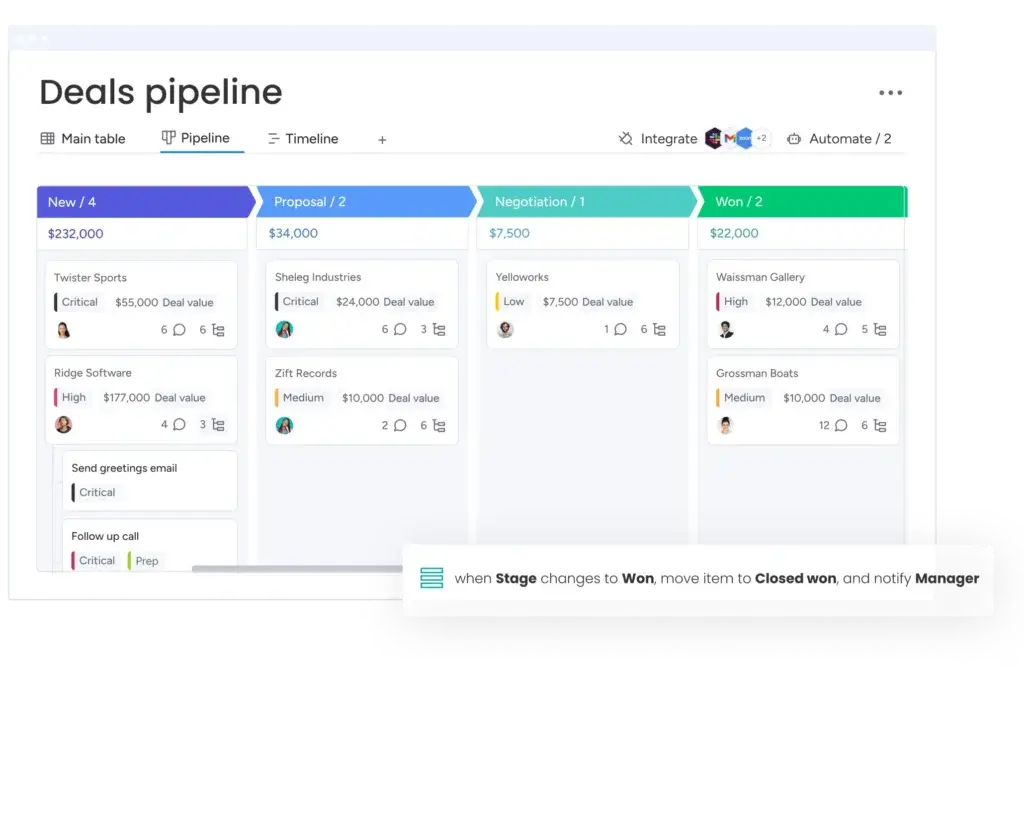
monday CRM gives you a clear visual view of your deals, leads, accounts, and activities. This is one of its strongest advantages over traditional spreadsheet-style CRMs.
- Move deals between stages with a simple drag-and-drop layout
- Use color-coded statuses to see what is moving, stuck, or at risk
- Track deal size, owner, priority, probability, close date, and next action
- Switch between table, Kanban, timeline, chart, calendar, and dashboard views
Why it matters: Sales managers get a fast view of pipeline health, while reps get a simple workspace for daily selling.
Customizable Workflows and No-Code Automation
monday CRM is highly customizable, but you do not need a developer to shape it around your process. You can create workflows that match how your team qualifies leads, follows up, updates deal stages, and hands customers to onboarding or support.
Useful automations include:
- Assigning leads based on region, deal size, source, or owner
- Sending reminders when a deal has no recent activity
- Creating follow-up tasks after a meeting or call
- Updating statuses when a form is submitted or an email is sent
- Notifying managers when high-value deals move forward
Expert note: The value of monday CRM depends heavily on how well you structure your workflows. If your pipeline stages are clear, the platform can remove a lot of manual admin work.
Integrations With Popular Business Tools
Your CRM should not sit separately from your email, calendar, communication tools, or marketing systems. monday CRM connects with many common business tools, helping your sales data stay closer to the work your team is already doing.
- Gmail and Outlook for email sync and activity tracking
- Google Calendar and Microsoft Calendar for scheduling visibility
- Slack and Microsoft Teams for team notifications
- DocuSign for document workflows
- Mailchimp and marketing tools for campaign-related workflows
- Zapier and API options for additional connections
Best use case: If your sales team works across email, chat, calendar, and spreadsheets, monday CRM can centralize more of that activity into one shared workspace.
User-Friendly Interface for Sales Teams
Many CRM platforms are powerful, but difficult to adopt. monday CRM stands out because it feels approachable from the first login.
The interface is visual, fast, and easy to understand. That matters because CRM adoption is often less about the number of features and more about whether your team actually uses the system every day.
- Boards are simple to scan
- Columns are easy to customize
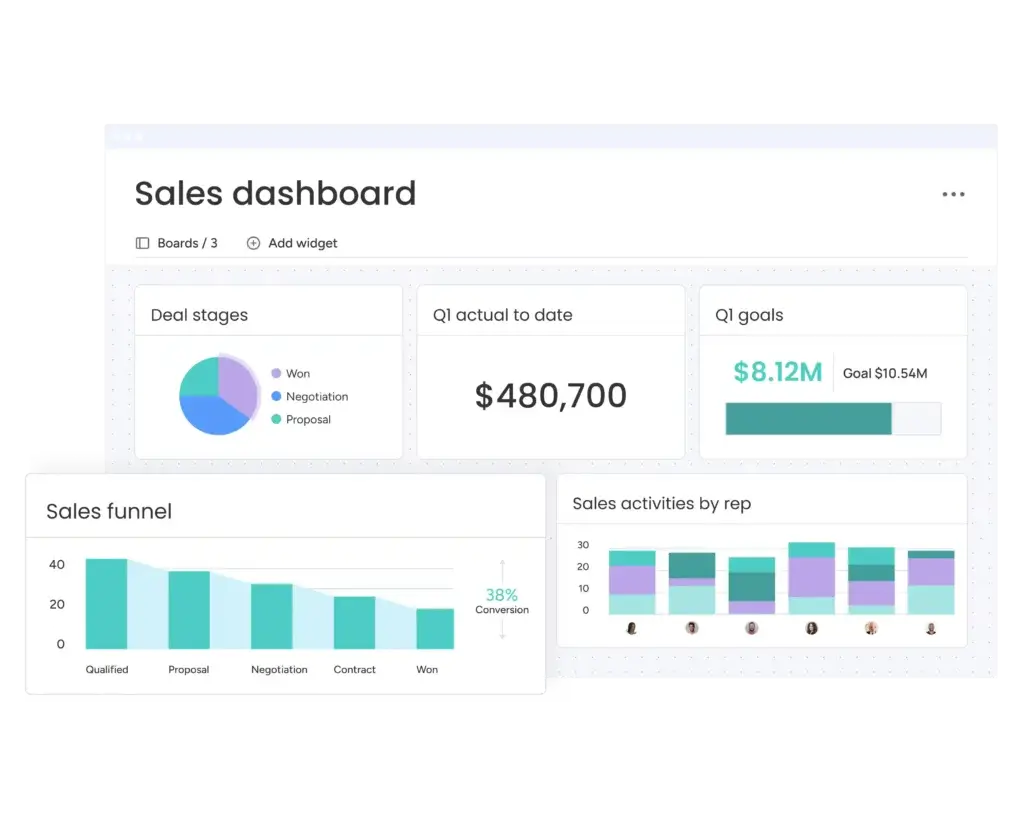
- Dashboards are visual and manager-friendly
- Views can be adjusted by role or workflow
- New team members can learn the basics quickly
CRM insight: For many SMBs, the best CRM is not the most advanced one. It is the one sales reps update consistently without being forced.
Personalized Pipelines for Different Sales Models
monday CRM can support different sales motions, including B2B sales, agency sales, real estate pipelines, consulting, recruitment, account management, and customer success workflows.
You can start with a template or build your CRM from scratch. This makes it useful for teams that do not fit neatly into a standard CRM template.
- Create separate boards for leads, deals, accounts, contacts, and onboarding
- Use custom fields for industry-specific data
- Build dashboards for reps, managers, and executives
- Create different pipelines by region, product, service, or sales team
Why this matters: A CRM should reflect your sales process, not force you to rebuild your sales process around the software.
monday Marketplace and App Ecosystem
The monday Marketplace gives you access to additional apps, templates, integrations, and widgets. This helps you extend the platform beyond basic CRM functions.
- Sales reporting apps
- Advanced dashboard widgets
- Workflow enhancement tools
- Lead management apps
- Industry-specific templates
- Integration extensions
This ecosystem is useful if you want to keep monday CRM lightweight at first, then add more functionality as your processes mature.
monday CRM AI Features
monday CRM has become more AI-focused. Its AI capabilities are designed to reduce repetitive sales work, improve follow-up quality, and help teams move leads through the pipeline faster.
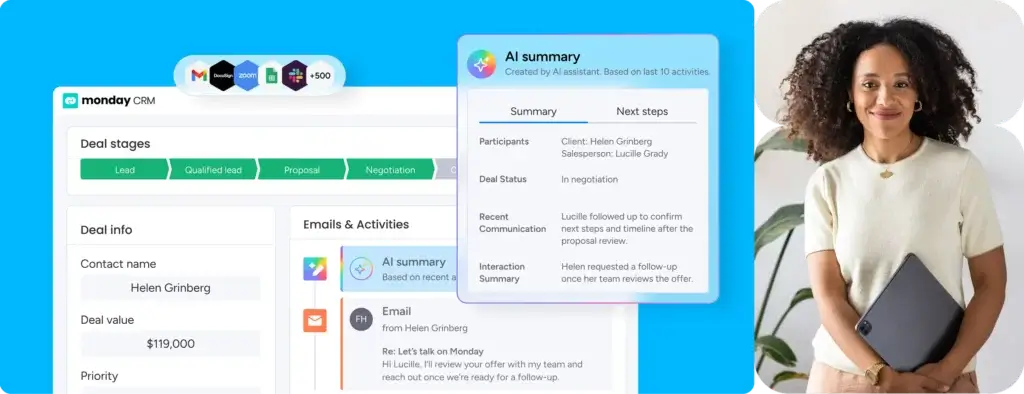
Current AI-related capabilities include AI-assisted writing, meeting summaries, activity summaries, field updates, AI Notetaker, AI Lead Agent, and AI Sales Agent.
- AI Sales Agent: Helps with outbound voice outreach and SMS follow-ups, currently in beta and available in the U.S.
- AI Lead Agent: Searches publicly available sources to find leads that match your ideal customer profile
- AI Notetaker: Summarizes calls, suggests next steps, and can help draft follow-ups
- AI summaries: Helps summarize calls, emails, files, activity, and deal context
- AI workflow support: Helps update fields, log activities, assign reps, and set alerts
Important limitation: These AI features are promising, but you should not treat them as a full replacement for a sales rep or CRM admin. They are best used as a productivity layer that supports your team.
Key Benefits
Benefits of Using monday CRM
monday CRM is most valuable when your team needs more visibility, less admin work, and a clearer way to manage sales activities.
1. Better Sales Pipeline Visibility
You can see every deal stage, owner, priority, and next action in one place. This makes it easier to spot stalled deals, balance workloads, and forecast more accurately.
2. Less Manual Sales Admin
Automations can handle repetitive work like assigning leads, sending reminders, updating statuses, and creating tasks. This gives your sales team more time to focus on conversations and closing.
3. Faster Team Adoption
The platform is simple enough for beginners and flexible enough for advanced users. This helps reduce one of the biggest CRM problems: low adoption.
4. Stronger Sales Collaboration
Comments, files, notes, updates, timelines, and notifications can live directly next to the deal. This reduces scattered communication across email, chat, and spreadsheets.
5. Easier Scaling as Your Team Grows
You can begin with a simple sales pipeline and expand into dashboards, automations, AI tools, permissions, and more advanced workflows as your needs grow.
6. More Controlled Email Collaboration
Shared team inboxes and email privacy controls help teams manage sales communication without exposing sensitive messages to the wrong people.
7. Better Revenue Operations Alignment
Because monday CRM connects sales work with tasks, projects, onboarding, and reporting, it can support a wider revenue workflow beyond the first closed deal.
Pros and Cons
Advantages vs Disadvantages
Positive
✅ Easy visual interface
✅ Strong no-code automations
✅ Highly flexible workflows
✅ Useful AI-assisted sales tools
Negative
❌ Setup needs planning
❌ Best features sit on higher plans
❌ Advanced CRM depth may require workarounds
❌ Marketplace apps can add extra cost
Before choosing any CRM, you should look at both the strengths and the trade-offs. monday CRM is easy to like, but it is not perfect for every sales team.
✅ Pros
1. Easy-to-use visual interface
The platform is clean, colorful, and simple to navigate. You can manage leads, deals, contacts, and tasks without feeling buried inside a complex CRM menu.
2. Strong no-code automation
You can automate reminders, status updates, assignments, notifications, and follow-ups without needing a developer. This is valuable for sales teams that want efficiency without technical overhead.
3. Flexible customization for different workflows
You can build pipelines around your actual sales model. This makes monday CRM useful for agencies, SaaS companies, real estate teams, consultants, and service businesses.
4. Useful AI and sales productivity features
AI Notetaker, AI summaries, AI Lead Agent, and AI Sales Agent can help reduce manual work. These features are especially helpful for teams that want faster lead response and cleaner CRM updates.
❌ Cons
1. Initial setup requires planning
The flexibility is a strength, but it can also create messy workflows if you do not define your pipeline, fields, permissions, and automations clearly.
2. Some valuable features require higher plans
Advanced dashboards, larger automation limits, quotes, invoices, and governance features are more useful on higher tiers. Small teams should check plan limits carefully before choosing.
3. Not the deepest CRM for complex enterprise sales
monday CRM can scale, but Salesforce may still be better for highly complex enterprise sales processes, advanced territory management, and deep CRM governance.
4. Add-ons and integrations can increase total cost
The Marketplace is useful, but relying on extra apps or integrations can add cost and complexity over time.
User Experience
User Interface and Experience
A CRM can have impressive features and still fail if your team avoids using it. This is where monday CRM performs well. The platform feels less like a traditional CRM database and more like a flexible sales workspace.
Ease of Navigation and Interface Use
The interface is clean, visual, and easy to scan. You can move through boards, dashboards, contacts, deals, and activities without feeling lost.
- Boards are easy to update
- Deal stages are visually clear
- Views can be changed based on user preference
- Dashboards make reporting easier for managers
- Templates help new users get started faster
What stands out: monday CRM lowers the adoption barrier. That is important because CRM success depends on consistent usage.
Mobile Experience
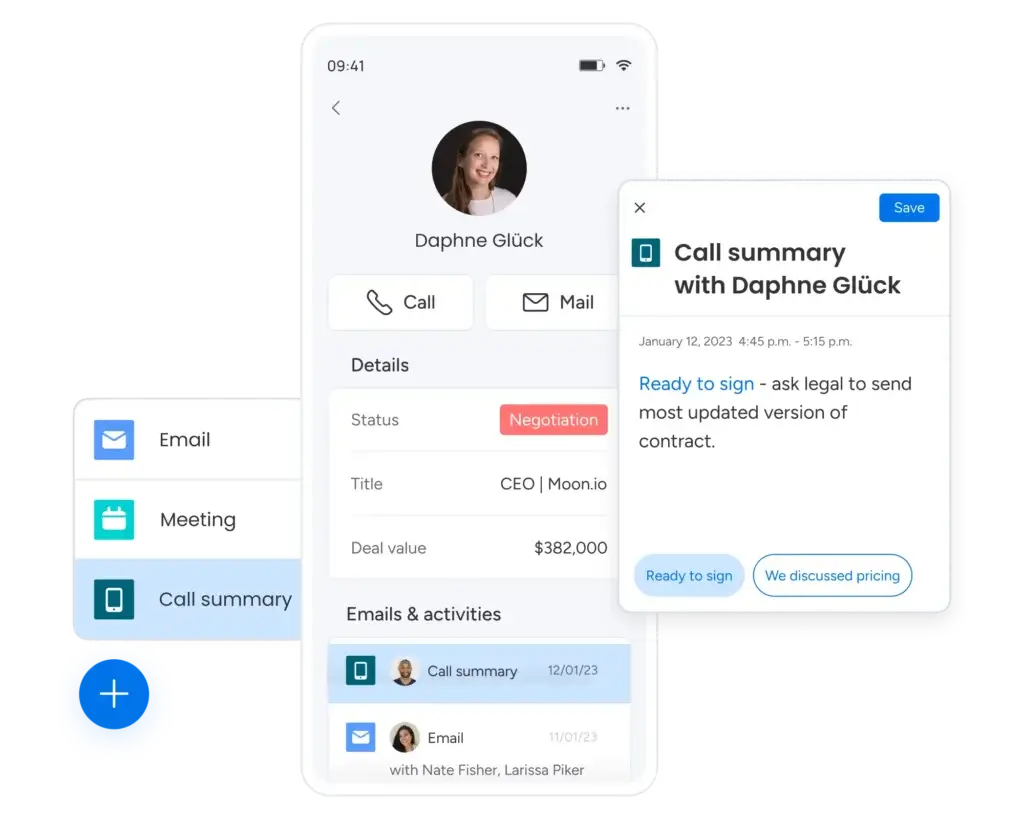
monday CRM has mobile apps for iOS and Android. The mobile experience is useful for checking pipeline status, updating deals, adding notes, and staying connected while away from your desk.
That said, mobile is better for quick updates than deep workflow building. Advanced filtering, bulk updates, dashboard analysis, and complex automation work are still easier on desktop.
Best for: Sales reps in the field, hybrid teams, real estate professionals, consultants, and managers who need quick pipeline visibility.
Support and Learning Resources
monday CRM provides a strong support ecosystem, including a help center, tutorials, webinars, community resources, and support channels. This matters because the platform is flexible, and teams often need guidance on how to structure it properly.
- Knowledge base articles for setup and troubleshooting
- Templates for common CRM workflows
- Community discussions and workflow ideas
- Training resources for new users
- Support options depending on plan level
CRM expert tip: Do not treat onboarding as a one-time task. Review your fields, automations, dashboards, and pipeline stages after the first 30 days.
Performance and Reliability
monday CRM is cloud-based and built for real-time collaboration. Updates are reflected across boards and views quickly, which helps teams stay aligned.
For most sales teams, performance should be strong enough for daily CRM work, including pipeline tracking, communication updates, dashboards, and automation triggers.
Common User Challenges
The main challenge is not the interface. It is the setup discipline. Because monday CRM is flexible, teams can build too many boards, fields, or automations without a clear structure.
- Too much customization: Can make reporting messy if not standardized
- Recurring task setup: Often depends on automations
- Mobile limitations: Better for updates than advanced configuration
- Higher-tier dependency: Some advanced features require more expensive plans
These are not dealbreakers for most teams, but they are important to plan for before implementation.
Best Practices for a Smooth Experience
- Start with a CRM template, then customize carefully
- Define pipeline stages before adding automations
- Use required fields only where they improve data quality
- Create dashboards for each role, not one dashboard for everyone
- Review automations monthly to remove unnecessary rules
Business size fit
monday CRM for Different Business Sizes
monday CRM can support different team sizes, but the best fit depends on how complex your sales process is. Smaller teams will value the simplicity. Larger teams will value the customization, permissions, dashboards, and governance options.
| Business Size | How monday CRM Fits | Best Features |
| Small Businesses | Great for teams that need a simple, visual CRM without a heavy setup process. | Visual pipelines, templates, basic automations, contact and deal tracking |
| Mid-Sized Teams | Strong fit for teams that need more automation, reporting, and structured collaboration. | Custom dashboards, email tools, automations, integrations, shared workflows |
| Large Organizations | Useful when configured properly, especially for cross-functional revenue workflows. | Permissions, governance, advanced dashboards, AI tools, security controls, Ultimate plan |
Pricing and Plans
How Much Does monday CRM Cost?
monday CRM pricing depends on your plan, region, billing cycle, and number of users. Plans start from three users, and annual billing usually gives you a discount compared with monthly billing.
The main paid plans are Basic, Standard, Pro, and Ultimate. Ultimate is the newer name for the former Enterprise tier.
| Plan | Actual Pricing | Best For | Key CRM Features | Important Notes |
| Basic | From $12/user/month, billed annually | Small teams starting with CRM | Contact and deal management, customizable pipelines, basic dashboards, lead and contact templates | Good for simple CRM tracking, but limited for growing sales operations because automations and integrations are restricted |
| Standard | From $17/user/month, billed annually | Growing teams that need automations | More contacts and deals, two-way email sync, quotes and invoices, custom dashboards, automations, integrations | Often the best starting point for active sales teams that need email sync and workflow automation |
| Pro | From $28/user/month, billed annually | Sales teams that need deeper reporting | Advanced dashboards, sales forecasting, larger automation limits, more workspaces, more quotes and invoices | Better for teams that rely on forecasting, reporting, and operational sales visibility |
| Ultimate | Custom pricing | Larger teams with security and control needs | Enterprise-grade controls, unlimited dashboards, advanced permissions, support, governance | Best for organizations that need scale, compliance, advanced administration, and stronger security controls |
Cost-benefit analysis: monday CRM offers the best value when your team will actively use automations, dashboards, email tracking, and shared workflows. If you only need a contact database, it may be more CRM than you need.
Competitor Comparison
monday CRM vs Other CRM Software
monday CRM is not the only strong CRM on the market. The right choice depends on how your team sells, how much automation you need, and whether your business is more sales-led, marketing-led, or enterprise-led.
| CRM | Best For | Where monday CRM Wins | Where monday CRM Falls Short |
| HubSpot CRM | Marketing-led sales teams | More flexible visual workflow customization | HubSpot is stronger for native marketing automation and inbound funnels |
| Salesforce | Large enterprise sales teams | Easier setup, cleaner interface, faster adoption | Salesforce is deeper for enterprise CRM architecture and complex governance |
| Pipedrive | Sales teams focused on pipeline execution | Broader work management and collaboration flexibility | Pipedrive can feel more sales-native out of the box |
| Zoho CRM | Budget-conscious teams needing many CRM modules | Cleaner and more visual user experience | Zoho can offer broader CRM depth at lower cost for some teams |
| ClickUp | Teams that want task and project management first | Stronger CRM-specific sales pipeline experience | ClickUp may be better if CRM is only one part of project operations |
My recommendation: Choose monday CRM if you want the best balance of visual CRM, customization, ease of use, and sales collaboration. Choose Salesforce if you need a deep enterprise CRM infrastructure. Choose HubSpot if marketing automation is your main priority.
Best Use Cases
Who Should Use monday CRM?
monday CRM is best for teams that want a CRM they can adapt quickly without building a complex system from scratch.
✅ Best for
- Small and mid-sized sales teams that need a visual CRM
- Agencies managing leads, clients, proposals, and onboarding
- Real estate teams tracking buyers, sellers, listings, and deals
- SaaS teams managing demos, trials, renewals, and customer handoffs
- Consulting firms that need sales and delivery visibility in one place
- Teams already using monday.com for project or work management
❌ Not best for
- Teams that need a completely pre-built enterprise CRM process
- Companies that require very advanced native lead scoring
- Sales organizations with complex territory hierarchies and governance rules
- Teams that do not want to invest time in setup and customization
- Businesses looking only for a free contact database
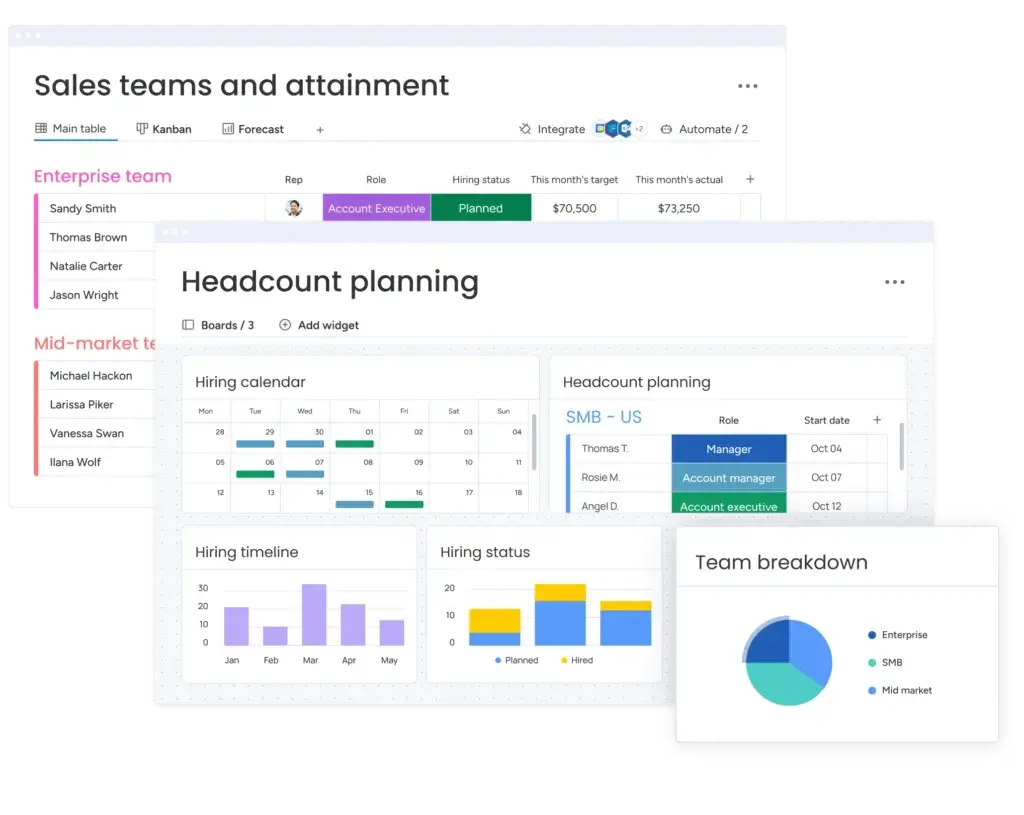
How Easy Is It to Start?
Implementation and Setup
monday CRM is easier to set up than many traditional CRM systems, but the best results still require planning.
You should start by mapping your sales process before building boards. Define your lead stages, deal stages, required fields, ownership rules, handoff points, and reporting needs first.
Recommended Setup Process
- Step 1: Map your current sales process
- Step 2: Choose or customize a CRM template
- Step 3: Create fields for leads, deals, contacts, and accounts
- Step 4: Build automations for reminders, assignments, and updates
- Step 5: Connect email, calendar, and communication tools
- Step 6: Create dashboards for reps, managers, and executives
- Step 7: Review usage after 30 days and simplify where needed
Best practice: Start simple. A clean CRM that your team actually uses is better than an overbuilt system with too many fields and automations.
Security and Compliance
Protection for Your Data
When you manage customer data, security is not optional. monday CRM includes security and compliance controls designed to protect sales data, customer information, and internal workflows.
The platform supports major security and compliance programs, including ISO standards, SOC reports, GDPR, CCPA, and HIPAA.
- Encryption: Data is protected in transit and at rest
- Permissions: Control access across boards, dashboards, files, and workspaces
- SSO and SCIM: Available for larger organizations with identity management needs
- Audit controls: Help administrators track important account activity
- Compliance support: Includes major certifications and compliance programs
| Security Area | What It Means for CRM Users |
| Permissions | You can control who can see, edit, and manage CRM data |
| Data encryption | Customer and sales data is protected during storage and transfer |
| Compliance programs | Supports standards such as ISO, SOC, GDPR, CCPA, and HIPAA |
| Enterprise controls | Ultimate plan users get stronger governance and administration features |
| AI data protection | monday states that AI data follows its product security protocols |
Important note: If you operate in healthcare, finance, legal, or another regulated industry, confirm your specific compliance requirements with monday before rollout.
Conclusion
Final Thoughts
⭐ Overall Rating: 9.4/10
If you have made it this far, you are clearly serious about choosing the right CRM for your business. That is a smart move.
Choosing a platform like monday CRM is not just about tracking leads. It is about building a sales system that helps your team stay organized, respond faster, automate busywork, and create a cleaner path from lead to customer.
🔍 What You Are Really Getting
Here is a quick recap of what monday CRM brings to the table:
- A visual, centralized workspace for leads, deals, contacts, and accounts
- No-code automations that reduce repetitive sales admin
- AI-assisted tools for summaries, calls, lead research, and follow-up support
- Custom dashboards for pipeline tracking, forecasting, and performance visibility
- Team collaboration features that keep sales communication connected to the deal
- A flexible system that can grow from a small team into a larger revenue workflow
If you take the time to tailor it properly, monday CRM becomes more than a sales tracker. It becomes the operational center for your revenue process.
👥 Is It the Right Fit?
If you are a small or mid-sized business looking for a CRM that is fast to set up, easy to use, and flexible enough to fit your workflow, monday CRM is one of the strongest options available.
It is also a strong choice for larger teams that want customization and visibility without the heavier learning curve of traditional enterprise CRM software.
Still comparing? Explore our full guide to the best CRM software to see how monday CRM compares with other leading platforms.
🧠 Final Word from a CRM Expert
After working with many CRM systems, one thing is clear: the best CRM is not always the one with the most features. It is the one your team uses consistently.
monday CRM gets that part right. It is visual, approachable, customizable, and powerful enough for most growing sales teams. If you want a CRM that balances simplicity with serious workflow flexibility, monday CRM deserves a top place on your shortlist.
Frequently Asked Questions
Have more questions?
Is monday CRM good for small businesses?
Yes. monday CRM is a strong option for small businesses because it is visual, easy to customize, and simpler to adopt than many traditional CRM platforms. It works especially well for teams that want lead tracking, pipeline management, reminders, and basic automations without a heavy implementation process.
Does monday CRM have AI features?
Yes. monday CRM includes AI-assisted features such as AI summaries, AI Notetaker, AI Lead Agent, and AI Sales Agent. These tools can help with meeting notes, lead research, follow-ups, call summaries, and sales activity updates. Availability may depend on your plan, region, admin settings, and beta access.
Is monday CRM better than HubSpot?
monday CRM is often better if you want a more visual and customizable sales workspace. HubSpot is usually stronger if your CRM strategy is deeply connected to inbound marketing, landing pages, email campaigns, and marketing automation.
Is monday CRM better than Salesforce?
monday CRM is easier to use and faster to set up for many small and mid-sized teams. Salesforce is stronger for large enterprises that need advanced CRM architecture, complex permissions, territory management, and deep sales operations customization.
Can monday CRM replace spreadsheets?
Yes, for most sales teams, monday CRM is a much better option than spreadsheets. It gives you structured fields, visual deal stages, automations, reminders, dashboards, activity tracking, and collaboration features that spreadsheets cannot manage well at scale.
Does monday CRM support quotes and invoices?
Yes. monday CRM supports customizable quotes and invoices, with limits depending on the plan. This can be useful for teams that want to move from deal tracking into proposal and revenue workflow management inside the same platform.
Can monday CRM be used for customer onboarding?
Yes. Although it is mainly designed for sales, you can customize monday CRM to manage onboarding, renewals, customer success tasks, handoffs, and post-sale workflows. This is one of its advantages over sales-only CRM tools.
Does monday CRM work for real estate teams?
Yes. monday CRM can work well for real estate teams because you can build pipelines for buyers, sellers, listings, property stages, showings, offers, and closings. Its visual layout is useful for tracking multiple properties and client relationships at once.
What are the main limitations of monday CRM?
The main limitations are that advanced setup requires planning, some powerful features are tied to higher plans, AI features are still evolving, and very complex enterprise sales teams may need deeper native CRM functionality than monday CRM offers out of the box.
Who should not use monday CRM?
monday CRM may not be the best fit if you want a completely pre-built enterprise CRM with minimal customization, very advanced native lead scoring, deep sales territory management, or a free contact database with only basic CRM needs.