
Introduction
If you are looking for a simple way to document jobsite work with photos, timestamps, GPS location, notes, and organized project folders, Timemark is one of the more focused tools to consider. It is designed for field teams that need reliable photo proof without adopting a full construction management platform.
Timemark is especially relevant for construction companies, contractors, field service teams, telecom crews, property managers, inspection teams, security providers, cleaning teams, and any business that needs to prove when and where work was completed. Instead of letting site photos get buried in phone galleries, email threads, WhatsApp messages, or shared drives, Timemark turns field photos into structured project documentation.
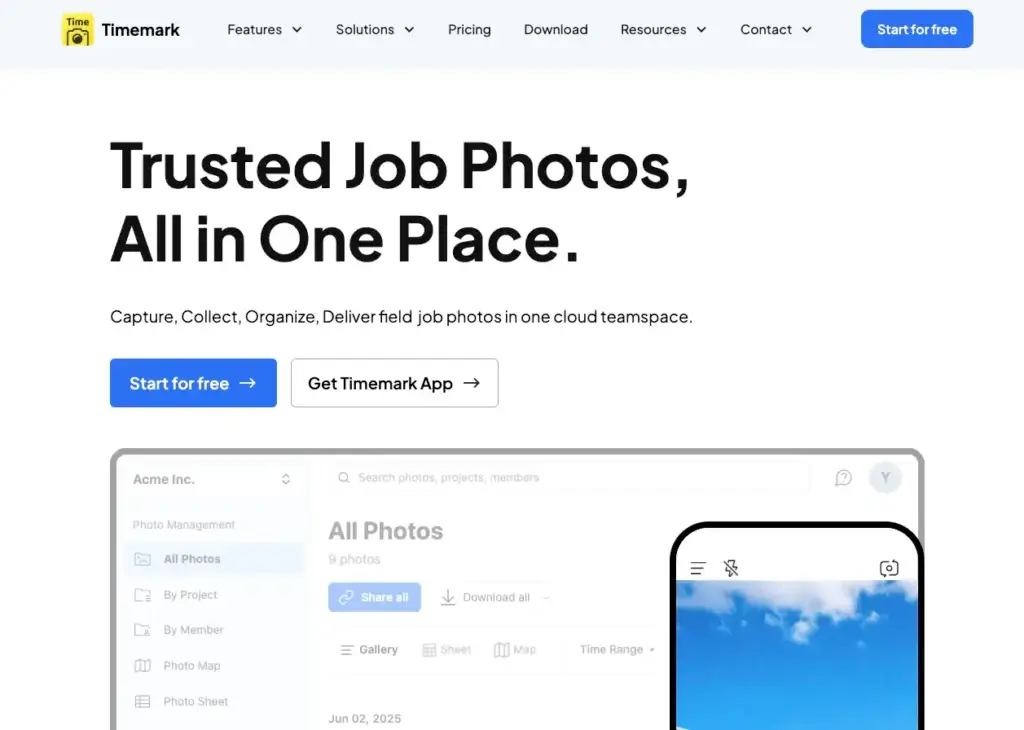
The platform focuses on photo verification and jobsite documentation. Field workers can capture photos with verified time, GPS location, notes, logos, weather details, map data, and other job information. Project managers can then review, organize, export, and share those photos from a central workspace.
This makes Timemark useful for progress tracking, inspection records, proof of delivery, repair documentation, before-and-after photos, subcontractor accountability, client updates, and dispute prevention. It is not a full project management system like Procore, Raken, or Buildertrend. It is also not a full time clock or payroll tool. Its strongest value is in photo-based proof of work.
But is Timemark the right construction photo documentation tool for your business in 2026? This review covers its core features, pricing, user experience, advantages, limitations, security considerations, and how it compares with alternatives like CompanyCam, Raken, and SiteCam.
Company Background
Timemark is a photo documentation platform built for field teams that need trusted, organized, and shareable work photos. Its main product is Timemark Camera, supported by a cloud-based Teamspace for organizing photos across projects, members, and teams.
The company positions Timemark as an all-in-one photo management tool for field teams. Its website highlights use cases such as construction photo documentation, jobsite photo proof, site inspection, GPS camera documentation, photo evidence, proof of delivery, group photo sharing, and shared project photo albums.
Timemark’s product direction is clear: it is built around field evidence. Instead of trying to replace every construction management workflow, it focuses on one common problem that almost every contractor has: jobsite photos are difficult to collect, verify, organize, and share.
For small and mid-sized construction teams, this narrow focus can be an advantage. Many field workers do not want a complex platform with too many modules. They need to open the app, take a photo, add context, and know that the record will be stored in the right place with reliable time and location data.
Timemark also supports broader field industries beyond construction. Telecom, fiber optic contractors, HVAC teams, property management companies, cleaning teams, delivery operators, security teams, and inspection-based businesses can all use the platform to document work with more reliable visual records.
Software Specification
Core Features Breakdown
Timemark’s feature set is built around jobsite photo proof and field documentation. The platform helps teams capture photos with reliable metadata, organize them by project and member, sync them to the cloud, generate reports, and share visual records with clients or stakeholders.
1. Verified Jobsite Photo Capture
Timemark’s main feature is verified photo capture. Field workers can take photos that include timestamp, GPS location, notes, logo, coordinates, weather, map information, and other contextual details.
This is valuable in construction because a normal phone photo is often not enough. A project manager may need to know where the photo was taken, when it was captured, which crew member submitted it, and what job or task it relates to. Timemark adds that context directly into the documentation process.
For contractors, verified photos can help prove work completion, document site conditions, reduce disputes, support change order conversations, and provide clearer updates to clients. This is especially useful for teams working across multiple sites where supervisors cannot physically inspect every detail in real time.
2. Timestamp and GPS Location Stamps
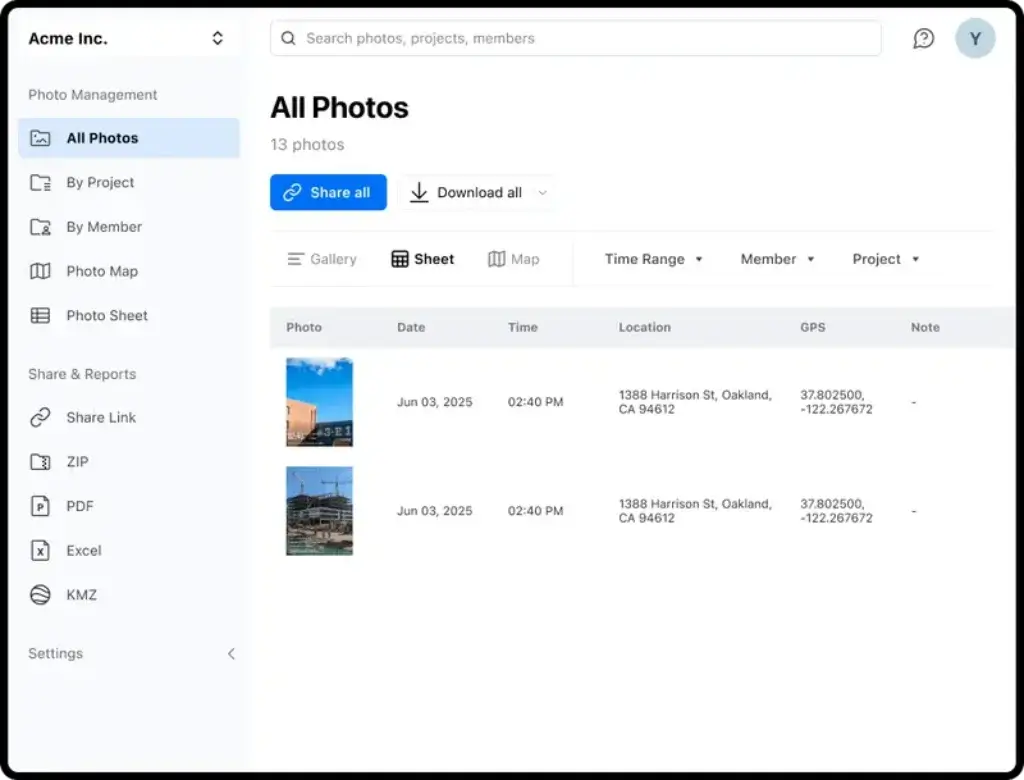
Timemark automatically adds time and GPS location data to work photos. This helps create a more trustworthy record than manually naming files or asking workers to describe when and where a photo was taken.
In a construction environment, location and timing matter. A photo showing installed materials, site damage, equipment condition, or completed work becomes much more useful when it includes reliable time and location context. This can support daily reports, client communication, internal accountability, and dispute resolution.
3. Notes, Logos, and Custom Photo Templates
Timemark allows teams to add notes and branded information to photos. This helps turn a basic image into a clearer work record. Instead of relying on separate messages or handwritten notes, the field worker can add job context while capturing the photo.
Custom templates are useful for standardizing documentation across teams. A construction company can create a consistent photo format for inspections, punch list items, deliveries, repairs, safety checks, maintenance visits, or progress updates.
4. Offline Capture and Automatic Sync
One of Timemark’s strongest construction-related features is offline support. Field teams can capture photos, GPS data, and notes even when there is no internet connection. Once the device is back online, photos can sync to the cloud.
This matters because many construction sites have unreliable connectivity. Basements, remote locations, new builds, large jobsite areas, and temporary work zones often have weak signal. A documentation app that depends on constant internet access can slow down the crew. Timemark’s offline-first approach makes it more practical for field use.
5. Teamspace for Cloud Photo Organization
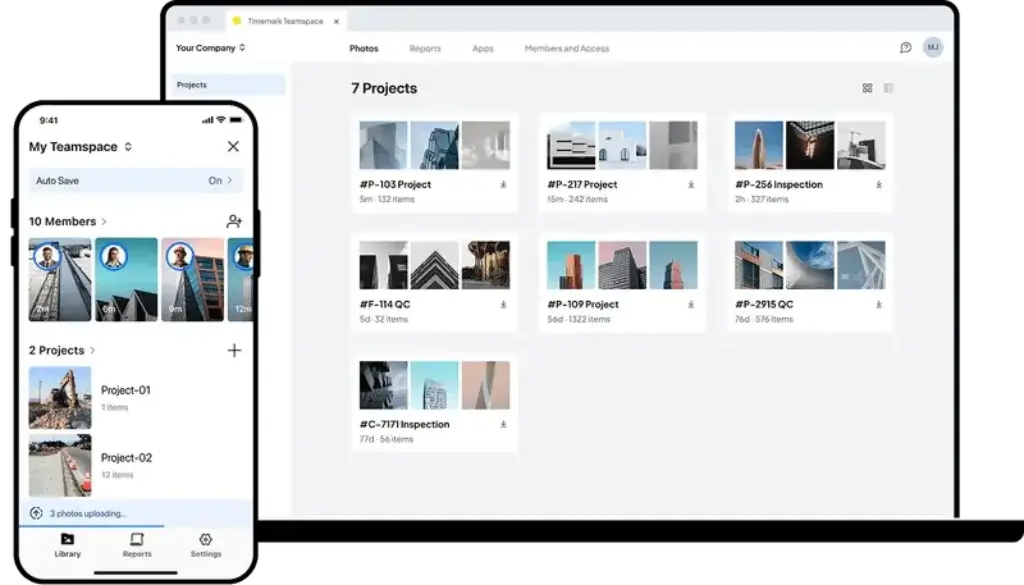
Timemark Teamspace gives teams a central place to collect and organize work photos. Instead of asking workers to send images manually, photos can be saved into shared project spaces and organized by project, member, and date.
This solves one of the most common problems in construction documentation: photo chaos. Without a dedicated system, jobsite photos often end up scattered across phones, text threads, email attachments, Google Drive folders, WhatsApp groups, and personal camera rolls. Timemark helps separate work photos from personal photos and keeps project records easier to retrieve.
6. Project Folders and Member-Based Organization
Timemark organizes photos by project and team member. This is helpful for supervisors who need to review what happened on a specific job, who submitted each photo, and how work progressed over time.
For contractors managing several crews, this structure can reduce administrative work. Office teams do not need to chase each employee for photos, rename image files manually, or search through long message threads to find a specific record.
7. PDF and Excel Photo Reports
Timemark lets teams export jobsite photos into professional reports. These reports can be useful for client updates, inspection summaries, internal documentation, progress records, proof of delivery, and project closeout documentation.
The ability to export to PDF or Excel is important because not every client or stakeholder wants access to another software account. A simple, organized report is often enough to show what was completed, where work took place, and when the evidence was captured.
8. Secure Sharing Links and Client Access
Timemark supports shareable project galleries and view-only links. This helps teams share photos with clients, owners, project managers, subcontractors, or stakeholders without requiring every viewer to install the app.
This is a practical feature for construction and field service businesses. Clients often want visibility, but they do not want to learn a new system. A secure gallery or report gives them organized access without adding friction.
9. Photo Verification and Anti-Tamper Evidence
Timemark includes a Photo Code verification feature designed to verify photo authenticity. The platform can check the original capture time, GPS location, and photo integrity to help identify whether a photo record is trustworthy.
This feature is especially useful when photos are being used as evidence. For example, a contractor may need to prove that a repair was completed before a deadline, that materials were delivered to the right location, or that site conditions existed before additional work was requested.
10. Integrations and Cloud Backup Options
Timemark supports workflow connections such as Google Drive, OneDrive, SharePoint, email, and Zapier. The official pricing page also mentions integrations under the Enterprise plan.
This gives teams more flexibility when they already have an existing storage or operations workflow. For example, a company may use Timemark to capture verified field photos, then back them up or share them through a cloud storage system already used by the office.
User Experience
Timemark User Experience
Simple Photo-First Interface
Timemark’s user experience is designed around fast field capture. This is important because construction workers and field technicians usually do not have time to complete complex forms while standing on a jobsite.
The app is best understood as a professional jobsite camera with added verification and organization features. Workers can take photos, add notes, apply templates, and rely on automatic metadata instead of manually documenting every detail.
Good Fit for Field Crews
Timemark is a good fit for crews that need a lightweight tool. It does not try to manage the entire construction project. It does not include heavy scheduling, estimating, bidding, payroll, or resource planning features. That simplicity can be a strength for teams that only need better photo documentation.
For example, a roofing contractor, property maintenance company, fiber installation crew, cleaning team, or small general contractor may not need a full construction management system. They may simply need trusted visual proof of what happened on site. Timemark fits that use case well.
Useful for Project Managers and Supervisors
Project managers benefit from Timemark because they can review site photos in a central place instead of chasing updates from multiple workers. Photos can be organized by project or member, viewed in a web portal, exported into reports, and shared with clients.
This is especially useful for managers who oversee multiple sites. Instead of driving to every location, they can review visual updates remotely and ask better follow-up questions based on verified photo records.
Strong for Client Communication
Clients often judge contractors by communication quality. Timemark can help contractors send more professional updates because photos are organized, timestamped, geotagged, and exportable into reports.
This can improve trust. A client does not simply receive a random image in a text message. They receive a clearer record that shows what was done, where it was done, and when it was documented.
Setup and Adoption
Timemark should be easier to adopt than larger construction management systems. The core workflow is familiar: open the app, take a photo, add context, and save it to the right project.
However, teams should still define a documentation process before rollout. For best results, managers should decide which projects require photos, what templates should be used, when photos should be taken, how reports should be shared, and who can access each project.
Where the Experience May Feel Limited
Timemark is not designed to replace a full construction management platform. Teams that need daily reports, RFIs, submittals, safety forms, workforce scheduling, payroll time cards, budget tracking, and cost codes will need a broader system.
The best way to view Timemark is as a focused photo documentation layer. It can work alongside a broader construction system, but it should not be evaluated as if it were a complete project management suite.
Pros and Cons
Advantages and Disadvantages
Pros
✅ Excellent photo proof
✅ Built for jobsites
✅ Professional reporting
✅ Affordable plans
Cons
❌ Not a full construction management suite
❌ Free plan has Teamspace limits
❌ Enterprise features require contact
❌ Not a payroll time tracking tool
Timemark is strong because it solves a specific jobsite documentation problem without becoming unnecessarily complex. It is particularly useful for contractors that need reliable photo records but do not want to force field workers into a heavy construction management workflow.
✅ Strengths
- Excellent photo proof: Timemark makes field photos more reliable by adding timestamp, GPS location, notes, and other job details.
- Built for jobsites: Offline capture, mobile access, and simple photo workflows make it practical for field teams.
- Professional reporting: PDF and Excel exports help teams send clearer documentation to clients, managers, and stakeholders.
- Affordable plans: Timemark’s paid plans are relatively inexpensive compared with many broader construction documentation platforms.
❌ Weaknesses
- Not a full construction management suite: Timemark does not replace tools built for RFIs, submittals, scheduling, budgeting, safety management, daily logs, and resource planning.
- Free plan has Teamspace limits: The free plan is useful for basic capture, but team collaboration and cloud storage are more practical on paid plans.
- Enterprise features require contact: SAML SSO, integrations, multi-team billing, and higher limits require contacting the company.
- Not a payroll time tracking tool: Despite the name, Timemark is better understood as photo proof and documentation software, not a full crew time clock.
Overall, Timemark is best for teams that need organized, verified, and shareable jobsite photos. It is less suitable for companies that primarily need payroll tracking, workforce scheduling, cost code tracking, or complete construction project management.
Pricing and Plans
How Much Does Timemark Cost?
Timemark offers a free plan, paid individual plans, team plans, and an Enterprise option. Pricing can change, so businesses should always confirm current prices on Timemark’s official pricing page before subscribing.
At the time of this review, Timemark lists a Free plan, Plus, Business, and Enterprise. The pricing page shows Plus at $5 per user/month or $49.99 per user/year, Business at $7 per user/month or $60 per user/year, and Enterprise as a contact-based plan.
Timemark Plans
| Plan | Price | Best For | Key Limits | Main Features |
| Free | $0 | Individuals testing basic jobsite photo capture | 100 Teamspace photos and 3 projects | Take photos, add timestamp, GPS, logo, notes, save original photos, use custom templates, and generate basic reports |
| Plus | $5/user/month or $49.99/user/year | Individual users who need more professional photo capture features | 100 Teamspace photos and 3 projects | Remove developer watermark, save original photos, auto backup to OneDrive and Google Drive, and use productivity features |
| Business | $7/user/month or $60/user/year | Field teams, contractors, and companies managing multiple workers | 300,000 photos and unlimited projects | Everything in Plus, higher Teamspace limits, centralized team billing, unlimited projects, and team photo organization |
| Enterprise | Contact sales | Larger companies with security, integration, or multi-team requirements | Custom limits | More photos, SAML SSO, integrations, and support for multiple teams |
The Free plan is useful for individuals who mainly need Timemark’s core photo capture features. Users can capture jobsite photos with timestamp and GPS location completely free, with no limits on that basic photo capture workflow. The Teamspace limits only apply when users want to use Timemark’s team collaboration features, such as shared cloud organization, projects, and team-based photo management.
The Plus plan is a better fit for individual professionals who need polished work photos, original photo saving, and backup options. It can work well for independent contractors, inspectors, property managers, or field technicians who mostly work alone.
The Business plan is the most relevant plan for construction and worksite teams. It expands Teamspace capacity to 300,000 photos, supports unlimited projects, and includes centralized billing. This makes it much more practical for contractors managing multiple crews, sites, and clients.
The Enterprise plan is designed for larger organizations that need stronger security and administration features. SAML SSO, integrations, more photos, and multi-team payment support are listed under Enterprise, but pricing requires direct contact.
Which Timemark Plan Is Best?
The Free and Plus plans can still work well for individuals who mainly need Timemark’s photo capture features, including timestamp and GPS data, but the Teamspace limits apply when users want to collaborate with a team, manage shared projects, and organize photos across multiple active jobs.
The Business plan is more suitable for contractors that need to document multiple jobs, organize photos by project, centralize billing, and give managers better visibility across field activity.
Enterprise is worth considering if the company needs SSO, higher storage limits, advanced integrations, multiple teams, or a more controlled corporate setup.
Security and Privacy
How Timemark Protects Your Data
Timemark handles sensitive field documentation, so security and privacy matter. Jobsite photos may include client properties, workers, equipment, addresses, site conditions, damage, completed work, or other operational details.
1. Photo Metadata and Verification
Timemark can collect metadata such as time, latitude, longitude, location, and device information when Photo Code is enabled. This data is used to help verify photo authenticity.
For construction teams, this is one of the platform’s most important security-related benefits. Verified metadata makes photo records more useful for accountability, reporting, and dispute prevention.
2. Encrypted Storage of Verification Data
Timemark’s privacy policy states that Photo Code-related data is anonymized and stored encrypted. This is important because location and device data can be sensitive, especially when teams work at client sites or private properties.
Businesses should still create internal policies for how photos are captured, who can view them, how long they are retained, and when they should be shared externally.
3. Role-Based Permissions
Timemark supports role-based permission settings in the web portal. Administrators can restrict employees so they only see assigned projects, photo access, and editing rights.
This is useful for construction companies with multiple crews, subcontractors, or client-specific projects. Not every worker should have access to every project photo. Project-level access helps reduce accidental exposure and keeps records more controlled.
4. View-Only Sharing Links
Timemark allows teams to share view-only links with clients. Clients can view selected photos without installing Timemark or creating an account.
This is convenient, but teams should manage links carefully. Only relevant photos should be shared, and links should be used according to company policy, client confidentiality requirements, and project documentation standards.
5. Enterprise Security Options
The Enterprise plan lists SAML SSO and integrations. SSO can be important for larger organizations that need centralized identity management and more controlled access.
Smaller contractors may not need SSO, but larger construction companies, multi-location field service businesses, and corporate teams should ask Timemark about security, data retention, access logs, admin controls, and integration details before deployment.
Comparison with Competitors
Timemark vs Top Alternatives
Timemark competes with several types of tools. Some are dedicated construction photo apps, while others are broader construction management platforms with photo documentation features. The most useful comparisons are CompanyCam, Raken, and SiteCam.
These comparisons show where Timemark fits best. CompanyCam is stronger as a more mature contractor photo and collaboration platform. Raken is stronger for full field reporting, time tracking, safety, and construction management workflows. SiteCam is a direct photo documentation alternative with plan and map-based photo organization. Timemark is strongest for lightweight verified photo proof at an affordable price.
Timemark vs CompanyCam
| Feature | Timemark | CompanyCam |
| Main positioning | Verified jobsite photo proof and photo management for field teams | Contractor photo documentation, job progress tracking, collaboration, and AI-powered workflows |
| Best for | Teams that need simple timestamped and geotagged photo records | Contractors that want a deeper photo documentation and collaboration platform |
| Ease of use | Very simple and photo-first | Still field-friendly, but broader and more feature-rich |
| Photo verification | Strong focus on timestamp, GPS, notes, and Photo Code verification | Strong photo organization and contractor workflows |
| Reporting | PDF and Excel exports, project galleries, share links | Reports, updates, project collaboration, and broader workflow tools |
| Best advantage | Affordable, simple, and focused on proof of work | More complete contractor photo management ecosystem |
Summary: CompanyCam is the better choice for contractors that want a richer photo documentation platform with collaboration, AI shortcuts, integrations, checklists, reports, and broader contractor workflows.
Timemark is better for teams that want a simpler and more affordable tool for verified photo proof. If the main requirement is to capture timestamped and GPS-stamped work photos, organize them by project, and export reports, Timemark is easier to justify. If the team needs a deeper contractor operations platform around photos, CompanyCam is stronger.
Timemark vs Raken
| Feature | Timemark | Raken |
| Main positioning | Photo proof and worksite photo documentation | Construction field management, daily reports, time tracking, safety, and field insights |
| Best for | Teams that mainly need verified photos and reports | Contractors that need complete field data capture and daily reporting |
| Daily reports | Photo reports only | Strong daily report workflows |
| Time tracking | Not a full payroll time tracking system | Includes construction time tracking and field data workflows |
| Safety and quality | Limited compared with full construction platforms | Includes safety, quality, checklists, observations, and toolbox talks |
| Best advantage | Simple and affordable photo evidence | Broader construction field management platform |
Summary: Raken is the better choice if a construction company needs daily reports, time cards, production tracking, safety workflows, checklists, observations, and field insights in one platform.
Timemark is better if the business does not need all of those modules and mainly wants jobsite photo evidence. For small teams, subcontractors, repair crews, and photo-heavy service businesses, Timemark may be easier to implement. For general contractors and larger construction teams needing structured field reporting, Raken is more complete.
Timemark vs SiteCam
| Feature | Timemark | SiteCam |
| Main positioning | Verified photo proof for field teams | Construction photo app for site teams |
| Best for | Teams that need proof-focused photos with verification and reports | Construction teams that want photo organization with locations, maps, tags, and reports |
| Offline support | Yes, capture offline and sync later | Yes, mobile apps can work offline and sync later |
| Photo organization | Project, member, date, Teamspace, and reports | Folders, descriptions, tags, plans, maps, and web access |
| Reporting | PDF and Excel reports, share links, project galleries | URL and PDF reports |
| Best advantage | Photo verification and affordability | Construction-focused photo organization with plans and map context |
Summary: SiteCam is a closer alternative to Timemark because both tools focus on construction site photos. SiteCam may be better for teams that want plan-based or map-based photo organization with tags and site reports.
Timemark is better for teams that care more about verified photo proof, timestamped evidence, GPS-based authenticity, simple field capture, and affordable team pricing. Both tools are worth comparing for construction photo documentation, but Timemark feels more focused on proof and verification.
For a mature contractor photo management platform, CompanyCam is the stronger choice. For complete field management with daily reports, time tracking, and safety workflows, Raken is the better option. For construction site photos with plans, maps, tags, and reporting, SiteCam is a strong direct alternative.
However, when the main requirement is affordable jobsite photo proof with timestamp, GPS location, notes, offline capture, cloud organization, reports, and simple field adoption, Timemark is a strong option in the construction documentation category.
Conclusion
Is Timemark Worth It in 2026?
Timemark is worth considering if your business needs a simple, affordable, and reliable way to document jobsite work with verified photos. Its strongest advantages are timestamped photo capture, GPS location data, notes, offline support, cloud organization, project folders, PDF and Excel reports, secure sharing links, and Teamspace collaboration.
It is especially valuable for construction companies, subcontractors, field service businesses, telecom crews, inspection teams, property managers, maintenance teams, delivery operators, security providers, and cleaning teams that rely on visual proof of work.
Timemark is not the right tool for every construction business. It should not be treated as a replacement for full construction management software. Teams that need RFIs, submittals, schedules, budgets, safety management, timesheets, payroll integrations, and cost code tracking should compare broader platforms like Raken, Procore, Buildertrend, Fieldwire, Contractor Foreman, or other construction management tools.
Final Thoughts
Timemark is an excellent choice for:
- Contractors that need verified jobsite photo proof
- Field teams that want a simple camera-based workflow
- Project managers who need organized site photos
- Construction teams documenting progress and completion
- Inspection teams capturing evidence with time and location
- Service businesses that send photo reports to clients
- Companies that want to reduce photo chasing and manual sorting
- Teams that need offline capture in low-connectivity locations
Timemark is less suitable for businesses that need complete construction project management, payroll time tracking, workforce scheduling, or advanced cost control. But for photo documentation, jobsite evidence, and visual accountability, Timemark is a focused and practical tool that can save time and reduce disputes.
Frequently Asked Questions
Have more questions?
What is Timemark?
Timemark is a jobsite photo documentation and photo proof tool for field teams. It helps users capture work photos with timestamp, GPS location, notes, logos, and other project details, then organize and share them through cloud-based Teamspace.
Is Timemark construction software?
Yes, Timemark can be used as construction photo documentation software. It is especially useful for contractors that need to capture progress photos, site conditions, delivery proof, inspection evidence, and before-and-after records. However, it is not a full construction project management platform.
Is Timemark a time tracking app?
Timemark is not a traditional payroll time tracking app. It focuses on photo proof with accurate time and location data. Businesses that need worker timesheets, payroll exports, cost codes, or labor tracking should compare construction time tracking tools such as Raken, Workyard, QuickBooks Time, or ClockShark.
Does Timemark work offline?
Yes, Timemark supports offline photo capture. Field workers can take photos with GPS data and notes even when there is no internet connection, and the data can sync to the cloud once the device is back online.
How much does Timemark cost?
Timemark offers a free plan, a Plus plan at around $5 per user per month, a Business plan at around $7 per user per month, and an Enterprise plan with custom pricing. Pricing may change, so businesses should confirm current costs on the official Timemark pricing page.
What is Timemark Teamspace?
Teamspace is Timemark’s shared cloud workspace for organizing jobsite photos by project, member, and date. It helps teams collect field photos in one place instead of relying on texts, emails, personal phone galleries, or scattered cloud folders.
Can Timemark generate reports?
Yes, Timemark can generate photo reports and export project photos in formats such as PDF and Excel. This is useful for client updates, inspections, progress documentation, proof of work, and project records.
Can clients view Timemark photos without an account?
Yes, Timemark supports view-only sharing links. Teams can share selected project photos or galleries with clients without requiring them to download the app or create a Timemark account.
Is Timemark better than CompanyCam?
Timemark is better for teams that want a simple and affordable photo proof tool with timestamp, GPS, notes, and verification. CompanyCam is better for contractors that want a more mature photo documentation platform with broader collaboration, AI, integrations, and contractor workflow features.
What is the main disadvantage of Timemark?
The main disadvantage is that Timemark is focused mainly on photo documentation. It does not replace a full construction management system with RFIs, submittals, scheduling, budgeting, time cards, safety workflows, and cost tracking.