Introduction
The best task management software helps you turn scattered work into clear, trackable action. When your team is juggling deadlines, priorities, meetings, and follow-ups across multiple projects, the right platform can make the difference between steady progress and constant chaos.
You no longer need to rely on messy spreadsheets, long email threads, or disconnected chat messages to keep work moving. A strong task management tool gives you one place to organize tasks, assign ownership, track progress, and stay aligned across your team.
That matters even more now, because task management software has evolved well beyond simple to-do lists. Many of today’s leading platforms combine task tracking with automation, collaboration, reporting, and AI-powered planning, giving you much more control over how work gets done.
In this guide, you’ll find the best task management tools for different types of teams and workflows. Some are better for structured project execution, some are better for visual collaboration, and some are best for flexible day-to-day task tracking.
The goal is simple: help you choose a platform that fits the way your team actually works. Whether you need a scalable all-in-one workspace, a highly customizable system, or a more visual way to manage tasks, this list will help you find the right option faster.
Quick Winners: Editors’ Top Picks
If you want the short version, these are the tools that stand out the most.
Best Overall: monday.com
monday.com is the best overall choice for most teams because it balances ease of use, flexibility, and advanced workflow capabilities. You get a platform that feels approachable at first, but still gives you room to build more complex processes as your team grows.
It works especially well if you want a task management tool that can support multiple departments, different project styles, and a mix of simple and advanced use cases.
Best for Customization: ClickUp
ClickUp is the strongest option if you want deep customization and a very broad feature set. It gives you multiple ways to view, organize, automate, and report on work, which makes it a strong fit for teams that want more control over their workflows.
It is especially useful when your team has complex processes or wants to manage tasks, docs, goals, and collaboration in one platform.
Best for Visual Collaboration: Miro
Miro stands out if your team works visually and needs more than a standard list or board. It is especially strong for brainstorming, mapping workflows, planning projects, and turning ideas into action.
If your work involves workshops, strategy sessions, product planning, or cross-functional collaboration, Miro offers a more dynamic experience than traditional task tracking tools.
Best for Personal Productivity: Todoist
Todoist is a strong choice if you want something simple, fast, and reliable. It works well for individuals, freelancers, and small teams that need a clean task manager without the complexity of full-scale project management software.
Best for Client Work: Teamwork.com
Teamwork.com is one of the best choices for agencies, service teams, and businesses that manage client-facing projects. Its structure is built around delivery, timelines, accountability, and visibility, which makes it especially useful when you need to keep internal work and client work organized.
Comparison Table
Here is a simple comparison section you can place near the top of the page to improve scannability and help readers make faster decisions.
| Tool | Best For | Main Strength | Ease of Use |
| monday.com | Teams of all sizes | Balanced all-in-one work management | Very easy |
| ClickUp | Custom workflows | Advanced customization and features | Moderate |
| Miro | Visual teams | Brainstorming and visual planning | Easy |
| Connecteam | Deskless teams | Mobile-first workforce coordination | Easy |
| Taskade | Remote collaboration | Lightweight collaboration and AI tools | Easy |
| ProofHub | All-in-one team collaboration | Flat pricing with unlimited users | Easy |
| Notion | Docs plus tasks | Knowledge management and flexibility | Moderate |
| Teamwork.com | Agencies and client work | Project delivery and client collaboration | Easy |
| Todoist | Personal productivity | Simple and fast task management | Very easy |
| Any.do | Daily planning | Clean to-do list and reminders | Very easy |
| Motion | Busy professionals | AI scheduling and task planning | Easy |
| Smartsheet | Spreadsheet-based workflows | Structured planning and reporting | Moderate |
| Wrike | Large teams | Enterprise workflow management | Moderate |
How We Tested and Ranked the Best Task Management Software
Choosing the best task management software is not just about picking the tool with the longest feature list. In real project management environments, the best software is the one that helps you organize work clearly, improve team accountability, and keep projects moving without adding friction.
That is why we looked at each tool through a practical, workflow-focused lens. Instead of focusing only on marketing claims, we evaluated how well each platform supports the day-to-day reality of managing tasks across teams, deadlines, and changing priorities.
What We Looked For
Ease of use
Task management software should help your team move faster, not slow them down. We gave higher scores to tools with clean interfaces, intuitive navigation, and a shorter learning curve.
If a platform is too hard to adopt, even strong features lose value.
Workflow flexibility
No two teams manage work in exactly the same way. Some need boards. Some need lists, calendars, dashboards, or timelines. We looked for tools that can adapt to different work styles without forcing every team into one rigid structure.
This matters even more if your business has multiple departments with different needs.
Core task management features
We prioritized platforms that handle the basics well. That includes task creation, due dates, assignees, recurring tasks, status updates, priority settings, and clear progress tracking.
Strong fundamentals matter more than feature overload.
Collaboration capabilities
Project management is rarely a solo activity. We looked at how well each tool supports comments, shared visibility, team coordination, file attachments, and cross-functional collaboration.
The best tools make it easier for your team to stay aligned without relying on endless follow-up messages.
Automation and efficiency
Automation has become a key part of modern task management. We gave extra credit to software that helps you reduce repetitive work through automations, reminders, workflow triggers, or AI-assisted features.
This is one of the biggest factors separating basic to-do apps from more advanced task management platforms.
Reporting and visibility
A good task management platform should help you understand what is happening across your work, not just store tasks. We looked for tools that offer useful visibility into deadlines, bottlenecks, workloads, and overall progress.
This is especially important if you manage a team and need stronger oversight.
Scalability
Some tools work well for individuals but struggle as your team grows. Others are built to support more users, more workflows, and more complex projects over time.
We rated platforms more highly when they could support both current needs and future growth.
Value for money
Price alone does not make a tool better. We looked at overall value, including what features you get, how usable the product is, and whether the tool can realistically replace other systems in your stack.
A more expensive product can still offer strong value if it saves time and reduces operational friction.
Now that you know how we evaluated the tools, let’s look at the best task management software options and where each one fits best.
monday.com

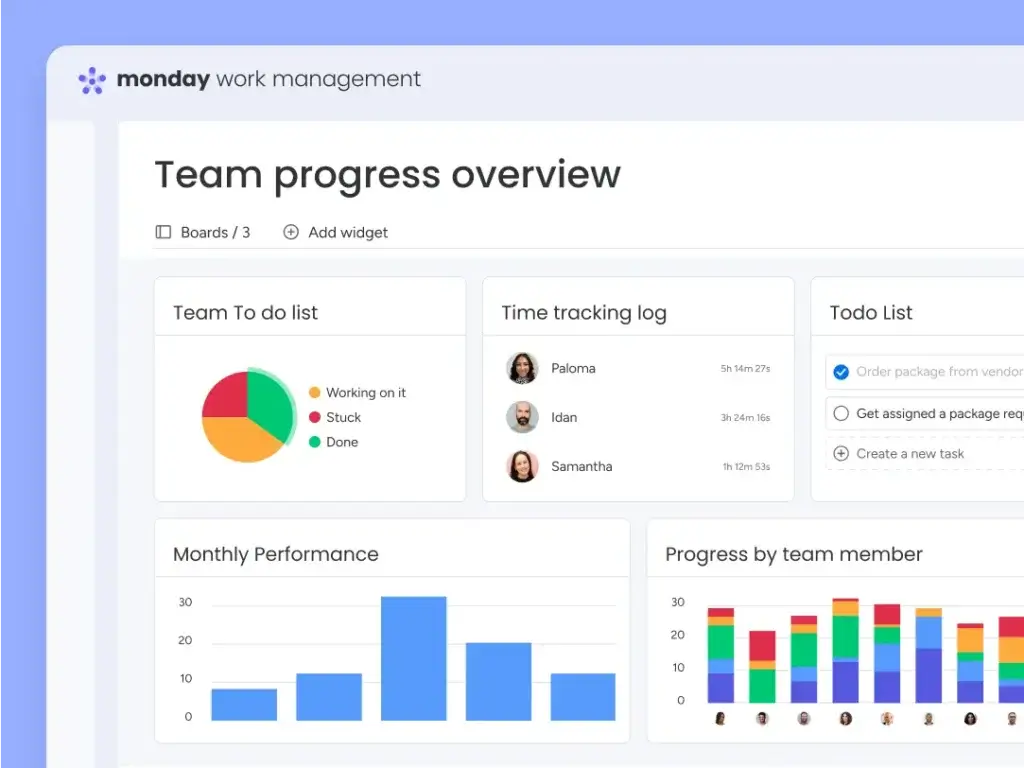
monday.com is the best fit for teams that want task management software that is easy to adopt but still powerful enough to support more advanced workflows over time. It works well for marketing, operations, product, IT, and cross-functional teams because it can handle both simple day-to-day task tracking and more structured work management.
What makes monday.com stand out is the balance between usability and flexibility. You can build boards for tasks, projects, requests, campaigns, or recurring processes, then customize statuses, columns, views, and dashboards based on how your team works. It is a strong option if you want visibility across work without forcing your team into a rigid setup.
monday.com is also a good choice if you want automation and reporting without too much complexity. It supports recurring workflows, progress tracking, multiple project views, and scalable dashboards, which makes it useful for both growing teams and more established businesses.
Top features and benefits
- Easy-to-use visual task management
- Strong workflow customization
- Built-in automation
- AI features that support execution
- Dashboards and reporting
- Templates for faster setup
Pros & Cons
Positive
✅ Intuitive and User-Friendly
✅ Highly Customizable Workflows
✅ Robust Automation Features
✅ Powerful Integration Options
Negatives
❌ Can Feel Overwhelming
❌ Higher Cost for Advanced Features
ClickUp

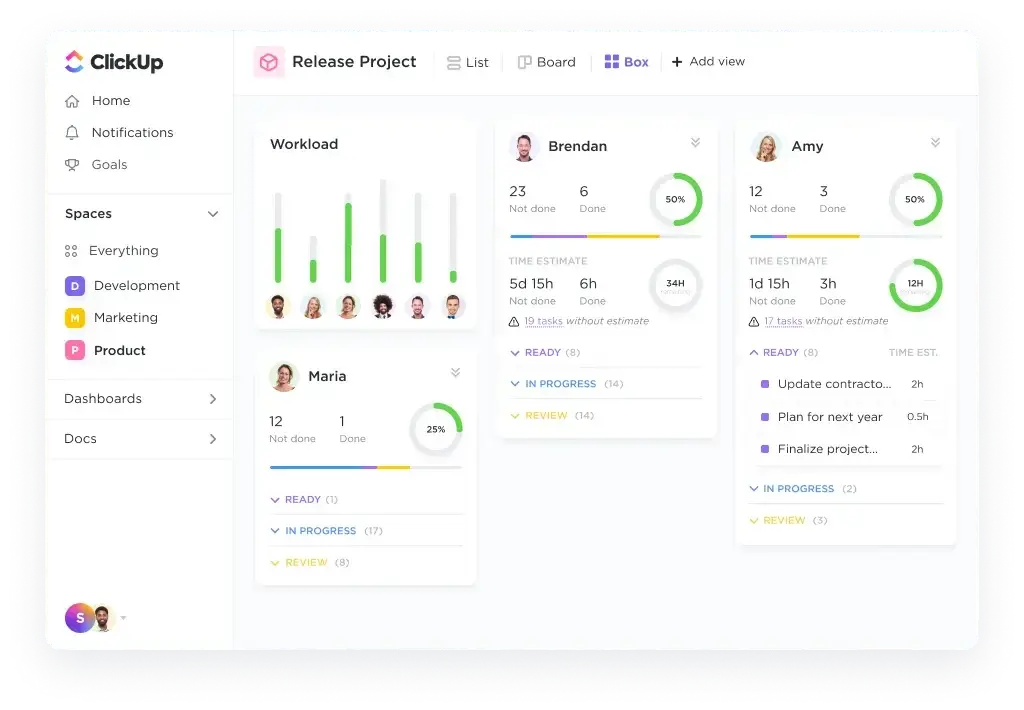
ClickUp is one of the best choices for teams that want a highly customizable task management platform with broad functionality in one place. It is a strong fit for operations, product, engineering, marketing, and cross-functional teams that need more than a simple to-do list.
What makes ClickUp stand out is how much it brings into a single workspace. It combines tasks, docs, chat, calendars, whiteboards, dashboards, and automations, while continuing to expand its AI capabilities with ClickUp Brain and AI Agents. That makes it especially attractive if your goal is to reduce tool sprawl.
ClickUp works best when your team is willing to invest a bit more time in setup. In return, you get a flexible system that can support simple task tracking, detailed project planning, and more advanced workflow management as your needs grow.
Top features and benefits
- Deep workspace customization
- Multiple task and project views
- Built-in docs and chat
- AI agents and assistance
- Automations and dashboards
- Time tracking and reporting
Pros & Cons
Positive
✅ Extremely flexible setup
✅ Broad feature depth
✅ Strong AI direction
✅ Excellent view options
Negatives
❌ Steeper learning curve
❌ Can feel crowded
Miro
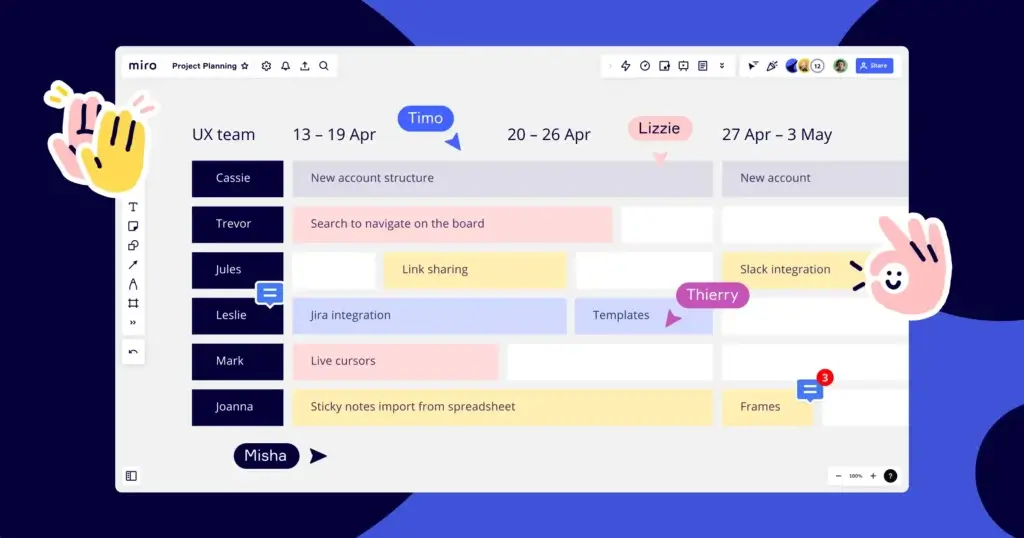
Miro is the strongest option on this list for teams that plan and collaborate visually. It is especially useful for product teams, strategy teams, agencies, and cross-functional groups that need to move from ideas and workshops into clearer execution.
What makes Miro different is that it is no longer just a digital whiteboard. The platform now positions itself as an AI innovation workspace with docs, tables, timelines, diagrams, slides, blueprints, and collaborative AI workflows that help teams turn ideas into structured plans.
Miro is a great fit if your team works best on a shared canvas and wants stronger alignment during planning. It is less traditional than a rigid task-first platform, but that flexibility is exactly why it works so well for brainstorming, mapping workflows, and collaborative project design.
Top features and benefits
- Visual planning canvas
- AI-powered workflows
- Docs, tables, and timelines
- Templates and blueprints
- Workshop-ready collaboration
- Large integration ecosystem
Pros & Cons
Positive
✅ Excellent visual planning
✅ Strong workshop collaboration
✅ Flexible creative workflows
✅ Growing AI capabilities
Negatives
❌ Less task-first structure
❌ Can get visually busy
Connecteam

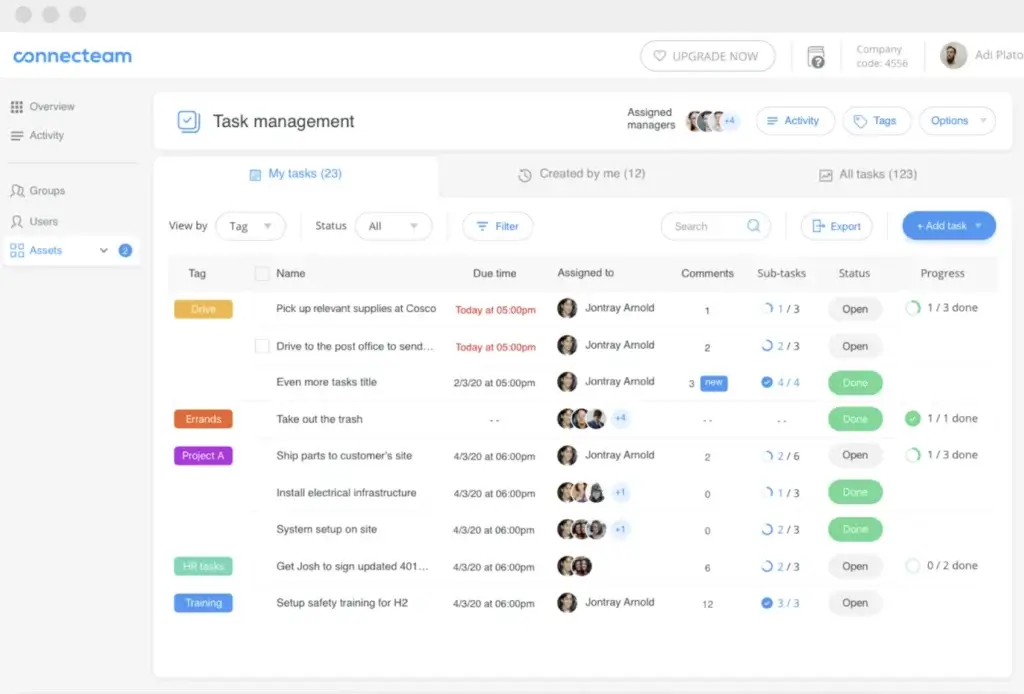
Connecteam is one of the best task management tools for deskless and frontline teams. It is built for businesses in construction, retail, healthcare, field services, hospitality, and other mobile-heavy environments where employees need clear tasks and updates on their phones.
What makes Connecteam stand out is its mobile-first approach. You can create one-time or recurring tasks, add subtasks, attach files, forms, checklists, and images, and track progress in real time. The platform also connects task management with scheduling, time tracking, communication, and broader workforce operations.
Connecteam is especially valuable when your team is spread across sites, shifts, or field locations. It gives managers more visibility and frontline workers a simpler way to know what needs to be done without relying on disconnected tools.
Top features and benefits
- Mobile-first task management
- Recurring tasks and subtasks
- Files, forms, and checklists
- Real-time status updates
- Push notifications and reminders
- Broader workforce management hubs
Pros & Cons
Positive
✅ Excellent for frontline teams
✅ Strong mobile experience
✅ Clear recurring task options
✅ Broad workforce toolkit
Negatives
❌ Less suited to desk teams
❌ Less depth for complex PM
Taskade

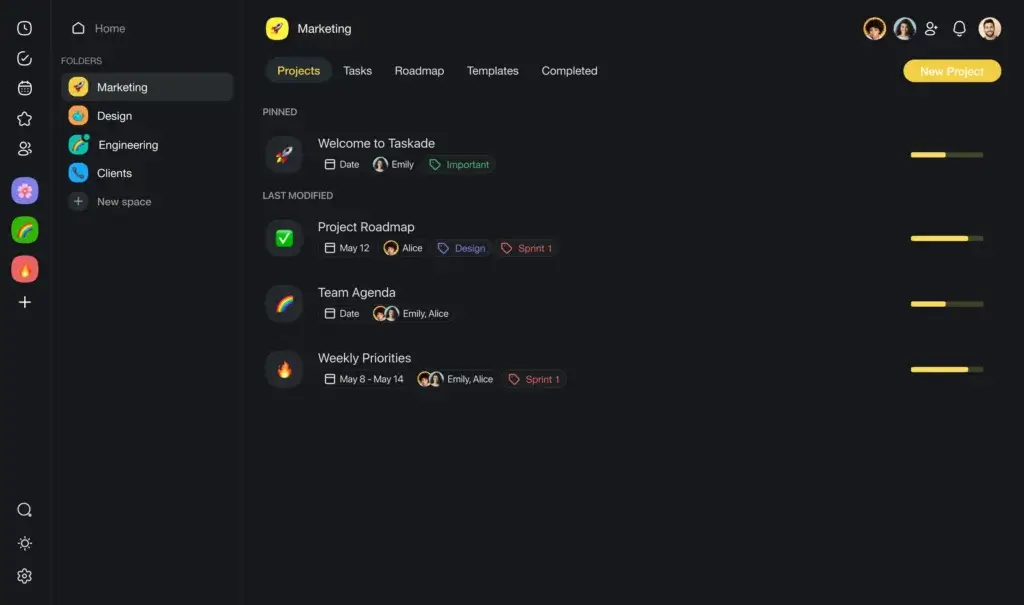
Taskade is a strong option for teams that want lightweight task management with a more AI-native workspace feel. It is well suited to startups, creators, remote teams, and small businesses that want to combine tasks, notes, mind maps, and AI support without moving into a heavier enterprise platform.
What makes Taskade stand out is how central AI has become to the product. The platform now emphasizes AI agents, automations, databases, and app-like workspace creation, while still supporting classic collaboration features such as task lists, outlines, mind maps, and built-in communication tools.
Taskade works best if you want a flexible productivity environment that feels faster and more experimental than traditional project management software. It is especially useful for teams that brainstorm often, document quickly, and want AI help inside the same workspace where they manage work.
Top features and benefits
- AI agents and automation
- Tasks, notes, and outlines
- Mind maps and visual planning
- Built-in collaboration tools
- Database-style project structure
- Fast workspace creation
Pros & Cons
Positive
✅ Strong AI-first approach
✅ Great visual flexibility
✅ Fast workspace setup
✅ Good remote collaboration
Negatives
❌ Lighter reporting depth
❌ Less structured for scale
ProofHub

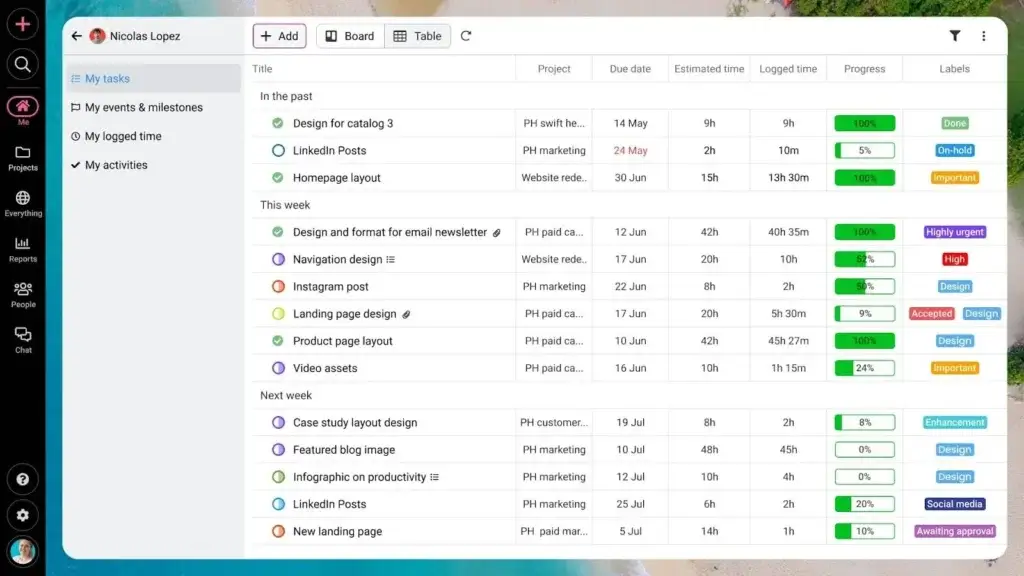
ProofHub is an all-in-one project management and team collaboration platform that gives teams complete control over tasks, projects, and communication in a single, centralized workspace. It eliminates the need to juggle multiple tools, avoids per-user pricing, and helps teams plan, execute, and deliver projects on time.
The platform allows users to create tasks and subtasks, assign owners, set deadlines, define custom workflows, set task dependencies, and track progress across multiple project views. What makes ProofHub different is that it is perfect for project managers and teams that need advanced task management and collaboration features without the complexity of traditional project management tools.
ProofHub also stands out for its simple and cost-effective pricing model. It offers flat-free pricing with unlimited users, allowing teams to scale without worrying about per-user costs. This makes it a budget-friendly option for growing teams that want access to core project management features without hidden charges.
Top features and benefits
- Task and subtask management
- Custom workflows and task dependencies
- Multiple project views (Board, Table, Gantt, Calendar)
- Built-in chat and file sharing
- Time tracking and timesheets
- Project reporting and progress tracking
Pros & Cons
Positive
✅ Simple and intuitive interface
✅ Minimal learning curve
✅ Strong task organization and collaboration features
✅ Flat-fee paid plans (unlimited users)
Negatives
❌ Basic reporting capabilities
❌ No free plan available
Notion
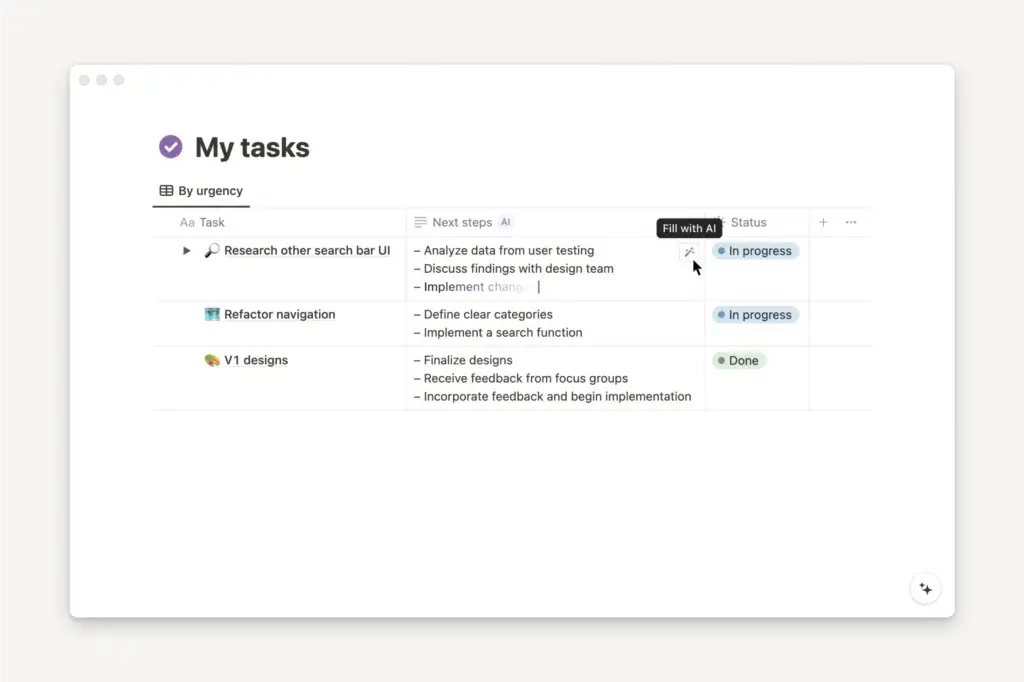
Notion is one of the best tools for teams that want task management inside a broader knowledge and collaboration workspace. It works especially well for product teams, startups, operations, content teams, and individuals who want tasks, docs, notes, databases, and AI support in one connected environment.
What makes Notion stand out is how flexible the platform has become. You can manage tasks and projects alongside wikis, meeting notes, roadmaps, and documentation, while Notion AI works directly inside pages, databases, and tasks. The platform is also expanding around calendar and connected workflow features, which makes it more useful for teams that want one workspace rather than multiple disconnected apps.
Notion is best if your team values flexibility and context. It may take more setup than a dedicated task-first tool, but it is excellent for building a system where execution and documentation live together in the same place.
Top features and benefits
- Tasks plus docs in one place
- Database-driven project tracking
- Built-in AI assistance
- Calendar and workflow support
- Highly customizable templates
- Strong knowledge management
Pros & Cons
Positive
✅ Great all-in-one workspace
✅ Excellent documentation layer
✅ Highly flexible setup
✅ Useful built-in AI
Negatives
❌ More setup required
❌ Less structured by default
Teamwork.com

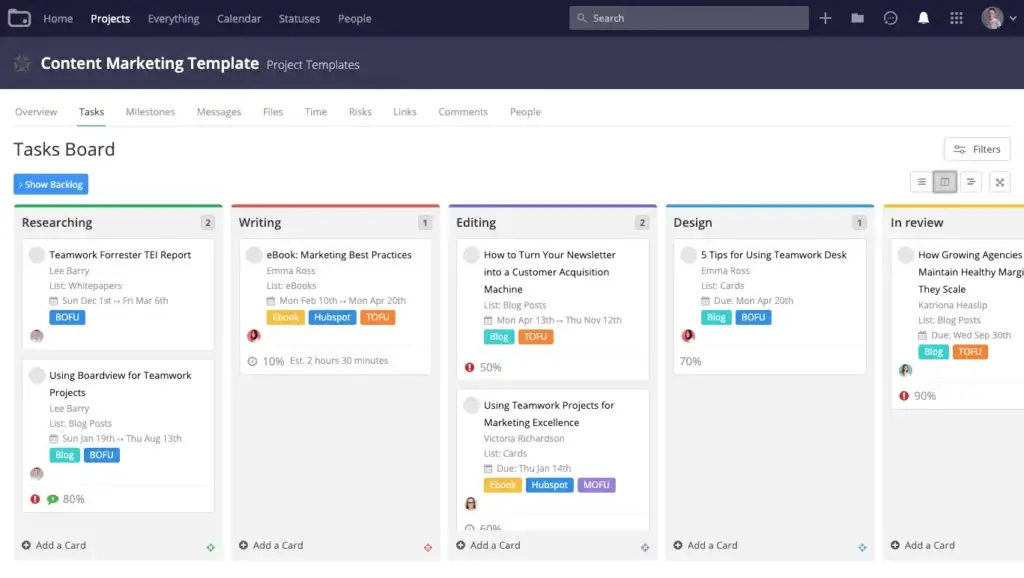
Teamwork.com is one of the best task management platforms for agencies, consultants, and service businesses that manage client work. It is built for teams that need to keep projects organized while also tracking time, workloads, budgets, and delivery performance.
What makes Teamwork.com stand out is how closely it connects task execution with business realities. You can manage tasks and subtasks, track billable time, balance team workloads, monitor budgets, and use AI-powered tools such as smart scheduling and project setup features to plan work more efficiently.
Teamwork.com is especially strong when your team needs clearer oversight across multiple client projects. If profitability, utilization, and delivery all matter, it offers a more tailored fit than many general-purpose task management tools.
Top features and benefits
- Client project tracking
- Built-in time tracking
- Resource and workload management
- Budget and profitability visibility
- Task templates and automation
- AI-powered project planning
Pros & Cons
Positive
✅ Built for client delivery
✅ Strong time tracking
✅ Useful workload visibility
✅ Better profitability insight
Negatives
❌ Less ideal for personal use
❌ Setup can take time
Todoist
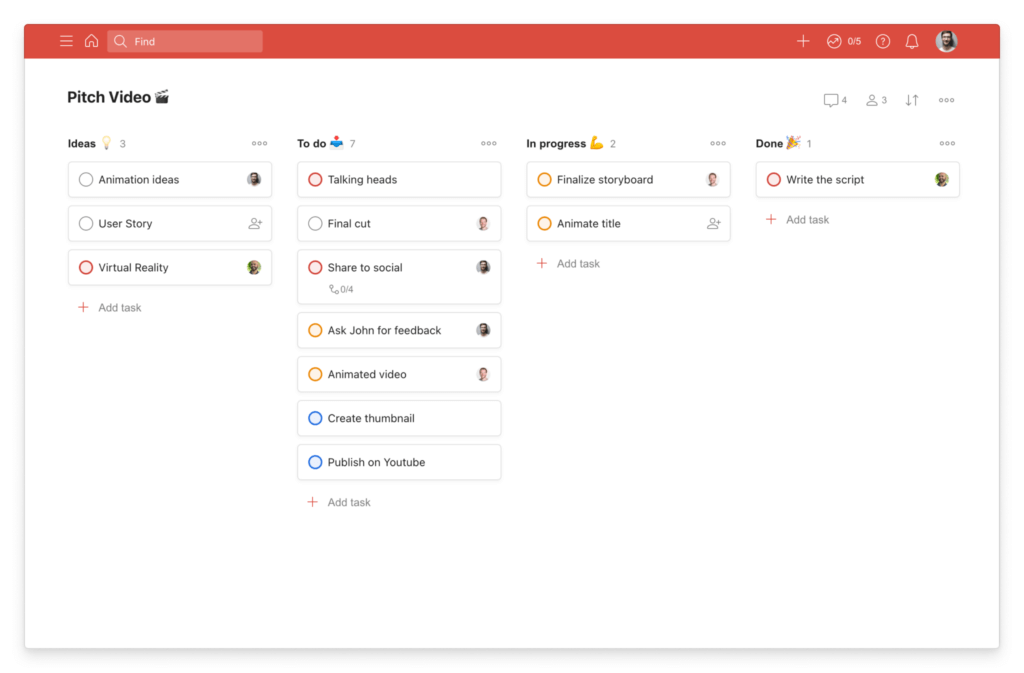
Todoist is one of the best task management tools for individuals, freelancers, and small teams that want something fast, focused, and easy to maintain. It is built around clarity, which makes it a strong option if you want better organization without the overhead of a full project management suite.
What makes Todoist stand out is how polished the core task experience feels. Quick capture, natural language scheduling, recurring tasks, reminders, filters, templates, and calendar view all work together to make everyday planning easier. It also supports shared team spaces without losing its personal productivity strengths.
Todoist is the right fit if your priority is staying consistent and organized rather than building highly complex workflows. It keeps the experience simple, but still gives you enough structure to manage work and personal tasks side by side.
Top features and benefits
- Fast task capture
- Natural language dates
- Recurring tasks and reminders
- Calendar, list, and board views
- Shared team task spaces
- Templates and smart filters
Pros & Cons
Positive
✅ Very easy to use
✅ Excellent recurring tasks
✅ Clean cross-device experience
✅ Strong personal productivity
Negatives
❌ Limited advanced reporting
❌ Light for complex teams
Any.do

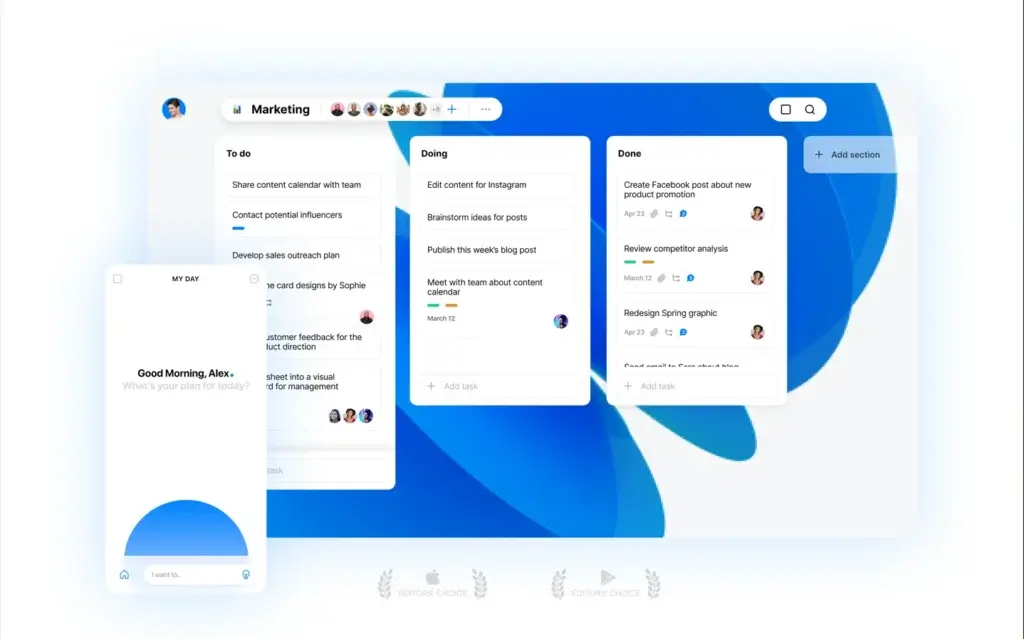
Any.do is a strong choice if you want a task management tool that stays simple, fast, and easy to maintain. It works especially well for individuals, families, and small teams that need a clean way to manage personal tasks, shared lists, reminders, and everyday planning without the complexity of a larger work management platform.
What makes Any.do stand out is its focus on daily execution. The platform combines to-do lists, calendar planning, reminders, and shared workspaces in one experience, which makes it practical for both personal organization and lightweight collaboration. It is especially useful if your priority is staying consistent with your day rather than building advanced project workflows.
Any.do is best for users who want a polished task app with low friction. Features like quick capture, recurring tasks, calendar integration, and daily planning help you stay organized without spending too much time maintaining the system itself.
Top features and benefits
- Simple list-based task management
- Daily planning workflow
- Calendar and time blocking support
- Recurring tasks and reminders
- Shared workspaces and lists
- Voice entry and quick capture
Pros & Cons
Positive
✅ Very easy to use
✅ Strong daily planning
✅ Helpful calendar sync
✅ Clean mobile experience
Negatives
❌ Light for larger teams
❌ Limited advanced workflows
Motion

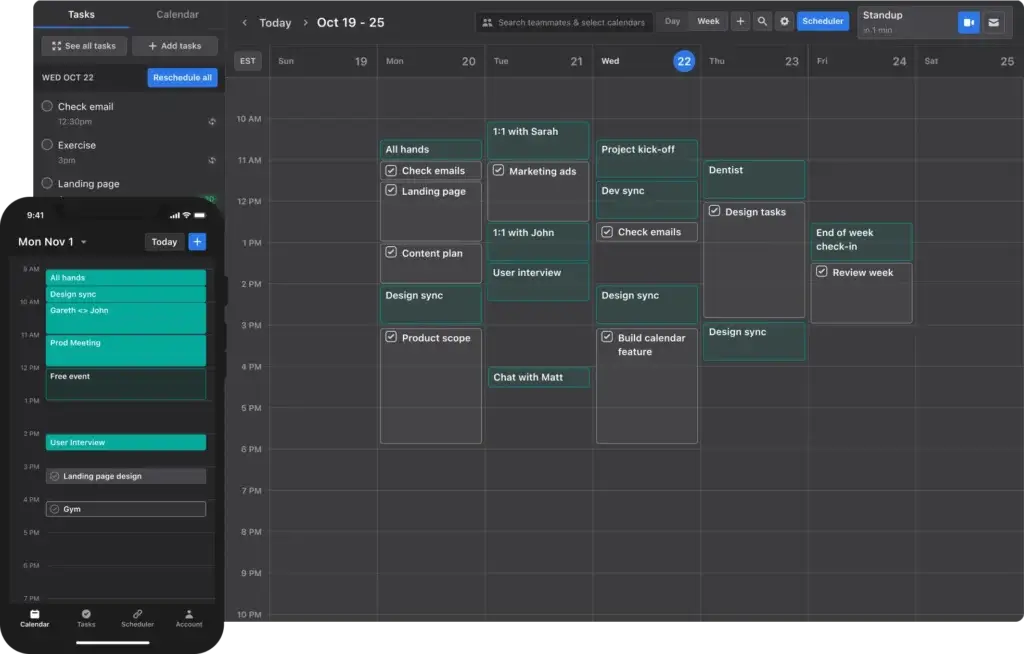
Motion is a strong fit for professionals and teams that struggle more with scheduling than with pure task entry. Instead of just storing tasks, it uses AI to place work directly into your calendar based on deadlines, priorities, and availability, which makes it especially useful for busy managers, founders, and client-facing teams.
What makes Motion stand out is the way it combines task management, project planning, and calendar automation into a single workflow. It can automatically reprioritize tasks when plans change, help schedule meetings, and support project execution with deadlines, dependencies, ownership, and progress tracking.
Motion works best if your biggest problem is not remembering what to do, but finding time to actually do it. That makes it more opinionated than a traditional task manager, but also more useful for people who want the system to actively protect focus time and reduce planning overhead.
Top features and benefits
- AI task scheduling
- Automatic reprioritization
- Calendar-based planning
- Project deadlines and dependencies
- Meeting scheduling support
- Focus-friendly time blocking
Pros & Cons
Positive
✅ Excellent AI scheduling
✅ Saves planning time
✅ Great for busy calendars
✅ Strong focus management
Negatives
❌ Less manual flexibility
❌ Smaller team depth
Smartsheet

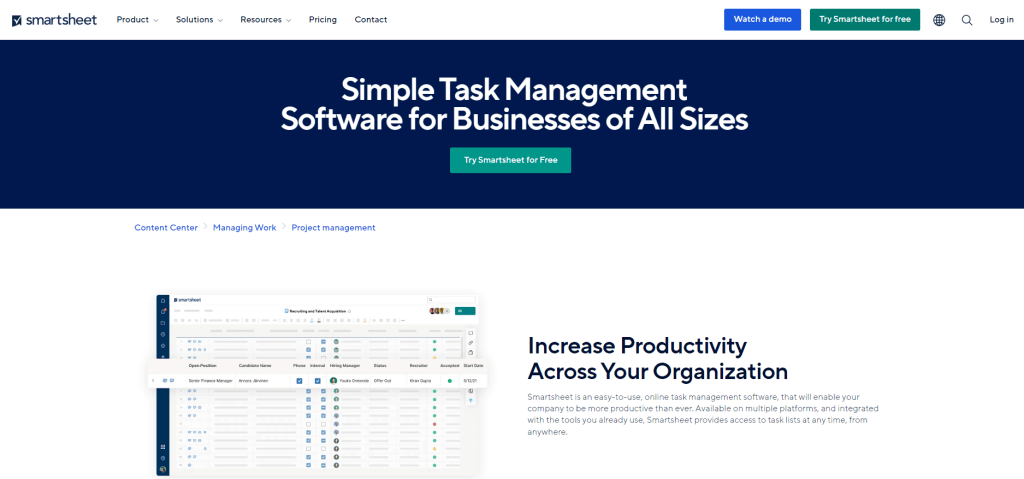
Smartsheet is one of the best options for teams that want task management with the logic and structure of a spreadsheet. It is especially effective for operations, PMOs, construction, IT, and enterprise environments where teams need more control over planning, workflows, and reporting.
What makes Smartsheet stand out is how well it combines familiar sheet-based work with broader work management capabilities. You can manage tasks across Grid, Card, Gantt, Timeline, and Calendar views, while also using automation, dashboards, request forms, and AI-powered assistance to reduce manual work and improve visibility.
Smartsheet is best when your team needs strong structure and process consistency. It is not as lightweight as simpler task managers, but it is one of the most compelling choices if your workflow depends on reporting, data handling, and repeatable operational systems.
Top features and benefits
- Spreadsheet-style task control
- Grid, card, and Gantt views
- Automation and request forms
- Dashboards and roll-up reporting
- AI formula and summary tools
- Resource and portfolio visibility
Pros & Cons
Positive
✅ Excellent for structured work
✅ Strong multi-view planning
✅ Powerful reporting tools
✅ Familiar sheet experience
Negatives
❌ Less intuitive for beginners
❌ Can feel enterprise-heavy
Wrike

Wrike is one of the best task management tools for larger teams and organizations that need stronger structure, visibility, and control. It is a particularly good fit for enterprise operations, PMOs, marketing teams, IT, and departments that manage complex workflows across many stakeholders.
What makes Wrike stand out is its focus on scalable work management. The platform combines automation, dashboards, custom item types, workflow control, and cross-team visibility, while continuing to expand its AI layer with Work Intelligence and new AI Agent capabilities. That makes it more compelling for teams that need governance as much as task execution.
Wrike is best when your team needs deeper process control and reporting than lighter tools can offer. It is not the simplest option on this list, but it is one of the strongest if your task management needs are tied to scale, consistency, and operational oversight.
Top features and benefits
- Enterprise workflow management
- Custom item types
- Automation and AI agents
- Dashboards and reporting
- Portfolio-level visibility
- Cross-team collaboration controls
Pros & Cons
Positive
✅ Strong enterprise structure
✅ Excellent reporting depth
✅ Powerful workflow controls
✅ Growing AI feature set
Negatives
❌ More complex to learn
❌ Overkill for simple use
How to Choose the Best Task Management Software
Choosing the best task management software starts with understanding how your team actually works. Some teams need a simple place to track daily tasks. Others need automations, dashboards, resource planning, and visibility across multiple projects.
The right tool should make work easier to manage, not harder to maintain. That is why it is important to look beyond feature lists and focus on workflow fit, usability, and long-term value.
Start with your team’s workflow
Before comparing tools, think about how your team plans, assigns, and completes work. A small team may only need lists, reminders, and shared task ownership. A larger team may need timelines, automations, reporting, and better cross-functional coordination.
If the software does not match the way your team works, adoption will be harder and the platform will create friction instead of clarity.
Prioritize ease of use
A task management platform should help your team move faster from day one. Clean navigation, clear task views, and a low learning curve are essential, especially if you want broad adoption across different departments.
This is one reason tools like monday.com, Todoist, and Any.do appeal to a wide audience. They reduce complexity and make it easier to build consistent habits around task tracking.
Look for the right level of flexibility
Some teams want a lightweight tool that works out of the box. Others need custom workflows, multiple project views, and structured reporting. The best option depends on how much control your team needs over statuses, templates, automations, and dashboards.
If your processes are likely to evolve, flexibility matters even more. A platform that fits your team now but cannot scale with you may need to be replaced sooner than expected.
Think beyond task lists
Modern task management software does much more than track checkboxes. Many teams now expect built-in collaboration, recurring workflows, reporting, integrations, and AI support to reduce manual work and improve visibility.
If your team works across multiple tools, you should also consider whether your task manager can connect smoothly with email, chat, docs, calendars, and file sharing.
Evaluate long-term value, not just price
A cheaper plan is not always the better choice. The real question is whether the software saves enough time, reduces enough friction, and improves enough coordination to justify the cost.
In many cases, the best value comes from a tool that replaces multiple disconnected systems and gives your team one clearer source of truth for work.
Use free trials strategically
The best way to evaluate task management software is to test it with real workflows. Build a simple project, assign tasks, check notifications, review dashboards, and see how your team responds.
This gives you a much better signal than reading feature lists alone.
Task Management Software vs To-Do List Apps vs Project Management Software
These categories overlap, but they are not the same. Understanding the difference helps you choose the right type of tool instead of buying more software than you need.
Task management software
Task management software sits in the middle. It helps you organize, assign, prioritize, and track work across individuals and teams. It usually includes task ownership, deadlines, recurring tasks, status tracking, and team collaboration features.
This category is ideal when you need more structure than a personal to-do list, but do not necessarily need the full complexity of enterprise project management software.
To-do list apps
To-do list apps are usually simpler and more personal. They are best for capturing tasks quickly, setting reminders, organizing your day, and maintaining personal productivity.
Tools like Todoist and Any.do are strong examples. They work well when speed, simplicity, and daily planning matter more than advanced workflows or reporting.
Project management software
Project management software is typically broader and more structured. It often includes timelines, dependencies, resource management, portfolio tracking, approvals, and deeper reporting.
This type of platform is better suited to teams managing larger initiatives, multiple stakeholders, or more formal delivery processes.
Which one do you need?
If you mostly manage your own daily work, a to-do list app may be enough. If your team needs shared visibility and better coordination, task management software is usually the best fit. If you manage large, multi-stage initiatives with many moving parts, project management software may be the better choice.
For many businesses, the strongest option is a task management platform that can support today’s workflows while still giving room to grow into broader work management later.
Why AI Now Matters in Task Management Software
AI is no longer just an extra feature in this category. It is becoming part of how modern teams plan, prioritize, automate, and execute work.
The biggest shift is practical. Instead of only helping you store tasks, newer platforms are starting to help you generate plans, summarize updates, surface risks, automate routine actions, and reduce manual coordination.
Where AI adds real value
The best AI features in task management are the ones that save time and improve decision-making. That can include generating tasks from notes, writing summaries, suggesting next steps, prioritizing work, or automating repetitive actions inside workflows.
Used well, these features reduce admin work and help teams stay focused on execution.
Why this matters when choosing software
If two tools look similar on the surface, AI can become a real differentiator. A platform that helps your team plan faster, communicate more clearly, and automate routine work can deliver more value over time than a tool that only tracks tasks manually.
That does not mean every team needs the most advanced AI platform. It does mean you should pay attention to whether a product is evolving in a way that supports how work is changing.
What to look for
When evaluating AI in task management software, focus on usefulness rather than hype. Look for features that improve planning, simplify updates, reduce repetitive work, and help your team stay aligned.
The best AI support should feel practical, not distracting.
Final Thoughts on the Best Task Management Software
The best task management software is the one that fits your workflow, supports your team’s habits, and gives you enough structure to keep work moving without adding unnecessary complexity.
If you want the strongest all-around option, monday.com is the best choice for most teams. It offers the best balance of usability, flexibility, and scalability. If you need deeper customization, ClickUp is a strong alternative. If your team works visually and collaborates heavily in planning sessions, Miro stands out.
For smaller teams or personal productivity, simpler tools like Todoist and Any.do can still be the better fit. For more structured or enterprise workflows, tools like Wrike and Smartsheet may offer more control.
The smartest next step is to shortlist two or three tools that match your workflow, test them with a real project, and see which one your team actually wants to keep using.
FAQs
What is task management software?
Task management software helps you organize, assign, prioritize, and track work in one place. It gives you better visibility into deadlines, responsibilities, and progress across individual and team tasks.
What is the best task management software for most teams?
For most teams, monday.com is the best overall choice because it combines ease of use, flexibility, automation, and scalability. It works well for both simple task tracking and more advanced workflows.
What is the difference between task management software and project management software?
Task management software focuses on organizing and tracking tasks, while project management software usually includes broader planning tools such as timelines, dependencies, resource management, and portfolio tracking.
Are task management tools good for small teams?
Yes. Small teams often benefit from task management tools because they improve accountability, reduce confusion, and keep work organized. Simpler tools like Todoist or Any.do work well for smaller teams, while monday.com offers more room to grow.
Do I need AI in task management software?
Not every team needs AI, but useful AI features can save time by helping with task creation, summaries, prioritization, and automation. The best AI features support execution instead of adding unnecessary complexity.
Which task management software is best for personal productivity?
Todoist is one of the best options for personal productivity because it is simple, fast, and easy to maintain. Any.do is also a strong choice if you want a more calendar-focused daily planning experience.
Which task management tool is best for customization?
ClickUp is one of the best tools for customization. It offers multiple views, flexible workflows, automation options, and a broad feature set for teams that want more control over how work is organized.
What should you look for in task management software?
You should look for ease of use, workflow fit, collaboration features, automation, reporting, integrations, and long-term scalability. The best platform is one your team can adopt quickly and keep using as your needs grow.
Can task management software replace spreadsheets?
In many cases, yes. Task management software can replace spreadsheets for day-to-day work tracking by offering clearer ownership, better visibility, automation, and real-time updates. Smartsheet is a strong choice if your team still prefers spreadsheet-style workflows.
How do you choose the right task management software?
Start by identifying how your team plans, assigns, and tracks work. Then compare tools based on usability, flexibility, collaboration, and value. The best way to choose is to test a few options with a real workflow before making a final decision.