Introduction
AI agents are quickly moving from experimental demos to practical work tools. Instead of asking an AI chatbot one question at a time, you can now assign an agent to monitor information, take actions, connect apps, draft content, manage workflows, and keep working after the initial prompt.
Globster.ai enters this category with a clear promise: one-click AI agents that you can deploy in minutes, without setting up servers, API keys, local machines, or complex agent infrastructure.
That positioning makes Globster.ai especially interesting for founders, marketers, operators, ecommerce teams, agencies, and productivity-focused businesses that want more than a chatbot but do not want to build a custom AI agent stack from scratch.
In this Globster.ai review, you will learn what the platform does, how it works, what it costs, who it is best for, where it still feels early, and how it compares with alternatives such as Zapier Agents, Make AI Agents, ChatGPT Agent, and self-hosted OpenClaw setups.
What Is Globster.ai?
Globster.ai is a hosted AI agent platform built by monday agent labs, the innovation unit connected to monday.com. The platform is designed to let you create and run a personal or business AI agent with minimal technical setup.
Instead of installing OpenClaw locally, configuring a machine, handling model API keys, and managing agent runtime security yourself, Globster.ai packages the agent experience into a managed cloud service.
The core idea is simple: you deploy an AI agent, connect it to channels and plugins, choose or route models, and let it execute workflows across your tools.
Globster.ai is built around the broader OpenClaw and NVIDIA NemoClaw movement. In practical terms, that means it sits closer to an “AI worker” than a simple chatbot. It can operate across workflows, run recurring actions, use plugins, and interact with apps more persistently.
For business users, the main value is not that Globster.ai answers questions. Many tools can already do that. The value is that it can be configured as a repeatable operator for workflows that usually require tabs, tools, manual checks, and follow-up.
Key Features
How Globster.ai Works
Globster.ai is built for users who want an AI agent running in the cloud rather than on a personal computer. That distinction matters.
Self-hosting an AI agent can be powerful, but it often involves local setup, API keys, dependencies, runtime management, security controls, and ongoing maintenance. Globster.ai tries to remove that friction by giving you a managed environment where the agent can be deployed quickly and connected to workflows.
In practical terms, Globster.ai works through five core layers:
- Hosted agent deployment: You create an AI agent without managing your own server or local machine.
- Model access: You can work with different AI models depending on task complexity, cost, and availability.
- Channels: The agent can operate where your team communicates or works, depending on connected channels.
- Plugins: The agent can connect to apps and services to perform real work across tools.
- Automation recipes: You can create repeatable workflows that chain tools, triggers, and actions together.
This makes Globster.ai feel like a mix between an AI assistant, an automation platform, and a lightweight digital teammate.
Globster.ai Key Features
Globster.ai is still an emerging platform, so its feature set is evolving quickly. However, its current direction is clear: give non-technical users a simple way to launch AI agents that can take action across business workflows.
One-Click AI Agent Deployment
The biggest selling point is deployment simplicity. Globster.ai is designed so you can create an AI agent in minutes instead of manually setting up an OpenClaw environment.
This matters because many users are interested in AI agents but are not ready to handle infrastructure. If you are a marketer, ecommerce operator, founder, or agency owner, you likely care more about the result than the runtime.
With Globster.ai, the value is speed. You can move from “I want an AI agent” to “I have an agent I can configure” much faster than you would with a do-it-yourself setup.
Hosted OpenClaw Experience
OpenClaw-style agents are powerful because they can plan, execute, adapt, and potentially work across multiple tasks. The challenge is that self-hosting can be intimidating for business users.
Globster.ai solves this by giving you a hosted experience. You do not need to keep a laptop running, worry about Wi-Fi interruptions, manage a Mac mini, or maintain your own infrastructure.
That makes Globster.ai more accessible than a raw open-source agent setup. It is not aimed only at developers. It is aimed at business users who want the outcome of agentic automation without the setup burden.
AI Model Choice and Credit-Based Usage
Globster.ai uses a credit-based system rather than a simple “unlimited AI” model. This is important because agentic workflows can consume more AI resources than normal chat conversations.
Depending on the task, your agent may need to reason, call tools, browse information, generate outputs, revise work, and execute multiple steps. Each step can consume credits.
The benefit of this structure is flexibility. You can use different models depending on the level of reasoning, speed, and cost you need. The limitation is that you need to understand usage patterns, especially if your agent runs frequent or complex automations.
Plugins for Real Workflows
Globster.ai becomes more useful when it is connected to the tools your business already uses. Its plugin direction includes practical work scenarios such as ecommerce, social media, meetings, documents, payments, and operational workflows.
For example, an ecommerce operator may use an agent to check Shopify activity, summarize unfulfilled orders, identify low-stock products, flag abandoned carts, or prepare product listing drafts.
A marketing team may use it to draft social posts, score content, rewrite copy for distribution, prepare a weekly content calendar, or support publishing workflows.
An operations team may use it to monitor competitors, gather data, create a digest, draft follow-up messages, or log updates in a work management system.
Automation Recipes
Automation Recipes are one of the most important concepts in Globster.ai. Instead of using the agent only for one-off prompts, you can create multi-step workflows that connect plugins and channels.
This shifts Globster.ai from “AI chat” to “AI operations.”
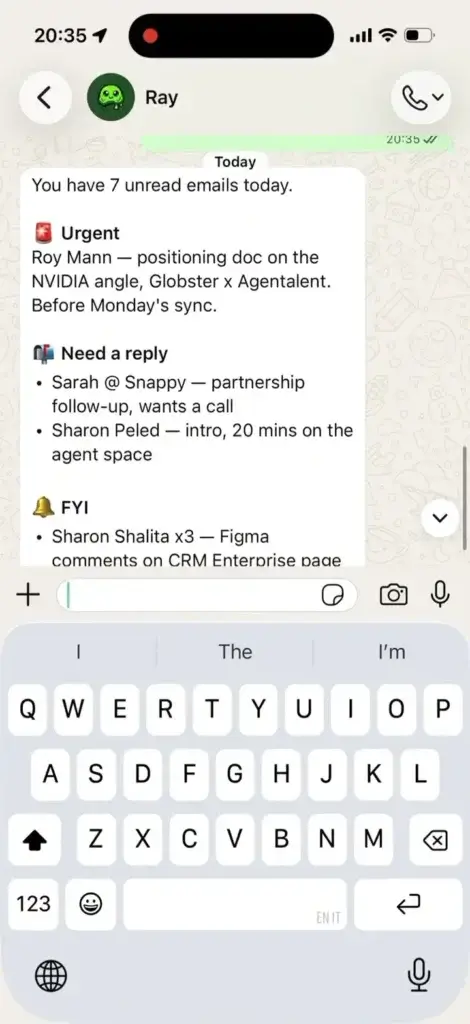
For example, you might create a workflow that monitors competitor mentions, gathers public sentiment, summarizes the findings in a document, and emails a weekly digest.
You might also create a workflow for unpaid invoices, where the agent checks payment status, drafts a reminder, and logs an update in your work system.
This is where Globster.ai becomes more comparable to automation platforms like Zapier and Make, but with an agent-first interface rather than a traditional automation builder.
Always-On Agent Workflows
A normal chatbot waits for your next message. Globster.ai is designed around a more persistent agent concept.
That means your agent can support workflows that happen while you are not actively prompting it. This is valuable for monitoring, daily digests, routine checks, content workflows, and operational follow-ups.
For productivity-focused teams, this is the main reason to consider Globster.ai. The strongest use cases are not simple Q&A tasks. They are repetitive workflows where an AI agent can reduce the manual effort of checking, drafting, summarizing, routing, and updating.
Use Cases & Benefits
Who Should Use Globster.ai?
Globster.ai is not the right tool for every AI user. If you only need to ask questions, summarize documents, or write basic content, a general AI assistant may be enough.
Globster.ai becomes more compelling when you want an AI agent to work across tools and workflows.
Best Fit Use Cases
- Founders: Delegate recurring research, operations, outreach, and admin workflows.
- Marketing teams: Generate content plans, monitor competitors, draft posts, and prepare campaign updates.
- Ecommerce teams: Track store activity, support product updates, review abandoned carts, and summarize operational issues.
- Agencies: Create repeatable client workflows for reporting, monitoring, and content production.
- Operations teams: Connect tools and create recurring workflows without building custom internal software.
- AI early adopters: Experiment with agentic workflows without managing OpenClaw infrastructure directly.
In my opinion, Globster.ai is most attractive for teams that already understand their workflows well. The clearer your process is, the easier it is to turn that process into an agent workflow.
If your work is chaotic, undocumented, and constantly changing, Globster.ai can still help, but you may need more experimentation before the agent becomes reliable.
Where Globster.ai Can Save Time
Globster.ai is strongest in workflows that combine information gathering, reasoning, drafting, and tool-based action.
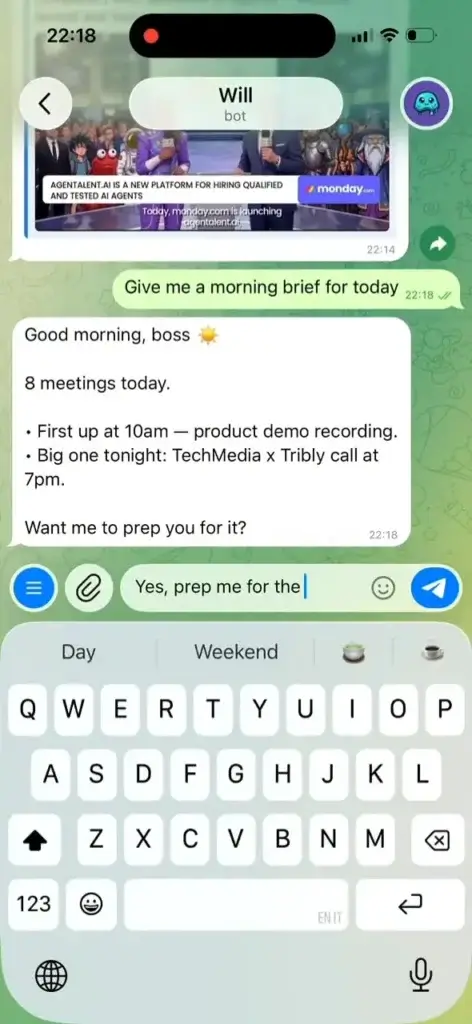
Examples include competitor monitoring, weekly ecommerce summaries, social content planning, follow-up drafting, meeting preparation, invoice reminders, customer research, lead enrichment, and internal reporting.
The platform is less ideal for highly sensitive, regulated, or mission-critical automations where every step requires strict audit controls, approval chains, or enterprise-grade compliance review.
That does not mean Globster.ai cannot mature into those environments. It simply means that, at this stage, most users should start with lower-risk workflows before allowing agents to handle business-critical actions.
Pros and Cons
Globster.ai Benefits and Limitations
Positive
✅ Fast hosted AI agent setup
✅ No local infrastructure required
✅ Useful plugin-based workflow direction
✅ Strong fit for automation-heavy teams
Negative
❌ Still early compared with mature automation platforms
❌ Credit usage can be hard to predict
❌ Requires testing before sensitive workflows
❌ Not ideal for users who only need basic AI chat
✅ Pros
- Very fast way to deploy an AI agent without technical infrastructure.
- Built around practical workflow automation, not only chat-based assistance.
- Useful for founders, marketers, ecommerce teams, and operations teams.
- Hosted cloud setup removes the need to keep local machines running.
- Supports a modern agentic workflow model through plugins and recipes.
- Better suited to non-technical users than self-hosted OpenClaw setups.
- Can reduce repetitive work across research, content, operations, and ecommerce.
- Model choice gives users more flexibility over performance and cost.
❌ Cons
- Still an early-stage platform, so documentation and feature depth may evolve quickly.
- Credit-based pricing can be less predictable than flat monthly subscriptions.
- Not as mature as Zapier or Make for traditional app-to-app automation.
- Requires thoughtful setup, agents are not magic without clear workflow design.
- May need more governance before being used for sensitive or regulated workflows.
- Public third-party reviews are still limited compared with established SaaS tools.
- Users who only need writing, search, or chat may be better served by ChatGPT or Claude.
Overall, Globster.ai’s strengths are speed, accessibility, and workflow ambition. Its weaknesses are typical for a newer AI agent platform: maturity, predictability, and the need for careful testing.
User Experience
Globster.ai Interface & Setup
Globster.ai’s user experience is built around reducing the complexity of agent deployment. Rather than presenting you with developer tooling first, it guides you toward creating an agent and connecting it to tasks.
The strongest part of the experience is the time-to-value. You are not starting with a terminal, local dependencies, or API provider setup. You are starting with a hosted product interface.
That makes Globster.ai more approachable for business users. If you understand the workflow you want to automate, the platform gives you a more direct path to building it.
Setup Experience
The setup experience is likely to appeal to users who have tried automation tools before but found agent infrastructure too technical.
You can think of it as the difference between building a workflow engine from scratch and using a managed product. Globster.ai gives you the managed route.
That said, simplicity does not remove the need for planning. The best results will come from users who define clear instructions, test workflows, review outputs, and refine the agent over time.
Learning Curve
The learning curve depends on what you expect the agent to do.
Basic tasks, such as drafting a message or summarizing information, should be easy. More advanced workflows, such as monitoring data sources, updating business systems, or chaining multiple apps, will require testing.
This is normal for agentic tools. AI agents are more flexible than fixed automations, but that flexibility also means you need to review behavior and set boundaries.
For most teams, I would start with one narrow workflow. Once the agent performs that workflow reliably, expand to more complex recipes.
Pricing
Globster.ai Plans & Costs
Globster.ai uses credit-based pricing. This is common for AI agent products because usage can vary widely depending on the model, workflow complexity, number of actions, and frequency of automation.
Based on publicly visible pricing information, Globster.ai lists three main paid plans:
| Plan | Monthly Price | Included Credits | Best For |
| Starter Globster | $29/month | 2,900 credits/month | Solo users and early AI agent testing |
| Pro Globster | $79/month | 7,900 credits/month | Power users, marketers, and small teams |
| Business Globster | $199/month | 22,900 credits/month | Teams running heavier workflows and recurring automations |
There may also be annual pricing differences or promotional pricing depending on when you subscribe. Before publishing, it is worth checking Globster.ai’s pricing page again because AI agent pricing changes quickly across the category.
How to Think About Globster.ai Credits
Credits are important because agent workflows are not always predictable. A short prompt may use few credits, while a multi-step workflow may consume more because the agent needs to reason, call tools, create outputs, and possibly revise them.
If you plan to use Globster.ai for occasional workflows, the Starter plan may be enough. If you want to run daily content, ecommerce, monitoring, or operations workflows, the Pro or Business plan will likely be more realistic.
For serious business use, I would not evaluate Globster.ai only by monthly price. You should evaluate it by workflow ROI.
If one agent workflow saves several hours per week, the cost can be easy to justify. If you use it only as another chat assistant, it may feel expensive compared with general AI subscriptions.
Is Globster.ai Good Value?
Globster.ai offers good potential value if you use it for repeatable work. The pricing makes more sense when the agent replaces repetitive manual tasks, not when it replaces occasional prompting.
For example, an agency that uses Globster.ai to generate weekly client monitoring reports may find strong value. An ecommerce operator that uses it to summarize daily store issues may also benefit.
However, if you do not yet have a clear workflow in mind, start small. Test one use case, track how often you use it, and monitor credit consumption before committing to broader usage.
Integrations and Workflow Compatibility
Globster.ai Apps, Channels & Plugins
Integrations are central to Globster.ai’s long-term value. An AI agent becomes much more useful when it can work inside the tools you already use.
Globster.ai’s public updates point toward plugins and channels across ecommerce, creative work, meetings, social media, documents, payment workflows, and work management.
Potential Workflow Categories
- Ecommerce: Shopify-related workflows such as order summaries, product updates, and cart recovery planning.
- Marketing: Social content planning, draft scoring, rewriting, scheduling, and performance summaries.
- Meetings: Zoom-related scheduling, messages, and transcript workflows.
- Creative work: Canva-style content and presentation creation from prompts.
- Operations: Document creation, invoice follow-up, data monitoring, and status logging.
- Work management: Logging updates or workflow outcomes into systems such as monday.com.
This gives Globster.ai a broad productivity angle. It can support marketing operations, ecommerce operations, admin workflows, and internal reporting.
Still, it is important to compare this with traditional automation platforms. Zapier and Make have larger integration ecosystems and more mature workflow controls. Globster.ai’s advantage is its agent-first approach, not necessarily the number of integrations.
Globster.ai vs Traditional Automation
Traditional automation tools are best when your workflow is structured and predictable. For example, when a form is submitted, create a CRM lead, send an email, and notify Slack.
Globster.ai is more interesting when the workflow requires interpretation, drafting, decision-making, or flexible reasoning.
For example, “check competitor activity, summarize what matters, decide what changed, draft a short internal update, and prepare a response idea” is better suited to an AI agent than a simple trigger-action automation.
In many teams, the best setup may be a combination: use Zapier or Make for deterministic automations, and use Globster.ai for workflows that need context, reasoning, and content generation.
Competitor Comparison
Globster.ai Alternatives
Globster.ai competes in a fast-moving category. Its closest alternatives depend on what you want to accomplish.
| Tool | Best For | How It Compares With Globster.ai |
| Zapier Agents | No-code AI agents across a large app ecosystem | More mature app coverage, but less OpenClaw-style agent positioning |
| Make AI Agents | Visual workflow automation with transparent logic | Better for structured automation, while Globster.ai feels more agent-first |
| ChatGPT Agent | General web tasks, research, documents, and personal productivity | Stronger general assistant experience, but less focused on persistent business agent deployment |
| Self-hosted OpenClaw/NemoClaw | Technical users who want control and customization | More flexible, but requires technical setup and maintenance |
| Claude Computer Use / Cowork | Screen-based AI computer control and developer workflows | Powerful for certain tasks, but not the same as a hosted business agent platform |
Globster.ai vs Zapier Agents
Zapier Agents is better if your priority is broad app coverage and no-code automation across thousands of apps. Zapier has a mature ecosystem, strong automation logic, and a familiar workflow model.
Globster.ai is better if you are specifically interested in the hosted OpenClaw-style agent experience and want a more AI-native operating model.
Choose Zapier Agents for app breadth. Choose Globster.ai for one-click agent deployment and experimental agentic workflows.
Globster.ai vs Make AI Agents
Make is excellent for visual automation, clear workflow mapping, and structured business processes. If you need full visibility into every step of an automation, Make may be easier to govern.
Globster.ai is more appealing when you want an agent that can interpret context and handle less rigid workflows.
Choose Make when the process is predictable. Choose Globster.ai when the process requires reasoning, summarization, drafting, or agent-like decision support.
Globster.ai vs ChatGPT Agent
ChatGPT Agent is a strong option for general personal productivity, research, documents, online tasks, and guided actions. It is likely easier for users who already live inside ChatGPT.
Globster.ai is more specialized. It is not just a general assistant, it is positioned as a hosted agent that can be connected to workflows, plugins, and channels.
Choose ChatGPT Agent for broad personal AI assistance. Choose Globster.ai when you want to experiment with persistent, workflow-oriented agents.
Globster.ai vs Self-Hosted OpenClaw
Self-hosted OpenClaw or NemoClaw setups give technical users more control. You can customize infrastructure, manage policies, experiment deeply, and avoid some hosted platform limitations.
The trade-off is complexity. You need technical comfort, setup time, and maintenance.
Globster.ai is better for business users who want the benefits of an agent without owning the technical stack.
Security
Globster.ai Risk & Controls
AI agents introduce a different risk profile than standard SaaS tools. A chatbot gives you output. An agent may take action.
That means you should think carefully about permissions, connected apps, sensitive data, approval steps, and what the agent is allowed to do without human review.
Globster.ai’s connection to NemoClaw is relevant because NemoClaw is designed around safer agent execution, privacy, security, and runtime controls. However, business users should still treat all agent workflows carefully.
Best Practices Before Using Globster.ai
- Start with low-risk workflows before connecting sensitive systems.
- Use human approval for emails, payments, customer messages, and public posts.
- Limit permissions to only the tools and data the agent needs.
- Document what each automation recipe is expected to do.
- Review logs and outputs regularly, especially during early testing.
- Separate experimental workflows from production workflows.
Globster.ai can be powerful, but the safest way to use it is gradually. Let the agent assist first, then expand its autonomy only after it proves reliable.
Conclusion
Final Thoughts on Globster.ai
Globster.ai is one of the more interesting tools in the emerging AI agent category because it focuses on removing the infrastructure barrier. It gives you a way to deploy hosted AI agents quickly, connect them to workflows, and experiment with agentic automation without building your own setup.
Its biggest strength is accessibility. You do not need to be a developer to understand the value of an AI agent that can monitor, summarize, draft, route, and execute recurring workflows.
Its biggest limitation is maturity. Compared with established automation platforms, Globster.ai is still young. You should expect fast product changes, evolving pricing, and a need for testing before relying on it for sensitive or mission-critical operations.
For marketers, ecommerce operators, founders, and agencies, Globster.ai is worth testing if you want to move beyond AI chat and start building repeatable AI-powered workflows.
For larger enterprises, it may be better to evaluate Globster.ai as part of a controlled pilot rather than a broad rollout. Start with internal workflows, document results, measure credit usage, and define governance rules before expanding.
My overall recommendation: Globster.ai is not just another AI writing tool. It is an early but promising AI agent platform for people who want practical automation without technical infrastructure. If you have clear repetitive workflows, it can be a valuable addition to your productivity stack.
Frequently Asked Questions
Have more questions?
What is Globster.ai?
Globster.ai is a hosted AI agent platform from monday agent labs. It lets you deploy AI agents in minutes without managing local infrastructure, servers, or complex technical setup.
What is Globster.ai used for?
Globster.ai is used for building AI agents that can support workflows such as research, ecommerce operations, social content planning, competitor monitoring, meeting workflows, follow-up drafting, and recurring business automation.
Is Globster.ai a monday.com product?
Globster.ai is built by monday agent labs, the innovation unit connected to monday.com. It is positioned as a one-click AI agent platform rather than a traditional monday.com work management feature.
Does Globster.ai require coding?
Globster.ai is designed to reduce technical setup, so you do not need to self-host an agent or manage local infrastructure. However, advanced workflows still require clear instructions, testing, and process design.
How much does Globster.ai cost?
Public pricing information lists Starter Globster at $29 per month with 2,900 credits, Pro Globster at $79 per month with 7,900 credits, and Business Globster at $199 per month with 22,900 credits. Pricing may change, so check the official pricing page before subscribing.
What are Globster.ai credits?
Credits are the usage unit Globster.ai uses for AI agent activity. More complex workflows may consume more credits because agents can reason, use tools, call models, generate outputs, and perform multiple steps.
Is Globster.ai better than Zapier Agents?
Globster.ai is better if you want a hosted OpenClaw-style AI agent experience. Zapier Agents is usually better if you need a broader app ecosystem and more mature no-code automation coverage across thousands of apps.
Is Globster.ai good for ecommerce?
Yes, Globster.ai can be useful for ecommerce workflows such as Shopify activity summaries, order checks, abandoned cart analysis, product listing drafts, and operational follow-ups. You should still test workflows before using them in live customer-facing processes.
Is Globster.ai safe to use?
Globster.ai is built around hosted agent infrastructure and the broader NemoClaw safety direction, but you should still apply strong governance. Start with low-risk workflows, limit permissions, and require human approval for sensitive actions.
Who should use Globster.ai?
Globster.ai is best for founders, marketers, ecommerce teams, agencies, operators, and AI early adopters who want to automate repeatable workflows with AI agents without building their own infrastructure.