
Introduction
Artificial intelligence has moved beyond simple chatbots. In 2026, many SaaS platforms are harnessing AI agents – pre‑trained software agents that perform specific tasks autonomously – to help businesses operate more efficiently. Enso is one of the pioneers in this area. Instead of offering a single tool, Enso functions like a marketplace of over 300 guided AI agents, each designed to tackle a particular business function.
As a small business owner or content marketer, you might be juggling social media, lead generation, proposal writing, and customer support all at once. Doing everything manually or piecing together multiple tools can be expensive and time‑consuming. Enso promises to simplify this by giving you an “AI team” under one roof. Its agents span marketing, sales, design, research, operations, and even legal document drafting. You choose the agent you need, input a few details, and let it run.
This review explores how the platform works, who it’s best for, and whether it delivers on its promise of affordable automation. You’ll learn about its top agents, from generating leads to creating Instagram posts, and get practical tips on how to make the most of Enso’s capabilities.
How Enso Works
Features That Power Your Focus
At the heart of Enso is the concept of guided AI agents. Unlike generic AI models that require constant prompts, Enso’s agents follow built‑in workflows based on industry best practices. This means you don’t need to know how to engineer prompts or set up complex workflows yourself; you simply fill out a few fields and the agent executes the task on your behalf.
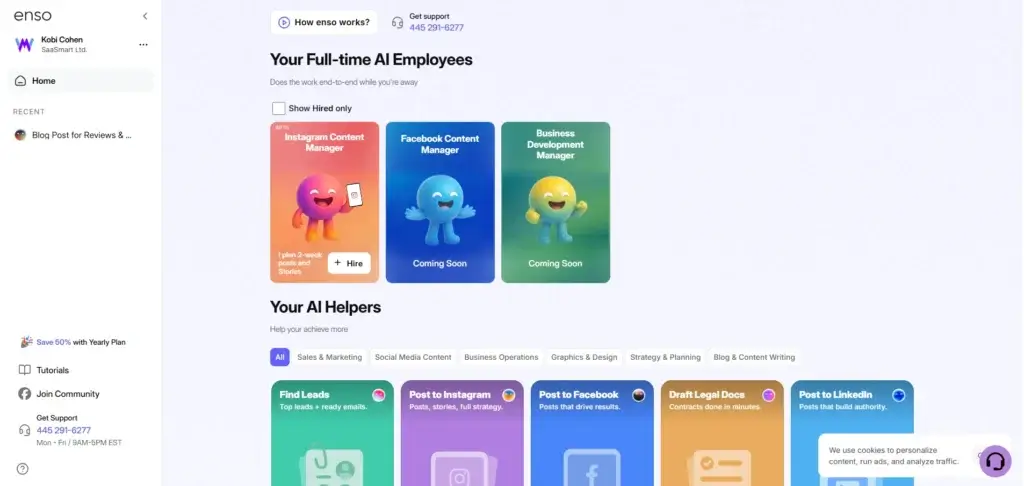
Platform Categories and Navigation
Enso organizes its agents into several categories to make them easy to find:
| Category | Typical Agents | Primary Use |
| Marketing & Sales | Lead generation, influencer outreach, SEO, email campaigns | Find prospects, create outreach and nurture leads |
| Social Media | Instagram content creator, LinkedIn posts, Facebook posts | Generate and schedule content on major platforms |
| Business Operations | Meeting prep, legal document drafting, calendar management | Automate administrative tasks and prep work |
| Research & Insights | Competitor analysis, sentiment analysis, market research | Gather data and insights for strategy and positioning |
| Design & Branding | Logo generator, presentation builder, graphics maker | Create visual assets and brand collateral |
You access these agents through Enso’s dashboard. Each agent has a brief description explaining what it does. When you click an agent, you’re taken to a form where you enter the required inputs. For example, the lead generation agent asks for target industries and job titles; the Instagram post agent asks for your preferred design style and content details. Once the form is complete, the AI goes to work behind the scenes and returns a finished result – sometimes instantly, sometimes after a minute or two.
Guided Workflows
Every agent follows a set workflow tailored to its task. You’re guided through prompts that ensure the AI has enough context, which reduces the risk of getting irrelevant or generic outputs. Some agents, like the business plan generator, allow you to edit the output directly inside the platform and download the final document as a PDF. Others, like the meeting preparation agent, pull information from external sources (e.g., LinkedIn and news sites) and compile it into a briefing.
Enso’s focus on guidance makes the platform approachable even if you have a limited technical background. You don’t need to know about API calls, web scraping, or complex prompt structures. The trade‑off is that each agent is somewhat rigid; you can’t customize every step as you might with more advanced automation tools, but you also avoid the complexity that comes with them.
Best AI Agents
Deep Dive into Top AI Agents
Enso offers a wide range of agents, but some stand out due to popularity and impact. The sections below explore the top agents you’re most likely to use.
Instagram Content Creator Agent
For brands that live on visual storytelling, Enso’s Instagram content creator simplifies the creative process. Instead of toggling between design tools, you select a visual style (for example, soft illustrations, graffiti‑inspired graphics, GTA‑style retro art, line art, or realistic digital illustrations) and provide a brief description of your post’s topic. The agent then:
- Generates a polished graphic that fits your chosen style.
- Write an accompanying caption with relevant hashtags to boost reach.
- Provides a preview of how the post will look in your feed, so you can adjust colors or text if needed.
What makes this agent appealing is speed. You don’t need to scroll through thousands of templates or worry about resizing assets. The AI produces a cohesive image and caption in seconds. You can even schedule the post directly from Enso thanks to its social media integration.
Of course, you may want to personalize the tone or swap out images that don’t quite fit your brand identity. It’s best to treat the output as a starting point rather than a final design. If you’re used to bespoke graphics from a professional designer, Enso’s art styles may feel generic at times. But for quick, consistent posts, this agent is a major productivity booster.
Lead Generation Agent
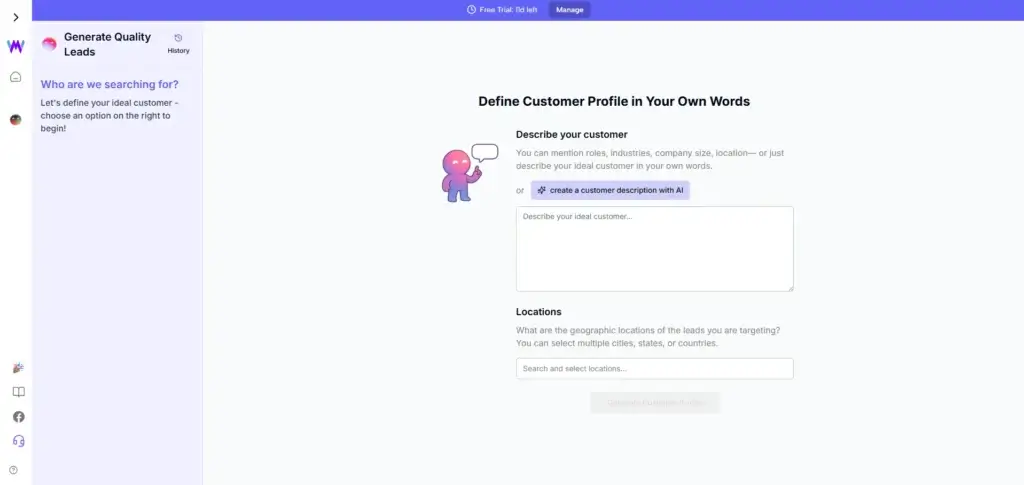
If acquiring new customers feels like a constant grind, the lead generation agent can lighten your load. You provide details such as your target industries, job titles, preferred location, and company size. Enso then crawls publicly available sources to compile a list of prospects. Here’s how it works:
- Input your criteria – specify industries (e.g., software, healthcare), titles (founder, marketing manager), geographic regions, and any other relevant filters.
- AI gathers contacts – the agent scours databases, professional networks and, web listings to find potential leads that match your profile.
- Draft outreach emails – alongside the list, Enso generates a personalized outreach email tailored to each lead. You can edit these templates before sending.
- Continuous updates – revisit the agent whenever you need fresh leads; the AI will produce new lists and update your outreach sequence.
The main benefit is time savings: you avoid manual prospecting and the repetitive task of crafting cold emails. Still, the output isn’t always perfect. You’ll likely want to customize the outreach templates to match your brand voice and double‑check that the leads are relevant. Enso’s lists sometimes return only a handful of contacts, so consider supplementing with your own research for the best results.
Meeting Preparation Agent
Meeting new clients or investors can be nerve‑wracking when you don’t have all the details at hand. Enso’s meeting preparation agent acts like a digital research assistant. You enter the LinkedIn profile URL of the person you’re meeting and optionally provide the meeting’s purpose (e.g., sales demo, partnership discussion). Then the agent:
- Scrapes public information – it fetches data from LinkedIn, news articles, and social media to build a comprehensive profile.
- Compiles a briefing – the AI organizes the data into sections, including career history, recent achievements, company information, and suggested talking points.
- Generates a PDF – you receive a polished document that you can print or review on your device before your meeting.
This agent saves hours you would otherwise spend researching. It also highlights conversation starters and key topics to help you build rapport. However, the AI relies on publicly available data; if the person has a limited online presence or uses privacy settings, the report may lack depth. Always skim the briefing and adjust your talking points for a personal touch.
Business Plan Generator
Drafting a business plan from scratch can be daunting, especially if you’re not sure what sections to include. Enso’s business plan generator uses your basic company details to build a professional document in under a minute. Here’s the typical workflow:
- Fill out basic information – provide your business name, industry, description, what makes you unique, and how much funding you need.
- Click “Generate” – the AI organizes your inputs into a full plan containing an executive summary, company overview, market analysis, pricing strategy, competitive advantages, marketing plan, funding request, financial projections, and implementation timeline.
- Review and edit – you can tweak any section directly in Enso’s editor. For example, update revenue projections or refine the marketing strategy.
- Download or print – once satisfied, export the plan as a PDF to share with investors, lenders, or team members.
This agent is ideal for entrepreneurs preparing pitch decks or business proposals. Its templates follow common standards (like those recommended by the SBA), giving your plan a professional structure. While you’ll still need to verify the financial projections and refine the narrative, having a comprehensive outline dramatically reduces preparation time.
Customer Feedback Analyzer
Understanding how customers perceive your brand is essential for continuous improvement. The customer feedback analyzer pulls reviews and ratings from platforms like TrustPilot, Google Reviews, and Yelp to evaluate sentiment. To use it, you enter your company’s website URL. The agent then:
- Collects reviews – crawls review sites and public comments associated with your company.
- Summarizes feedback – highlights positive and negative themes, quotes memorable comments, and identifies areas where customers consistently see value or have concerns.
- Suggests improvements – provides actionable recommendations such as improving user navigation, offering more integrations, or enhancing customer support.
- Presents sentiment scores – delivers an overall rating (if available) and sentiment breakdown to show the percentage of positive, neutral, and negative feedback.
This agent is useful for businesses with an existing customer base. Even if you don’t have many reviews, the AI will suggest strategies for collecting more feedback and building your online presence. Use the insights to refine your product or service and address pain points quickly.
Unique Tools
Other Notable Tools and Integrations
While the top agents cover core business needs, Enso includes several other features worth mentioning:
LinkedIn Post Generator: Craft professional posts for your company page or personal profile. You pick the tone (case study, best practices, trend analysis, or provocative question) and the AI creates three variants for you to choose from. It formats the post properly and suggests calls to action. You’ll still want to edit the tone for authenticity, but it’s a huge time saver.
Legal Document Drafting: Need a non‑disclosure agreement, service contract, or partnership agreement? Enso’s legal docs agent offers pre‑made templates for common agreements. Alternatively, describe your specific situation, and the AI generates a custom draft. You fill in details like party names, responsibilities, and profit sharing, and the agent assembles the document for review.
Influencer Marketing & Business Development: These agents help identify influencers and potential partners. You provide your industry and campaign goals; the AI finds relevant creators or companies and outlines outreach strategies. It’s great for expanding your brand’s reach without hiring a marketing agency.
SEO and Blog Writing: Enso includes agents that perform keyword research, create article outlines, and even draft blog posts. These tools can complement your content strategy, though they work best when you add your expertise to refine the output.
Pricing and Plans
Enso Pricing and Plan Details
Enso keeps pricing simple. There is one subscription tier priced at $49 per month. With this subscription, you get:
- Unlimited access to all AI agents – use any of the 300+ tools as often as you need.
- 3‑day free trial – test the platform before committing.
- Social media integration – publish directly to Facebook, Instagram and LinkedIn without leaving Enso.
- Automation of day‑to‑day tasks – generate proposals, draft emails, build presentations and more.
- Custom requests – request a bespoke AI agent if you have a task not yet covered.
There are no pay‑per‑use fees and no hidden charges. You can cancel anytime. Enso occasionally offers coupon codes (such as “save30” for 30 % off your first month), which are highlighted on the pricing page.
For small businesses, this flat rate can be attractive compared to hiring freelancers or paying for multiple specialized tools. However, the lack of a cheaper tier means you either commit to the full $49 monthly fee or go without the platform altogether.
Pros and Cons
Benefits and Limitations of Using Enso
Positive
✅ Time savings
✅ Cost efficiency
✅ Scalability
✅ Ease of use
Negatives
❌ Variable output quality
❌ Limited customization
❌ Data dependency
❌ Learning curve for breadth
✅ Benefits of Using Enso
Choosing Enso as your AI automation platform offers several advantages:
- Time savings – Agents handle repetitive tasks like generating content, conducting research and drafting documents, freeing you to focus on strategy and personal interactions.
- Cost efficiency – A flat monthly fee often costs less than hiring freelancers or purchasing multiple specialized tools. If you use several agents regularly, the subscription pays for itself.
- Scalability – As your business grows, you can tap into more agents without additional costs. This helps small teams accomplish more without expanding headcount.
- Consistency – Guided workflows ensure that outputs follow best practices, creating consistent branding across your marketing materials and business documents.
- Ease of use – The platform’s interface is straightforward. You don’t need technical expertise to run agents, making it accessible for entrepreneurs and marketers alike.
- Continuous expansion – Enso collaborates with AI developers and regularly adds new agents. This means you gain access to fresh capabilities without upgrading your plan.
🔴 Limitations and Potential Drawbacks
No tool is perfect. Before subscribing to Enso, consider the following limitations:
- Variable output quality – Not all agents deliver top‑notch results every time. You may need to edit content, verify data, and personalize templates to achieve professional outcomes.
- Limited customization – Guided workflows simplify tasks but also restrict flexibility. If you require highly customized automation sequences or deep integrations with your existing software, Enso might feel constrained.
- Data dependency – Research‑based agents rely on publicly available information. If a lead or meeting contact has minimal online presence, the outputs can be sparse. For sensitive tasks, always verify the information provided.
- Learning curve for breadth – Although each agent is simple on its own, navigating 300+ tools may feel overwhelming initially. You’ll need to spend time exploring which agents align with your workflow.
- Language and tone – AI‑generated content can sometimes sound generic or overly formal. Always review and adjust the tone to match your brand voice.
Setup
Best Practices for Maximizing Enso
To get the most out of Enso, consider these tips:
Start with a few core agents – Focus on agents that solve your biggest bottlenecks first (e.g., lead generation and Instagram posts). Once you’re comfortable, explore other categories.
Provide detailed inputs – The more context you give, the better the AI performs. When creating a business plan or legal document, include specific facts and requirements.
Edit outputs for authenticity – Treat AI‑generated content as a draft. Adjust tone, add personal anecdotes, and verify data before publishing.
Collect feedback and iterate – Use the customer feedback analyzer to monitor perceptions of your brand. Apply the insights to refine your marketing and product strategies.
Combine agents smartly – You can string together outputs from different agents. For example, generate a competitor analysis, then use insights to craft a marketing plan or blog post. Linking tasks amplifies efficiency.
Stay informed about new agents – Enso regularly adds features. Check the dashboard or subscribe to updates so you don’t miss out on tools that could benefit your business.
Conclusion
Final Thoughts
Enso positions itself as a one‑stop AI marketplace for small and midsize businesses. Its guided agents tackle a wide range of tasks: finding leads, creating social media content, preparing meeting briefings, drafting business plans, and analyzing customer feedback. For a flat monthly fee, you gain access to hundreds of tools that can reduce manual work and help you operate more efficiently.
The platform is best suited to entrepreneurs, marketers, and freelancers who want to offload repetitive tasks without hiring additional staff. While the output quality can vary and the workflows lack deep customization, the convenience and breadth of services make Enso a compelling option. By combining multiple agents and refining the AI’s drafts, you can build a streamlined workflow that supports your business goals in 2026 and beyond.
Have more questions?
Frequently Asked Questions
What is Enso?
Enso is an AI agent marketplace built to help small businesses automate repetitive work across sales, marketing, social media, research, content creation, business operations, and design. Instead of using one general chatbot, you can choose task-specific AI agents that guide you through a structured workflow.
How does Enso work?
Enso works by giving you access to guided AI agents. You choose the agent you need, enter details about the task, and the agent generates an output such as leads, Instagram content, business plans, meeting briefs, legal document drafts, or social media posts.
Who is Enso best for?
Enso is best for small business owners, solopreneurs, freelancers, marketers, agencies, and lean teams that want to automate daily business tasks without hiring extra staff or managing many separate SaaS tools.
What are Enso’s top AI agents?
Some of Enso’s most useful AI agents include the lead generation agent, Instagram Content Manager, business plan generator, meeting preparation agent, customer feedback analyzer, LinkedIn post generator, legal document drafter, and influencer marketing agent.
Is Enso good for lead generation?
Yes, Enso can help with lead generation by letting you define your ideal customer profile, target locations, and prospecting criteria. The lead generation agent can then help identify potential leads and draft outreach emails, although you should still review and personalize the results before sending them.
Can Enso create Instagram content?
Yes. Enso’s Instagram Content Manager can help you create Instagram posts, stories, and content plans. It is useful if you need fast social media content, but you should still check the visuals, captions, and tone to make sure they match your brand.
How much does Enso cost?
Enso uses a simple subscription model. At the time of this Enso review, the platform promotes unlimited services for $49 per month, with access to its AI agents and a free trial option. Pricing can change, so you should check the official pricing page before subscribing.
What are the main benefits of using Enso?
The main benefits of Enso are time savings, access to many business automation agents, simple guided workflows, predictable pricing, and support for tasks like sales outreach, social content, business planning, customer research, and day-to-day admin work.
What are the limitations of Enso?
Enso’s main limitations are that output quality can vary between agents, some results may need manual editing, and the guided workflows are not as customizable as advanced automation platforms. It works best when you treat the AI output as a strong first draft rather than a final result.
Is Enso worth it in 2026?
Enso can be worth it in 2026 if you run a small business and want an affordable way to automate multiple tasks from one platform. It is especially useful for lead generation, social media content, business planning, and research. However, if you need deep workflow customization or highly polished creative work, you may still need specialized tools or human review.