
Introduction
If you are looking for a cloud communications platform that can cover business phone service, team messaging, video meetings, contact center operations, and developer APIs, Vonage is one of the more flexible names in the category. It is not just a simple VoIP phone provider for small businesses. Vonage spans multiple layers of the communication stack, including Vonage Business Communications for UCaaS, Vonage Contact Center for customer-facing teams, and Communications APIs for companies that want to build voice, messaging, video, and verification directly into their products and workflows.
That broader product mix is exactly what makes Vonage interesting, but it is also what can make the platform a bit confusing to evaluate. Some businesses will only need the phone system, while others may benefit from CRM integrations, omnichannel support, workforce tools, or API-based customization. In this Vonage review, you will explore how the platform works, which features matter most, how pricing is structured, where Vonage stands out against rivals, and what type of business is most likely to get real value from it. If you want a communications platform that can scale beyond a basic business phone system, Vonage deserves a serious look.
Platform Overview
How Vonage Works
More than a standard business phone system
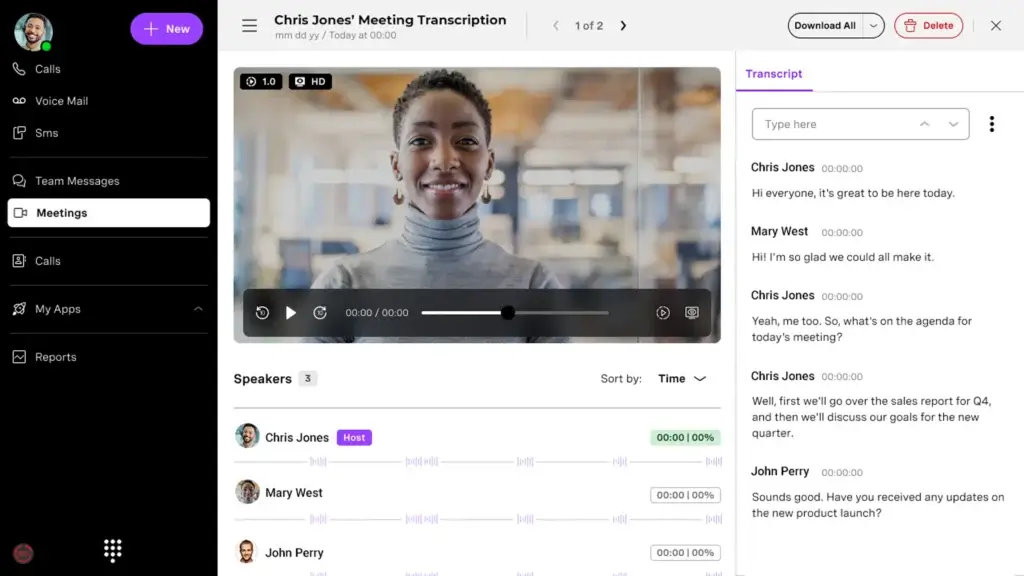
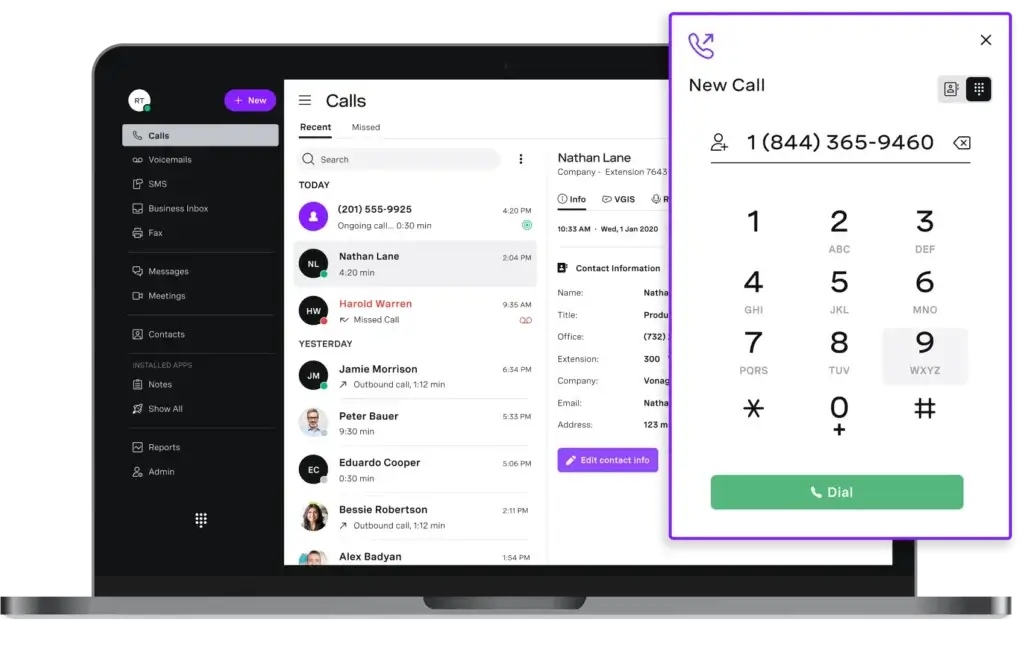
Vonage works best when you understand that it is not a single product. At the core, Vonage Business Communications gives companies a cloud phone system with desktop and mobile apps, unlimited domestic calling, business texting, voicemail, and admin controls. On higher tiers, it adds desk phone support, video meetings, team messaging, integrations, single sign-on, call recording, visual voicemail transcription, and call groups. This makes it a solid UCaaS option for companies that want a modern business phone setup without relying on traditional PBX hardware.
Where Vonage moves beyond a typical VoIP provider is in the surrounding ecosystem. The company also offers Vonage Contact Center for service and sales teams that need omnichannel routing, analytics, workforce tools, and CRM-connected workflows. On top of that, Vonage Communications APIs let businesses embed SMS, WhatsApp, voice, video, authentication, and other communication functions directly into apps and customer journeys. This layered model gives Vonage more flexibility than many standalone business phone providers.
Unified communications for internal teams
For businesses focused primarily on internal communication and customer calls, Vonage Business Communications is the most relevant product. It supports browser, desktop, and mobile access, lets companies port existing numbers, and gives administrators a central portal for managing users, billing, extensions, and account settings. For smaller companies, that means an easier shift away from legacy phone systems. For growing organizations, it means a phone platform that can expand into messaging, meetings, and CRM workflows over time.
Contact center and customer experience capabilities
Vonage Contact Center is aimed at companies that need more than inbound and outbound calling. The platform emphasizes CRM-connected productivity, omnichannel functionality, intelligent routing, speech analytics, workforce management, and dialer capabilities. That makes Vonage more comparable to providers like Talkdesk, Five9, or Genesys in the contact center layer, even though many buyers may first encounter the brand through its business phone plans.
Developer APIs for custom communication workflows
One of Vonage’s biggest differentiators is that it also serves developer-led use cases. Through its communications APIs, businesses can pay by usage for messaging, voice, video, verification, and in-app communication features instead of buying only packaged seat-based software. That gives Vonage an edge for SaaS companies, marketplaces, healthcare platforms, fintech apps, and other businesses that want to build communication into their own products rather than rely only on an employee-facing phone system.
Vonage Key Features
Vonage is strongest when you evaluate it as a flexible communications platform rather than a narrow VoIP app. These are the areas that matter most.
Business phone system with mobile and desktop flexibility
Vonage’s entry plans already include the basic phone features many businesses need, including unlimited domestic calling, SMS and MMS, voicemail, and app-based calling. Higher plans expand into desk phone support, business collaboration, and more advanced controls. That makes Vonage accessible for companies that want to start with telephony basics and grow into a broader system later.
Video meetings and internal collaboration
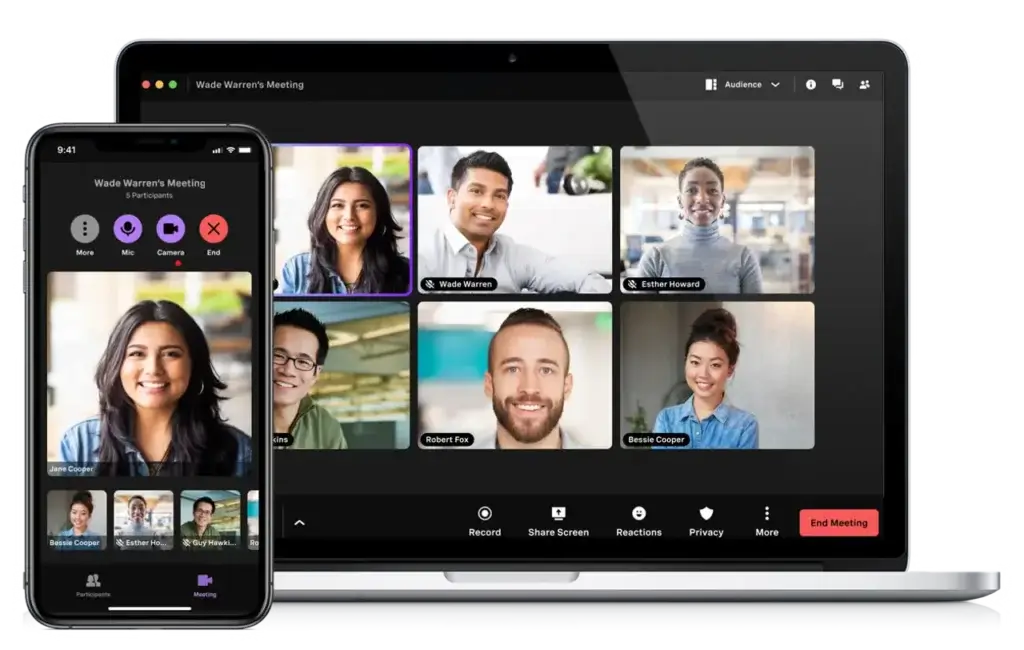
The Premium plan adds unlimited video meetings for up to 200 participants plus team messaging, which turns Vonage into more than just a calling platform. This matters if your business wants fewer disconnected tools for day-to-day communication. It is especially useful for distributed teams that want calling, meetings, and messaging tied to the same vendor and admin environment.
CRM and productivity integrations
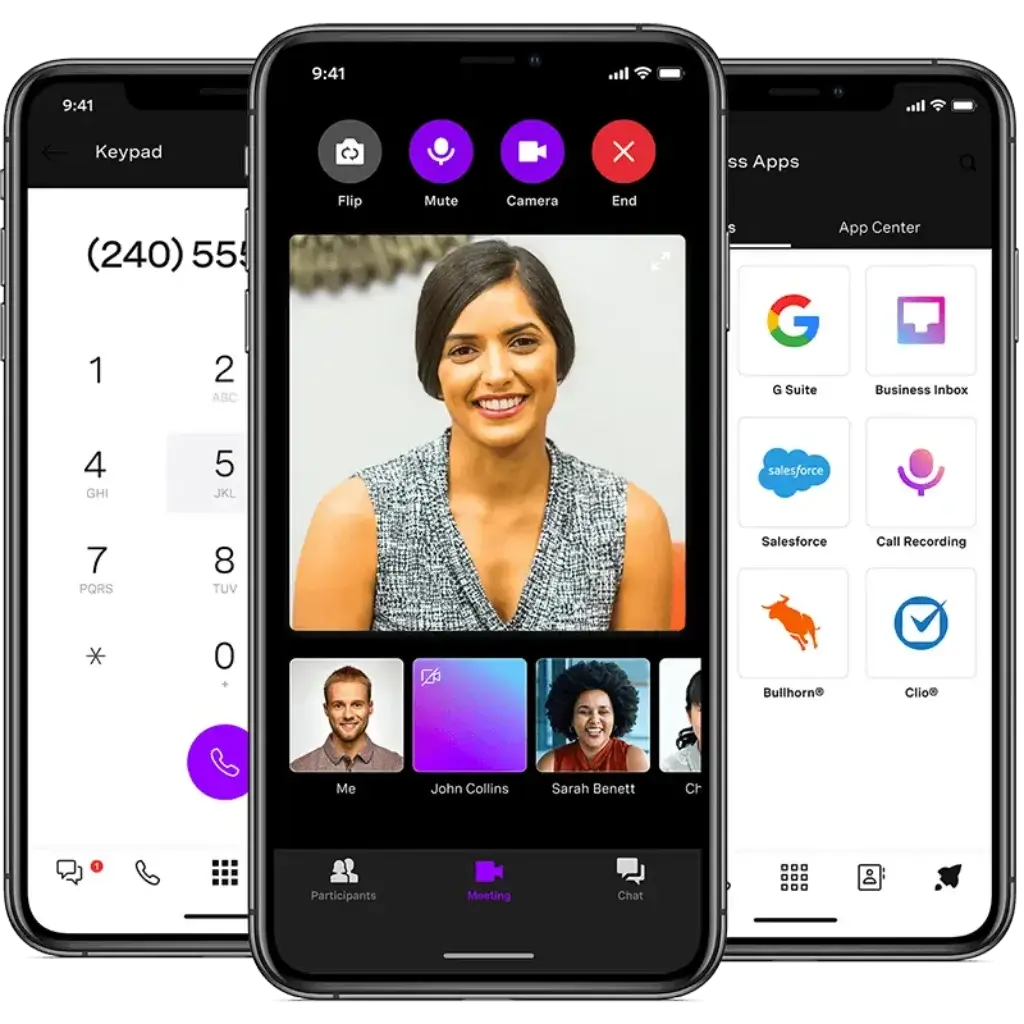
Vonage puts significant emphasis on integrations. Its App Center and integration ecosystem are designed to connect calling workflows with CRM systems and business apps, while the contact center side highlights ready-to-use integrations for platforms such as Salesforce, Microsoft Teams, Microsoft Dynamics, ServiceNow, and Zendesk. This is one of the reasons Vonage is more attractive to process-driven teams than low-cost phone systems that stop at voice and texting.
Contact center depth for sales and support teams
Vonage Contact Center adds a more advanced feature layer with omnichannel capabilities, speech analytics, dialer functionality, gamification, workforce management, and CRM-connected productivity tools. This makes Vonage relevant not only to office teams, but also to organizations with structured customer service, outbound sales, or blended contact center operations.
Communications APIs and custom development potential
Vonage’s API platform is a genuine differentiator. Messaging, verification, video, voice, and in-app communication pricing is usage-based, which means product teams can scale communication features based on actual demand. If your business wants to build branded customer messaging, authentication flows, or embedded calling into your own app, Vonage has a much stronger story than conventional VoIP competitors.
Pros and Cons
Advantages and Disadvantages
Pros
✅ Broad UCaaS and CCaaS coverage
✅ Valuable API layer for customization
✅ Scalable plan structure
✅ Integration-friendly
✅ Strong contact center path
Cons
❌ Too broad for simple needs
❌ Higher-value features sit on pricier tiers
❌ Can be less intuitive to position
Vonage is a strong platform, but it is not the right fit for every buyer. Its biggest advantage is flexibility. Its biggest drawback is that some businesses may end up paying for platform breadth they do not really need.
✅ Strengths
- Broad UCaaS and CCaaS coverage: Vonage can cover internal communications, customer-facing contact center needs, and developer-led communication use cases.
- Valuable API layer for customization: Few phone-system competitors have the same depth in programmable communications.
- Scalable plan structure: Businesses can start with a mobile-first phone plan and move up to more advanced collaboration and administration features.
- Integration-friendly: The platform emphasizes CRM and productivity integrations, which makes it more useful in real sales and service workflows.
- Strong contact center path: Omnichannel, analytics, dialer, workforce management, and speech analytics give Vonage a stronger customer-experience story than many UCaaS-only vendors.
❌ Weaknesses
- Too broad for simple needs: If you only want a lightweight small-business phone tool, Vonage can feel more complex than necessary.
- Higher-value features sit on pricier tiers: Video, app integrations, single sign-on, transcription, and call groups require moving beyond the basic plan.
- Can be less intuitive to position: Buyers comparing only VoIP services may not immediately understand where Vonage fits unless they also consider CCaaS and APIs.
Overall, Vonage is most compelling for businesses that want communications infrastructure with room to grow, not just a low-cost calling app.
Pricing
How Much Does Vonage Cost?
Vonage publishes pricing for its business communications plans, which is helpful because many competitors push buyers toward demos before sharing real numbers. The business phone lineup currently centers on Mobile, Premium, and Advanced tiers, although promotional pricing may vary by billing mode and promotional period.
Mobile plan
The Mobile plan starts at a lower entry point and is aimed at companies that need app-based business calling without the full collaboration stack. It includes desktop and mobile app support, unlimited domestic calling, SMS and MMS, and voicemail. This is the most practical starting point if you primarily want calling and texting rather than a wider communications suite.
Premium plan
The Premium plan is where Vonage starts to feel like a more complete unified communications platform. It adds VoIP desk phone support, unlimited video meetings with up to 200 participants, team messaging, App Center access, and single sign-on. For most growing teams, this is the more realistic plan to evaluate because it moves beyond basic telephony into daily collaboration and workflow integrations.
Advanced plan
The Advanced plan layers in on-demand call recording, visual voicemail with transcription, and call groups. If your team needs stronger supervisory and operational controls, this is the plan that makes Vonage feel more mature. It is the best fit for businesses where call handling is central to revenue, service, or compliance.
Communications API pricing
Unlike the seat-based business phone plans, Vonage APIs use a usage-based model. Messaging, video, verification, dispatch, and identity-related services are billed by request, message, or minute depending on the feature. This structure is useful for product teams because you can scale your costs with actual communication volume instead of assigning seats to internal users.
Pricing overview table
| Plan | Published Starting Price | Best For |
| Mobile | $19.99 monthly, promotional pricing available | Small teams that mainly need business calling and texting |
| Premium | $29.99 monthly, promotional pricing available | Teams that want meetings, messaging, integrations, and SSO |
| Advanced | $39.99 monthly, promotional pricing available | Businesses needing recording, transcription, and call groups |
| Communications APIs | Usage-based | Product teams embedding messaging, voice, video, or verification |
How to choose the right plan
If your company only needs calling, voicemail, and business texting, the Mobile plan may be enough. If you want video meetings, collaboration, and integrations, Premium is the better value. If call recording, voicemail transcription, and group call handling matter, Advanced is the stronger long-term choice. Businesses evaluating Vonage for customer-facing operations should also separate the business phone decision from the contact center decision, because the two product layers solve different problems.
Implementation tips
- Match the plan to real workflows: Do not jump to Advanced if your team only needs basic calling.
- Separate UCaaS from CCaaS needs: A front-office phone system and a contact center are not the same buying decision.
- Check promotion terms: Vonage frequently highlights temporary promotional pricing.
- Model future needs: If you may need CRM integration or admin controls soon, skipping the basic plan can save time later.
User Experience
Ease of Use & Setup
Usability for business phone buyers
Vonage is generally easier to understand on the business phone side than on the full product portfolio side. The business communications plans are clearly tiered, and the admin portal gives companies one place to manage users, extensions, billing, and account settings. That creates a better experience than fragmented legacy systems, especially for smaller businesses moving to cloud telephony for the first time.
Where complexity enters
The main usability challenge is not the calling experience itself. It is the breadth of the platform. If you start exploring contact center tools, marketplace integrations, API pricing, and specialized solutions like Salesforce voice or Microsoft Teams connections, Vonage becomes more enterprise-oriented. That is not a flaw, but it does mean you need to be clear about what layer of the platform you are actually buying.
What users seem to like most
Recent public review snippets point to ease of use, reliable call quality, mobile flexibility, and useful integrations as positives. At the same time, some reviewers suggest there is room to improve the interface and setup experience. That fits the overall Vonage story well: strong functionality, but not always the simplest product to evaluate if you are comparing only lightweight SMB calling tools.
Integrations & Compatibility
How Vonage Integrates with Other Tools
CRM and workflow integrations
Vonage emphasizes integrations as a major part of its value. On the UCaaS side, the Premium plan includes App Center access, while the broader integrations story includes CRM and productivity connections. On the contact center side, Vonage highlights integrations with Salesforce, Microsoft Teams, Microsoft Dynamics, ServiceNow, and Zendesk. This makes the platform more attractive for revenue teams and support teams that want communication data connected to the rest of their workflow.
Marketplace and ecosystem flexibility
Vonage also maintains a marketplace for add-ons, integrations, and related services. That matters because communications platforms become more valuable when they fit the rest of your stack rather than operate as isolated systems. If your team depends heavily on CRM visibility, helpdesk context, or productivity workflows, Vonage’s ecosystem is one of its more persuasive selling points.
Who benefits most from this
Businesses that run structured sales, support, or account management processes will get the most value from these integrations. If your needs are very simple, you may not use much of this ecosystem. But if your business cares about screen pops, synced communications, call activity logging, or agent productivity inside CRM systems, Vonage is a more serious option than many stripped-down VoIP tools.
Trust Factors
Security, Reliability & Support
Security and compliance posture
Vonage makes security a visible part of its enterprise story. The company states that it maintains certifications and attestations across product lines including ISO 27001, PCI-DSS, SOC, HITRUST, and CSA STAR. For businesses in regulated or security-conscious industries, this is one of the reasons Vonage has more enterprise credibility than many smaller business phone vendors.
Support availability
Vonage offers a dedicated support center for its business communications customers, and Capterra lists phone support, chat, and 24/7 live support availability for Vonage Business Communications. That does not automatically mean every support interaction will be exceptional, but it is a meaningful trust signal for companies where communication downtime directly affects operations.
Reliability perspective
Public review feedback suggests many customers find Vonage reliable once configured properly, especially for call quality and mobile access. That said, like most communication platforms, the real experience will depend on setup quality, internet stability, and whether you choose the product tier that actually fits your workflow.
Best Use Cases
Ideal Use Cases & Industries
Best use cases
Vonage is best suited to businesses that need more flexibility than a basic virtual phone number service can provide. The strongest fits include:
- Growing SMBs: Teams that want to start with business calling and scale into collaboration or integrations.
- Sales and service teams: Companies that need CRM-connected communications and potentially a future contact center path.
- Hybrid and remote organizations: Teams relying on mobile, desktop, and cloud-first communication tools.
- Tech-enabled businesses: Companies that want API-based messaging, voice, video, or verification built into their own products.
- Customer-experience-focused organizations: Businesses that want a route from UCaaS into omnichannel contact center capabilities.
Who may want something simpler
If you only need a lightweight calling tool for a very small team, Vonage may be broader than necessary. In those cases, a simpler SMB-focused VoIP provider could be easier to implement and easier to explain internally. Vonage becomes more attractive as communication complexity increases.
Alternatives & Competitors
How Vonage Compares to Alternatives
Vonage sits in a crowded communications market, but its positioning is different from many rivals because it spans more than one category. The right alternative depends on whether you care most about simplicity, unified communications depth, contact center functionality, or developer flexibility.
RingCentral
RingCentral is one of the closest broad-platform competitors. It is a strong alternative for businesses that want a polished UCaaS platform with enterprise credibility. Compared with RingCentral, Vonage’s strongest differentiation is its API layer and the flexibility that comes from being able to move beyond packaged calling tools.
Nextiva
Nextiva is often easier to position for SMBs that want a communications and customer experience platform with less complexity. Vonage has the broader developer story, while Nextiva may feel more straightforward for buyers who want packaged business communications rather than programmable infrastructure.
Dialpad
Dialpad is a compelling alternative for businesses prioritizing AI-forward communication workflows, especially around voice intelligence. Vonage can compete well on breadth and platform flexibility, but Dialpad may appeal more to buyers who want a cleaner, modern interface and AI-led positioning from day one.
Aircall
Aircall is narrower than Vonage, but very relevant for sales and support teams that mainly care about cloud calling and CRM integrations. If you want a focused phone tool for customer-facing teams, Aircall can feel more straightforward. If you want a path into contact center and APIs, Vonage is the more expensive option.
Vonage Alternatives Comparison Table
| Provider | Best For | Main Strength | Best When |
| Vonage | Businesses needing UCaaS, CCaaS, and API flexibility | Broad communications ecosystem | You want one vendor that can support internal comms, customer engagement, and embedded communications |
| RingCentral | Organizations wanting mature enterprise UCaaS | Strong all-around business communications suite | You want a proven unified communications platform with less emphasis on APIs |
| Nextiva | SMBs wanting packaged communications and CX tools | Easier business-facing positioning | You prefer simplicity and packaged workflows over platform breadth |
| Dialpad | Teams prioritizing AI-led communication workflows | Modern AI-focused voice experience | You want a cleaner AI-centric communications platform |
| Aircall | Sales and support teams focused on calling | Focused cloud telephony with CRM alignment | You mainly need customer-facing calling, not a broader communications stack |
Conclusion
Final Thoughts
Vonage is not the easiest communication platform to define in a single sentence, and that is actually part of its value. It is a business phone system, a collaboration platform, a contact center option, and a communications API provider under one broader umbrella. That makes it more versatile than many traditional VoIP competitors.
The best reason to choose Vonage is flexibility. You can start with business calling, move into meetings and integrations, add customer-facing contact center capabilities, and even build communication directly into your own product. The biggest reason not to choose it is simplicity. If your business only needs a very lightweight calling solution, Vonage may be more platform than you actually need.
If you want a communications vendor that can grow with you and support multiple layers of customer and employee communication, Vonage is well worth shortlisting. If you want the most straightforward SMB phone tool possible, you may prefer a narrower alternative. In my view, Vonage is strongest for businesses that think of communication as infrastructure, not just as a phone line.
Frequently Asked Questions
Have more questions?
What is Vonage?
Vonage is a cloud communications company that offers business phone service, contact center software, and communications APIs for voice, messaging, video, and authentication.
Is Vonage just a VoIP provider?
No. Vonage includes VoIP and business phone functionality, but it also offers contact center products and programmable APIs, which makes it broader than a standard VoIP-only provider.
How much does Vonage cost?
Vonage publishes starting prices for Mobile, Premium, and Advanced business communications plans, while its APIs are usage-based and some contact center solutions require quote-based pricing.
What is Vonage Business Communications?
Vonage Business Communications is the company’s UCaaS platform for cloud calling, messaging, meetings, voicemail, and admin management.
Does Vonage offer contact center software?
Yes. Vonage Contact Center includes omnichannel capabilities, speech analytics, workforce tools, dialer functionality, and CRM integrations.
What makes Vonage different from RingCentral or Nextiva?
Vonage stands out most through its broader communications platform strategy, especially its developer APIs and ability to span UCaaS, CCaaS, and embedded communications.
Is Vonage good for small businesses?
Yes, but mainly if the business wants room to scale. Small companies with very simple needs may prefer a narrower and simpler VoIP platform.
Does Vonage integrate with CRM tools?
Yes. Vonage emphasizes CRM and productivity integrations across its business communications and contact center offerings.
Is Vonage secure enough for serious business use?
Vonage highlights certifications and attestations such as ISO 27001, PCI-DSS, SOC, HITRUST, and CSA STAR, which strengthens its enterprise credibility.
Who should choose Vonage?
Vonage is a strong fit for businesses that want communications infrastructure that can support internal collaboration, customer-facing operations, and future custom communication workflows.