Introduction
Managing a team schedule can feel like solving a complex puzzle. When shifts change, employees request time off, or labour costs fluctuate, managers need a reliable tool to keep everything running smoothly. Shiftie is a cloud‑based scheduling and HR management platform designed to simplify this process. With features for creating rotas, tracking attendance, managing leave, and storing employee documents, it aims to replace spreadsheets and disjointed apps with an all‑in‑one solution.
This in‑depth review will help you decide if Shiftie is the right fit for your business. You’ll learn about its core features, pricing, user experience, and how it compares to competing solutions. By the end, you’ll be able to make an informed choice about adopting Shiftie for your workforce management needs.
Overview
What is Shiftie
Shiftie positions itself as a user‑friendly scheduling and HR tool. The software runs as a progressive web app, meaning you can access the full desktop experience from any device without installing a separate application. After creating a free 28‑day trial account, you can import your team members, build your schedules, and explore the various modules:
- Staff Scheduling: Build rotas using drag‑and‑drop shifts, templates, and open shifts your team can claim. Real‑time availability and labour cost data help ensure optimal staffing levels.
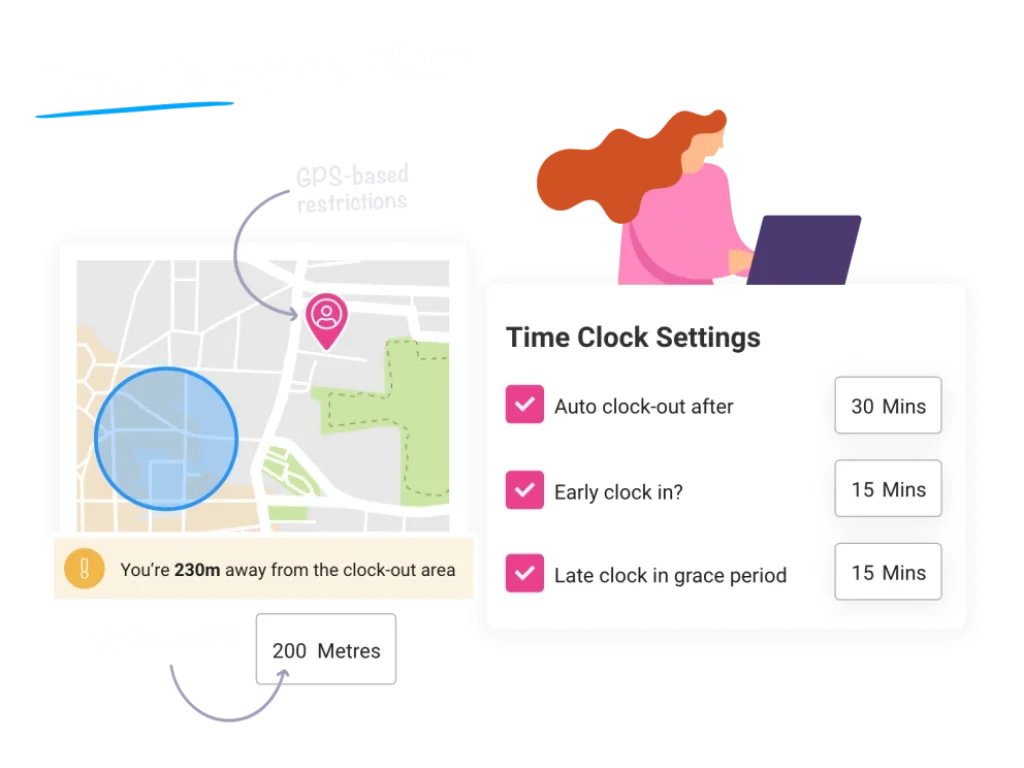
- Time & Attendance: Employees clock in and out via mobile devices or a central portal, with GPS restrictions to prevent off‑site clock‑ins. Their hours feed directly into digital timesheets.
- Employee Availability & Absences: Staff record their availability, recurring patterns, and sick days in one place. Automated conflict detection notifies you if a shift conflicts with an employee’s availability.
- Leave Management: Employees request holiday leave through the system. You can review requests alongside existing leave to ensure fairness and adequate coverage.
- HR & Documents: Store employee contact details, pay rates, job roles, training records, and documents securely. Centralised information reduces admin and helps maintain compliance.
- Integrations: Shiftie integrates with DigiTickets to pull visitor numbers into schedules, helping businesses like attractions and hospitality venues plan staffing levels more accurately.
The platform is cloud‑hosted and includes UK‑based support from 08:00–20:00 daily. It suits small to medium‑sized businesses across various industries, including retail, hospitality, visitor attractions, healthcare, and leisure centres.
Key Features
Shiftie’s Software Specification
Staff Scheduling
Shiftie’s scheduling tools help you create and manage rotas efficiently. Instead of juggling spreadsheets and emails, you can build shifts quickly and ensure coverage at a glance. Key capabilities include:
- Shift & Schedule Templates: Save recurring schedules and apply them to future weeks, saving setup time.
- Open Shifts & Volunteering: Create unassigned shifts that employees can claim based on their availability and qualifications.
- Drag‑and‑Drop Builder: Adjust dates, times, or assignments by dragging shifts on the calendar view.
- Conflict Detection: The system warns you if a shift conflicts with availability, double‑books an employee, or exceeds target hours.
- Assignment Recommendations: Suggestions help you pick the best staff for a shift based on skills, availability, and cost.
- Labour Cost Visibility: View wage costs and target hours per shift to avoid over‑ or understaffing.
Time & Attendance Tracking
Accurately tracking time worked is essential for payroll accuracy and labour compliance. Shiftie’s Time Clock replaces manual sign‑in sheets with digital tools:
- Mobile Clock‑In/Out: Employees clock in from their phones or any web‑enabled device. GPS restrictions ensure they are on site.
- Clock‑In Portal: For teams without smartphones, a central terminal with a unique PIN allows quick clock‑ins.
- In‑Progress Overview: Managers view who is currently on site and adjust staffing on the fly.
- Automated Timesheets: Clock‑in data feeds into digital timesheets, saving hours of manual entry. You can approve or edit entries before exporting to payroll.
Employee Availability
Coordinating availability can be one of the biggest headaches in scheduling. Shiftie makes it easy for team members to communicate when they can work:
- Self‑Service Availability: Employees log one‑off unavailability or set recurring patterns (e.g., unavailable on Tuesdays) directly in the system.
- Real‑Time Visibility: Availability feeds into the scheduler so you never assign someone to a shift they can’t take.
- Reduced Back‑and‑Forth: By centralising availability, you eliminate emails, texts, and handwritten notes about schedules.
Absence Management
Managing sick leave and unexpected absences is critical for maintaining coverage. Shiftie’s absence module simplifies this process:
- Sick Leave Logging: Staff can log illnesses, or managers can record sickness on their behalf.
- Automated Alerts: Notifications let you know when an employee reports an absence so you can find cover quickly.
- Record Keeping: Track sickness history, ensuring fair treatment and supporting compliance with labour laws.
Employee Timesheets
Shiftie automates timesheets to reduce payroll admin:
- Automated Approval: Timesheets are automatically approved when clock‑ins match scheduled shifts.
- Easy Edits: Managers can adjust timesheets for discrepancies or overtime directly from the dashboard.
- On‑the‑Go Review: Approve timesheets from any device, keeping payroll on schedule.
Leave Management
Handling holiday requests fairly is simpler with Shiftie:
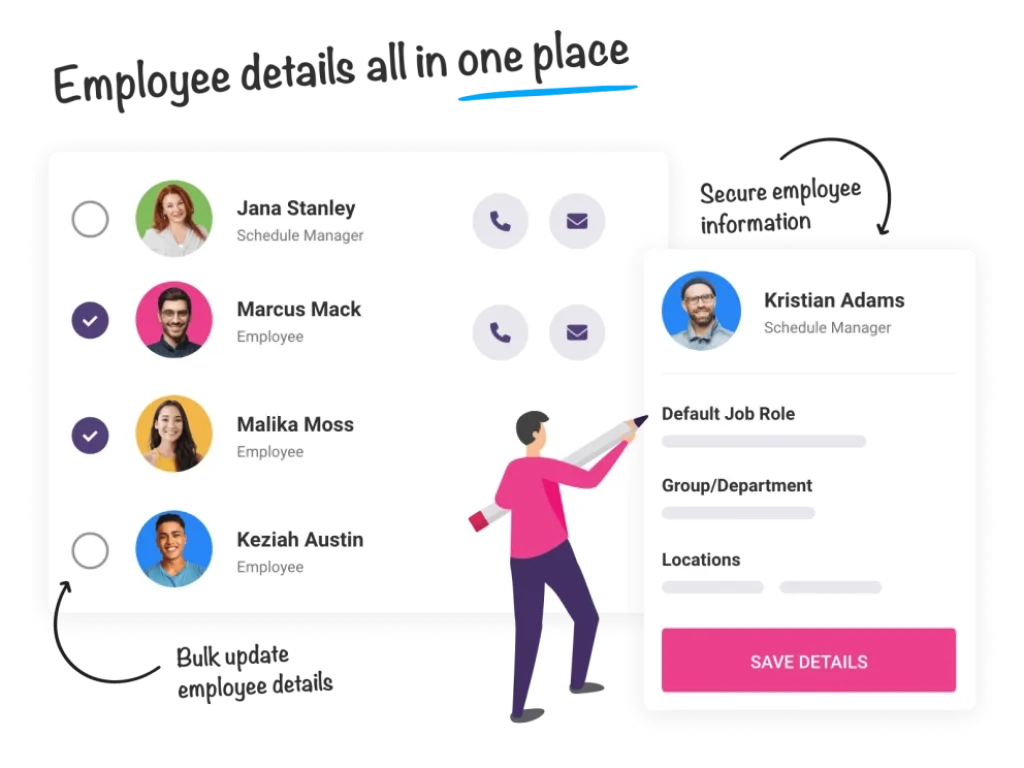
- Self‑Service Requests: Employees submit leave requests through the platform for managers to approve or decline.
- Allowance Tracking: Monitor each team member’s remaining holiday allowance and prevent double bookings.
- Cross‑Checking: View pending requests against existing rotas to ensure adequate staffing before approving time off.
Team Management & HR
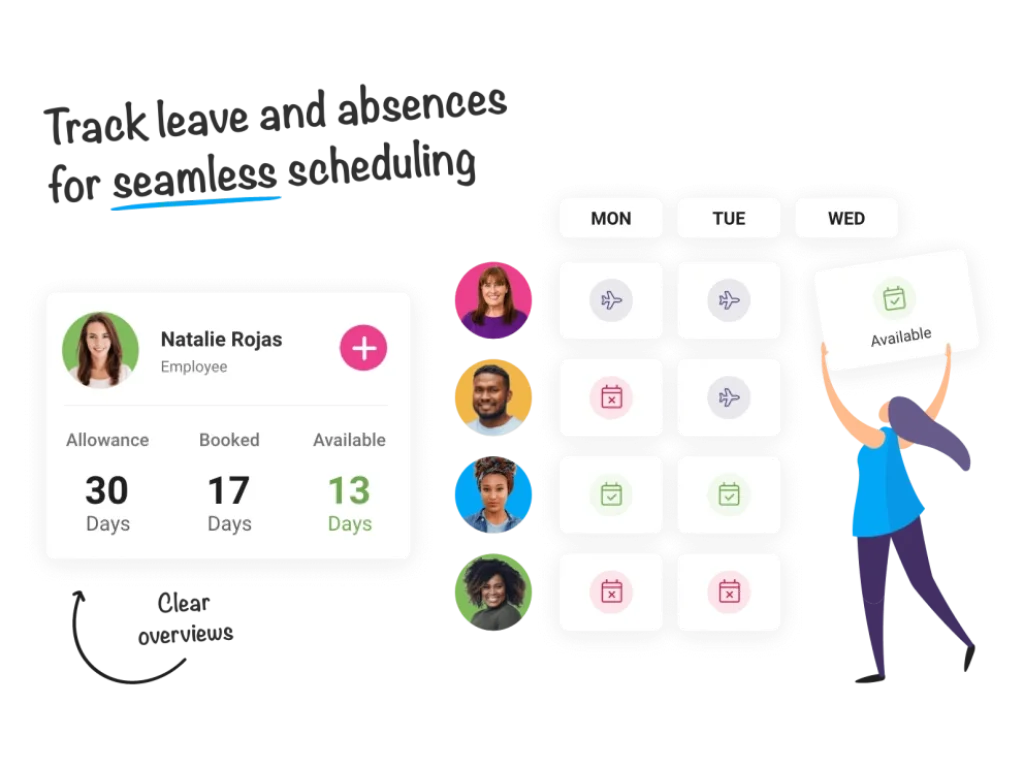
Shiftie offers basic HR functionality to centralise employee data:
- Employee Profiles: Store personal details, contact information, pay rates, job roles, and line manager assignments.
- Document Storage: Upload and assign documents to individuals, such as employment contracts or certifications.
- Bulk Updates: Update groups of employees simultaneously without using separate software.
Reporting & Analytics
While Shiftie focuses on scheduling, it also offers reporting tools:
- Schedule Insights: Identify staffing trends, labour cost breakdowns, and hours worked across teams.
- Exportable Data: Export timesheets and attendance data for payroll or further analysis in other tools.
Integrations
Shiftie’s integration options are limited compared to larger platforms, but it offers a key integration with DigiTickets, a ticketing system popular with visitor attractions and event venues. This integration pulls pre‑booked visitor numbers into your schedule, helping you match staffing levels to expected footfall and avoid over‑ or understaffing.
Mobile & Web Accessibility
Shiftie is a Progressive Web App (PWA). Rather than downloading a native app, you access the system via a web browser on any device:
- Full Desktop Experience on Mobile: The PWA provides the same features whether you use a phone, tablet, or laptop.
- No Installation Required: Create a shortcut on your home screen for quick access without taking up storage space.
- Works Offline: PWAs can function offline and sync data once the connection is restored.
Pros and Cons
Advantages and Disadvantages
Positive
✅ User‑Friendly Interface
✅ Comprehensive Scheduling Tools
✅ Integrated Time Tracking
✅ Centralised HR Data
Negative
❌ Limited Integrations
❌ Lack of Advanced Analytics
❌ Relatively New Market Presence
✅ Advantages
- User‑Friendly Interface: Drag‑and‑drop scheduling, colour coding, and intuitive navigation make it easy to learn and use.
- Comprehensive Scheduling Tools: Templates, open shifts, conflict detection, and cost visibility help ensure optimal staffing.
- Integrated Time Tracking: Mobile clock‑ins and automated timesheets streamline payroll and attendance management.
- Centralised HR Data: Employee profiles, documents, and leave balances are stored securely in one place.
- Flexible Pricing: Pay only for active users, with affordable per‑employee rates for smaller teams.
- Industry Diversity: Suitable for visitor attractions, restaurants, retail, healthcare, hospitality, and leisure businesses.
- Progressive Web App: Accessible on any device without installation, with offline functionality.
❌ Disadvantages
- Limited Integrations: Aside from DigiTickets, Shiftie offers few integrations compared to larger HR platforms.
- Lack of Advanced Analytics: Reporting is basic; managers seeking deep analytics might need additional tools.
- Relatively New Market Presence: As a newer tool, Shiftie has fewer user reviews and a smaller community than established competitors.
User Experience
User Experience and Ease of Use
One of Shiftie’s biggest selling points is its ease of use. The platform is designed for people who may not have formal HR or IT training. Here’s how it achieves a friendly user experience:
Onboarding & Setup
During sign‑up, Shiftie guides you through adding employees, creating schedules, and customizing settings. An interactive tutorial walks you through the main features. You can import existing data or build schedules from scratch, and the system will suggest best practices along the way. A 28‑day free trial allows you to test the software without entering payment details.
Intuitive Interface
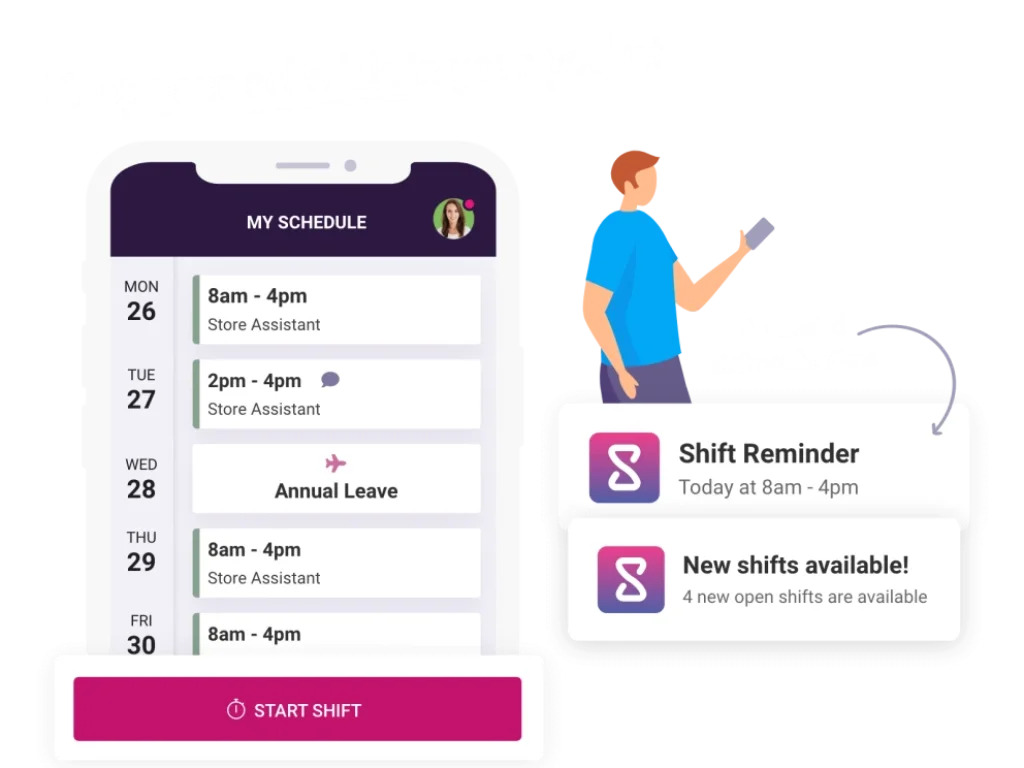
The interface uses clear icons, colour coding, and drag‑and‑drop functionality. Managers can switch between daily and weekly calendar views, filter by department or location, and quickly move shifts around. Real‑time notifications appear when conflicts arise, helping you make adjustments without leaving the scheduler. The employee portal is equally straightforward, allowing staff to view upcoming shifts, clock in/out, request leave, and update availability.
Device Compatibility
Because Shiftie is web‑based, it runs on any device with an internet connection and modern browser. Whether your staff use Windows laptops, iPads, or Android phones, they can access the same tools and data. GPS restrictions ensure that mobile clock‑ins happen on site, adding accountability without requiring expensive hardware.
Pricing
How Much Does Shiftie Cost?
Shiftie offers two primary subscription tiers, plus per‑user pricing based on the number of active employees. All plans include a 28‑day free trial and unlimited 7‑day support.
A Little Bit Shiftie
This entry‑level plan costs £39 per month and includes:
- Employee scheduling
- Employee availability and absence management
- Basic HR management
- Leave and document storage
- Unlimited 7‑day customer support
Very Shiftie
The more comprehensive plan costs £79 per month and includes everything in the A Little Bit Shiftie plan plus:
- Time clock & timesheets
- Multi‑venue management
- Team messaging and reports
- Enhanced analytics and schedule insights
The FAQ section on Shiftie’s website also outlines per‑user pricing for small teams: £2.75 per employee up to 30 employees, then £1.50 per employee beyond that. You only pay for active users, and billing occurs at the start of each month based on the previous month’s active staff count. This flexible pricing model scales with your business as it grows.
Shiftie Pricing Comparison Table
| Feature / Plan | Very Shiftie (£79/month) | A Little Bit Shiftie (£39/month) |
| Employee Scheduling | Included | Included |
| Availability Management | Included | Included |
| HR Management | Included | Included |
| Leave Management | Included | Included |
| Document Storage | Included | Included |
| Time Clock & Timesheets | Included | Not included |
| Support | Standard | Unlimited 7-day support |
Common Use Cases
Best Use Cases and Industries
Shiftie’s flexibility makes it suitable for various sectors, but it shines in industries that rely on shift‑based work and dynamic staffing:
- Visitor Attractions & Event Venues: Integration with DigiTickets enables staffing based on ticket sales and visitor numbers.
- Restaurants & Cafés: Manage fluctuating shift demands, handle short‑notice absences, and keep labour costs in check.
- Bars & Nightclubs: Late‑night venues can coordinate complex rotas and manage last‑minute availability changes.
- Retail: Ensure adequate floor coverage during busy periods and track staff performance across multiple locations.
- Healthcare & Dental Practices: Schedule qualified staff to comply with care standards and manage leave requests fairly.
- Hotels & Hospitality: Coordinate front‑of‑house, housekeeping, and kitchen teams with different shift patterns.
- Sports & Leisure Centres: Align staffing with peak hours, classes, and facility bookings.
Compare with Others
Alternatives to Shiftie
Choosing a staff scheduling platform often comes down to how well a tool balances ease of use, automation, pricing, and depth of workforce management. Shiftie stands out for its clean interface, strong UX focus, and practical features for SMBs and mid-sized teams. Still, it competes with several well-established employee scheduling solutions.
Below is a clearer look at how Shiftie compares to Connecteam, 7shifts, and QuickBooks Time.
| Parameter | Shiftie | Connecteam | 7shifts | QuickBooks Time |
| Core Purpose | Intuitive staff scheduling with built-in availability, leave and time clock tools | All-in-one workforce management for frontline teams | Restaurant and hospitality scheduling with labour optimisation | GPS time tracking and payroll-focused workforce management |
| User Experience | Modern, visual and easy to adopt for managers and employees | Robust but more complex due to multiple modules | Clean interface with hospitality-specific workflows | Straightforward but less scheduling-centric |
| Scheduling Strength | Drag-and-drop scheduler with clear availability and absence controls | Powerful scheduler with advanced rule options | Excellent restaurant-ready scheduling with compliance features | Basic scheduling, not the platform’s primary focus |
| Time Tracking | GPS-based clock-in, automated rules, approvals and timesheets | Strong time tracking integrated with tasks and chat | Time clock built for hospitality crews, including break rules | Industry-leading GPS and geofencing features with mobile punch accuracy |
| HR / Employee Records | Core HR tools: documents, job roles, sickness logs, employee details | Full HR suite including training, documents, forms and onboarding | Basic employee profiles with role and availability details | Limited HR functionality outside time data |
| Industry Focus | Retail, visitor attractions, hospitality, healthcare, general service teams | Frontline operations across any industry | Restaurants, cafes, bars, franchises and hospitality venues | Companies with mobile/field employees who need accurate location tracking |
| Integrations | Limited but includes DigiTickets and industry-specific tools | Rich integration ecosystem across HR, comms and task platforms | Deep POS integrations and restaurant-specific systems | Deep QuickBooks ecosystem and payroll integrations |
| Mobile App Experience | PWA that mimics native app functionality across devices | Full-featured mobile app for employees and managers | Restaurant-friendly mobile experience for fast shift actions | Mobile-first punch clock focused on location accuracy |
| Best For | Teams wanting a scheduling-first tool with simple HR and time tracking | Companies needing an all-in-one operations and HR platform | Hospitality organisations needing forecasting, POS sync and compliance | Field teams prioritising GPS time accuracy and payroll automation |
| Pricing Approach | Flat monthly plans or per-employee billing tiers | Priced by modules and number of users | Priced per location or per employee | Usage-based or per-employee pricing tied to QuickBooks ecosystem |
Shiftie vs Connecteam
Connecteam is one of the most popular all-in-one frontline workforce apps. It includes scheduling, time tracking, task management, chat, training tools, and full HR capabilities.
How Shiftie compares:
Shiftie feels more focused and easier to master if you mainly need scheduling, availability, leave, and time clock functions without extra modules. Its scheduling UX is cleaner and purpose-built, while Connecteam offers more breadth but can feel more complex.
Who should choose which:
- Shiftie: teams wanting simplicity and scheduling-first workflows
- Connecteam: larger or multi-location teams needing a full operations suite
Shiftie vs 7shifts
7shifts is designed primarily for restaurants, hospitality, and shift-heavy service businesses. It offers strong labour forecasting, compliance tools, and tip management.
How Shiftie compares:
Shiftie isn’t industry-specific, but provides strong scheduling, availability tracking, and intuitive leave management across multiple verticals. It lacks 7shifts’ restaurant-specific labour tools, but feels easier to adopt and more flexible for non-hospitality teams.
Who should choose which:
- Shiftie: teams from retail, attractions, healthcare, education, and general service sectors
- 7shifts: restaurants needing labour forecasting, POS integrations, and tip pooling
Shiftie vs QuickBooks Time (formerly TSheets)
QuickBooks Time excels in mobile time tracking, geofencing, and workforce reporting. Its scheduling tools are sufficient but tend to be secondary.
How Shiftie compares:
Shiftie provides a more cohesive experience for rota creation, availability, leave, and HR documentation. QuickBooks Time shines when GPS tracking and payroll integrations are the priority, especially for field teams.
Who should choose which:
- Shiftie: businesses prioritising scheduling workflows and in-platform HR features
- QuickBooks Time: companies needing strong GPS time tracking and syncing with QuickBooks payroll
🎯 Overall Takeaway
Shiftie delivers one of the most user-friendly scheduling experiences in the market, especially for SMBs and mid-sized organisations looking for clean automation, simple setup and great UX.
Compared to its alternatives, Shiftie stands out for:
- Intuitive, visually clear rota building
- Strong availability, leave and absence management
- GPS-based time clock with flexible controls
- Modern UX suitable for varied industries
- Straightforward pricing and onboarding
Setup and Support
Get Started & Tips for Best Use
Conclusion
Final Thoughts
Shiftie brings together employee scheduling, time tracking, leave management, and basic HR functions in a single, user‑friendly platform. Its drag‑and‑drop scheduler, automated timesheets, and per‑user pricing make it an attractive choice for small and medium‑sized businesses looking to streamline workforce management without investing in a complex enterprise system.
While Shiftie lacks extensive integrations and advanced analytics, its ease of use, responsive support, and unique DigiTickets integration offer clear advantages in certain industries. If you’re tired of juggling spreadsheets and need a modern solution to organise your team, Shiftie’s 28‑day free trial gives you the opportunity to test its features risk‑free. By leveraging the platform’s tools and following the tips above, you can simplify scheduling, reduce administrative overhead, and create a more efficient and happier workforce.
Have more questions?
Frequently Asked Questions
How does Shiftie’s pricing work?
Shiftie offers two subscription plans (£39/month and £79/month) plus per‑user pricing. For up to 30 employees you pay £2.75 per active user; beyond 30 employees it drops to £1.50 per user. Billing occurs monthly based on the previous month’s active users.
Can my team clock in from their phones?
Yes. Shiftie’s time clock allows employees to clock in and out using any web‑enabled device. GPS restrictions ensure clock‑ins happen on site, and a central portal with unique PINs is available for teams without smartphones.
Is Shiftie available as a mobile app?
Shiftie is a Progressive Web App, meaning it runs in a web browser but behaves like a native app. You can save it to your home screen and use it offline without installing software from an app store.
Does Shiftie handle payroll?
Shiftie generates timesheets based on clock‑in data and schedules, which you can export to your payroll system. It does not process payroll directly but simplifies the data hand‑off.
What industries is Shiftie best for?
Shiftie is ideal for shift‑based industries such as visitor attractions, restaurants, bars, retail, healthcare, hospitality, and leisure centres. Its integration with DigiTickets makes it particularly suited to attractions and event venues.
Can employees request leave through the system?
Yes. Employees submit leave requests via Shiftie, and managers can approve or decline them while checking staffing levels and remaining allowances.
Is there a free trial?
Shiftie offers a 28‑day free trial with no credit card required. During the trial you have full access to all features and support resources.
How do I import existing schedules and staff data?
The onboarding wizard guides you through importing employee information and existing schedules. You can manually enter data or upload it in bulk to get started quickly.
What support options are available?
Shiftie provides support via email, chat, and phone from 08:00–20:00 daily. Its help centre and FAQ pages also offer detailed guidance for common tasks.
Does Shiftie integrate with other business software?
Shiftie currently offers limited integrations. Its main integration is with DigiTickets, which imports visitor numbers for improved scheduling in attractions and venues. If extensive integrations are critical, you may need to use additional tools or consider alternative platforms.