Introduction
Email is still one of the most important communication channels for work, but the traditional inbox often feels slow, cluttered, and disconnected from how teams actually collaborate.
You receive long threads, repeated subject lines, scattered attachments, calendar updates, and follow-ups that get buried under newsletters or automated notifications. If your work depends on fast replies and clear communication, a standard inbox can quickly become a bottleneck.
Spike takes a different approach. Instead of treating email as a static list of messages, it turns your inbox into a conversational, chat-style workspace with built-in AI, calendar, notes, tasks, groups, and collaboration tools.
In this Spike review, you’ll see how the platform works, what has changed in 2026, how much it costs, who it is best for, where it falls short, and how it compares with other email management tools.
My opinion: Spike is one of the most interesting email apps if you want email to feel closer to messaging. It is especially useful for freelancers, founders, remote teams, and small businesses that want fewer tabs and a more modern communication flow. However, it is not the best fit for users who prefer a classic Gmail or Outlook experience, or for teams that need advanced CRM, help desk, or project management integrations.
Main Features Breakdown
What Is Spike and How Does It Work?
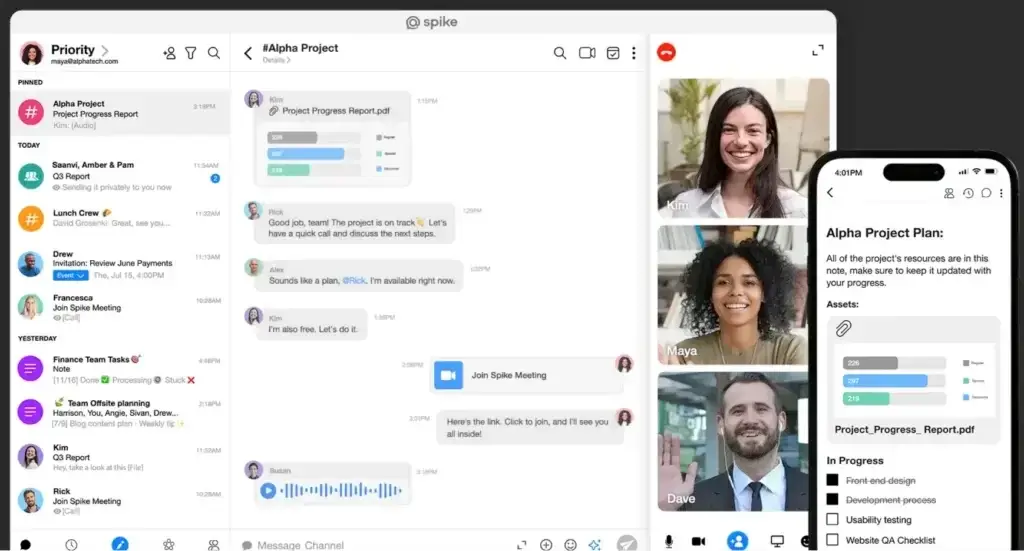
Spike is an AI-powered email app and team communication workspace. Its core idea is simple: your inbox should feel like a conversation, not a filing cabinet.
When you connect your email account, Spike removes much of the traditional email clutter and displays conversations in chat-style bubbles. Instead of constantly scanning subject lines, headers, signatures, and repeated quote blocks, you can focus on the actual conversation.
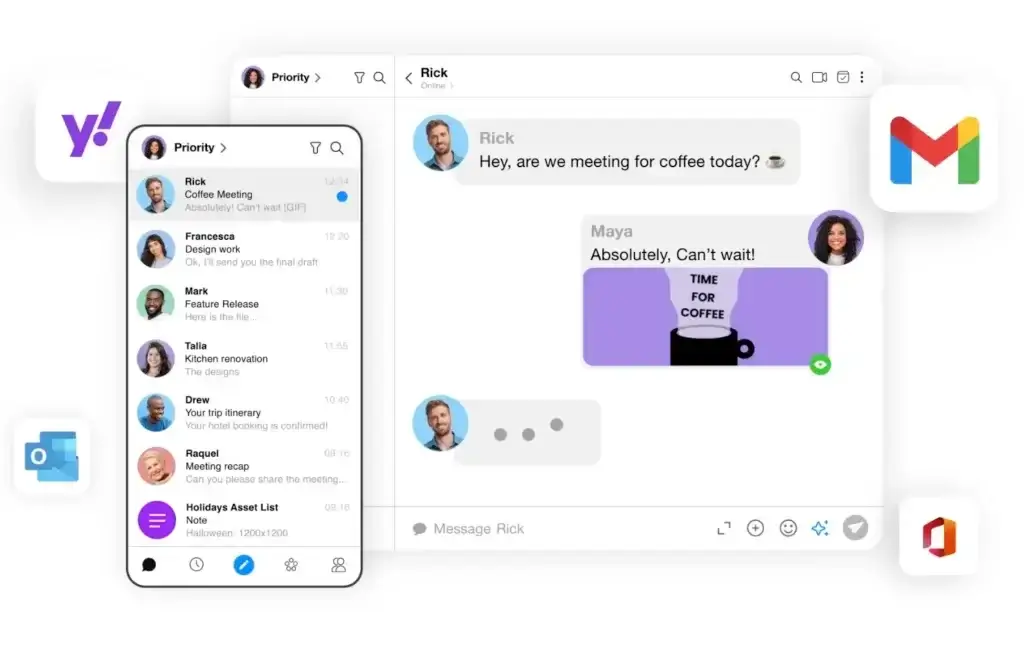
Spike works with existing email accounts, including Gmail, Outlook, Yahoo, iCloud, and IMAP-supported providers. You can also use Spike Teamspace if your team wants a dedicated workspace with team email, chat, meetings, shared inboxes, notes, tasks, and business communication tools.
Spike Email App vs Spike Teamspace
One of the most important updates to understand is that Spike now has two main product paths.
Spike Email App is for users looking to upgrade their email experience. It is best if you already use Gmail, Outlook, Yahoo, iCloud, or another email account and want a smarter, more conversational inbox.
Spike Teamspace is for teams that want a broader communication hub. It brings together team email, chat, meetings, AI, shared inboxes, notes, tasks, and collaboration with external contacts, even if those people are not using Spike.
This distinction matters because pricing, storage, file upload limits, and collaboration features differ depending on whether you choose the Email App or Teamspace plans.
How Spike Works
Once you sign in, Spike turns regular email threads into a chat-like interface. Messages are grouped by person or group, which makes ongoing conversations easier to follow.
Here’s what makes the experience different:
- Conversational email: Email threads look and feel more like messaging conversations.
- Unified inbox: You can manage multiple email accounts in one place.
- People Mode: You can focus on people and relationships instead of subject lines.
- Spike AI: You can summarize, draft, translate, and respond faster.
- AI Feed: You can review unread emails through AI-generated summaries.
- Collaboration tools: Notes, tasks, groups, calls, and calendar live inside the same workspace.
Spike is not only trying to clean your inbox. It is trying to replace the scattered workflow many professionals build around email, chat, meetings, notes, and task apps.
Top Benefits
What Makes It So Effective?
The main benefit of Spike is not that it adds more features to email. The real value is that it changes how you experience email.
Instead of jumping between your inbox, task manager, notes app, calendar, meeting tool, and chat app, you can handle much of that work in one interface. That makes Spike especially useful for people who treat email as the center of their workday.
Conversational Email
Spike’s conversational email is its signature feature. Traditional email threads often become hard to read because every reply includes signatures, headers, repeated text, and long subject lines.
Spike strips away much of that visual noise and turns messages into a clean chat format. This is useful when you have frequent back-and-forth conversations with clients, teammates, vendors, or partners.
For external recipients, nothing unusual is required. They can continue using their normal email app, while you manage the conversation inside Spike.
Spike AI and AI Feed
Spike has moved further into AI-powered email productivity. Its AI features help you write replies, summarize long conversations, translate messages, and generate content inside your workspace.
The most important new addition is AI Feed. Instead of opening every unread email one by one, AI Feed summarizes unread messages in a scrollable feed. You can review what matters, mark messages as read, delete, archive, or take quick actions from the summary view.
This is one of Spike’s strongest updates because it addresses one of the biggest inbox problems: triage. When you return from meetings, travel, or a focused work session, you can quickly understand what needs attention without opening every message.
Unified Inbox and Calendar
Spike lets you bring multiple email accounts into one unified inbox. This is valuable if you manage work, client, and personal email accounts, or multiple business accounts.
The unified calendar also helps you manage meetings without leaving the inbox. For professionals who use email as their main command center, this reduces the need to move between Gmail, Outlook, Apple Calendar, and other scheduling tools.
Notes, Tasks, and Collaboration
Spike includes collaborative notes and tasks, which makes it more than a simple email client. You can create notes, share them with teammates, add rich content, and collaborate in real time.
You can also turn messages into tasks, assign work, track action items, and keep context connected to the original conversation. This is helpful when email threads create work that would otherwise get copied into a separate project management tool.
Spike will not replace a full project management platform for complex workflows, but it works well for lightweight task tracking and communication-driven work.
Groups, Channels, and Shared Inbox
Spike becomes more powerful for teams through groups, channels, and shared inbox features.
Groups let you create project or team-based conversations. Channels are useful for announcements or one-way updates. Shared inboxes help teams manage common email addresses, such as support, sales, info, or operations accounts.
This makes Spike more relevant for small teams that want a simpler collaboration layer around email. However, if you need advanced ticket routing, SLA tracking, automation, analytics, or customer support reporting, a dedicated help desk or shared inbox platform may still be stronger.
Search, Snooze, Pin, Auto Archive, and Unsubscribe
Spike also includes practical inbox management tools that help you stay organized day to day.
- Super Search: Find emails, files, groups, and conversations faster.
- Snooze: Hide messages until you are ready to handle them.
- Pin: Keep important conversations visible.
- Auto Archive: Reduce inbox clutter automatically.
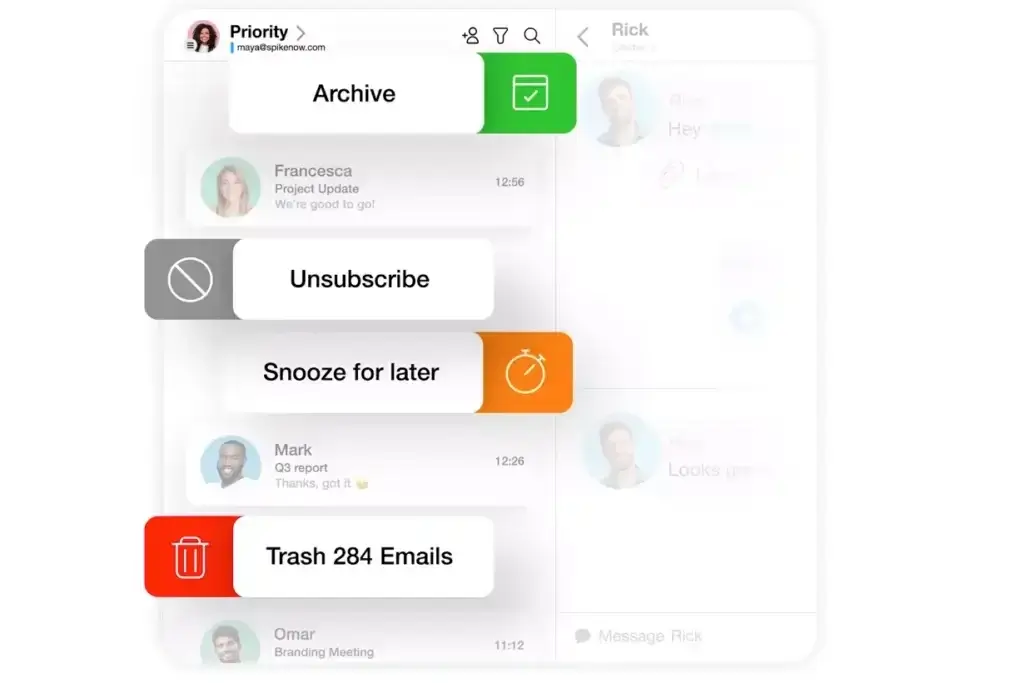
- 1-click unsubscribe: Remove unwanted newsletters and promotional emails faster.
These features make Spike more useful as a daily email management tool, not only as a communication app.
Pros and Cons
Advantages and Limitations of Using Spike
Positive
✅ Chat-style email is fast and modern
✅ AI Feed helps reduce inbox triage
✅ Strong fit for freelancers and small teams
✅ Notes, tasks, calls, and calendar are built in
✅ Works with existing email accounts
Negative
❌ Chat-style email has a learning curve
❌ Pricing is split between Email App and Teamspace
❌ Limited integrations compared with some competitors
❌ Not a full CRM, help desk, or project management tool
❌ Some advanced features may depend on plan limits
Pros
It makes email easier to follow
Spike’s chat-style layout is excellent for ongoing conversations. If you often deal with long threads, repeated replies, and messy email chains, Spike makes those conversations easier to scan and continue.
AI Feed saves time on unread messages
AI Feed is a practical update because it helps you understand unread messages without opening each one. For busy professionals, this can make daily inbox review faster and less mentally draining.
It reduces tool switching
Spike combines email, chat, calendar, notes, tasks, voice messages, and meetings in one workspace. This will not replace every specialized tool, but it can reduce the number of apps you open for daily communication.
It works with existing email accounts
You do not need to abandon your current email provider. This lowers the adoption barrier because you can connect an existing account and test Spike before making a bigger workflow change.
It supports external collaboration
Spike is useful when you collaborate with clients, vendors, and partners who still use normal email. They do not need to adopt Spike for you to benefit from the chat-style experience.
Cons
The interface may feel unfamiliar at first
If you are comfortable with a traditional inbox, folders, subject lines, and formal email structure, Spike may feel too casual or different during the first few days.
The pricing structure requires attention
Spike now separates Email App plans from Teamspace plans. This gives users more flexibility, but it also means you need to choose the right product path before comparing prices.
It is not a full enterprise workflow system
Spike includes tasks, notes, shared inboxes, and collaboration tools, but it is not a replacement for advanced project management, CRM, ITSM, or help desk platforms.
Integrations are not its strongest point
Spike is best when you want to work inside its unified workspace. If your workflow depends on deep integrations with tools like Salesforce, HubSpot, Asana, Jira, or Zendesk, you may find Spike less flexible than some alternatives.
Plan limits matter
Storage, search history, number of email addresses, file upload size, video call participants, and support level vary by plan. You should review those limits before choosing a plan.
User Experience
Spike Every Day User Experience
Using Spike feels different from using Gmail, Outlook, or Apple Mail. The entire product is built around conversations, people, and speed.
The experience is strongest when you have a lot of active back-and-forth communication. Instead of opening a message, scrolling past quote blocks, replying, and searching for the latest context, you can read the thread like a chat.
Interface and Usability
Spike’s interface is clean and modern. The left-side navigation gives you access to email, people, groups, notes, tasks, calendar, and calls.
The biggest change is the conversation view. Messages appear in bubbles, and the experience feels closer to messaging than formal email. For relationship-based communication, this can feel much more natural.
You can also use inbox-focused views if you prefer a more traditional layout. That flexibility helps, but Spike still feels most valuable when you embrace its conversational style.
Mobile Experience
Spike performs well as a mobile-first email experience because the chat-style layout fits naturally on smaller screens.
You can reply quickly, swipe through messages, use voice notes, access tasks, and manage conversations without feeling like you are using a reduced version of the desktop app.
This is especially useful for freelancers, founders, sales professionals, and remote workers who handle communication throughout the day from multiple devices.
Collaboration Experience
Spike’s collaboration features are best for lightweight teamwork. You can create groups, collaborate on notes, assign tasks, share files, start calls, and continue working from the same communication thread.
This makes Spike a good option for teams that want less app switching. However, teams with formal workflows, complex approvals, reporting needs, or customer service SLAs may still need dedicated software alongside Spike.
Learning Curve
The learning curve is not technical. Setup is simple. The bigger adjustment is mental.
If you are used to treating email like a formal archive, Spike can feel unusual. If you already prefer Slack, WhatsApp, iMessage, or Teams-style communication, Spike will probably feel more natural.
Pricing and Plans
How much does Spike cost?
Spike pricing is now easier to understand if you separate it into two categories: Spike Email App and Spike Teamspace.
The Email App plans are best if you want to connect and improve your existing email account. Teamspace plans are best if you want a broader team workspace with business email, shared inboxes, collaboration, and team communication features.
Spike Email App Pricing
| Plan | Annual Price | Best For | Main Limits and Features |
| Free | $0 | Individuals testing Spike | 1 email address, 60 days search history, 1 GB storage, 30 MB file upload, limited AI queries |
| Pro | $6/user/month billed annually | Professionals with multiple inboxes | Up to 3 email addresses, unlimited search history, 5 GB storage, 100 MB file upload, priority support |
| Ultimate | $12/user/month billed annually | Power users and heavier email workflows | Unlimited email addresses, 20 GB storage, 1 GB file upload, VIP support, higher video call limits |
Spike Teamspace Pricing
| Plan | Annual Price | Best For | Main Limits and Features |
| Starter | $0 | Small teams testing Teamspace | Up to 3 members, 1 teamspace, 60 days search history, team email basics, core collaboration tools |
| Team | $4/member/month billed annually | Small teams that need a custom email domain | Custom domain, unlimited search history, 100 GB storage, shared inbox, 100 MB file upload |
| Business | $8/member/month billed annually | Growing teams with heavier collaboration needs | 1 TB storage, 500 MB file upload, VIP support, larger team communication capacity |
Which Spike Plan Should You Choose?
Choose Spike Email App Free if you want to test the conversational inbox with one email address and basic usage.
Choose Spike Email App Pro if you manage multiple email accounts, need unlimited search history, and want more storage.
Choose Spike Email App Ultimate if you are a power user with many inboxes, larger files, and heavier communication needs.
Choose Spike Teamspace Starter if your team wants to test team communication inside Spike before committing.
Choose Spike Teamspace Team if your business wants a custom email domain, shared inbox, and more storage at a relatively accessible price.
Choose Spike Teamspace Business if you need larger storage, higher file upload limits, and VIP support.
Pricing note: SaaS pricing can change. Before publishing, check Spike’s official pricing page and update plan limits if needed.
Spike VS Alternatives
How Does Spike Compare To Other Tools?
Spike competes with several types of tools. Some alternatives are traditional email clients, some are shared inbox platforms, and others are inbox cleanup tools.
This matters because not every Spike alternative solves the same problem. Spike is best when you want email, chat, AI, tasks, notes, calendar, and lightweight collaboration in one place. Tools like SaneBox and Clean Email are better if your main goal is inbox cleanup without changing your email client.
| Tool | Best For | How It Compares to Spike |
| Spike | Chat-style email and lightweight team collaboration | Best if you want email, chat, AI, notes, tasks, calendar, and calls in one workspace |
| Superhuman | Fast personal email productivity | Better for keyboard-driven speed, but less collaborative than Spike |
| Missive | Shared inbox and team email workflows | Stronger for assignments, internal comments, and multi-channel team communication |
| Spark Mail | Smart personal and team email | More traditional than Spike, with a lower learning curve for Gmail and Outlook users |
| Shortwave | AI-first Gmail productivity | Strong for AI summaries and Gmail workflows, but less of an all-in-one workspace |
| Front | Customer-facing shared inboxes | Better for support and sales teams that need routing, analytics, and workflow control |
| SaneBox | Email filtering without switching clients | Better for inbox cleanup, but not a full email client or team workspace |
| Clean Email | Bulk email cleaning and unsubscribe management | Best for decluttering old inboxes, not replacing email or team chat |
Spike vs SaneBox
Spike and SaneBox solve different email problems. Spike changes the way you use email by turning your inbox into a conversational workspace with AI, tasks, notes, groups, calls, and calendar tools.
SaneBox works on top of your existing email client. It does not redesign the inbox experience. Instead, it helps filter less important messages, reduce distractions, and keep your existing Gmail, Outlook, or Apple Mail setup cleaner.
- Choose Spike if you want a new email experience with collaboration tools.
- Choose SaneBox if you want smarter filtering without changing email clients.
👉🏼 Read Full SaneBox Review Here or visit SaneBox platform here
Spike vs Clean Email
Spike is better for communication and collaboration. It helps you reply faster, work from chat-style threads, use AI summaries, and manage tasks or notes from your inbox.
Clean Email is better for bulk cleanup. It helps you delete, archive, unsubscribe, and organize large volumes of email without changing the way you send and receive messages.
- Choose Spike if you want email to become a modern workspace.
- Choose Clean Email if your inbox is overloaded and you need cleanup automation.
👉🏼 Read Full Clean Mail Review Here or hop on directly to Clean email here
Spike vs Superhuman
Superhuman is built for speed. It is excellent for professionals who want a premium, keyboard-first email experience with fast triage and personal productivity workflows.
Spike is broader. It is less about pure email speed and more about changing email into a collaboration hub. Choose Superhuman if personal email performance is your priority. Choose Spike if you want email, AI, team collaboration, notes, tasks, and calls together.
👉🏼 Read Full Superhuman Review Here or hop on directly to Superhuman here
Spike vs Missive
Missive is one of the strongest Spike alternatives for teams that need a more structured shared inbox. It supports team assignments, internal comments, collaborative drafting, and multi-channel communication.
Spike feels more modern and conversational. Missive feels more workflow-driven. If your team needs shared inbox accountability and internal email operations, Missive may be stronger. If you want a simpler workspace that feels closer to chat, Spike is easier to adopt.
Final Takeaway on the Alternatives
Spike is not simply another inbox cleaner. It is closer to a communication workspace built on top of email.
If you want to keep your existing inbox but reduce clutter, compare Spike with the best email management tools, including SaneBox and Clean Email.
If you want to replace the feeling of traditional email with a faster, more conversational workflow, Spike is the more distinctive option.
Is Spike For You?
Who Should Use Spike?
Spike is best for users who want email to become faster, lighter, and more collaborative. It is not built for everyone, and that is part of its strength.
Best Suited For
- Freelancers and consultants: Manage clients, projects, calls, notes, and follow-ups from one inbox.
- Remote teams: Reduce switching between email, chat, notes, meetings, and task tools.
- Founders and small businesses: Keep communication simple without building a complex SaaS stack.
- Client-facing professionals: Make ongoing conversations easier to follow and act on.
- Productivity-focused users: Use AI summaries, AI Feed, snooze, pin, and unified inbox features to move faster.
Not Ideal For
- Traditional email users: If you strongly prefer classic folders and subject-line workflows, Spike may feel too different.
- Large support teams: Teams needing ticketing, SLAs, routing, and advanced analytics may need a help desk instead.
- CRM-heavy sales teams: Spike does not replace a sales CRM with pipeline management and automation.
- Integration-heavy workflows: If your team depends on deep external app integrations, Spike may feel limited.
- Highly regulated enterprises: Larger organizations should review security, compliance, admin, and procurement requirements before adopting.
Summary
Use Spike if your inbox is already the center of your work and you want it to feel more like a modern communication hub.
Skip Spike if you mainly need email cleanup, enterprise ticketing, advanced workflow automation, or a traditional email interface.
Getting Started with Spike
Setup Guide
Spike is easy to set up, especially if you are using it as an email app with an existing account. You do not need to migrate your email history manually or ask external contacts to change how they email you.
Step-by-Step Setup
- Go to Spike
Visit spikenow.com and choose whether you want the Email App or Teamspace experience. - Download the app or use the web version
Spike is available on desktop, mobile, and web, so you can start from the device you use most. - Connect your existing email
Sign in with Gmail, Outlook, Yahoo, iCloud, or another supported email provider. - Choose your workspace style
Decide whether you want to use Spike mainly as a personal email app or as a team workspace. - Enable AI features
Try AI summaries, AI-generated replies, translation, and AI Feed to speed up email triage. - Connect your calendar
Bring meetings and scheduling into the same workspace as your conversations. - Create notes and tasks
Turn conversations into action items and organize work without leaving the inbox. - Invite teammates if needed
If you use Teamspace, add your team, create groups, set up shared inboxes, and define how you want to collaborate.
Best Practices for New Users
- Start with one inbox: Test Spike with your main account before adding every email address.
- Use AI Feed daily: Review unread messages faster and clear low-priority items.
- Pin important conversations: Keep client, sales, or project threads easy to access.
- Use tasks only for lightweight work: Keep complex projects in a dedicated project management tool.
- Review plan limits: Check storage, search history, file upload, and AI usage before upgrading.
Spike is easiest to adopt when you treat it as a new communication workflow, not just a different skin for your old inbox.
Security and Privacy
Is Spike Safe to Use?
Security is important for any email tool because your inbox may include contracts, invoices, client conversations, internal documents, and sensitive business information.
Spike says message data is stored using AES-256 encryption and that it uses a unique key for every message. Spike also says it does not use, manipulate, or share user data, and that employees are prohibited from accessing user data except under controlled procedures.
For business use, you should still review Spike’s security page, data and security documentation, and privacy policy before rollout.
My recommendation: Spike is reasonable for many freelancers, small teams, and business users, but larger organizations should complete a formal security review before moving team communication into any third-party email workspace.
Conclusion
Final Thoughts: Should You Try Spike?
Spike is one of the more original email productivity tools because it does not simply add filters or templates to your inbox. It changes the way email feels.
If you are tired of long threads, scattered follow-ups, and switching between too many communication tools, Spike can make your workflow feel faster and more organized. The combination of conversational email, AI Feed, summaries, tasks, notes, calendar, groups, and calls gives it a strong position in the email management category.
That said, Spike is not the best choice for every workflow. If you love traditional email, need deep integrations, or run a support team with ticketing requirements, you may be better served by a more specialized tool.
Should You Use Spike?
Yes, if you want:
- A modern email app that feels more like messaging
- AI summaries and AI Feed to reduce inbox review time
- Built-in notes, tasks, calendar, calls, and collaboration
- A simpler workspace for freelancers or small teams
- A way to work with external contacts without forcing them into a new app
Maybe not, if you need:
- A classic Gmail or Outlook-style inbox
- Advanced CRM, help desk, or project management workflows
- Deep integrations with your existing SaaS stack
- Enterprise-grade admin and compliance workflows
- A tool focused only on inbox cleanup
Bottom line: Spike is worth trying if your inbox is where most of your work starts and you want a faster, more conversational way to manage communication in 2026. It is not the most traditional email client, but that is exactly why it stands out.
Have more questions?
Frequently Asked Questions
What is Spike?
Spike is an AI-powered email app and communication workspace that turns traditional email threads into chat-style conversations. It also includes tools for notes, tasks, calendar, calls, groups, AI summaries, and team collaboration.
Is Spike an email client or a team chat app?
Spike is both. The Spike Email App upgrades your existing email account with a conversational interface, while Spike Teamspace adds team email, chat, meetings, shared inboxes, notes, tasks, and collaboration tools.
Does Spike work with Gmail and Outlook?
Yes. Spike works with major email providers such as Gmail, Outlook, Yahoo, iCloud, and IMAP-supported email accounts. You can also connect multiple accounts and manage them from a unified inbox.
What is Spike AI Feed?
Spike AI Feed summarizes unread emails in a scrollable feed so you can understand new messages without opening every thread. You can also take quick actions such as marking messages as read, archiving, or deleting from the feed.
Is Spike free?
Yes. Spike offers free plans for both the Email App and Teamspace. The free plans include core features, but limits apply to search history, storage, email addresses, file uploads, AI usage, and team size depending on the product path.
What is the difference between Spike Email App and Spike Teamspace?
Spike Email App is best if you want to improve an existing email account. Spike Teamspace is best if your team wants a broader workspace for team email, chat, meetings, AI, shared inboxes, notes, tasks, and collaboration.
Is Spike good for teams?
Spike can be a good fit for small teams, remote teams, startups, and client-facing teams that want email, chat, notes, tasks, calendar, and calls in one workspace. Larger teams with advanced workflow or compliance requirements should review plan limits carefully.
Is Spike better than Gmail?
Spike is better than Gmail if you want a chat-style inbox, AI summaries, collaboration tools, notes, tasks, and calls inside your email workspace. Gmail may be better if you prefer a traditional inbox, deep Google Workspace integration, and familiar email workflows.
What are the best Spike alternatives?
The best Spike alternatives depend on your goal. Superhuman is strong for fast personal email, Missive is strong for shared inbox collaboration, Spark Mail is good for a more traditional smart inbox, SaneBox is useful for filtering, and Clean Email is better for bulk cleanup.
Is Spike worth it in 2026?
Spike is worth it if you want email to feel more like messaging and you prefer one workspace for inbox management, AI summaries, tasks, notes, calendar, and lightweight team collaboration. It may not be ideal if you need a classic inbox, advanced integrations, or full help desk functionality.