
Introduction
If you need a CRM that does more than track deals, Insightly is worth a serious look.
Many CRM tools focus mainly on contacts, activities, and sales pipelines. Insightly goes further by connecting sales management with project delivery, which makes it useful for service-based businesses, agencies, consultants, and B2B teams that need to manage the customer journey after the deal is closed.
In this Insightly CRM review, you’ll see how the platform performs across core CRM features, automation, project management, AI, integrations, pricing, security, and overall usability.
The main question is simple: does Insightly give you enough depth to manage both sales and client work in one system, or would a more flexible CRM like monday CRM, HubSpot, or Pipedrive be a better fit?
Overview
What Is Insightly CRM?
Insightly is a cloud-based CRM platform built for teams that want to manage contacts, leads, opportunities, emails, tasks, and projects from one place.
Its biggest strength is the connection between CRM and project management. You can track a lead, convert an opportunity into a customer, and then manage the delivery work without moving everything into a separate project management tool.
That makes Insightly especially useful for businesses where the sale is only the beginning of the relationship.
For example, if you run an agency, consultancy, implementation service, or B2B service team, you often need to manage onboarding, deliverables, milestones, renewals, and follow-up tasks after a deal is won. Insightly is designed around that kind of workflow.
Who Insightly Is Best For
Insightly is a strong fit if your team needs CRM, pipeline tracking, and post-sale project visibility in one system.
- ✅ Service businesses that manage client work after the sale
- ✅ Agencies and consultants that need project visibility
- ✅ SMB and mid-market teams moving away from spreadsheets
- ✅ Sales teams that want stronger relationship tracking
- ✅ Teams that need CRM automation without Salesforce-level complexity
Who May Not Be the Best Fit
Insightly is not the best option for every business. If you only need a very simple sales pipeline, Pipedrive may feel easier. If you need a free CRM with strong marketing tools, HubSpot may be more appealing.
- ❌ Very small teams looking for a free-forever CRM
- ❌ Sales-only teams that do not need project tracking
- ❌ Companies needing deep enterprise customization
- ❌ Teams that want the most visual workflow builder
Key Features
Insightly CRM Key Features
Insightly covers the main CRM functions you would expect, including contact management, lead tracking, pipeline management, workflow automation, reporting, and integrations.
Where it becomes more interesting is in the way it connects those CRM functions with projects, tasks, milestones, and relationship mapping.
Lead and Opportunity Management
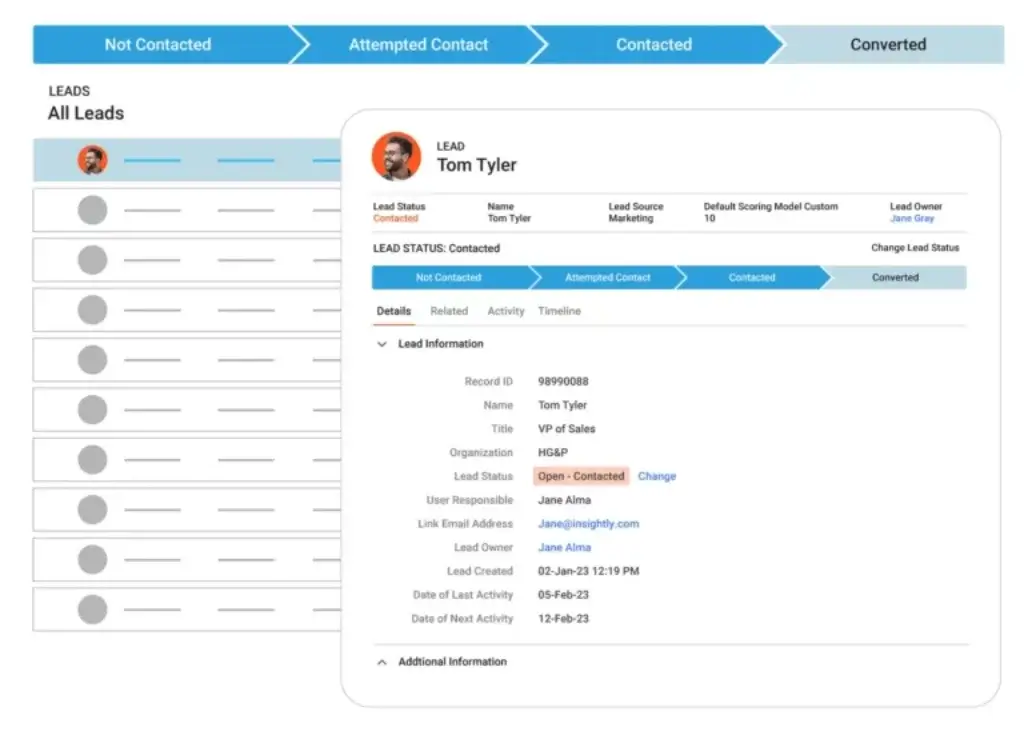
Insightly helps you manage leads from first contact through qualification, proposal, negotiation, and close.
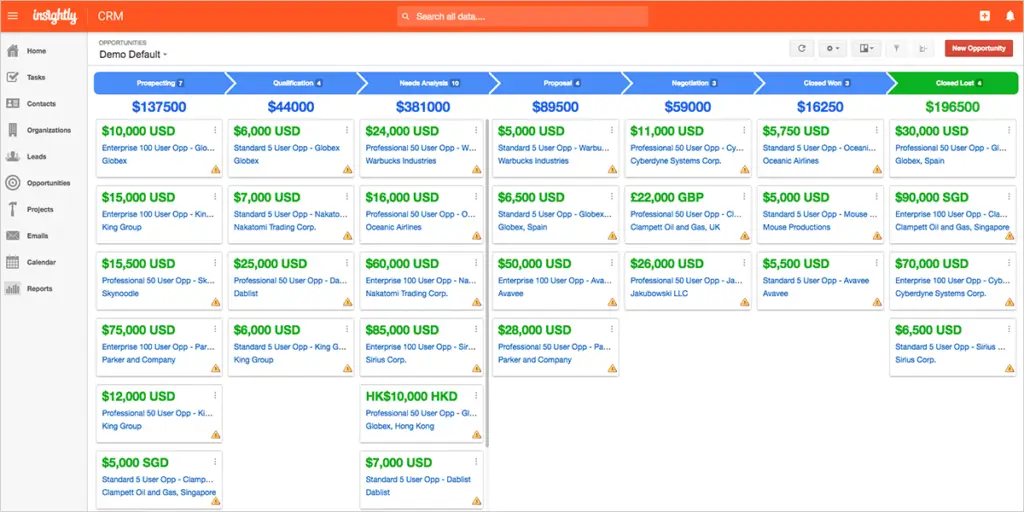
You can organize opportunities by pipeline stage, assign owners, add notes, track activity, and keep sales conversations connected to the right contact or organization record.
This is useful when you want more structure than a spreadsheet but do not want to deal with a heavy enterprise CRM setup.
Project Management Built Into the CRM
One of Insightly’s strongest features is its built-in project management layer.
Once a deal is closed, you can convert it into a project and continue managing tasks, milestones, deadlines, and responsibilities from the same system. This helps your team keep the customer context connected from sales handoff to delivery.
For service-based businesses, this is a real advantage. You do not have to rebuild client details in a separate project tool after the deal is won.
Email Tracking and Templates
Insightly supports email templates, email tracking, and integrations with major email tools.
This helps sales reps save time on repetitive outreach while keeping communication history attached to CRM records. It also gives managers better visibility into follow-ups and customer conversations.
Workflow Automation
Insightly includes workflow automation to reduce repetitive admin work.
You can use automation for tasks like assigning leads, creating follow-up activities, updating record statuses, and triggering internal notifications. This is helpful for teams that want to standardize their sales process without adding more manual work.
The Professional plan is usually the better starting point if workflow automation is a key reason you are choosing Insightly.
Relationship Linking
Relationship linking is one of Insightly’s more valuable CRM features.
It lets you connect people, companies, opportunities, projects, and related records so your team can understand how each stakeholder fits into the account.
This is useful for B2B sales, partner management, consulting, and account-based selling, where one deal may involve several decision-makers and influencers.
Dashboards and Reporting
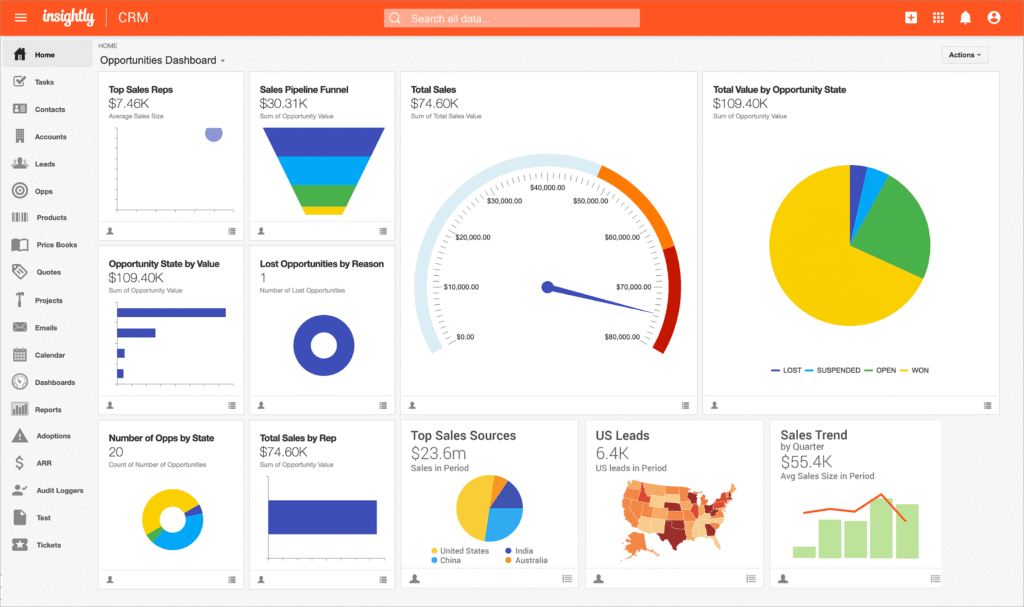
Insightly gives you dashboards and reports for tracking sales activity, pipeline health, opportunity value, rep performance, and project-related work.
The reporting tools are useful for small and mid-sized teams, but they may feel less flexible than what you get from larger enterprise CRMs. If reporting is a major requirement, you should test the dashboard builder during the free trial.
Mobile CRM App
Insightly offers mobile apps for iOS and Android, which help your team access contacts, tasks, deals, and notes while working away from the desk.
The mobile experience is practical for field sales, account managers, and remote teams. However, more advanced reporting, automation, and admin work are still easier to manage from the desktop version.
AppConnect and Integrations
Insightly connects with popular business tools such as Gmail, Outlook, QuickBooks, Mailchimp, Slack, Microsoft 365, and other apps.
For more advanced workflows, Insightly AppConnect is designed as a no-code integration tool that helps teams connect CRM data with other business systems. This matters if your CRM needs to work with finance, marketing, support, operations, or project delivery tools.
Before choosing a plan, check which integrations are included in your package and whether AppConnect is priced separately for your setup.
Quick Take
Insightly is strongest when you want CRM and project delivery in the same platform. If your team wants deeper visual customization, monday CRM may feel more flexible. If you want a sales-only CRM, Pipedrive may feel faster and simpler.
Insightly AI Features
Copilot and Automation
AI has become an important part of CRM software, and Insightly has started moving in that direction with Insightly Copilot.
Insightly Copilot is designed to help users interact with CRM data through a more conversational experience. Instead of searching through records manually, users can ask questions, retrieve insights, update records, and manage CRM workflows more naturally.
This is especially useful for teams that struggle with CRM adoption. Many businesses invest in CRM software but only use a small part of its functionality. A built-in AI assistant can reduce friction by helping reps find information faster and complete routine tasks with fewer clicks.
What Insightly Copilot Can Help With
Insightly’s AI direction is focused on making CRM data easier to use and act on.
- Conversational CRM task management
- Faster access to customer and pipeline insights
- AI-assisted data hygiene and cleaner records
- Better visibility into trends, follow-ups, and priorities
- More intuitive workflow execution inside the CRM
This does not mean Insightly is automatically the most advanced AI CRM on the market. HubSpot, Salesforce, Freshsales, monday CRM, and Pipedrive are also investing heavily in AI features.
Still, Insightly Copilot makes the platform more competitive for small and mid-market teams that want CRM intelligence without adding a separate AI tool.
Important Note About AI Access
AI availability can depend on your plan, account setup, and product rollout timing.
Before buying, confirm which Insightly Copilot features are currently available, whether they are included in your plan, and whether there are usage limits or add-on costs.
Pros and Cons
Advantages and Limitations of Using Insightly
Positive
✅ CRM and project management in one platform
✅ Strong fit for service-based businesses
✅ Useful relationship linking and pipeline tracking
✅ Solid integrations and workflow automation
Negative
❌ No free-forever CRM plan
❌ Advanced features can increase total cost
❌ Reporting may not satisfy complex enterprise needs
❌ Learning curve for automation and admin setup
Like any CRM, Insightly has clear strengths and limitations.
It is especially valuable if your team wants to connect sales activity with client delivery. But if your main need is a free CRM, a very visual workflow builder, or deep enterprise analytics, you may want to compare it with alternatives before committing.
✅ Pros of Insightly CRM
CRM and project management in one system
Insightly helps you manage sales opportunities and post-sale projects without switching between separate tools.
Strong fit for service-based businesses
If your work continues after the deal closes, Insightly gives your team a more complete customer view.
Useful relationship mapping
You can connect contacts, organizations, opportunities, and projects, which is helpful for B2B teams with multiple stakeholders.
Solid automation and integration options
Workflow automation and AppConnect can help you reduce manual tasks and connect Insightly with other business tools.
❌ Cons of Insightly CRM
No free-forever plan
Insightly offers a free trial, but you need a paid plan after that. This may not suit very small teams with limited budgets.
Reporting depth may be limited for complex teams
The dashboards are useful, but large companies may need more advanced analytics and governance.
Setup can take time
Basic CRM use is simple, but automation, relationship mapping, and advanced workflows may require planning.
Total cost can rise with add-ons
If you need marketing automation, support tools, or advanced integrations, check the full package cost before buying.
User Experience
User Interface and Experience
Insightly is relatively easy to use, especially if you are coming from spreadsheets, basic contact databases, or older CRM software.
The interface is clean enough for everyday sales activity, but it still gives you access to deeper tools such as pipelines, projects, reports, workflow automation, and relationship linking.
Web App Experience
The web app gives you a central place to manage contacts, organizations, opportunities, activities, dashboards, and projects.
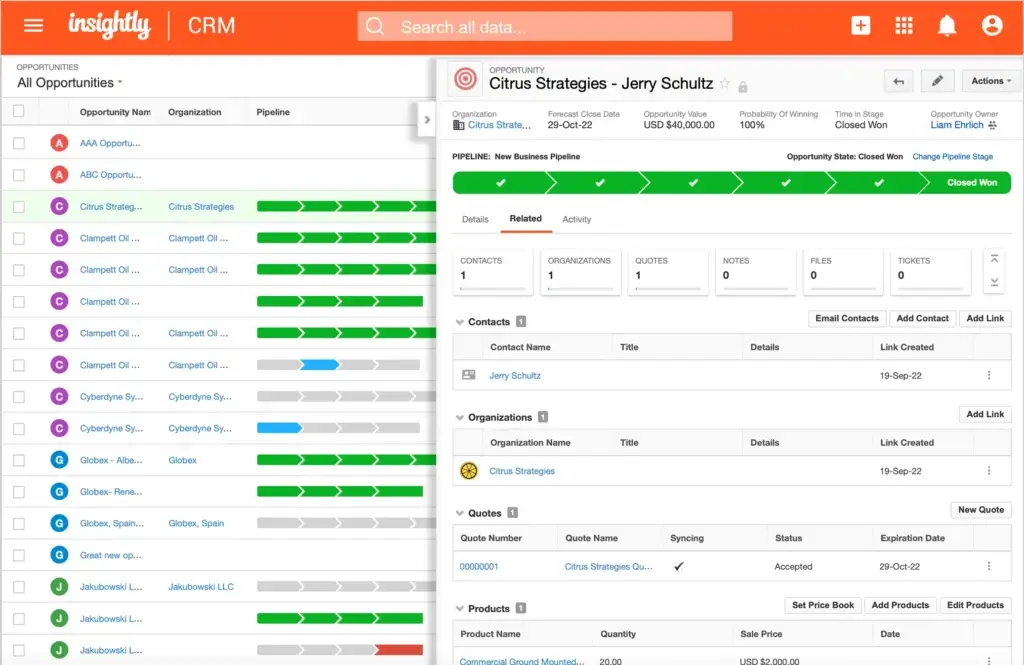
The pipeline view is useful for sales teams because it gives you a visual way to track deals by stage. You can also open a record and see related contacts, emails, files, projects, quotes, and activity history.
This helps reduce context switching. Instead of searching through emails, spreadsheets, and project tools, your team can work from the customer record.
Mobile App Experience
Insightly’s mobile app is helpful for reps, consultants, and account managers who need CRM access while traveling or meeting clients.
- Call or email contacts from the app
- Add notes and update records after meetings
- Review tasks and follow-ups on the go
- Access key account and opportunity details
The mobile app is best for quick updates and field activity. For advanced automation, reporting, and admin work, the desktop version is still the better experience.
Learning Curve
Insightly is not difficult to learn, but it does require setup if you want to use it properly.
Simple contact and pipeline management are easy to understand. More advanced areas, such as workflow automation, custom objects, permissions, reporting, and AppConnect, may require admin planning.
If your team only wants basic deal tracking, this may feel like more structure than you need. If your team manages both sales and delivery, the added structure can be a major advantage.
User Experience Compared to monday CRM and Pipedrive
- monday CRM is more visual and flexible for teams that want custom workflows.
- Pipedrive is easier for sales-only teams that want simple pipeline management.
- Insightly is stronger when your sales process needs to connect with post-sale project delivery.
Bottom line: Insightly feels practical and business-focused. It may not be the flashiest CRM, but it gives service-based teams a useful bridge between selling and delivering work.
Business Size Fit
Insightly for Different Business Sizes
Insightly works best for small and mid-sized businesses that need more than a basic CRM but do not want the complexity of a large enterprise platform.
It can also work for larger organizations, but it is usually a better fit for specific teams or departments rather than highly complex global CRM operations.
| Business Size | Fit | Why It Fits |
| Small business | Strong fit | Good for teams that need contact management, pipeline tracking, and basic post-sale project visibility. |
| Mid-sized business | Very strong fit | Works well when sales, account management, and delivery teams need shared customer context. |
| Large enterprise | Selective fit | Can work for departments, but complex enterprises may need deeper reporting, governance, and customization. |
👥 Common Insightly CRM Use Cases
Insightly is especially useful when customer work does not stop at the sales handoff.
- Agencies managing proposals, clients, and delivery projects
- Consultants tracking relationships, opportunities, and engagements
- Implementation teams managing onboarding after a sale
- B2B sales teams that need clear stakeholder tracking
- Account managers handling renewals and ongoing client work
If your business sells a service and then delivers ongoing work, Insightly’s CRM and project management combination can help you build a more connected workflow.
Pricing and Plans
How Much Does Insightly Cost?
Insightly offers a 14-day free trial, but it does not offer a free-forever CRM plan.
The CRM pricing is usually structured around three main paid plans: Plus, Professional, and Enterprise. Pricing can change, so you should always confirm the latest details on Insightly’s official pricing page before buying.
| Plan | Best For | Key Features | Starting Price |
| Plus | Small teams getting started with CRM | Lead management, contact management, project management, email templates, and basic CRM tools. | $29/user/month, billed annually |
| Professional | Growing teams that need automation | Workflow automation, lead assignment, custom dashboards, team selling, and stronger admin controls. | $49/user/month, billed annually |
| Enterprise | Teams needing advanced CRM control | Advanced permissions, custom objects, product tracking, expanded limits, and enterprise-level functionality. | $99/user/month, billed annually |
Which Insightly Plan Offers the Best Value?
For most serious CRM users, the Professional plan is likely the best starting point.
The Plus plan can work if you only need basic CRM functionality. However, many teams choose a CRM to improve process consistency, and that usually requires automation. That is where Professional becomes more practical.
Enterprise is better if you need more advanced configuration, custom objects, stronger permissions, and higher usage limits.
Add-ons and Extra Costs
Insightly also offers related products beyond the core CRM, including marketing automation, AppConnect, support and ticketing, and all-in-one packages.
- Insightly Marketing can support email campaigns and marketing workflows.
- Insightly AppConnect can help connect CRM data with other business tools.
- Insightly Service supports ticketing and customer support workflows.
- Insightly All-in-One may be useful if you want CRM, marketing, and service together.
Before choosing Insightly, calculate the full cost based on users, automation needs, integrations, marketing tools, and support requirements.
Connected CRM Workflows
Insightly Integrations and AppConnect
CRM software becomes more valuable when it connects with the tools your team already uses.
Insightly supports common integrations for email, productivity, accounting, marketing, collaboration, and data workflows. This helps teams reduce duplicate entry and keep customer information more consistent across systems.
Popular Insightly Integrations
- Gmail and Outlook for email workflows
- Microsoft 365 and calendar tools
- Slack for team communication
- QuickBooks for accounting workflows
- Mailchimp for marketing communication
- AppConnect for more advanced no-code integrations
AppConnect is particularly important if Insightly needs to work across multiple departments. For example, you may want CRM activity to sync with finance, marketing, support, or operations.
If integrations are critical to your CRM decision, test them during the trial and confirm whether they require a specific plan or add-on.
Security and Compliance
Protection for Your Data
CRM security matters because your CRM stores sensitive customer data, sales activity, account history, emails, notes, and internal workflows.
Insightly provides several security and compliance capabilities that are important for small and mid-sized businesses evaluating CRM software.
Core Security Features
Encryption
Insightly uses encryption controls to help protect data while it is stored and transferred.
Role-Based Access
You can control what users can see and do inside the CRM based on roles and permissions.
Authentication Controls
Teams can use authentication settings to strengthen login protection and reduce account risk.
Audit and Record Visibility
Activity history and record tracking help teams understand what changed and who was involved.
Compliance and Vendor Assurance
Insightly states that SOC 2 Type II attestation information is available by request through a Customer Success Manager or Account Executive.
This is important for B2B buyers who need assurance around security, availability, and confidentiality controls. Insightly also provides compliance information related to privacy and data protection, including GDPR-related resources.
If you operate in a regulated industry, do not rely on a public feature list alone. Ask Insightly directly for the latest security documents, SOC 2 report access, data processing terms, and any industry-specific compliance details you need.
Security Recommendation
For most SMB and mid-market CRM use cases, Insightly provides a reasonable security foundation.
For healthcare, financial services, government, or enterprise procurement, you should complete a vendor security review before implementation.
CRM Comparison
Insightly vs Competitors
Insightly competes with popular CRM tools like Pipedrive, monday CRM, HubSpot CRM, Zoho CRM, and Salesforce.
The right choice depends on what you value most: simplicity, customization, marketing tools, AI, project delivery, or enterprise-level scale.
| CRM | Best For | Main Strength | Main Limitation |
| Insightly | Teams that manage sales and post-sale projects | CRM and project management in one platform | Advanced setup and add-ons can increase cost |
| Pipedrive | Sales-focused teams | Simple visual pipeline management | Less built-in project delivery functionality |
| monday CRM | Teams that want flexible workflows | Highly visual customization and automation | Requires setup to fit complex sales processes |
| HubSpot CRM | Growing sales and marketing teams | Strong free CRM and marketing ecosystem | Costs can rise as you add hubs and features |
Insightly vs Pipedrive
Pipedrive is easier if your main goal is sales pipeline management. It is clean, fast, and built around moving deals forward.
Insightly is better if your sales process continues into client onboarding, service delivery, or project work.
Insightly vs monday CRM
monday CRM is more flexible and visual. It is a better fit if you want customizable boards, automations, dashboards, and team workflows.
Insightly is more CRM-native for relationship tracking and post-sale project continuity.
Insightly vs HubSpot CRM
HubSpot is stronger if you want a free CRM, marketing tools, content workflows, and a large app ecosystem.
Insightly is stronger if your priority is connecting sales opportunities with project delivery in the same system.
Conclusion
Final Recommendation
⭐ Overall Rating: 8.0/10
Insightly is a strong CRM choice for small and mid-sized businesses that need to manage both customer relationships and post-sale work.
Its biggest advantage is the combination of CRM, project management, relationship linking, automation, and integrations. This makes it especially useful for service-based teams that need continuity from lead capture to delivery.
You should consider Insightly if:
- You want one system for sales and client projects
- Your team manages complex B2B relationships
- You need CRM automation but want to avoid enterprise complexity
- You value project tracking after the deal closes
- You want AI features that may help improve CRM usability
You may want to compare alternatives if you need a free CRM, a more visual workflow builder, or deeper enterprise analytics.
Recommended Alternatives
- ✅ monday CRM – Best for flexible workflows, visual customization, and team automation.
- ✅ HubSpot CRM – Best for marketing-led growth and teams that want a free CRM entry point.
- ✅ Pipedrive – Best for sales teams that want a simple, focused pipeline CRM.
Bottom line: Insightly is not the most customizable CRM, and it is not the cheapest once you factor in advanced needs. But for teams that need CRM and project delivery in one place, it remains one of the more practical options in the CRM market.
Have More Questions
Frequently Asked Questions
What is Insightly CRM used for?
Insightly CRM is used to manage contacts, leads, sales opportunities, customer relationships, projects, tasks, and post-sale workflows from one platform. It is especially useful for businesses that need CRM and project management together.
Is Insightly a good CRM for small businesses?
Yes. Insightly is a good CRM for small businesses that need contact management, pipeline tracking, email tools, and light project management. However, it does not offer a free-forever plan, so very small teams may want to compare it with free CRM options.
Does Insightly include project management?
Yes. Insightly includes project management features that let you convert closed opportunities into projects, assign tasks, track milestones, and manage delivery work inside the CRM.
Does Insightly have AI features?
Yes. Insightly has introduced AI capabilities through Insightly Copilot, which is designed to help users interact with CRM data, manage tasks, retrieve insights, and improve CRM usability through a more conversational experience.
What is Insightly Copilot?
Insightly Copilot is an AI assistant built for Insightly CRM. It helps users work with CRM data more naturally, including finding information, generating insights, improving data hygiene, and supporting workflow execution.
How much does Insightly CRM cost?
Insightly CRM pricing starts at $29 per user per month when billed annually for the Plus plan. The Professional plan starts at $49 per user per month, and the Enterprise plan starts at $99 per user per month. Pricing may change, so always confirm current costs on Insightly’s official pricing page.
Does Insightly offer a free plan?
No. Insightly does not offer a free-forever CRM plan. It offers a free trial, but continued use requires a paid subscription.
What integrations does Insightly support?
Insightly integrates with tools such as Gmail, Outlook, Microsoft 365, QuickBooks, Slack, Mailchimp, and other business applications. Insightly AppConnect also supports more advanced no-code integration workflows.
Is Insightly secure?
Insightly provides CRM security features such as role-based access, encryption, authentication controls, and compliance documentation. Insightly also states that SOC 2 Type II attestation information is available by request.
What are the best Insightly alternatives?
The best Insightly alternatives include monday CRM for flexible visual workflows, HubSpot CRM for marketing-led growth and a free CRM entry point, and Pipedrive for simple sales pipeline management.