

Introduction
Choosing the right CRM is especially important when you work in financial services. You are not only managing contacts and follow-ups. You are managing client relationships, household details, review schedules, compliance records, documents, notes, emails, tasks, and team accountability.
Redtail CRM is built specifically for financial advisors, RIAs, broker-dealers, wealth managers, and advisory operations teams. Instead of trying to serve every industry, it focuses on the day-to-day workflows that matter most in an advisory firm.
In this Redtail CRM review, you’ll get a clear look at its features, pricing, user experience, compliance tools, security, integrations, strengths, limitations, and best-fit use cases. You’ll also see how Redtail compares with alternatives like Wealthbox, Salesforce Financial Services Cloud, HubSpot, and Zoho CRM.
Redtail is a strong choice if you want an advisor-focused CRM with client and household records, workflows, calendars, notes, QuickLists, document storage options, email archiving, compliant texting, and deep wealthtech integrations. It is less ideal if you need a general sales CRM, advanced marketing automation, or highly customizable enterprise CRM architecture.
Quick Summary
Redtail CRM is best understood as a relationship and operations CRM for financial advisory firms. It helps you organize client data, standardize service workflows, maintain activity history, support compliance, and connect your advisory tech stack in one central workspace.
| Category | Redtail CRM Review Summary |
| Best For | Financial advisors, RIAs, broker-dealers, wealth managers, and advisory operations teams |
| Starting Price | $39/user/month billed annually for Launch |
| Free Plan | No permanent free plan, but a free trial is available |
| Core Strength | Advisor-specific client records, workflows, calendar, notes, compliance support, and integrations |
| Main Limitation | Less flexible than enterprise CRMs for complex custom data models and non-advisor sales processes |
| Best Alternative | Wealthbox for simplicity, Salesforce Financial Services Cloud for enterprise customization |
For advisory firms that want a CRM designed around real client service work, Redtail has a clear purpose. It is not trying to be a generic CRM for every type of sales team. It is trying to help advisors stay organized, serve clients consistently, and reduce the operational friction that slows down firm growth.
Key Features
Redtail CRM Software specification
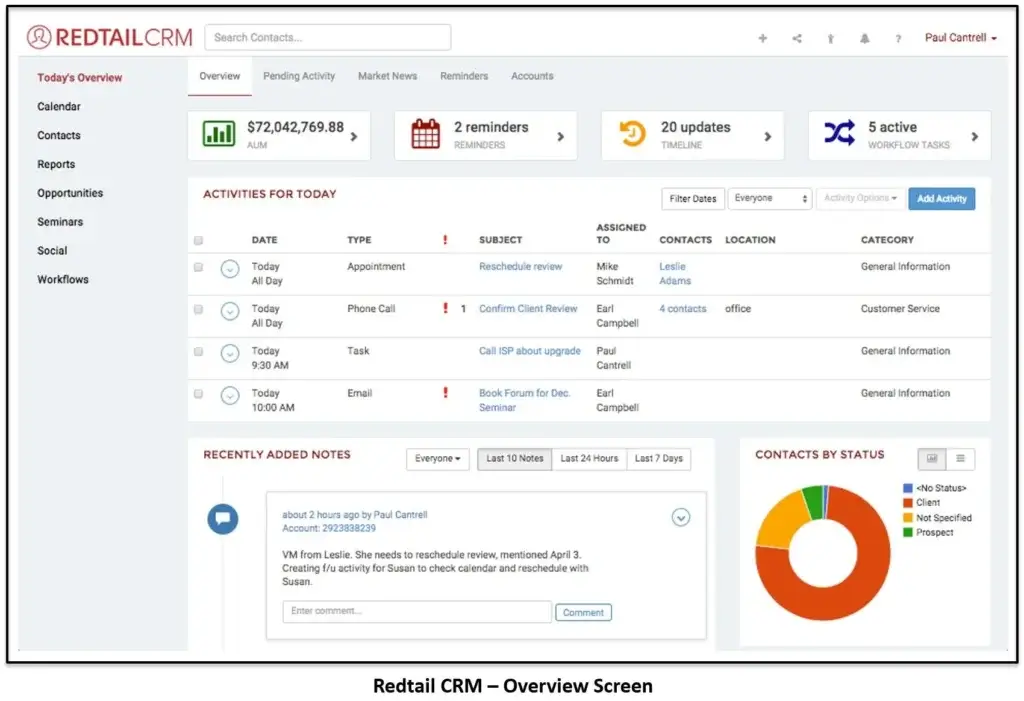
Redtail’s feature set is centered on advisor relationship management. Instead of focusing mainly on sales pipelines, Redtail helps you manage client households, activities, calendars, workflows, communication history, compliance documentation, and integrations with the tools your firm already uses.
Client and household records
One of Redtail’s most important strengths is its advisor-specific contact structure. You can manage individuals, households, businesses, beneficiaries, centers of influence, prospects, and client relationships from one CRM database.
This matters because advisory firms rarely work with isolated contacts. You often need to understand spouses, children, trustees, business partners, attorneys, accountants, referrals, and account relationships. Redtail gives you a more practical way to see those connections compared with a generic sales CRM.
- Store client, prospect, and household details in one database.
- Track family relationships, business connections, and referral sources.
- Use custom fields and tags to segment records.
- Attach notes, documents, activities, and emails to client records.
- Create a fuller relationship history for service and compliance context.
The practical value is simple: your team can quickly understand who the client is, what matters to them, what happened recently, and what needs to happen next.
Workflows and automation
Redtail includes workflow tools that help advisory firms standardize repeatable processes. This is one of the biggest reasons firms choose Redtail over a generic CRM.
You can build workflows for onboarding, annual reviews, account opening, beneficiary updates, money movement, client service requests, seminar follow-up, prospect nurturing, and compliance-related tasks.
The value is not only automation. It is consistency. When every advisor, admin, and operations team member follows the same process, fewer tasks fall through the cracks.
- Build repeatable workflows for service and operations tasks.
- Assign workflow steps to specific team members.
- Track task ownership, deadlines, and progress.
- Use templates to reduce manual setup time.
- Improve consistency across advisors and support staff.
For firms with multiple team members, workflows can become the operational backbone of the CRM. They help turn Redtail from a contact database into a structured service system.
Notes and timeline
Redtail’s notes and timeline features help your team maintain a clear record of client interactions. You can log calls, meetings, service requests, emails, tasks, and important updates directly against the client record.
This is especially valuable in advisory firms where several people may touch the same client relationship. A service associate may handle a paperwork request, an advisor may hold the planning meeting, and a compliance officer may later review the record.
When activity history is centralized, handoffs become cleaner and client service becomes more consistent.
QuickLists, tagging, and segmentation
Redtail’s QuickLists and search tools help you segment your database for better follow-up and reporting. You can create lists based on client type, status, tag, age, location, service need, review date, account type, or custom fields.
This is useful for targeted outreach. For example, you may want to create a list of clients due for annual reviews, prospects who attended a seminar, households with upcoming birthdays, or clients affected by a market update.
For firms that want to improve client engagement, segmentation is one of the most practical CRM habits to build.
Email, communication history, and Redtail Email
Redtail can support email-related workflows, including email history and archiving options. Redtail Email is designed to automatically capture, store, organize, and search client messages while connecting communication history back to the CRM.
This is important for financial advisors because client communication is not only a productivity issue. It is also a compliance and recordkeeping issue.
With email archiving, your team can reduce manual logging, improve audit readiness, and find prior client communication faster. This can be especially useful when a client asks about a past request, a compliance officer needs documentation, or an advisor needs context before a meeting.
Redtail Speak for compliant texting
Redtail Speak is Redtail’s compliant texting and chat solution for advisors. It allows you to communicate with clients by text while automatically archiving messages for review and recordkeeping.
This is a meaningful advantage because many clients prefer texting for quick updates. At the same time, advisory firms need to manage communication through approved, searchable, and auditable channels.
Redtail Speak can help firms meet client expectations without losing control over compliance documentation. It is most valuable for firms that already use texting or want to introduce texting in a more supervised way.
Redtail Imaging and document management
Redtail Imaging gives firms a secure, centralized way to manage client documents. It connects document storage to client records, helping your team move closer to a paperless workflow.
This is useful for account paperwork, signed forms, planning documents, meeting materials, client agreements, service requests, and internal documentation.
Document management is not just about storage. It improves speed, consistency, and audit readiness. When documents are attached to the right client record, your team spends less time searching and more time serving clients.
Calendar and activities
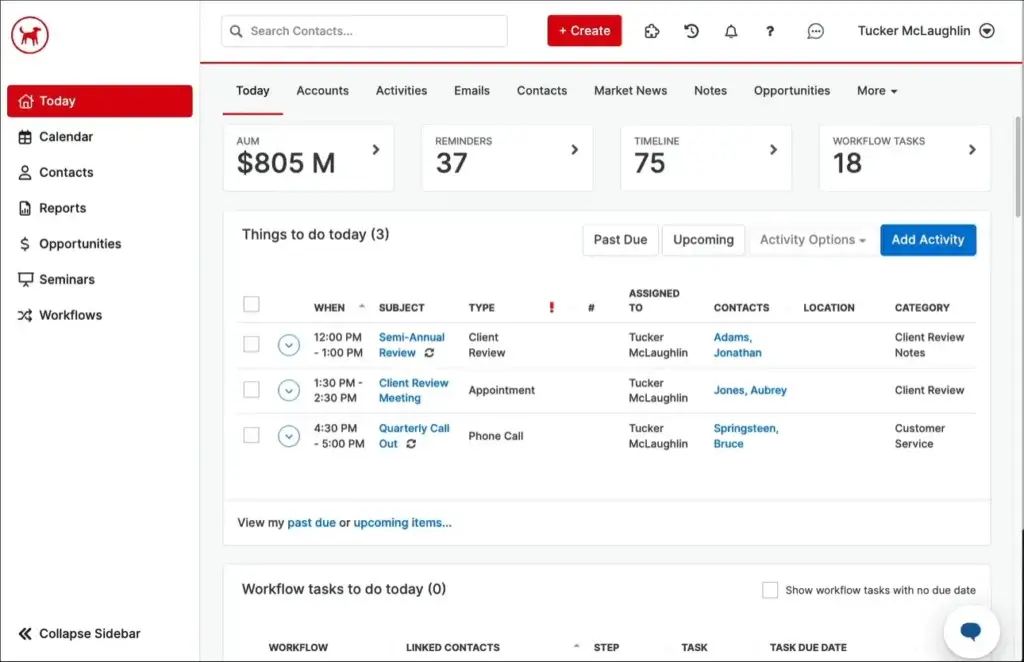
Redtail includes calendar and activity management so your team can schedule meetings, assign tasks, track follow-ups, and maintain visibility across client work.
This is useful for advisory firms because follow-up timing matters. Annual review meetings, RMD reminders, beneficiary updates, plan changes, client service requests, and account paperwork all require structured follow-through.
Redtail’s calendar and activities help you keep those commitments visible. Advisors can see what is due, admins can support the workflow, and managers can spot bottlenecks before clients are affected.
Advisor technology integrations
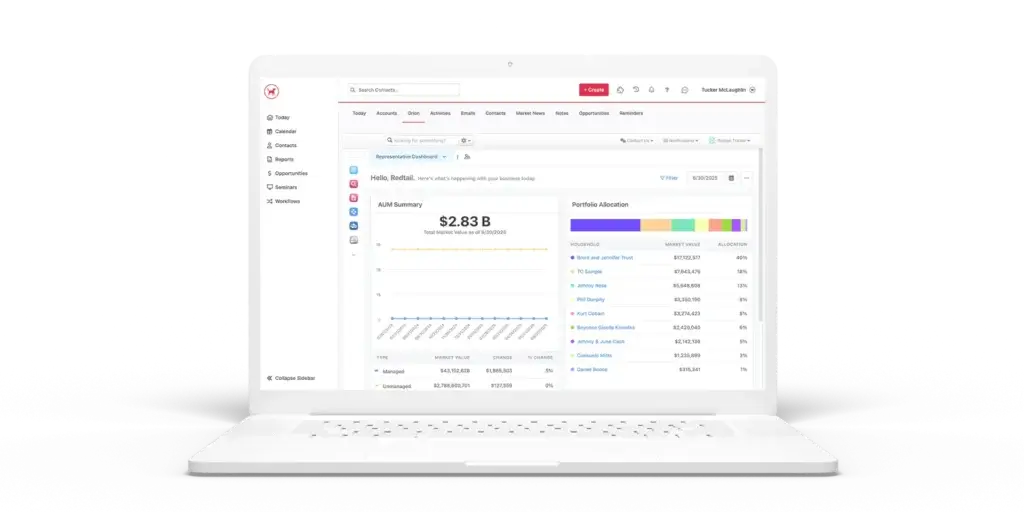
Integrations are one of Redtail’s biggest strengths. Redtail connects with many tools commonly used by financial advisors, including planning software, portfolio management platforms, custodians, risk tools, document tools, communication systems, and automation platforms.
Common integration categories include:
- Financial planning: eMoney, MoneyGuidePro, and other planning tools.
- Portfolio and reporting: Orion and other advisor platforms.
- Custodians: Schwab and other wealth management partners.
- Communication: Redtail Speak, email tools, and phone integrations.
- Document management: Redtail Imaging and related storage tools.
- Automation: Zapier and partner integrations.
This makes Redtail a strong fit if your firm wants a CRM that works inside the wealth management ecosystem. A generic CRM may offer more broad app integrations, but Redtail’s advisor-specific integration depth is often more useful for RIAs and broker-dealers.
AI meeting support through Jump integration
One of the more important recent developments is the embedded Jump experience inside Redtail CRM. Jump brings AI-powered meeting prep, notes, summaries, transcripts, follow-up tasks, and CRM updates into the Redtail workflow.
This matters because advisor meetings create a large amount of administrative work. After each meeting, your team may need to summarize the conversation, update the CRM, create follow-up tasks, send recaps, and document next steps.
AI meeting tools can reduce that workload. The key is to use them carefully. Advisory firms should still review accuracy, supervision rules, privacy requirements, and compliance expectations before relying on AI-generated records.
Mobile access
Redtail offers mobile access so advisors and team members can review client information, tasks, notes, and activity while away from the office.
This is helpful for advisors who move between client meetings, events, office locations, and travel. You can prepare before a meeting, check recent notes, or capture follow-up details without waiting until you are back at your desk.
The mobile experience is best for access and updates. For heavy workflow setup, reporting, and database administration, the desktop experience will still be more practical.
Pros and Cons
Advantages and Limitations of Using Redtail CRM
Positive
✅ Built specifically for financial advisors
✅ Strong client and household management
✅ Useful workflows for advisory operations
✅ Deep integrations with advisor technology tools
✅ Compliance-focused communication and archiving options
Negative
❌ No permanent free plan
❌ Interface can feel dated compared with newer CRMs
❌ Advanced tools may require add-ons or higher plans
❌ Less flexible for non-advisor sales teams
❌ Enterprise customization is lighter than Salesforce
Redtail has a clear advantage when your firm wants an advisor-specific CRM that supports client service, task management, workflows, compliance documentation, and wealthtech integrations. Its limitations become more visible when you need a modern general-purpose sales CRM, heavy marketing automation, or deeply customized enterprise workflows.
Advantages of Redtail CRM
- Advisor-specific design: Redtail is built around financial advisory workflows, not generic sales processes.
- Strong household management: It helps you track families, relationships, referrals, and service context.
- Workflow consistency: You can standardize onboarding, reviews, follow-ups, and client service tasks.
- Compliance support: Notes, archiving, texting, email, and audit-friendly records support regulated workflows.
- Deep integrations: Redtail connects with many advisor tools across planning, portfolio, custodial, and document workflows.
- Scalable firm fit: It can work for solo advisors, small firms, larger RIAs, and broker-dealer networks.
Limitations of Redtail CRM
- No free plan: Redtail offers a free trial, but ongoing use requires a paid subscription.
- Interface expectations: Some users may find the experience less modern than newer CRM platforms.
- Add-on costs: Speak, Email, Imaging, and other capabilities may affect total cost.
- Not a broad marketing platform: You may need separate tools for advanced marketing automation.
- Less ideal for general sales teams: Non-advisor businesses may prefer HubSpot, Pipedrive, Zoho, or Salesforce.
- Enterprise customization limits: Salesforce Financial Services Cloud is stronger for complex enterprise architecture.
User Experience
User Interface and Experience
Redtail’s user experience is built around practical advisory work. The platform focuses on records, notes, tasks, calendar items, workflows, and service visibility rather than flashy dashboards.
Setup and onboarding
Redtail is generally easier to set up than an enterprise CRM like Salesforce Financial Services Cloud. You can import data, configure users, set up tags, define workflows, connect integrations, and start using the system without a long custom implementation.
That said, data preparation still matters. Before you migrate, clean duplicates, standardize household names, review contact categories, confirm custom fields, and decide which old records are worth bringing into the new CRM.
A clean migration makes Redtail much more useful from day one.
Daily advisor workflow
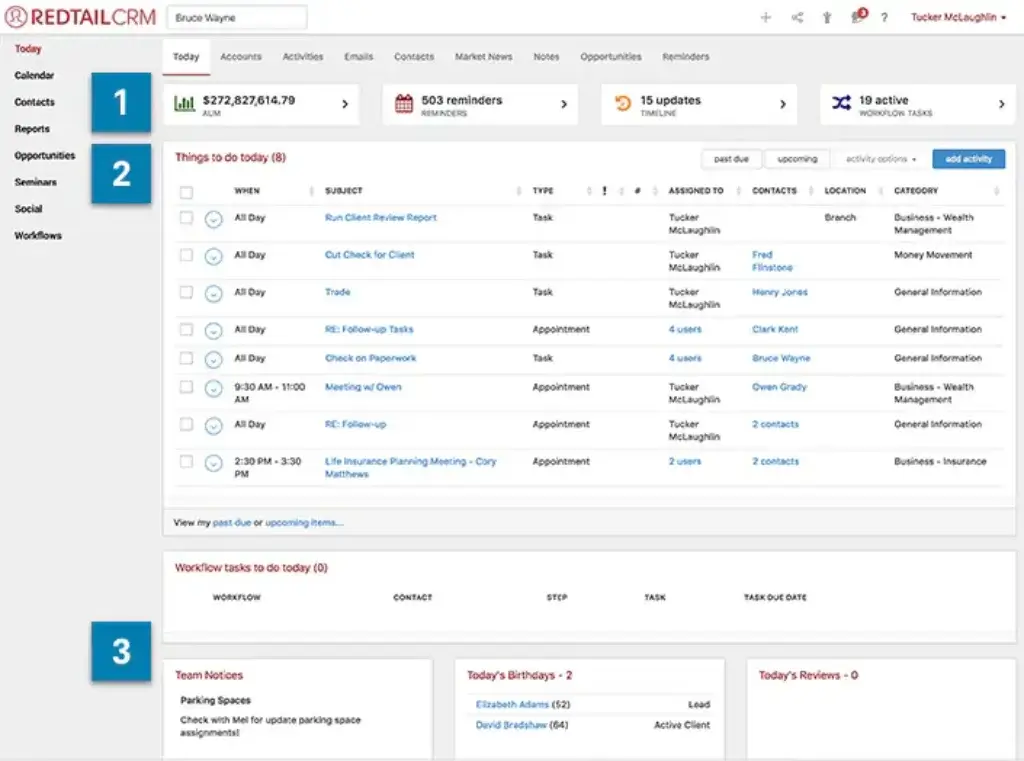
The daily workflow in Redtail typically centers on the calendar, activities, client records, notes, workflows, and QuickLists. Your team can see who needs follow-up, which tasks are overdue, which meetings are scheduled, and which client records need attention.
This makes Redtail valuable as an operational command center. Advisors can prepare for meetings, admins can manage service tasks, and managers can monitor activity across the firm.
Learning curve
Redtail is not overly difficult to learn, especially for teams already familiar with advisor CRM systems. However, new users may need time to understand the best way to use tags, QuickLists, workflows, notes, categories, and integrations.
The biggest learning curve is not usually the software itself. It is building consistent team habits. Redtail works best when everyone agrees how to log notes, assign tasks, name workflows, tag contacts, and update client records.
Mobile app experience
Redtail’s mobile access helps advisors stay connected while away from the office. You can review contact details, notes, tasks, and activity history before or after client meetings.
This is useful for meeting preparation, quick follow-up, and client context. However, for larger administrative tasks, workflow creation, reporting, and configuration, desktop use is still the better experience.
Customer support and training
Redtail offers support resources, training, webinars, documentation, and onboarding content. This is important because CRM success in an advisory firm depends heavily on process adoption.
For smaller firms, self-guided resources may be enough. Larger firms should consider structured training so advisors, admins, operations staff, and compliance teams all use the CRM consistently.
Business size fit
Redtail CRM for Different Business Sizes
Redtail can support different firm sizes, but the value depends on your advisory model, team structure, compliance needs, and technology stack.
Redtail CRM for solo advisors
Redtail can work well for solo advisors who want a structured way to manage clients, prospects, tasks, notes, meetings, and follow-ups.
The key benefit is organization. Even if you do not have a large team, Redtail can help you keep client details, review reminders, documents, and communication history in one place.
The main question is whether you need an advisor-specific CRM or a simpler tool. If you only need basic contact management, a cheaper general CRM may be enough. If you want a long-term system for an advisory practice, Redtail is more relevant.
Redtail CRM for small advisory firms
Small firms are often a strong fit for Redtail. You may have multiple advisors, client service associates, operations staff, and part-time support, but not a full CRM administrator.
Redtail gives you structure without requiring an enterprise-level implementation. You can standardize workflows, improve task ownership, and create better visibility across client relationships.
Redtail CRM for growing RIAs
Growing RIAs can use Redtail to improve operational consistency. As the firm adds advisors, clients, service tiers, and support roles, informal processes become harder to manage.
Redtail helps growing firms create repeatable workflows for client onboarding, reviews, service requests, document collection, account updates, and internal handoffs.
At this stage, integrations become more important. Redtail works best when it connects with your planning, portfolio, document, email, compliance, and custodial systems.
Redtail CRM for broker-dealers and larger networks
Redtail can support broker-dealers and larger advisor networks, especially when supervision, centralized visibility, and standardized processes matter.
Larger firms should evaluate user permissions, compliance workflows, reporting needs, enterprise support, integration requirements, and data governance before rollout.
If your organization needs advanced custom objects, complex territory structures, multi-layer permissions, and extensive enterprise automation, Salesforce Financial Services Cloud may be a better fit.
Who should not use Redtail CRM?
Redtail is not the right CRM for every business. You may want to consider another option if you need:
- A permanent free CRM plan.
- A CRM for a non-financial-services sales team.
- Advanced native marketing automation.
- Highly customizable enterprise data models.
- A modern pipeline-first sales interface.
- Deep ecommerce, support, or product-led growth workflows.
Redtail is best when financial advisor workflows are the priority. If your main need is broad sales automation or general CRM flexibility, another platform may be a better fit.
Pricing and Plans
How much does Redtail CRM cost?
Redtail uses a tiered pricing model. Public pricing includes Launch and Growth, while Enterprise pricing is custom. The pricing below reflects the latest public information available at the time of writing, but you should always confirm the final cost directly with Redtail because software pricing, package limits, and add-ons can change.
| Plan | Launch | Growth | Enterprise |
| Annual Price | $39/user/month | $59/user/month | Custom pricing |
| Monthly Price | $45/user/month | $65/user/month | Custom pricing |
| Best For | Solo advisors and smaller firms | Growing firms needing automation and sync | Large advisory firms, broker-dealers, and complex organizations |
| User Limit | Up to 5 users | Unlimited users | Custom |
| Contact Management | Included | Included | Included |
| Custom Fields and Lists | Included | Included | Included |
| Calendar and Activities | Included | Included | Included |
| Automated Workflows | Limited or plan-dependent | Included | Advanced |
| Email, Calendar, and Contact Sync | Not the strongest plan fit | Included through CRM Suite Sync | Custom |
| Bulk Emails and Templates | Plan-dependent | Included | Custom |
| Document and Imaging Features | Plan-dependent | More advanced Imaging capabilities | Custom |
| Best Value | Best entry point | Best fit for most growing advisory firms | Best for larger organizations needing governance |
Launch plan
The Launch plan is the entry-level Redtail CRM plan. It is best for solo advisors and smaller firms that need core CRM functionality, contact management, custom fields, calendar tools, notes, reporting, templates, and client segmentation.
This plan gives you the foundation of Redtail without the full power of more advanced workflow and synchronization features. It can be a good starting point if your firm is small and wants to organize client records without overcommitting.
Growth plan
The Growth plan is likely the better fit for firms that want Redtail to support more daily operations. It adds stronger workflow automation, CRM automations, templates, CRM Suite Sync, bulk email capabilities, and more advanced document-related functionality.
If your team includes advisors, client service associates, operations staff, and admins, Growth is usually more realistic than Launch. It gives you more of the automation and collaboration value that makes Redtail useful as the firm scales.
Enterprise plan
The Enterprise plan is designed for larger firms, broker-dealers, and organizations with more complex needs. Pricing is customized, and the value depends on your required support, governance, data structure, integrations, supervision workflows, and implementation needs.
If you are evaluating Enterprise, you should prepare a detailed requirements list before speaking with sales. Include user count, compliance needs, integrations, migration requirements, reporting expectations, and support needs.
Add-ons and extra costs
Redtail’s total cost may include more than the CRM subscription. Depending on your firm, you may also consider Redtail Speak for texting, Redtail Email for email archiving, Redtail Imaging for document management, AI meeting tools, data migration services, training, or other integrated software.
Before choosing a plan, calculate the real monthly cost based on users, communication needs, archiving requirements, document storage, compliance review, and the rest of your advisory technology stack.
Security and Compliance
Protection for Your Data
Security and compliance are central to any CRM decision in financial services. Your CRM may contain personally identifiable information, financial planning notes, household relationships, account-related documentation, emails, text messages, meeting notes, and service history.
Redtail and Orion position the platform around secure, compliant data handling for advisory firms. Public materials reference SOC 2 Type II certification, compliance-ready communication tools, and security documentation available through Orion’s Trust Center.
SOC 2 Type II and security posture
SOC 2 Type II certification is important because it indicates that a vendor’s controls have been reviewed over a period of time, not only at a single point. For advisory firms, this can help with vendor due diligence and internal technology reviews.
Redtail’s security posture should still be reviewed as part of your own compliance process. Ask for current security documentation, data handling details, retention policies, encryption information, access controls, and business continuity practices before making a final decision.
FINRA and SEC recordkeeping considerations
Advisory firms and broker-dealers need strong recordkeeping habits. A CRM can help, but it does not automatically make the firm compliant by itself.
Redtail Speak and Redtail Email are designed to support compliant communication capture and archiving. This can help firms manage text and email communication in a more controlled and searchable way.
Your firm still needs written policies, supervision procedures, retention settings, approved communication channels, employee training, and periodic reviews.
Access control and permissions
Permissions become more important as your firm grows. Not every employee should have the same access to every record, communication, report, or administrative setting.
Before implementation, define user roles clearly. Advisors, admins, compliance officers, operations staff, and executives may all need different permissions. A clean permission model reduces operational risk and improves governance.
Data privacy considerations
Redtail can be a strong option for many advisory firms, but you should still confirm your specific privacy obligations. This is especially important if you serve clients across different jurisdictions or handle sensitive personal and financial information.
Review your data processing agreements, privacy policies, retention rules, client consent practices, and internal procedures before storing sensitive data in any CRM.
Setup
Setup, Migration, and Integrations
Adopting Redtail successfully depends on more than choosing the right plan. Your results will depend on data quality, workflow design, team training, compliance rules, and how well Redtail connects with the rest of your advisory tech stack.
Migration tools and data cleanup
Before migrating into Redtail, clean your existing CRM or spreadsheet data. Remove duplicates, standardize household names, confirm email addresses, review client statuses, and decide which fields you actually need.
Many CRM problems come from importing messy data. If the data is inconsistent at launch, your reporting, search, segmentation, and workflows will suffer.
Workflow setup
Workflows are one of the most important implementation areas in Redtail. Start with the processes your firm repeats most often.
Good starting workflows include new client onboarding, annual reviews, beneficiary updates, money movement requests, prospect follow-up, account paperwork, client meeting preparation, and post-meeting follow-up.
Keep workflows simple at first. Add complexity only after your team is using the basics consistently.
Integrations and connected systems
Redtail works best when it is connected to your planning, portfolio, email, document, communication, and compliance tools. Integrations reduce duplicate data entry and help your CRM become the center of your client relationship workflow.
Before implementation, map each tool in your stack and decide what should sync with Redtail. This helps avoid disconnected systems and unclear ownership of client data.
Best Practices for Implementing Redtail CRM
To get the most value from Redtail, treat implementation as an operations project, not just a software setup task.
- Clean your database first: Remove duplicate contacts, outdated records, and inconsistent household structures.
- Define naming rules: Standardize households, tags, workflows, custom fields, and activity types.
- Build priority workflows: Start with onboarding, reviews, service requests, and meeting follow-up.
- Train by role: Advisors, admins, operations, and compliance users should learn different workflows.
- Use QuickLists: Segment clients and prospects for targeted outreach and service follow-up.
- Review activity weekly: Monitor overdue tasks, workflow progress, and client service bottlenecks.
The biggest mistake is treating Redtail as a static contact database. The firms that get the most value use it as a daily operating system for client relationships.
Comparisons
Redtail CRM Alternatives and Competitors
Redtail is one of the strongest CRM options for financial advisors, but it is not the only choice. The best alternative depends on whether you prioritize simplicity, enterprise customization, marketing automation, or lower-cost general CRM functionality.
| CRM | Best For | Where It Beats Redtail | Where Redtail Is Stronger |
| Wealthbox | Modern advisor CRM simplicity | Cleaner interface and easier adoption for some teams | Long-standing advisor market presence and deep operational familiarity |
| Salesforce Financial Services Cloud | Enterprise financial services CRM | Advanced customization, reporting, permissions, and scale | Faster setup and advisor-specific usability for many firms |
| HubSpot CRM | CRM plus marketing automation | Marketing, forms, campaigns, content, and lifecycle tools | Advisor-specific workflows, compliance focus, and wealthtech integrations |
| Zoho CRM | Affordable general CRM | Lower entry cost and broad customization | Financial advisor-specific structure and integrations |
Redtail CRM vs Wealthbox
Wealthbox is one of Redtail’s most direct competitors. It is also built for financial advisors and is often praised for its clean interface, simple collaboration, and ease of use.
Redtail is better if your firm values its long-standing advisor market presence, deep familiarity across the industry, workflow structure, and broad integration ecosystem. Wealthbox may be better if your team wants a more modern interface and a lighter user experience.
For firms choosing between the two, the decision often comes down to usability preference, workflow depth, integration requirements, and team adoption.
Redtail CRM vs Salesforce Financial Services Cloud
Salesforce Financial Services Cloud is more powerful for enterprise customization. It is better for large organizations that need complex objects, advanced permission models, custom automation, deep analytics, multi-division workflows, and a large implementation ecosystem.
Redtail is easier to adopt for many advisory firms. It is built around the workflows advisors already use, which can reduce implementation complexity and improve team adoption.
If your firm wants a practical advisor CRM without a heavy implementation, Redtail is usually the better fit. If your firm needs enterprise CRM architecture, Salesforce is stronger.
Redtail CRM vs HubSpot
HubSpot is better if your firm needs strong marketing automation, website forms, landing pages, email campaigns, lead nurturing, and sales pipeline tools in one broader platform.
Redtail is better if your core need is advisor-specific relationship management. It handles client households, notes, workflows, compliance-oriented communication, and advisor integrations better than a general marketing CRM.
You can also read our HubSpot CRM review for a deeper look at its broader CRM and marketing capabilities.
Redtail CRM vs Zoho CRM
Zoho CRM is more affordable and flexible for general business use. It can work well for small businesses that need pipelines, automation, custom modules, and sales tracking at a lower price.
Redtail is stronger for advisory firms because it is built for financial services workflows. If you need household management, advisor integrations, compliance-friendly communication tools, and service workflows, Redtail is more relevant.
Zoho is a better fit for general sales teams. Redtail is a better fit for financial advisors.
Conclusion
Final thoughts
Redtail CRM is one of the most established CRM platforms for financial advisors, and its value is clear. It gives advisory firms a purpose-built system for managing client relationships, households, tasks, workflows, calendars, notes, documents, communication history, and compliance-related records.
Its biggest advantage is focus. Redtail is not trying to be a generic sales CRM. It is designed for the way advisory firms operate, especially firms that need consistent client service workflows, team visibility, and integrations with financial planning, portfolio, custodial, communication, and document tools.
The platform is not perfect for every firm. The interface may feel less modern than some newer CRMs, advanced capabilities may require higher plans or add-ons, and firms with complex enterprise requirements may prefer Salesforce Financial Services Cloud.
Still, if your priority is an advisor-specific CRM that can help your team stay organized, support compliance workflows, reduce missed follow-ups, and centralize client relationship data, Redtail CRM deserves strong consideration in 2026. It is best for financial advisory firms that want a proven, practical, and deeply integrated CRM built around client service.
Frequently Asked Questions
Have more questions?
What is Redtail CRM best used for?
Redtail CRM is best used for financial advisor relationship management. It helps advisory firms manage client and household records, workflows, calendars, notes, activities, documents, communication history, and compliance-related records.
Is Redtail CRM only for financial advisors?
Redtail CRM is built specifically for financial professionals, including RIAs, broker-dealers, wealth managers, and advisor support teams. Other businesses can technically use it, but most non-advisor teams will be better served by a general CRM.
How much does Redtail CRM cost?
Redtail CRM starts at $39 per user per month when billed annually for the Launch plan. The Growth plan starts at $59 per user per month when billed annually, and Enterprise pricing is customized based on firm needs.
Does Redtail CRM have a free plan?
No. Redtail CRM does not offer a permanent free plan. It offers a free trial, but ongoing access requires a paid subscription.
What is Redtail Speak?
Redtail Speak is a compliant texting and chat solution for financial advisors. It allows firms to communicate with clients by text while archiving messages for search, review, and compliance documentation.
What is Redtail Email?
Redtail Email is an email archiving solution that captures, stores, organizes, and searches client email communication. It connects archived emails with Redtail CRM records to support better visibility and compliance workflows.
What is Redtail Imaging?
Redtail Imaging is Redtail’s document management solution. It helps advisory firms securely store, search, organize, and manage client documents while connecting files to CRM records.
Is Redtail CRM better than Wealthbox?
Redtail is often better for firms that want a long-standing advisor CRM with deep workflow familiarity and many industry integrations. Wealthbox may be better for firms that prioritize a cleaner modern interface and simpler collaboration.
Is Redtail CRM secure?
Redtail and Orion provide security and compliance resources, including SOC 2 Type II-related materials. Advisory firms should still review current security documentation, access controls, retention policies, and compliance requirements before purchase.
Which Redtail CRM plan is best for growing advisory firms?
The Growth plan is usually the better fit for growing advisory firms because it includes stronger workflow automation, CRM automations, CRM Suite Sync, templates, bulk email capabilities, and more advanced operational features than Launch.








