
Introduction
If you rely on outbound sales, the quality of your prospect data can make or break your campaigns. A well-written cold email will not help much if the contact is outdated, the email bounces, or the company does not match your ideal customer profile.
That is where ListKit positions itself. It is a B2B lead generation and sales intelligence platform designed to help you build targeted prospect lists, verify contacts, enrich data, and move leads into your outbound workflow faster.
ListKit is not a traditional CRM like HubSpot, Pipedrive, or Salesforce. It is better understood as a B2B prospecting database and AI list-building tool. Its main job is to help you find the right companies and contacts before outreach begins.
That distinction matters.
If your team needs a full CRM for pipeline management, customer success, support, forecasting, or post-sale account management, ListKit will not replace that system. But if your biggest challenge is building clean outbound lists quickly, ListKit can be a practical addition to your sales stack.
In this ListKit review, you’ll see how the platform works, which features stand out, how pricing is structured, what the main pros and cons are, and how it compares with tools like Apollo, ZoomInfo, Lusha, and Cognism.
ListKit Review: Quick Summary
ListKit is best for B2B sales teams, agencies, founders, and outbound marketers that need verified lead lists without spending hours on manual research and email verification. It is less ideal if you need built-in multichannel outreach, a deep CRM, or enterprise-grade sales operations control.
| Category | Details |
| Best For | B2B outbound sales teams, cold email agencies, founders, SDR teams, and demand generation teams |
| Not Best For | Teams that need a full CRM, built-in email sequencing, customer support workflows, or advanced sales forecasting |
| Main Strength | AI-powered list building with triple-verified B2B contact data |
| Main Limitation | It focuses on prospect data and list exports, not full sales engagement or CRM management |
| Best Use Case | Finding verified leads for cold email, cold calling, enrichment, and outbound prospecting |
| Starting Price | Paid plans start from $82/month when billed yearly, with credit-based usage |
Key Features
ListKit‘s Software Specification
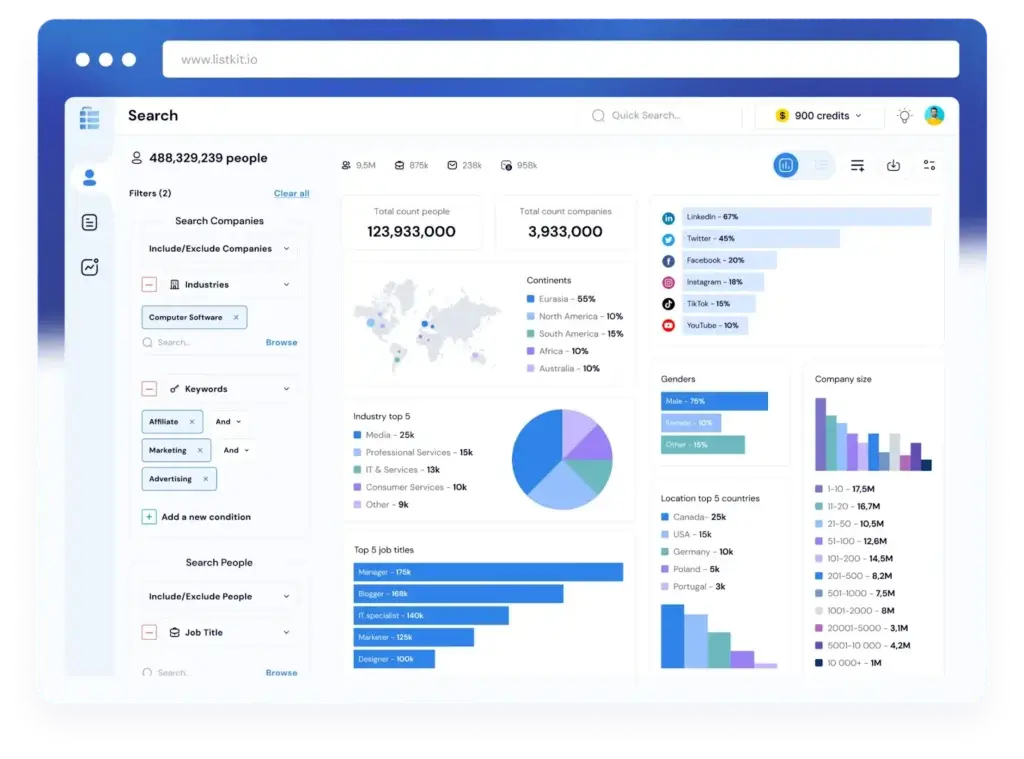
ListKit is built around one core idea: make outbound list building faster and cleaner. Instead of forcing you to manually search LinkedIn, scrape websites, export spreadsheets, and verify emails in separate tools, ListKit brings the main list-building steps into one workflow.
AI Company Search
ListKit’s AI Company Search is one of its most important features. Instead of starting only with filters, you can describe the type of companies you want to target in plain English.
For example, you could search for SaaS companies hiring sales leaders, ecommerce brands using Shopify, or funded fintech companies selling into banks. The idea is to help you turn your ideal customer profile into a usable prospect list faster.
- Describe your target accounts using natural language
- Build company lists around niche ICPs and industries
- Refine results by re-prompting the AI search
- Move from account research to contact discovery more quickly
This is especially useful if your targeting is more nuanced than simple job titles and industries. You can use the AI search as a starting point, then refine the output before exporting leads.
Triple-Verified B2B Leads
ListKit’s main selling point is its triple-verification process. The platform verifies contact data before export, with the goal of reducing bounce rates and removing the need for separate email verification tools.
For outbound teams, this matters because bad data can damage deliverability, waste credits, and reduce campaign performance. Even a strong cold email sequence will struggle if too many addresses are invalid or risky.
- Access verified B2B contacts for outbound campaigns
- Reduce the need for separate third-party verification tools
- Improve list quality before pushing leads into outreach software
- Lower bounce risk when compared with unverified exports
You should still monitor bounce rates and campaign health, but ListKit’s verification layer is a clear benefit for teams that build lead lists regularly.
Large B2B Contact Database
ListKit promotes a large B2B contact database with hundreds of millions of profiles. That gives you broad coverage across industries, company types, job titles, and locations.
The practical value is not just database size. The more important question is whether the platform can help you find the right contacts inside the right companies. ListKit performs best when you already understand your ICP and use the platform to build precise lists around that profile.
- Find contacts by company, role, industry, location, and other targeting criteria
- Build lists for cold email, cold calling, and account-based outreach
- Target specific decision-makers inside relevant companies
- Export leads into your sales workflow once verified
For small outbound teams and agencies, this can reduce a lot of manual prospecting work. Instead of building lists one record at a time, you can generate larger lists in a structured way.
Intent Data
ListKit includes intent data to help you identify prospects that may be more likely to engage. Intent data can be useful when you want to prioritize accounts that show signs of interest in a topic, category, or solution area.
This does not mean every intent lead is ready to buy. It means you may have better context for prioritizing outreach and tailoring your message.
- Find prospects connected to relevant buying signals
- Prioritize accounts that may be researching related topics
- Improve segmentation for outbound campaigns
- Support more relevant messaging for cold outreach
Intent data works best when it is combined with strong ICP targeting. If your targeting is too broad, intent signals alone will not fix the campaign.
Data Enrichment
ListKit can also enrich company and lead data. This helps you add more context to your records before they move into a CRM or outreach tool.
Enrichment is helpful when your team wants to segment lists by company attributes, personalize campaigns, or improve CRM data quality.
- Enrich contacts with business emails and other lead data
- Use company attributes to improve targeting
- Add context for personalization and segmentation
- Support cleaner data before export
From a CRM perspective, enrichment should not be treated as a one-time task. The best teams build a process for reviewing, updating, and syncing enriched data so their CRM does not become messy over time.
CRM and Outreach Integrations
ListKit supports integrations that help you move leads into your sales workflow. This is important because ListKit is not where most teams will manage the full sales cycle.
In many cases, ListKit is the data layer. Your CRM or sales engagement platform remains the system where reps manage sequences, deals, calls, tasks, and revenue reporting.
- Connect prospect data with CRM workflows
- Export lists for use in cold email platforms
- Use verified contacts in outreach campaigns
- Reduce manual CSV work when integrations fit your stack
Before adopting ListKit, check whether it integrates directly with your existing CRM and sending tools. A good data platform becomes much more useful when it fits cleanly into your sales process.
Key Benefits
Benefits of Using ListKit
ListKit’s strongest value is speed. It helps you move from “who should we target?” to “which verified leads can we contact?” with fewer manual steps.
Faster Lead List Building
ListKit can save time by combining AI search, contact discovery, enrichment, and verification. This is useful if your team regularly builds new outbound lists for different campaigns, offers, verticals, or clients.
Better Data Quality Before Outreach
The triple-verification workflow helps reduce the risk of sending to invalid or risky addresses. That is important for deliverability, domain reputation, and campaign efficiency.
Useful for Cold Email Agencies
Agencies that build lead lists for clients can benefit from ListKit’s unlimited-user approach and fast exports. The platform is especially relevant when list quality is a recurring deliverable.
Good Fit for ICP Testing
If you are testing multiple niches, verticals, or target personas, ListKit can help you build and compare lists quickly. That makes it useful for early-stage sales teams still refining their outbound strategy.
Lower Tool Complexity for List Building
ListKit can reduce your reliance on separate scraping, spreadsheet, enrichment, and verification tools. You may still need a CRM and outreach platform, but your data workflow can become simpler.
Pros and Cons
Advantages and Limitations of Using ListKit
Positive
✅ Strong AI list-building workflow
✅ Triple-verified lead data
✅ Useful intent data and enrichment
✅ Unlimited users on paid plans
Negative
❌ Not a full CRM or outreach suite
❌ Credit usage can affect total cost
❌ Data quality still needs monitoring
❌ Limited value for non-outbound teams
ListKit is a focused tool, and that is both its strength and its limitation. It can be very useful for prospect data, but it should not be evaluated like a complete CRM or full sales engagement platform.
✅ Pros
Strong AI list-building workflow
ListKit makes list building easier by letting you describe your target companies in plain English, refine the results, and turn those accounts into lead lists. This is faster than building lists manually across LinkedIn, Google, spreadsheets, and separate enrichment tools.
Triple-verified lead data
The platform’s triple-verification process is one of its clearest advantages. If your team depends on cold email, reducing invalid emails and risky contacts can help protect deliverability and campaign performance.
Useful intent data and enrichment
ListKit gives you more than basic names and emails. Intent signals and enrichment data can help you prioritize accounts, personalize messaging, and build stronger segmentation.
Unlimited users on paid plans
The unlimited-user model can be valuable for agencies and teams that want multiple people involved in list building without paying per seat in the same way they would with many sales tools.
❌ Cons
Not a full CRM or outreach suite
ListKit is primarily a prospecting and data platform. If you need built-in email sequences, a dialer, pipeline management, deal forecasting, or customer lifecycle workflows, you will still need other tools.
Credit usage can affect total cost
ListKit uses a credit-based model. Your real cost depends on how many leads you export, what data points you enrich, and whether you need phone numbers or higher-volume prospecting.
Data quality still needs monitoring
No B2B database is perfect. Even with verification, you should monitor bounce rates, invalid contacts, outdated roles, regional coverage, and segment-level performance.
Limited value for non-outbound teams
If your company does not run cold email, cold calling, or outbound prospecting, ListKit may not be necessary. It is strongest when your growth strategy depends on building and contacting targeted B2B lists.
User Experience
User Interface and Experience
ListKit’s interface is designed around speed rather than broad CRM customization. The main workflow is straightforward: search for companies, identify contacts, verify data, enrich records, and export the leads.
This simplicity is useful. Sales teams do not always need another complex system. In many cases, they need a reliable way to build lists and move them into the tools they already use.
Simple Workflow for Prospecting
The platform is built for users who want to create targeted lists without becoming data operations experts. You can start with a company search, narrow your target audience, and then choose the contacts you want to export.
- Use AI search to define target accounts
- Apply filters to improve list relevance
- Verify and enrich contact data before export
- Move leads into your outbound workflow
For teams that have struggled with complicated B2B data tools, ListKit’s simplicity can be an advantage.
Best Workflow for Outbound Teams
A typical ListKit workflow looks like this:
- Define your ICP based on company type, industry, size, region, and pain point
- Use AI Company Search to generate a relevant account list
- Find decision-makers inside those companies
- Verify and enrich data before outreach
- Export contacts into your CRM or cold email platform
This flow is ideal for cold email agencies, founder-led sales, B2B startups, and SDR teams that need repeatable list-building processes.
Reporting and Campaign Visibility
ListKit is not primarily a campaign analytics platform. You can use it to build and enrich lists, but campaign reporting will usually happen in your sending tool, CRM, or sales engagement platform.
This is important when comparing ListKit with Apollo or Outreach. Apollo includes more built-in engagement features, while ListKit is more focused on building and exporting verified lists.
Setup and Onboarding
ListKit is relatively easy to understand, but your results will depend heavily on how clearly you define your target audience. The platform can help you build lists quickly, but it cannot replace a weak ICP strategy.
Before using any credits at scale, define your targeting rules clearly:
- Which industries and company sizes fit your offer?
- Which job titles and seniority levels matter most?
- Which regions should you include or exclude?
- Which data fields are worth paying credits for?
- Which sending tool or CRM will receive the exported leads?
My recommendation is to test ListKit with one narrow ICP first. Once you validate list quality and campaign results, then expand into larger exports.
Business size fit
ListKit for Different Business Sizes
ListKit can work for different team sizes, but it is not equally useful for every business. The strongest fit is for teams where outbound prospecting is a meaningful part of revenue generation.
| Business Type | Fit for ListKit | Why |
| Freelancers | Moderate fit | Useful if you sell B2B services through cold outreach, but may be too advanced for basic networking |
| Small B2B teams | Good fit | Helps build targeted lists without hiring a dedicated sales operations person |
| Startups | Strong fit | Useful for testing ICPs, building outbound campaigns, and finding early pipeline |
| Agencies | Excellent fit | Strong use case for client list building, niche targeting, and repeatable outbound workflows |
| Mid-market sales teams | Good fit | Works well as a prospecting data layer alongside a CRM and sales engagement platform |
| Enterprise teams | Moderate fit | May be useful for specific outbound teams, but larger organizations may need deeper governance and data controls |
Who Gets the Most Value from ListKit?
You are more likely to get value from ListKit if:
- You run B2B outbound campaigns
- You need verified contacts for cold email or cold calling
- You build lists for multiple niches, clients, or campaigns
- You already use a separate CRM or outreach platform
- You want to reduce manual research and verification work
ListKit is less suitable if you only need simple contact management, inbound lead tracking, or customer lifecycle workflows. In those cases, a platform like HubSpot CRM, Pipedrive, or Zoho CRM will usually make more sense.
Integrations
How ListKit Connects With Other Tools
ListKit is most effective when it connects to the rest of your sales stack. You use ListKit to find and verify leads, then use your CRM or outreach platform to manage communication, follow-up, pipeline, and reporting.
CRM Integrations
ListKit promotes CRM integrations as part of its platform. This matters because most teams do not want prospect data trapped inside a separate database. They want clean contact data moving into the systems reps already use.
Before buying, confirm whether your specific CRM integration is native, supported through an export workflow, or handled through another connector. This matters for data hygiene and long-term adoption.
Cold Email and Sending Tools
ListKit is often used with cold email platforms. That makes sense because its core value is building verified lists that can be used in outbound campaigns.
If your team already uses a sending tool, check whether ListKit can push lists directly into that workflow. If not, you may need to rely on CSV exports and manual imports.
Sales Operations Workflow
The most important integration question is not simply “Does it connect?” It is “Which system owns the data?”
For a clean sales workflow, decide:
- Where contacts are created and updated
- Where outreach activity is tracked
- Where replies and meetings are managed
- Where qualified opportunities are created
- Where opt-outs and suppression lists are stored
This is especially important for compliance and deliverability. If a prospect unsubscribes or asks not to be contacted, your team needs a clear process to prevent future outreach.
Email Deliverability Considerations
ListKit can help with verified data, but email deliverability still depends on your sending practices. Verified contacts reduce bounce risk, but they do not guarantee replies or inbox placement.
- Set up sending domains correctly before outreach
- Use clean, segmented lists rather than broad exports
- Personalize campaigns around the prospect’s context
- Monitor bounces, spam complaints, and reply quality
- Maintain suppression lists across all outreach tools
Think of ListKit as improving the input quality. Your sending strategy, offer, copy, targeting, and follow-up process still determine campaign outcomes.
Pricing and Plans
How much does ListKit cost?
ListKit uses a credit-based pricing model. This means the monthly plan price is only part of the cost. Your real spend depends on how many contacts you target, which data points you enrich, and how often you export leads.
As of the latest reviewed pricing, ListKit’s yearly plans include Pro, Scale, Ultimate, and Enterprise options. Pricing can change, so always confirm the latest plan details directly on ListKit’s pricing page before buying.
| Plan | Best For | Listed Yearly Price | Included Credits |
| Pro | Small teams testing outbound list building | $82/month, billed yearly | 24,000 credits |
| Scale | Growing outbound teams and agencies | $252/month, billed yearly | 120,000 credits |
| Ultimate | High-volume prospecting teams | $507/month, billed yearly | 600,000 credits |
| Enterprise | Larger teams with custom data needs | Custom pricing | Custom package |
How ListKit Credits Work
Credits are used for different data actions. Basic company or lead fields may be free, while more valuable data points, such as verified emails, personal emails, mobile phone numbers, and certain enrichment fields, can consume credits.
This model can be efficient if you know exactly which data you need. It can become expensive if you enrich too broadly or export large lists without strong targeting.
What to Check Before Choosing a Plan
Before you choose a ListKit plan, review your expected usage carefully:
- How many leads do you need each month?
- Do you need emails only, or emails and phone numbers?
- How much enrichment do you need per company?
- Will multiple team members or clients use the account?
- Which CRM or outreach tool will receive exported leads?
My recommendation is to start with a realistic monthly list-building estimate. If you only need a few small campaigns, the Pro plan may be enough. If you run high-volume campaigns or manage multiple clients, Scale or Ultimate may be more practical.
Comparison
ListKit vs Other B2B Lead Generation Tools
ListKit competes with B2B data platforms, sales intelligence tools, and outbound prospecting systems. The right choice depends on whether your priority is verified data, built-in outreach, enterprise intelligence, phone numbers, or CRM depth.
ListKit vs Apollo.io
Apollo.io is broader than ListKit because it combines prospecting data with email sequences, calling, workflow automation, and lightweight CRM features.
ListKit is more focused on AI list building and verified lead exports. If you already have a CRM and outreach platform, ListKit may be enough. If you want prospecting and engagement in one platform, Apollo may be the better fit.
ListKit vs ZoomInfo
ZoomInfo is typically stronger for enterprise sales intelligence, account data, intent signals, org charts, and large revenue teams with advanced data needs.
ListKit is usually more attractive for small teams, agencies, and startups that want faster list building without committing to a large enterprise data platform. ZoomInfo may offer more depth, but ListKit can be easier to adopt for outbound-focused teams.
ListKit vs Lusha
Lusha is a popular B2B contact data platform known for prospecting, direct dials, and contact enrichment. It can be useful for sales reps who need quick access to individual contact data.
ListKit is stronger when your workflow is list-based rather than one-contact-at-a-time. If you want to build larger campaign lists with AI search and verification, ListKit may feel more practical.
ListKit vs Cognism
Cognism is often a strong choice for teams that need compliant B2B data, phone-verified mobile numbers, and strong coverage in EMEA markets.
ListKit is better suited to teams that want an easier and more affordable way to build outbound lists. Cognism may be a stronger fit for larger sales teams that prioritize phone outreach, compliance review, and enterprise buying processes.
| Tool | Best For | Where ListKit Wins | Where ListKit May Fall Short |
| ListKit | AI list building, verified B2B leads, cold email prospecting | Fast list creation, triple-verified leads, simple workflow | No full CRM or built-in sales engagement suite |
| Apollo.io | Prospecting, sequences, calling, and lightweight CRM workflows | ListKit can be simpler for pure lead list building | Apollo offers more built-in outreach and CRM-style tools |
| ZoomInfo | Enterprise sales intelligence and account data | ListKit is more accessible for smaller outbound teams | ZoomInfo is deeper for enterprise data and sales intelligence |
| Lusha | Quick contact lookup and enrichment | ListKit is stronger for campaign list building | Lusha may be easier for individual rep prospecting |
| Cognism | Phone-verified data and EMEA-focused sales teams | ListKit may be easier and more cost-effective for cold email teams | Cognism may be stronger for direct dials and compliance-heavy teams |
When ListKit May Not Be the Best Choice
ListKit is useful, but it is not the right choice for every team. You should be careful if you expect it to replace tools it was not designed to replace.
ListKit may not be the best fit if:
- You need a complete CRM for managing deals and customers
- You want built-in email sequencing and campaign analytics
- Your main sales motion is inbound rather than outbound
- You need advanced enterprise governance and territory management
- You do not have a clear ICP or outbound strategy yet
In these cases, ListKit may still help with data, but you will need additional tools and a stronger sales process to get meaningful value.
Security and Compliance
Protection for Your Data
Security, privacy, and compliance are important when you use any B2B data provider. ListKit handles business contact data, enrichment data, CRM workflows, and prospect exports, so your team should review its privacy documentation before buying.
🔐 Privacy Documentation
ListKit publishes privacy documentation that describes how it collects, uses, discloses, and processes personal information. This is important because B2B data tools often operate across multiple privacy laws and regional requirements.
🌐 State Privacy Rights and Opt-Outs
ListKit’s privacy statement references state privacy laws such as CCPA, CPA, CTDPA, UCPA, and VCDPA. It also describes consumer rights related to access, deletion, correction, and opt-out requests.
📨 Responsible Outreach Matters
Even if a tool provides business contact data, your company is still responsible for using it properly. You should maintain suppression lists, respect opt-outs, follow regional email rules, and avoid sending irrelevant bulk campaigns.
🛡️ Compliance Review Before Rollout
Before rolling out ListKit at scale, ask your legal or compliance team to review:
- How ListKit sources and licenses data
- How opt-out and deletion requests are handled
- Which regions your team will target
- How exported data will be stored in your CRM
- How unsubscribe and suppression rules will be enforced
From a CRM expert perspective, the biggest risk is not only the vendor. It is how your team uses, stores, syncs, and reuses contact data across tools.
Conclusion
Final thoughts
⭐ Overall Rating: 8.1/10
ListKit is a strong option if your main goal is to build verified B2B lead lists faster. It is especially useful for cold email agencies, B2B startups, founder-led sales teams, and outbound teams that already have a CRM and sending tool in place.
🔍 What You’re Really Getting
Here’s a quick recap of what ListKit brings to your sales stack:
- AI Company Search for faster account list building
- Triple-verified B2B lead data for cleaner outreach
- Intent data to help prioritize warmer prospects
- Data enrichment for better segmentation and personalization
- Credit-based pricing for different prospecting volumes
- CRM and outreach workflow support through integrations and exports
ListKit’s biggest advantage is that it makes list building feel less fragmented. You do not need to jump between a scraper, spreadsheet, verifier, enrichment tool, and CRM just to prepare a campaign.
👥 Is It the Right Fit?
If your team depends on outbound prospecting, ListKit is worth considering. It can help you build more targeted lists, reduce manual research, and improve the quality of the data entering your outreach workflow.
However, you should not treat ListKit as a full CRM or a complete sales engagement suite. It is a lead data and list-building platform. For best results, pair it with a CRM, a cold email platform, and a clear outbound process.
Still comparing tools? You can also review our best CRM software guide or compare ListKit with tools like Apollo, ZoomInfo, and HubSpot depending on your sales motion.
🧠 Final Word from a CRM Expert
My view is clear: ListKit is best for teams that already understand outbound sales and need better prospect data. It will not create your sales strategy for you, but it can make your list-building workflow much faster and cleaner.
If you have a defined ICP, a good offer, a healthy sending setup, and a CRM process for managing replies, ListKit can be a valuable data layer. If you are still missing those fundamentals, fix the sales process first, then use ListKit to scale it.
Frequently Asked Questions
Have more questions?
What is ListKit?
ListKit is a B2B lead generation and sales intelligence platform. It helps sales teams, founders, and agencies build targeted prospect lists using AI Company Search, verified contact data, enrichment, intent data, and CRM-ready exports.
Is ListKit a CRM?
No. ListKit is not a full CRM. It is mainly a B2B prospecting and lead data platform. You can use it to find and verify leads, then send those leads into a CRM or outreach platform for follow-up, pipeline tracking, and reporting.
What is ListKit best used for?
ListKit is best used for outbound prospecting, cold email lead generation, B2B list building, contact verification, intent-based targeting, and lead enrichment. It is especially useful when you need clean prospect lists for campaigns.
How much does ListKit cost?
ListKit pricing is credit-based. As of the latest reviewed pricing, yearly plans start at $82 per month for Pro, $252 per month for Scale, and $507 per month for Ultimate. Enterprise pricing is custom. Always confirm current pricing directly with ListKit before buying.
Does ListKit offer a free trial?
ListKit promotes a free trial experience that allows users to test its triple-verified B2B data. Trial terms may change, so you should confirm the current offer, lead limits, and requirements on ListKit’s website.
What are ListKit credits?
ListKit credits are used for data actions such as accessing business emails, triple-verifying emails, enriching records, or retrieving phone numbers. Your total usage depends on how many leads you target and which data fields you need.
Is ListKit good for cold email?
Yes. ListKit is a strong fit for cold email teams because it focuses on verified B2B contact data and targeted list building. However, you still need proper domain setup, personalization, sending controls, and a dedicated outreach tool to run campaigns well.
How does ListKit compare with Apollo?
ListKit is more focused on AI list building and verified lead exports. Apollo is broader because it includes prospecting data, email sequences, calling, automation, and lightweight CRM features. Choose ListKit for cleaner list building, and Apollo if you want prospecting plus outreach in one platform.
Can ListKit replace ZoomInfo?
ListKit can replace ZoomInfo for some small teams, startups, and agencies that mainly need verified outbound lead lists. Larger enterprise teams may still prefer ZoomInfo for deeper account intelligence, governance, intent data, and enterprise sales operations workflows.
Is ListKit worth it?
ListKit is worth considering if you run outbound B2B campaigns and need faster access to verified prospect data. It is less worthwhile if you do not use cold outreach, already have a strong data provider, or need a full CRM instead of a lead generation tool.
“`