
Introduction
If you are looking for a CRM that combines sales, marketing, and basic customer service in one place, Agile CRM is worth considering, especially if you run a small business and want to avoid paying for several separate tools.
Agile CRM is built around one main promise: giving you contact management, pipeline tracking, email marketing, automation, appointment scheduling, and helpdesk tools in one affordable platform. That makes it appealing if your team needs practical CRM features without the cost or complexity of enterprise software.
However, Agile CRM also comes with clear trade-offs. The interface feels dated compared with newer CRM platforms, advanced reporting is limited, and some important features are only available on higher-tier plans.
In this Agile CRM review, you will see where the platform performs well, where it falls short, how much it costs, and whether it is still a smart CRM choice for your business in 2026.
Quick Overview
Agile CRM Review Summary
Agile CRM is best understood as a budget-friendly all-in-one CRM for small businesses. It is not the most modern or advanced CRM on the market, but it gives you a useful mix of sales, marketing, and service tools at a low starting price.
| Category | Agile CRM Review Summary |
| Best for | Small businesses, startups, agencies, consultants, and lean sales teams |
| Best use cases | Contact management, pipeline tracking, email campaigns, scheduling, and basic helpdesk |
| Main strengths | Free plan, all-in-one feature set, marketing automation, and built-in web engagement tools |
| Main limitations | Dated interface, limited advanced reporting, feature caps, and less polished user experience |
| Starting price | Free plan available, paid plans start at $8.99/user/month |
| Best alternatives | Pipedrive for sales pipelines, HubSpot for marketing, monday CRM for visual workflows, and Zoho CRM for customization |
Expert take: Agile CRM makes the most sense if your priority is tool consolidation. If you want one affordable system for contacts, deals, email outreach, booking links, and support tickets, it can be a practical option. If you need advanced analytics, modern AI features, or enterprise-grade customization, you will likely outgrow it.
Top Benefits of Using Agile CRM
If you are running a lean team, Agile CRM can help you centralize important customer-facing work without creating a heavy software stack.
- Reduce software costs by combining CRM, email marketing, scheduling, and support tools
- Improve follow-up consistency with automation and task reminders
- Capture more leads with forms, landing pages, popups, and web engagement tools
- Keep customer context organized with timelines, tags, notes, and activity history
In simple terms, Agile CRM helps you spend less time switching between tools and more time managing customer relationships. That is its main appeal.
Software Specification
Agile CRM Key Features
Agile CRM markets itself as an all-in-one CRM platform for sales, marketing, and service teams. That positioning is important because the platform is not only about storing contacts. It is built to help you capture leads, nurture them, manage deals, and support customers from one workspace.
Here are the Agile CRM features that matter most when you are comparing it with other CRM software.
Contact Management
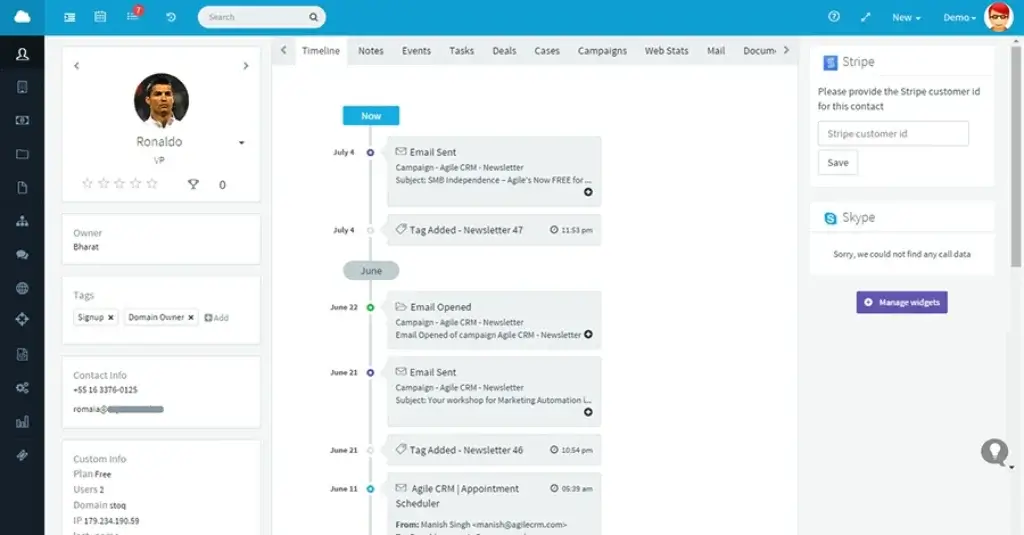
Agile CRM gives you a centralized contact database where you can track leads, customers, companies, activities, tags, notes, and communication history.
- Segment contacts by tags, behavior, source, or deal stage
- Add custom fields for sales and marketing context
- Track email activity, appointments, and engagement history
Why it matters: Good CRM performance starts with clean contact data. Agile CRM gives small teams enough structure to organize leads by intent, activity, and relationship stage without needing a complex CRM setup.
Email Marketing
Agile CRM includes built-in email marketing tools, so you can create campaigns, send personalized emails, and track engagement without connecting a separate email platform.
- Create email campaigns and templates
- Track opens, clicks, and replies
- Use email activity to inform follow-up timing
Why it matters: This is one of Agile CRM’s strongest value points. If you are a small business trying to combine CRM and basic email marketing, Agile CRM can reduce your software stack and lower your monthly costs.
Marketing Automation
Agile CRM includes automation tools for lead nurturing, behavior-based campaigns, lead scoring, and follow-up workflows. This helps you move beyond manual email outreach and create more consistent customer journeys.
- Build drip campaigns based on timing or behavior
- Trigger actions when contacts engage with emails or forms
- Combine email, web activity, and CRM actions in workflows
Why it matters: Automation is where Agile CRM becomes more than a contact database. You can create repeatable follow-up systems that help your team respond faster and reduce missed opportunities.
Appointment Scheduling
Agile CRM includes appointment scheduling, which is useful for sales reps, consultants, agencies, and service teams that need prospects to book meetings without back-and-forth emails.
- Share booking options with leads and customers
- Connect scheduling with CRM contact records
- Use appointments as part of your sales follow-up process
Why it matters: For small teams, booking automation can save hours each week. It also gives prospects a smoother path from interest to conversation.
Web Engagement Tools
Agile CRM includes website engagement features that help you capture leads directly from your site. These include web forms, landing pages, popups, and visitor tracking features depending on your plan.
- Capture leads through forms and landing pages
- Use web activity to understand buyer interest
- Connect website engagement with campaigns and contacts
Why it matters: Many CRMs require third-party tools for this. Agile CRM’s built-in web engagement features are useful if your website is a major source of leads.
Helpdesk and Customer Service
Agile CRM also includes basic service features, which can help small teams manage customer questions, support tickets, and service activity from the same platform used by sales and marketing.
- Manage customer service requests in one system
- Connect service activity to customer records
- Reduce the need for a separate helpdesk tool
Why it matters: This is useful when your team is small and roles overlap. A sales rep, account manager, or founder can see customer context without switching platforms.
Telephony and Calling Tools
Agile CRM offers calling-related features such as telephony integration, call logging, and call activity tracking on eligible plans. This helps sales teams connect calls with contact records and sales activity.
- Track calls inside customer records
- Use call history for sales follow-up context
- Connect calling activity with pipeline management
Why it matters: If your sales process still depends heavily on phone conversations, call tracking inside the CRM helps protect valuable context and improves handoffs between team members.
Sales Pipeline Management
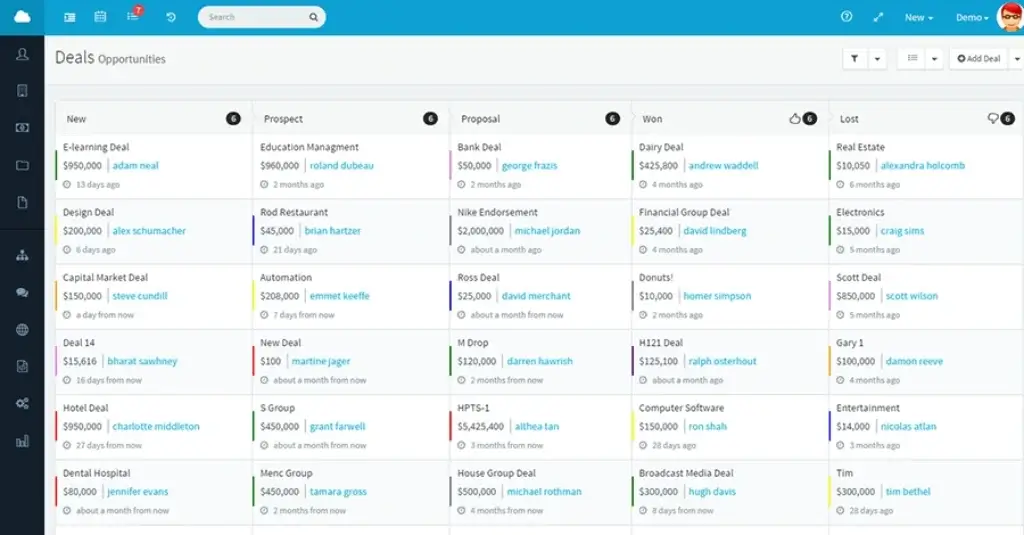
Agile CRM includes visual deal pipelines that help you track opportunities from new lead to closed sale. You can create deal stages, assign owners, add tasks, and move opportunities through the pipeline.
- Use visual deal stages to track sales progress
- Create custom deal milestones for your process
- Assign tasks and follow-ups to sales reps
Why it matters: For small sales teams, visibility is often more valuable than complexity. Agile CRM gives you a simple way to see what is open, what is moving, and where follow-up is needed.
Pros and Cons
Advantages and Limitations of Using Agile CRM
Positive
✅ Free plan for up to 10 users
✅ Strong all-in-one feature set
✅ Useful marketing automation
✅ Built-in scheduling and web tools
Negative
❌ Interface feels dated
❌ Reporting is limited on lower plans
❌ Support feedback is mixed
❌ Some key features are plan-gated
No CRM is perfect, and Agile CRM is no exception. Its biggest advantage is value, but its biggest weakness is polish.
✅ Pros
1. Free plan for small teams
Agile CRM offers a free plan for up to 10 users, which makes it a strong entry point for startups, freelancers, and small teams testing CRM software for the first time.
2. All-in-one platform
You get sales, marketing, and service features in one system. That can reduce software costs and make it easier for your team to work from a shared customer view.
3. Strong automation for the price
Agile CRM gives you useful automation features for lead nurturing, follow-ups, email campaigns, and task creation. This is valuable if you want to build repeatable sales and marketing processes.
4. Built-in scheduling and web engagement tools
Appointment scheduling, web forms, landing pages, and popups make Agile CRM more versatile than many basic CRMs at a similar price point.
❌ Cons
1. Interface feels outdated
Agile CRM is functional, but the interface does not feel as modern as platforms like monday CRM, HubSpot CRM, or Pipedrive.
2. Reporting is not its strongest area
Agile CRM includes reporting, but it is not the best choice if you need advanced dashboards, deep forecasting, or enterprise-grade analytics.
3. Support experience can vary
User feedback on support is mixed. Some customers appreciate the value, while others mention slow responses or difficulty getting issues resolved quickly.
4. Lower plans have important limits
The lower-tier plans are affordable, but you may need to upgrade as your contact volume, automation needs, integrations, and reporting requirements grow.
User Experience
User Interface and Experience
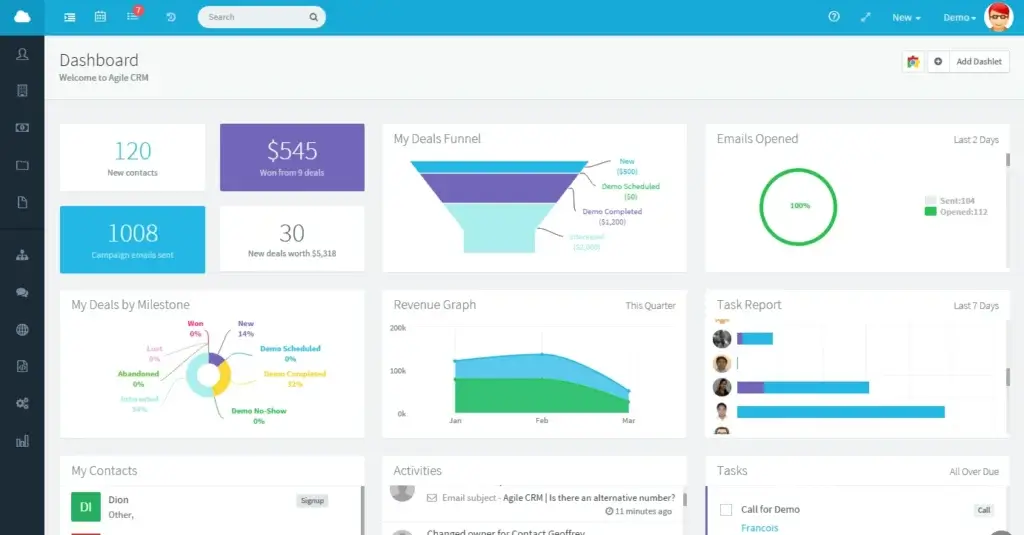
Agile CRM is not the most polished CRM from a design perspective. When you log in, you get a practical dashboard with modules for contacts, deals, campaigns, tasks, reports, and service activity.
The layout is relatively easy to understand, but it does not feel as modern as many newer CRM platforms. If you are coming from a tool like HubSpot, monday CRM, or Pipedrive, you may notice the difference quickly.
Interface Design: Functional but Dated
The interface is built more for utility than style. You can find the main tools without much difficulty, but some screens feel busy and older compared with current CRM design standards.
This does not make Agile CRM unusable. It simply means the platform is better for teams that care more about practical features and affordability than a polished visual experience.
Navigation and Usability
Navigation is generally straightforward. You can move between contacts, deals, campaigns, tasks, and service areas from the main navigation areas.
- Contacts and deals are easy to access
- Sales and marketing tools are grouped clearly
- Advanced campaign logic takes more time to learn
The biggest learning curve is not basic navigation. It is understanding how the sales, marketing, automation, and service tools connect together.
Mobile Access
Agile CRM offers mobile access for managing contacts, deals, tasks, and activities while you are away from your desk.
For everyday updates, the mobile experience is useful. For deeper work, such as building automation workflows or reviewing complex campaign settings, you will be better off using the desktop version.
Learning Curve
If you have used a CRM before, Agile CRM should feel manageable. The basic tools are easy enough to understand, especially contact records, deal stages, tasks, and appointments.
Newer CRM users may need more time with campaign workflows, automation rules, integrations, and segmentation. These features are powerful for the price, but they require setup discipline.
Customization Options
Agile CRM lets you customize fields, deal milestones, workflows, tags, and user access depending on your plan. This gives small teams enough flexibility to match the CRM to their sales process.
However, if your company needs complex permissions, advanced role structures, or highly customized reporting, a more scalable CRM may be a better fit.
User feedback
User feedback on Agile CRM is mixed but consistent. Many users like the value, feature depth, and all-in-one approach. At the same time, several reviews point to a dated interface, support concerns, and a learning curve around deeper features.
This matches the product experience well. Agile CRM gives you many tools for the price, but it does not always feel as refined as newer CRM platforms.
Expert note: When evaluating user reviews, focus less on the star rating alone and more on the pattern. Agile CRM is often praised for affordability and functionality, while criticism usually centers on UX, support, and polish.
Summary: How It Feels to Use Agile CRM
Agile CRM feels practical, affordable, and feature-rich, but not modern.
You will likely enjoy it if you want one system for daily sales and marketing tasks. You may find it limiting if design, collaboration, advanced reporting, or enterprise scalability are high priorities.
Pricing and Plans
Agile CRM Pricing and Plan Limits
Agile CRM is one of the more affordable CRM platforms, especially if you need sales and marketing tools together. The free plan supports up to 10 users, while paid plans start at $8.99/user/month when billed at the lowest available rate.
Pricing is only part of the story. The real difference between plans is the number of contacts, plugins, integrations, campaign workflows, automation rules, and API calls you can use.
| Plan | Starting Price | Best For | Key Limits and Notes |
| Free | $0 for up to 10 users | Startups and very small teams | 1,000 contacts and companies, 1 plugin, basic CRM features |
| Starter | $8.99/user/month | Small teams that need email and basic marketing | 10,000 contacts and companies, more email and service features |
| Regular | $29.99/user/month | Teams that need marketing automation | 50,000 contacts and companies, stronger automation and integrations |
| Enterprise | $47.99/user/month | Larger teams that need more control | Unlimited contacts, access controls, advanced limits, and more administrative flexibility |
📌 Key Pricing Notes
- The Free plan is useful, but it has contact and feature limits
- Starter is better if you need email campaigns and basic support tools
- Regular is the strongest value if automation is important to you
- Enterprise is best if you need access controls and higher usage limits
🔍 Which Agile CRM Plan Should You Choose?
- Choose Free if you are testing CRM software or managing a very small contact database.
- Choose Starter if you need affordable CRM features with email campaigns and more business tools.
- Choose Regular if you want Agile CRM’s strongest small-business value, especially around marketing automation and integrations.
- Choose Enterprise if your team needs more contacts, access controls, and higher system limits.
For teams that need stronger reporting or a more modern interface, compare Agile CRM with our monday CRM review, HubSpot CRM review, and Pipedrive review.
Connected Tools
Agile CRM Integrations
Agile CRM supports integrations with popular business tools, although the depth and number of integrations depend on your plan. This matters because small teams often need the CRM to connect with email, calendars, ecommerce, billing, communication, and marketing tools.
- Email and calendar: Gmail, Google Workspace, Outlook, and calendar tools
- Marketing: Email marketing, web forms, and campaign tools
- Communication: Telephony and messaging integrations such as Twilio
- Business tools: Ecommerce, payment, and automation platforms through plugins or connectors
Expert note: Before choosing Agile CRM, list your must-have tools and check whether they are supported on the plan you are considering. A CRM can look affordable at first, but integration limits can affect its real value.
Business Size Fit
Agile CRM for Different Business Sizes
Agile CRM is strongest for smaller teams that want useful CRM functionality without a large budget. It can support growing teams, but it may not be ideal for larger organizations with complex reporting, permissions, and customization needs.
| Business Size | Fit for Agile CRM? | Why or Why Not |
| Freelancers | ✅ Excellent fit | The free plan can cover basic contact tracking, scheduling, email activity, and simple sales follow-up. |
| Small Teams | ✅ Excellent fit | Agile CRM gives small teams sales, marketing, and service tools at an accessible price. |
| Mid-Sized Businesses | ⚠️ Moderate fit | It can work if processes are straightforward, but reporting and customization limits may become more noticeable. |
| Enterprises | ❌ Not ideal | Large companies often need deeper analytics, stronger governance, advanced security, and more scalable customization. |
🧠 Our Recommendation
Agile CRM is a strong fit if you are running a small agency, SaaS startup, consulting business, local service company, or lean sales team.
It is less ideal if your sales operation is complex, your reporting needs are advanced, or your company requires enterprise-level compliance documentation.
Best Use Cases
Agile CRM is best for teams that want to centralize sales and marketing work without building a complicated tech stack.
- Startups that need an affordable CRM with room to grow
- Small businesses that want sales and marketing tools in one place
- Agencies that need contact tracking, campaigns, and scheduling
- Consultants who need lightweight CRM and appointment management
- SaaS teams that need lead nurturing and customer activity tracking
It is especially useful if you are replacing spreadsheets, basic email tools, or disconnected sales and marketing apps.
CRM Comparison
Agile CRM vs Alternatives
Agile CRM competes best when the buyer wants affordability and an all-in-one feature set. However, it is not always the best CRM depending on your priorities.
| CRM | Best For | Why Choose It Over Agile CRM? |
| Pipedrive | Sales pipeline management | Cleaner pipeline experience, stronger sales focus, and better usability for sales teams |
| HubSpot CRM | Inbound marketing and scalable CRM | More modern interface, stronger ecosystem, and deeper marketing capabilities |
| monday CRM | Visual workflows and team collaboration | More flexible interface, easier customization, and better collaborative workflow design |
| Zoho CRM | Customization and broader business apps | Deeper configuration options and a wider ecosystem of connected business tools |
Agile CRM vs Pipedrive
Agile CRM is better if you want sales, marketing, and service tools bundled together. Pipedrive is better if your main focus is pipeline management, sales activity tracking, and a cleaner sales-focused user experience.
Agile CRM vs HubSpot
Agile CRM is more affordable for small teams that need bundled features. HubSpot is stronger if you want a more modern CRM ecosystem with advanced marketing, content, service, and automation capabilities.
Agile CRM vs monday CRM
Agile CRM gives you more built-in marketing and service tools at a low price. monday CRM is stronger if you value visual workflows, flexible boards, collaboration, and a more modern interface.
Agile CRM vs Zoho CRM
Agile CRM is simpler for small teams that want an all-in-one starter platform. Zoho CRM is better if you need deeper customization, broader app coverage, and more advanced CRM configuration.
Security and Compliance
Agile CRM Security and Data Protection
When you store customer data in a CRM, security should be part of your buying decision. Agile CRM provides core security and hosting protections suitable for many small businesses, but it is important to verify specific compliance requirements directly with the vendor.
Core Security Considerations
- Cloud hosting: Agile CRM states that its paid plans include reliable cloud hosting infrastructure
- Customer data separation: The platform describes separated customer databases for account data
- Access controls: Higher-tier plans include stronger administrative and access-control options
- Uptime guarantee: Paid plans list a 99.5% uptime guarantee
Compliance Considerations
Agile CRM may support common data management needs for small businesses, but you should not assume it meets strict regulatory requirements without confirmation.
If your business handles sensitive healthcare, financial, legal, or regulated data, confirm requirements such as GDPR, HIPAA, SOC 2, SSO, MFA, audit logging, data residency, and vendor documentation before storing sensitive information in the platform.
Bottom Line on Security
Agile CRM is likely sufficient for many small-business CRM use cases. However, if compliance is a major requirement, you may need a more enterprise-focused CRM or a direct security review with Agile CRM before implementation.
Conclusion
Final Thoughts
Agile CRM is a strong option for small businesses that want an affordable, all-in-one CRM with sales, marketing, scheduling, and basic service features. Its main advantage is that it helps you do more from one platform without paying for several separate tools.
That said, it is not the best CRM for every team. The interface feels dated, reporting is not as strong as some competitors, and scaling teams may eventually need a more modern or more customizable platform.
When Agile CRM Makes the Most Sense
Choose Agile CRM if you:
- Need a free or low-cost CRM for a small team
- Want sales, marketing, and service tools in one platform
- Value automation but do not need enterprise complexity
- Prefer practical features over a modern interface
When You Should Consider Alternatives
Choose another CRM if you need advanced reporting, a polished user experience, deep customization, stronger enterprise controls, or a more active AI-focused roadmap.
Bottom line: Agile CRM is best for small teams that want affordable CRM functionality with built-in marketing and service tools. It is less ideal for larger businesses that need advanced analytics, modern UX, and enterprise-grade scalability.
Frequently Asked Questions
Have more questions?
What is Agile CRM?
Agile CRM is an all-in-one customer relationship management platform for small businesses. It combines contact management, sales pipelines, email marketing, marketing automation, appointment scheduling, and basic customer service tools.
Is Agile CRM good for small businesses?
Yes. Agile CRM is best suited for small businesses, startups, agencies, consultants, and lean teams that want affordable CRM, marketing, and service features in one platform.
Is Agile CRM really free?
Yes. Agile CRM offers a free plan for up to 10 users. The free plan includes useful CRM basics, but it has limits around contacts, features, plugins, automation, and usage.
How much does Agile CRM cost?
Agile CRM has a free plan, while paid plans start at $8.99/user/month. The paid tiers are Starter, Regular, and Enterprise, with higher plans adding more contacts, automation, integrations, and access controls.
What are the main limitations of Agile CRM?
The main limitations of Agile CRM are its dated interface, limited advanced reporting, mixed support feedback, and feature restrictions on lower-tier plans. It may not be ideal for larger teams with complex CRM needs.
Does Agile CRM include marketing automation?
Yes. Agile CRM includes marketing automation features such as email campaigns, drip workflows, behavior-based triggers, lead scoring, and web engagement tools depending on your plan.
Does Agile CRM have a mobile app?
Agile CRM offers mobile access for managing contacts, deals, tasks, and activities. It is useful for quick updates, but deeper work such as workflow building is better handled on desktop.
Is Agile CRM better than Pipedrive?
Agile CRM is better if you want sales, marketing, and service tools in one affordable platform. Pipedrive is better if you mainly need a cleaner, sales-focused pipeline CRM with stronger usability for sales teams.
Is Agile CRM better than HubSpot?
Agile CRM is usually more affordable for small teams that need bundled CRM features. HubSpot is better if you want a more modern interface, stronger marketing ecosystem, and better long-term scalability.
Who should not use Agile CRM?
Agile CRM may not be the best fit for enterprise teams, analytics-heavy sales organizations, regulated industries, or companies that need advanced customization, deep reporting, modern AI features, or strict compliance documentation.