
Introduction
Choosing the right CRM is not only about storing contacts. It is about building a system that helps your team capture leads, follow up faster, automate repetitive work, and understand every customer interaction in one place.
CRMOne is an AI-first CRM platform built for growing businesses, agencies, startups, and sales teams that want more than a basic pipeline tool. It combines CRM software, sales automation, marketing campaigns, AI tools, customer communication, support features, and website/funnel tools inside one platform.
That makes CRMOne very different from a traditional sales CRM like Pipedrive. Instead of focusing only on deal tracking, CRMOne tries to support the full customer journey, from lead capture and nurturing to sales conversations, support, reporting, and retention.
This CRMOne review will help you understand what the platform does well, where it may feel too broad, how its pricing works, and whether it is the right CRM for your business in 2026.
Quick summary: CRMOne is best for teams that want an all-in-one CRM with AI, automation, marketing, and sales tools. It is less ideal if you only need a simple, low-cost pipeline CRM with lightweight contact management.
Key Features
CRMOne Software Specification
CRMOne is no longer just a lightweight CRM for basic sales tracking. Its current product positioning is much broader, combining pipeline management, AI automation, multichannel campaigns, communication tools, reporting, websites, forms, and customer support features.
That broader feature set gives CRMOne strong value if you want fewer disconnected tools. But it also means you should evaluate it differently from a simple CRM.
| Feature Type | CRMOne | Why It Matters |
| CRM and Deal Pipeline | Included | Helps teams manage leads, opportunities, and deal stages |
| AI Features | AI Bot, Voice AI, Copilot, sentiment analysis, personalized replies | Supports faster follow-up, lead handling, and daily productivity |
| Campaigns | Email, SMS, WhatsApp, and multichannel campaigns | Useful for teams that manage outreach from one place |
| Workflow Automation | Included, with AI workflow actions | Reduces manual follow-up and repetitive sales tasks |
| Web and Funnel Tools | Pages, forms, surveys, landing pages, and templates | Helps capture leads without relying on separate tools |
| Reporting | Dashboards, goals, forecasts, and custom dashboards on higher plan | Improves sales visibility and management reporting |
| Support Tools | Help desk, customer portal, chatbot, and knowledge base features | Supports post-sale service and customer communication |
Visual Sales Pipeline
CRMOne includes a core CRM and deal pipeline, which gives your team a central place to manage contacts, opportunities, and sales stages.
For sales teams, this matters because a CRM must help you understand where every opportunity stands. If reps are still tracking deals in spreadsheets, inboxes, or personal notes, CRMOne can help create a more consistent sales process.
- Deal tracking: Follow opportunities from lead to close.
- Pipeline visibility: See where deals stand across your team.
- Task coordination: Connect follow-ups to the right contact or opportunity.
Contact and Lead Management
CRMOne helps you organize contacts, leads, accounts, and communication history. This is one of the most important CRM foundations because poor contact data creates poor follow-up.
You can use CRMOne to keep sales notes, conversations, tasks, and engagement history connected to the customer record. That gives your team a clearer view of who the customer is and what needs to happen next.
Multichannel Communication
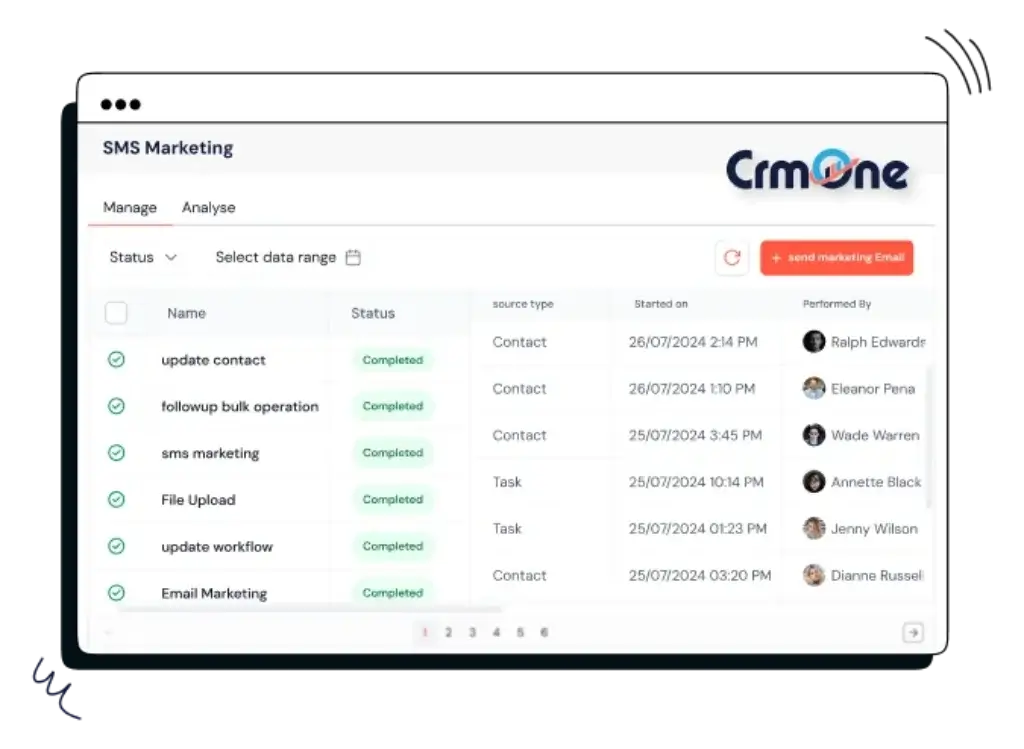
One of CRMOne’s stronger use cases is communication. The platform supports multichannel campaigns across email, SMS, and WhatsApp, which makes it useful for teams that do not want to manage outreach from multiple disconnected tools.
This is especially helpful for businesses where quick response time matters. Real estate, local services, agencies, coaching businesses, healthcare-adjacent services, and appointment-based teams can all benefit from having communication tied to the CRM record.
Reporting and Dashboards
CRMOne includes reporting and dashboards, with more advanced customization available on the higher-tier plan. This is an important update because the platform should not be described as having only basic reporting anymore.
That said, you should still evaluate reporting depth before committing. If your team needs complex revenue attribution, advanced BI-style dashboards, or highly customized analytics, compare CRMOne carefully with platforms like monday CRM, HubSpot, or Salesforce.
Task and Calendar Management
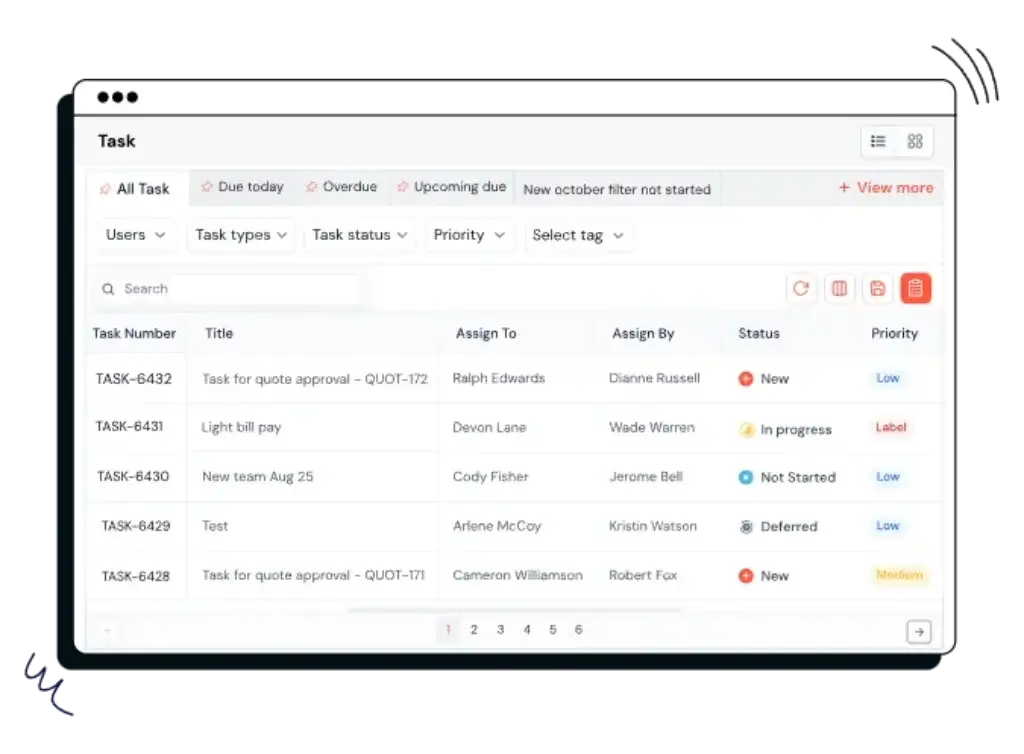
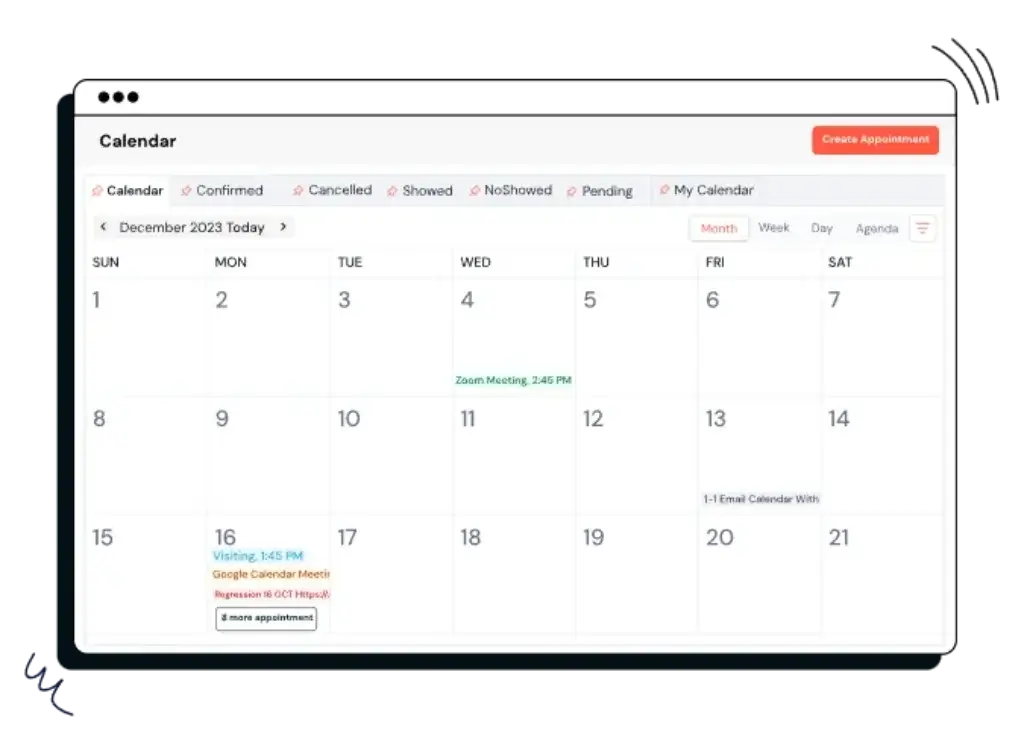
CRMOne also includes productivity tools such as task management and calendar scheduling. These features help your sales team move from “remembering what to do” to working from a structured follow-up system.
That may sound simple, but it is one of the biggest reasons CRM adoption succeeds or fails. If your reps can see their next tasks, appointments, and follow-ups clearly, they are more likely to use the system every day.
AI CRM Tools
CRMOne AI and Automation Features
CRMOne’s biggest update is its stronger move into AI-powered CRM. This is where the platform becomes more interesting for teams that want to reduce manual work, qualify leads faster, and support customers across more channels.
Instead of treating AI as a small add-on, CRMOne now includes several AI capabilities across sales, marketing, support, and productivity.
AI Lead Scoring
AI lead scoring helps your team prioritize the prospects most likely to convert. Instead of asking reps to judge every lead manually, CRMOne can help surface stronger opportunities based on engagement and customer signals.
This is useful when your team has more leads than time. It helps sales reps focus on the accounts that deserve faster follow-up.
AI Copilot
CRMOne’s AI Copilot is designed to support daily CRM work. For example, it can help with productivity, replies, summaries, and customer-facing tasks.
For busy sales teams, this can reduce the amount of time spent writing messages, reviewing customer records, and preparing follow-ups.
AI Chatbot
The platform includes AI chatbot capabilities, which can help businesses handle website inquiries, qualify visitors, and support customers without relying only on live staff.
This does not replace human sales or support teams. But it can help filter common questions, capture lead details, and route conversations to the right person.
Voice AI
CRMOne also lists Voice AI as part of its AI feature set. This can be useful for teams that manage high call volume, appointment booking, follow-up calls, or lead qualification workflows.
Voice AI is especially valuable when it connects back to the CRM. Otherwise, call insights can get trapped outside your main customer database.
Workflow AI and Personalized Replies
CRMOne supports workflow AI model actions and personalized replies. This matters because modern CRM automation is moving beyond “if this, then that” rules.
For your team, this means automation can become more useful in practical workflows, such as lead routing, follow-up messages, campaign responses, and task creation.
Key Benefits
Benefits of Using CRMOne
The main benefit of CRMOne is that it gives you a broad operating system for customer-facing work. You can use it for sales, marketing, support, automation, and AI-assisted communication without immediately stitching together several separate tools.
1. Reduce Tool Switching
CRMOne combines CRM, communication, campaigns, workflows, reporting, and website/funnel tools. If your team currently jumps between a CRM, email tool, SMS tool, chatbot, form builder, and spreadsheet, CRMOne can simplify your stack.
2. Improve Lead Follow-Up
Lead follow-up often breaks down when tasks, messages, and ownership are unclear. CRMOne helps connect leads, conversations, tasks, and automation inside the same platform.
3. Use AI Across Sales and Support
The platform’s AI tools can help with lead scoring, chatbot conversations, personalized replies, sentiment analysis, summaries, and voice workflows.
4. Support Agencies and Multi-Account Teams
CRMOne is especially relevant for agencies because its plans include sub-accounts, white label features, and SaaS mode on the Unlimited plan. That makes it more agency-friendly than many traditional CRMs.
5. Manage Campaigns From the CRM
CRMOne supports email, SMS, WhatsApp, and multichannel campaigns. This is useful if your sales and marketing activities need to work from the same customer data.
Pros and Cons
Advantages and Limitations of Using CRMOne
Positive
✅ Broad all-in-one CRM platform
✅ Strong AI feature set
✅ Multichannel campaigns included
✅ Agency-friendly features
Negative
❌ Pricing is no longer low per-user pricing
❌ May feel too broad for simple CRM needs
❌ Some advanced features require Unlimited
❌ Buyers should verify integrations before purchase
CRMOne has a clear strength: it gives you far more than a traditional CRM. But that strength is also the main tradeoff.
If you want one platform for CRM, AI, automation, campaigns, support, forms, and websites, CRMOne is worth evaluating. If you only want a simple sales pipeline, it may be more software than you need.
✅ Pros
- Broad all-in-one CRM platform – CRMOne combines sales, marketing, support, communication, and automation tools in one system.
- Strong AI feature set – AI lead scoring, AI Copilot, Voice AI, sentiment analysis, AI Bot, and personalized replies help teams work faster.
- Multichannel campaigns included – Email, SMS, WhatsApp, and campaign tools are useful for teams that rely on proactive outreach.
- Agency-friendly features – Sub-accounts, white label features, SaaS mode, and rebilling make CRMOne relevant for agencies and service providers.
❌ Cons
- Pricing is no longer low per-user pricing – CRMOne now starts at a flat monthly plan price, which may be expensive for very small teams.
- May feel too broad for simple CRM needs – If you only need contact management and a basic pipeline, CRMOne may feel heavier than necessary.
- Some advanced features require Unlimited – Unlimited sub-accounts, SaaS mode, rebilling, custom dashboards, custom objects, and advanced API access sit on the higher plan.
- Integration fit should be verified – CRMOne includes many native tools, but you should confirm how well it connects with your current email, accounting, analytics, and operations stack.
User Experience
User Interface and Experience
CRMOne’s user experience depends heavily on what you expect from the platform. If you want a basic CRM, it may feel like a lot. If you want an all-in-one workspace for sales, marketing, and automation, the broader structure makes more sense.
The interface is built around customer data, workflows, communication, and business operations. That gives your team many tools in one place, but it also means setup deserves attention.
Desktop Experience
On desktop, CRMOne is best suited for users who need to manage several parts of the customer journey. Sales managers can review pipelines, marketers can manage campaigns, and support teams can work from customer conversations.
The benefit is centralization. The tradeoff is that you should expect more configuration than you would with a very simple CRM.
- Manage contacts, deals, campaigns, and workflows from one system.
- Use dashboards to monitor team activity and business performance.
- Connect customer conversations to sales and support records.
Mobile and Field Use
CRMOne can also support teams that work outside the office. Field sales teams, agencies, and appointment-based businesses can use mobile access to stay connected to records, tasks, and customer conversations.
This is useful for teams where follow-up speed matters. A lead that waits too long often becomes a lost opportunity.
Learning Curve
CRMOne is not difficult in the same way enterprise CRMs can be difficult, but it is not just a lightweight contact manager either. Because the platform includes CRM, AI, campaigns, automations, forms, websites, and support features, onboarding should be planned.
Small teams can start with the core CRM and pipeline first. Then, once the workflow is clear, they can add AI, campaigns, automations, and reporting.
Customization
CRMOne gives you more customization than a basic CRM, especially if you move into higher-tier features such as custom dashboards, custom objects, and API access.
This makes it more flexible for agencies, multi-service businesses, and teams with more advanced workflows. For very small teams, however, the best approach is to avoid overbuilding the system too early.

Business Size Fit
CRMOne for Different Business Sizes
CRMOne is best for teams that want a broad system rather than a narrow sales CRM. It can work well for small and mid-sized businesses, but the pricing and feature depth make it especially relevant for teams that will use more than just the basic CRM module.
| Business Size | Fit | Notes |
| Freelancers | Limited | May be too broad and expensive if you only need basic contact tracking |
| Small Teams | Good Fit | Works well when the team needs CRM, outreach, automation, and AI in one platform |
| Mid-Sized Teams | Excellent Fit | Strong fit for growing teams that need campaigns, workflows, reporting, and customer communication |
| Agencies | Excellent Fit | Sub-accounts, white label features, SaaS mode, and rebilling make it agency-friendly |
| Large Enterprises | Mixed Fit | Useful for some teams, but enterprises should verify integrations, governance, procurement, and compliance needs |
Best Use Cases for CRMOne
Agencies and Service Providers
CRMOne is particularly relevant for agencies because of its sub-account structure, white label features, SaaS mode, and rebilling capabilities on the higher plan.
If you manage CRM, marketing, campaigns, or websites for clients, CRMOne may help you package services more efficiently.
Sales Teams That Need Automation
CRMOne works well for sales teams that want to automate follow-ups, prioritize leads, manage conversations, and keep tasks connected to customer records.
Appointment-Based Businesses
Businesses that rely on booked calls, consultations, property showings, demos, or service appointments can benefit from CRMOne’s scheduling, communication, and automation tools.
Marketing-Led SMBs
If your CRM needs to connect with campaigns, SMS, WhatsApp, email, landing pages, and forms, CRMOne gives you a broader system than a pipeline-only CRM.
Support and Customer Communication Teams
CRMOne includes support-related features such as help desk, chatbot, customer portal, knowledge base, and multi-channel support options. That makes it useful for teams that want sales and service data closer together.
Pricing and Plans
How much does CRMOne cost?
CRMOne’s pricing has changed significantly from the older low per-user pricing model. The current pricing structure is based on two main monthly plans: Essentials and Unlimited.
This makes CRMOne less attractive as a cheap CRM for solo users, but more interesting for teams that need unlimited contacts, multiple users, AI tools, sub-accounts, campaigns, and agency-focused features.
| Plan | Price | Best For | Key Features |
| Essentials | $99/month | Growing teams that need CRM, campaigns, AI, and automation | Core CRM, deal pipeline, 3 sub-accounts, white label, AI tools, multichannel campaigns, reports, dashboards |
| Unlimited | $299/month | Agencies, SaaS-style service providers, and larger teams | Everything in Essentials, unlimited sub-accounts, SaaS mode, rebilling, custom dashboards, custom objects, advanced API, priority support |
| Free Trial | 14 days | Teams evaluating the platform before committing | Trial available, credit card required for registration according to CRMOne’s pricing page |
Essentials Plan
The Essentials plan is the entry point for CRMOne’s current pricing model. It includes the core CRM and deal pipeline, unified inbox, AI chatbot, AI builders, multichannel campaigns, reporting, dashboards, and up to 3 sub-accounts.
This plan is best if you are a growing business that wants one platform for sales, marketing, and customer communication.
Unlimited Plan
The Unlimited plan is built for teams that need more scale, more customization, and agency-oriented capabilities. It includes unlimited sub-accounts, SaaS mode, rebilling for email, SMS, voice, and AI features, custom dashboards, custom objects, advanced API access, and priority support.
This plan is more relevant if you run an agency, offer client services, or want to create a more scalable operating model around CRMOne.
Is CRMOne affordable?
CRMOne is affordable if you use it as an all-in-one platform. It may replace several tools across CRM, marketing automation, SMS, WhatsApp, forms, landing pages, chatbot, and reporting.
However, if you only need a basic CRM for a few users, the starting price may feel high compared with simple per-user tools like Pipedrive, Zoho CRM, or basic HubSpot plans.
Security and Compliance
Protection for Your Data
Security is a major part of any CRM decision because your CRM holds customer names, emails, phone numbers, sales notes, support history, and sometimes sensitive business context.
CRMOne’s current privacy and security documentation is more detailed than the older review reflected. The company references GDPR-related documentation, Data Privacy Framework participation, SSL/TLS, encryption at rest, SSO, user roles, field-level permissions, and SOC 2-related reporting language.
Core Security Features
- SSL/TLS and HTTPS: CRMOne references HTTPS encryption for login interfaces and hosted customer sites.
- Encryption at rest: CRMOne states that stored data is encrypted at rest.
- Single sign-on: SSO is listed as a security-related feature.
- User roles: Permission levels help teams manage access by role.
- Field-level permissions: Admins can limit editing of certain properties.
- Web application firewall protection: CRMOne references WAF protection in its privacy/security documentation.
GDPR and Data Privacy
CRMOne publishes a GDPR-focused section in its privacy documentation. It also references the EU-U.S. Data Privacy Framework, UK Extension, Swiss-U.S. Data Privacy Framework, Standard Contractual Clauses, and UK Addendum for certain international transfers.
That is a meaningful improvement from saying that CRMOne does not publish GDPR-related information. Still, if you operate in the EU, UK, Switzerland, healthcare, finance, or another regulated environment, you should review CRMOne’s DPA and privacy documentation with your legal team before purchase.
SOC 2 and Compliance Notes
CRMOne’s privacy documentation references SOC 2 reporting language and says certain reports may be supplied on a confidential basis. This is stronger than a platform with no security documentation, but buyers should still verify the exact report, scope, date, and availability during procurement.
In short, CRMOne provides more public security detail than many small CRM vendors. For regulated teams, the right next step is a formal vendor security review.
CRM Comparisons
CRMOne vs Other CRM Software
CRMOne competes in a crowded CRM market, but it does not compete in the same way as every CRM. Its strongest comparison is not only against sales pipeline tools, but also against all-in-one CRM and marketing platforms.
CRMOne vs Pipedrive
Pipedrive is usually better if your main priority is simple, visual sales pipeline management. It is focused, mature, and easy for sales teams to adopt.
CRMOne is better if you want broader functionality, including AI, campaigns, SMS, WhatsApp, forms, pages, support features, and agency-focused capabilities.
CRMOne vs monday CRM
monday CRM is stronger for teams that want flexible workflows, custom boards, project-style sales operations, and a highly visual interface.
CRMOne is stronger if you want an all-in-one platform with built-in campaign tools, AI features, sub-accounts, white-label options, and SaaS mode for agencies.
CRMOne vs HubSpot
HubSpot is a more mature ecosystem with deep capabilities across marketing, sales, service, CMS, reporting, and integration. It is a strong fit for teams seeking a well-established platform and prepared to incur higher costs as they scale.
CRMOne may be more attractive for smaller agencies and growing teams that want many HubSpot-like categories of tools in a more bundled package.
CRMOne vs Zoho CRM
Zoho CRM is usually better for teams that want affordable CRM depth, customization, and access to the wider Zoho ecosystem.
CRMOne is better for teams that prioritize AI-assisted workflows, campaigns, white-label options, and agency-style account management.
Best Fit Warning
Who Should Avoid CRMOne?
CRMOne is not the right fit for every business. It is strongest when you will use several parts of the platform, not only the CRM database.
CRMOne may not be ideal if:
- You only need a simple contact database.
- You want the lowest possible per-user CRM price.
- Your team already has separate best-in-class tools for email, SMS, forms, chat, and automation.
- You need a very mature enterprise CRM with complex governance and procurement requirements.
- You require highly specific integrations that CRMOne does not support natively.
If that sounds like your situation, you may want to compare CRMOne against our best CRM software guide before making a decision.
Conclusion
Final Thoughts
CRMOne has evolved into a broader AI-first CRM platform. It is no longer best described as only a lightweight sales CRM or WhatsApp-focused CRM.
The platform is now better positioned as an all-in-one CRM for growing teams, agencies, and service businesses that want to manage sales, marketing, AI automation, customer conversations, support, and web-based lead capture in one place.
You should choose CRMOne if you want breadth, automation, AI features, and agency-friendly tools. You should look elsewhere if you want only a simple sales pipeline, the lowest per-user cost, or a highly specialized enterprise CRM.
Choose CRMOne if you want:
- CRM, campaigns, AI, and automation in one platform.
- Sub-accounts and white label features for agency work.
- AI tools such as lead scoring, chatbot, Copilot, Voice AI, and sentiment analysis.
- Multichannel communication across email, SMS, and WhatsApp.
Consider alternatives if you need:
- A very simple CRM for a small team.
- Deep enterprise governance and procurement workflows.
- A cheaper per-user CRM for basic contact and pipeline management.
- A CRM that already integrates with every tool in your current stack.
Overall, CRMOne is worth reviewing if your team wants to consolidate customer-facing work. Its biggest value comes when you use it as a broader growth platform, not only as a place to store contacts.
Frequently Asked Questions
Have more questions?
What is CRMOne?
CRMOne is an AI-first CRM platform that combines contact management, sales pipelines, automation, multichannel campaigns, AI tools, reporting, support features, and website or funnel tools in one system.
What is CRMOne used for?
It is used to manage leads, deals, customer conversations, marketing campaigns, automation workflows, appointments, support activity, and AI-assisted sales tasks from one platform.
Does CRMOne include AI features?
Yes. CRMOne lists AI features such as AI Bot, Voice AI, AI Copilot, personalized replies, workflow AI actions, sentiment analysis, and AI lead scoring. These tools are designed to help teams prioritize leads, automate responses, and reduce manual work.
How much does CRMOne cost?
CRMOne currently lists two main plans: Essentials at $99 per month and Unlimited at $299 per month. Annual billing may reduce the total cost, and CRMOne lists a 14-day trial with a credit card required for registration.
Does CRMOne offer a free plan?
CRMOne does not appear to offer a permanent free plan on its current pricing page. It does offer a 14-day trial, but the pricing page states that a credit card is required for registration.
Is CRMOne good for agencies?
Yes. It can be a strong fit for agencies because it includes sub-accounts, white-label features, and SaaS mode on the higher plan. These features are useful for agencies managing multiple client accounts.
Does CRMOne support WhatsApp marketing?
Yes. It supports multichannel campaigns that include WhatsApp, SMS, and email. This makes it useful for businesses that rely on direct customer communication and fast follow-up.
Is CRMOne better than Pipedrive?
CRMOne is better if you want an all-in-one CRM with AI, campaigns, automation, sub-accounts, and marketing tools. Pipedrive is usually better if you want a simpler and more focused sales pipeline CRM.
Is CRMOne secure?
CRMOne publishes security and privacy information that references SSL or TLS, encryption at rest, user roles, field-level permissions, SSO, Data Privacy Framework participation, and SOC 2-related reporting language. Regulated teams should still review the documentation before purchase.
Who should use CRMOne?
It is best for growing businesses, agencies, sales teams, service providers, and marketing-led SMBs that want CRM, AI, automation, communication, campaigns, reporting, and customer support tools in one platform.