Introduction
Choosing the right CRM is not only about storing contacts. You need a platform that helps your team follow up faster, manage sales conversations, track pipeline movement, and close more revenue without adding unnecessary admin work.
Close CRM is built for that exact use case. It is a sales-focused CRM designed for inside sales teams, outbound teams, startups, and growing SMBs that rely heavily on calls, emails, SMS, follow-ups, and pipeline visibility.
In this Close CRM review, you’ll get a clear look at its features, pricing, user experience, security, strengths, limitations, and best-fit use cases. You’ll also see how Close compares with alternatives like Pipedrive, HubSpot, Salesforce, and monday CRM.
Close is a strong choice if your team wants a CRM with built-in calling, SMS, email, workflows, Smart Views, sales reporting, and AI-powered sales assistance. It is less ideal if you need a free CRM, deep marketing automation, advanced enterprise customization, or industry-specific compliance, such as HIPAA.
Quick Summary
Close CRM is best understood as a sales engagement CRM. It combines CRM records, sales communication, lead follow-up, and pipeline management in one workspace, which makes it especially useful for teams that live in calls, emails, and sales tasks every day.
| Category | Close CRM Review Summary |
| Best For | Inside sales teams, outbound teams, SMBs, and high-volume sales workflows |
| Starting Price | $9/user/month billed annually for Solo |
| Free Plan | No free plan, but a free trial is available |
| Core Strength | Built-in calling, SMS, email, Smart Views, workflows, and pipeline tracking |
| Main Limitation | Advanced automation, dialers, and permissions require higher-tier plans |
| Best Alternative | Pipedrive for simple pipeline management, HubSpot for CRM plus marketing |
For sales teams that want fewer tabs, fewer disconnected tools, and a faster way to follow up with prospects, Close has a clear purpose. It is not trying to be a full business operating system. It is trying to help your team sell faster.
Key Features
Close CRM Software specification
Close’s feature set is centered on sales execution. Instead of forcing your reps to manage communication in one system and pipeline data in another, Close brings calling, SMS, email, tasks, workflows, and deal tracking into the same interface.
Built-in calling, SMS, and email
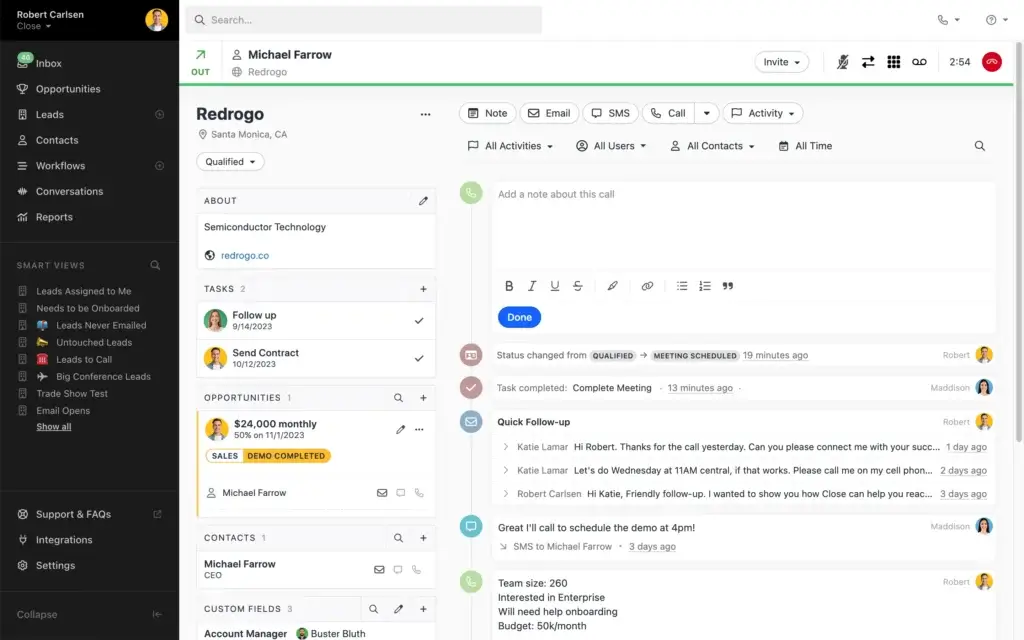
The strongest reason to consider Close CRM is its native communication stack. Your reps can call, email, text, schedule follow-ups, and log outcomes from the lead record, without jumping between a dialer, inbox, spreadsheet, and notes app.
This is especially useful for inside sales teams and outbound teams where speed matters. When a lead replies, books a meeting, misses a call, or needs a follow-up, your team can act from the same workspace.
- Built-in calling helps reps place and log calls directly from Close.
- Email sync keeps conversations connected to each lead timeline.
- SMS supports faster follow-up in supported regions.
- Call notes, recordings, and activity history improve context.
- Meeting scheduling and Notetaker features reduce manual admin work.
The practical value is simple: your team spends less time switching tools and more time moving conversations forward.
Pipeline and opportunity management
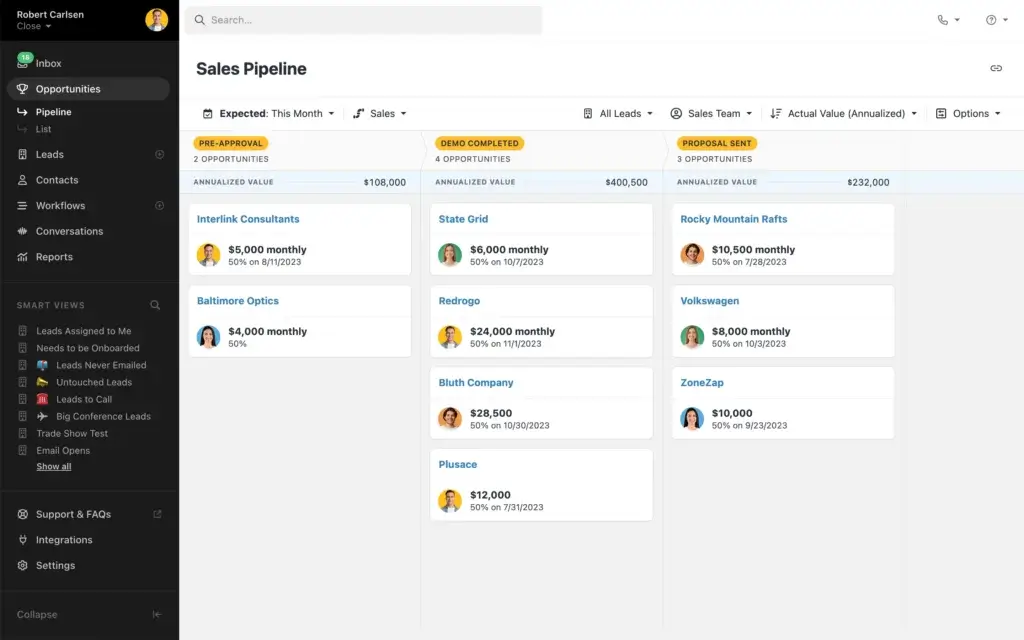
Close gives you a visual sales pipeline where your team can track opportunities by stage, value, probability, and expected close date. You can create multiple pipelines for different sales motions, such as new business, renewals, partnerships, or enterprise deals.
The pipeline view is easy to understand, which helps with adoption. Reps can see what needs attention, managers can monitor pipeline health, and leadership can understand where revenue may be stuck.
Compared with more complex CRM systems, Close feels lighter and faster. That can be a major advantage for small and mid-sized teams that want structure without spending months building a custom CRM environment.
Smart Views and lead prioritization
Smart Views are one of the most practical productivity features in Close. They let you create focused lead lists based on status, activity, ownership, communication history, custom fields, and follow-up needs.
For example, you can build views for leads that were never emailed, leads assigned to you, untouched leads, leads to call, or opportunities expected to close this month.
This makes Close useful not only as a CRM, but also as a daily sales workspace. Instead of asking reps to manually decide what to do next, Smart Views help surface the right leads at the right time.
Email sequences and workflow automation
Close includes email sequences and workflow automation for teams that want to standardize follow-up and reduce repetitive manual work. You can use sequences for cold outreach, post-demo follow-up, missed call recovery, reactivation campaigns, and nurture steps before a deal is ready to close.
The important detail is that workflow automation is strongest from the Growth plan upward. Solo and Essentials are better for core CRM use, communication, and pipeline management. If automation is a major reason you are considering Close, the Growth plan is likely the more realistic starting point.
This matters for budgeting. Close can be affordable for a solo user, but the real productivity gains for a sales team often come when you unlock workflows, Power Dialer, and AI features.
Power Dialer and Predictive Dialer
Close is a strong fit for high-volume outbound teams because it includes sales calling features that many CRMs only provide through third-party dialer integrations.
The Power Dialer helps reps work through call lists faster, while the Predictive Dialer supports larger teams that need higher call volume and more efficient connect rates. These features are most valuable when calling is a core part of your sales process.
If your sales team mostly relies on inbound leads, demos, and relationship-based selling, the dialer may be less essential. But if your team runs outbound prospecting, follow-up sprints, or SDR call blocks, Close’s built-in calling tools can reduce tool sprawl.
Chloe AI Sales Agent
One of the biggest updates to Close is Chloe, its AI sales agent. Chloe is designed to use CRM data to call leads, qualify prospects, book meetings, create follow-ups, summarize calls, and update CRM records automatically.
This makes Close more than a traditional sales CRM. It positions the platform as a CRM that can help act on pipeline data, not just store it.
That said, you should still evaluate AI sales agents carefully. Chloe can reduce repetitive sales work, but your team should review call quality, qualification rules, data accuracy, compliance expectations, and how AI conversations fit your brand voice.
For teams with high lead volume and limited SDR capacity, Chloe could become a meaningful advantage. For complex enterprise sales, human review and personalized selling will still matter.
AI Call Assistant and AI Email Assistant
Close also includes AI tools that help reduce admin work. The AI Call Assistant can transcribe calls, summarize conversations, identify action items, and make call details easier to review later.
The AI Email Assistant can help draft follow-up emails and reduce the time reps spend writing repetitive messages. These tools are most useful when reps handle many conversations per day and need a faster way to maintain quality follow-up.
AI should not replace sales judgment, but it can help your team keep better records and move faster after calls, demos, and discovery conversations.
Reporting and sales analytics
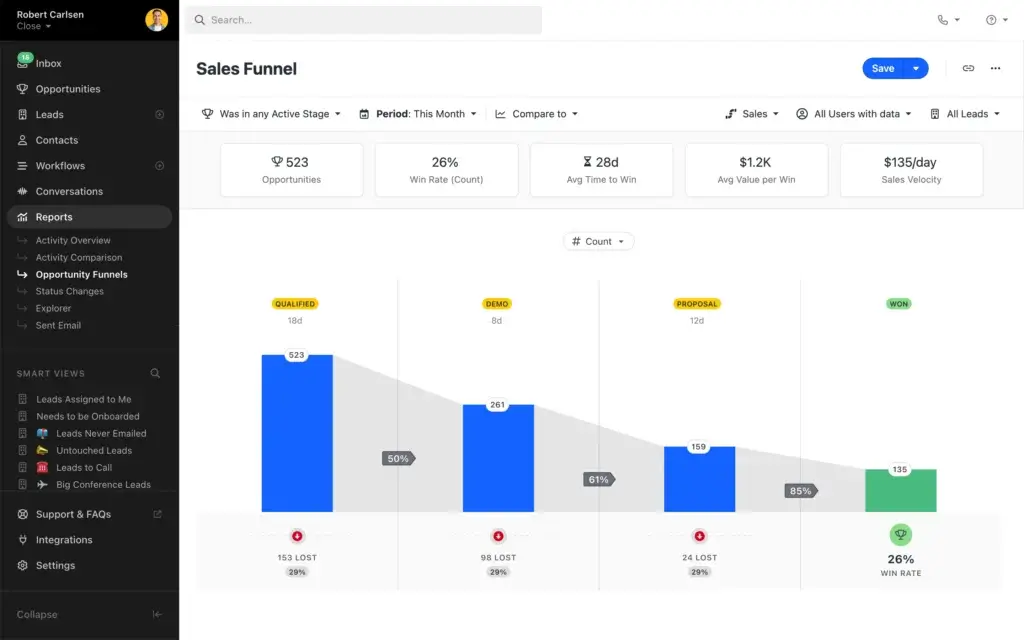
Close includes sales reporting for pipeline health, activity tracking, win rates, sales velocity, forecasting, and rep performance. Managers can use these reports to understand where opportunities drop off and which reps may need coaching.
The reporting experience is practical and sales-focused. It gives you the visibility most growing teams need, especially around activities and pipeline movement.
However, Close is not as flexible as enterprise BI or highly customizable CRM reporting tools. If you need advanced dashboards across marketing, finance, customer success, product usage, and revenue operations, you may eventually need deeper reporting tools or a more customizable CRM setup.
Integrations and API
Close works best when it sits at the center of your sales workflow. Its integrations help you connect your CRM with email, calendars, meetings, documents, marketing tools, support tools, and data enrichment platforms.
Common integration categories include:
- Email and calendar: Google Workspace, Microsoft 365, Outlook, Apple Calendar.
- Communication: Zoom, Slack, Google Meet, Microsoft Teams.
- Documents: DocuSign, PandaDoc, Google Drive, Dropbox.
- Marketing: HubSpot, Mailchimp, ActiveCampaign, Drip.
- Support: Intercom, Drift, Zendesk.
- Automation: Zapier and native API access.
This gives Close enough flexibility for most SMB sales stacks. Still, if your CRM needs extremely deep custom objects, complex approval flows, and enterprise-level process automation, Salesforce or HubSpot may offer more room to build.
Mobile access and ease of use
Close offers mobile apps for iOS and Android, allowing reps to access leads, make calls, send messages, update deal records, and review activity while away from their desk.
The interface is one of Close’s biggest strengths. The left navigation, lead records, activity timeline, Smart Views, and communication actions are all easy to understand. That matters because CRM adoption often fails when reps see the system as extra work.
Close feels built around the daily habits of salespeople. For teams that want reps to keep data updated without constant reminders, that usability is a real advantage.
Pros and Cons
Advantages and Limitations of Using Close CRM
Positive
✅ Built-in calling, SMS, and email
✅ Strong fit for outbound sales teams
✅ Easy-to-use lead and pipeline views
✅ Helpful Smart Views and automation
✅ AI tools for calls, follow-ups, and CRM updates
Negative
❌ No permanent free plan
❌ Advanced automation starts on higher plans
❌ Less suitable for marketing automation
❌ Reporting is not as flexible as enterprise CRMs
❌ SMS availability may not fit every region
Close has a clear advantage when your sales team wants communication, pipeline management, and sales activity tracking in one workspace. Its limitations become more visible when you need broad business operations, deep marketing automation, or enterprise-grade customization.
Advantages of Close CRM
- Built-in communication: Calling, SMS, email, notes, and activity history are connected to the CRM record.
- Strong outbound sales fit: Power Dialer, Predictive Dialer, sequences, and Smart Views support high-volume follow-up.
- Fast adoption: The interface is clean, practical, and easier to learn than many enterprise CRMs.
- AI sales assistance: Chloe, AI call summaries, and AI email tools can reduce repetitive sales work.
- Pipeline clarity: Managers can track deals, stages, expected value, and conversion points quickly.
- Useful integrations: Close connects with common sales, marketing, communication, and support tools.
Limitations of Close CRM
- No free plan: Close offers a free trial, but not a permanent free CRM plan.
- Automation is plan-dependent: Workflow automation is strongest on Growth and Scale.
- Marketing tools are limited: You may need separate software for advanced marketing automation.
- Enterprise customization is lighter: Salesforce offers more depth for complex workflows and data models.
- SMS limitations may apply: SMS support and costs should be checked based on your region and use case.
- Costs can rise: Add-ons, dialer needs, AI tools, and support packages can increase total cost.
User Experience
User Interface and Experience
User experience is one of Close’s strongest advantages. Many CRM platforms become difficult to maintain because reps see them as admin systems. Close feels more like a daily sales workspace, which helps improve adoption and data consistency.
Setup and onboarding
Close is relatively quick to set up compared with enterprise CRM platforms. You can import contacts, map fields, configure pipelines, create Smart Views, connect email accounts, and start logging sales activity without a long implementation cycle.
If you are migrating from another CRM, the most important step is data cleanup. Before importing records, remove duplicates, standardize company names, confirm ownership rules, and decide which custom fields are truly needed.
This prevents your new Close workspace from becoming messy on day one.
Daily sales workflow
The daily workflow in Close usually starts with Smart Views, open tasks, lead activity, or pipeline stages. Reps can quickly see who needs a call, who opened an email, who has not been contacted, and which opportunities are moving toward a decision.
The lead timeline is especially useful because it combines calls, emails, SMS, notes, tasks, and status changes in one view. This helps reps avoid awkward handoffs and gives managers better visibility into what actually happened with each prospect.
Mobile app experience
Close’s mobile apps allow reps to continue managing sales activity while away from their desk. They can place calls, review notes, update deal status, send follow-ups, and check activity without waiting until they are back at a laptop.
This is especially helpful for distributed teams, field sales reps, founders selling between meetings, and small teams that need flexibility.
Customer support experience
Close provides a knowledge base, onboarding resources, and support options depending on your plan. For most small teams, the available documentation and support will be enough to get started.
Larger sales teams should evaluate support expectations during the trial. If you need hands-on implementation, custom training, or dedicated success help, check which support level is included and which services may cost extra.
Business size fit
Close CRM for Different Business Sizes
Close CRM can support different team sizes, but the value changes based on how your sales team works. It is strongest when your team needs fast follow-up, outbound activity, and pipeline discipline.
Close CRM for solo users
The Solo plan can work well for consultants, founders, freelancers, and independent sales professionals who need a simple CRM with communication tools and lead tracking.
The main limitation is scale. Once you need team collaboration, workflows, more advanced reporting, or higher-volume sales execution, Solo may feel too limited.
Close CRM for small businesses
Small businesses can benefit from Close because it reduces the number of tools needed to manage sales conversations. You can track leads, call prospects, send emails, follow up by SMS, and manage opportunities from one place.
This is especially valuable when your team does not have a dedicated sales operations person. Close gives you structure without requiring a heavy CRM administrator.
Close CRM for growing sales teams
Growing teams will likely get the most value from the Growth plan because this is where automation, Power Dialer, and AI tools become more important.
At this stage, the CRM is not just a contact database. It becomes a system for repeatable sales motion, rep productivity, coaching, and forecasting.
Close CRM for larger sales organizations
Larger teams can use Close, especially if they are inside-sales focused. The Scale plan adds stronger controls, role-based permissions, and advanced sales productivity features.
However, if your organization needs complex custom objects, territory structures, multi-department workflows, deep CPQ, or advanced revenue operations infrastructure, Salesforce or HubSpot may be better suited.
Who should not use Close CRM?
Close is not the right CRM for every team. You may want to consider another option if your business needs:
- A permanent free CRM plan.
- Advanced marketing automation in the same platform.
- Highly complex enterprise customization.
- Deep customer support ticketing features.
- Industry-specific compliance requirements such as HIPAA.
- Advanced quote, contract, billing, or CPQ workflows.
Close is best when sales engagement is the priority. If your main need is broad customer lifecycle management, a wider CRM suite may be more appropriate.
Pricing and Plans
How much does Close CRM cost?
Close uses a tiered pricing model with monthly and annual billing. Annual pricing is cheaper, while monthly billing gives you more flexibility. The pricing below reflects the current public plan structure, but you should always check the official pricing page before purchasing because software pricing and AI availability can change.
| Plan | Solo | Essentials | Growth | Scale |
| Monthly Price | $19/user/month | $49/user/month | $109/user/month | $149/user/month |
| Annual Price | $9/user/month | $35/user/month | $99/user/month | $139/user/month |
| Best For | Solo users and founders | Small sales teams | Growing teams needing automation | Larger sales teams needing controls |
| Users | 1 user | Multiple users | Multiple users | Multiple users |
| Contacts and Leads | Limited to 10k leads | Unlimited contacts and leads | Unlimited contacts and leads | Unlimited contacts and leads |
| Calling, Email, and SMS | Included | Included | Included | Included |
| Multiple Pipelines | Included | Included | Included | Included |
| Workflows | Not included | Not included | Included | Included |
| Power Dialer | Not included | Not included | Included | Included |
| Predictive Dialer | Not included | Not included | Not included | Included |
| AI Features | Plan-dependent | Plan-dependent | AI tools included | Advanced AI and coaching tools |
| Best Value | Best for one-person sales use | Best for basic team CRM | Best for most sales teams | Best for scale and governance |
Solo plan
The Solo plan is designed for one user. It works best for a founder, consultant, or independent rep who wants a lightweight sales CRM without paying for a full team plan.
The key limitation is that Solo does not include workflows and is capped for larger-scale use. It is a good entry point, but not the plan most growing sales teams will stay on for long.
Essentials plan
Essentials is better for small teams that need unlimited contacts, multiple pipelines, calling, SMS, email, and lead management. It gives you the foundation of Close without the more advanced automation features.
This plan makes sense if your team is still early and mainly needs a shared sales workspace. If you already know you need automated workflows or dialer productivity, Growth will be more relevant.
Growth plan
Growth is likely the best-fit plan for many serious sales teams. It adds workflow automation, Power Dialer, AI Email Assistant, custom activities, and stronger productivity features.
If you are choosing Close because you want a faster sales motion, Growth is where the platform starts to feel meaningfully different from a basic CRM.
Scale plan
Scale is built for larger teams that need more control, stronger calling tools, and advanced governance. It is the better fit when you need role-based permissions, predictive dialing, call coaching, and more structure around team activity.
This plan is not necessary for every team. But if your sales organization has multiple reps, managers, territories, or performance coaching needs, Scale may justify the higher cost.
Add-ons and extra costs
Close offers add-ons that can increase the total cost of ownership. These may include premium phone numbers, additional organizations, AI usage, enhanced support, or advanced calling features, depending on your setup.
Before choosing a plan, calculate the real monthly cost based on users, phone lines, SMS volume, AI needs, and support expectations.
Security and Compliance
Protection for Your Data
Security is an important part of any CRM decision because your CRM stores customer conversations, contact records, deal information, call notes, and internal sales activity.
Close supports security and privacy through SOC 2 Type 2 compliance, GDPR support, encryption, access controls, and authentication features. These controls make it a credible option for most B2B sales teams.
SOC 2 Type 2 compliance
Close is SOC 2 Type 2 compliant, which is especially important for software buyers who need evidence that a vendor has security controls in place and has been independently assessed over time.
For SMBs selling into larger companies, this can also help with vendor security reviews because SOC 2 is often requested during procurement.
GDPR compliance
Close supports GDPR-related obligations for handling personal data. This is important if you work with prospects, customers, or partners in the European Union.
GDPR compliance is not only about choosing a compliant CRM. Your team still needs proper consent practices, retention policies, data processing agreements, and internal processes for handling personal data requests.
Access control and permissions
Close includes user permissions and administrative controls that help teams manage access to data. This becomes more important as your team grows and not every user should see every lead, account, or deal.
For larger teams, review role-based access before implementation. Clear permissions reduce risk and make the system easier to govern.
Data privacy considerations
Close is suitable for many B2B sales teams, but it may not fit every regulated use case. If you work in healthcare, financial services, government, or another heavily regulated industry, confirm your exact compliance requirements before storing sensitive data in the platform.
Setup
Setup, Migration, and Integrations
Adopting a CRM is not only about selecting software. The real success depends on setup quality, clean data, rep adoption, and clear sales processes. Close helps reduce friction, but your team still needs a thoughtful rollout.
Migration tools
Close supports CSV imports and field mapping, making it possible to move leads, contacts, companies, and sales data into the platform. If you are coming from another CRM, plan your migration carefully instead of importing every old record by default.
Focus on clean, active, and relevant data. Old duplicates, outdated contacts, and inconsistent fields will weaken reporting and make adoption harder.
Onboarding support
Close offers onboarding resources and support to help teams configure the platform. Smaller teams can usually start quickly, while larger teams should spend more time on pipeline stages, user permissions, workflows, reporting, and lead ownership rules.
The best onboarding approach is to start with the workflows your reps already follow. Then configure Close around those workflows instead of forcing a completely new process on day one.
Marketplace and integrations
Close integrates with common tools for email, calendars, meetings, documents, data enrichment, marketing automation, and support. It also offers API access and Zapier connectivity for more flexible automation.
This is enough for most SMB sales stacks. If your revenue operations team needs deep multi-system orchestration, test the API and integration limits before committing.
Best Practices for Implementing Close CRM
To get the most value from Close, treat implementation as a sales process improvement project, not only a software setup task.
- Clean your data before import: Remove duplicates, outdated records, invalid emails, and inconsistent company names.
- Map your sales process: Define pipeline stages, exit criteria, lead statuses, and required fields before setup.
- Create useful Smart Views: Build views for new leads, untouched leads, hot prospects, open tasks, and stuck deals.
- Start with core workflows: Roll out calling, email, SMS, tasks, and pipeline management before advanced automation.
- Train reps on daily habits: Show them how to work from Smart Views, log outcomes, and keep next steps updated.
- Review reporting weekly: Use pipeline and activity data to coach reps and improve your sales process.
The biggest mistake is overcomplicating the CRM too early. Start with the sales actions your team repeats every day, then add more automation once the basics are working.
Comparisons
Close CRM Alternatives and Competitors
Close is a strong CRM for sales engagement, but it is not the only option. The best alternative depends on what you need most: pipeline simplicity, marketing automation, enterprise customization, or flexible work management.
| CRM | Best For | Where It Beats Close | Where Close Is Stronger |
| Pipedrive | Simple visual pipeline management | Lower learning curve for deal tracking | Built-in calling, SMS, and sales engagement |
| HubSpot CRM | CRM plus marketing automation | Marketing, website, forms, and lifecycle tools | Focused inside sales workflow and calling tools |
| Salesforce | Enterprise CRM customization | Complex workflows, ecosystem, and reporting | Faster setup and easier daily rep experience |
| monday CRM | Flexible CRM and work management | Custom boards, operations, and workflow flexibility | Native sales communication and outbound workflows |
Close CRM vs Pipedrive
Pipedrive is excellent for teams that want a clean, visual pipeline and straightforward deal tracking. It is easy to adopt and often works well for small sales teams that do not need built-in calling or SMS at the same level.
Close is stronger if communication is central to your sales motion. If your reps spend most of their day calling, emailing, texting, and following up with leads, Close gives you more native sales engagement functionality.
You can also read our Pipedrive review for a deeper look at its pipeline-focused CRM approach.
Close CRM vs HubSpot
HubSpot is better if you need a broader CRM suite that includes marketing automation, website forms, landing pages, content tools, customer service, and sales features in one ecosystem.
Close is better if you want a more focused sales engagement CRM with built-in communication and faster outbound workflows. It is less broad than HubSpot, but often simpler for inside sales teams.
For a wider CRM comparison, you can also review our HubSpot review and best CRM software guide.
Close CRM vs Salesforce
Salesforce is more powerful for enterprise customization, complex reporting, multi-department workflows, integrations, and revenue operations at scale.
Close is easier to implement and more focused on sales activity. If your team wants speed, built-in calling, and fewer admin layers, Close may be the better everyday tool. If your company needs complex CRM architecture, Salesforce will likely be more suitable.
For more context, you can compare with our Salesforce review.
Close CRM vs monday CRM
monday CRM is a flexible option for teams that want CRM workflows connected with project management, operations, onboarding, and custom work processes.
Close is stronger for dedicated sales engagement. It is built around calls, emails, SMS, pipelines, follow-up, and sales activity, while monday CRM is more flexible across departments.
You can also read our monday CRM review if you want a more customizable CRM-work management hybrid.
Conclusion
Final thoughts
Close CRM is one of the strongest options for sales teams that want a CRM built around communication, speed, and follow-up execution. Its biggest advantage is that it brings calling, SMS, email, Smart Views, workflows, pipeline tracking, and AI-powered sales assistance into one sales-focused workspace.
That makes Close especially useful for inside sales teams, outbound teams, startups, and growing SMBs that want reps to spend less time updating systems and more time talking to prospects.
The platform is not perfect for every business. You may outgrow Close if you need deep marketing automation, complex enterprise customization, advanced cross-department workflows, or a permanent free CRM plan. Costs can also rise once you move into Growth, Scale, AI tools, or add-ons.
Still, if your priority is a fast, practical, communication-first CRM that your sales team can actually use every day, Close CRM deserves serious consideration. It is best for teams that want to reduce tool switching, improve follow-up discipline, and build a more consistent sales process.
Frequently Asked Questions
Have more questions?
What is Close CRM best used for?
Close CRM is best used for sales engagement, inside sales, outbound sales, and high-volume follow-up workflows. It helps your team manage calls, emails, SMS, tasks, pipelines, and lead activity from one system.
Is Close CRM good for outbound sales?
Yes. Close CRM is one of the stronger CRM options for outbound sales because it includes built-in calling, SMS, email sequences, Smart Views, Power Dialer, Predictive Dialer on higher plans, and AI-powered follow-up tools.
Does Close CRM include a dialer?
Yes. Close includes calling features, and higher-tier plans add stronger dialing capabilities such as Power Dialer and Predictive Dialer. This makes it useful for teams that rely on phone-based prospecting and follow-up.
Does Close CRM have SMS?
Yes. Close supports SMS as part of its built-in communication tools. However, availability, supported regions, and messaging costs should be checked before purchase if SMS is central to your workflow.
What is Chloe in Close CRM?
Chloe is Close CRM’s AI sales agent. It is designed to call leads, qualify prospects, book meetings, summarize interactions, create follow-ups, and update CRM records automatically.
Does Close CRM have a free plan?
No. Close CRM does not offer a permanent free plan. It offers a free trial, and paid plans start with the Solo plan for individual users.
Which Close CRM plan is best for small teams?
Essentials is a good starting point for small teams that need core CRM, calling, email, SMS, and pipeline management. Growth is better if your team needs workflows, Power Dialer, AI email tools, and more automation.
Is Close CRM better than Pipedrive?
Close is usually better if your team needs built-in calling, SMS, and outbound sales engagement. Pipedrive may be better if you mainly want a simple visual pipeline and do not need as much native communication functionality.
Is Close CRM better than HubSpot?
Close is better for focused sales engagement and outbound workflows. HubSpot is better if you need a broader CRM suite with marketing automation, website tools, forms, customer service, and lifecycle management.
Is Close CRM secure?
Close CRM includes important security and privacy controls such as SOC 2 Type 2 compliance, GDPR support, encryption, access controls, and secure authentication options. Teams in regulated industries should still confirm their specific compliance requirements.