
Introduction
Salesforce is one of the most powerful and widely recognized CRM platforms available. It helps sales, service, marketing, commerce, and operations teams manage customer relationships from one connected system.
But power alone does not make a CRM the right choice. You also need to know whether it fits your budget, team size, sales process, and internal technical resources.
In this Salesforce review, you will get a practical look at the platform’s features, pricing, pros, cons, AI capabilities, security, user experience, and best-fit use cases.
You will also see where the platform is strong, where it can feel complex, and when a simpler CRM may be a better option.
Quick Salesforce Review Summary
| Review Category | Salesforce CRM Analysis |
| Best For | Growing sales teams, mid-sized businesses, and enterprises that need deep customization |
| Starting Price | $25 per user/month for Starter Suite, billed annually |
| Free Option | Free Suite available for very small teams, plus trial options for paid editions |
| Main Strength | Advanced customization, automation, reporting, integrations, and AI-powered workflows |
| Main Drawback | Learning curve, setup complexity, and higher cost at scale |
| Best Alternative for Simplicity | Pipedrive or monday sales CRM |
| Best Alternative for Affordability | Zoho CRM or Freshsales |
| Overall Recommendation | Best for teams that want a scalable CRM they can customize deeply over time |
Bottom line: Salesforce is not the easiest CRM to master, but it is one of the strongest choices if you need a platform that can grow with your business and support advanced sales operations.
How We Reviewed Salesforce
To make this review useful for real buying decisions, we evaluated the CRM based on the areas that matter most when choosing business software.
- Core CRM features: lead management, contact management, pipelines, and opportunity tracking
- Ease of use: interface quality, onboarding, mobile access, and user adoption
- Automation: workflow builder, task automation, alerts, and sales process control
- AI capabilities: Agentforce, forecasting, lead scoring, and sales productivity tools
- Pricing: monthly cost, plan limitations, add-ons, and long-term value
- Integrations: AppExchange, APIs, Slack, Gmail, Outlook, and third-party apps
- Security: compliance, permissions, encryption, audit controls, and Trust Center transparency
- Business fit: suitability for small businesses, mid-market teams, and enterprise organizations
This approach helps you look beyond the brand name and decide whether the platform is actually right for your team.
Key Features
Salesforce CRM Capabilities
Salesforce offers a broad CRM toolkit for managing leads, contacts, accounts, opportunities, quotes, forecasts, customer service cases, campaigns, and business reporting.
The platform is strongest when you need more than basic contact management. It is built for companies that want to design a CRM around their sales process instead of forcing the sales process into a rigid tool.
Contact, Account, and Opportunity Management
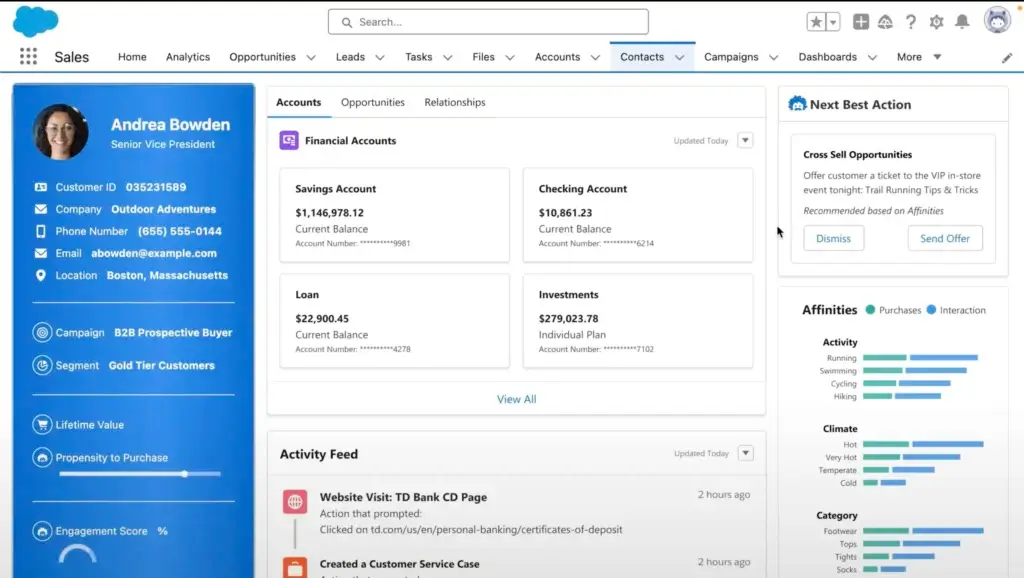
At its core, Salesforce gives your team a central place to manage customer relationships. You can track prospects, customers, deals, activities, notes, calls, emails, meetings, and account history from one record.
- Manage leads, contacts, accounts, and opportunities
- Track the full customer journey from first touch to closed deal
- Connect sales activity with service, marketing, and support data
- Create custom views for reps, managers, and leadership teams
Why it matters: Your team gets one reliable source of truth instead of scattered spreadsheets, inbox notes, and disconnected sales tools.
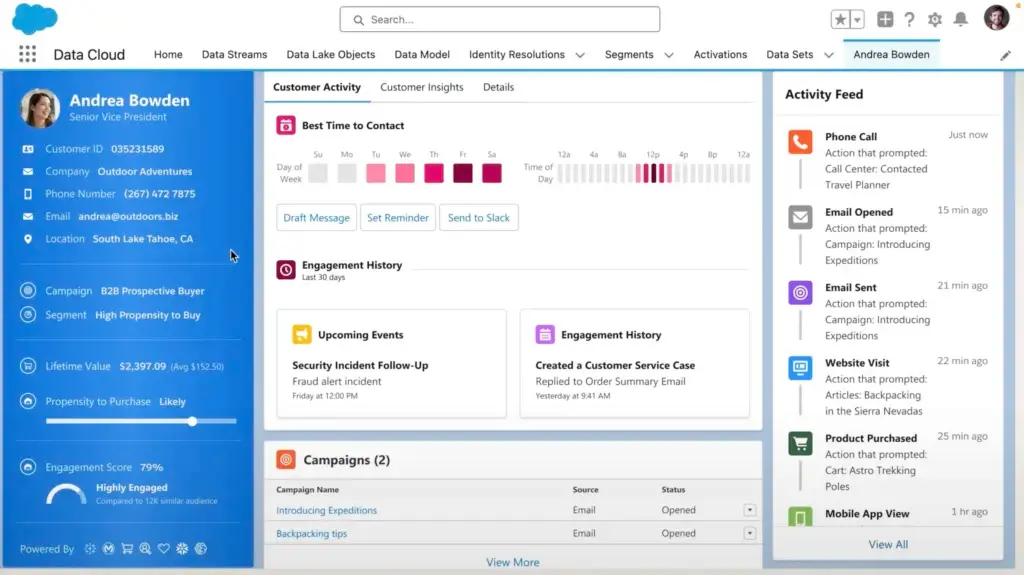
Advanced Reporting and Sales Analytics
Reporting is one of the platform’s biggest strengths. You can create dashboards for sales performance, pipeline health, rep activity, lead conversion, forecast accuracy, and revenue trends.
- Build dashboards for executives, managers, and sales reps
- Track KPIs like win rate, deal velocity, pipeline value, and close rate
- Segment reports by product, region, team, source, or sales stage
- Use real-time data to make faster business decisions
CRM expert note: The reporting tools are powerful, but they depend on clean data. If your team does not update records consistently, your dashboards will not tell the full story.
Workflow Automation and Process Control
Salesforce is built for teams that want to automate repeatable work. With Flow Builder and automation rules, you can reduce manual tasks and make sure every lead, deal, and customer request moves through the right process.
- Automate lead assignment and follow-up tasks
- Create alerts when a deal changes stage
- Trigger approval workflows for discounts or contracts
- Route records based on territory, product, industry, or rep availability
Why it matters: Automation helps reduce missed follow-ups, improves handoffs, and gives managers more control over sales execution.
AppExchange, APIs, and Business Integrations
The integration ecosystem is a major reason many companies choose Salesforce. You can connect it with tools for email, support, finance, eCommerce, marketing, analytics, document management, and communication.
- Connect with Gmail, Outlook, Slack, Zoom, Mailchimp, and many other tools
- Use AppExchange to extend functionality with apps and prebuilt components
- Use APIs to connect with internal systems and custom business applications
- Support more advanced integrations through MuleSoft and other data tools
Best fit: This is especially useful if your CRM needs to sit at the center of a larger software stack.
Cloud-Based Access and Mobile CRM
Because the platform is cloud-based, your team can access customer data from the office, at home, or on the road. This is useful for hybrid teams, field sales reps, remote managers, and distributed organizations.
- Access CRM data from desktop, tablet, or mobile
- Log calls, tasks, and notes after customer interactions
- Use dashboards and reports while away from your desk
- Keep teams aligned across locations and departments
Remote-friendly advantage: Sales reps can update records quickly after meetings, which improves data accuracy and forecasting.
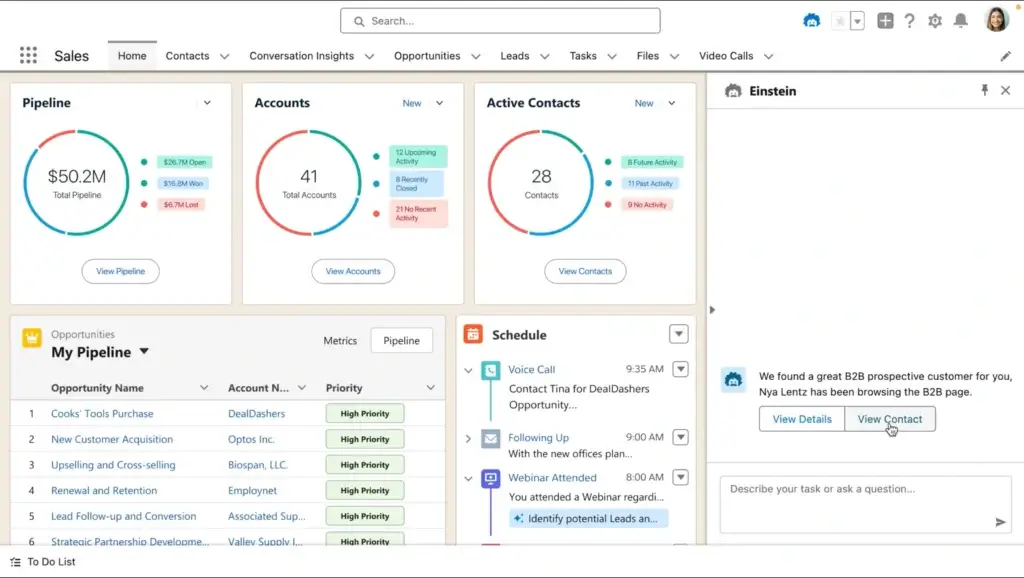
Agentforce and AI Capabilities
Salesforce has moved strongly toward agentic AI with Agentforce. Instead of only helping you analyze data, Agentforce is designed to help teams take action, automate work, answer questions, and support sales and service processes.
- Use AI agents to support lead qualification and customer interactions
- Get deal insights, account summaries, and suggested next steps
- Improve sales productivity with AI-assisted workflows
- Support employees with contextual answers based on CRM data
What this means for you: AI is no longer just a reporting layer. It is becoming part of how sales teams prioritize work, coach reps, respond faster, and reduce repetitive admin tasks.
Key Benefits
Benefits of Using Salesforce
The strongest benefit is not just that the platform has many features. The real value comes from how those features work together when your CRM strategy is properly designed.
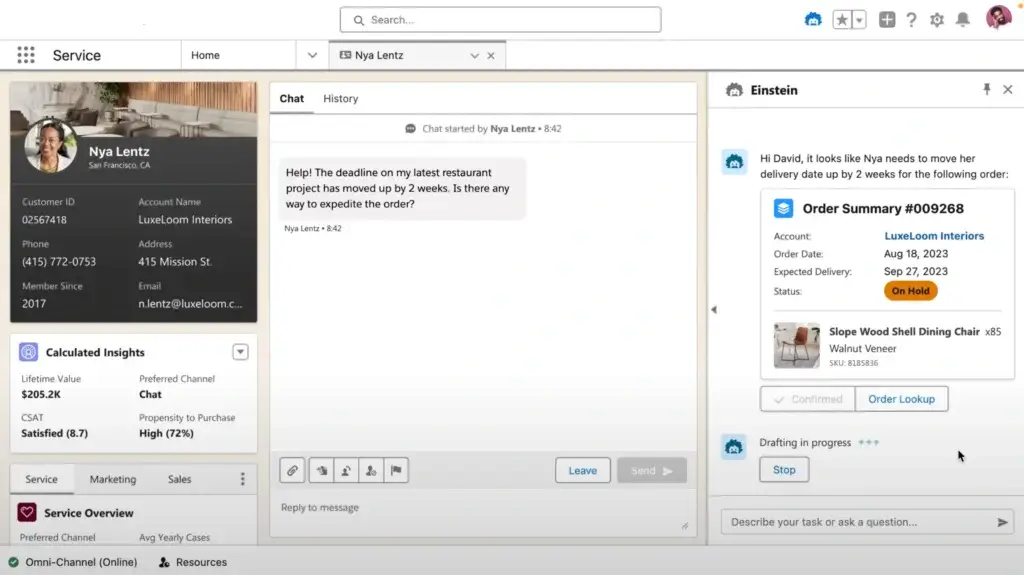
A Unified Customer View
You can centralize leads, accounts, opportunities, service cases, communication history, and customer preferences. This gives your team a clearer view of every relationship.
Why it matters: When sales, service, and marketing work from the same data, the customer experience becomes more consistent.
Better Sales Decisions
Real-time dashboards help managers understand what is happening across the pipeline. You can see which deals are moving, which reps need support, and which sources generate the best opportunities.
- Track deal value, close probability, and sales cycle length
- Monitor rep activity and pipeline health
- Compare performance by region, product, segment, or campaign
Less Manual Work
Automation helps your team spend less time on admin and more time selling. This is one of the biggest advantages for teams with repeatable sales steps.
- Automate follow-up tasks
- Route leads to the right owner
- Trigger approval processes
- Create reminders when deals go inactive
AI-Assisted Productivity
Agentforce and related AI capabilities can help teams summarize customer records, identify next steps, qualify opportunities, and improve responsiveness.
CRM expert insight: AI works best when your CRM data is clean, structured, and consistently updated. Without that foundation, even the best AI tools will struggle to deliver reliable recommendations.
Long-Term Scalability
The platform can support small sales teams, multi-department workflows, global enterprises, and industry-specific needs. This makes it a strong long-term choice if you expect your CRM requirements to grow.
Benefits and Limitations
Salesforce Pros and Cons
Salesforce can be a powerful growth system, but it is not the right CRM for every business. Before choosing it, you should understand both the upside and the tradeoffs.
Positive
✅ Deep customization options
✅ Strong automation and reporting
✅ Advanced AI and Agentforce capabilities
✅ Large integration ecosystem
Negative
❌ Steep learning curve
❌ Higher cost for advanced plans
❌ Setup may require expert help
❌ Too complex for very simple CRM needs
✅ Main Pros
- Highly customizable CRM environment
You can customize fields, layouts, workflows, reports, dashboards, automations, and user permissions to match your business process. - Powerful sales automation
The platform can automate routine work such as lead routing, follow-up tasks, approval flows, reminders, and internal notifications. - Strong reporting and forecasting
Sales managers get detailed visibility into pipeline performance, team activity, revenue trends, and forecast accuracy. - Built for growth
You can start with a simple setup and expand into AI, service, marketing, commerce, analytics, and custom applications over time.
❌ Main Cons
- It takes time to learn
New users may need training, especially if they are coming from simpler CRM tools. - Costs can rise quickly
Advanced plans, add-ons, implementation support, integrations, and admin work can increase the total cost. - Customization requires planning
The platform is flexible, but poor setup can lead to cluttered fields, confusing workflows, and weak adoption. - Not always ideal for basic use cases
If you only need simple contact storage and task reminders, a lighter CRM may be easier and more affordable.
User Experience
User Interface and Experience
When you choose a CRM, usability matters as much as features. If your team does not understand the system, adoption drops and your data becomes unreliable.
Salesforce has improved its user experience over the years, especially with Lightning Experience, but it is still a deep platform. You get flexibility, but you also need training and thoughtful setup.
Interface and Ease of Use
The Lightning interface is cleaner and more modern than the older Classic experience. You can customize pages, layouts, tabs, dashboards, and apps so different teams see what matters to them.
- Use tab-based navigation to move between records quickly
- Search across accounts, contacts, opportunities, and files
- Personalize dashboards for different roles
- Customize record pages without code
Expert tip: Keep the interface simple during the first rollout. Too many fields and custom views can overwhelm new users.
Mobile Experience
The mobile app is strong for sales teams that work outside the office. Reps can update records, log activities, review dashboards, and manage tasks while traveling or working in the field.
- View and edit customer records
- Log calls, notes, meetings, and follow-ups
- Receive push notifications for important updates
- Access dashboards and reports from mobile devices
Best use case: Field sales teams benefit most when mobile CRM usage is part of the daily sales process.
Support, Training, and Community
The learning resources are a major advantage. Trailhead provides free guided training, while the Trailblazer Community gives users access to peer advice, implementation ideas, and troubleshooting support.
- Trailhead: Free training modules, badges, and certifications
- Salesforce Help: Documentation and troubleshooting guides
- Trailblazer Community: Peer discussions and expert insights
- Partner ecosystem: Consultants and implementation partners for complex setups
Pro insight: If you plan to customize heavily, having a trained admin or implementation partner is often worth the investment.
Performance and Reliability
The platform is built on a mature cloud infrastructure and is designed for high-volume CRM environments. Large organizations can manage complex data, workflows, integrations, and user permissions at scale.
The Trust Center also gives customers visibility into system status, performance, security information, and compliance documentation.
What this means for you: You can monitor platform health and use trust documentation during vendor reviews, audits, and procurement processes.
Common User Challenges
The biggest challenge is not usually a lack of features. It is knowing how to configure the platform in a way that supports your team without making the CRM too complicated.
- New users may need structured onboarding
- Admins need to control field and workflow complexity
- Data quality requires consistent internal processes
- Customization can become expensive without clear planning
Best practice: Start with your core sales process first. Add advanced workflows, AI, and integrations after the team is comfortable with the basics.
Business Size Fit
Who Is Salesforce Best For?
Salesforce can support many types of businesses, but it is not equally practical for every team. The best fit depends on your sales complexity, budget, internal resources, and growth plans.
For Small Businesses: Powerful, But Not Always Necessary
Small businesses can use Starter Suite to manage contacts, leads, opportunities, emails, and basic sales activity. This can be a good option if you want a CRM that you can grow into over time.
- Best for small teams planning to scale
- Useful for lead tracking, pipelines, and basic reporting
- Good choice if you want sales, service, and marketing in one suite
- May feel too complex for teams that only need simple contact management
Recommendation: Choose it as a small business if you expect your CRM needs to grow. If you only need a lightweight sales pipeline, Pipedrive, Zoho CRM, or monday sales CRM may be easier.
For Mid-Sized Companies: Strong Fit for Growing Sales Teams
This is where the platform often makes the most sense. Mid-sized teams usually need automation, permissions, forecasting, reporting, integrations, and better handoffs between departments.
- Automate lead routing and follow-up workflows
- Create reports by sales rep, region, product, or pipeline stage
- Connect sales data with support, marketing, and finance tools
- Build repeatable processes without replacing the CRM later
Recommendation: Mid-sized B2B companies with structured sales teams are often the best match because they can benefit from the depth without needing a full enterprise setup on day one.
For Enterprises: Built for Complex CRM Operations
Enterprise teams benefit from the platform’s strongest capabilities, including advanced customization, AI, integrations, compliance controls, industry clouds, and large-scale workflow design.
- Support complex sales cycles and global teams
- Use advanced analytics, forecasting, and AI tools
- Create role-based permissions across departments
- Connect CRM workflows with service, marketing, commerce, and data systems
- Use industry-specific solutions for finance, healthcare, manufacturing, communications, and more
Recommendation: Large organizations with complex customer operations, multiple departments, and dedicated CRM admins will get the most value.
Industry-Specific Use Cases
The platform is also useful when your CRM needs are shaped by industry-specific workflows.
- Retail and eCommerce: Manage customer data, personalize engagement, and connect sales with commerce activity.
- Financial services: Support relationship management, account visibility, compliance processes, and client onboarding.
- Healthcare: Manage patient or member relationships when using the appropriate industry cloud and agreements.
- Technology: Track SaaS sales pipelines, renewals, expansions, customer success activity, and partner relationships.
- Manufacturing: Connect sales, channel partners, service activity, and account planning.
Pricing and Plans
How Much Does Salesforce Cost?
Salesforce Sales Cloud pricing is based on a per-user, per-month model. The cost depends on the edition you choose, the number of users, and whether you add extra products such as Agentforce, Revenue Cloud, Marketing Cloud, Data Cloud, or advanced support.
The prices below reflect current Sales Cloud pricing listed by Salesforce. Most paid editions are billed annually.
- Free Suite: $0 per user/month, designed for very small teams with limited needs
- Starter Suite: $25 per user/month, useful for simple sales, service, marketing, and commerce tools
- Pro Suite: $100 per user/month, better for growing teams that need more customization and automation
- Enterprise: $175 per user/month, designed for advanced pipeline management, automation, integrations, and reporting
- Unlimited: $350 per user/month, built for larger teams that need more support, flexibility, and advanced capabilities
- Agentforce 1 Sales: $550 per user/month, the most complete sales CRM package with built-in AI and unified data
Hidden Costs to Consider
The monthly license cost is only one part of the total investment. Before you commit, consider the extra costs that may affect your budget.
- Implementation: Larger setups may require consultants or certified admins
- Training: Teams may need onboarding to improve adoption
- Add-ons: AI, CPQ, data, marketing, and advanced support can increase costs
- Integrations: Connecting external systems may require technical work
- Administration: Complex environments often need ongoing admin support
CRM expert take: Salesforce can deliver strong ROI, but only when the implementation is planned properly. A poorly configured system can become expensive without improving sales execution.
Salesforce Pricing Comparison Table
| Plan | Price | Best For | Key Features | Main Limitation |
| Free Suite | $0/user/month | Very small teams testing basic CRM | Basic CRM access for limited users | Limited functionality and scalability |
| Starter Suite | $25/user/month | Small businesses starting with CRM | Lead, contact, account, opportunity, email, and basic reporting tools | Limited automation and customization depth |
| Pro Suite | $100/user/month | Growing teams that need stronger CRM control | More customization, automation, forecasting, and sales productivity tools | May still be limited for complex enterprise workflows |
| Enterprise | $175/user/month | Mid-sized and larger teams with advanced processes | Advanced pipeline management, workflow automation, APIs, permissions, and reporting | Requires more admin planning and setup |
| Unlimited | $350/user/month | Large organizations needing full CRM flexibility | Advanced support, deeper customization, stronger automation, and enterprise controls | High cost for smaller teams |
| Agentforce 1 Sales | $550/user/month | Enterprise teams prioritizing AI-powered sales operations | Complete sales CRM with built-in AI, unified data, advanced insights, and Agentforce capabilities | Premium price and more complex implementation |
Which Plan Offers the Best Value?
For most small businesses, Starter Suite is the safest entry point. It gives you enough CRM functionality to organize leads and customer activity without paying for enterprise-level features too early.
For growing B2B sales teams, Enterprise is often the strongest value because it unlocks the automation, reporting, and integration depth that makes the platform worth the investment.
For large teams that want AI-native selling, Agentforce 1 Sales is the most advanced option, but it should be evaluated carefully against your expected ROI.
Comparison
Salesforce vs CRM Alternatives
Salesforce is one of the strongest CRMs for customization and scale, but it is not always the easiest or most affordable option. If your team values simplicity, faster setup, or lower cost, another CRM may fit better.
| CRM | Best For | Ease of Use | Customization | Best Reason to Choose It |
| Salesforce | Mid-sized teams and enterprises | Moderate | Very high | Best for advanced customization, automation, AI, and scale |
| HubSpot CRM | Marketing-led growth teams | High | Medium | Best for combining CRM, marketing, content, and sales tools |
| Pipedrive | Sales teams that want pipeline simplicity | Very high | Medium | Best for straightforward deal tracking and fast adoption |
| Zoho CRM | Budget-conscious teams | Medium | High | Best for affordable customization and Zoho ecosystem users |
| monday CRM | Visual workflow-driven teams | High | High | Best for flexible boards, collaboration, and visual sales processes |
| Freshsales | SMBs that want sales tools with built-in communication | High | Medium | Best for ease of use, calling, email, and sales engagement features |
Recommendation: Choose Salesforce if you need a CRM that can support complex growth. Choose a simpler alternative if speed, low cost, and ease of use matter more than deep customization.
Security and Compliance
Protection for Your Data
When you manage customer data, security cannot be treated as an afterthought. This CRM is built with enterprise-grade controls for access management, compliance, privacy, and audit readiness.
Security Features
Admins can control how users access data and what each role is allowed to view or edit. This is important for larger teams, regulated industries, and businesses with sensitive customer information.
- Role-based access controls
- Field-level and object-level permissions
- Multi-factor authentication support
- Encryption for data protection
- Login policies, session settings, and IP restrictions
- Audit logs for monitoring activity
Why it matters: You can give sales reps, managers, service teams, and executives different levels of access without exposing unnecessary data.
Compliance and Trust Center Transparency
The platform supports major compliance needs for businesses operating across regions and industries. The Trust Center provides public access to system status, security documentation, privacy details, and compliance resources.
- GDPR support for privacy and data rights
- CCPA-related privacy controls
- HIPAA support for eligible healthcare use cases with the right agreements
- Security certifications and audit documentation for vendor reviews
- Real-time trust and system status resources
Buyer note: If your procurement team requires security reviews, the Trust Center can help speed up evaluation with documentation and transparency.
Data Privacy and Admin Control
Your business remains responsible for how customer data is collected, managed, and governed. The CRM gives you tools to support data access, consent, retention, deletion, and privacy workflows.
Best practice: Set clear rules for data ownership, required fields, retention policies, and access permissions before your implementation goes live.
Conclusion
Final Thoughts
⭐ Overall Rating: 7.8/10
If you are serious about building a scalable sales operation, Salesforce deserves a place on your shortlist.
It is not the cheapest CRM, and it is not the simplest. But it is one of the most capable platforms for businesses that need customization, automation, integrations, reporting, AI, and long-term flexibility.
🔍 What You’re Really Getting
At its best, this CRM becomes more than a database. It becomes the operating system for your customer relationships.
- A unified view of leads, accounts, deals, and customers
- Automation that reduces manual work and improves consistency
- AI capabilities through Agentforce and related sales intelligence tools
- Advanced reporting for pipeline, forecasting, and performance management
- A scalable system that can support small teams, mid-market growth, and enterprise operations
If you take the time to configure it properly, Salesforce can become the command center for your revenue team.
👥 Is It the Right Fit?
Choose Salesforce if your team needs a CRM that can handle complexity. It is a strong fit if you have a defined sales process, multiple users, reporting needs, integrations, or plans to scale.
It may not be the right fit if you only need basic contact management, have a limited budget, or want a CRM your team can master in one afternoon.
Still comparing options? Review our full guide to the best CRM software to see how Salesforce compares with HubSpot, Pipedrive, Zoho CRM, monday sales CRM, and other leading platforms.
🧠 Final Word from a CRM Expert
The best CRM is not always the one with the longest feature list. It is the one your team will actually use, trust, and maintain over time.
Salesforce is a high-ceiling CRM. If you have the budget, admin support, and process discipline to use it properly, the payoff can be significant.
For growing sales teams and enterprise organizations, it remains one of the strongest CRM platforms available.
Frequently Asked Questions
Have more questions?
Is Salesforce worth it for small businesses?
Salesforce can be worth it for small businesses that plan to scale, need structured sales processes, or want sales, service, and marketing tools in one system. However, if you only need basic contact management, a simpler CRM may be more practical and affordable.
What is the difference between Sales Cloud and Salesforce CRM?
Salesforce CRM is the broader platform for managing customer relationships across sales, service, marketing, commerce, and more. Sales Cloud is the sales-focused product used for lead management, opportunity tracking, forecasting, sales automation, and pipeline management.
Does Salesforce have a free plan?
Yes. Salesforce offers a Free Suite for very small teams, plus trial options for paid editions. The free option is useful for testing basic CRM functionality, but most growing teams will need a paid plan to access stronger automation, reporting, customization, and integrations.
What is Agentforce in Salesforce?
Agentforce is Salesforce’s agentic AI layer. It helps teams build and use AI agents that can assist with tasks such as lead qualification, customer support, record summaries, workflow actions, and contextual recommendations across sales and service processes.
How much does Salesforce cost?
Salesforce Sales Cloud pricing starts with Free Suite at $0 and Starter Suite at $25 per user/month. Paid plans then scale to Pro Suite, Enterprise, Unlimited, and Agentforce 1 Sales. Prices are usually billed annually, and add-ons can increase the total cost.
Is Salesforce better than HubSpot?
Salesforce is usually better for advanced customization, enterprise sales processes, complex reporting, and large teams. HubSpot is often easier to use and better for companies that want CRM, marketing, and content tools in a simpler all-in-one system.
Is Salesforce hard to learn?
Salesforce has a learning curve because it is highly customizable and feature-rich. Basic users can learn daily tasks quickly, but admins, managers, and teams using automation or advanced reporting will need more structured training.
What are the main disadvantages of Salesforce?
The main disadvantages are cost, implementation complexity, admin requirements, and the learning curve. It can also feel too advanced for teams that only need a simple CRM for contacts, tasks, and basic pipeline tracking.
Does Salesforce include marketing automation?
Salesforce includes some marketing tools in certain suites, but advanced marketing automation usually requires additional Salesforce products such as Marketing Cloud or related add-ons. Sales teams should review exactly which marketing features are included in their selected plan.
Which Salesforce plan is best for sales teams?
Starter Suite is best for small teams, Pro Suite works for growing businesses, and Enterprise is often the best value for serious sales teams that need automation, reporting, integrations, and stronger customization. Agentforce 1 Sales is best for enterprise teams prioritizing AI-powered selling.