
Introduction
Choosing the right CRM becomes more complex when your business needs more than contact management and pipeline tracking. You may need sales automation, marketing journeys, service workflows, approval processes, customer data models, reporting, AI support, and integrations across multiple departments.
Creatio is built for that broader use case. It is not only a CRM. It is an AI-native CRM and no-code workflow platform designed to help businesses manage customer relationships, automate operational processes, and build custom applications without relying heavily on traditional development.
In this Creatio review, you’ll get a clear look at its CRM features, no-code tools, AI capabilities, pricing model, user experience, security, integrations, strengths, limitations, and best-fit business use cases. You’ll also see how Creatio compares with alternatives like Salesforce, HubSpot, Zoho CRM, and Pipedrive.
Creatio is a strong choice if you want a flexible CRM that can support sales, marketing, service, workflow automation, and custom business applications in one connected platform. It is less ideal if you need a simple, low-cost CRM for a small team that only wants basic pipeline management.
Quick Summary
Creatio is best understood as a CRM and business automation platform for companies that want deep customization without building everything from scratch. It combines sales CRM, marketing automation, customer service management, no-code app development, AI agents, workflow automation, dashboards, and marketplace extensions.
| Category | Creatio Review Summary |
| Best For | Mid-market and enterprise teams that need AI CRM, no-code customization, and workflow automation |
| Starting Price | Public pricing commonly starts around $40/user/month for Growth, with CRM products and add-ons affecting total cost |
| Free Plan | No permanent free plan, but a free trial is available |
| Core Strength | Highly flexible no-code CRM platform for sales, marketing, service, AI agents, and operational workflows |
| Main Limitation | More complex and expensive than lightweight CRMs for small teams |
| Best Alternative | Salesforce for deep enterprise CRM, HubSpot for marketing-led growth, Zoho CRM for affordability |
For businesses that need a CRM to fit their processes rather than forcing processes into a rigid CRM, Creatio is one of the more interesting platforms to evaluate. Its main advantage is flexibility. Its main challenge is that flexibility requires planning, ownership, and a realistic implementation approach.
Key Features
Creatio Software Specification
Creatio’s feature set is centered on three major ideas: CRM, no-code workflow automation, and AI-assisted execution. This makes it different from simpler CRM tools that focus mainly on contacts, deals, and email tracking.
No-code CRM customization
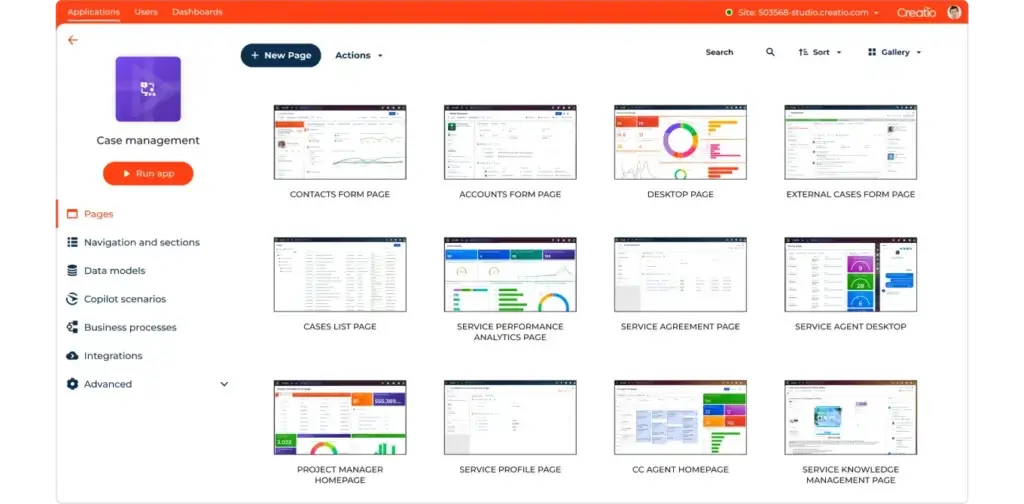
Creatio’s biggest strength is its no-code architecture. You can customize pages, fields, layouts, workflows, dashboards, business rules, and data models with visual tools instead of building everything through custom code.
This matters when your CRM needs to match your actual business processes. Many companies outgrow basic CRM systems because their sales, marketing, and service workflows become too specific. Creatio gives you more control over how the system works, without requiring every change to become an IT development ticket.
- Customize CRM objects, fields, layouts, and pages.
- Build workflows with visual process tools.
- Create custom applications on the same platform.
- Connect sales, marketing, service, and operations data.
- Use governance tools to manage no-code development safely.
The practical value is clear: Creatio can become a tailored CRM environment for your business instead of a generic database with a pipeline view.
Sales CRM and pipeline management
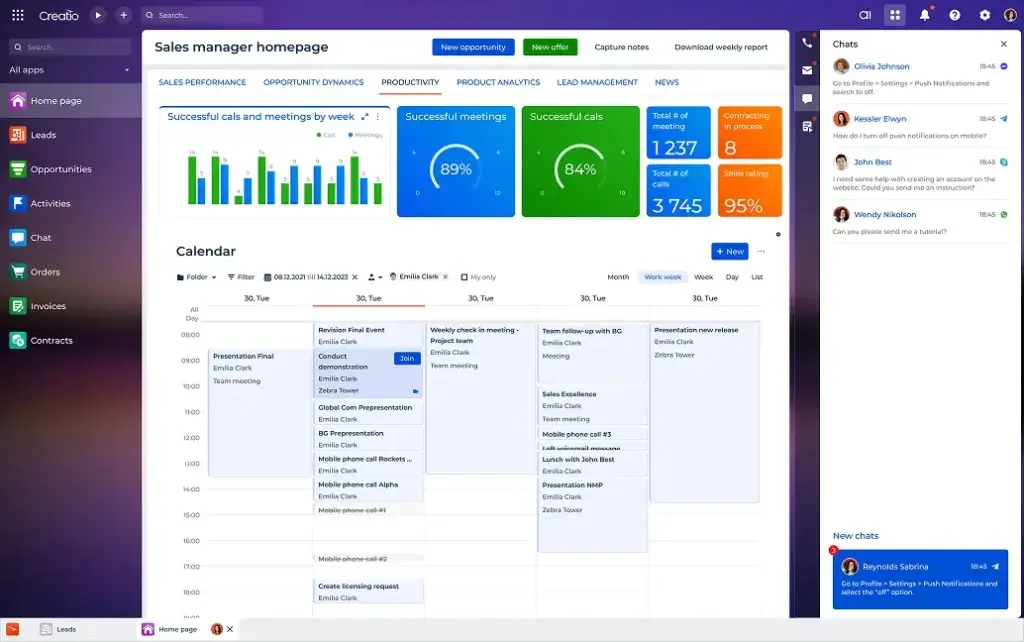
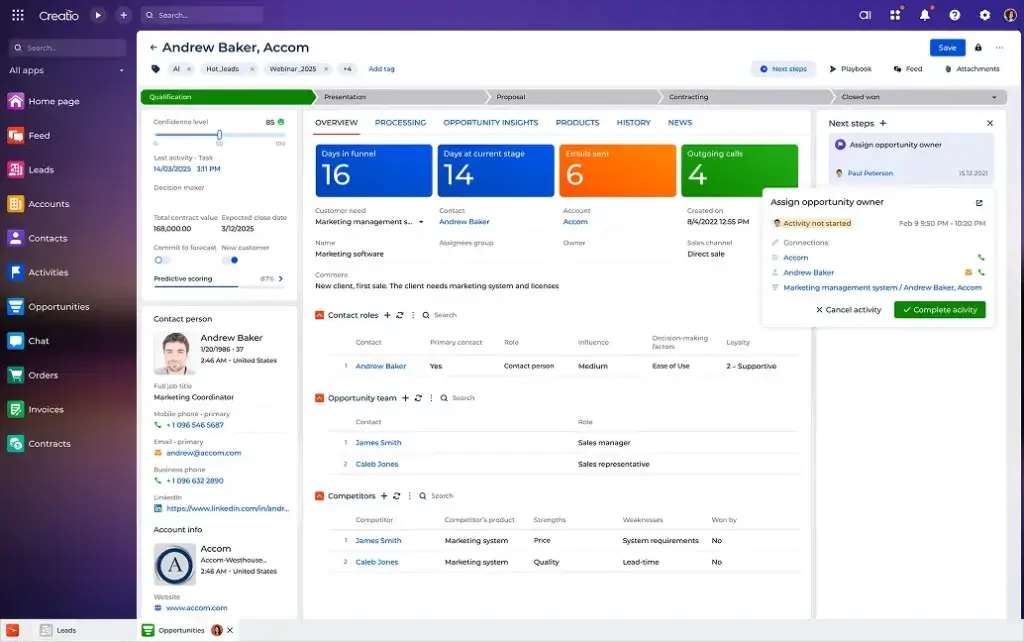
Sales Creatio is built to manage the full sales cycle, from lead capture and qualification to opportunity management, forecasting, activities, orders, and account growth.
You can use Creatio to organize contacts, companies, leads, opportunities, territories, sales tasks, communication history, and sales performance dashboards. For sales teams with more complex processes, this is where Creatio becomes more powerful than lightweight CRMs.
- Manage leads, accounts, contacts, and opportunities.
- Build custom sales pipelines and workflows.
- Automate lead routing, follow-ups, and sales tasks.
- Track forecasts, activities, and sales team performance.
- Support complex B2B sales processes with custom rules.
Creatio is especially relevant when your sales process includes multiple teams, approval steps, different product lines, custom qualification rules, or handoffs between sales, implementation, and customer success.
Marketing automation and customer journeys
Marketing Creatio extends the platform beyond sales management. It helps teams manage customer profiles, segmentation, campaigns, lead nurturing, event workflows, email marketing, account-based marketing, and handoffs from marketing to sales.
The key benefit is that marketing activity can live closer to CRM data. Instead of treating campaigns and customer records as separate systems, Creatio can connect audience segmentation, lead scoring, campaign engagement, and sales follow-up.
- Create customer segments based on CRM and behavior data.
- Run email, event, and digital campaign workflows.
- Use lead scoring and qualification rules.
- Automate marketing-to-sales handoffs.
- Analyze campaign performance inside the CRM environment.
For B2B teams, this can reduce friction between marketing and sales. Your team can see where leads came from, how they engaged, what stage they are in, and which follow-up action should happen next.
Service CRM and case management
Service Creatio is designed for customer service teams that need to manage cases, requests, knowledge, SLAs, omnichannel communication, and support workflows.
This is important because many CRM decisions are no longer only about sales. Customers expect consistent service after purchase. If your sales, support, and account management teams work in disconnected systems, customer experience suffers.
- Manage cases, requests, and service queues.
- Build service workflows and escalation rules.
- Create knowledge base and self-service processes.
- Track service performance and customer satisfaction.
- Connect service data with sales and account records.
Creatio is a good fit for companies that want a shared customer view across the revenue lifecycle. Sales can see service history, support can understand customer value, and managers can analyze operational performance across departments.
AI agents and intelligent automation
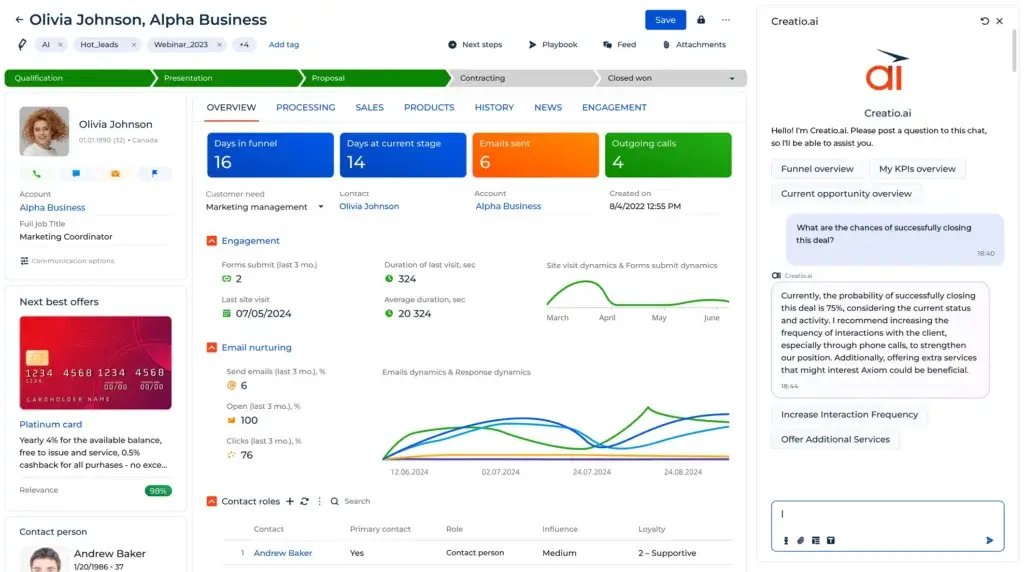
Creatio has moved strongly into AI-native CRM positioning. The platform includes AI-assisted capabilities that can support sales research, lead scoring, content generation, campaign workflows, service responses, forecasting, and process automation.
The biggest opportunity is not simply writing better emails. The real value is using AI to reduce repetitive CRM work. This may include preparing account research, suggesting next actions, summarizing customer context, qualifying leads, generating campaign content, and assisting agents with service responses.
However, AI should be implemented carefully. Teams should define approval rules, review generated content, monitor data quality, and make sure AI workflows align with compliance, privacy, and customer experience standards.
Business process management and workflow automation
Creatio’s roots in business process management are still visible. The platform is especially strong when you need structured workflows across teams, not just simple task reminders.
You can create workflows for lead qualification, quote approvals, onboarding, renewals, customer service escalations, partner requests, compliance checks, document routing, internal reviews, and operational handoffs.
This is one of the main reasons to choose Creatio over simpler CRMs. If your organization has repeatable but complex customer-facing processes, Creatio can help you standardize them.
Reports, dashboards, and analytics
Creatio includes reporting and dashboard tools that help teams analyze pipeline performance, campaign results, service operations, activities, conversion rates, and operational workflows.
The advantage is that analytics can be shaped around your custom CRM setup. If you create custom fields, objects, workflows, or stages, you can also build dashboards that reflect those processes.
- Track sales pipeline and forecast metrics.
- Measure campaign engagement and conversion.
- Monitor service case volume and SLA performance.
- Create custom dashboards for leadership teams.
- Analyze workflow bottlenecks across departments.
For managers, this can turn Creatio from a CRM system into a performance management layer across sales, marketing, service, and operations.
Marketplace, integrations, and ecosystem
Creatio Marketplace gives users access to apps, connectors, templates, AI agents, data tools, service tools, sales extensions, document management integrations, telephony connectors, analytics tools, and industry-specific solutions.
This matters because most businesses do not run CRM in isolation. You may need to connect CRM data with email, calendar, forms, telephony, document signing, ERP, BI, marketing tools, support tools, and internal databases.
Creatio is best when you treat integrations as part of the implementation plan. Before launch, map which systems need to connect, what data should sync, who owns each data source, and how errors will be handled.
Mobile access
Creatio offers mobile access so sales reps, managers, field teams, and service users can review customer records, update activities, manage tasks, and work while away from their desk.
The mobile experience is useful for field sales, account management, service follow-up, and meeting preparation. However, like most advanced CRM systems, heavy configuration, workflow design, and admin work are still better handled from the desktop experience.
Pros and Cons
Advantages and Limitations of Using Creatio
Positive
✅ Strong no-code CRM customization
✅ Combines sales, marketing, and service workflows
✅ Useful AI and automation capabilities
✅ Good fit for complex B2B processes
✅ Strong marketplace and integration options
Negative
❌ No permanent free plan
❌ Pricing can be difficult to estimate quickly
❌ More setup effort than simple CRMs
❌ May be too advanced for small teams
❌ Requires process ownership to get full value
Creatio has a clear advantage when your business needs flexibility, workflow depth, and cross-functional CRM automation. Its limitations become more visible when your team only needs basic contact management, fast setup, and low monthly costs.
Advantages of Creatio
- Strong no-code CRM customization: Creatio lets teams adjust layouts, workflows, objects, and dashboards with visual tools.
- Unified CRM coverage: Sales, marketing, and service can work from one connected platform.
- Workflow automation depth: The platform can manage complex business processes, approvals, and handoffs.
- AI-native direction: AI agents and assistants can support repetitive sales, marketing, and service work.
- Enterprise flexibility: Creatio is strong for teams that need tailored processes without building a CRM from scratch.
- Marketplace ecosystem: Apps, connectors, and extensions help expand the platform beyond native features.
Limitations of Creatio
- No permanent free plan: Creatio is not built for teams looking for a forever-free CRM.
- Pricing complexity: The final cost depends on platform tier, CRM products, support, implementation, and add-ons.
- Implementation effort: Teams need to define workflows, data models, roles, and governance before rollout.
- Overkill for simple sales teams: Smaller teams may prefer Pipedrive, HubSpot, monday CRM, or Zoho CRM.
- Admin ownership matters: Without a CRM owner, the platform can become underused or over-customized.
- Learning curve: No-code flexibility is easier than custom development, but it still requires training and process discipline.
User Experience
User Interface and Experience
Creatio’s user experience is more modern and visual than many older enterprise CRM systems, but it is not as simple as a lightweight sales pipeline tool. The interface is built for configurable workspaces, records, workflows, dashboards, automations, and cross-functional processes.
Setup and onboarding
Creatio can be easier to customize than traditional enterprise CRM platforms because of its no-code tools. However, that does not mean setup is instant.
Before implementation, you should define your sales stages, lead sources, customer lifecycle, service processes, marketing handoffs, reporting needs, permission structure, and integration requirements. The cleaner your process map is, the better Creatio will perform.
For small teams with simple needs, this may feel like too much work. For growing companies with complex operations, this planning is exactly what makes Creatio valuable.
Daily CRM workflow
Daily users can work from dashboards, records, tasks, communication history, pipelines, service queues, campaign workflows, and custom pages. Managers can track activity, performance, bottlenecks, and workflow progress.
The platform works best when users have clear roles. Sales reps should know which fields to update, marketers should know how leads are qualified, service agents should know how cases move, and managers should know which dashboards reflect the source of truth.
Learning curve
Creatio is not difficult because the interface is outdated. The learning curve comes from its depth. Users need to understand how records, workflows, business rules, dashboards, automations, and no-code customization fit together.
This is why Creatio adoption should include role-based training. A sales rep does not need the same training as a CRM admin. A marketing operations manager does not need the same training as a service agent.
The most successful implementations usually have one internal owner who manages structure, data quality, process updates, and user adoption.
Customer support and training
Creatio offers support resources, Academy content, community resources, knowledge base access, support packages, and implementation guidance. Support packages can affect response times, authorized contacts, proactive monitoring, and availability.
This is worth evaluating before purchase. If Creatio will support business-critical workflows, you should not only compare software features. You should also compare support coverage, implementation help, success resources, and the cost of higher support tiers.
Business Size Fit
Creatio for Different Business Sizes
Creatio can support different business sizes, but it is not equally practical for every team. Its value increases when your CRM requirements become more complex.
Creatio for small businesses
Creatio can work for small businesses, but only if the business has advanced CRM and workflow needs. A small team that only wants contacts, deals, email sync, and basic reports will usually get faster value from a simpler CRM.
Small businesses should consider Creatio if they need custom workflows, regulated processes, multi-step approvals, service operations, or a CRM that can grow into a broader automation platform.
Creatio for mid-market companies
Mid-market companies are often the best fit for Creatio. At this stage, CRM usually becomes more than pipeline management. Teams need structured processes, better reporting, marketing-to-sales alignment, service visibility, and workflow automation.
Creatio can help mid-market teams standardize processes without moving straight into a heavily customized enterprise CRM implementation.
Creatio for enterprise organizations
Enterprise teams can use Creatio to build custom CRM and operational applications on one no-code platform. This can be especially useful when business teams need flexibility but IT still needs governance, security, lifecycle management, and integration control.
For very complex global organizations, Salesforce may still have a larger enterprise ecosystem. However, Creatio is compelling if you want more no-code ownership and faster process adaptation.
Who should not use Creatio?
Creatio is not the right CRM for every organization. You may want to consider another option if you need:
- A permanent free CRM plan.
- A very simple sales pipeline tool.
- The lowest possible monthly cost.
- Fast setup with minimal configuration.
- A CRM that marketing teams can run without operations support.
- A small-business CRM with limited admin responsibility.
If your team is small and your CRM needs are straightforward, HubSpot, Pipedrive, Zoho CRM, or monday CRM may be more practical. If your team needs deep process automation and no-code customization, Creatio becomes much more attractive.
Pricing and Plans
How Much Does Creatio Cost?
Creatio uses a composable pricing model. That means the final cost depends on the platform plan, the CRM products you choose, the number of users, support requirements, implementation services, integrations, and any marketplace add-ons.
Public pricing references commonly place Creatio’s Growth plan around $40 per user per month, Enterprise around $70-$75 per user per month, and Unlimited as custom pricing. Sales, Marketing, and Service CRM products may be priced separately, so you should always confirm the exact quote directly with Creatio before publishing final pricing.
| Pricing Area | Growth | Enterprise | Unlimited |
| Typical Public Starting Point | From around $40/user/month | From around $70-$75/user/month | Custom pricing |
| Best For | Growing teams that need no-code CRM and automation | Companies needing advanced governance, scale, and security | Large organizations needing broad adoption across users and AI agents |
| CRM Products | Sales, Marketing, and Service may be added based on needs | Sales, Marketing, and Service may be added based on needs | Custom package |
| No-code Tools | Included in the platform | More advanced controls and scale | Custom enterprise scope |
| AI Capabilities | Available depending on package and configuration | More relevant for advanced automation | Designed for larger AI and workflow adoption |
| Support | Support package may affect total cost | Support package may affect total cost | Custom support structure |
| Best Value | Best entry point for serious CRM automation | Best fit for mature operations teams | Best for enterprise-wide transformation |
Growth plan
The Growth plan is the entry point for teams that want Creatio’s no-code CRM and automation capabilities. It is best for companies that are moving beyond basic CRM but do not yet need the full enterprise feature set.
This plan can make sense if you need customized processes, dashboards, workflow automation, and a more flexible CRM foundation than a simple sales tool can provide.
Enterprise plan
The Enterprise plan is better for companies that need stronger scale, governance, security, and process control. It is more relevant when CRM is used across multiple departments or business units.
This plan is usually a better fit for businesses with formal CRM administration, more complex permissions, advanced workflows, and deeper reporting needs.
Unlimited plan
The Unlimited plan is designed for larger organizations that want broader adoption across people, workflows, applications, and AI agents. Pricing is customized, so it should be evaluated based on the full business case rather than seat cost alone.
If you are considering Unlimited, prepare a clear requirements list before speaking with sales. Include user count, departments, applications, AI use cases, integrations, data volume, support needs, and implementation expectations.
Add-ons and extra costs
The real cost of Creatio may include more than licenses. You may need implementation services, partner consulting, data migration, integrations, support upgrades, custom apps, marketplace tools, user training, and internal CRM administration.
This does not mean Creatio is poor value. It means you should compare total cost of ownership, not only monthly license pricing.
Security and Compliance
Protection for Your Data
Security matters when your CRM stores customer records, emails, activity history, deal data, service notes, support requests, documents, and operational workflows. Creatio provides security and compliance information covering infrastructure, application-level controls, data protection, and governance.
Security standards and hosting controls
Creatio publicly references data processing centers aligned with major standards such as GDPR, ISO 27001, HIPAA, SOC 1, and SOC 2. This is important for companies that need to complete vendor due diligence before adopting a CRM platform.
You should still request current security documentation before purchase. Ask for security reports, data processing terms, encryption details, access control options, backup practices, data retention settings, and incident response policies.
Application-level security
Creatio emphasizes application-level controls such as customer data isolation, encryption, authentication, and access management. These controls matter because CRM systems often contain sensitive commercial and customer information.
Before implementation, define user roles carefully. Sales, marketing, service, finance, operations, and administrators should not automatically have the same access to every record or workflow.
Data governance and no-code control
No-code customization is powerful, but it also needs governance. Without clear rules, teams may create duplicate fields, inconsistent workflows, unmanaged reports, or automations that conflict with business policy.
Creatio is strongest when business users and IT work together. Business teams can move quickly, while IT can define standards for data quality, permissions, deployment, security, and lifecycle management.
Implementation
Setup, Migration, and Integrations
Creatio implementation should be treated as a business process project, not only a software setup. The platform gives you flexibility, but you need a clear structure to turn that flexibility into operational value.
Migration and data cleanup
Before moving into Creatio, clean your existing CRM data. Remove duplicates, standardize company names, validate email addresses, review pipeline stages, archive irrelevant records, and decide which custom fields still matter.
Bad data will weaken every CRM. It affects segmentation, reporting, automation, AI suggestions, lead scoring, service history, and sales forecasting.
Workflow design
Start with the workflows that affect revenue and customer experience most. Good starting points include lead routing, opportunity qualification, quote approvals, onboarding, renewal management, case escalation, campaign follow-up, and customer success handoffs.
Keep the first version simple. It is better to launch a clear workflow your team uses than a sophisticated workflow no one understands.
Integrations and connected systems
Creatio can connect with many external systems through marketplace connectors, APIs, and integration tools. Before implementation, map each system that needs to exchange data with Creatio.
Common integration categories include:
- Email and calendar: Sync communication and activity data.
- Marketing tools: Connect forms, campaigns, and lead sources.
- ERP and finance: Sync account, order, invoice, and contract data.
- Telephony and chat: Support sales and service communication workflows.
- Document tools: Manage proposals, contracts, and e-signature processes.
- BI and analytics: Analyze CRM data alongside business performance data.
Best practices for implementing Creatio
To get the most value from Creatio, focus on process clarity before customization.
- Define your CRM owner: Assign responsibility for structure, adoption, and governance.
- Clean your data first: Remove duplicates and standardize core records before migration.
- Map workflows: Document sales, marketing, service, and operational processes.
- Start with priority automations: Build the workflows that create the fastest business value.
- Train by role: Give each team practical training based on their daily work.
- Review dashboards weekly: Use reporting to find bottlenecks and adoption gaps.
The biggest mistake is buying Creatio for flexibility but implementing it without governance. The platform works best when customization supports clear business rules.
Comparisons
Creatio Alternatives and Competitors
Creatio is one of the stronger options if you need no-code CRM and workflow automation, but it is not the best choice for every team. The right alternative depends on whether you prioritize enterprise scale, marketing automation, affordability, or sales simplicity.
| CRM | Best For | Where It Beats Creatio | Where Creatio Is Stronger |
| Salesforce | Large enterprise CRM ecosystems | Bigger app ecosystem, enterprise adoption, advanced CRM specialization | No-code workflow flexibility and faster process customization for some teams |
| HubSpot | Marketing-led CRM and inbound growth | Easier adoption, strong marketing tools, content and lead generation workflows | More flexible process automation and custom operational workflows |
| Zoho CRM | Affordable CRM customization | Lower entry cost and broad business app ecosystem | Stronger no-code workflow platform for complex processes |
| Pipedrive | Simple sales pipeline management | Faster setup and easier use for small sales teams | Much deeper customization, automation, and cross-functional CRM coverage |
Creatio vs Salesforce
Salesforce is the stronger choice for large enterprises that want the biggest CRM ecosystem, extensive implementation partner support, deep industry clouds, and advanced enterprise CRM architecture.
Creatio is better if your organization wants a more no-code-driven approach to CRM customization and business process automation. It can be more approachable for teams that want to build and adapt workflows without relying as heavily on traditional development resources.
If your company needs maximum enterprise ecosystem depth, Salesforce is hard to beat. If your priority is no-code CRM flexibility, Creatio deserves serious consideration.
Creatio vs HubSpot
HubSpot is usually better for companies that want an easier CRM with strong marketing, landing pages, forms, email campaigns, content workflows, lead nurturing, and a clean user experience.
Creatio is stronger when CRM needs to support complex workflows across sales, marketing, service, and operations. It gives you more control over process design, custom data models, and automation logic.
Choose HubSpot if growth marketing and usability matter most. Choose Creatio if flexible workflow automation and no-code CRM customization matter more.
Creatio vs Zoho CRM
Zoho CRM is more affordable and practical for many small and mid-sized businesses. It offers strong CRM functionality, automation, customization, and access to the broader Zoho ecosystem.
Creatio is better for businesses that need more advanced workflow automation, process design, and no-code application development. It feels more like a CRM and operational automation platform, while Zoho is more of a flexible business software suite.
Zoho is better for cost-conscious teams. Creatio is better for process-heavy teams.
Creatio vs Pipedrive
Pipedrive is better if your team wants a simple sales CRM that reps can adopt quickly. It is easy to use, pipeline-focused, and much lighter than Creatio.
Creatio is better if your sales process is only one part of a larger customer workflow. If you need marketing automation, service processes, custom workflows, AI agents, and no-code applications, Creatio offers far more depth.
Pipedrive is best for straightforward sales execution. Creatio is best for complex CRM and workflow automation.
Conclusion
Final Thoughts
Creatio is one of the more compelling CRM platforms for businesses that have outgrown simple pipeline tools but do not want every CRM change to depend on custom development. Its biggest strength is the combination of CRM, no-code workflow automation, AI agents, dashboards, integrations, and business process management in one platform.
The platform is especially strong for mid-market and enterprise teams with complex sales, marketing, service, or operational workflows. If your business needs custom processes, automated handoffs, cross-department visibility, and a flexible customer data model, Creatio can deliver significant long-term value.
The tradeoff is complexity. Creatio is not the easiest or cheapest CRM for small teams. Pricing can require careful review, implementation needs planning, and your team should assign a clear CRM owner to manage governance and adoption.
Creatio is a strong choice in 2026 if you want an AI-native CRM and no-code platform that can adapt to your business. It is less ideal if your priority is a basic CRM that can be launched in a few hours with minimal configuration.
Frequently Asked Questions
Have More Questions?
What is Creatio best used for?
Creatio is best used for AI CRM, no-code workflow automation, sales management, marketing automation, service management, and custom business process applications. It is especially useful for mid-market and enterprise teams with complex CRM workflows.
Is Creatio only a CRM?
No. Creatio includes CRM products for sales, marketing, and service, but it also functions as a no-code workflow and application development platform. This makes it broader than a traditional sales CRM.
How much does Creatio cost?
Creatio uses composable pricing. Public pricing references commonly list Growth from around $40 per user per month, Enterprise around $70 to $75 per user per month, and Unlimited as custom pricing. Final pricing depends on selected CRM products, users, support, implementation, and add-ons.
Does Creatio have a free plan?
No. Creatio does not offer a permanent free plan. A free trial is available, but ongoing use requires a paid subscription.
Is Creatio good for small businesses?
Creatio can work for small businesses with advanced workflow needs, but it is usually better for mid-market and enterprise teams. Small teams that only need simple sales pipeline management may prefer HubSpot, Pipedrive, Zoho CRM, or monday CRM.
What makes Creatio different from Salesforce?
Salesforce has a larger enterprise ecosystem and deeper market adoption. Creatio stands out for no-code CRM customization, workflow automation, and the ability for business teams to adapt processes visually with less dependence on traditional development.
Does Creatio include marketing automation?
Yes. Marketing Creatio supports segmentation, lead scoring, campaigns, customer journeys, event workflows, and marketing-to-sales handoffs. It is useful for teams that want marketing automation connected closely to CRM data.
Does Creatio include customer service tools?
Yes. Service Creatio includes tools for case management, service workflows, knowledge management, omnichannel service, queues, escalations, and customer support performance tracking.
Is Creatio secure?
Creatio provides security and compliance information covering infrastructure, application security, data protection, and governance. Public materials reference standards such as GDPR, ISO 27001, HIPAA, SOC 1, and SOC 2. Buyers should still request current documentation before purchase.
Who is Creatio best for?
Creatio is best for companies that need flexible CRM, AI-assisted workflows, no-code customization, sales automation, marketing automation, service management, and cross-functional process automation. It is strongest for teams with complex customer and operational workflows.