
Introduction
Choosing the right LinkedIn automation tool is not just about saving time. It is about building a repeatable prospecting workflow that helps you find relevant leads, start conversations, and avoid risky automation habits that can hurt your LinkedIn account.
In this Octopus CRM review, you’ll get a clear look at the platform’s features, pricing, pros and cons, user experience, security considerations, and best-fit use cases. You’ll also see where Octopus CRM performs well, where it feels limited, and which alternatives may be better if you need more advanced outreach automation.
Octopus CRM is often described as a CRM, but it is not a full customer relationship management system like HubSpot, Pipedrive, Zoho CRM, or Salesforce. It is better understood as a LinkedIn automation tool with lightweight CRM features for organizing prospects, running outreach campaigns, and tracking basic campaign activity.
Octopus CRM Review 2026: Quick Summary
If you want a simple, affordable tool for LinkedIn prospecting, Octopus CRM can be a useful starting point. It is especially appealing if you work alone, manage one LinkedIn account, and need basic automation for connection requests, profile visits, endorsements, and message follow-ups.
However, Octopus CRM is not the strongest option for teams, agencies, or sales organizations that need multi-account management, cloud-based automation, advanced sequences, shared inboxes, or deep reporting.
| Category | Octopus CRM Review Summary |
| Best for | Solo users, freelancers, recruiters, consultants, and small B2B teams |
| Main use case | LinkedIn lead generation and outreach automation |
| Starting price | $9.99/month, with lower annual pricing available |
| Free trial | 7-day trial available |
| Deployment | Chrome extension |
| Main strength | Simple LinkedIn outreach automation at a low cost |
| Main limitation | Limited sequencing, reporting, collaboration, and cloud-based automation |
What Is Octopus CRM?
Octopus CRM is a Chrome extension that helps you automate LinkedIn outreach tasks. It allows you to send personalized connection requests, message first-degree connections in bulk, visit LinkedIn profiles automatically, endorse skills, and organize prospects inside a simple campaign dashboard.
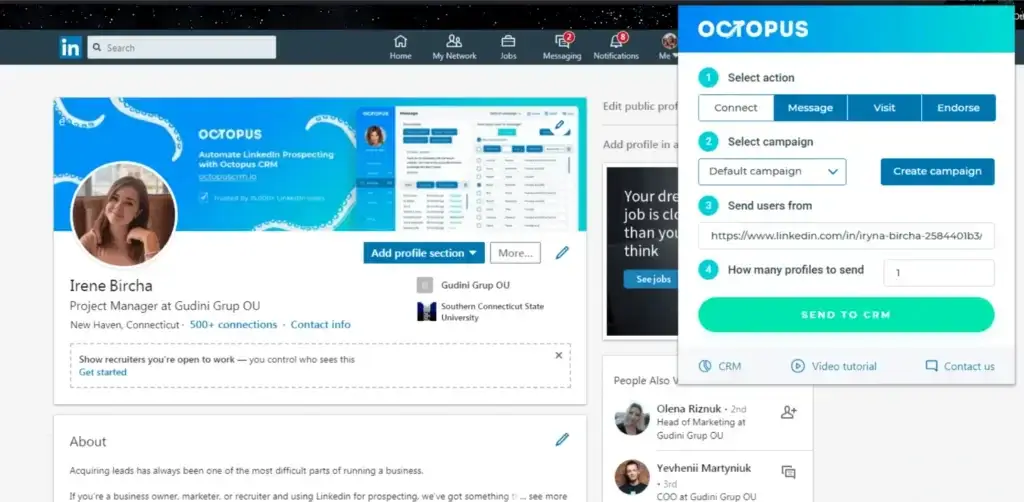
The tool works directly inside LinkedIn, which makes the experience easy to understand. You search for prospects on LinkedIn or Sales Navigator, import them into Octopus CRM, assign them to a campaign, and choose the action you want to automate.
Because Octopus CRM is built around LinkedIn activity, it is most useful for people who already use LinkedIn as a primary prospecting channel. This includes sales professionals, recruiters, consultants, agency owners, founders, coaches, and B2B service providers.
If you need a complete CRM with deal tracking, revenue forecasting, account management, customer support history, or advanced sales reporting, Octopus CRM will not replace a full CRM system. For that use case, you may want to compare the best CRM software instead.
Key Features
Octopus CRM Software Specification
Octopus CRM focuses on one clear use case: helping you automate repetitive LinkedIn prospecting tasks. The feature set is not as broad as a full sales engagement platform, but it gives you enough functionality to build a simple LinkedIn lead generation workflow.
The main value is speed. Instead of manually visiting profiles, sending invites, tracking responses, and exporting lead data, you can manage these actions through one lightweight extension.
Automated LinkedIn Connection Requests
Octopus CRM lets you send personalized LinkedIn connection requests to selected prospects. You can import profiles from LinkedIn search or Sales Navigator, add them to a campaign, and use custom fields to personalize your invite message.
This is useful when you want to reach a targeted audience without manually sending each request. However, you should avoid generic messages and aggressive daily limits. Personalized outreach usually performs better and reduces the risk of looking like spam.
- Best for scaling low-volume LinkedIn prospecting
- Supports personalized invite messages
- Requires careful daily limit management
Bulk LinkedIn Messaging
Once prospects become first-degree connections, Octopus CRM can help you send bulk LinkedIn messages. This is helpful for follow-ups, webinar invitations, partnership outreach, recruiting messages, or basic lead nurturing.
The important limitation is that Octopus CRM is not a full sequence builder. You can send messages in bulk, but you do not get advanced branching logic, multi-step conditional workflows, or deep personalization rules like you would find in more advanced sales engagement tools.
- Useful for messaging first-degree LinkedIn connections
- Supports message templates for repeated outreach
- Limited compared with advanced drip campaign tools
Profile Visits and Skill Endorsements
Octopus CRM can automatically visit LinkedIn profiles and endorse selected skills. Profile visits can increase visibility because many LinkedIn users check who viewed their profile. Endorsements can also create a small engagement touchpoint before or after a connection request.
These features are useful as light engagement signals, but they should not replace real personalization. The strongest LinkedIn outreach still depends on relevant targeting, thoughtful messaging, and a clear reason to connect.
- Automates profile visits to increase visibility
- Can endorse skills on selected profiles
- Works best when combined with relevant messaging
Personal CRM and Campaign Management
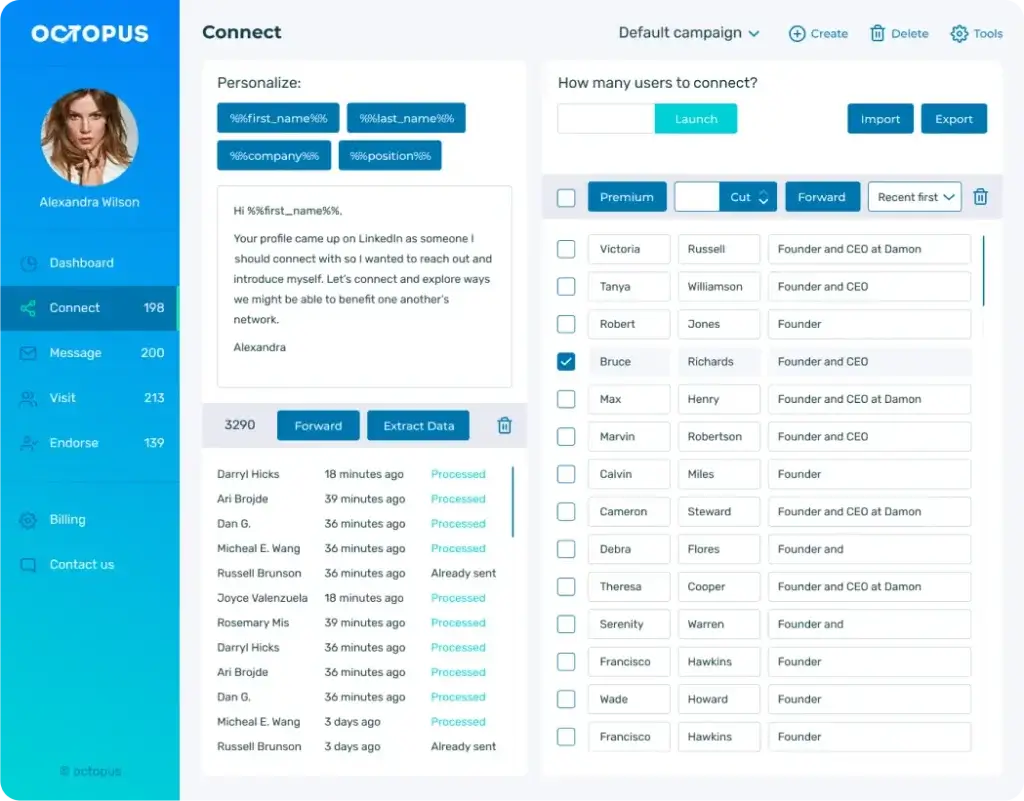
Octopus CRM includes a personal CRM view where you can organize imported LinkedIn prospects. You can group leads into campaigns, monitor their status, and track basic outreach activity.
This makes Octopus CRM more useful than a simple LinkedIn automation clicker. Still, the CRM functionality is basic. You should not expect advanced pipeline management, deal stages, account records, revenue forecasting, custom reporting, or multi-user collaboration.
- Organizes LinkedIn prospects by campaign
- Tracks basic lead and outreach activity
- Does not replace a complete CRM platform
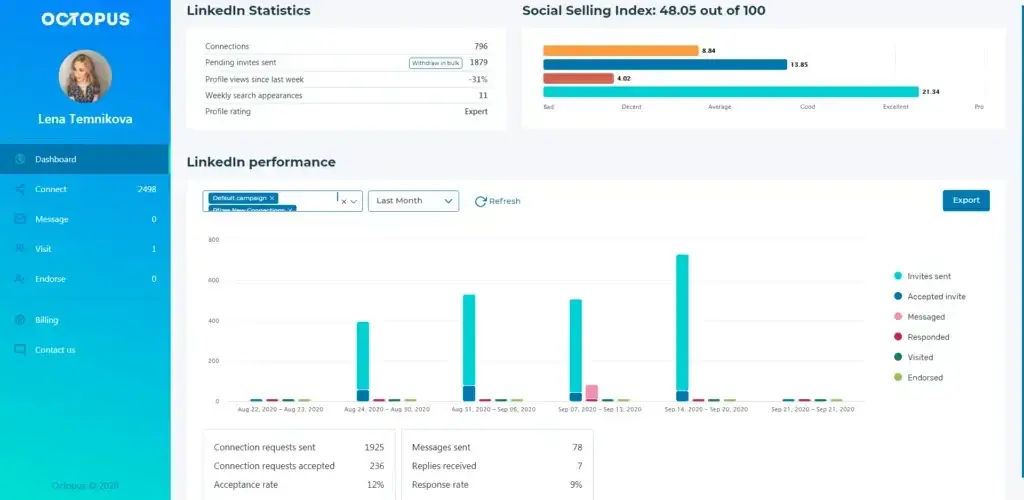
Analytics and LinkedIn Performance Tracking
Octopus CRM gives you basic analytics for LinkedIn outreach. You can review metrics such as connection requests sent, accepted invitations, messages sent, replies received, profile views, and endorsements.
These metrics are helpful if you want to understand whether your campaign is getting traction. For example, a low acceptance rate may suggest that your targeting is too broad or your connection message is not relevant enough.
That said, reporting is one of the areas where Octopus CRM feels limited. It is enough for basic campaign monitoring, but not strong enough for agencies or sales teams that need client reporting, account-level dashboards, team performance analysis, or attribution data.
- Tracks invite, message, reply, visit, and endorsement activity
- Useful for basic outreach optimization
- Limited for advanced sales reporting
Safety Controls and LinkedIn Activity Limits
Octopus CRM includes basic safety controls to help you manage LinkedIn automation more carefully. You can adjust activity limits and delays so actions appear more natural and less repetitive.
This matters because LinkedIn automation always carries some account risk. Octopus CRM can help you slow down activity, but it does not remove the need for user discipline. You still need to monitor how many requests, messages, visits, and endorsements you run each day.
- Includes adjustable limits and delays
- Helps reduce aggressive automation patterns
- Still requires careful manual monitoring
Integrations and Data Export
Octopus CRM supports data export and integrations, depending on the plan you choose. You can work with CSV files, connect lead data with Google Sheets, and use integrations such as Zapier and HubSpot on higher-tier plans.
This makes Octopus CRM more flexible if you want to move LinkedIn leads into another CRM or sales workflow. For example, you may use Octopus CRM for LinkedIn prospecting, then transfer qualified leads into HubSpot CRM, Pipedrive, or another sales pipeline tool.
- Supports CSV import and export
- Connects with HubSpot and Zapier on higher plans
- Useful for moving LinkedIn leads into your sales stack
Pros and Cons
Benefits of Using Octopus CRM
Positive
✅ Easy to use for LinkedIn outreach
✅ Affordable starting price
✅ Useful for solo prospecting
✅ Works with LinkedIn Sales Navigator
✅ Includes basic CRM and campaign tracking
Negative
❌ Not a full CRM system
❌ No advanced sequence builder
❌ Browser extension limits automation
❌ Not ideal for agencies or larger teams
❌ Stronger features require higher plans
Octopus CRM’s biggest advantage is simplicity. You can install the extension, import prospects, create a message, and start basic LinkedIn outreach quickly. This makes it approachable for users who do not want a complex CRM or sales engagement platform.
The tradeoff is depth. Octopus CRM is not built for sophisticated multi-step automation, large outbound teams, shared workflows, or detailed reporting. It works best when your process is simple and your LinkedIn outreach volume is controlled.
Why the Pros Matter
The main benefits of Octopus CRM are its low cost, fast setup, and focused LinkedIn automation. If you are testing LinkedIn outreach for the first time, these benefits are meaningful. You do not need to invest in a large sales platform before knowing whether LinkedIn works as an acquisition channel for your business.
It is also useful if you prefer a tool that sits close to your day-to-day workflow. Since it runs inside Chrome, you can work directly from LinkedIn and avoid switching between multiple systems.
Why the Cons Matter
The limitations become more noticeable as your outreach process becomes more advanced. For example, if you want to run multi-step campaigns with conditional follow-ups, rotate multiple LinkedIn accounts, manage client workspaces, or report results to stakeholders, Octopus CRM may feel too narrow.
The Chrome extension model is another important limitation. It is simple, but it also means automation depends on your browser session. If you want always-on campaigns that run in the cloud, you may need a different LinkedIn automation platform.
User Experience
User Interface and Experience
Octopus CRM is designed for users who want a simple LinkedIn automation experience without learning a complex CRM. The interface is clean, direct, and focused on a small number of core actions: importing leads, choosing a campaign, sending connection requests, messaging contacts, visiting profiles, and reviewing results.
This makes the platform easy to approach, especially if you are a solo user or freelancer. You do not need to configure a complicated sales pipeline before seeing value.
Onboarding and Setup Flow
The setup process is straightforward. You install the Chrome extension, open LinkedIn, select the profiles you want to target, and send them into Octopus CRM. From there, you can choose the relevant campaign and decide which automation action to run.
This workflow is practical because it keeps you close to LinkedIn. You do not need to jump between a separate prospecting database and your browser. However, the onboarding experience could be stronger. If you are new to LinkedIn automation, you may need to rely on tutorials, help articles, or some trial and error.
Day-to-Day Usability
For daily LinkedIn outreach, Octopus CRM feels efficient. You can quickly review imported leads, assign prospects to campaigns, adjust campaign limits, and monitor activity. The main interface is not overloaded with unnecessary settings, which improves readability and speed.
Common actions include reviewing LinkedIn profiles, sending invites, preparing message templates, checking campaign performance, and exporting lead data. These actions are easy enough for non-technical users.
The main UX limitation is that the tool is functional rather than advanced. If you are used to a full CRM with custom dashboards, detailed activity timelines, pipeline automation, and team permissions, Octopus CRM may feel limited.
Chrome Extension vs Cloud-Based Automation
Octopus CRM works as a Chrome extension, not a fully cloud-based platform. This is one of the most important user experience factors to understand before buying.
The benefit is simplicity. You can run the tool directly inside your LinkedIn workflow. The limitation is that automation depends on your browser session. If your computer is off, your browser is closed, or the extension is interrupted, campaigns may not continue running the same way a cloud-based tool would.
This setup is fine for lower-volume outreach. For always-on prospecting, agency workflows, or multi-account campaigns, a cloud-based LinkedIn automation tool may be more reliable.
Performance and Reliability
Octopus CRM performs well for basic actions when configured conservatively. It is best used at moderate volume with realistic delays and personalized messaging.
The platform is less suitable if you expect heavy automation or advanced workflow logic. It does not provide the same campaign depth as tools built for high-scale sales teams. You also need to monitor daily activity to avoid pushing LinkedIn too aggressively.
Mobile and Accessibility Considerations
Octopus CRM does not offer a dedicated mobile app. Campaign management happens through the desktop Chrome extension.
If you manage most of your outreach from a laptop or desktop, this should not be a major issue. If you want to check campaigns, edit workflows, or control outreach from a phone, this limitation is important.
Overall UX Takeaway
The Octopus CRM user experience is simple, lightweight, and beginner-friendly. It works best when you want to automate basic LinkedIn tasks from your browser without managing a full sales platform.
You will likely appreciate the UX if you manage one LinkedIn account, prefer minimal setup, and want a low-friction way to run outreach. You may find it limiting if you need team dashboards, cloud-based automation, advanced reporting, or multi-step campaign logic.
Business size fit
Who Is Octopus CRM Best For?
Octopus CRM is not designed for every business. Its value depends on how much your team relies on LinkedIn, how many accounts you manage, and how advanced your outreach workflow needs to be.
In simple terms, Octopus CRM is strongest for solo LinkedIn prospecting and weakest for structured sales teams that need collaboration, automation depth, and reporting at scale.
Best Fit: Solo Professionals and Freelancers
Octopus CRM is a strong fit if you run your own LinkedIn outreach and want to save time on repetitive actions. Freelancers, consultants, coaches, and solo founders can use it to build targeted prospect lists, send connection requests, and follow up with new contacts.
The low starting price also makes it appealing if you are testing LinkedIn as a lead generation channel before committing to a more expensive sales engagement tool.
Best Fit: Recruiters and Talent Sourcers
Recruiters can use Octopus CRM to source candidates from LinkedIn, send personalized connection requests, and follow up with potential applicants. The profile visit and messaging features can support light recruiting outreach.
However, Octopus CRM is not an applicant tracking system. It does not replace recruiting software, candidate pipelines, interview scheduling, or hiring team collaboration. It is best used as a LinkedIn sourcing assistant rather than a full recruiting platform.
Best Fit: Small B2B Teams Testing LinkedIn Outreach
Small B2B teams can use Octopus CRM to test whether LinkedIn outreach generates meetings, conversations, or partnership opportunities. It is useful when each user works independently and does not require shared dashboards or complex approval workflows.
If your small team grows and needs shared reporting, role-based access, multiple senders, or a unified inbox, you may quickly outgrow Octopus CRM.
Limited Fit: Agencies and Sales Teams
Octopus CRM is less ideal for agencies, outbound teams, and sales departments managing multiple LinkedIn accounts. Each account typically needs its own license, and the platform does not offer the same team workflow depth as tools built for agencies.
Agency users usually need client workspaces, multi-account rotation, shared inboxes, approval workflows, and campaign reporting. Octopus CRM can support simple solo campaigns, but it is not built for managing LinkedIn outreach at scale.
Business Size Alignment
| Business Type | Octopus CRM Fit | Why It Matters |
| Solo users | Strong fit | Simple setup, low cost, and enough features for basic LinkedIn outreach |
| Freelancers and consultants | Strong fit | Useful for prospecting from one LinkedIn account |
| Small teams | Moderate fit | Works if each user manages outreach independently |
| Recruiters | Moderate fit | Good for candidate sourcing, but not a recruiting CRM or ATS |
| Agencies | Limited fit | Lacks strong multi-account, workspace, and team reporting features |
| Enterprise teams | Poor fit | Not built for structured sales operations or compliance-heavy workflows |
Strategic Fit Summary
Octopus CRM works best as an entry-level LinkedIn automation tool. It helps you move faster when your workflow is simple, but it does not scale naturally into a complete sales operation.
If LinkedIn is one of several outreach channels in your sales strategy, you may eventually need a broader tool that supports email outreach, CRM sync, shared inboxes, advanced sequences, and detailed reporting.
Pricing and Plans
How Much Does Octopus CRM Cost?
Octopus CRM uses a tiered pricing model with four main plans: Starter, Pro, Advanced, and Unlimited. The entry price is low compared with many LinkedIn automation platforms, but the more practical features are spread across higher tiers.
Pricing and feature availability can change, so you should always confirm the latest plan details on the Octopus CRM pricing page before subscribing. This is especially important if you need bulk messaging, data export, HubSpot integration, Zapier integration, LinkedIn Recruiter compatibility, or activity controls.
Starter Plan
The Starter plan is the lowest-cost option. It is mainly useful if you want a simple personal CRM and basic LinkedIn invite automation. It can work for beginners, but it may feel limited if you need campaign building, bulk messaging, or data export.
Pro Plan
The Pro plan adds more useful engagement features, including bulk messaging, profile views, and skill endorsements. This plan is a better fit if you want to run more consistent LinkedIn outreach beyond basic connection requests.
Advanced Plan
The Advanced plan is more practical for users who want campaign creation, import and export options, and basic funnel-building capabilities. If you plan to organize outreach across different audiences, this tier will likely make more sense than Starter or Pro.
Unlimited Plan
The Unlimited plan unlocks the broadest feature set, including Zapier and HubSpot integration, activity controls, and compatibility with more LinkedIn account types. This is the best Octopus CRM plan if you want the most complete version of the platform.
| Plan | Best For | Monthly Price |
| Starter | Basic LinkedIn invites and simple personal CRM use | $9.99/month |
| Pro | Bulk messaging, profile visits, and endorsements | $14.99/month |
| Advanced | Campaigns, funnels, and data import/export | $21.99/month |
| Unlimited | Integrations, activity controls, and full feature access | $39.99/month |
Is Octopus CRM Pricing Worth It?
Octopus CRM pricing is attractive if you only need basic LinkedIn automation. The starting cost is low, and the free trial makes it easy to test the platform.
The value becomes less clear if you need advanced outreach workflows. Since important features are tied to higher plans, the real cost may be higher than the starting price suggests. Teams also need to consider that licensing is typically tied to individual LinkedIn accounts.
Security and Compliance
Is Octopus CRM Safe to Use?
Octopus CRM approaches security mainly through activity controls rather than enterprise-grade governance. Since it works as a Chrome extension connected to LinkedIn, account safety depends heavily on how carefully you configure your outreach.
The platform includes basic safeguards such as adjustable delays and daily activity settings. These can help reduce repetitive automation patterns, but they do not make aggressive LinkedIn automation risk-free.
LinkedIn Account Safety
Octopus CRM does not require you to give the platform your LinkedIn password directly. Actions run through your browser session, which is a positive baseline from an account-access perspective.
Still, LinkedIn may restrict accounts that send too many connection requests, messages, visits, or endorsements too quickly. Octopus CRM can help you control activity, but you remain responsible for using the tool conservatively.
How to Use Octopus CRM More Safely
- Start with low daily limits before increasing activity
- Personalize connection requests instead of using generic messages
- Pause campaigns if acceptance or response rates drop sharply
- Avoid automating too many actions at the same time
- Use Sales Navigator targeting to improve lead relevance
Data Handling and Integrations
Octopus CRM stores and processes lead data for LinkedIn outreach workflows. You can also export leads through CSV files or connect data to tools such as HubSpot, Google Sheets, or Zapier.
Because Octopus CRM is not a full enterprise CRM, you should not expect advanced controls such as detailed audit logs, complex permissions, or enterprise security administration. For single-user outreach, this may be acceptable. For teams handling sensitive customer data, a more robust CRM may be necessary.
Security Takeaway
Octopus CRM is suitable for cautious, low-risk LinkedIn automation from one account. It is less suitable if you require strict compliance controls, detailed permissions, team governance, or always-on safety automation.
Competitors and Comparisons
Octopus CRM Alternatives
Octopus CRM is a good option for basic LinkedIn automation, but it is not the only tool in this category. If you need more advanced campaign logic, team workflows, multi-channel outreach, or cloud-based automation, it is worth comparing alternatives.
Octopus CRM vs Waalaxy
Waalaxy is often a better fit if you want LinkedIn and email outreach in the same workflow. It offers more campaign sequence flexibility than Octopus CRM and is better suited for users who want to build multi-channel prospecting journeys.
Octopus CRM is simpler and usually more affordable, while Waalaxy is better for users who need more advanced outbound campaign structure.
Octopus CRM vs Dripify
Dripify is designed for more advanced LinkedIn drip campaigns. It provides stronger automation workflows, team features, and campaign controls than Octopus CRM.
If your main requirement is simple LinkedIn outreach, Octopus CRM may be enough. If you need detailed sequences and team-based sales prospecting, Dripify is likely a stronger fit.
Octopus CRM vs Expandi
Expandi is a cloud-based LinkedIn automation platform with deeper personalization and more advanced campaign management. It is typically better suited for serious outbound teams and agencies.
Octopus CRM is easier to start with and more budget-friendly, but Expandi offers more scale and flexibility for structured LinkedIn outreach.
Octopus CRM vs HeyReach
HeyReach is built for agencies and teams that manage multiple LinkedIn accounts. It offers workspaces, multi-account workflows, and stronger collaboration features.
Octopus CRM is better for individual users. HeyReach is better when you need to manage outreach across multiple senders, clients, or team members.
Octopus CRM vs SalesRobot
SalesRobot combines LinkedIn and email outreach with more advanced personalization and sequence features. It is a stronger option if your prospecting strategy goes beyond LinkedIn alone.
Octopus CRM remains more lightweight and affordable, but SalesRobot is better for users who need broader sales engagement workflows.
| Tool | Best For | Main Difference vs Octopus CRM |
| Waalaxy | LinkedIn plus email sequences | Better for multi-channel outreach workflows |
| Dripify | LinkedIn drip campaigns | Stronger sequencing and team controls |
| Expandi | Cloud-based LinkedIn automation | More scalable and advanced than a browser extension |
| HeyReach | Agencies and multi-account teams | Better workspace and multi-sender management |
| SalesRobot | LinkedIn and email sales engagement | Better for multi-channel outbound campaigns |
Customer Feedback
Octopus CRM User Reviews
User reviews generally position Octopus CRM as an affordable and easy-to-use LinkedIn automation tool. Many users like that it helps them save time on prospecting, automate repetitive LinkedIn actions, and manage outreach without a steep learning curve.
The most common positive themes are simplicity, pricing, and useful automation for connection requests and LinkedIn messages. This aligns with the tool’s strongest use case: helping individuals run basic LinkedIn outreach more efficiently.
The negative feedback tends to focus on limited advanced functionality. Some users want stronger reports, more flexible sequences, better support responsiveness, or a cloud-based experience that does not depend on Chrome.
| Review Theme | What Users Like | Common Limitation |
| Ease of use | Simple interface and fast setup | Limited guidance for new users |
| Pricing | Low starting price and free trial | Useful features often require higher plans |
| Automation | Saves time on LinkedIn outreach | No advanced branching or sequence logic |
| Reporting | Basic campaign metrics are helpful | Reports are not deep enough for teams |
| Scalability | Works well for one account | Less practical for agencies and multiple users |
Conclusion
Final Thoughts
Octopus CRM is a practical LinkedIn automation tool for users who want a simple, affordable way to manage outreach. It helps you send connection requests, message prospects, visit profiles, endorse skills, organize campaigns, and review basic performance metrics.
The platform is best for solo users, freelancers, recruiters, consultants, and small B2B teams that rely on LinkedIn for prospecting. If your workflow is simple and you only manage one LinkedIn account, Octopus CRM can deliver solid value for the price.
The limitations become clear when you need scale. Octopus CRM is not ideal for agencies, larger sales teams, complex outbound sequences, detailed reporting, or always-on cloud automation. In those cases, alternatives like Waalaxy, Dripify, Expandi, HeyReach, or SalesRobot may be better choices.
Choose Octopus CRM if you want an entry-level LinkedIn automation tool that is affordable, easy to use, and focused on basic prospecting tasks.
Choose an alternative if you need multi-account management, advanced sequences, shared team workflows, deeper reporting, or LinkedIn plus email automation.
Frequently Asked Questions
Have more questions?
1. What is Octopus CRM?
Octopus CRM is a LinkedIn automation tool that helps you send connection requests, message prospects, visit profiles, endorse skills, and organize outreach campaigns through a lightweight personal CRM dashboard.
2. Is Octopus CRM a real CRM?
Octopus CRM includes basic CRM features for managing LinkedIn prospects, but it is not a full CRM platform. It is better suited for LinkedIn outreach than deal management, forecasting, customer records, or team sales operations.
3. Is Octopus CRM safe to use on LinkedIn?
Octopus CRM includes activity limits and delay settings, but LinkedIn automation always carries some risk. It is safest when used conservatively with low daily limits, personalized messages, and careful monitoring.
4. How much does Octopus CRM cost?
Octopus CRM pricing starts at $9.99 per month for the Starter plan and goes up to $39.99 per month for the Unlimited plan. Annual billing is usually available at a discounted monthly rate.
5. Does Octopus CRM work with LinkedIn Sales Navigator?
Yes. Octopus CRM can work with LinkedIn Sales Navigator, making it useful for users who want more targeted lead searches before importing prospects into outreach campaigns.
6. Is Octopus CRM cloud-based?
No. Octopus CRM works primarily as a Chrome extension. This makes setup simple, but it also means automation depends on your browser session rather than running fully in the cloud.
7. Can Octopus CRM send automated LinkedIn messages?
Yes. Octopus CRM can send automated LinkedIn messages to first-degree connections. It also supports message templates, but it does not offer the same advanced sequence logic as dedicated sales engagement tools.
8. What are the main limitations of Octopus CRM?
The main limitations are basic reporting, limited sequence automation, one-account licensing, no dedicated mobile app, no full cloud-based operation, and weak team collaboration features compared with advanced alternatives.
9. What is the best Octopus CRM alternative?
The best alternative depends on your use case. Waalaxy is useful for LinkedIn and email sequences, Dripify for LinkedIn drip campaigns, Expandi for cloud-based automation, and HeyReach for agencies managing multiple accounts.
10. Is Octopus CRM worth it for small businesses?
Octopus CRM can be worth it for small businesses that use LinkedIn as a prospecting channel and need simple automation. It is less suitable for teams that need advanced CRM workflows, shared reporting, or multi-account management.