When you’re choosing a VPN, you’re not just picking a piece of software, you’re trusting a company to guard your privacy, boost your online freedom, and keep your data safe. Hotspot Shield has long positioned itself as a high‑speed VPN service with a generous free plan and a large server network. Since being acquired by Aura, a broader cybersecurity company, it’s been through several changes. You may have come across Hotspot Shield when looking for a way to stream geo‑blocked content or to secure your connection on public Wi‑Fi. In this review, you’ll learn how the service performs in 2026, how its proprietary Hydra protocol measures up against competitors, what you get with the free tier, and whether its privacy practices live up to the marketing claims.
Server Network & Protocols
Main Capabilities of Hotspot Shield
Before diving into a detailed analysis, here’s a quick overview of what Hotspot Shield offers in 2026. This table summarizes the most important facts to help you quickly assess the service.
| Feature | Hotspot Shield |
| Server network | 1,800+ servers across 80+ countries; some virtual locations |
| VPN protocols | Catapult Hydra (default), IKEv2/IPsec, WireGuard |
| Encryption | AES‑128 (default) with option for AES‑256; perfect forward secrecy |
| Max devices | Up to 10 simultaneous connections |
| No‑logs claim | Deletes IP address after session; collects aggregated usage data; jurisdiction: United States |
| Streaming access | Unblocks Netflix, BBC iPlayer, Hulu, Amazon Prime and YouTube on premium servers; mixed results on DAZN and TV Tokyo |
| Torrenting | P2P allowed on all servers; no dedicated torrenting servers |
| Starting price | Free plan available; paid plans start at US$12.99 monthly, with discounts on annual (US$7.99/month) and three‑year (US$2.99/month) plans |
| Money‑back guarantee | 45 days on paid plans |
| Customer support | Knowledge base for all users; 24/7 live chat and email for paid subscribers |
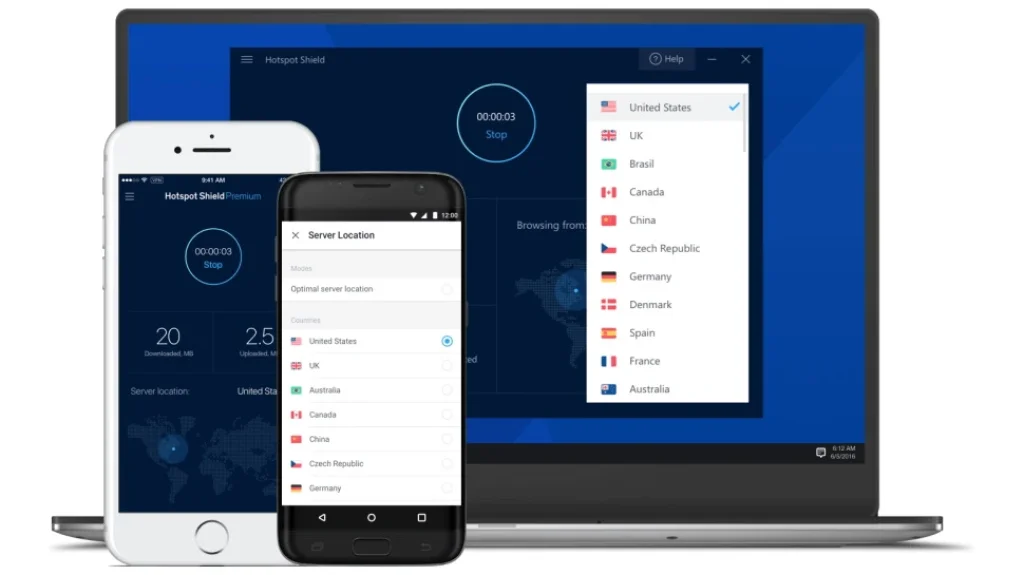
Hotspot Shield’s server fleet has grown to more than 1,800 servers spanning 80 countries and over 35 cities. This network includes both physical and virtual servers. A virtual location means the server is physically located in a different country but configured to appear as if it is in the advertised location. Virtual locations can help users circumvent geo‑blocking, yet some privacy purists prefer exclusively physical servers because they reduce the risk of misconfiguration. Hotspot Shield’s distribution is broad: roughly 16 countries in the Americas, 48 in Europe, 28 in the Asia–Pacific region, and 7 across the Middle East and Africa. You can normally choose between city‑level locations in major regions, although the free tier restricts you to a single U.S. location.
Catapult Hydra, IKEv2, and WireGuard
The proprietary Catapult Hydra protocol is central to Hotspot Shield’s marketing. Built on top of Transport Layer Security (TLS), Hydra is designed to reduce latency and maintain stable speeds even over long distances. Independent testing shows Hydra can deliver download speeds around 60–70 percent of your baseline connection—fast enough for HD streaming, online gaming, and large downloads. Because Hydra is closed source, its inner workings aren’t publicly auditable. However, several antivirus firms, including Bitdefender and McAfee, have licensed Hydra, which adds some credibility to its security.
The service also supports IKEv2/IPsec, a widely trusted protocol for mobile devices that balances speed and security. IKEv2 tends to reconnect quickly when you switch between Wi‑Fi and cellular networks, making it a smart choice if you’re often on the move. WireGuard is available on Android and macOS clients and, in many tests, outperforms Hydra for raw speed. WireGuard’s minimalist codebase enhances both security and efficiency. Unfortunately, WireGuard servers are not yet available in every region and may occasionally fail to connect, so Hydra remains the default.
Encryption and Kill Switch
By default, Hotspot Shield uses AES‑128 encryption along with 2048‑bit RSA certificates and perfect forward secrecy. These choices offer a practical balance between speed and security; breaking 128‑bit AES by brute force would take billions of years with current computing capabilities. If you prefer stronger encryption, paid plans allow you to enable AES‑256. The kill switch feature, which cuts off internet traffic if the VPN connection drops unexpectedly, is available on Windows, macOS, and Android. It’s disabled by default, so you need to activate it manually in the settings. Tests show it works reliably once enabled, although some macOS reviewers have reported having to restart their device to regain internet access after the kill switch triggers.
Pros and Cons
Advantages and Disadvantages
Positive
✅ Fast connection
✅ Large server network
✅ User‑friendly apps
✅ Supports 10 devices simultaneously
Negative
❌ Based in the United States
❌ Collects aggregated usage data
❌ Free version is limited
❌ No cryptocurrency payments
Understanding the trade‑offs of a VPN helps you decide whether it fits your needs. Here are the key strengths and weaknesses of Hotspot Shield:
✅ Pros
- Fast connection speeds thanks to Hydra and WireGuard
- Large server network across many countries
- User‑friendly apps for Windows, macOS, Android, and iOS
- Supports 10 devices simultaneously
- Unblocks popular streaming services
- Free version with 500 MB/day
- Split tunneling and malware protection on select platforms
- 45‑day money‑back guarantee.
❌ Cons
- Based in the United States, which is part of the Five Eyes data‑sharing alliance
- Collects aggregated usage data and retains your IP address temporarily
- The proprietary Hydra protocol isn’t open to public audit
- The free version is limited to 2 Mbps and one location, and displays ads
- No cryptocurrency payments
- Some advanced features are missing from macOS and iOS clients
- Customer support chat is only available to paying users.
Security & Privacy
Built for Peace of Mind
Encryption and Authentication
Hotspot Shield employs a combination of TLS 1.2, RSA‑2048 certificates, and AES encryption to secure your traffic. Each VPN session generates unique encryption keys and deletes them once the session ends, providing perfect forward secrecy. These standards align with those used by financial institutions and government agencies, meaning an attacker would need enormous resources and time to crack the encryption. Hydra’s integration with TLS makes its traffic resemble normal HTTPS traffic, which helps it evade network restrictions and deep packet inspection.
Logging Policy and Jurisdiction
The company markets Hotspot Shield as a “no‑logs” VPN, but the fine print reveals a more nuanced practice. According to its privacy policy, Hotspot Shield records the duration of your sessions, bandwidth consumption, and device hashes to monitor service limits and improve performance. Your IP address is stored in an encrypted form during the session and deleted afterward. For free users, the service collects the advertising identifier, device information (such as IMEI and MAC address), and approximate location to deliver ads. While the company states that it cannot connect this data to your browsing history, its jurisdiction raises questions.
Hotspot Shield is headquartered in the United States, one of the founding members of the Five Eyes intelligence alliance. U.S. law allows government agencies to request user data, and the company’s logs could potentially be used to comply with such requests. There is no independent third‑party audit of Hotspot Shield’s logging practices, which makes it difficult to verify its claims. If absolute anonymity is your top priority, a provider headquartered in a privacy-friendly jurisdiction with a zero-log policy, audited by reputable firms, might be more suitable.
Past Controversies and Improvements
Historically, Hotspot Shield faced criticism for embedding tracking code and data‑sharing practices in its software. After being acquired by Aura, the company updated its privacy policy and introduced transparency reports that summarise law enforcement requests and what data is retained. Third‑party tests by AV‑Test have rated Hotspot Shield highly for security and leak protection, and no recent reports of DNS or WebRTC leaks have surfaced. Even so, the lack of an independent audit and the U.S. jurisdiction remain sticking points for privacy advocates.
Real-World Performance
Speed, Stability, and Reliability
Speed and reliability are critical for daily VPN use. Independent benchmarks show Hotspot Shield retains much of your baseline bandwidth, though results vary by protocol and server location. With a 500 Mbps baseline, Hydra servers in New York deliver around 200 Mbps download and 170 Mbps upload. WireGuard servers in the same region often push speeds closer to 450 Mbps download and 260 Mbps upload. Across Europe, Hydra typically yields about 200 Mbps, while WireGuard can reach 430 Mbps download on nearby servers. Performance on distant servers, such as Australia or Japan, drops to around 200 Mbps or less, with higher latency.
These numbers place Hotspot Shield among the faster VPNs, albeit no longer the undisputed speed leader. Competing services like NordVPN and ProtonVPN have caught up to or surpassed Hydra’s speeds in recent years. Free servers are heavily congested and throttle bandwidth to roughly 2 Mbps, suitable only for light browsing. The app’s built‑in speed test can help you identify the fastest server in your region. Once connected, sessions remain stable and reconnect quickly if you change networks, especially when using IKEv2.
Streaming & Content Access
One of the primary reasons many people seek out a VPN is to bypass geo‑blocks on streaming services. Hotspot Shield performs well in this area when you subscribe to a premium plan. In tests, the VPN consistently unblocked Netflix libraries in the United States, United Kingdom, Germany, Canada, and Australia. BBC iPlayer, Hulu, Amazon Prime Video, and YouTube also worked without major buffering, though some users noticed slight delays when jumping between episodes. Gaming and streaming‑optimized servers are labeled within the app to help you choose the best option.
Where Hotspot Shield struggles is with services that have particularly aggressive VPN detection. DAZN and TV Tokyo frequently block connections, and there are mixed reports on Disney+ performance. The free tier does not offer optimized streaming servers and is effectively unsuitable for high‑bandwidth video. For torrenting, Hotspot Shield allows P2P traffic on all servers and demonstrates good performance. Downloading a 431 MB file on a U.S. server took just over 2.5 minutes using Hydra compared to 1.9 minutes without the VPN, which is an acceptable overhead. If you prefer to stick with a provider that offers specialized P2P servers and audited privacy policies, you might consider alternatives.

Threat Protection & Extras
More Than Just a VPN
Hotspot Shield has steadily added extra features beyond basic tunneling. Not all of them are available on every platform, so it’s worth noting the differences.
Split Tunneling
Split tunneling lets you choose which applications or websites use the VPN connection and which bypass it. This is useful if you want your streaming app to route through the VPN while leaving your online banking connected directly to your ISP. On Hotspot Shield, split tunneling is available on Windows, macOS, and Android. The feature offers both normal and inverse modes, allowing you to either include or exclude selected apps from the tunnel. iOS users, unfortunately, don’t have access to this feature.
Malware Protection
The VPN client includes a database of over 3.5 million known malicious websites. When you navigate to a site, the client checks it against this list and blocks access if it detects a match. This built‑in malware protection operates automatically in the background and doesn’t noticeably affect browsing speed. While it’s not a substitute for a dedicated antivirus solution, it adds a helpful layer of defense when you’re browsing unfamiliar websites.
Automatic Wi‑Fi Security
Another useful extra is automatic Wi‑Fi protection. When enabled, the app detects when you connect to a new Wi‑Fi network and automatically encrypts your traffic. This feature is particularly valuable on public networks, where man‑in‑the‑middle attacks are common. It requires no manual intervention once activated, enhancing your overall security posture.
Built‑In Speed Test and Server Load Indicators
Hotspot Shield’s desktop and mobile apps display real‑time server load and estimated connection speeds. You can run a quick speed test within the client to find the optimal server in your region. The interface shows your new IP address and data usage graph, offering transparency about the connection. The mobile app also includes an “Always‑On” option for iOS that reconnects automatically if the VPN is interrupted.
Pricing Plans
Hotspot Shield Pricing
Hotspot Shield offers a free tier and several paid plans. Pricing is determined by the length of your subscription rather than differences in features. All paid plans include unlimited data, access to over 115 virtual locations, and support for up to 10 devices. They also include a 45‑day money‑back guarantee.
Free Plan
The Basic plan is always free and doesn’t require a credit card. You’re limited to one device, one U.S. virtual location, and 500 MB of data per day. Speeds are capped at about 2 Mbps, and ads are displayed in the app. Because the free plan is supported by advertising, the company collects additional device identifiers and approximate location data to serve targeted ads. It’s a good option for occasional use on public Wi‑Fi, but not a replacement for a full VPN subscription.
Paid Plans
Paid subscriptions come in monthly, yearly, and multi‑year options. The monthly plan costs US$12.99 and is the most expensive on a per‑month basis. A one‑year plan reduces the price to US$7.99 per month (billed annually), while the three‑year plan offers the lowest rate at US$2.99 per month. Payment methods include major credit cards and PayPal; cryptocurrency payments are not accepted. Each paid plan unlocks the same features and comes with a 45‑day money‑back guarantee, giving you ample time to test the service.
To contextualize Hotspot Shield’s pricing, consider that rival services such as Surfshark and NordVPN offer two‑year plans at roughly US$1.99–US$3.39 per month. Hotspot Shield’s three‑year plan is competitive on price, but its one‑month and one‑year options cost more than many alternatives with stronger privacy credentials. The lack of anonymous payment options is another downside for privacy‑conscious users.
User Interface & Support
Ease of Use
Apps and Ease of Use
Hotspot Shield’s applications are clean and modern, with a large connect button and a clearly labeled server list. On Windows and macOS, the app displays current download and upload speeds, server load, and your new IP address. Connection times are quick, and the client reconnects automatically if the network drops. On Linux, the experience is more limited; there’s no graphical interface, and you can only connect via the command line using Hydra, without extra features like split tunneling or a kill switch.
Mobile apps for Android and iOS mirror the desktop design. The Android app includes split tunneling and protocol switching but lacks an always‑on feature. The iOS app provides the “Always‑On VPN” option, but does not support IKEv2 on all versions. Browser extensions are available for Chrome, Edge, and Firefox. The extensions work more like encrypted proxies than full VPNs and are useful for quick IP changes in the browser, but do not protect system‑wide traffic. Overall, Hotspot Shield scores well on usability, especially for users new to VPNs.
Customer Support
Free users can access a searchable knowledge base, setup guides, and FAQs. Paid subscribers gain access to 24/7 live chat and email support. In tests, the live chat response time was short, and representatives were helpful on common questions, though some agents lacked deep expertise on less common issues (such as Linux troubleshooting). If a question can’t be resolved via chat, the issue is converted into an email ticket for follow‑up. There is no phone support. Because live chat is locked behind a paywall, free users are limited to self‑service resources.
Conclusion
Who Should Use Hotspot Shield in 2026
Hotspot Shield remains one of the fastest VPNs on the market and offers a generous free tier, intuitive apps, and a well‑distributed server network. Its Hydra protocol delivers impressive speeds and stable connections, while WireGuard support brings additional performance gains. Streaming enthusiasts will appreciate its ability to unblock major platforms like Netflix and BBC iPlayer, and torrent users benefit from P2P support across all servers. Extra features such as split tunneling, malware protection, and automatic Wi‑Fi security add practical value on supported platforms.
However, privacy concerns linger. The company’s headquarters in the United States exposes it to data requests under a jurisdiction that is not privacy‑friendly, and its no‑logs promise is undermined by the collection of session durations, bandwidth statistics, and device hashes. The logging policy has improved since the past controversies, but the lack of an independent audit makes it difficult to fully trust the service. Pricing is competitive on the three‑year plan but expensive on monthly and annual subscriptions, and you cannot pay anonymously. Ultimately, Hotspot Shield is a solid choice for users who prioritize speed and streaming access over strict anonymity. If privacy is your foremost concern, you may want to consider alternatives with audited no‑logs policies and offshore jurisdictions.
Have more questions?
Frequently Asked Questions
What is Hotspot Shield, and how does it work?
Hotspot Shield is a virtual private network, VPN, service that encrypts your internet traffic and routes it through a remote server. This process hides your IP address, making it appear as though you’re connecting from another location and protecting your data from eavesdroppers. The service offers a proprietary protocol called Catapult Hydra, as well as IKEv2/IPsec and WireGuard on certain platforms.
How much does Hotspot Shield cost?
Hotspot Shield has a free plan limited to one device, one U.S. virtual location, and 500 MB of data per day. Paid plans cost US$12.99 per month, US$7.99 per month on a one-year subscription, billed annually, and US$2.99 per month on a three-year subscription. All paid plans include unlimited data, up to 10 devices, and a 45-day money-back guarantee.
Is Hotspot Shield safe, and does it keep logs?
Hotspot Shield uses strong encryption and has passed independent security tests for DNS and WebRTC leaks. However, it records session durations, bandwidth usage, and device hashes and stores your IP address during each session. The company deletes your IP after the session ends and claims not to log your browsing activity, but there has been no independent audit to verify this.
How fast is Hotspot Shield?
On premium servers, Hotspot Shield retains between 60 percent and 90 percent of your baseline bandwidth, depending on protocol and distance. Hydra offers download speeds of around 200 Mbps on U.S. servers when starting from a 500 Mbps connection, while WireGuard can reach above 400 Mbps. Free servers throttle bandwidth to around 2 Mbps.
Does Hotspot Shield work with Netflix and other streaming services?
Yes. The premium version reliably unblocks Netflix libraries in the U.S., UK, Germany, Canada, and Australia. It also works with BBC iPlayer, Hulu, Amazon Prime Video, and YouTube. Some services with strict VPN detection, such as DAZN and TV Tokyo, may block the connection. The free plan lacks streaming-optimized servers.
Can I use Hotspot Shield for torrenting?
Yes. Hotspot Shield allows P2P traffic on all servers, so you can use it for torrenting without switching to a specific server category. Download speeds remain respectable, though there are faster VPNs available if torrenting is your primary use case.
How many devices can I connect at once?
You can connect up to 10 devices simultaneously on a paid plan. The free version allows only one connection. Installing the VPN on a compatible router can protect all devices on your network without counting toward the device limit.
Does Hotspot Shield work in China?
Hotspot Shield claims its Hydra protocol can bypass the Great Firewall, but user reports are mixed. Some travellers have been able to connect, while others experienced frequent blocks. If you need a VPN specifically for China, consider a provider with obfuscated servers and a track record of working reliably in restrictive countries.
What customer support does Hotspot Shield offer?
Paid subscribers have access to 24/7 live chat and email support. Free users can consult the knowledge base and setup guides, but do not have direct contact with support agents.
Is there a better alternative to Hotspot Shield?
If speed and ease of use are your top priorities, Hotspot Shield is a strong choice. If privacy and anonymity matter more, consider services like NordVPN or Surfshark that operate under more privacy-friendly jurisdictions and have independently audited no-logs policies. Always compare features, pricing, and privacy practices before committing to a VPN.