If you’re considering a privacy-first VPN that still gives you strong speeds and plenty of control, this hide.me review is for you. Hide.me sits in an interesting spot in the VPN market. It is not the loudest brand, but it appeals to people who care about technical flexibility, reliable encryption, and features you can actually tune.
In 2026, hide.me continues to stand out for two reasons. First, it offers a usable free plan that lets you test the service before committing. Second, its apps include more advanced settings than most mainstream VPNs, including options for protocols, split tunneling, leak protection, and multi-hop style routing.
That said, a VPN is only worth paying for if it performs well in real life. You care about speed, streaming access, torrenting stability, and whether the provider handles privacy claims responsibly. In this hide.me review, you’ll get a practical breakdown of:
- Server network and protocol options
- Security and privacy features that matter
- Performance, streaming, and P2P use cases
- Pricing, free plan limitations, and renewal considerations
- Who should use hide.me, and who should pick an alternative
By the end, you’ll know whether hide.me fits your needs or if you should go with a more beginner-friendly or feature-heavy competitor.
Server Network & Protocols
Main Capabilities of hide.me
Server coverage & locations
Hide.me has built a respectable network of over 2 ,600 servers spread across dozens of countries. While this doesn’t match giants like NordVPN, it’s more than enough for most use cases. Servers cover North America, Europe, Asia, Oceania, and parts of Africa and South America, giving you regional flexibility for better performance and content access. Premium plans allow you to select from the full list of countries, whereas the free plan is limited to a handful of locations.
The company advertises that most of its servers are physical and connected via 10 Gbps links. Physical servers tend to deliver more predictable performance and lower latency compared with virtual locations. That said, a few of hide.me’s locations are virtual (the IP address indicates one country while the hardware is housed in a nearby region). Virtual locations can improve stability in regions with poor infrastructure, but they may also introduce unexpected latency. The app doesn’t clearly identify these, so you may need to test a few servers to find the fastest connection.
Supported protocols & encryption
For protocol support, hide.me stands out with a broad menu of choices:
- WireGuard: The default for most users. It offers the best balance of speed and security, with rapid connection times and efficient handling of data. WireGuard is available across desktop and mobile apps.
- OpenVPN (TCP/UDP): Time‑tested and highly secure. The service includes an optional Bolt accelerator on Windows that significantly boosts OpenVPN performance by optimizing TCP connections. This makes OpenVPN a viable alternative when WireGuard isn’t available or when you need more control over port settings.
- IKEv2/IPSec: Ideal for mobile users who switch between Wi‑Fi and cellular networks. It provides strong encryption with fast reconnection times.
- SoftEther & SSTP: Less common protocols that may be useful in restrictive networks. SSTP uses SSL over port 443 to evade firewalls, while SoftEther offers robust performance on some systems.
Hide.me employs AES‑256 encryption across protocols, coupled with secure handshakes (RSA‑4096 for OpenVPN and Curve25519 for WireGuard). You can choose between UDP and TCP modes for OpenVPN, configure custom ports, and even decide whether the VPN tunnel should use IPv4, IPv6 or both. Full IPv6 support is rare among VPNs and helps future‑proof your connection.
Simultaneous connections & bandwidth
A single paid subscription allows you to connect up to 10 devices concurrently. This is generous compared with many premium competitors that limit users to five or seven devices. The free tier, however, permits only one simultaneous connection. There’s no bandwidth cap on paid plans, and speeds are uncapped. Free users benefit from unlimited data as well, though performance can vary depending on server load and location.
To maximise bandwidth, hide.me offers dynamic port forwarding. This feature allows specific applications, such as torrent clients or game servers, to receive inbound connections through the VPN. It’s especially helpful for peer‑to‑peer (P2P) activities and gaming where low latency matters.
Pros and Cons
Advantages and Disadvantages
Positive
✅ Strong security foundation
✅ Fast speeds on modern protocols
✅ Feature‑rich free plan
✅ Versatile apps
Negative
❌ Moderate server network
❌ Complexity for beginners
❌ Variable connection times
❌ Old or infrequent audits
✅ Pros
- Strong security foundation: AES‑256 encryption, multiple protocols, and advanced privacy tools keep your data secure.
- Fast speeds on modern protocols: WireGuard and OpenVPN with Bolt deliver excellent download speeds and minimal latency.
- Feature‑rich free plan: The free tier offers unlimited data, basic servers, and full security features, great for light users.
- Versatile apps: Consistent interfaces across Windows, macOS, Linux, iOS, and Android, with advanced settings for power users.
- Streaming success: Dedicated servers reliably unblock Netflix, Disney+, BBC iPlayer, Hulu, Amazon Prime Video, and more.
- Multi‑hop and split tunneling: You can route traffic through two servers for extra anonymity and customise which apps use the VPN.
- Generous device limit: Connect up to 10 devices simultaneously on one subscription.
❌ Cons
- Moderate server network: 2 ,600 servers across around 60–90 countries is smaller than leading providers; some regions have limited options.
- Complexity for beginners: The abundance of settings and protocols may overwhelm non‑technical users, particularly on a desktop.
- Variable connection times: Some servers take longer to connect, and the kill switch may not always engage instantly during server switching.
- Old or infrequent audits: Independent auditing exists, but isn’t as frequent or transparent as with some competitors.
- Pricey monthly plan: The monthly subscription is relatively expensive compared with multi‑year deals from competitors; savings only appear on long‑term plans.
Security & Privacy
Built for Peace of Mind
No‑logs policy & jurisdiction
Hide.me emphasises privacy by operating under a strict no‑logs policy. According to its policy documents, it does not store connection timestamps, IP addresses, browsing history, or any other usage data. The service records a randomly generated username and internal IP address during an active session for troubleshooting purposes, but this information is automatically purged within a few hours.
The company is headquartered in Labuan, Malaysia. Malaysia is not a member of the Five Eyes or Fourteen Eyes surveillance alliances, meaning it isn’t obligated to participate in international intelligence sharing agreements. Local laws do not compel VPN services to retain user data, which further strengthens privacy. Hide.me has undergone independent audits in the past to verify its no‑logs claims, though critics note that the latest public audit dates back several years. More regular, transparent audits would bolster confidence.
Encryption & protocols
Your connection is shielded with AES‑256 encryption, an industry standard used by banks and governments, paired with secure authentication protocols such as SHA‑256 and RSA‑4096. The WireGuard implementation uses ChaCha20 encryption with Poly1305 authentication, offering both speed and security. OpenVPN provides a robust fallback with configurable cipher suites and the option to prioritise performance or security.
A kill switch feature is built into the apps to prevent traffic leaks if the VPN connection drops. This can be set to block all internet traffic or to shut down specific applications via custom scripts. Hide.me goes a step further with StealthGuard (available on Windows and Android), which allows you to enforce that certain apps only work when the VPN is active. If you set your torrent client to run through StealthGuard, for instance, it won’t launch unless the VPN is connected.
Additional privacy tools
- IPv6 support: Unlike many VPNs that disable IPv6 to prevent leaks, hide.me handles IPv6 traffic directly, reducing the chances of leaks and improving compatibility with newer networks.
- Split tunneling: Allows you to choose which apps or websites use the VPN and which use your regular connection. This is useful for tasks like streaming or online banking while maintaining fast local speeds.
- Multi‑hop connections: Route your traffic through two separate servers (entry and exit) to increase anonymity. This feature is available across platforms and can even be customised for gaming or speed optimisation.
- SmartGuard: A DNS‑based filter that blocks ads, trackers, malicious domains, and, optionally, adult content. It provides network‑wide protection similar to an ad blocker, though it may not catch every advertisement, especially on complex platforms like YouTube.
- Dynamic port forwarding: Beneficial for P2P users and gamers who need inbound connections through the VPN.
- Private DNS: Each server uses private DNS resolvers to prevent third parties from viewing your browsing history.

Real-World Performance
Speed, Stability, and Reliability
Speed test results
Performance is critical to the VPN experience. Hide.me’s modern protocols deliver excellent speeds, especially when using WireGuard. Independent tests show that local connections typically see download speeds reduced by as little as 10–15% compared with a direct connection. Upload speeds are more heavily affected but still adequate for most tasks. In distance‑based testing, performance declines as expected: connecting from the U.S. to European servers shows a download drop of 10–12%, while connections to Australian servers may see a reduction closer to 20%. Latency increases substantially over long distances, but that’s consistent with other VPNs.
The Bolt feature on Windows improves OpenVPN throughput by optimising TCP overhead. Testers have reported speeds close to 400 Mbps on OpenVPN with Bolt compared with around 260 Mbps without it. Bolt remains a Windows‑exclusive feature at the moment, so Mac and Linux users should stick with WireGuard for the best performance.
Reliability & stability
During daily use, hide.me tends to connect within a couple of seconds using WireGuard. However, some users have reported occasional hangs during connection or disconnection. When the app fails to establish a connection, restarting the service usually fixes the problem. Once connected, stability is generally good; no unexpected drops were observed in recent tests.
Gaming & latency considerations
For gamers, latency is a key metric. Hide.me’s local servers typically add 20–30 ms of latency, which is manageable for most online games. WireGuard delivers lower latency than OpenVPN, making it the preferred choice for competitive gaming. Multi‑hop connections, while adding security, will usually double the latency, so they are not ideal for gaming. The presence of dynamic port forwarding can improve performance for peer‑to‑peer multiplayer games by enabling more direct connections through the VPN tunnel.
Streaming & Content Access
Unblocking popular platforms
One area where hide.me has grown substantially is its streaming capabilities. The app includes a dedicated “Streaming” tab that lists servers optimised for specific services. Users have reported success accessing Netflix libraries in the U.S., Canada, UK, Australia, and many other regions without triggering proxy errors. Disney+, Hulu, BBC iPlayer, and Amazon Prime Video also work reliably on the recommended servers.
Hide.me’s streaming servers are clearly labelled, making it easy to find a location that unblocks the platform you want. Speeds on these servers remain strong thanks to the 10 Gbps infrastructure and WireGuard support. If you encounter buffering, switching to another streaming server in the same region often resolves the issue.
Torrenting & P2P support
Peer‑to‑peer file sharing is permitted on most of hide.me’s servers. Split tunneling and StealthGuard are particularly helpful for torrenting because they let you restrict your torrent client to the VPN while your web browser operates normally outside the tunnel. The no‑logs policy means your activity isn’t recorded, and dynamic port forwarding improves performance by allowing incoming connections. Combined with a kill switch, these features make hide.me a solid choice for torrenting.
Threat Protection & Extras
More Than Just a VPN
SmartGuard (ad & malware blocking)
SmartGuard is hide.me’s built‑in DNS filter is designed to block advertisements, tracking scripts, and malicious domains across your entire network. You can enable or disable ad blocking, tracker blocking, and parental filtering separately. This feature adds convenience by providing broad network protection without requiring a browser extension. However, DNS filtering has limitations. Complex ad networks (like those used by YouTube) may still slip through, and some legitimate sites can be inadvertently blocked. You can whitelist domains via the settings menu to fine‑tune SmartGuard’s behavior.
Multi‑hop & split tunneling
Multi‑hop connections route your traffic through two servers, providing an extra layer of anonymity. Hide.me allows you to choose both the entry and exit locations, which is useful for avoiding geo‑blocks while maintaining privacy. Split tunneling, on the other hand, lets you specify which apps or URLs go through the VPN. This is available on Windows and Android as StealthGuard and as a traditional split‑tunneling feature on macOS and iOS. You might, for example, direct your banking app outside the VPN for optimum performance while routing torrent clients through the encrypted tunnel.
Bolt acceleration & port forwarding
Hide.me’s Bolt technology is a Windows‑only feature that accelerates OpenVPN connections by reducing the overhead associated with TCP handshake processes. When enabled, it can boost speeds by up to 50% over standard OpenVPN. Because it is still under active development, occasional stability issues have been reported, but it’s a welcome option if you prefer OpenVPN over WireGuard.
Dynamic port forwarding lets your device receive inbound connections via the VPN. In P2P environments, incoming requests are routed through the VPN tunnel to your application, improving connectivity for torrent clients and gaming servers. The service offers only dynamic ports (no static ports) for security reasons; the assigned port will change each session.
Dedicated IP & other add‑ons
Hide.me doesn’t include a dedicated IP address in its standard plans, but it offers fixed IP addresses for an extra fee. A fixed IP gives you an address that doesn’t change between sessions, which can be useful if you host services or need a consistent endpoint for remote access. A static IP is selected from a shared pool, so it still retains a measure of privacy by mixing your traffic with other users who share the same address.
Pricing Plans
hide.me VPN Pricing
Hide.me’s pricing varies depending on your commitment length. The service is most economical when you commit to a long‑term plan. Plans as of 2026 include:
- Free plan: Unlimited data with one device connection and access to around eight server locations. It includes full encryption, a kill switch, and basic split tunneling but lacks streaming servers, SmartGuard and multi‑hop.
- Monthly plan: Approximately $9.95 per month. Provides complete access to the full network, unlimited data and all advanced features. Best for short‑term use.
- One‑year plan: Typically around $3.50–$4.50 per month when billed annually. Offers a substantial discount versus paying month to month.
- Two‑year or 26‑month plan: The most affordable option, often priced around $2.49–$2.70 per month. This plan frequently includes extra months for free.
All paid subscriptions come with a 30‑day money‑back guarantee. Hide.me occasionally bundles promotional extras, such as extended trial periods or third‑party cloud storage, but these vary over time.
Free vs. premium features comparison
| Feature | Free Plan | Premium Plan |
| Data allowance | Unlimited | Unlimited |
| Device connections | 1 device | Up to 10 devices |
| Server access | 8 locations | 2 ,600+ servers in 50–90 countries |
| Streaming servers | Not included | Dedicated streaming servers |
| SmartGuard | Not included | DNS ad & malware blocking |
| Split tunneling / StealthGuard | Basic split tunneling | Advanced split tunneling & custom scripts |
| Multi‑hop | Not available | Available |
| Dynamic port forwarding | Not available | Available |
| Money‑back guarantee | N/A | 30‑day guarantee |
Payment methods & guarantee
Hide.me accepts major credit and debit cards, PayPal, Amazon Pay, Google Pay, and several cryptocurrencies, including Bitcoin. Some regional payment methods and gift cards are also supported, so you can subscribe anonymously if desired. The 30‑day money‑back guarantee applies to all paid plans; you can request a refund within the first month without data caps or restrictions.
User Interface & Support
Ease of Use
Desktop apps
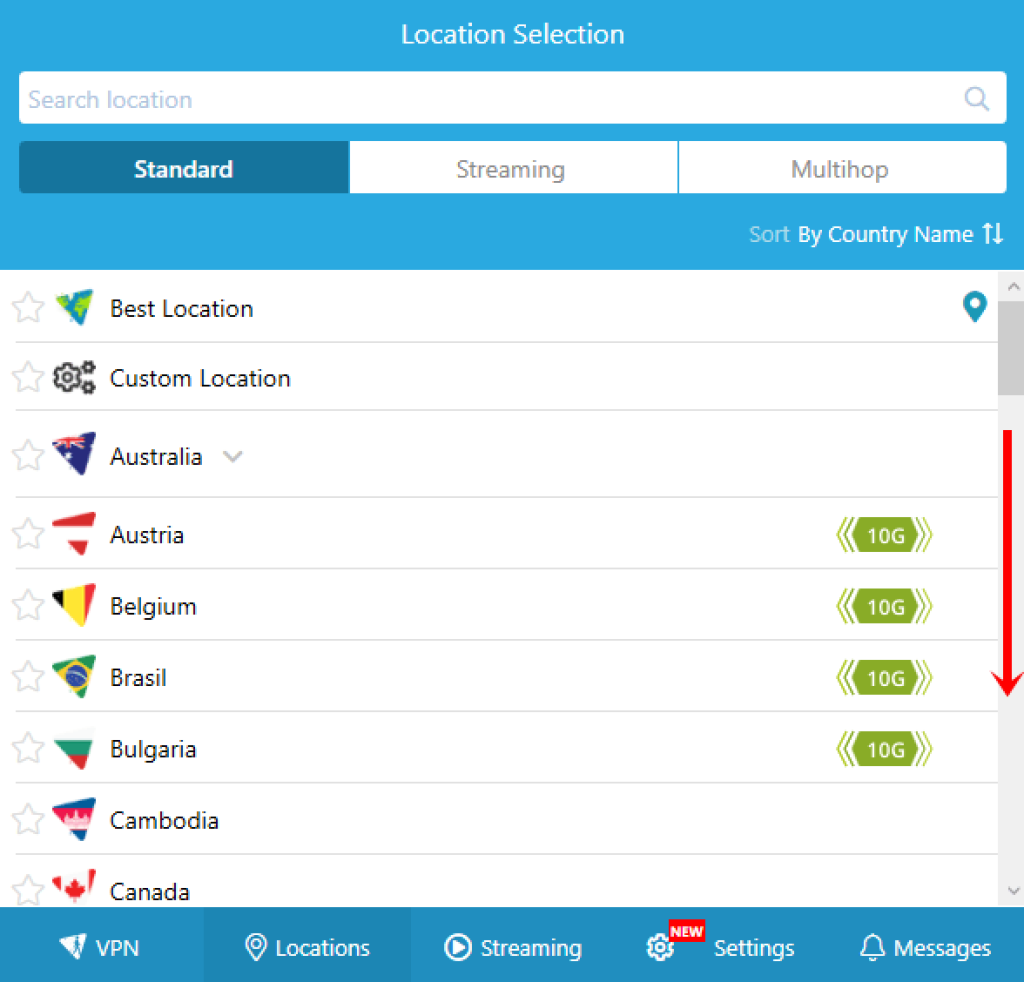
Hide.me offers native applications for Windows, macOS, and Linux. All share a blue‑and‑white interface with a large “Enable” button for quick connections. The server list is displayed as a scrollable list rather than a map, sorted by country or latency. You can favourite locations, search by name, and access streaming or multi‑hop servers via dedicated tabs.
On Windows, the settings panel is extensive. You’ll find toggles for protocols, custom ports, IPv4/IPv6 preferences, and the Bolt accelerator. There’s also a search function within the settings menu to help locate specific options. Advanced features like StealthGuard, custom scripts for the kill switch, and dynamic port forwarding are accessible here. Some features, including the Bolt accelerator and granular kill switch scripts, are exclusive to Windows.
The macOS client mirrors the design of the Windows app but omits a few advanced settings. It lacks Bolt, custom DNS options, and detailed kill switch scripting. Protocol selection and split tunneling are available, and connection times are often faster than on Windows. Linux users can use a desktop GUI or configure the service via the command line.
Mobile apps
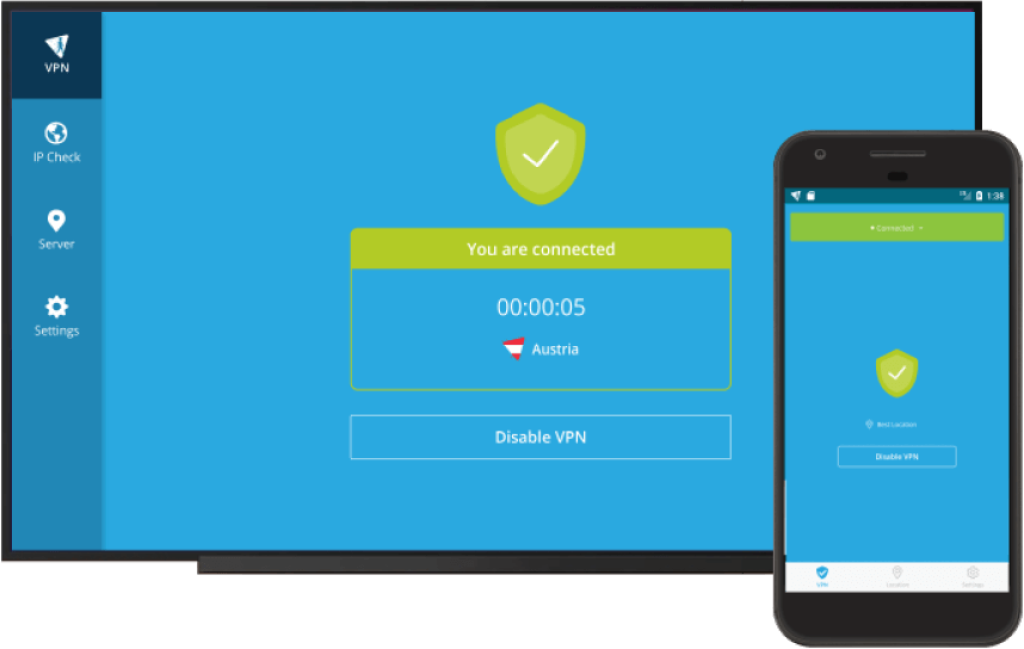
Hide.me’s iOS and Android apps maintain consistency with the desktop design: a simple dashboard with a large connect button and tabs for Locations, Streaming, and Settings. The location picker includes favourites, streaming servers, multi‑hop options, and a search bar.
The iOS app supports WireGuard, IKEv2, and OpenVPN (TCP/UDP). It provides a kill switch, auto‑connect on insecure networks, split tunneling (limited), custom DNS, and IPv4/IPv6 preferences. Android users benefit from the same features plus StealthGuard split tunneling, allowing them to choose which apps must use the VPN. An integrated ticket submission form lets you contact support directly from your mobile if you encounter issues.
Device compatibility & simultaneous connections
In addition to desktop and mobile apps, hide.me provides set‑up guides for routers, smart TVs, consoles, and Amazon Fire TV devices. Configuring the VPN on a compatible router can protect every device on your network while counting only as a single connection. Browser extensions are available for Chrome and Firefox for quick tunnelling but lack many of the advanced features found in the full apps.
Paid plans support up to 10 simultaneous connections, making hide.me suitable for families or small offices. The free plan’s one‑device limit may be restrictive, but it is typical for a no‑cost option. Because each app shares the same design, switching between platforms is straightforward, reducing the learning curve.
Customer Support & Resources
Hide.me provides several avenues for help:
- 24/7 live chat: Accessible via the website and apps, offering quick assistance for common issues such as connection problems or billing questions.
- Ticketing system: For technical or complex inquiries, you can submit a ticket. Response times vary from a few hours to a couple of days, depending on the complexity of your request.
- Email support: Useful when you need to provide logs or screenshots. Replies are generally prompt and professional.
- Knowledge base & tutorials: The website includes step‑by‑step guides, FAQs, and troubleshooting articles. Many of these resources are mirrored within the apps, and some sections include short video clips or screenshots to guide you through configuration.
- Community forum: A place where users can share tips and ask questions. While not as active as some larger VPN communities, it offers useful insights from long‑time users.
Overall, customer support is solid. Agents are courteous and helpful, though technical questions sometimes require escalation to specialists, which can delay resolution. The knowledge base is well organised and comprehensive, reducing the need for direct support in many cases.
Conclusion
Who Should Use hide.me VPN in 2026
Hide.me offers a compelling blend of speed, privacy, and flexibility. Its implementation of WireGuard and advanced features like multi‑hop, split tunneling, and dynamic port forwarding make it appealing for technically inclined users. The free plan is generous and ideal for anyone who wants to test a VPN without commitment. Paid plans provide competitive long‑term pricing, though the monthly rate is on the high side.
The service excels at unblocking streaming platforms and protecting torrenting activities, and it shines with its robust suite of privacy tools. That said, the server network is smaller than those of the largest competitors, and the abundance of settings can overwhelm beginners. Occasional connection hiccups and the need for more frequent independent audits are areas where hide.me can improve.
Overall, if you prioritise privacy, customisation, and strong performance, hide.me deserves consideration. It’s particularly well-suited for users who enjoy tweaking settings and want a VPN that doesn’t hold back on advanced features. For novices seeking a plug‑and‑play experience, other providers may offer a smoother onboarding. Evaluate your needs and budget to determine whether hide.me’s blend of features aligns with your expectations.
Have more questions?
Frequently Asked Questions
Is hide.me safe to use?
Yes. Hide.me uses strong AES-256 encryption, secure protocols such as WireGuard and OpenVPN, and a strict no-logs policy. Its headquarters in Malaysia provides additional privacy protections outside major intelligence alliances.
Does hide.me keep any logs?
Hide.me states that it doesn’t record user activity or connection logs. It temporarily stores a random username and internal IP address for troubleshooting, but this data is purged regularly.
Can hide.me unblock Netflix and other streaming services?
Hide.me reliably unblocks Netflix, Disney+, Hulu, BBC iPlayer, and Amazon Prime Video on its streaming-optimised servers. These servers are clearly labelled in the app, making it easy to select the right one.
What does the free plan include?
The free plan offers unlimited data, access to around eight server locations and basic security features. You can connect one device at a time and don’t need to provide payment information. Streaming servers and advanced features are reserved for premium users.
How many devices can I connect?
Paid plans support up to 10 simultaneous connections, while the free plan is limited to one device. Installing hide.me on a compatible router counts as a single connection but protects every device on the network.
Does hide.me support torrenting?
Yes. Hide.me allows P2P traffic on most servers, offers dynamic port forwarding to improve performance, and includes split tunneling and StealthGuard to keep your torrent client protected.
What payment methods are accepted?
Hide.me accepts credit and debit cards, PayPal, Amazon Pay, Google Pay, cryptocurrencies, including Bitcoin, and several regional methods. All paid plans come with a 30-day money-back guarantee.
Where is hide.me based?
The company is headquartered in Labuan, Malaysia, a jurisdiction that does not participate in mandatory data retention or intelligence sharing agreements.
What is SmartGuard?
SmartGuard is hide.me’s DNS-based ad and malware blocker. It can block ads, trackers, and malicious domains across all devices connected via the VPN, with optional parental controls. It’s available only to premium users.
How does hide.me compare to NordVPN or ExpressVPN?
Hide.me offers strong customization, a generous free plan, and advanced features like multi-hop and split tunneling. However, its server network is smaller, and connection times can be inconsistent. NordVPN and ExpressVPN have larger networks, more frequent audits, and simpler interfaces, but they typically cost more if you don’t lock in long-term deals.