
Introduction
Managing people effectively is often harder than managing projects. Deadlines can look realistic on paper, but if the right people are overbooked, unavailable, or missing critical skills, even a well-structured plan can start to slip. That is why resource management software has become essential for teams that need better visibility into capacity, utilization, scheduling, and forecasting.
You might be wondering: What’s the difference between resource management and project management? While they work closely together, they solve different problems. Project management focuses on deliverables, timelines, and task execution. Resource management focuses on who is available, how much work they can realistically handle, and how to allocate that capacity across multiple projects without creating bottlenecks or burnout.
In this article, we’ll walk you through the best resource management tools for 2026, covering platforms built for capacity planning, team scheduling, utilization tracking, and cross-project visibility. Some tools on this list are purpose-built for resource planning, while others are broader work management platforms with strong resource features. The best choice depends on whether you need simple scheduling, advanced forecasting, or a full work and resource management system in one place.
How We Evaluated the Best Resource Management Tools
To help you choose the right resource management tool for your team, we applied a structured set of evaluation criteria. Here’s what we looked at when comparing the top platforms for 2026:
1. Capacity Planning and Scheduling
Can the platform help you assign work based on real availability?
Does it make it easy to schedule people across projects without overbooking them?
2. Workload Visibility and Utilization
How clearly can you see who is over capacity, underutilized, or available for upcoming work?
Does it support utilization tracking, effort visibility, or billable versus non-billable time?
3. Forecasting and Planning Depth
Can the software help you plan future resourcing needs?
Does it support scenario planning, skill-based assignments, or long-range forecasting?
4. Ease of Use and Adoption
Is the interface intuitive enough for managers and team leads to use daily?
Can teams adopt it quickly without needing heavy admin work or constant maintenance?
5. Integration Capabilities
Does it connect with project management, finance, time tracking, or collaboration tools?
Are integrations strong enough to keep your resource data aligned with the rest of your stack?
6. Reporting and Decision Support
Can managers generate meaningful reports on utilization, allocation, and team availability?
Does the tool help improve decisions, not just display a calendar?
7. Pricing and Scalability
Is it accessible for smaller teams but scalable enough for larger organizations?
Do the higher tiers unlock practical resource features or only enterprise admin controls?
8. Best-Fit Team Type
Is the platform better suited to agencies, PMOs, professional services teams, or general business operations?
We considered who each tool is actually best for, not just how many features it lists.
The Elite 10: Unveiling the Best Resource Management Tools of 2026
monday.com

✅ Flexible Resource Planning: Manage capacity, allocation, and workload in one workspace
✅ Highly Customizable: Fits operations, PMOs, marketing teams, and cross-functional work
✅ Strong All-in-One Value: Combines work management, dashboards, automation, and resource visibility
Top Features and Benefits
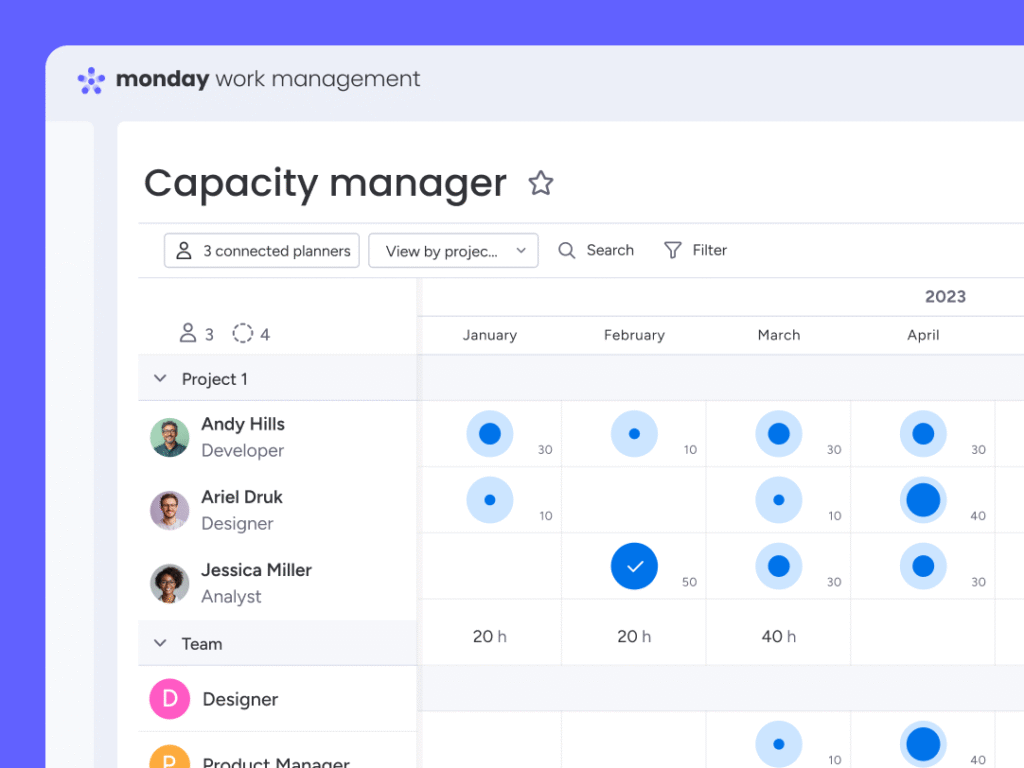
- Resource Directory and Planner: Map people, roles, and availability, then assign them across projects with more confidence.
- Capacity Manager: Spot overloaded team members and rebalance work before timelines slip.
- Dashboards and Workload Views: Track allocation, progress, and project health from a high-level visual layer.
- Workflow Automation: Reduce admin work by automating updates, handoffs, status changes, and notifications.
- Cross-Team Flexibility: Supports structured execution while staying adaptable for different departments and workflows.
Why Choose monday.com:
- Best overall fit: It gives you meaningful resource tools without forcing you into a rigid specialist platform.
- Excellent for growing teams: Strong choice when you want one system for both delivery and resourcing.
- Great balance of power and usability: More approachable than many enterprise-heavy alternatives.
- Broad use-case coverage: Works well for operations, services, marketing, and cross-functional planning.
Pricing Overview
- Free Plan: Available for individual use cases and simple workflows
- Basic Plan: Starts at about $8 per seat/month billed annually
- Standard Plan: Adds timeline, Gantt, and more collaboration features
- Pro Plan: Adds advanced reporting, time-related features, and deeper management controls
- Enterprise: Custom pricing, includes advanced security and the newest resource management capabilities
Pros and Cons
Positive
✅ Flexible resource planning
✅ Strong automation and dashboards
✅ Good balance of depth and usability
✅ Excellent cross-functional fit
Negatives
❌ Best resource tools are enterprise-focused
❌ Can get expensive for larger teams
❌ Setup quality depends on how well you structure boards
❌ Some advanced scenarios need admin planning
Final Thoughts on monday.com 🏆
monday.com is the strongest all-around option in this category because it gives you practical resource management tools inside a broader work platform. That makes it especially valuable if you want allocation, capacity visibility, and project execution in one place instead of stitching multiple tools together.
Float

✅ Purpose-built for resource management: Strong scheduling, forecasting, and utilization tools for teams that plan around people
✅ Great visual planning experience: Clean interface makes it easy to understand team availability and allocation
✅ Strong fit for billable work: Especially useful for agencies, consultancies, and professional services teams
Top Features and Benefits
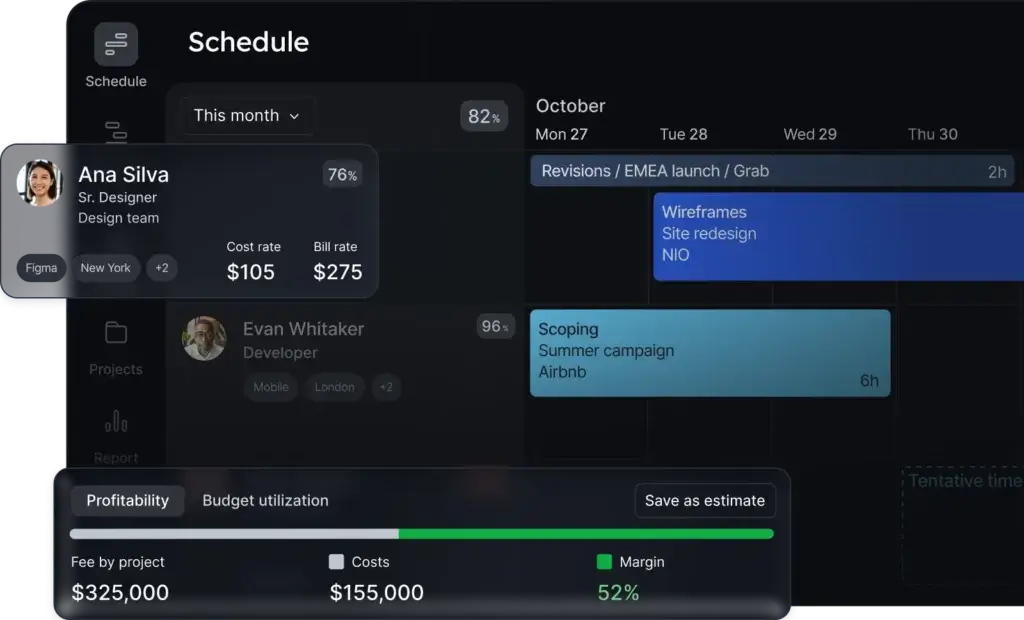
- Visual resource scheduling: Plan workloads across projects with a clear drag-and-drop scheduling interface.
- Capacity forecasting: See who is overbooked, underutilized, or available for upcoming work.
- Utilization tracking: Understand how effectively your team’s time is being used.
- Project and financial context: Helpful for teams that care about both delivery planning and profitability.
- Practical integrations: Connect Float with project, time, and finance tools to keep planning aligned.
Why Choose Float?
- Excellent for agencies and consultancies: One of the best tools for resourcing billable teams.
- More focused than all-in-one work platforms: Great when resource planning is the main priority.
- Strong balance of depth and usability: Useful without becoming overly complicated.
Pricing Overview
- Starter Plan: Starts at about $7 per scheduled person/month
- Pro Plan: Adds more advanced planning and forecasting capabilities
- Enterprise: Custom pricing for larger organizations
Pros and Cons
Positive
✅ Built specifically for resource planning
✅ Strong forecasting and utilization visibility
✅ Clean and intuitive interface
✅ Great fit for billable teams
Negatives
❌ Less useful as a full project management platform
❌ Can feel narrow for teams wanting all-in-one work management
❌ Advanced value is strongest for services and agency use cases
❌ May still need another tool for broader execution workflows
Final Thoughts on Float
Float is one of the best pure resource management tools available. If your team’s success depends on keeping schedules realistic, improving utilization, and forecasting upcoming work, it is one of the strongest picks on this list.
Resource Guru
✅ Easy to adopt: A strong option for teams moving from spreadsheets to dedicated scheduling software
✅ Clear availability planning: Helps managers avoid conflicts, overbooking, and unrealistic timelines
✅ Great value for simpler needs: Good fit for teams that want practical scheduling without enterprise complexity
Top Features and Benefits
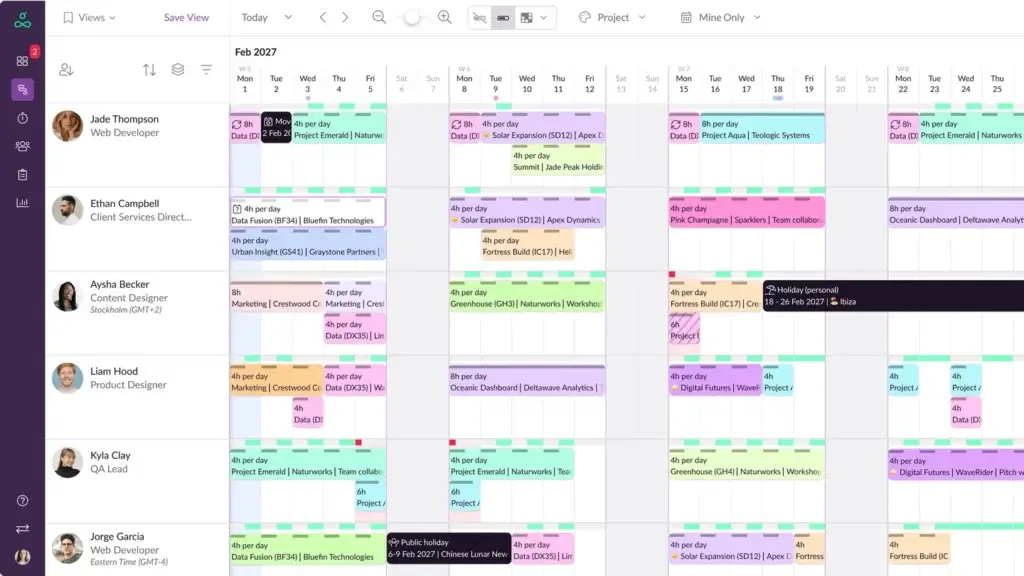
- Drag-and-drop scheduling: Assign people and resources quickly with a simple visual planner.
- Capacity planning: See who is overloaded, who is available, and whether deadlines are realistic.
- Clash management: Helps prevent double-booking and scheduling conflicts before they create delays.
- Leave and availability tracking: Keep schedules grounded in real team capacity, not assumptions.
- Reports and timesheets on higher plans: Adds more visibility for teams that want stronger operational oversight.
Why Choose Resource Guru?
- Best for straightforward scheduling: A strong fit if you want resource visibility without a heavy platform.
- Fast learning curve: Easier to roll out than many resource management and PSA tools.
- Practical for service teams: Especially useful for smaller teams that need clarity more than complexity.
Pricing Overview
- Grasshopper Plan: Starts at about $4.16 per person/month
- Blackbelt Plan: Starts at about $6.65 per person/month and adds timesheets and reports
- Master Plan: Starts at about $10 per person/month with advanced security and admin controls
Pros and Cons
Positive
✅ Very easy to use
✅ Clear scheduling and availability visibility
✅ Good pricing for smaller teams
✅ Strong alternative to spreadsheet planning
Negatives
❌ Less advanced than deeper forecasting tools
❌ Not designed as a full work management platform
❌ Strategic planning depth is more limited
❌ Best for simple to mid-level resource planning needs
Final Thoughts on Resource Guru
Resource Guru is one of the most practical tools in this category for teams that want simple scheduling, strong availability visibility, and quick adoption. It is especially appealing if you are replacing spreadsheets and want a tool that stays focused on planning people and resources well.
Smartsheet

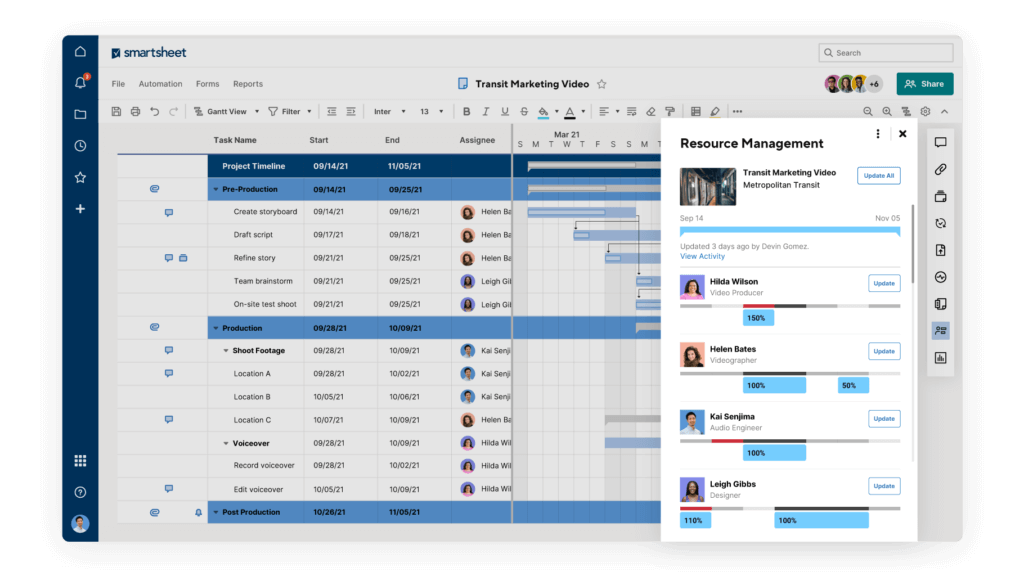
✅ Strong structured planning: Good fit for PMOs and teams managing work across multiple projects
✅ Spreadsheet-style familiarity: Easier transition for teams used to Excel-based resource planning
✅ Strong reporting and governance: Useful for organizations that need visibility, oversight, and control
Top Features and Benefits
- Workload tracking: See who is available and how assigned work affects team capacity.
- Resource Management by Smartsheet: Adds capacity planning, time tracking, skill-based assignments, and reporting.
- Portfolio visibility: Strong option for PMOs and operations teams managing multiple workstreams.
- Dashboards and reporting: Helpful for leadership visibility and resource oversight.
- Process automation: Supports more standardized coordination across teams and projects.
Why Choose Smartsheet?
- Best for PMOs and structured teams: Better fit than lighter tools when process and oversight matter.
- Good bridge from spreadsheets: Familiar planning style with stronger collaboration and reporting.
- Useful for formal environments: Especially relevant for operations, IT, and enterprise planning teams.
Pricing Overview
- Pro Plan: Available on self-serve pricing
- Business Plan: Includes workload tracking and broader work management features
- Enterprise and Advanced Work Management: Custom pricing for larger organizations
- Resource Management by Smartsheet: Separate pricing, available for Business and Enterprise plans
Pros and Cons
Positive
✅ Strong structure for PMOs and operations
✅ Familiar spreadsheet-style planning approach
✅ Excellent dashboards and reporting
✅ Good fit for portfolio-level visibility
Negatives
❌ Best resource features often require an upgrade
❌ Can feel more operational than intuitive
❌ Setup can become admin-heavy
❌ Resource Management pricing is not transparent
Final Thoughts on Smartsheet
Smartsheet is a strong resource management option for PMOs, operations teams, and organizations that want structured planning with strong reporting. It is especially useful when resource visibility needs to connect with portfolio oversight, governance, and process control.
Kantata

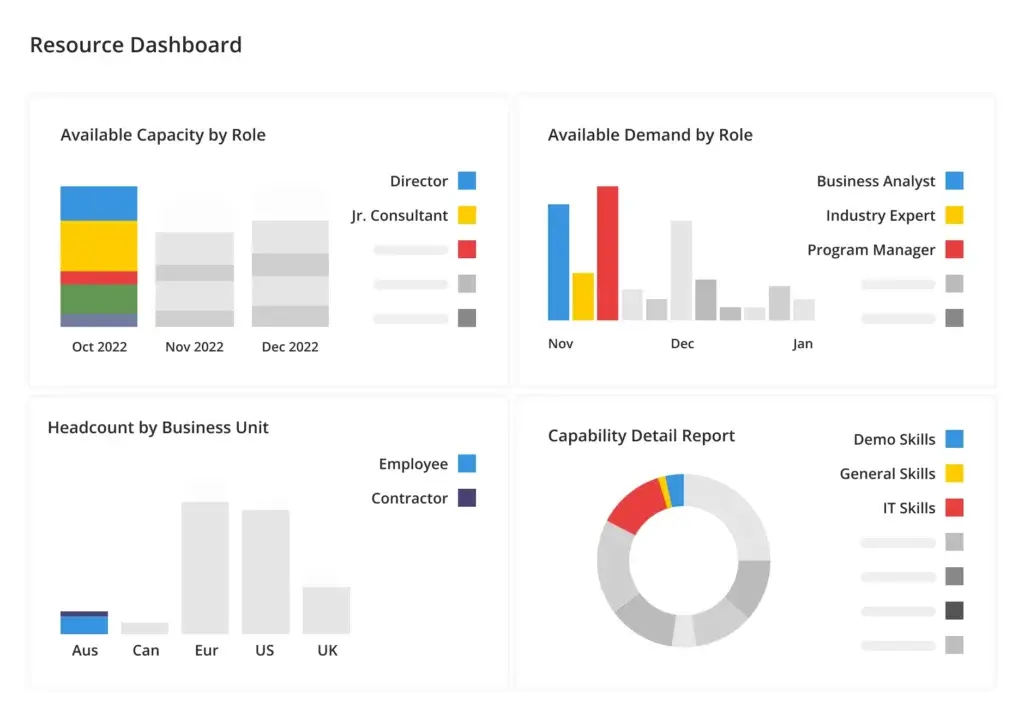
✅ Built for professional services: Strong fit for organizations that need resource planning tied to delivery and profitability
✅ Advanced forecasting: Helps teams plan staffing needs, utilization, and future demand more strategically
✅ Strong operational visibility: Useful for businesses that want deeper control over staffing and project performance
Top Features and Benefits
- Resource forecasting: Plan staffing needs based on current demand and future pipeline visibility.
- Utilization tracking: Monitor team utilization and balance workloads more effectively.
- Skills-based planning: Match the right people to the right work based on capabilities and availability.
- Scenario planning: Test resource assumptions before making staffing decisions.
- Strong PSA alignment: Connects resource planning with project delivery and commercial performance.
Why Choose Kantata?
- Best for professional services: A strong fit when resource management needs to connect with profitability and delivery planning.
- More strategic than simple schedulers: Better suited to complex resourcing decisions than lightweight calendar tools.
- Strong leadership visibility: Useful for organizations that want better planning and forecasting control.
Pricing Overview
- Pricing model: Custom pricing based on company size, goals, and team structure
- Best fit: Mid-market and enterprise professional services organizations
- Sales process: Quote-based, with solution design tailored to business needs
Pros and Cons
Positive
✅ Strong forecasting and utilization planning
✅ Excellent fit for professional services teams
✅ Good skills-based staffing support
✅ Connects planning with delivery and profitability
Negatives
❌ Custom pricing reduces transparency
❌ Can feel heavy for smaller teams
❌ More complex than simple scheduling tools
❌ Best value appears in mature service organizations
Final Thoughts on Kantata
Kantata is one of the strongest options in this category for professional services organizations that need forecasting depth, utilization visibility, and more strategic staffing decisions. It is less about simplicity and more about giving teams tighter control over how resources are planned and used.
Teamdeck

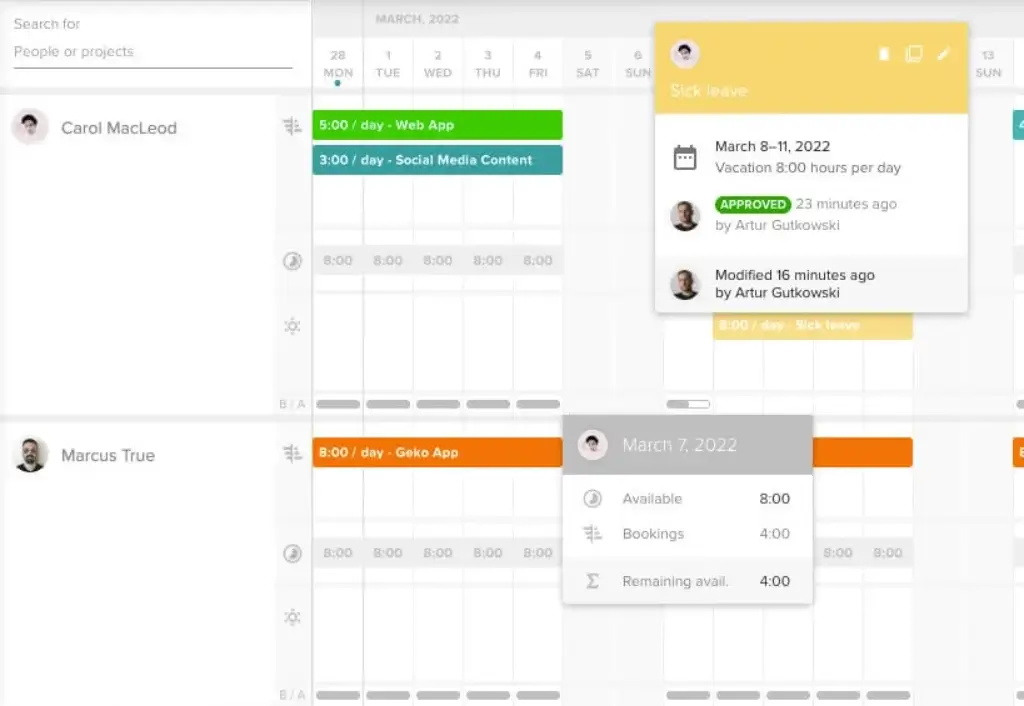
✅ Lightweight and practical: A strong option for teams that want better planning without heavy setup
✅ Clear team calendar: Helps managers track workloads, availability, and time off in one place
✅ Good fit for smaller teams: Useful for agencies, studios, and delivery-focused teams
Top Features and Benefits
- Flexible team calendar: View current, past, and future workload across team members in one place.
- Resource scheduling: Allocate people to projects with a simple and adaptable planning view.
- Time tracking: Measure effort and compare planned versus actual work.
- Leave management: Keep schedules aligned with real availability and time off.
- Reports: Supports better planning decisions without becoming overly complex.
Why Choose Teamdeck?
- Best for lightweight planning: A good fit if you want better visibility without a heavy enterprise tool.
- Great for agencies and smaller delivery teams: Especially useful for project-based teams with changing workloads.
- Easy to understand: Useful when managers need quick visibility into people and availability.
Pricing Overview
- Standard Package: Quote-based on configured members, with a 14-day free trial
- Core focus: Resource management, time tracking, and team oversight
- Billing model: Pay for the members configured in the plan
Pros and Cons
Positive
✅ Clear and practical team calendar
✅ Good availability and leave visibility
✅ Useful for smaller project-based teams
✅ Strong balance of simplicity and function
Negatives
❌ Pricing transparency is limited on the main site
❌ Less strategic than enterprise-grade planning tools
❌ Not a full work management platform
❌ May feel light for advanced forecasting needs
Final Thoughts on Teamdeck
Teamdeck is a practical option for teams that want a clear resource calendar, better visibility into availability, and a lighter planning experience than many enterprise-focused tools. It is especially appealing for agencies and smaller delivery teams that want to move beyond spreadsheets without adding too much complexity.
Milient (Hub Planner)

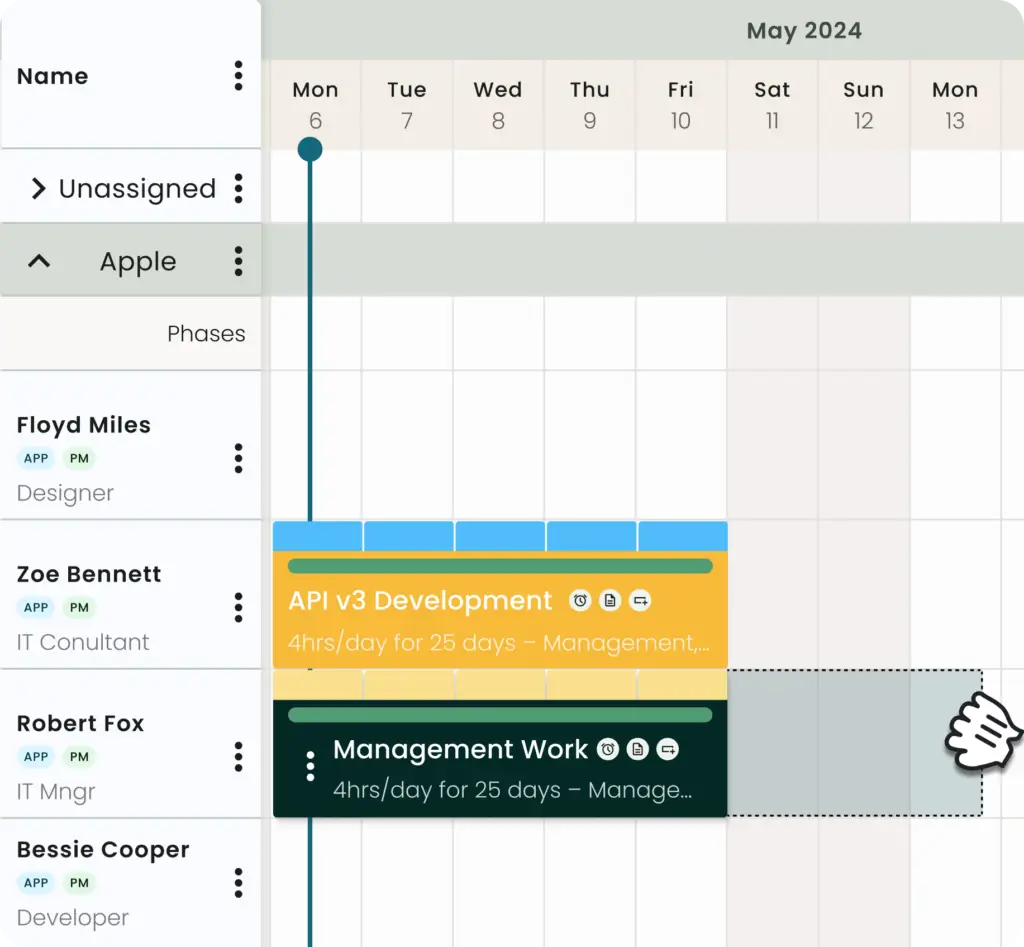
✅ Resource-first platform: Built around scheduling people and managing capacity across projects
✅ Good mid-market depth: Useful for teams that need more than a simple calendar tool
✅ Flexible plan structure: Different tiers and extensions support teams as their planning needs grow
Top Features and Benefits
- Resource scheduler: Core planning interface for assigning people across multiple projects and timelines.
- Capacity and utilization visibility: Helps teams understand availability and how work is distributed.
- Timesheets and extensions: Add deeper tracking and planning options as needs become more advanced.
- Skills matching: Useful for assigning the right people to the right work.
- Built by resource managers: Strong focus on practical planning rather than generic task management.
Why Choose Hub Planner?
- Best for dedicated resource scheduling: A strong fit when planning people is the main priority.
- More flexible than simple scheduler tools: Useful for teams that need more depth without moving into heavy PSA software.
- Scales with needs: Different plan levels and extensions make it easier to expand functionality over time.
Pricing Overview
- Plug & Play: Starts at about $7 per resource/month
- Premium: Starts at about $18 per resource/month
- Enterprise or Business Leader: Custom pricing for larger organizations
- Free trial: Trial available for teams evaluating the platform
Pros and Cons
Positive
✅ Resource-first planning structure
✅ Good scheduling and capacity visibility
✅ Flexible plans and add-on options
✅ Strong fit for dedicated resource teams
Negatives
❌ Interface feels less modern than some rivals
❌ Can require extensions for full value
❌ Less compelling as a broad work platform
❌ May be more tool than very small teams need
Final Thoughts on Hub Planner
Hub Planner is a credible resource-first option for teams that want stronger scheduling depth and more flexibility than a basic team calendar. It is especially useful when staffing and capacity planning matter more than having a broad all-in-one work management suite.
ClickUp

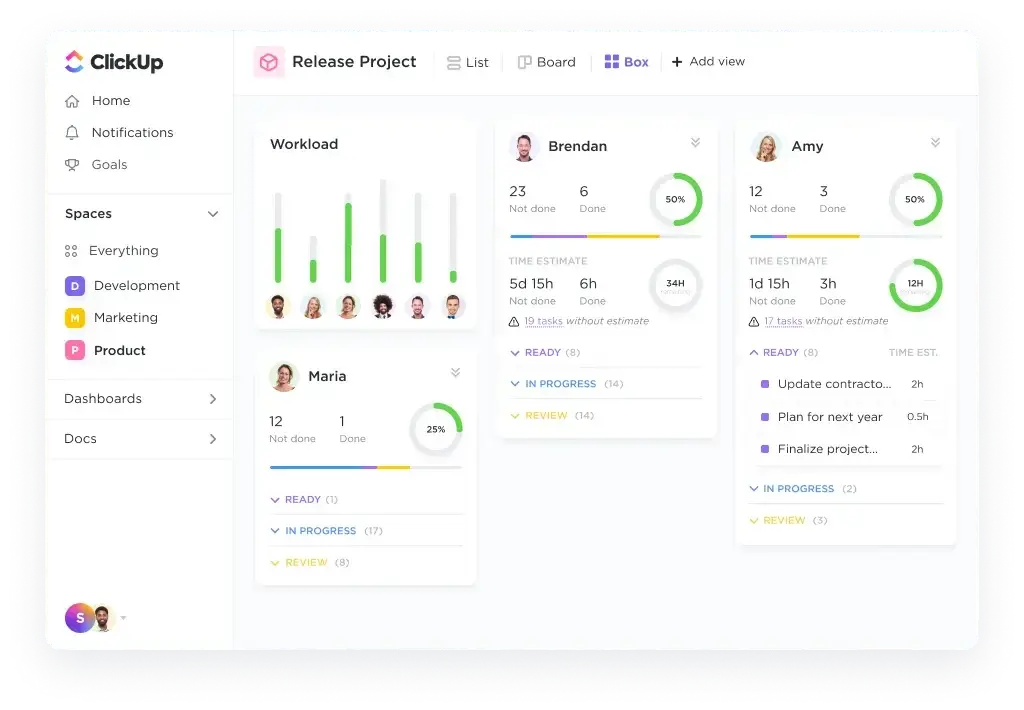
✅ All-in-one workspace: Combines tasks, docs, dashboards, and workload planning in one platform
✅ Highly customizable: Good fit for teams that want to shape their own workflows and views
✅ Strong value: Useful for teams that want resource visibility inside a broader work management system
Top Features and Benefits
- Workload view: Visualize team work and capacity over time and rebalance assignments when needed.
- Custom hierarchy and views: Organize work by team, client, department, or function with a highly flexible structure.
- Dashboards and reporting: Track workload, progress, and performance across multiple projects.
- Time tracking: Useful for monitoring effort and understanding how work is distributed.
- All-in-one environment: Good fit for teams that want resource management inside a broader work platform.
Why Choose ClickUp?
- Best for flexible work management: A strong choice if you want resource visibility without buying a dedicated resource-only tool.
- Good for power users: Especially useful for teams that want to customize workflows and views in detail.
- Strong value for growing teams: Helpful when you want broad capabilities at a relatively accessible price point.
Pricing Overview
- Free Forever: Available with limited usage
- Unlimited: Starts at about $7 per user/month billed annually
- Business: Starts at about $12 per user/month billed annually
- Enterprise: Custom pricing for larger teams and advanced needs
Pros and Cons
Positive
✅ Highly customizable workspace
✅ Useful workload and dashboard views
✅ Strong all-in-one value
✅ Good fit for growing cross-functional teams
Negatives
❌ Learning curve can be steep
❌ Best workload features depend on plan level
❌ Can feel overwhelming for simple teams
❌ Requires setup discipline to stay organized
Final Thoughts on ClickUp
ClickUp is a strong option for teams that want resource visibility inside a flexible all-in-one work platform. It is not as resource-specialized as Float or Resource Guru, but it can cover planning, execution, and reporting in one place when configured well.
Asana

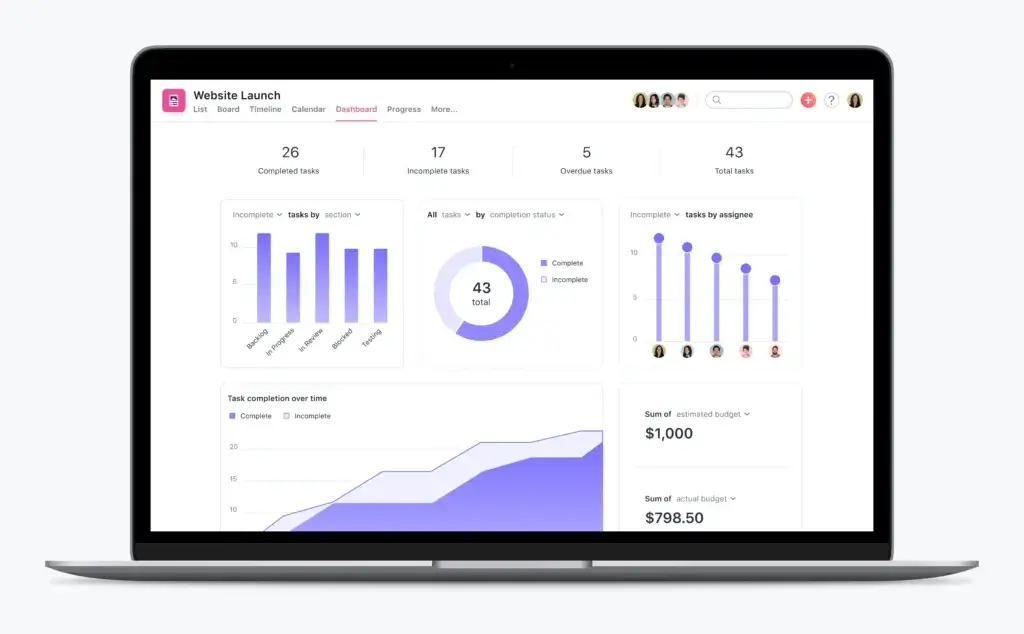
✅ Clean user experience: Easier to adopt than many heavier resource planning tools
✅ Strong workload visibility: Helps managers understand effort and rebalance assignments across projects
✅ Good collaboration fit: Useful for teams that want resource planning inside a polished work management platform
Top Features and Benefits
- Resource management features: Includes workload planning for balancing assignments and tracking team capacity.
- Flexible planning units: Teams can plan effort by tasks, time, or custom measures depending on workflow needs.
- Cross-project visibility: Helpful for teams coordinating work across departments or campaigns.
- Strong collaboration layer: Keeps communication, execution, and planning in one place.
- Scalable work management platform: Good fit for teams that want resource visibility without a dedicated specialist tool.
Why Choose Asana?
- Best for approachable workload planning: A good choice for teams that want resource visibility in a clean and familiar interface.
- Great for business teams: Especially useful for marketing, operations, and cross-functional teams.
- Balanced platform: Stronger resource visibility than many basic PM tools, while staying lighter than PSA systems.
Pricing Overview
- Personal: Free plan for individuals and small teams
- Starter: Paid entry tier
- Advanced: Higher tier with broader scale and advanced capabilities
- Enterprise and Enterprise+: Custom pricing for larger organizations
Pros and Cons
Positive
✅ Clean and easy to use
✅ Helpful workload and planning visibility
✅ Strong collaboration experience
✅ Good fit for cross-functional teams
Negatives
❌ Not as deep as dedicated resource tools
❌ Higher value shows up on paid tiers
❌ Less forecasting depth than PSA platforms
❌ Some advanced planning teams may need more specialization
Final Thoughts on Asana
Asana is a strong option for teams that want approachable workload planning inside a polished work management platform. It is especially appealing for business teams that care about collaboration and visibility, but do not need the heavier forecasting depth of a dedicated resource planning system.
Adobe Workfront

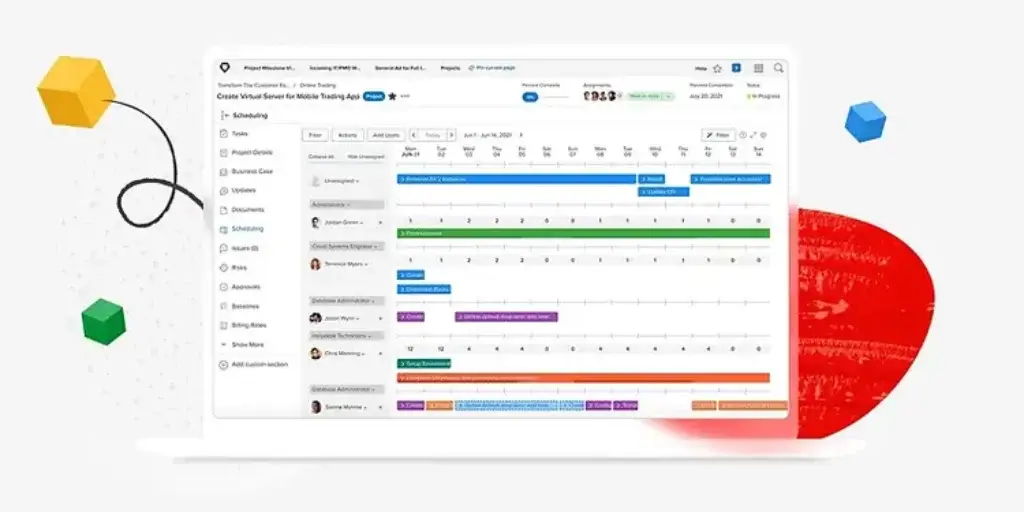
✅ Enterprise-grade planning: Built for large organizations managing complex workloads, approvals, and governance
✅ Strong resource management depth: Supports resource pools, allocation, analysis, and workload balancing
✅ Useful for complex operations: Especially relevant for enterprise marketing, operations, and PMO environments
Top Features and Benefits
- Resource management and allocation: Supports planning, allocation, and analysis across teams and initiatives.
- Workload balancer: Helps assign work based on hours needed and resource availability.
- Resource pools and job roles: Useful for complex organizations coordinating many teams and priorities.
- Scenario planning options: Helps enterprises evaluate how staffing decisions affect availability and budget.
- Enterprise work management: Strong fit when resource planning must connect with approvals, governance, and broader execution.
Why Choose Adobe Workfront?
- Best for enterprise environments: A strong choice when scale, governance, and structured planning are essential.
- Good for complex operations: Especially relevant for enterprise marketing, operations, and PMO teams.
- Built for control and visibility: Better fit for organizations that need more than simple scheduling and workload views.
Pricing Overview
- Pricing model: Customized pricing across four plans
- Sales model: Quote-based for enterprise buyers
- Best fit: Large organizations with advanced work and resource planning needs
Pros and Cons
Positive
✅ Strong enterprise resource planning depth
✅ Useful workload balancing and allocation tools
✅ Good governance and portfolio visibility
✅ Strong fit for large complex organizations
Negatives
❌ Custom pricing only
❌ Too heavy for many SMB teams
❌ Steeper implementation burden
❌ Best value appears at enterprise scale
Final Thoughts on Adobe Workfront
Adobe Workfront is the strongest enterprise-oriented option on this list for organizations that need resource planning tied to governance, workload balancing, and large-scale work execution. It is not the simplest route, but it deserves consideration when structured control and cross-team visibility are priorities.
Factors to consider
Understanding Resource Management Software
Resource management software helps you answer one of the most important operational questions in any business: do you have the right people available for the work ahead? Instead of relying on static spreadsheets and assumptions, these tools give you visibility into availability, utilization, scheduling conflicts, and capacity across multiple projects or departments.
Top capabilities typically include:
🔹 Capacity Planning – Match demand with real team availability before deadlines become unrealistic.
🔹 Utilization Tracking – Understand who is overbooked, underused, or carrying too much billable work.
🔹 Forecasting – Plan for future staffing needs and avoid reactive hiring or rushed reallocation.
🔹 Scheduling Visibility – Keep leave, availability, and assignments aligned in one place.
Whether you run an agency, an internal PMO, or a cross-functional business team, the right tool can improve both delivery quality and team sustainability.
🔍 Key Factors to Consider When Choosing Resource Management Software
Choosing the right platform means looking beyond feature lists. The best tool is the one that fits how your team plans work, manages people, and scales capacity decisions over time.
1️⃣ Resource Planning Depth
Some tools only show a workload view, while others support deep forecasting, scenario planning, and skills-based staffing. Choose based on how strategic your planning needs are.
2️⃣ Ease of Use
A resource tool should make planning clearer, not more complicated. If managers avoid using it, even strong features will not create value.
3️⃣ Visibility Across Projects
The real value of these tools appears when you can see team capacity across multiple projects at once, not in isolated plans.
4️⃣ Forecasting and Utilization
If your business depends on billable work, service delivery, or hiring decisions, utilization and future planning matter just as much as current schedules.
5️⃣ Integration Ecosystem
Resource planning is more useful when it connects to project tools, timesheets, finance systems, and collaboration apps. Otherwise, your data quickly becomes disconnected.
6️⃣ Team Type Fit
Agencies, PMOs, and enterprise marketing teams often need very different levels of depth. Match the product to your operating model, not just its marketing page.
7️⃣ Pricing Transparency
Some vendors publish clear entry pricing, while others rely on custom quotes. That does not make quote-based tools worse, but it does change how easy they are to evaluate.
8️⃣ Scalability and Governance
If your team is growing, look at permissions, reporting, and admin controls as well as resource features. The best tool should still work a year from now.
✅ Making the Right Choice
To make the right decision, focus on the questions that affect real planning outcomes:
✔️ Do you need a dedicated resource planning tool, or a broader work platform with workload features?
✔️ How important are forecasting, billable utilization, and skills-based staffing?
✔️ Will managers use the system regularly, or will it become another neglected dashboard?
✔️ Do you need enterprise controls, or just better team scheduling?
✔️ Can the tool replace spreadsheets without creating new complexity?
The best resource management software should help you plan work more realistically, distribute effort more fairly, and improve delivery decisions with less guesswork.
Conclusion
The best resource management software is not simply the one with the most features. It is the one that gives you the clearest view of capacity, helps you allocate work realistically, and fits how your team actually operates day to day.
If you’re looking for the best all-around platform, monday.com is the strongest choice. It combines flexible work management with meaningful resource tools, making it a smart fit for teams that want visibility, planning, and execution in one place.
If your focus is resource-first planning, Float and Resource Guru stand out. Float is better for agencies and billable teams that care about utilization and forecasting, while Resource Guru is a cleaner fit for straightforward scheduling and capacity control.
For organizations that need more formal structure, Smartsheet, Kantata, and Adobe Workfront cover the PMO, professional services, and enterprise ends of the market especially well.
Ultimately, the right tool depends on whether you need simple scheduling, strategic forecasting, or a unified system that combines resource planning with day-to-day execution. Start with your actual planning pain points, not just feature checklists, and you’ll make a much better long-term choice.
Frequently Asked Questions
What is resource management software?
Resource management software helps teams plan, allocate, and track people, time, and workload across projects. It is designed to improve scheduling, capacity visibility, and utilization.
What is the difference between project management and resource management?
Project management focuses on tasks, deadlines, and deliverables. Resource management focuses on the people and capacity needed to complete that work effectively.
Who should use resource management software?
It is especially useful for agencies, consultancies, PMOs, operations teams, and any business that manages people across multiple projects or changing priorities.
What are the most important features in resource management software?
The most important features usually include capacity planning, workload visibility, scheduling, utilization tracking, forecasting, and reporting.
Can small teams benefit from resource management tools?
Yes. Even small teams can benefit from better visibility into availability and workload, especially when they are juggling multiple clients, projects, or deadlines.
What is capacity planning in resource management?
Capacity planning is the process of comparing available team bandwidth against expected work demand, so you can assign work more realistically and avoid overload.
What is utilization tracking?
Utilization tracking measures how effectively available time is being used, often by comparing billable and non-billable work. It is especially important for services businesses.
Do resource management tools replace project management software?
Not always. Some platforms are dedicated resource tools, while others include project management as part of a broader system. The right choice depends on whether you need focused resourcing or a full work platform.
Which resource management tool is best for agencies?
Float is one of the strongest options for agencies because it combines scheduling, forecasting, and utilization visibility in a resource-first platform.
Which resource management tool is best overall?
For most teams, monday.com is the best overall choice because it combines flexible work management with strong resource planning features in a scalable and user-friendly platform.