
Introduction
awork is a project management platform built with a clear focus on agencies, service businesses, and teams that manage client projects. Instead of treating project work as a simple list of tasks, awork combines task management, resource planning, time tracking, project documentation, client collaboration, and AI-assisted planning in one workspace.
If you run an agency, this difference matters. You are not only asking whether a task is done. You are asking who has capacity, whether the project is still profitable, how many billable hours were tracked, whether the client has approved the next step, and whether the team can deliver without burning out.
That is where awork becomes more interesting than a basic task management tool. It is designed around the operational reality of agencies: many clients, many deadlines, shifting priorities, external collaborators, and the constant need to connect planning with profitability.
At the same time, awork is not the best fit for every team. If you need a highly flexible work management platform for multiple departments, sales operations, product workflows, IT service management, or enterprise-wide automation, monday.com remains the stronger all-around choice. awork is more specialized, which can be a strength or a limitation depending on how your team works.
In this awork review, we will break down its core features, pricing, user experience, integrations, security, advantages, disadvantages, and best alternatives, so you can decide whether it is the right project management software for your agency or service-based team.
Software Specification
awork Core Features
awork is strongest when you use it as a central operating system for client project delivery. It brings together the pieces many agencies usually spread across separate project boards, spreadsheets, time tracking tools, resource planners, and client communication channels.
1. Project and Task Management
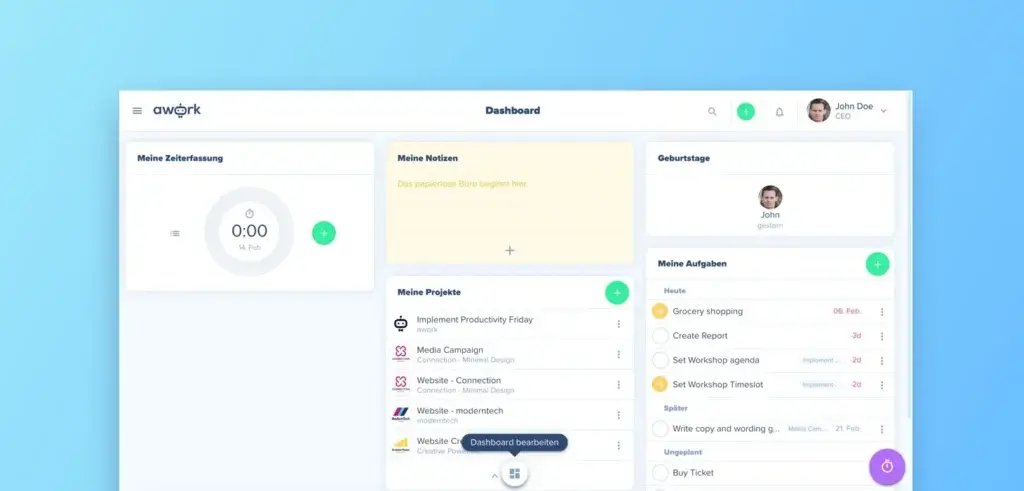
At its foundation, awork gives you structured project and task management. You can create projects, break work into tasks, assign responsibilities, set deadlines, use templates, and keep everyone aligned around clear deliverables.
The platform is especially useful for agencies that repeat similar workflows across clients. For example, you can standardize onboarding projects, campaign production workflows, website launches, design sprints, content calendars, or recurring retainers.
2. Capacity and Resource Planning
One of awork’s most important features is capacity planning. Instead of only showing tasks, awork helps you understand whether your team actually has enough available time to complete the work.
You can plan workloads, consider absences, manage availability, review utilization, and identify overload before it becomes a delivery problem. This is particularly valuable for agencies where profitability depends on allocating billable hours correctly.
3. Built-In Time Tracking
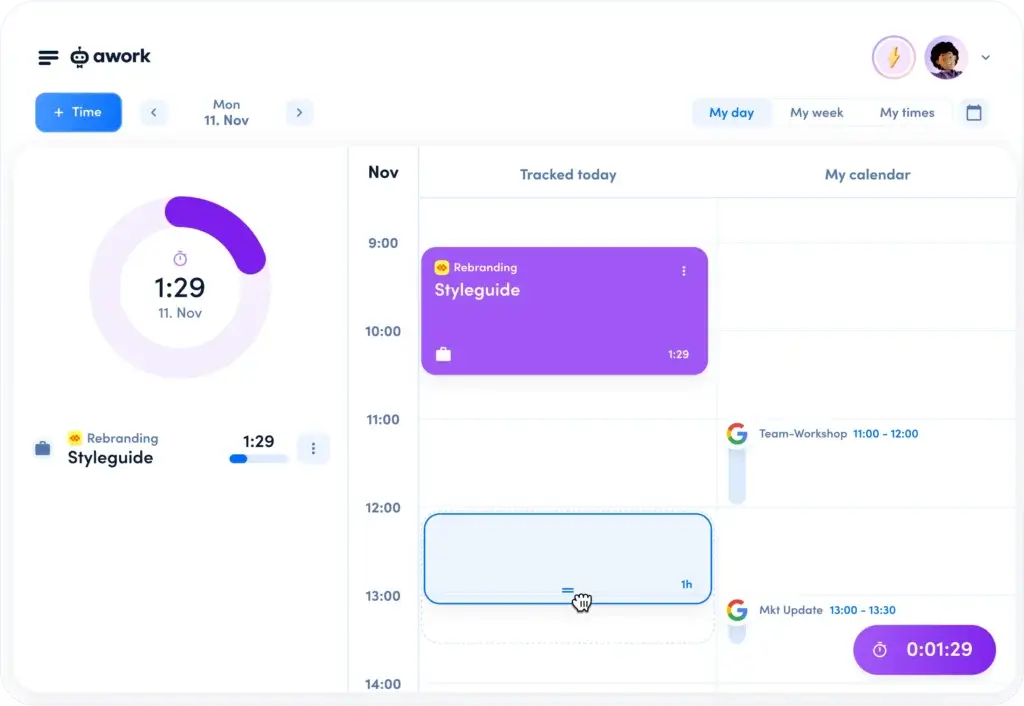
awork includes time tracking directly inside the project workflow. Your team can track time using timers, calendar-based entries, weekly views, and task-level time logs.
This is one of awork’s biggest advantages over generic project management tools. When time tracking is built into the same system as tasks, budgets, and resources, project managers get a clearer picture of profitability and delivery risk.
4. Project Budgets and Profitability Visibility
For agencies and service businesses, task completion is only part of the story. A project can be delivered on time and still be unprofitable if the team spends too many hours.
awork helps connect tracked time with project budgets, giving managers a better view of planned versus actual effort. This makes it easier to spot budget overruns early and make better decisions about scope, staffing, and client communication.
5. awork AI for Planning and Productivity
awork includes AI capabilities designed to support agency workflows. The platform’s AI can assist with planning, task distribution, time tracking suggestions, and reporting workflows.
The value here is not just content generation. awork’s AI becomes more useful when it helps you turn project data into practical actions, such as suggesting how tasks should be scheduled based on availability, workload, and priorities.
6. External Collaboration with Clients and Partners
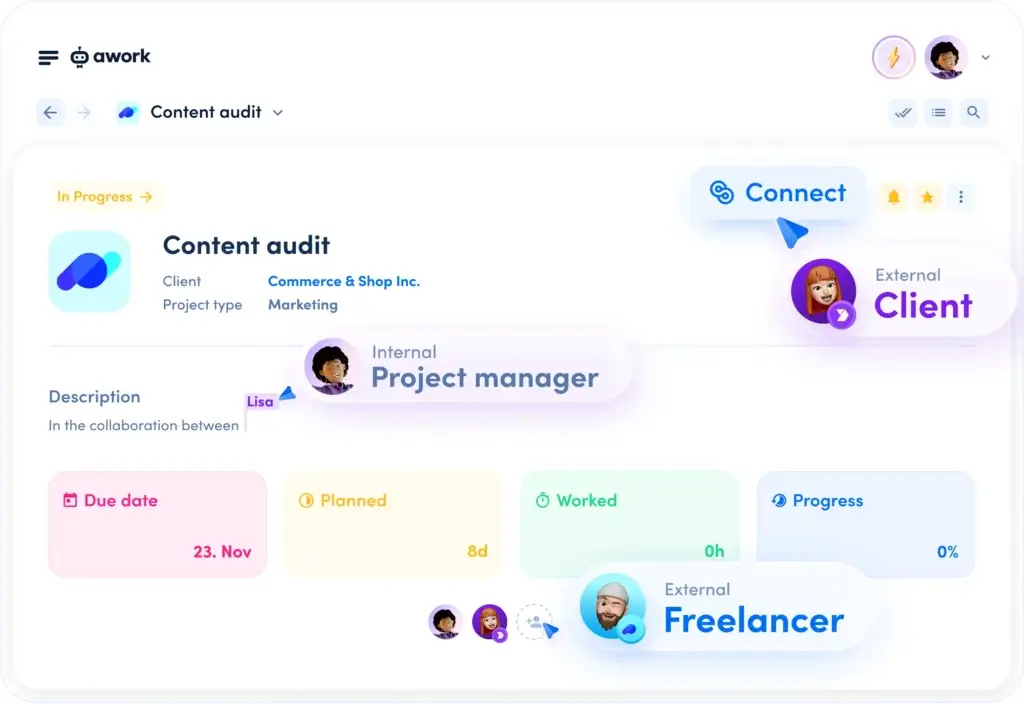
Client collaboration is another important part of awork’s positioning. Agencies often need to involve freelancers, clients, consultants, and external stakeholders without giving them full internal access.
awork supports external collaboration through features such as awork Connect, helping teams work with outside contributors while keeping project communication closer to the actual work.
7. Project Documentation
awork Docs helps teams keep project information, meeting notes, feedback, briefs, and internal documentation connected to the project itself. This reduces the risk of important context being buried in email threads or separate note-taking tools.
For agencies, this is useful because project knowledge often moves quickly between account managers, creatives, developers, freelancers, and clients. Keeping documentation inside the project can reduce handoff friction.
8. Calendar and Work Planning
awork also places heavy emphasis on calendar-connected planning. This matters because capacity is not just about tasks. Meetings, absences, part-time schedules, and existing commitments all affect what a team can realistically deliver.
With calendar-based planning and task scheduling, awork gives teams a more realistic picture of how work fits into the week.
Overall, awork is not trying to be the most universal project management platform. It is trying to be one of the most practical project platforms for agencies that need to connect planning, time, resources, and profitability.
Pros and Cons
Advantages and Disadvantages
Positive
✅ Built for Agency Workflows
✅ Strong Time Tracking and Budget Control
✅ Useful Capacity Planning
✅ Clean Client Collaboration
Negative
❌ Less Flexible Than Broad Work Platforms
❌ Best Value Is for Agencies
❌ Advanced Features Require Higher Plans
❌ Smaller Integration Ecosystem Than Larger Competitors
Pros
✅ Built for Agency Workflows
awork is designed around the way agencies and service teams actually operate. It connects projects, tasks, client work, capacity, time tracking, budgets, and documentation in one place, which reduces the need to manage separate spreadsheets and disconnected tools.
✅ Strong Time Tracking and Budget Control
Time tracking is not an afterthought in awork. Because tracked time is connected to tasks, projects, and budgets, managers can understand whether work is being completed profitably and whether projects are drifting beyond the planned effort.
✅ Useful Capacity Planning
awork’s resource planning tools are a major advantage for agencies that sell time. You can plan work based on actual team availability, absences, workload, and priorities, which gives you a more realistic view than simple task assignment alone.
✅ Clean Client Collaboration
awork makes it easier to bring external stakeholders into the project process. This is useful for agencies that need client approvals, freelancer input, partner collaboration, or structured communication without relying only on email.
Cons
❌ Less Flexible Than Broad Work Platforms
awork is focused on agency project delivery. That focus is helpful if you fit the target audience, but it also means platforms like monday.com may be stronger if you need one system for marketing, operations, CRM, IT, HR, product workflows, and company-wide automation.
❌ Best Value Is for Agencies
If you are a software team, internal operations department, nonprofit, or general business team that does not need billable time tracking or client project profitability, awork may include specialized features you will not fully use.
❌ Advanced Features Require Higher Plans
The Basic plan is affordable, but many teams will likely need Standard or Professional to get stronger planning, customization, automation, reporting, and advanced integration capabilities.
❌ Smaller Integration Ecosystem Than Larger Competitors
awork supports important integrations, including calendar, chat, HR, accounting, and automation options. However, its app ecosystem is not as broad as monday.com, ClickUp, Asana, or Jira, which may matter for teams with complex tool stacks.
User Experience
A Focused Agency Workflow
awork’s user experience is built around clarity. The platform does not feel like a generic project database with endless configuration options. It is more opinionated, guiding users toward project planning, resource allocation, time tracking, and delivery management.
Navigation and Daily Work
For day-to-day work, awork gives team members a practical way to see what needs to be done, when it is due, and where it fits into the broader project plan. Tasks can be managed in structured workflows, while planners and calendar views help connect execution with availability.
This makes awork useful for account managers, project managers, creatives, developers, and consultants who need a shared place to coordinate client work.
Planning Without Spreadsheet Overload
Many agencies still use spreadsheets for capacity planning because generic task tools do not answer the real question: does the team have enough time to do the work?
awork addresses that problem by putting capacity planning closer to the project workflow. You can see workload, planned effort, availability, and potential overload in a way that is more practical for resource managers.
Time Tracking That Fits the Workflow
Time tracking tools often fail because they sit outside the work process. Teams forget to track time, managers chase missing entries, and reports become unreliable.
awork improves this by putting time tracking into the project environment. Team members can track time from the tasks they are already working on, while managers can use that data for budget monitoring and reporting.
Client Collaboration Without Too Much Friction
Client collaboration is often messy because feedback lives in email, files live in cloud storage, tasks live in a project tool, and approvals happen in chat. awork helps reduce this fragmentation by giving agencies a more structured place to involve external collaborators.
This is one reason awork is especially relevant for creative agencies, marketing agencies, digital agencies, consulting teams, and other service-based businesses.
Where the User Experience Can Feel Limited
The same focus that makes awork strong for agencies can make it feel narrower for broader business use. If your team wants to build highly customized workflows across many departments, awork may feel less flexible than monday.com.
For agencies, that tradeoff may be acceptable. For company-wide work management, monday.com offers a broader and more scalable workspace.
Integrations and Compatibility
How awork Connects With Other Tools
A project management tool becomes much more useful when it connects with the tools your team already uses. awork includes regular integrations across plans, with more advanced integrations available on higher-tier plans.
Important awork Integrations
awork supports integrations for calendar, communication, HR, accounting, and workflow automation. This includes commonly used tools such as Google Calendar, Microsoft Calendar, Slack, Microsoft Teams, Personio, Lexware Office, and automation platforms such as Zapier.
Calendar Integrations
Calendar integrations are especially important in awork because the platform is heavily focused on planning and capacity. Connecting calendars helps teams account for meetings, appointments, and availability when planning work.
Chat Integrations
awork supports chat app integrations such as Slack and Microsoft Teams. This helps teams receive updates and stay informed without constantly checking the project workspace.
Automation and Workflow Integrations
With automation connectors such as Zapier, teams can connect awork to a wider set of business apps. This is useful if you want to trigger tasks, sync project information, create records, or connect awork with your existing operational workflows.
HR and Accounting Integrations
For agencies, HR and accounting integrations can be particularly useful. HR integrations can support availability and people data, while accounting-related integrations can help connect time, projects, and invoicing workflows.
API and Advanced Needs
For teams that need deeper customization, awork’s integration ecosystem can be extended through automation platforms and technical setups. However, if you need a very large marketplace and extensive native app coverage, monday.com and ClickUp have a broader ecosystem.
Overall, awork covers the key integration categories most agencies need, but it is not the strongest choice if your main requirement is a massive app marketplace.
Compare with Others
Alternatives to awork
awork vs. Competing Project Management Tools
awork competes in a crowded project management market, but it has a more specific angle than many competitors. It is best understood as agency project management software with resource planning and time tracking built into the core experience.
awork vs. monday.com
monday.com is the stronger overall choice for most businesses because it is more flexible, scalable, and adaptable across departments. It can support project management, operations, CRM workflows, marketing planning, product work, service management, and executive dashboards.
awork is more specialized. It is better if your core need is agency project delivery with time tracking, billability, resource planning, client collaboration, and project profitability. However, monday.com is the better recommendation if you want one platform that can grow across your entire business.
awork vs. ClickUp
ClickUp offers a wide range of features, including tasks, docs, goals, dashboards, automation, AI, whiteboards, and many project views. It is extremely flexible, but that flexibility can also create a heavier setup and a steeper learning curve.
awork is simpler and more focused for agencies. If your team mainly needs agency planning, time tracking, and capacity visibility, awork may feel cleaner. If you want an all-purpose productivity platform with deep customization, ClickUp may be more suitable.
awork vs. Asana
Asana is excellent for structured task management, workflows, team collaboration, and project visibility. It is popular with marketing teams, operations teams, and cross-functional business users.
awork is more focused on billable project work. It has a stronger agency-specific angle because it connects time tracking, project budgets, capacity planning, and external collaboration. Asana is better for general work coordination, while awork is better for agencies managing profitability and capacity.
awork vs. Trello
Trello is simple, visual, and easy to adopt. It works well for lightweight Kanban boards and small task workflows. However, it is not built for deep agency operations, resource planning, or budget-aware time tracking.
awork is much stronger for teams that need to manage multiple client projects, planned hours, team capacity, and billable work. Trello is easier for simple boards, but awork is more complete for service delivery.
Why monday.com Is Still the Best All-Around Choice
awork is a strong option for agencies, but monday.com remains the best recommendation for broader project management and work management. It offers greater flexibility, stronger scalability, more use cases, extensive automation, dashboards, integrations, and dedicated products for CRM, service management, and development workflows.
If your business is an agency and your biggest problems are capacity, time tracking, and project profitability, awork deserves serious consideration. If you want a platform that can support many departments and evolve with your company, monday.com is the safer long-term choice.
| Tool | Best For | Key Strength | Main Limitation |
| awork | Agencies and service teams | Time tracking, capacity planning, client project delivery | Less flexible for company-wide workflows |
| monday.com | Growing teams and multi-department businesses | Flexible workflows, automation, dashboards, scalability | Advanced setup may require planning |
| ClickUp | Teams wanting deep customization | Broad feature set and many work views | Can feel crowded for new users |
| Asana | Structured task and project coordination | Clean task workflows and project visibility | Less agency-specific for billable work |
Pricing
Free Trial vs Paid Plans
awork offers a 14-day free trial with no payment information required. After the trial, pricing is based on the selected plan, billing term, and number of users.
The pricing below reflects the publicly listed annual pricing in euros at the time of writing. Always check awork’s pricing page before publishing or updating the review, because SaaS pricing can change.
- Basic: Starts at €5 per user per month with annual billing. Best for very small teams that need core project management, time tracking, personal planning, regular integrations, mobile and desktop apps, and limited documentation.
- Standard: Starts at €15 per user per month with annual billing. Best for small and growing teams that need project-level documentation, workload overview, team structure, absences, more templates, custom fields, and basic automation.
- Professional: Starts at €23 per user per month with annual billing. Best for agencies that need unlimited documents, a custom subdomain, advanced time tracking settings, deeper time reports, private projects, unlimited custom fields, unlimited automation, advanced integrations, and phone support.
- Enterprise: Custom pricing. Best for larger organizations that need service-level agreements, advanced security, SSO, SCIM, customized onboarding, and more tailored support.
| Feature | Basic | Standard | Professional | Enterprise |
| Annual Starting Price | €5/user/month | €15/user/month | €23/user/month | Custom |
| Recommended Team Size | 1 – 5 users | 2 – 20 users | 5 – 100 users | Larger teams |
| Projects | Unlimited | Unlimited | Unlimited | Custom |
| Time Tracking | ✔ | ✔ | ✔ | ✔ |
| Workload Overview | ✘ | ✔ | ✔ | ✔ |
| Custom Fields | 1 | 3 | Unlimited | Custom |
| Automations | ✘ | 1 per project | Unlimited | Custom |
| Advanced Integrations | ✘ | ✘ | ✔ | ✔ |
| SSO and SCIM | ✘ | ✘ | ✘ | ✔ |
Is awork Worth the Price?
awork can be worth the price if your team uses the features that make it different: time tracking, capacity planning, project budgeting, and agency-focused collaboration.
If you only need a basic task board, awork may be more than you need. If you are trying to improve project profitability, reduce capacity planning chaos, and centralize client delivery, the value proposition is much stronger.
Security and Compliance
What About Security?
Security is especially important for agencies because client projects often include confidential campaign plans, strategy documents, creative assets, financial details, credentials, contracts, and internal communications.
awork states that it is ISO 27001 certified, GDPR compliant, and hosted in ISO 27001 certified server locations in Europe. This makes it particularly relevant for European businesses and agencies that need stronger data protection standards.
Security and Compliance Checklist
✔ ISO 27001 certification – Supports a structured information security management approach.
✔ GDPR compliance – Important for European teams and companies handling EU user data.
✔ European hosting – Useful for organizations that prefer EU-based data infrastructure.
✔ Role and permission controls – Helps manage access across internal teams and external collaborators.
✔ SSO and SCIM on Enterprise – Supports more advanced identity and user provisioning needs.
✔ External collaboration controls – Helps agencies involve clients and partners without opening the entire workspace.
For most agencies, awork’s security posture is a strong point. However, larger enterprises should still review the exact contract, data processing agreement, subprocessor list, security documentation, and Enterprise controls before rollout.
The Genesis of awork
The Company and Product Evolution
awork is a Germany-based software company focused on improving project work for agencies and service teams. Its product direction is clear: instead of becoming another generic productivity app, awork is building around the operational needs of agency businesses.
That means the platform has evolved toward connected planning. Project management, time tracking, capacity planning, documentation, and AI are not treated as separate modules. They are designed to work together inside the project delivery process.
Product Evolution Timeline
- Early product focus: Project and task management for teams that needed more structure than spreadsheets and simple boards.
- Agency specialization: Stronger focus on agencies, client work, external collaboration, and billable project delivery.
- Time and budget integration: Deeper connection between task execution, time tracking, budgets, and project profitability.
- Capacity planning: More emphasis on real-time team planning, workload visibility, absences, and availability.
- AI capabilities: Introduction of AI-assisted planning, time tracking suggestions, task distribution, and reporting support.
- Security maturity: Continued emphasis on ISO 27001, GDPR compliance, and European hosting.
The result is a platform that feels more like agency operations software than a generic project management app. That focus is awork’s main advantage.
Conclusion
Final Thoughts
awork is a strong project management platform for agencies and service-based teams that need more than task lists. Its best features are built around the real economics of client work: resource planning, time tracking, budget visibility, project documentation, and external collaboration.
That makes it a smart option for digital agencies, creative agencies, marketing teams, consulting firms, implementation teams, and professional service providers that want to centralize project delivery and improve visibility into billable work.
Is awork a Good Choice for Project Management?
Yes, awork is a good choice if your team manages client projects and needs to connect work planning with capacity and profitability. It is particularly useful when you want to reduce spreadsheet-based planning, improve time tracking discipline, and give project managers a clearer view of delivery risk.
However, awork is not the best choice for every business. If you need a flexible, all-purpose work management platform across many departments, monday.com is still the stronger recommendation.
Best Use Cases and Audience
✅ Digital and Creative Agencies
awork is a natural fit for agencies managing client campaigns, website projects, design work, retainers, content production, and recurring deliverables. The combination of time tracking and capacity planning makes it especially useful for teams selling hours or project packages.
✅ Consulting and Service Businesses
Consulting firms and service providers can use awork to manage client engagements, track billable effort, plan workload, and organize project documentation in one place.
✅ Project Managers Responsible for Profitability
If your project managers need to monitor budgets, planned time, tracked time, and resource availability, awork gives them more useful operational data than basic task tools.
✅ Teams Collaborating With Clients and Freelancers
awork is useful when your work depends on external collaborators. It helps reduce email overload and keeps client-related communication closer to the project workflow.
⭐ Overall Rating: 8.7/10
awork is one of the better project management tools for agencies because it understands that project delivery is not only about tasks. It is about time, capacity, profitability, deadlines, collaboration, and client visibility.
For agencies, awork is focused, practical, and well-aligned with real service delivery needs. For broader business use, monday.com remains the better overall platform because it offers more flexibility, deeper scalability, and wider use cases across departments.
For a detailed comparison with other top project management tools, check out our comprehensive guide.
Frequently Asked Questions
Have more questions?
What is awork?
awork is project management software built mainly for agencies and service teams. It combines project planning, task management, time tracking, capacity planning, documentation, client collaboration, and AI-assisted workflows.
Is awork good for agencies?
Yes. awork is especially strong for agencies because it connects client project management with time tracking, resource planning, workload visibility, and budget control.
Does awork include time tracking?
Yes. awork includes built-in time tracking with timers, task-level time entries, calendar-based entries, and reporting options for project budgets and billable work.
Does awork support capacity planning?
Yes. awork includes capacity and workload planning features that help teams plan work based on availability, absences, workload, skills, and project priorities.
How much does awork cost?
awork offers a 14-day free trial. Paid plans start at €5 per user per month with annual billing for the Basic plan. Standard and Professional plans add more planning, automation, reporting, and integration features.
Does awork have a free plan?
awork offers a free trial, but it is not positioned as a permanently free plan. You can test the platform for 14 days without payment information before choosing a paid plan.
Is awork better than monday.com?
awork may be better for agencies that specifically need project profitability, time tracking, and capacity planning. monday.com is better as a broader work management platform for multiple departments and larger workflow variety.
Does awork integrate with Slack and Microsoft Teams?
Yes. awork supports chat integrations such as Slack and Microsoft Teams, helping teams receive updates and collaborate without constantly switching tools.
Is awork secure?
awork states that it is ISO 27001 certified, GDPR compliant, and hosted in ISO 27001 certified European server locations. Enterprise customers can also access advanced controls such as SSO and SCIM.
Who should use awork?
awork is best for agencies, consulting firms, creative teams, marketing teams, and professional service providers that need project management, time tracking, workload planning, and client collaboration in one tool.