
Introduction
Lucidchart remains one of the most recognizable names in online diagramming, but the reason it still matters in 2026 is not just that it helps you draw flowcharts. The platform has evolved into a more intelligent visual workspace for mapping processes, creating technical diagrams, building org charts, documenting systems, and collaborating across teams in real time.
In this Lucidchart review, you will get a practical look at what the software does well, where it still has limits, how its pricing works, and which types of users are most likely to benefit from it. If your priority is polished diagramming, strong template support, and team-friendly collaboration, Lucidchart is still one of the best tools in its category. If you need a broader brainstorming canvas, a free-first option, or a more code-centric diagramming workflow, there are cases where an alternative may fit better.
What is Lucidchart?
Lucidchart is a cloud-based diagramming platform designed for creating visual documentation such as flowcharts, process maps, org charts, UML diagrams, ERDs, network diagrams, and system architecture diagrams. It is part of the broader Lucid ecosystem, which also includes Lucidspark for whiteboarding and brainstorming.
What makes Lucidchart stand out is that it combines polished diagram creation with real-time collaboration, data-linked visuals, and a growing set of AI-powered features. That makes it useful not only for solo diagram creation, but also for teams trying to align around how work, systems, or decisions flow.
Why Lucidchart matters in 2026
The biggest reason Lucidchart still matters is that most teams do not just need drawings, they need clarity. They need a faster way to explain processes, handoffs, systems, reporting structures, and technical environments without writing a long document that nobody reads carefully.
Lucidchart is especially strong when you need a tool that looks polished enough for stakeholders, is flexible enough for technical teams, and is simple enough for cross-functional collaboration. In my view, that balance is still one of Lucidchart’s biggest strengths. It is not the cheapest option, and it is not the most open-ended visual canvas on the market, but it remains one of the most reliable diagramming tools for business use.
Software Specification
Core Features of Lucidchart
Diagramming depth and shape libraries 🚀
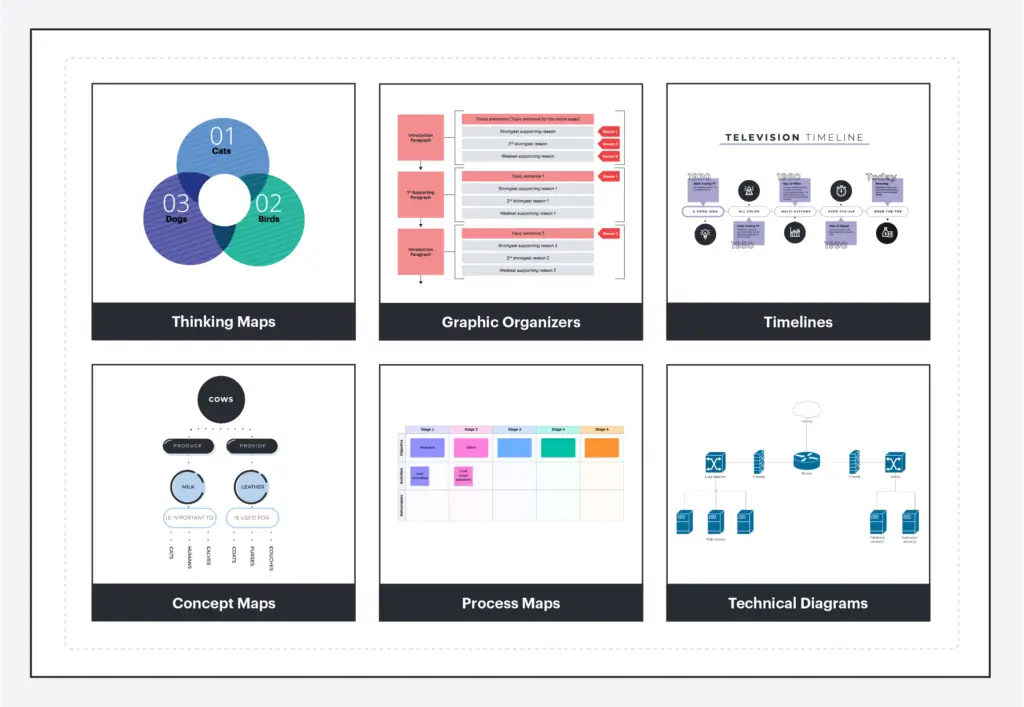
Lucidchart’s biggest advantage is still the breadth of diagram types it supports well. You can build flowcharts, swimlane diagrams, org charts, UML diagrams, ERDs, wireframes, process maps, floor plans, and network diagrams without feeling like the product is awkwardly stretching beyond its core purpose.
The shape libraries are one of the reasons the platform continues to appeal to both business and technical users. It is easy to move from a simple workflow diagram to something more structured and specialized without switching tools. That versatility makes Lucidchart a practical choice for operations teams, product teams, IT, engineering, HR, and consultants.
Templates that speed up real work
Lucidchart is one of the better tools in this category if you do not want to start from a blank canvas every time. The template library is broad enough to support everything from basic process documentation to architecture planning and team organization charts.
This matters more than many reviews admit. In practice, most teams do not want infinite creative freedom, they want a faster starting point. Lucidchart saves time because it gives you a polished first structure and then lets you customize it, instead of forcing you to build every diagram from scratch.
Real-time collaboration and review workflows
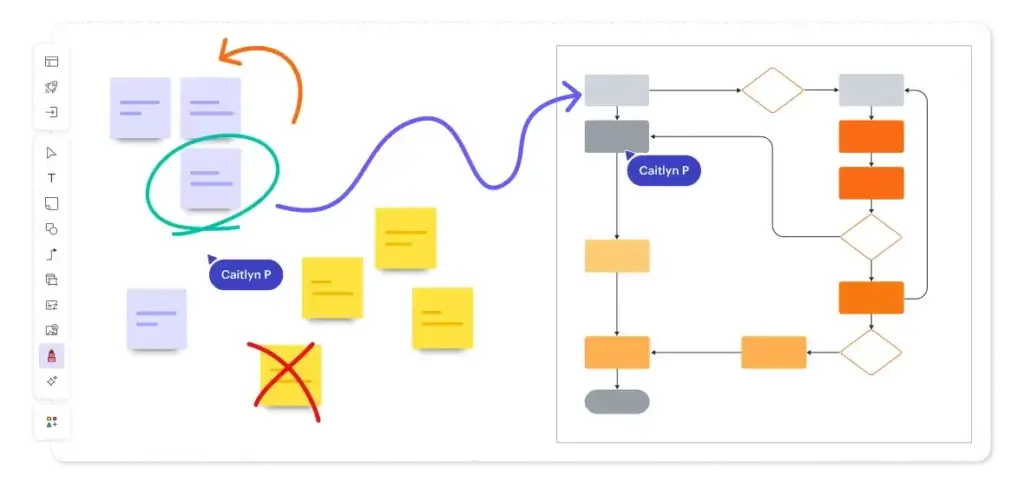
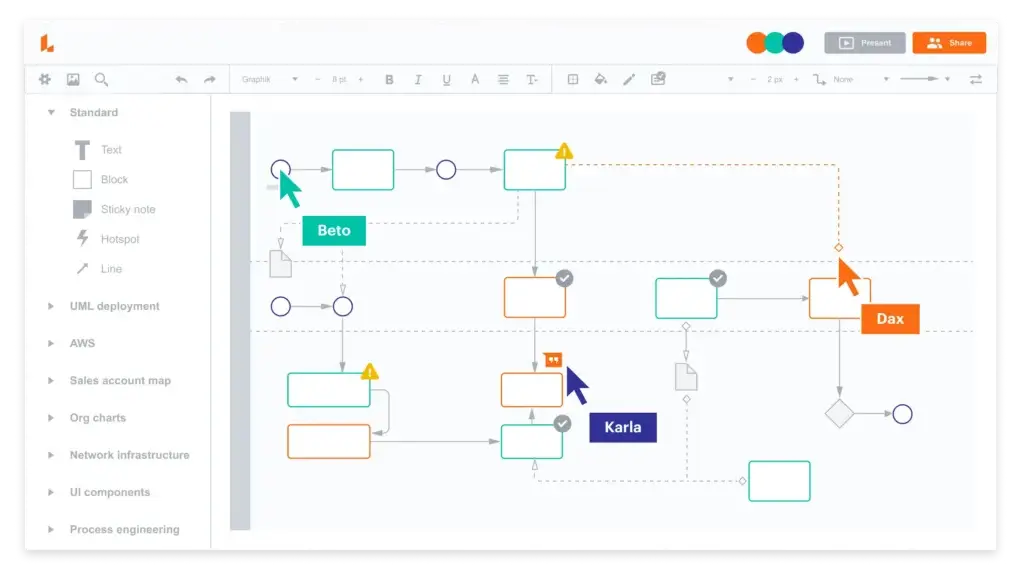
Lucidchart is not only about drawing. It is also built for collaboration. Teams can co-edit in real time, leave comments, see cursors live, and share diagrams without the handoff friction that older desktop tools often create.
That makes the platform much more useful for cross-functional workflows. You are not just creating a diagram for yourself. You are creating something that product managers, engineers, operations teams, leadership, or clients can actually review and react to together.
Data linking, conditional formatting, and presentation mode
Lucidchart is stronger than many simpler diagramming tools because it can connect data to visuals instead of treating diagrams as static pictures. Features like data linking and conditional formatting help you add context to diagrams and surface patterns more clearly.
Presentation mode is another useful feature that often goes overlooked. Instead of exporting a diagram into another tool just to explain it, you can present directly from Lucidchart. That is especially useful when you are using diagrams to get stakeholder buy-in rather than just document an internal workflow.
Integrations and ecosystem fit
Lucidchart fits well into business workflows because it integrates with tools many teams already use. That includes Google Workspace, Atlassian, Microsoft Office, Slack, and other workplace systems.
This is one of the areas where Lucidchart feels more enterprise-ready than many lighter alternatives. It does not just help you create diagrams, it helps you keep diagrams closer to the places where work is already happening.
AI-assisted diagram generation 🤖
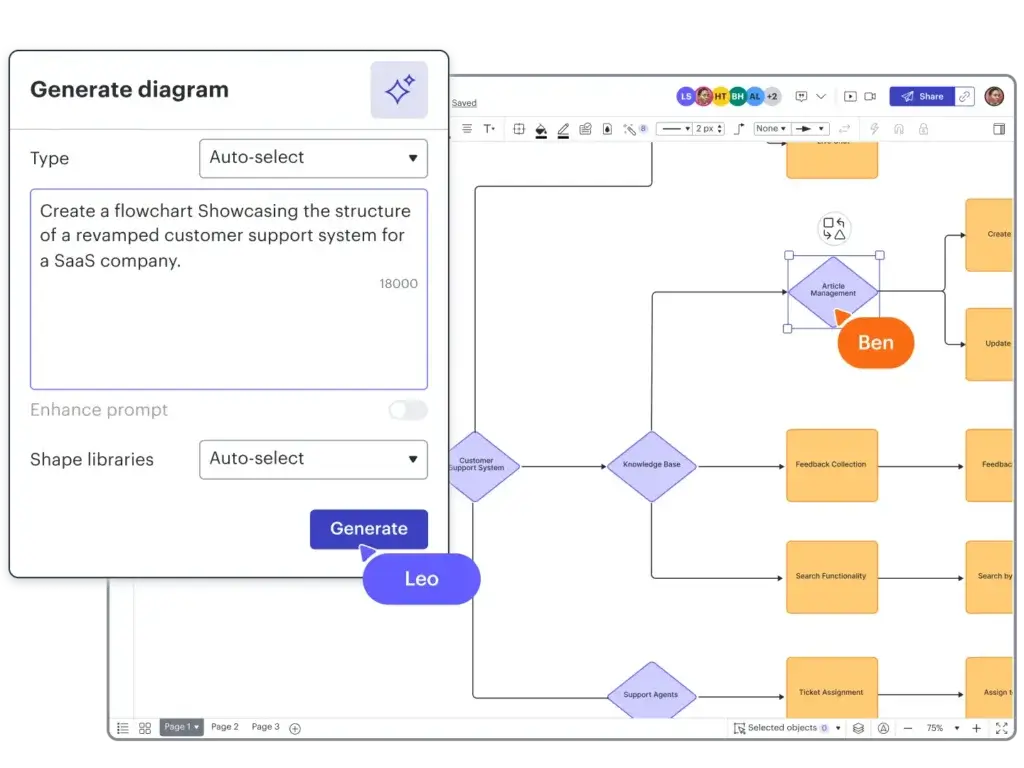
One of the more important updates to Lucidchart in 2026 is how much more visible AI has become in the product. Lucid now supports AI-assisted diagram generation from prompts, AI-powered refinement, and more guided workflows for building process diagrams faster.
Lucidchart does not suddenly become an AI-first tool in the same way some newer products position themselves, but the AI additions are practical. They help reduce the time it takes to create a first draft, especially for process maps and structured business diagrams. Used well, that can be a meaningful productivity gain.
Pros and Cons
Advantages and Disadvantages
Positive
✅ Excellent balance of usability and diagramming depth
✅ Strong template library for faster setup
✅ Real-time collaboration works well for teams
✅ Broad integrations and solid enterprise controls
Negative
❌ Free plan is too limited for many regular users
❌ Pricing becomes less attractive for larger teams
❌ Less flexible than Miro for open-ended whiteboarding
❌ Some users will prefer free or code-based alternatives
Pros
✅ Excellent balance of usability and diagramming depth
Lucidchart is one of the few tools that feels approachable for non-technical users while still being useful for more structured business and technical diagramming. It is not overly simplistic, but it rarely feels intimidating.
✅ Strong template library for faster setup
Templates are a major reason Lucidchart saves time in the real world. Whether you are building a process map, org chart, ERD, or system diagram, the platform gives you a strong starting point that reduces setup work significantly.
✅ Real-time collaboration works well for teams
Lucidchart remains one of the better diagramming tools for teamwork. Real-time editing, comments, sharing, and live collaboration make it easier to use diagrams as working assets instead of static deliverables.
✅ Broad integrations and enterprise readiness
The platform fits well into common workplace ecosystems, which matters if you want visuals to support ongoing work rather than live in isolation. For larger organizations, Lucidchart’s security, governance, and admin controls add real value.
Cons
❌ Free plan is too limited for many serious users
Lucidchart’s free option is good for testing the platform, but regular users will likely hit limits quickly. That makes it less appealing if you want a free long-term tool rather than a product you will eventually upgrade.
❌ Pricing can feel expensive as usage grows
For individuals the pricing is reasonable, but teams need to look more carefully at cost versus alternatives. Lucidchart earns its pricing more through polish, collaboration, and governance than through being the cheapest option.
❌ Less flexible than Miro for broad ideation
Lucidchart is built for structured diagrams, not for every type of open-ended visual collaboration. If your team runs workshops, sticky-note brainstorming sessions, or freeform strategy boards, Miro or Lucidspark may feel more natural.
❌ Not the best fit for code-first or ultra-lightweight users
Some technical users prefer diagramming tools that are more closely tied to text-based workflows, and some smaller teams simply want a free option like diagrams.net. Lucidchart sits in the middle as a polished business tool, which is not always the right fit for every buyer.
Hands-On Experience
User Experience and Performance
Ease of use and learning curve
Lucidchart is one of the most beginner-friendly diagramming tools in its class. The interface is clean, drag-and-drop behavior is intuitive, and most common actions are easy to figure out without deep training.
That does not mean there is no learning curve. Once you start using more advanced libraries, data-linked diagrams, or team governance settings, there is more to learn. Still, compared with many enterprise-friendly tools, Lucidchart does a good job of staying approachable.
How it feels in day-to-day use
In day-to-day use, Lucidchart feels polished. That sounds simple, but it matters. Diagrams are easy to rearrange, share, and present, and the collaboration layer is mature enough that teams can actually work inside the product rather than use it only as a final export tool.
I would not describe Lucidchart as the most innovative visual product on the market right now, because some competitors push harder on whiteboarding or AI-native positioning. But I would describe it as one of the most dependable. For many businesses, that is the more important quality.
Pricing
Pricing and Plan Options
| Plan | Price | Best For | What Stands Out |
| Free | $0 | Testing the platform | Good for trying the editor before committing to a paid plan |
| Individual | From $9/month | Solo professionals | Better for regular diagramming without the tighter limits of the free plan |
| Team | From $10/user/month | Small and midsize teams | Collaboration, shared work, and team-level management make more sense here |
| Enterprise | Custom pricing | Larger organizations | Advanced admin controls, security, governance, and scale |
Is Lucidchart pricing competitive? 💰
Lucidchart is not the cheapest option in diagramming, but it is also not overpriced for what it offers. The value case is strongest when your team actually benefits from collaboration, templates, integrations, and governance. If all you want is basic diagram creation, cheaper options can look more attractive very quickly.
For individual users, the paid entry point is still reasonable. For teams, the decision becomes more strategic. You are paying for more than drawing tools, you are paying for workflow fit, collaboration quality, and operational polish.
Academic and education use
Lucid also has a strong education angle. Students, teachers, and faculty can access free educational licensing through Lucid’s education program, which makes the platform more attractive in academic settings than many business-first diagramming tools.
That matters because Lucidchart is genuinely useful for study maps, systems thinking, research workflows, and class presentations, not only for business process documentation.
Security and Compliance
Security and Privacy
Enterprise security positioning
Security is one of the areas where Lucidchart is stronger than many lighter diagramming tools. Lucid highlights encryption in transit and at rest, supports SAML and two-factor authentication, and maintains a set of certifications and compliance frameworks that matter to larger organizations.
For enterprise buyers, this makes Lucidchart easier to justify than a lower-cost tool that may be fine functionally but weak from a procurement and governance perspective.
Visibility, control, and compliance features
Lucid’s enterprise controls include domain verification, account governance, security settings, and additional features through Enterprise Shield. That makes the platform more credible for organizations with tighter access, compliance, or data protection requirements.
In my opinion, this is one of the reasons Lucidchart continues to hold its position in the market. It is not only easy to use, it is also easier for larger companies to standardize around than many alternatives.
What I would still verify before rollout
Even with a solid trust and compliance story, I would still verify the exact requirements for your organization before a large rollout. That includes retention policies, admin controls, identity management setup, AI settings, and any industry-specific compliance needs.
Compare with Others
Lucidchart vs Alternatives
Lucidchart vs Miro
Miro is the better fit if your team needs a more open-ended visual collaboration environment for brainstorming, workshops, and sticky-note ideation. Lucidchart is the better fit if your priority is cleaner structured diagrams, process maps, and technical visuals.
If I had to simplify it, I would say Miro is stronger for freeform collaboration, while Lucidchart is stronger for disciplined diagramming.
Lucidchart vs Microsoft Visio
Visio still matters, especially for organizations deeply tied to the Microsoft ecosystem. It remains a viable option for more traditional enterprise diagramming. But Lucidchart usually feels easier to adopt, easier to collaborate in, and more modern in everyday use.
Unless Microsoft alignment is the deciding factor, I would generally choose Lucidchart over Visio for teams that want faster adoption and smoother collaboration.
Lucidchart vs diagrams.net
diagrams.net, formerly draw.io, is one of the strongest alternatives if cost is a major concern. It is hard to beat from a free-value perspective. But Lucidchart is easier to recommend when you care about polish, templates, collaboration maturity, and enterprise controls.
This is one of the clearest value tradeoffs in the category. diagrams.net wins on price, Lucidchart wins on experience and organizational readiness.
Lucidchart vs Whimsical or Creately
Whimsical often feels lighter and faster for product thinking and simple visual communication, while Creately is attractive for teams that want a broader visual workspace with project-style use cases. Lucidchart remains the safer choice when structured business diagramming is the center of your workflow.
Overall view: Lucidchart still earns a place near the top of the category because it is balanced. It does not always win on price or creative flexibility, but it wins often on reliability, clarity, and business fit.
Conclusion
Final Thoughts: Is Lucidchart Worth It?
Who should use Lucidchart?
Lucidchart is a strong fit for business teams, consultants, IT teams, operations leaders, product teams, and managers who need clear, shareable diagrams without a clunky learning curve. It is especially useful when visual clarity matters across departments, not just inside one specialist team.
If your main need is process documentation, org charts, technical diagrams, and collaborative review, Lucidchart remains easy to recommend.
My final take on Lucidchart in 2026
Lucidchart still earns its reputation because it solves a real business problem well: turning complexity into diagrams people can actually understand and collaborate around. It combines a polished editor, strong templates, team-friendly collaboration, solid integrations, and credible enterprise security in a way many competitors still do not match all at once.
It is not the cheapest diagramming tool, and it is not the most flexible platform for every visual workflow. But if you want a dependable diagramming platform that works well for both individual contributors and cross-functional teams, Lucidchart is still one of the strongest options available.
Have more questions?
Frequently Asked Questions (FAQs)
What is Lucidchart used for?
Lucidchart is used for creating flowcharts, process maps, org charts, UML diagrams, ERDs, network diagrams, and other forms of visual documentation for teams and businesses.
Is Lucidchart free?
Lucidchart has a free plan, but many regular users will need a paid plan for fewer limits and better ongoing usability.
Is Lucidchart better than Visio?
For many teams, yes. Lucidchart is generally easier to use and better for collaboration. Visio still makes sense for organizations that are deeply tied to Microsoft workflows.
Is Lucidchart good for teams?
Yes. Real-time editing, comments, sharing, and collaboration are some of Lucidchart’s strongest advantages over older diagramming tools.
Does Lucidchart have AI features?
Yes. Lucid now offers AI-assisted diagram generation and refinement, which helps users create and improve diagrams faster.
What kinds of diagrams can you make in Lucidchart?
You can create flowcharts, swimlanes, org charts, ERDs, UML diagrams, network diagrams, wireframes, and many other business or technical visuals.
Does Lucidchart integrate with Google and Microsoft tools?
Yes. Lucidchart supports integrations with Google Workspace, Microsoft tools, Atlassian products, Slack, and other workplace apps.
Is Lucidchart secure enough for enterprise use?
Lucidchart has a strong enterprise security and compliance story, including encryption, SAML support, compliance certifications, and more advanced controls for larger organizations.
Who is Lucidchart best for?
Lucidchart is best for professionals and teams that need polished diagrams for business processes, systems, planning, and collaborative documentation.
What is the best Lucidchart alternative?
That depends on your needs. Miro is better for whiteboarding, diagrams.net is better for free diagramming, and Visio still matters for Microsoft-heavy organizations.