
Introduction
SocialRails is an AI-powered social media scheduling and content creation platform built for creators, freelancers, small businesses, and lean marketing teams that want to move faster without paying enterprise-level prices. The platform focuses on a simple promise: create content, adapt it for multiple networks, and publish it from one dashboard. In this SocialRails review, you’ll see what the tool does well, where it still feels limited, how it compares with alternatives, and whether it is the right fit for your workflow in 2026.
Key Features
SocialRails Software Specification
SocialRails is designed to combine social media creation and scheduling in one lightweight platform. Compared with traditional schedulers, its main appeal is that it puts AI-assisted writing and visual creation much closer to the publishing workflow, which makes it especially relevant for creators and small teams that want speed over complexity.
Publishing and Scheduling
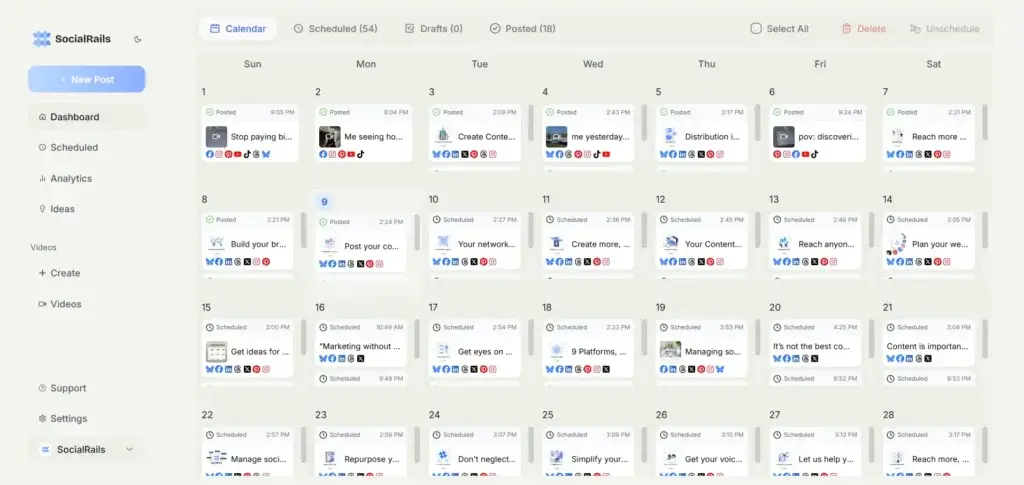
Scheduling is the core of the product. SocialRails supports posting across nine major social platforms from a single dashboard, with content planned in advance and organized visually in a drag-and-drop calendar. It also supports recurring posts, bulk content generation, and workspace management for users handling multiple brands or campaigns.
- 9-platform publishing: Publish to Instagram, Facebook, X, LinkedIn, TikTok, YouTube, Pinterest, Bluesky, and Threads from one place.
- Drag-and-drop calendar: Manage your content plan visually and move scheduled posts with less friction.
- Auto-recurring posts: Reuse evergreen content without rebuilding your schedule manually.
- Bulk creation workflows: Generate and plan 30 days of content faster.
- Story scheduling: Supports scheduling for formats such as Instagram and Facebook Stories.
AI Content Creation Tools
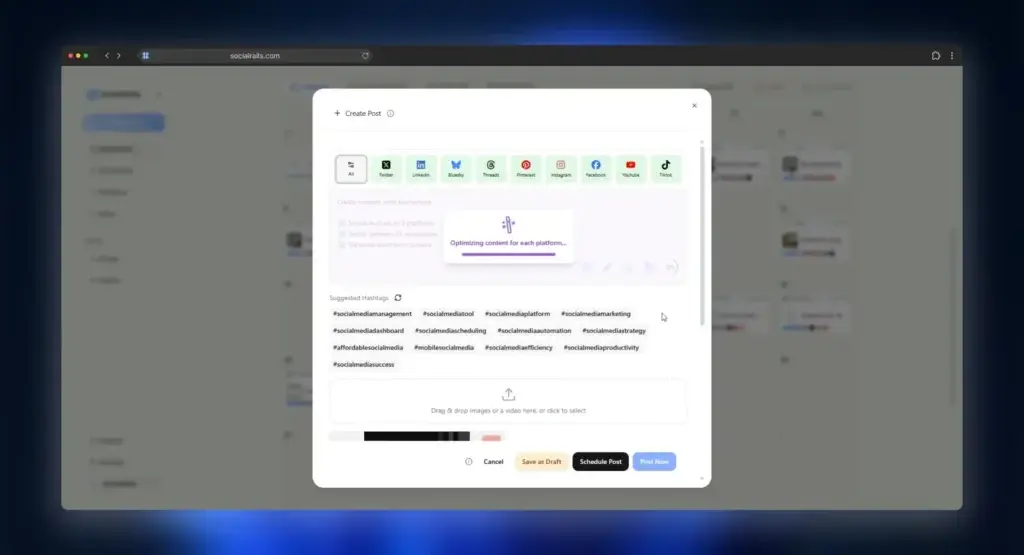
This is where SocialRails stands out more clearly. The tool is not just a scheduler with a caption assistant attached. It positions AI as part of the day-to-day content workflow, helping you come up with ideas, create captions, generate images, and build short-form video assets without leaving the platform.
- Unlimited AI captions: Paid plans include strong caption-generation capacity.
- AI content ideas: Generate post ideas based on your brand and posting goals.
- AI images: Create visuals inside the platform, with monthly image credits varying by plan.
- Short-form video creation: Includes video generation limits and access to 350+ video templates for TikToks and Reels.
- Pinterest pin generation: Create Pinterest-ready visual assets with templates and AI support.
- Platform optimization: Resize and adapt creatives for different channels more efficiently.
Team Collaboration and Workspaces
Although SocialRails feels creator-friendly, it is not limited to solo use. The platform supports multiple workspaces and team members, which gives it more flexibility for consultants, small agencies, and growing internal marketing teams.
- Workspace support: Paid plans scale from 3 to 25 workspaces depending on tier.
- Team collaboration: Business and Agency plans support multiple team members.
- Multi-brand management: Better suited than basic schedulers if you manage several brands.
API and Developer Options
One notable recent development is the launch of the SocialRails public API. That adds more long-term potential for companies that want to connect publishing workflows with internal systems, custom dashboards, or automation layers. It is still a young ecosystem, but it makes the platform more serious than many creator-only schedulers.
- Public API access: Available on paid plans.
- Scoped API keys: Permissions can be limited by use case.
- Code examples and docs: Official documentation includes curl, JavaScript, and Python examples.
- Webhook support: SocialRails has also introduced webhook support for real-time notifications.
Analytics and Performance Tracking
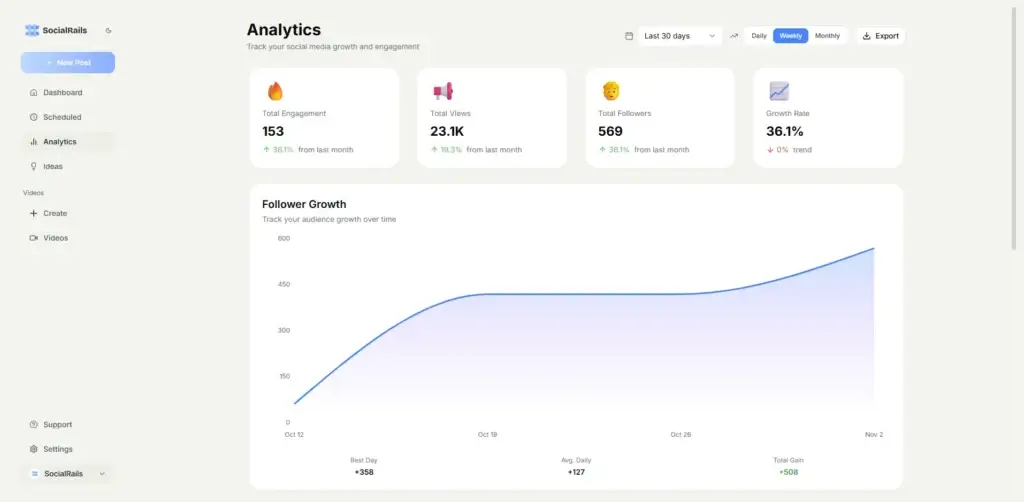
SocialRails includes analytics across connected accounts, which is important because many budget-focused tools stop at publishing. Here, you can track engagement, reach, clicks, and content performance trends to understand which formats and topics are worth repeating.
- Cross-account analytics: Track performance across your connected social profiles.
- Engagement metrics: Monitor reach, clicks, and interaction trends.
- Content performance feedback: Use results to refine future posts instead of publishing blindly.
- Best-time guidance: The platform also positions optimal posting-time support as part of its scheduling workflow.
Pros and Cons
Benefits and Limitations of SocialRails
SocialRails gets a lot right for its target market. It is affordable, it keeps creation and scheduling close together, and it avoids the bloated feel of larger enterprise suites. At the same time, it is still a newer platform, and that shows in areas like public customer-review depth, ecosystem maturity, and the breadth of advanced social management features.
✅ Pros
- Strong AI creation tools: SocialRails is stronger than many low-cost schedulers when it comes to built-in content generation.
- Transparent pricing: Pricing is clear and publicly available, which is still not true across this category.
- Good publishing coverage: Support for 9 platforms is enough for many creators and small brands.
- Useful for multi-brand workflows: Workspace limits are generous for the price.
- Video and Pinterest support: Short-form video templates and Pinterest pin creation make it more creation-oriented than many direct competitors.
❌ Cons
- Limited public review footprint: SocialRails currently has little verified review depth on major software directories.
- Lighter enterprise social suite: If you need heavy listening, broad integrations, or advanced inbox workflows, other tools go deeper.
- Analytics appear solid but not category-leading: Data coverage is useful, though not as robust as analytics-first platforms.
- Newer vendor risk: Buyers who prefer established vendors may view SocialRails as less proven.
User Experience
User Interface and Experience
Onboarding and Setup
SocialRails appears to be built for quick setup. The onboarding flow centers on connecting your social accounts, choosing a workspace, generating content, and moving directly into scheduling. That is a strong advantage if you want something lighter than Hootsuite or Sprout Social.
Interface and Navigation
The interface is built around speed and simplicity, not enterprise depth. That works well for creators and small teams because there is less clutter than you get in broader social media suites. The trade-off is that users who expect advanced inbox management, large integration libraries, or deeper listening tools may find the platform narrower than more mature competitors.
Support and Resources
SocialRails offers a free trial and public help resources, and its product messaging suggests a hands-on, product-led experience. Still, one area where buyers should stay realistic is support validation. Because the platform has a limited public review footprint right now, there is less third-party evidence about long-term support quality than you would find with larger vendors.
Pricing and Plans
How Much Does SocialRails Cost?
Pricing is one of SocialRails’ clearest strengths. The company publicly lists plans on its website, and the structure is easy to understand. For many buyers, that alone makes the tool easier to evaluate than competitors with custom quotes or feature-gated upsells.
| Plan | Best For | Highlights |
| Creator – $29/month | Solo creators and freelancers | Unlimited posts, 27 social connections, 3 workspaces, analytics, limited AI assistant, 40 AI images, 20 AI videos |
| Business – $49/month | Growing brands and small teams | Unlimited posts, 90 social connections, 10 workspaces, 5 team members, unlimited AI assistant, 90 AI images, 70 AI videos |
| Agency – $99/month | Agencies and larger teams | Unlimited posts, 225 social connections, 25 workspaces, 15 team members, unlimited AI assistant, 180 AI images, 250 AI videos |
All paid plans include a free trial, and the company states that subscriptions can be canceled anytime. In my view, the pricing is attractive for creators and small teams that want more AI-assisted creation than tools like Buffer typically provide at the same starting tier.
Is SocialRails good value?
Yes, for the right buyer. If you want an affordable tool that combines scheduling, AI captions, visual creation, and short-form video templates, SocialRails offers strong value. If you care more about advanced analytics, listening, customer service proof, or a mature third-party integration ecosystem, the lower price becomes less decisive.
Use Cases & Suitable Users
Who Should Use SocialRails
SocialRails is best suited for users who need fast content production and scheduling without the overhead of a large enterprise suite.
- Creators and solopreneurs: A strong fit if you want to create and schedule content from one place.
- Freelancers managing several brands: Workspace support makes it more flexible than many basic schedulers.
- Small businesses: Useful if your team wants affordable publishing plus AI-assisted creative production.
- Small agencies: The Agency tier is reasonably priced for multi-client scheduling.
- Lean marketing teams: Helpful for brands that value speed and content throughput over enterprise reporting depth.
It is less ideal for larger organizations that need advanced social listening, a full engagement inbox, deep governance controls, or broad proof from verified customer reviews.
Comparison with Alternatives
How SocialRails Compares to Alternatives
SocialRails sits in an interesting position in the market. It is broader than a basic post scheduler because it includes AI content generation and media creation, but it is still much lighter than premium social media suites built for large organizations.
SocialRails vs Buffer
Buffer is still one of the cleanest and easiest social publishing tools, and it remains a safer choice if you want an established platform with a large user base and simpler publishing-first workflows. SocialRails is more appealing if you care strongly about built-in AI content creation, short-form video templates, and more generous workspace scaling for the money. My take is that Buffer is better for proven simplicity, while SocialRails is more compelling if content creation speed is the main priority.
SocialRails vs SocialBee
SocialBee is stronger if your workflow depends heavily on category-based scheduling and evergreen queue organization. SocialRails feels more creator-oriented because it pushes harder into AI-generated captions, image generation, and short-form video creation. If you prioritize content recycling structure, SocialBee has an edge. If you want more built-in creative help, SocialRails is the more interesting option.
SocialRails vs Hootsuite
Hootsuite is the more mature platform and still stronger for organizations that need a broader operational environment. But it is also more expensive and often heavier than smaller teams need. SocialRails is the better fit when affordability, quick setup, and content creation are more important than enterprise-level depth.
SocialRails vs Metricool
Metricool is a stronger choice for analytics-focused users who want deeper reporting and performance monitoring. SocialRails is better when your bottleneck is actually creating the content itself. Between the two, SocialRails is more creation-first, while Metricool is more analysis-first.
Best Use Tips
Tips and Best Practices for Using SocialRails
To get more value from SocialRails, treat it as a lightweight content engine, not just a posting calendar.
- Use AI for drafts, not final copy: Let the platform speed up ideation, then refine posts to match your brand voice.
- Build recurring content categories: This helps you use the calendar and recurring features more strategically.
- Take advantage of workspaces: Separate clients, brands, or campaign types clearly from the start.
- Test the video templates: This is one of the more distinctive parts of the product versus simpler schedulers.
- Review analytics monthly: Use performance data to improve which post types you repeat.
- Validate support during the trial: Since public review volume is still limited, test real responsiveness before committing at scale.
Conclusion
Final thoughts
⭐ Overall Rating: 8.0/10
SocialRails is a promising social media management tool for buyers who want an affordable, AI-first platform that makes creating and publishing content faster. Its strongest advantages are transparent pricing, generous workspace limits, 9-platform scheduling, and built-in creative tools that go beyond basic caption assistance.
That said, I would not frame it as the best fit for every business. The public review footprint is still limited, and the product does not appear to compete head-on with the deepest enterprise suites for listening, governance, or mature ecosystem breadth. In other words, SocialRails looks strongest when you judge it as a smart creator and SMB tool, not as an all-purpose enterprise social platform.
If your main goal is to reduce content-production time while keeping scheduling affordable, SocialRails is worth serious consideration in 2026.
Have more questions
Frequently Asked Questions
What is SocialRails used for?
SocialRails is used for creating, scheduling, and analyzing social media content across multiple platforms from one dashboard.
How many social media platforms does SocialRails support?
SocialRails supports 9 major social media platforms, including Instagram, Facebook, X, LinkedIn, TikTok, YouTube, Pinterest, Bluesky, and Threads.
Does SocialRails have AI tools?
Yes. SocialRails includes AI tools for captions, post ideas, images, Pinterest pins, and short-form video creation.
Does SocialRails offer analytics?
Yes. The platform includes analytics for connected social accounts, including engagement and performance tracking.
Is there a free trial?
Yes. SocialRails offers a free trial before you commit to a paid plan.
Is SocialRails good for agencies?
It can be, especially for small agencies that want affordable multi-workspace publishing and AI-assisted content creation.
Does SocialRails include team collaboration?
Yes. Higher plans include multiple team members and more workspaces for collaborative workflows.
Does SocialRails offer an API?
Yes. SocialRails has a public API for paid plans and has also introduced webhook support.
What is the biggest strength of SocialRails?
Its main strength is combining AI content creation and multi-platform scheduling at a relatively accessible price point.
What is the biggest limitation of SocialRails?
The biggest limitation is that it is still a newer platform with a limited public review footprint and a lighter feature set than enterprise social media suites.