

Introduction
Managing social media well takes more than scheduling posts. You also need a clear content workflow, useful analytics, reliable collaboration, and simple ways to engage with your audience without wasting hours each week. Buffer has built its reputation around doing exactly that, offering a clean and approachable social media management platform that helps creators, small businesses, agencies, and marketing teams plan, publish, analyze, and improve their content strategy.
In this Buffer review, you will get a detailed look at the platform’s core features, pricing, strengths, limitations, user experience, and best use cases. You will also see how Buffer compares with a few popular alternatives, so you can decide whether it is the right fit for your social media workflow in 2026.
Key Features
Buffer’s Software Specification
Buffer has expanded well beyond basic post-scheduling. The platform is now organized around five main areas, Create, Publish, Community, Analyze, and Collaborate. Its strongest appeal is simplicity. Rather than overwhelming you with enterprise-heavy menus, Buffer focuses on giving you a streamlined workspace that is easy to adopt while still covering the features most growing teams actually use.
Create and Content Planning
Buffer’s Create workspace is designed to help you capture, organize, and refine social content ideas before they enter your publishing calendar. This part of the platform is useful if your content process often starts with rough notes, campaign concepts, repurposed posts, or saved inspiration from other sources.
- Ideas and drafts: Save post ideas, build drafts, and organize content before publishing.
- Board view: Use a Kanban-style layout to manage content stages and workflows.
- Tags and templates: Categorize content by topic or campaign and reuse proven formats.
- Browser extension: Save content ideas from around the web directly into Buffer.
AI Assistant
Buffer includes an AI Assistant that helps you brainstorm ideas, rewrite posts, repurpose content for different networks, and adjust tone based on the platform or audience. This is one of Buffer’s more practical AI use cases because it is not trying to replace strategy. Instead, it speeds up repetitive writing tasks and helps you turn one content idea into several usable post variations.
If your team regularly repurposes blog posts, newsletters, webinars, or product updates into social content, Buffer’s AI Assistant can save real time. It is especially useful for solo marketers and small teams that need help scaling output without adding extra tools.
Publishing and Scheduling
Publishing is still Buffer’s core strength. The interface is clean, fast, and easy to understand, which is one reason the platform remains popular among smaller teams and creators. You can schedule content across multiple social channels from one dashboard and customize posts for each channel instead of pushing the exact same copy everywhere.
- Visual calendar: Plan and reschedule content with a simple calendar view.
- Queue scheduling: Maintain consistent publishing times without manual work.
- Bulk scheduling: Upload and schedule content faster for campaigns and recurring workflows.
- First comment scheduling: Useful for Instagram caption hygiene and hashtag placement.
- Hashtag manager: Save frequently used hashtag sets for faster publishing.
Buffer also supports publishing to a wide range of channels, including Instagram, Facebook, LinkedIn, TikTok, X, Threads, Pinterest, YouTube, Google Business Profile, Bluesky, and Mastodon. That broad support makes it more flexible than many people expect, especially if you manage newer or less commonly supported networks.

Community and Engagement
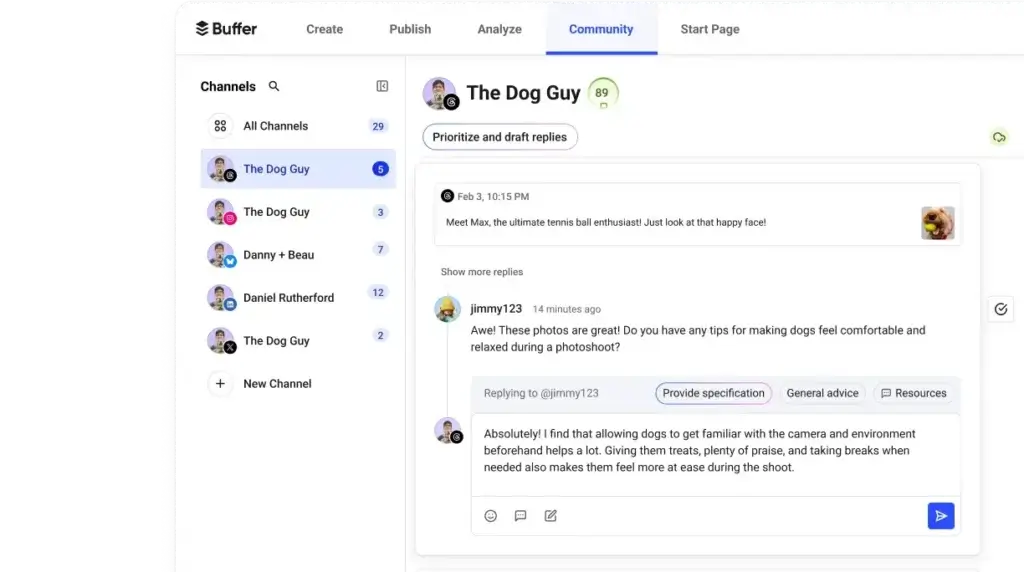
Buffer’s Community area is built around comment management and audience engagement. It is not a full enterprise social listening suite, but it does give you a practical way to stay on top of comments without constantly jumping between native apps.
For many small and mid-sized teams, this is enough. You get a cleaner engagement workflow and a more centralized way to handle replies. That said, if you need advanced listening, sentiment analysis, or deep monitoring across keywords and competitors, Buffer will likely feel too lightweight.
Collaboration and Team Management
Buffer becomes more capable for team use on its Team plan, which adds unlimited team members, approval workflows, and custom permissions. This means you can build a cleaner editorial process with contributors, editors, and approvers involved before content goes live.
That makes Buffer more than a solo scheduling tool. It can support small agency teams, in-house marketing departments, and growing brands that need collaboration but do not want the overhead of more enterprise-focused platforms.
Start Page and Extra Tools
One of Buffer’s useful additions is Start Page, its built-in link in bio tool. You can use it to create a mobile-friendly landing page for social traffic, promote multiple links from one profile, and track clicks and engagement. For creators, consultants, e-commerce brands, and service businesses, this is a practical extra that reduces the need for a separate bio link product.
Buffer also includes integrations with tools like Canva, Google Drive, Dropbox, Unsplash, Zapier, Bitly, Feedly, Pocket, WordPress, and OneDrive, which helps keep content workflows connected.
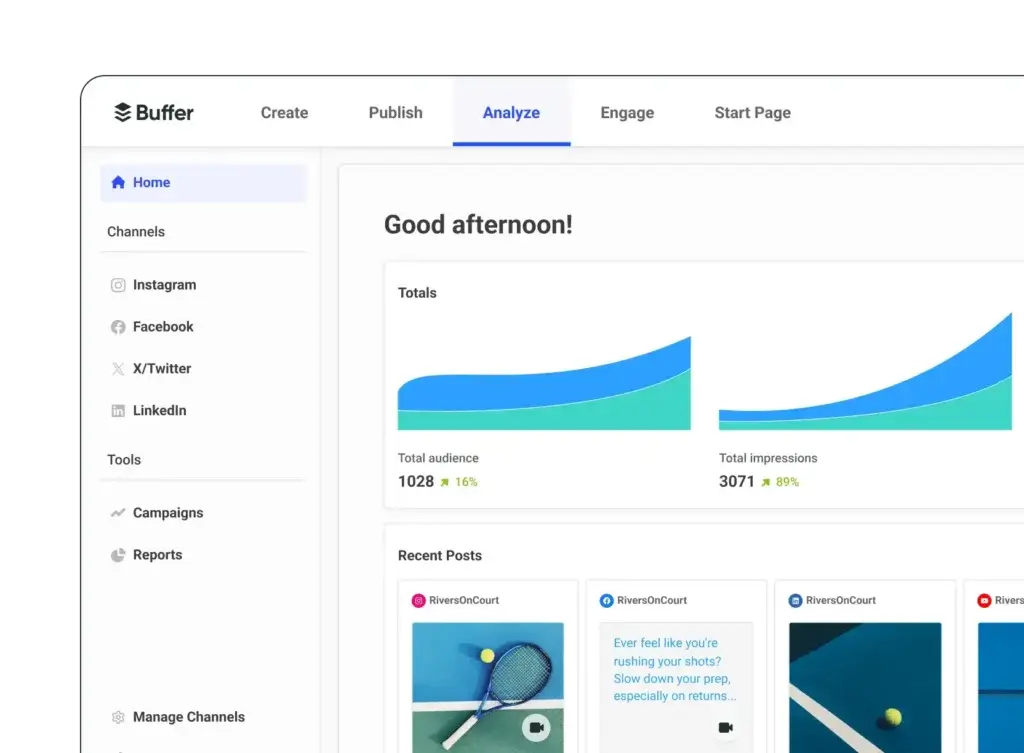
Analytics and Reporting
Buffer’s analytics are strongest for marketers who want actionable reporting without heavy complexity. The platform supports analytics for Instagram, Facebook, X, and LinkedIn, giving you access to key metrics like engagement, follower growth, impressions, post-level performance, and audience data on paid plans.
Its reporting approach is practical rather than overly technical. You can create custom reports, export them, and use the data to understand what content is working. Buffer also supports branded reports on the Team plan, which is useful for agencies or consultants who need more client-facing polish.
Pros and Cons
Benefits and Limitations of Buffer
Positive
✅ Simple and intuitive interface
✅ Strong scheduling workflow
✅ Broad channel support
✅ Helpful AI assistant
✅ Good value for small teams
Negative
❌ Limited social listening
❌ Analytics coverage is selective
❌ Team workflows require higher plan
❌ Less depth than enterprise tools
Buffer’s biggest advantage is clarity. It does not try to be everything for everyone, and that is one reason many users like it. The platform does the fundamentals well, feels approachable from day one, and offers strong value for creators, freelancers, startups, and smaller marketing teams.
✅ Pros
- Simple and intuitive interface: Buffer is easy to learn, even if you are new to social media management software.
- Strong scheduling workflow: Scheduling, queue management, bulk posting, and calendar planning are all straightforward.
- Broad channel support: It supports both major and emerging social channels.
- Helpful AI assistant: The AI Assistant helps with rewriting, repurposing, and idea generation.
- Good value for small teams: The free plan and low entry pricing make Buffer accessible for individuals and small teams.
- Helpful add-ons: Start Page and built-in integrations expand its practical use without too much complexity.
❌ Cons
- Limited social listening: Buffer is not built for deep monitoring, sentiment analysis, or sophisticated brand listening.
- Analytics coverage is selective: Reporting is strongest on select networks rather than across the full publishing list.
- Team workflows require higher plan: More advanced collaboration is reserved for the higher plan.
- Less depth than enterprise tools: Organizations needing deeper governance, larger-scale reporting, and more advanced social CRM may outgrow it.
User Experience
User Interface and Experience
Onboarding and Learning Curve
Buffer is one of the easiest social media tools to onboard. You can connect channels quickly, start drafting posts right away, and move from idea to scheduled content without much setup. This is one of the reasons Buffer remains such a strong recommendation for smaller businesses and solo marketers.
The platform avoids the clutter that often makes more powerful suites feel intimidating. If your team values speed, clarity, and low training overhead, Buffer performs very well here.
Navigation and Daily Use
The main navigation is organized around the product areas that matter most: content creation, publishing, community, analytics, and collaboration. That structure is practical because it mirrors how social teams actually work. You move from ideas, to scheduling, to engagement, to reporting in a fairly natural way.
In daily use, Buffer feels polished and efficient. The experience is more focused than many alternatives, which is a strength rather than a weakness for most teams that want to move quickly.
Mobile Experience
Buffer offers iOS and Android apps, and it also redesigned its iOS app as part of its recent product improvements. For users who need to monitor activity, make light edits, or manage posts on the go, mobile support is meaningful. It is not just an afterthought.
Support and Educational Resources
Buffer also performs well on approachability through its support content and educational resources. The company has long invested in helpful documentation, practical guides, and creator-focused education. That adds value if you are still refining your social media processes and need a tool that is easier to grow into.
Pricing and Plans
How Much Does Buffer Cost?
Buffer uses a per-channel pricing model rather than a traditional flat subscription tier based only on seats. That makes the platform flexible, but it also means you need to understand how many channels you actually plan to connect before estimating total cost.
| Plan | Starting Price | Main Limits and Features |
| Free | Free forever | Up to 3 channels, 10 scheduled posts per channel, 1 user, basic analytics, AI Assistant, community inbox |
| Essentials | $5/month per channel, billed yearly | Unlimited scheduled posts, unlimited ideas, 1 user, advanced analytics, community inbox, hashtag manager, first comment scheduling |
| Team | $10/month per channel, billed yearly | Unlimited team members, advanced analytics, community inbox, approval workflows, access levels, branded reports |
Buffer also offers a 14-day free trial for paid functionality. One important point is that pricing scales by connected channel, so costs can rise meaningfully as you add more brands, profiles, or client accounts. Even so, Buffer remains competitively priced for the value it offers, especially compared with more expensive social media management suites.
For most freelancers, creators, and smaller businesses, the Essentials plan is often enough. For agencies or teams that need approvals and shared workflows, the Team plan makes much more sense.
Use Cases & Suitable Users
Who Should Use Buffer
Buffer is best suited for users who care about efficiency, clarity, and affordability more than advanced enterprise complexity. It is a strong fit for the following types of users:
- Creators and freelancers: Ideal if you want a fast way to plan content, repurpose posts, and manage several social profiles from one workspace.
- Small businesses: A strong fit if you need scheduling, basic engagement management, and useful analytics without a steep learning curve.
- Agencies with lighter workflow needs: Good for smaller agencies that need collaboration and approvals but do not need deep listening or enterprise governance.
- Startups and lean marketing teams: Useful when you need practical social media execution without investing in a more expensive platform.
- Personal brands and consultants: Especially valuable if you also want a simple link in bio tool through Start Page.
Buffer is less ideal if your strategy depends heavily on advanced listening, high-level social CRM, complex approval structures, or enterprise-wide reporting across large teams and many brands.
Comparison with Alternatives
How Buffer Compares to Alternatives
Buffer sits in a very specific part of the market. It is more capable than a lightweight scheduler, but less enterprise-heavy than platforms built for large organizations. That balance is one of its main strengths.
Buffer vs Sprout Social
Sprout Social is the stronger option for larger organizations that need deeper analytics, more mature reporting, stronger social listening, and a broader social CRM layer. Buffer is the better option if you want a more affordable, easier-to-use platform that focuses on everyday publishing, engagement, and practical analytics without the cost and complexity of enterprise software.
My view is simple: Sprout Social is stronger for larger teams with more demanding social operations, but Buffer is often the smarter choice for smaller teams that want speed, value, and usability.
Buffer vs Hootsuite
Hootsuite offers broad functionality and an enterprise-friendly reputation, but Buffer often feels much easier to adopt and easier to enjoy using daily. If your team has struggled with overly complex dashboards in other tools, Buffer can feel refreshing. Hootsuite has more depth in some areas, but Buffer often wins on user experience and accessibility.
Buffer vs Later
Later is often a strong option for visually driven brands and creator-led marketing, especially where Instagram-centric planning is a priority. Buffer, however, has a broader all-around feel for multi-channel planning, practical analytics, and everyday team workflows. If your use case is wider than visual-first content planning, Buffer is usually the more balanced choice.
Buffer vs SocialBee
SocialBee is especially strong when your strategy relies on content categories, evergreen recycling, and structured posting queues. Buffer is usually better if you want a cleaner interface, easier adoption, stronger overall usability, and a more straightforward workflow for publishing and reporting. SocialBee can be powerful, but Buffer is often easier to operationalize quickly.
Best Use Tips
Tips & Best Practices When Using Buffer
To get the most value from Buffer, it helps to treat it as more than a scheduler. The real return comes when you use its content ideation, AI assistance, analytics, and engagement features together as part of one repeatable workflow.
- Use the Ideas area consistently: Capture content ideas throughout the week so your publishing calendar never starts from zero.
- Repurpose with AI Assistant: Turn one blog post, email, or webinar into multiple platform-specific social posts.
- Build a repeatable queue: Create predictable posting rhythms by content type, campaign, or channel.
- Review analytics monthly: Look for patterns in format, timing, engagement, and top-performing posts.
- Use Start Page strategically: Treat your link in bio as a conversion asset, not just a list of random links.
- Upgrade to Team when approvals matter: If multiple people touch content, approval workflows are worth the extra cost.
Conclusion
Final Thoughts
Buffer remains one of the best social media management tools for users who want a clean, reliable, and affordable way to manage content across multiple channels. Its strongest selling points are ease of use, broad publishing support, practical AI assistance, a helpful community inbox, and pricing that remains accessible for smaller operations.
It is not the most advanced platform in the category, and that is important to understand. If you need heavy-duty social listening, enterprise-level governance, or highly sophisticated reporting across a large organization, Buffer will probably feel too light. But for creators, freelancers, startups, agencies, and small to mid-sized teams, that lighter feel is often exactly the advantage.
Overall, Buffer is a strong recommendation if your priority is getting social media work done efficiently. It balances usability and capability very well, and for many businesses, that balance matters more than having the most feature-heavy platform on the market.
Have more questions
Frequently Asked Questions
Does Buffer offer a free plan?
Yes. Buffer offers a free plan that supports up to three connected channels, along with limited scheduling, basic analytics, AI Assistant access, and community inbox functionality.
How does Buffer pricing work?
Buffer charges by connected social channel on paid plans. Essentials starts at $5 per month per channel billed yearly, and Team starts at $10 per month per channel billed yearly.
Which social networks does Buffer support?
Buffer supports Instagram, Facebook, LinkedIn, TikTok, X, Threads, Pinterest, YouTube, Google Business Profile, Bluesky, and Mastodon, among others.
Is Buffer good for small businesses?
Yes. Buffer is especially strong for small businesses because it combines a low barrier to entry with practical scheduling, analytics, AI writing help, and a user-friendly interface.
Does Buffer include analytics?
Yes. Buffer includes analytics, with advanced reporting available on paid plans. Its analytics are especially focused on Instagram, Facebook, X, and LinkedIn.
Can teams collaborate inside Buffer?
Yes. Team collaboration features are stronger on the Team plan, where you get unlimited team members, approval workflows, and access controls.
Does Buffer have a link in bio tool?
Yes. Buffer includes Start Page, which lets you create a customizable link in bio page and track engagement from that page.
Is Buffer better than Hootsuite?
That depends on your needs. Buffer is often better for ease of use, affordability, and smaller-team workflows, while Hootsuite can be better for larger organizations needing broader enterprise functionality.
Is Buffer better than Sprout Social?
For smaller teams and budget-conscious businesses, Buffer is often the better fit. For larger organizations needing deeper analytics, listening, and customer care features, Sprout Social is usually stronger.
Who is Buffer best for?
Buffer is best for creators, freelancers, small businesses, lean marketing teams, and agencies that want efficient social media management without paying for enterprise-level complexity they may not need.





