Introduction
If you are looking for a modern business communications platform that combines cloud calling, team messaging, video meetings, AI-powered transcription, and contact center tools, Dialpad is one of the more compelling options in the market. It is designed for businesses that want more than a basic VoIP phone system, but still want a platform that feels more unified and AI-driven than many traditional telecom products. Instead of stitching together separate tools for voice, meetings, sales, and support, Dialpad brings those workflows together under one broader communications platform.
In this Dialpad review, you will explore how the platform works, which features stand out, how its pricing is structured, and where it fits best. You will also see how Dialpad compares with alternatives like RingCentral, Nextiva, Aircall, and CallHippo, what types of businesses benefit most from it, and whether its AI-first positioning is meaningful in practice or mostly marketing. If you need a business communications platform that can support internal collaboration and customer conversations from one place, this guide will help you decide whether Dialpad is the right fit.
Key Features
How Dialpad Works
Dialpad Key Features
Dialpad’s feature set is strongest when you look at it as a unified communications and customer communications platform rather than only a VoIP phone system. Below are the capabilities that matter most when evaluating it.
Unified communications platform with multiple products
Dialpad is not just a business phone app. It is a broader communications platform that includes Dialpad Connect for calling, messaging, and meetings, Dialpad Support for contact center teams, Dialpad Sell for outbound sales teams, and Dialpad AI as the intelligence layer across the entire suite. That broader product structure matters because businesses can start with internal communications and then expand into customer support or sales workflows without switching vendors later.
This makes Dialpad more versatile than many smaller VoIP providers that focus mainly on calling. If your business wants one platform for internal collaboration and customer-facing communication, Dialpad has a stronger story than tools that stay limited to business phone features alone.
Calling, messaging, and meetings in one app
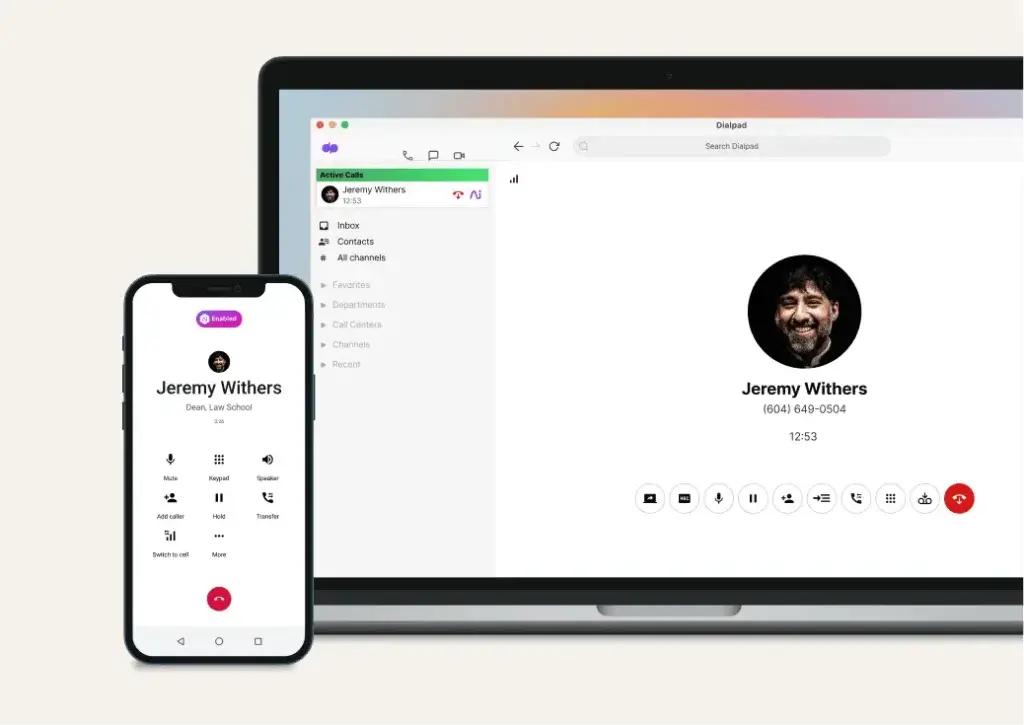
At the core of Dialpad Connect is a unified workspace for phone calls, SMS and MMS messaging, team chat, and video meetings. This gives employees one place to manage both internal collaboration and external communication, which can reduce tool sprawl and simplify day-to-day adoption. It also helps remote and hybrid teams stay connected without needing separate systems for every communication channel.
If your business values simplicity and a single interface, this is one of Dialpad’s strongest advantages. It combines enough communications breadth to replace several separate tools while still feeling easier to understand than some enterprise-heavy alternatives.
Built-in AI before, during, and after conversations
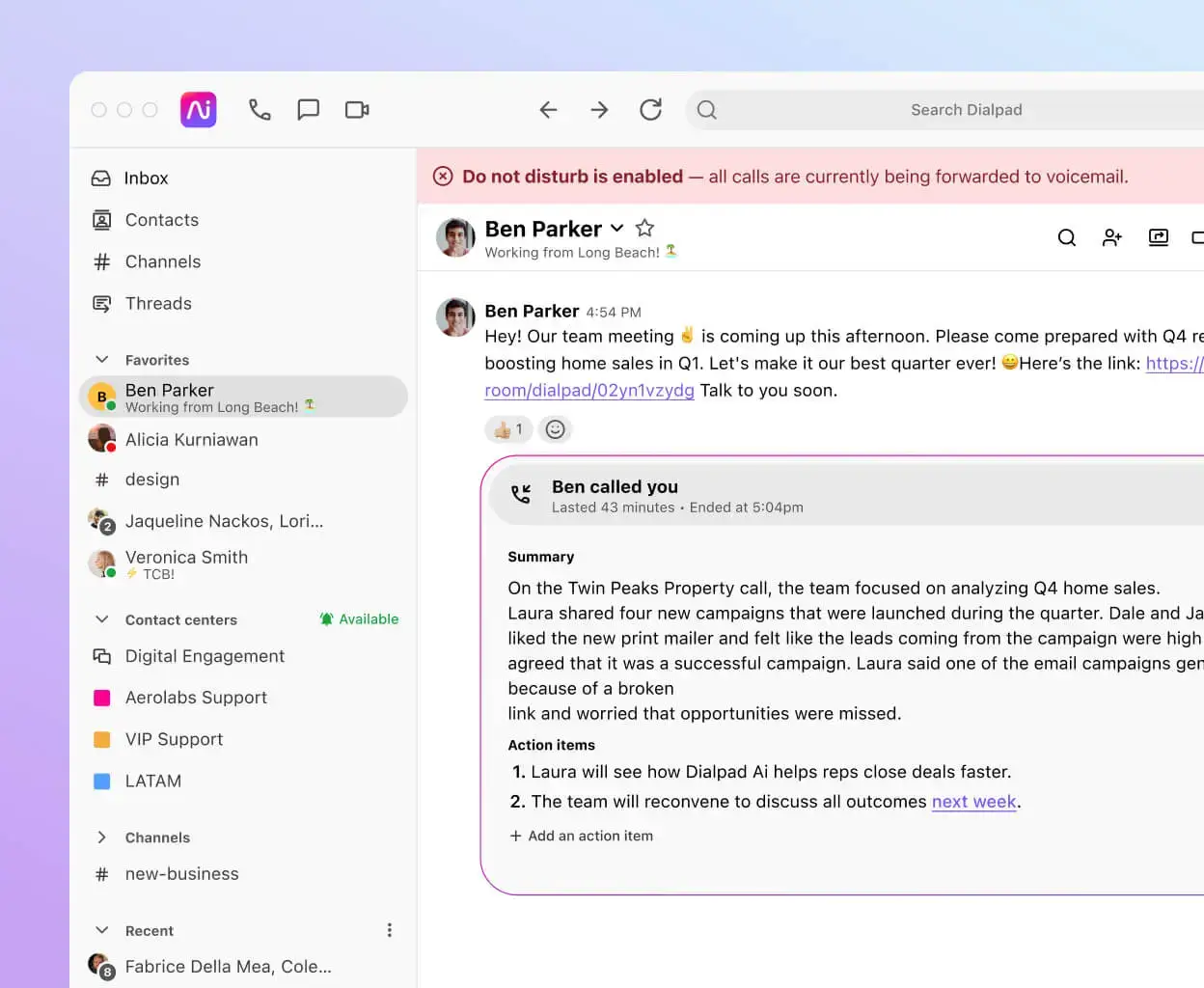
One of Dialpad’s clearest differentiators is that AI is built into the platform rather than treated as a separate add-on concept. Official product materials emphasize live transcription, AI Recaps, summaries, sentiment analysis, real-time coaching, AI Scorecards, and AI CSAT across different parts of the platform. In practical terms, this helps teams capture conversations automatically, reduce manual note-taking, and get more usable insight from calls without relying as heavily on third-party conversation intelligence tools.
For businesses comparing modern communications platforms, this is where Dialpad feels more product-led than many traditional telecom providers. The AI positioning is not just branding, it is tied directly to real workflows across calling, support, and sales.
AI transcription, recaps, and conversation insights
AI is one of the main reasons to consider Dialpad over a simpler phone system. The platform highlights features such as AI Transcription, AI Recaps, summaries, real-time coaching, sentiment analysis, and automated QA-style insights depending on the product tier. These tools can make a real difference for teams that need to document calls, coach reps, review quality, or move faster on follow-up work.
Contact center and customer support functionality
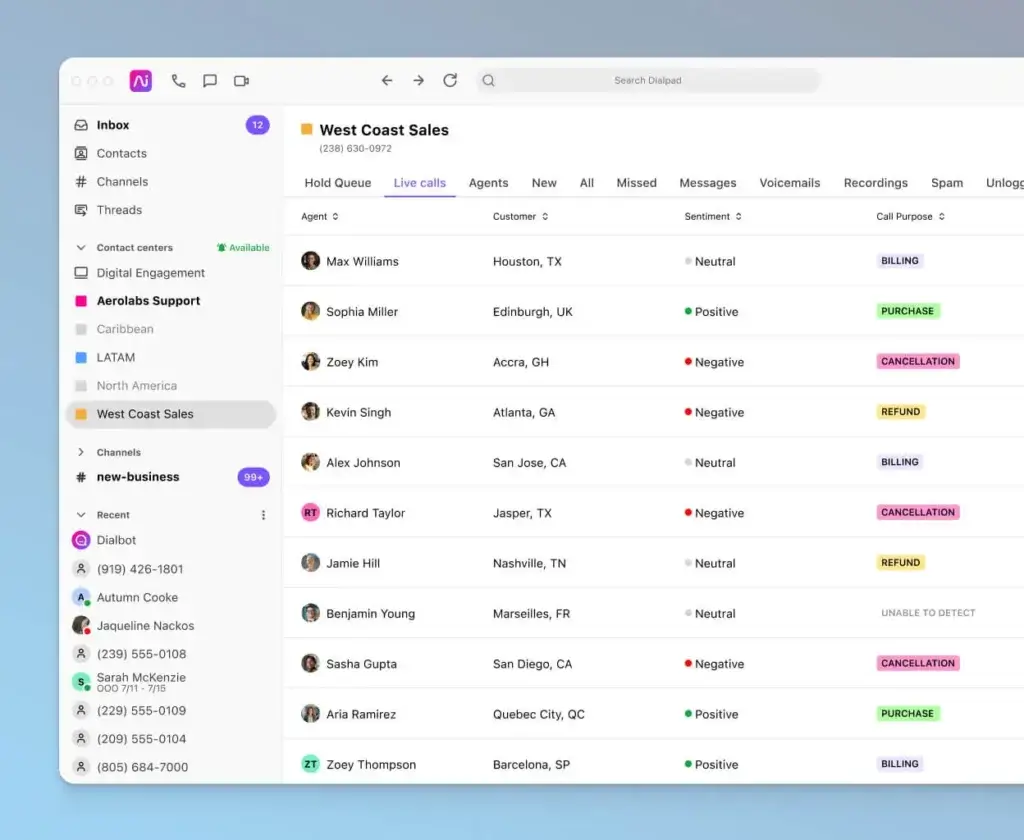
Dialpad Support expands the platform into contact center territory with tools for routing, analytics, AI CSAT, scorecards, coaching, and digital support workflows. That makes Dialpad more than a UCaaS tool. It can also serve businesses that want to run customer support from the same broader communications environment instead of buying a completely separate contact center stack.
Sales enablement and outbound calling
Dialpad Sell is designed for outbound sales teams that want coaching, playbooks, AI assistance, and sales-focused calling workflows. If your organization has both support and sales communication needs, Dialpad has a meaningful advantage over providers that handle only general business telephony. It creates a clearer upgrade path as your communication use cases become more specialized.
App marketplace and API flexibility
Dialpad offers an app marketplace, integrations with major business systems, and developer APIs for customization. Native and marketplace integrations are part of the platform story, especially for teams using Salesforce, HubSpot, Zendesk, Microsoft Teams, Google Workspace, and related tools. This gives Dialpad a stronger ecosystem than lightweight phone systems, even if it may not always match the absolute breadth of the largest enterprise vendors.
Cloud phone system and business calling
Dialpad includes the core phone capabilities most businesses expect, including virtual phone numbers, call routing, auto attendants, call forwarding, voicemail, and business calling across devices. It is built as a cloud-first platform, so teams can work from desktop, browser, or mobile without depending on legacy PBX hardware. This makes it especially appealing for remote teams, multi-location companies, and businesses that want to modernize calling without a complicated telecom rollout.
Pros and Cons
Advantages and Disadvantages
Pros
✅ Strong built-in AI
✅ Broad platform scope
✅ Unified calling and meetings
✅ Strong ecosystem foundations
Cons
❌ Not the cheapest full platform option
❌ Can feel broader than needed
❌ Learning curve grows with product scope
❌ Best value varies by use case
Dialpad has a strong value proposition, but it is not the perfect fit for every business. Its strengths are most obvious when AI, unified communications, and scalability matter. Its limitations become more noticeable when a business only needs a very simple phone service or wants a lower-cost tool with fewer moving parts.
✅ Strengths
- Strong built-in AI: Dialpad’s transcription, summaries, coaching, AI CSAT, and recap features feel more integrated than the AI labels used by many competitors.
- Broad platform scope: Dialpad spans business phone, messaging, meetings, sales, support, and AI agents, which gives it long-term flexibility.
- Unified calling and meetings: Calling, SMS, meetings, and internal collaboration can live in one environment instead of being split across multiple apps.
- Strong ecosystem foundations: The app marketplace, integrations, and APIs make the platform more extensible than many smaller VoIP tools.
- Good fit for scaling teams: Businesses can start with Dialpad Connect and expand into support or sales use cases over time.
❌ Weaknesses
- Not the cheapest full platform option: Dialpad can look affordable at the entry level, but more advanced sales and contact center capabilities move into higher pricing tiers.
- Can feel broader than needed: Very small teams that only want a basic phone number and simple calling may not use enough of Dialpad’s platform depth to justify it.
- Learning curve grows with product scope: The more you use Connect, Support, and Sell together, the more setup and process design matter.
- Best value varies by use case: Dialpad is strongest when AI and multi-team communications matter. If those features are not priorities, simpler competitors may feel more cost-effective.
Overall, Dialpad looks strongest for growth-minded businesses that want modern communications, built-in AI, and a platform that can handle both internal collaboration and customer conversations.
Pricing
How Much Does Dialpad Cost?
Dialpad’s pricing is clearer than many communications platforms once you separate the products correctly. The most important thing to understand is that Dialpad does not operate as a single flat-plan tool. Pricing depends on whether you are buying Dialpad Connect for unified communications, Dialpad Support for contact center use cases, or Dialpad Sell for outbound sales teams.
Dialpad Connect pricing
Dialpad Connect is the main business communications product for calling, messaging, and meetings. Current published pricing starts at $15 per user per month on annual billing for Standard, while the Pro plan is $25 per user per month annually. Monthly pricing is higher, and Enterprise is quote-based. For many SMBs, Connect is the most relevant place to start because it covers the core day-to-day communication stack.
Dialpad Support pricing
Dialpad Support is the contact center product and is priced much higher than Connect because it targets customer support and service teams. Current pricing starts at $80 per user per month annually for Essentials, then moves up to Advanced and Premium tiers. This makes sense if you need deeper routing, quality monitoring, AI CSAT, and contact center analytics, but it is not the right benchmark for simple business phone comparisons.
Dialpad Sell pricing
Dialpad Sell is the outbound sales product. Pricing starts at $39 per user per month annually for Essentials, with higher Advanced and Premium tiers for more sophisticated sales workflows. If your team relies heavily on outbound calling and coaching, Sell adds capabilities that go beyond what you get in a standard business phone plan.
Pricing overview table
| Product | Starting Price (annual billing) | Best For |
| Dialpad Connect | $15/user/month | Business phone, messaging, and meetings |
| Dialpad Support | $80/user/month | Customer support and contact center teams |
| Dialpad Sell | $39/user/month | Outbound sales teams and coaching workflows |
How to choose the right plan
If you mainly need cloud calling, internal messaging, and meetings, Dialpad Connect is the logical entry point. If you run a customer service operation, Dialpad Support is the better fit. If your priority is outbound performance and rep coaching, Dialpad Sell deserves more attention. The right choice depends less on company size alone and more on whether your main use case is internal communication, customer support, or sales execution.
Implementation tips
- Choose the right product first: Do not compare Support pricing to standard business phone tools unless you truly need contact center functionality.
- Map your workflows: Decide whether your main need is UCaaS, CCaaS, or sales enablement before purchasing.
- Test the AI features: AI is one of Dialpad’s biggest differentiators, so validate how useful it is for your actual calls and team habits.
- Check scaling plans early: If you expect to expand from internal communications into support or sales, Dialpad’s broader suite can become a long-term advantage.
User Experience
Ease of Use & Setup
Dashboard and overall usability
Dialpad’s interface is one of the reasons it remains attractive to SMBs and mid-market teams. Public review sentiment frequently highlights ease of use, intuitive navigation, and the convenience of having calling, messaging, and AI-powered conversation records in one place. This is important because communication tools only create value when teams actually adopt them, and Dialpad generally appears to perform well on that front.
Onboarding and setup process
As a cloud-based platform, Dialpad is easier to deploy than traditional on-premise phone systems. Teams can get started without the complexity of legacy PBX hardware, and the self-service trial model lowers the barrier for initial testing. This makes the platform particularly appealing for fast-moving companies that do not want telecom setup to become an IT project.
What may limit the experience
The main usability caveat is that Dialpad becomes more complex as you move beyond simple calling into support, sales, routing, AI management, and cross-team workflows. That is not a weakness in itself, but it does mean the platform feels best when the business is ready to take advantage of its broader capabilities. Very small teams that only want a lightweight phone line may find the platform more than they need.
Integrations & Compatibility
How Dialpad Integrates with Other Tools
CRM and customer support integrations
Dialpad has a stronger integration story than many lightweight VoIP providers. Official materials highlight integrations and marketplace access for tools such as Salesforce, HubSpot, Zendesk, Microsoft Teams, and Google Workspace. That makes Dialpad easier to fit into existing sales, service, and collaboration workflows instead of forcing teams to rebuild their process around a phone system.
App marketplace and APIs
Beyond native connections, Dialpad also offers an app marketplace and developer APIs. This is important for businesses that need custom workflows, deeper reporting connections, or more tailored communication setups. It helps Dialpad compete more effectively with larger platforms because it is not locked into a closed ecosystem.
Why this matters in practice
If your phone system has to talk to your CRM, help desk, chat platform, or internal productivity stack, integrations stop being a nice extra and become a core buying factor. Dialpad performs well here because it has enough ecosystem depth to serve serious business workflows without feeling as rigid as some legacy enterprise communications platforms.
Customer Support
How Good is Dialpad Support
Support quality and customer sentiment
Public review summaries are generally positive about Dialpad’s support and overall product experience. Users often call out quick response times, knowledgeable assistance, and the convenience of managing calls and messages from one place. This is encouraging because customer support quality matters a great deal in a communications platform, where downtime or confusion can affect daily operations directly.
Where support expectations should stay realistic
Even with positive sentiment, no communications platform gets universal praise. Some user feedback points to occasional UI frustrations, support timing variability, or feature expectations that depend on the tier or use case. That does not make Dialpad unreliable, but it does mean businesses should test the workflows that matter most to them rather than assuming every product area is equally polished.
Reliability and enterprise readiness
Dialpad strengthens its enterprise story with security and infrastructure messaging around dual-cloud architecture, compliance, and its Trust Center. That helps the platform feel more credible for larger organizations and regulated industries than many smaller business phone providers that focus mostly on surface-level feature lists.
Trust & Privacy
Security and Compliance
Compliance and certifications
Dialpad places significant emphasis on security, privacy, and compliance. Official materials point to SOC 2 Type II compliance, broader privacy and compliance documentation in the Trust Center, and messaging around HIPAA, GDPR, and related enterprise security frameworks. This makes Dialpad more credible for businesses that cannot treat communications security as an afterthought.
Why security matters here
Communications platforms handle sensitive conversations, customer records, and internal business data. A vendor with a clearer security posture is easier to justify for legal, IT, and procurement stakeholders. Dialpad’s security story is one of the reasons it feels more enterprise-capable than a basic SMB calling app.
Best Use Cases
Ideal Use Cases & Industries
Best use cases
Dialpad makes the most sense for businesses that want more than a phone system and are likely to benefit from AI, integration depth, and a broader communications platform. The strongest use cases include:
- SMBs and mid-market teams: Especially companies that want one modern platform for calling, meetings, and messaging.
- Remote and hybrid organizations: Teams that need device flexibility and cloud-first communication.
- Support teams: Businesses that want to grow from UCaaS into AI-supported contact center workflows.
- Sales teams: Organizations that can benefit from Dialpad Sell, AI coaching, and outbound calling optimization.
- Growth-stage companies: Businesses that want one vendor they can expand with over time.
Who may want something simpler
If your only requirement is a low-cost business number with basic routing and light calling, Dialpad may be broader than necessary. In that situation, a more lightweight tool can sometimes be easier to justify on price and simplicity alone. Dialpad is best when you want a platform, not just a utility.
Alternatives & Competitors
How Dialpad Compares to Alternatives
Dialpad competes in a crowded category, but it stands out most when AI and platform breadth matter more than bare-minimum telephony pricing.
RingCentral
RingCentral is one of the closest broad-platform comparisons because it also combines calling, messaging, meetings, and AI-powered business communications. RingCentral is often the safer choice for organizations that want a very established communications brand, while Dialpad feels more AI-centric in how it positions and structures the product experience.
Nextiva
Nextiva is another strong alternative, especially for businesses that prioritize customer experience management and unified CX. Compared with Nextiva, Dialpad often feels more tightly associated with conversation intelligence and AI in the communications workflow itself, while Nextiva leans harder into broader customer experience positioning.
Aircall
Aircall is a strong option for sales and support teams that want a phone-centric communications platform with CRM and help desk integrations. Compared with Dialpad, Aircall is usually more focused on customer-facing calling workflows, while Dialpad has a broader UCaaS plus CCaaS platform story.
CallHippo
CallHippo is often more appealing to small teams that want fast setup, business calling, and lighter-weight communication automation without the heavier platform scope of Dialpad. If budget and simplicity matter more than a unified AI communications stack, CallHippo can be easier to justify. If long-term depth matters more, Dialpad is the stronger overall platform.
Dialpad Alternatives Comparison Table
| Provider | Best For | Main Strength | Positioning vs Dialpad |
| Dialpad | Businesses wanting AI-powered communications across calling, meetings, support, and sales | Built-in AI across the platform | Best for teams that want a broader AI-first communications stack |
| RingCentral | Organizations wanting a mature all-in-one communications suite | Broad UCaaS credibility and depth | Similar scope, but often feels more traditional and enterprise-established |
| Nextiva | Businesses focused on customer experience and unified CX | Strong CX-oriented positioning | Broader CX framing, while Dialpad feels more conversation-intelligence-led |
| Aircall | Sales and support teams needing customer-facing calling workflows | Customer communication focus | Narrower than Dialpad, but often very strong for support and sales use cases |
| CallHippo | Small teams wanting easy setup and lighter business telephony | Fast deployment and simplicity | Less broad than Dialpad, but easier for basic phone-system needs |
Conclusion
Final Thoughts
Dialpad is one of the stronger communications platforms for businesses that want cloud telephony, meetings, messaging, and AI-powered conversation intelligence under one roof. Its biggest advantage is that it does not stop at being a simple VoIP tool. Instead, it gives businesses room to grow into customer support, sales enablement, and AI-assisted communication workflows without leaving the broader ecosystem.
At the same time, Dialpad is not always the simplest or cheapest answer for every business. Very small teams that only need basic phone functionality may not take full advantage of what the platform offers. The real value appears when you care about AI recaps, transcription, coaching, support analytics, integrations, and the flexibility to scale into more advanced use cases over time.
If your business wants a modern communications platform with meaningful AI functionality and a clear path from internal calling to customer-facing workflows, Dialpad is absolutely worth shortlisting. If you want a more narrowly focused phone system or a simpler, lower-cost setup, alternatives like Aircall or CallHippo may fit better depending on your priorities. But overall, Dialpad earns its place as one of the more complete and forward-looking platforms in this category.
Frequently Asked Questions
Have more questions?
What is Dialpad?
Dialpad is an AI-powered business communications platform that includes cloud calling, messaging, meetings, contact center software, sales communication tools, and conversation intelligence features.
Is Dialpad just a VoIP phone system?
No. Dialpad includes VoIP calling, but it is broader than a basic phone system because it also covers meetings, internal messaging, AI-powered insights, customer support, and sales workflows.
How much does Dialpad cost?
Dialpad Connect starts at $15 per user per month on annual billing. Dialpad Support starts at $80 per user per month annually, and Dialpad Sell starts at $39 per user per month annually.
What is Dialpad Connect?
Dialpad Connect is Dialpad’s unified communications product for business phone, messaging, and meetings. It is the best starting point for most businesses that do not yet need a contact center or sales-specific tools.
What AI features does Dialpad include?
Dialpad highlights AI transcription, AI Recaps, summaries, sentiment analysis, real-time coaching, AI Scorecards, and AI CSAT depending on the product and plan.
Does Dialpad work for contact centers?
Yes. Dialpad Support is the company’s contact center platform and includes routing, analytics, AI CSAT, quality insights, and support-focused capabilities.
Does Dialpad integrate with CRM and business tools?
Yes. Dialpad offers integrations and marketplace access for tools such as Salesforce, HubSpot, Zendesk, Microsoft Teams, Google Workspace, and more.
Is Dialpad good for small businesses?
Yes, especially for small and growing businesses that want a modern cloud phone system with AI features and room to scale into broader communication workflows.
What are the biggest drawbacks of Dialpad?
The biggest drawbacks are that advanced capabilities can become expensive at higher tiers, and the broader platform may be more than some very small teams actually need.
Is Dialpad better than RingCentral or Aircall?
That depends on your priorities. Dialpad is particularly strong when built-in AI and platform breadth matter most. RingCentral is a strong alternative for established all-in-one communications depth, while Aircall is often appealing for more focused sales and support calling workflows.