Introduction
AI is changing what businesses should expect from call center software. The best platforms no longer stop at queue management, routing, and call recording. They now help you automate repetitive interactions, guide agents in real time, summarize conversations automatically, surface customer sentiment, and improve service quality without adding more manual work.
If your team handles high call volumes, complex support workflows, or omnichannel service, choosing the right AI call center software can improve speed, consistency, and customer satisfaction. In this guide, you’ll explore the best AI call center software in 2026: Talkdesk, Five9, RingCentral RingCX, Aircall, Dialpad Support, NICE CXone, and 8×8 Contact Center. Each tool approaches AI differently, so the right choice depends on whether you prioritize self-service, agent assistance, analytics, ease of deployment, or enterprise scale.
Key Factors to Consider When Choosing AI Call Center Software
Not every platform that mentions AI delivers the same kind of value. Some focus on virtual agents, while others are stronger in coaching, transcription, routing, or analytics. When comparing options, keep these factors in mind:
- AI use cases: Look beyond the label. Decide whether you need AI for self-service, agent assist, summaries, sentiment analysis, quality management, forecasting, or all of the above.
- Omnichannel support: The best platforms unify voice with chat, SMS, email, social, and messaging apps so your agents can work from one place.
- Ease of deployment: Some tools are easier to launch and manage than others. If your team is lean, usability matters as much as feature depth.
- Workflow automation: AI is most useful when it reduces manual work, such as after-call summaries, note-taking, intent detection, and automated resolutions.
- Reporting and analytics: Strong AI platforms should help you understand sentiment, resolution trends, agent performance, and customer friction points.
- Integrations: Your call center should connect with CRM, helpdesk, and business systems so AI has the context it needs to be effective.
- Pricing model: Some vendors publish starting prices, while others rely on custom quotes. Make sure you understand what AI features are included and what costs extra.
- Scalability: A good platform should support your current team and your future growth without forcing a painful migration later.
Talkdesk

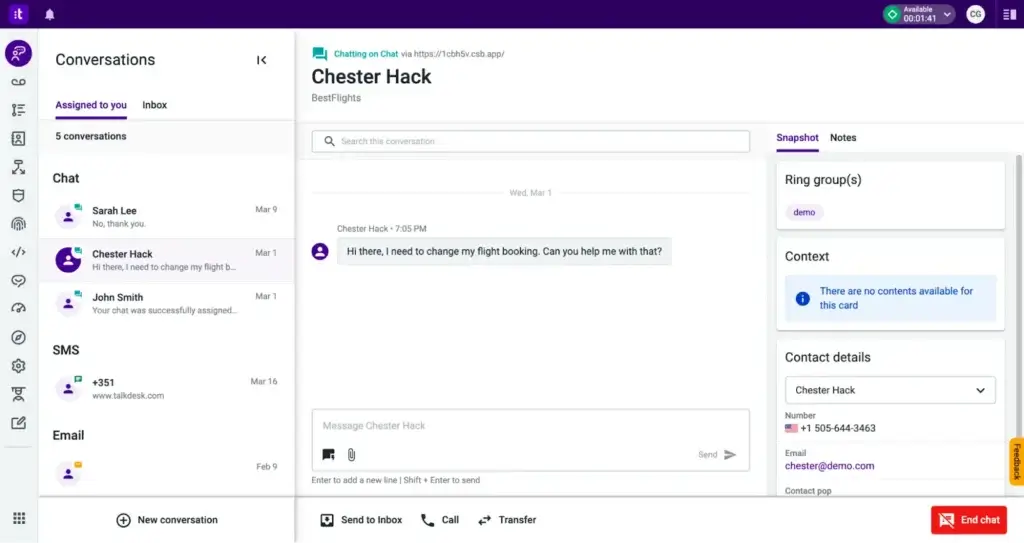
Talkdesk is one of the strongest AI-first call center platforms on the market. It stands out because AI is not treated as a side add-on. Instead, it is embedded throughout the product, from virtual agents and self-service to real-time agent guidance, analytics, and workflow automation. For companies that want to modernize customer support with automation while still keeping agents effective, Talkdesk is a very compelling option.
What makes Talkdesk especially attractive is the balance it strikes between enterprise-grade depth and a relatively modern user experience. It is well-suited to businesses that need omnichannel engagement, strong routing, and flexible AI capabilities without wanting a legacy platform that feels heavy to administer.
Key Features
Talkdesk combines core contact center functionality with a broad AI layer designed to reduce wait times and improve outcomes. Key capabilities include:
- AI agents for voice and digital self-service
- Real-time agent assistance with Talkdesk Copilot
- Omnichannel engagement across voice, chat, SMS, email, and social
- Workflow design and intelligent routing
- Speech analytics and conversation insights
- Industry-specific solutions for sectors like healthcare, financial services, and retail
- Automated summaries and reduced after-call work
Pros and cons
Pros
✅ Strong AI-first product strategy across self-service and live support
✅ Excellent automation options for modern omnichannel service teams
✅ Broad feature set for enterprise and upper mid-market environments
✅ Good balance between advanced functionality and modern usability
Cons
❌ Pricing can become expensive as AI and channel needs expand
❌ Better suited to serious support teams than smaller basic call operations
❌ Some deployments may still require vendor help and guided setup
❌ Can feel like more platform than lean teams actually need
Pricing
Talkdesk publishes a starting point for its digital-focused plan, but most contact center packages and AI-heavy deployments are quote-based.
| Plan / Pricing Direction | Best For | Main Highlights |
| Digital Essentials – starts at $85/user/month | Digital-first support teams | Email, chat, SMS, social channels, dashboards, APIs |
| Voice and enterprise packages – custom quote | Omnichannel and call-heavy operations | Routing, AI add-ons, automation, broader contact center capabilities |
Who Should Use Talkdesk?
Talkdesk is best for businesses that want a modern, AI-centric contact center and have enough service complexity to justify a more sophisticated platform. It is especially strong for:
- Mid-market and enterprise support teams
- Brands investing in AI self-service
- Omnichannel service environments
- Companies that need industry-specific CX workflows
Five9

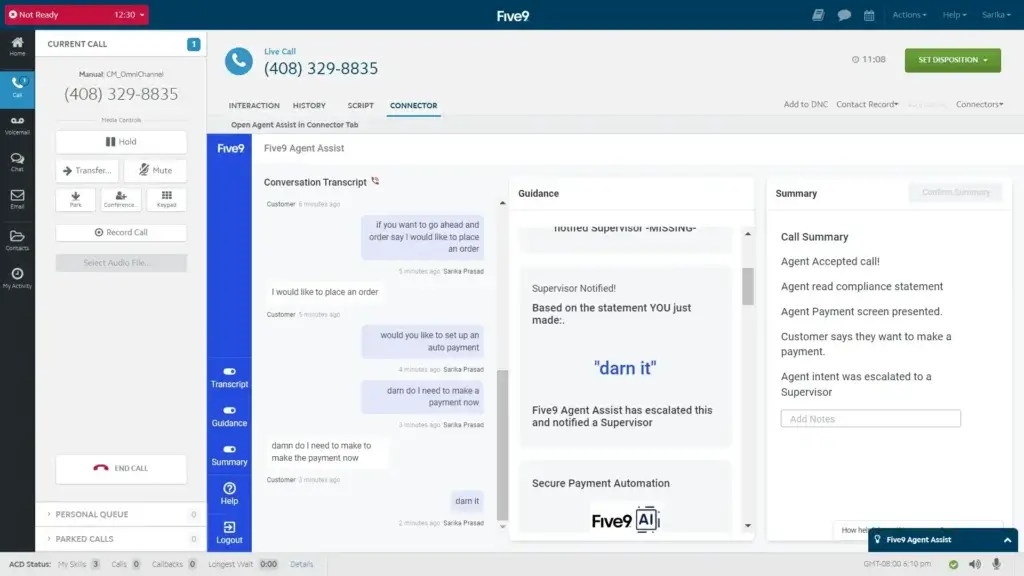
Five9 has been a serious contact center name for years, and it remains one of the strongest choices for businesses that want proven enterprise infrastructure plus a growing AI layer. Its current positioning around Genius AI makes it especially relevant for teams that want practical automation, agent assistance, and AI agents without giving up the depth expected from a mature CCaaS vendor.
In my view, Five9 is particularly strong when your operation has advanced routing needs, a large service team, or a more complex service environment. It is not the most lightweight platform in this group, but it is one of the most credible for large-scale deployments.
Key Features
Five9 combines enterprise contact center capabilities with AI tools designed to improve both self-service and live agent performance. Standout features include:
- Five9 Genius AI across the broader CX platform
- AI Agents for informational, actionable, and agentic interactions
- Intelligent Virtual Agent and Agent Assist
- Real-time guidance and knowledge suggestions for agents
- Omnichannel engagement and routing
- Workforce engagement and analytics
- Strong integration ecosystem for CRM and customer service stacks
Pros and cons
Pros
✅ Strong overall balance of AI, routing, analytics, and contact center depth
✅ Mature platform for enterprise and upper mid-market teams
✅ Good fit for large-scale inbound and outbound service environments
✅ Broad CCaaS capabilities without feeling overly narrow or phone-first
Cons
❌ More platform than many smaller teams actually need
❌ Costs can rise quickly as functionality expands
❌ Not the simplest rollout for smaller organizations
❌ Better suited to serious contact center buyers than casual SMB shoppers
Pricing
Five9 pricing is generally custom and tied to package scope, channels, AI components, and deployment complexity.
| Plan / Pricing Direction | Best For | Main Highlights |
| Custom quote | Mid-market and enterprise teams | Voice, digital engagement, routing, analytics, WEM |
| Custom AI packaging | Teams deploying automation at scale | AI Agents, IVA, Agent Assist, conversational and generative AI |
Who Should Use Five9?
Five9 is ideal for organizations that need a proven enterprise contact center with deeper AI capabilities layered on top. It is a strong fit for:
- Large support organizations
- Teams with advanced routing and workforce needs
- Companies modernizing legacy call center operations
- Businesses that want AI but still prioritize operational depth
RingCentral RingCX

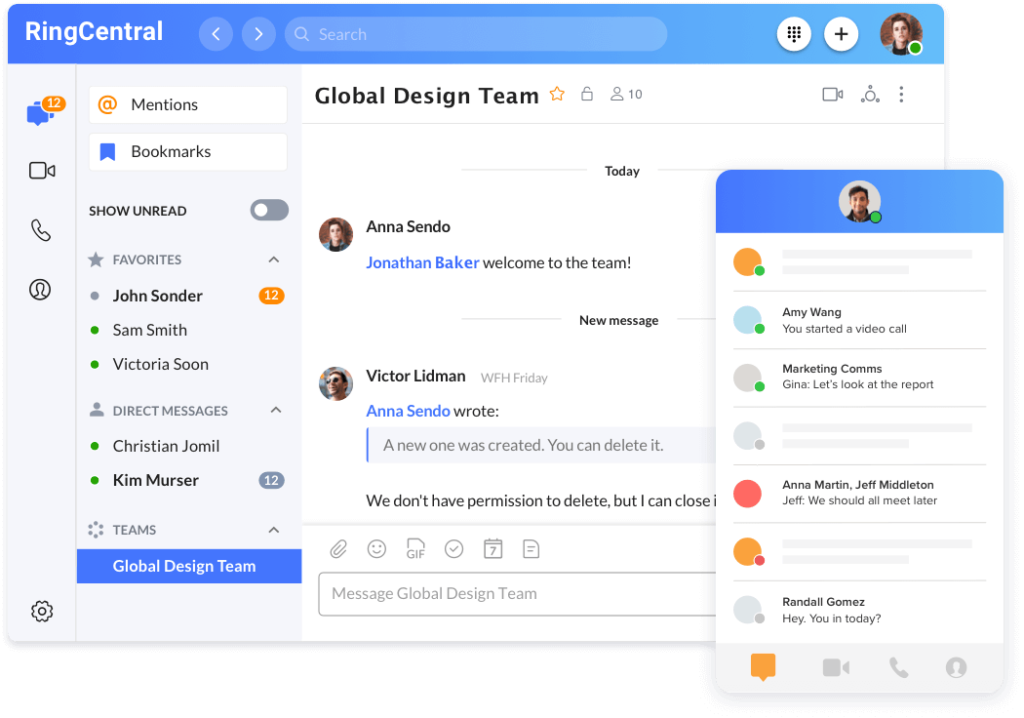
RingCentral RingCX is one of the most appealing options for companies that want modern AI contact center functionality without jumping straight into the heaviest enterprise deployment. It combines omnichannel service, AI-driven automation, digital channels, and agent assistance in a package that is relatively straightforward compared with some older CCaaS platforms.
What I like most about RingCX is its balance. It does not feel as narrowly focused as a basic inbound call center tool, but it also avoids some of the complexity that larger enterprise-first suites can introduce. That makes it a strong option for growing mid-market teams and larger organizations that want fast time to value.
Key Features
RingCX is positioned as an AI-first contact center solution with broad functionality available in one platform. Important capabilities include:
- AI Representative for voice-first AI agents
- AVA Agent Assist and Supervisor Assist
- 20+ digital channels in one license
- Unlimited domestic inbound and outbound calling
- Real-time coaching and insights
- Omnichannel routing and agent workspace
- 99.999% availability target for reliability
Pros and cons
Pros
✅ Strong value for AI plus omnichannel coverage
✅ Easier deployment than many enterprise rivals
✅ Includes broad digital channel support
✅ Good fit for scaling support teams
Cons
❌ Advanced AI still depends on add-ons in some cases
❌ Less battle-tested in some enterprises than older CCaaS leaders
❌ May require RingCentral sales help for full configuration
❌ Feature depth can vary by package
Pricing
RingCX is one of the clearer options in this category because it publishes a starting point for contact center pricing.
| Plan / Pricing Direction | Best For | Main Highlights |
| Starts at $65/user/month | Growing teams that want AI contact center capabilities | Core contact center features, unlimited minutes, AI tools, digital channels |
| AI add-ons available | Teams expanding automation and guidance | Additional AI agents, automation, and coaching layers |
Who Should Use RingCentral RingCX?
RingCX is ideal for businesses that want an AI-enabled omnichannel contact center that is powerful without being overly complicated. It works especially well for:
- Mid-market support teams
- Businesses expanding from phone-only service to omnichannel support
- Companies that want AI automation plus live agent tools
- Organizations that value fast deployment and predictable packaging
Aircall
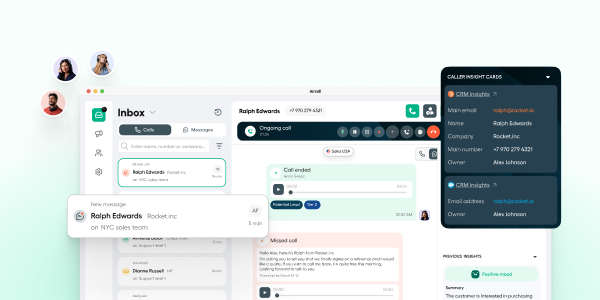
Aircall is one of the most practical AI call center options for growing support and sales teams. It does not try to be the heaviest enterprise contact center suite in this category, and that is part of its appeal. Instead, it focuses on giving teams a modern cloud calling and customer conversation platform with strong integrations, useful AI assistance, and a setup that is generally more approachable than some enterprise-first alternatives.
What makes Aircall stand out is how well it fits teams that want better performance and visibility without taking on a highly complex rollout. You get core call center capabilities like IVR, routing, analytics, shared visibility into conversations, and AI-powered summaries and insights, while still keeping the platform manageable for teams that are scaling quickly.
Key features
- AI Assist with call summaries, key topics, action items, and sentiment analysis
- Shared workspace for calls, SMS, and team collaboration
- IVR, smart routing, queue callback, and live monitoring
- Power Dialer and sales productivity features on higher plans
- 250+ integrations and API access
- Desktop and mobile apps for distributed teams
- International number support across plans, subject to local regulations
Pros and cons
Pros
✅ Strong fit for growing support and sales teams
✅ Useful AI features without feeling overly enterprise-heavy
✅ Excellent integration story for CRM and helpdesk workflows
✅ Easier to understand and manage than many larger CCaaS platforms
Cons
❌ Less enterprise depth than platforms like NICE CXone or Five9
❌ Advanced functionality becomes more compelling on higher tiers
❌ Better suited to voice-led teams than highly complex omnichannel operations
❌ Custom tier requires larger scale and a higher commitment
Pricing
Aircall currently structures pricing around Essentials, Professional, and Custom. The pricing page highlights Essentials as the entry-level option, Professional as the main performance tier, and Custom for larger deployments, with a 25-license minimum on Custom. In practice, Aircall fits best in the SMB to mid-market range, especially for teams that want AI-assisted calling and strong integrations without buying a more complex enterprise contact center platform.
Who should use Aircall?
Aircall is best for growing support and sales teams that want modern cloud calling, strong CRM and helpdesk integrations, and practical AI features that improve daily performance. It is especially well-suited to companies that value speed of rollout, shared team visibility, and a cleaner operational experience over the deepest enterprise contact center feature stack.
Dialpad Support

Dialpad Support is the most approachable AI call center platform on this list for many growing teams. Its core pitch is simple but effective: use real-time AI to help agents resolve issues faster, reduce manual note-taking, and get better visibility into conversations without adding separate tools. That makes it a strong option if you want AI value quickly, not after a long enterprise rollout.
Compared with heavier platforms, Dialpad often feels more straightforward. You still get essential contact center features like IVR, ACD, routing, analytics, and omnichannel support, but the user experience is usually easier to manage. For small and mid-sized teams, that usability edge matters a lot.
Key Features
Dialpad Support focuses on practical AI that helps agents in real time while keeping the platform manageable. Key features include:
- Real-time transcription and summaries
- AI-powered coaching and scorecards
- AI CSAT and conversation insights
- Inbound support workflows with IVR and ACD
- Voice and digital support capabilities
- Seamless integrations and app marketplace access
- Human and AI agent support within one platform
Pros and cons
Pros
✅ AI is useful from day one
✅ Clean and approachable interface
✅ Transparent starting prices
✅ Strong fit for small and mid-sized support teams
Cons
❌ Less enterprise depth than the largest CCaaS platforms
❌ Some advanced quality tools vary by tier or add-on
❌ Global complexity is not its strongest angle
❌ Premium functionality can push pricing up
Pricing
Dialpad is more transparent than most competitors here and is one of the easier platforms to budget for at the start.
| Plan | Best For | Main Highlights |
| Essentials – from $80/user/month annually | Lean support teams | Inbound voice, IVR, ACD, AI transcription, core support tools |
| Advanced – from $115/user/month annually | Growing support teams | More advanced workflows and AI capabilities |
| Premium – from $150/user/month annually | Larger support operations | Expanded AI, analytics, and higher-end support features |
| Enterprise – custom | Complex deployments | Custom packaging, demos, and additional controls |
Who Should Use Dialpad Support?
Dialpad Support is best for businesses that want practical AI benefits, clean usability, and less complexity than a traditional enterprise contact center deployment. It is especially strong for:
- Small and mid-sized support teams
- Fast-growing companies building their first modern contact center
- Service teams that want real-time transcription and AI coaching
- Businesses that care about transparency and ease of rollout
NICE CXone

NICE CXone remains one of the most serious enterprise contact center platforms available. It has a long history in the space, and its current CXone positioning makes it a strong choice for organizations that want AI across self-service, orchestration, analytics, workforce management, and agent support. If your environment is complex, NICE deserves to be high on the shortlist.
That said, NICE is rarely the simplest option. It is built for scale, breadth, and operational rigor. In practical terms, that makes it a better fit for large customer service organizations than for smaller teams that just want quick AI wins.
Key Features
NICE CXone offers a broad AI-powered platform rather than a narrow call handling tool. Important features include:
- AI-powered customer engagement across channels
- CXone Autopilot for end-to-end customer service workflows
- Intelligent Virtual Agent and self-service automation
- Agent and supervisor workspaces
- Extensive analytics and performance reporting
- Customer journey orchestration and integrations
- Deep enterprise capabilities for workforce and compliance-heavy environments
Pros and cons
Pros
✅ Deep enterprise feature set
✅ Excellent AI automation and self-service potential
✅ Strong analytics and operational tooling
✅ Good fit for highly complex environments
Cons
❌ Higher starting cost than several rivals
❌ More complexity to buy and deploy
❌ Often too much platform for smaller teams
❌ Best value depends on full enterprise usage
Pricing
NICE is more transparent than it used to be, but it still sits clearly in the enterprise tier.
| Plan | Best For | Main Highlights |
| Omnichannel Suite – $110/agent/month | Teams needing omnichannel basics | Core omnichannel contact center functionality |
| Essential Suite – $135/agent/month | Growing enterprise teams | Broader operational tools and CXone platform depth |
| Core Suite – $169/agent/month | Larger, more complex teams | More advanced enterprise contact center capabilities |
| Complete Suite – $209/agent/month | Advanced enterprise operations | Expanded feature depth and orchestration |
| Ultimate Suite – $249/agent/month + usage | High-scale enterprise environments | Highest-tier packaging with broader platform options |
Who Should Use NICE CXone?
NICE CXone is ideal for large organizations that need deep control, broad functionality, and long-term scalability. It is a strong fit for:
- Enterprise contact centers
- Compliance-heavy industries
- Teams with advanced workforce and analytics needs
- Organizations investing heavily in AI-driven service transformation
8×8 Contact Center

8×8 Contact Center is a solid choice for companies that want omnichannel contact center functionality with AI assistance and global reach. Its biggest strength is not that it tries to outdo every rival in headline-grabbing AI claims. Instead, it offers a practical mix of omnichannel routing, analytics, self-service, and agent assistance inside a broader communications ecosystem.
For internationally distributed teams, that matters. 8×8 has long been relevant for businesses that want communications and customer engagement capabilities under one roof, and its contact center offering remains especially attractive when global operations are part of the picture.
Key Features
8×8 Contact Center delivers a broad set of service features with AI layered into both customer and agent workflows. Key capabilities include:
- AI-enabled omnichannel contact center
- Omnichannel routing across voice and digital channels
- AI-enabled self-service
- 8×8 Agent Assist for guidance and summaries
- Voice, text, and sentiment analytics
- Intuitive agent and supervisor workspaces
- Integrations and secure payment options
Pros and cons
Pros
✅ Strong global and omnichannel story
✅ Useful AI assistance for agents and analytics
✅ Good choice for distributed businesses
✅ Solid balance of communications and contact center features
Cons
❌ Less pricing transparency for contact center packages
❌ AI positioning is solid but less differentiated than top leaders
❌ Can require more sales involvement for packaging
❌ Not the simplest option for small teams
Pricing
8×8 contact center pricing is custom and is usually packaged according to channels, scale, and required capabilities.
| Plan / Pricing Direction | Best For | Main Highlights |
| Custom quote | Omnichannel support teams | Routing, workspaces, analytics, AI-enabled self-service |
| Custom AI packaging | Distributed and larger operations | Agent Assist, sentiment analysis, broader CX tooling |
Who Should Use 8×8 Contact Center?
8×8 Contact Center is best for businesses that need omnichannel support with strong international and distributed-team capabilities. It is especially useful for:
- Global or multi-location organizations
- Teams that want AI-assisted service, not just basic telephony
- Businesses already considering 8×8 for broader communications
- Customer support environments with voice and digital channels
Feature Comparison Table
| Tool | Best For | Standout AI Strength | Pricing Transparency |
| Talkdesk | AI-first enterprise CX | Autopilot, Copilot, automation across voice and digital | Medium |
| Five9 | Mature enterprise contact centers | Genius AI, AI Agents, Agent Assist | Low |
| RingCentral RingCX | Mid-market and fast-scaling teams | AI Representative, Agent Assist, 20+ digital channels | High |
| Aircall | Growing support and sales teams | AI Assist, call summaries, sentiment analysis, action items | High |
| Dialpad Support | Usability and practical AI | Real-time transcription, summaries, AI coaching | High |
| NICE CXone | Large enterprises and complex environments | Autopilot, IVA, orchestration, analytics depth | High |
| 8×8 Contact Center | Global omnichannel support | Agent Assist, sentiment analytics, AI-enabled self-service | Low |
How to Choose the Right AI Call Center Software
Start with the AI problem you actually want to solve. Many businesses shop for AI call center software as if every platform does the same thing, but that is rarely true. Some tools are strongest at self-service, others at agent productivity, and others at enterprise analytics.
- Map your highest-cost interactions: Identify whether your biggest pain point is long handle time, repetitive inquiries, poor routing, inconsistent QA, or lack of omnichannel visibility.
- Separate must-have AI from nice-to-have AI: If you mainly need call summaries and agent assistance, Dialpad or RingCX may be enough. If you need broader orchestration and enterprise automation, Talkdesk, Five9, Aircall, or NICE may fit better.
- Check channel coverage: Make sure the platform supports the voice and digital channels your customers actually use today, not just the ones you might add later.
- Validate integration depth: AI gets much stronger when it can pull CRM, ticketing, order, and knowledge-base data into the workflow.
- Understand pricing carefully: Ask which AI features are included, which are add-ons, and how usage-based pricing may affect long-term costs.
- Run a realistic pilot: A short proof of concept using real workflows often reveals more than a polished demo.
Benefits of AI Call Center Software
The main reason to invest in AI call center software is not novelty. It is leverage. The right platform helps your team do more with the same headcount while improving consistency and customer experience.
- Faster resolutions: AI can suggest answers, automate routine tasks, and reduce dead time during and after calls.
- Better self-service: Virtual agents can resolve simple requests 24/7 and hand off more complex issues cleanly.
- Higher agent productivity: Automated notes, summaries, and coaching reduce repetitive work and support newer agents.
- More useful analytics: AI helps surface trends in sentiment, performance, and customer friction that manual review often misses.
- Improved scalability: Support teams can absorb more volume without relying only on hiring.
- More consistent service: AI guidance helps agents follow the right process and deliver more reliable customer experiences.
Conclusion
The best AI call center software is not simply the platform with the longest AI feature list. It is the one that fits the way your team actually works. Some platforms are built for large, highly structured service operations, while others are better for growing teams that want faster deployment and practical AI support in daily workflows.
If you want an AI-first platform with broad automation and self-service potential, Talkdesk remains one of the strongest choices. Five9 and NICE CXone make the most sense for larger organizations that need deeper contact center infrastructure, advanced control, and enterprise-scale AI capabilities. RingCentral RingCX is a strong fit for teams that want a modern omnichannel platform with a more approachable rollout. Dialpad Support stands out for smaller and mid-sized teams that want real-time AI benefits without heavy operational complexity. Aircall is especially appealing for growing support and sales teams that prioritize integrations, usability, and AI-assisted calling. 8×8 Contact Center remains a solid option for businesses that need omnichannel engagement with stronger international and distributed-team support.
That is why the smartest way to choose is to look past the marketing language and focus on fit. Start with your team size, service complexity, preferred channels, integration requirements, and how much AI you will realistically use in production. When those pieces line up, the right platform can help you improve customer experience, reduce manual work, and scale support more efficiently.
Frequently Asked Questions (FAQs)
What is AI call center software?
AI call center software is a contact center platform that uses artificial intelligence to automate customer interactions, assist agents in real time, summarize conversations, analyze sentiment, and improve routing, reporting, and service quality.
What is the difference between AI call center software and traditional call center software?
Traditional call center software focuses on telephony, routing, and agent workflows. AI call center software adds automation, virtual agents, transcription, summaries, coaching, and conversation intelligence.
Which AI call center software is best for mid-sized businesses?
RingCentral RingCX and Dialpad Support are two of the strongest options for mid-sized businesses because they combine useful AI features with more accessible deployment and pricing than many enterprise-first platforms.
Which platform is best for enterprise call centers?
NICE CXone, Five9, and Talkdesk are usually the strongest enterprise choices because they offer deeper operational tooling, broader automation options, and better support for large, complex service environments.
Is AI call center software only for voice support?
No. Most leading platforms now support omnichannel service, including chat, SMS, email, social messaging, and other digital channels alongside voice.
Can AI replace live agents completely?
Not in most real-world service teams. AI is best used to automate routine requests, guide agents, and shorten resolution time, while human agents handle exceptions, sensitive issues, and more complex conversations.
Does AI call center software reduce costs?
It can. AI reduces repetitive work, lowers after-call effort, improves self-service containment, and helps teams handle more volume without adding headcount at the same pace.
Which platform has the most transparent pricing?
Dialpad Support, RingCentral RingCX, and NICE CXone are more transparent than several competitors in this list because they publish clearer starting or package pricing.
What AI features matter most when comparing vendors?
The most important features usually include virtual agents, agent assist, real-time transcription, conversation summaries, sentiment analysis, quality management insights, and CRM-aware automation.
How should you evaluate AI call center software before buying?
Focus on your top service bottlenecks, verify integration depth, request a realistic pilot, and make sure the AI features you need are included in the package you are actually considering.