
Introduction
Choosing the right CRM can directly shape how your sales team manages leads, follows up with prospects, and closes revenue. If you want a sales-first CRM that feels simple without being shallow, Pipedrive is one of the strongest options to consider.
In this Pipedrive review, you’ll get a clear look at its key features, pricing, AI tools, add-ons, user experience, security, and best-fit use cases. The goal is simple: help you decide whether Pipedrive is the right CRM for your sales process in 2026.
What is Pipedrive?
Pipedrive is a customer relationship management platform built mainly for sales teams. It helps you manage leads, deals, activities, email communication, sales reports, and pipeline visibility from one workspace.
Unlike broad CRM platforms that try to cover sales, marketing, service, commerce, and operations in one system, Pipedrive focuses heavily on pipeline management. That makes it especially useful if your main priority is helping your team sell with more structure and fewer missed follow-ups.
Pipedrive Review: Quick Summary
If you need a quick answer, Pipedrive is best for small and mid-sized sales teams that want a visual, easy-to-use CRM. It is less ideal if you need deep native marketing automation, advanced service desk features, or enterprise-level customization similar to Salesforce.
- Best for: Sales teams that need pipeline clarity and activity tracking
- Main strength: Simple visual deal management
- Main limitation: Add-ons can increase the total cost
- Free plan: No permanent free plan, but a free trial is available
- Best alternatives: HubSpot, monday CRM, Salesforce, and Zoho CRM
Software specification
Pipedrive Key Features
If you are looking for a CRM that keeps your sales process clear, Pipedrive delivers a focused and practical toolkit. It does not overload you with every possible business feature. Instead, it gives your sales team the tools needed to manage pipeline activity, improve follow-up, and move deals forward faster.
Here are the Pipedrive features that matter most for sales-driven teams in 2026.
Visual Sales Pipeline
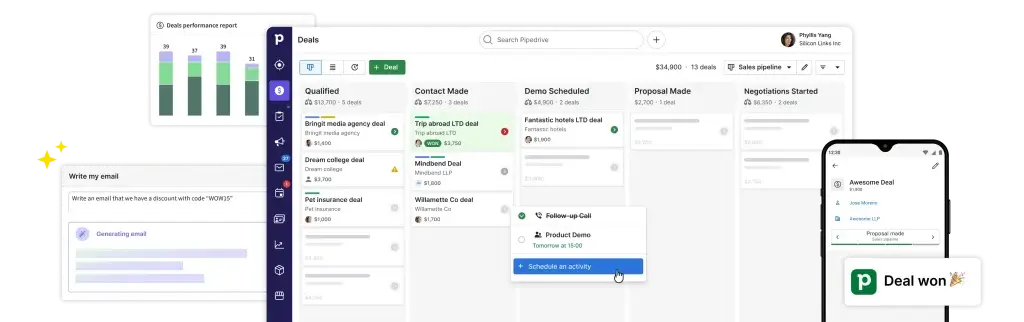
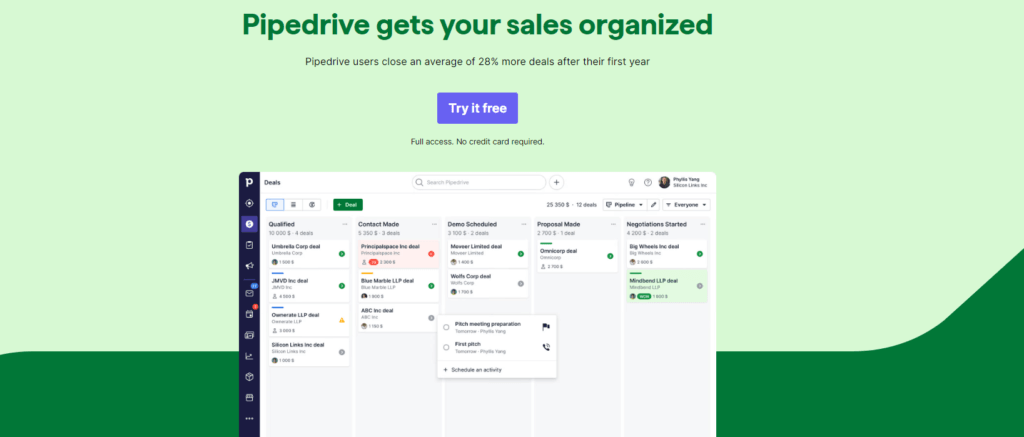
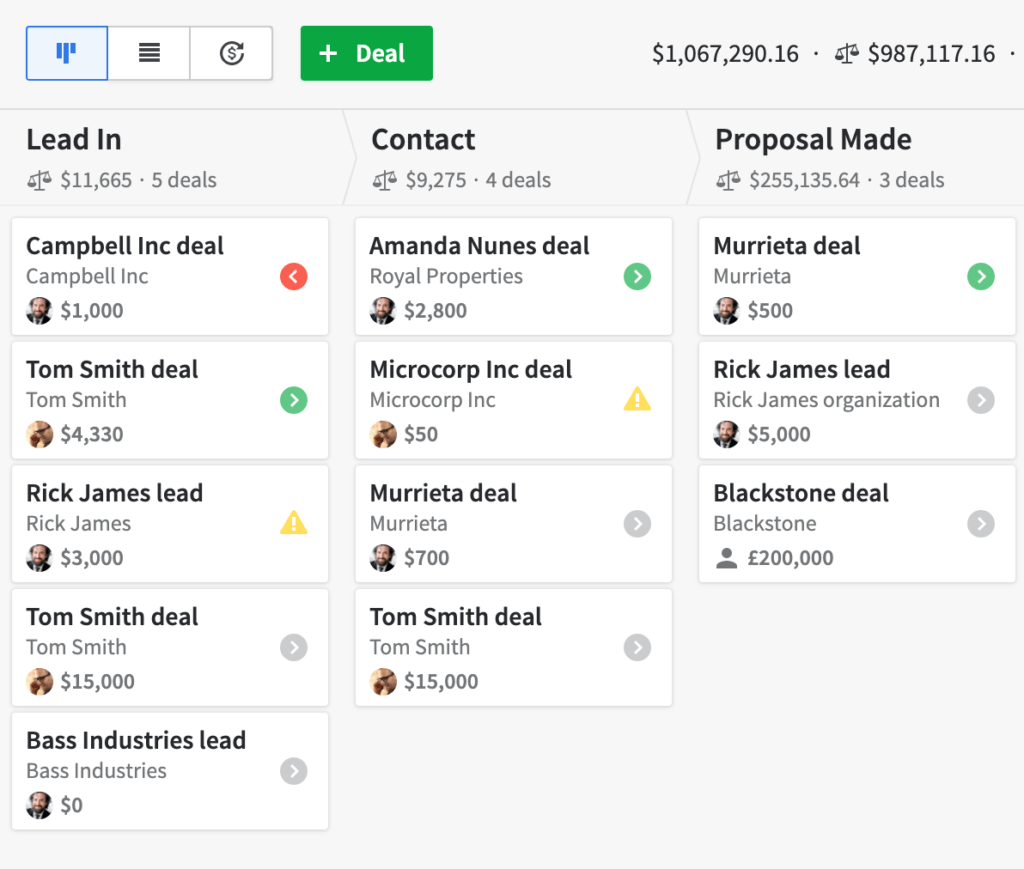
Pipedrive’s visual pipeline is the core of the platform. You can drag and drop deals between stages, customize each stage to match your sales process, and see where every opportunity stands at a glance.
This is especially useful if your team needs better visibility into deal progress. Instead of digging through spreadsheets or scattered notes, you can quickly see which deals are moving, which are stuck, and which need attention.
💡 Expert Tip: A visual pipeline is not just a design feature. It helps managers identify bottlenecks, coach reps, and keep follow-up activity consistent.
Activity and Task Management
Pipedrive is built around activity-based selling. That means each deal should have a clear next step, such as a call, demo, proposal, or follow-up email.
You can use Pipedrive to:
- Schedule calls, meetings, and follow-up tasks
- Set reminders for important sales activities
- Sync tasks with Google and Microsoft calendars
- Track overdue activities before they affect revenue
This keeps your sales process moving and reduces the risk of strong leads going cold because nobody followed up on time.
Email Sync and Communication Tracking
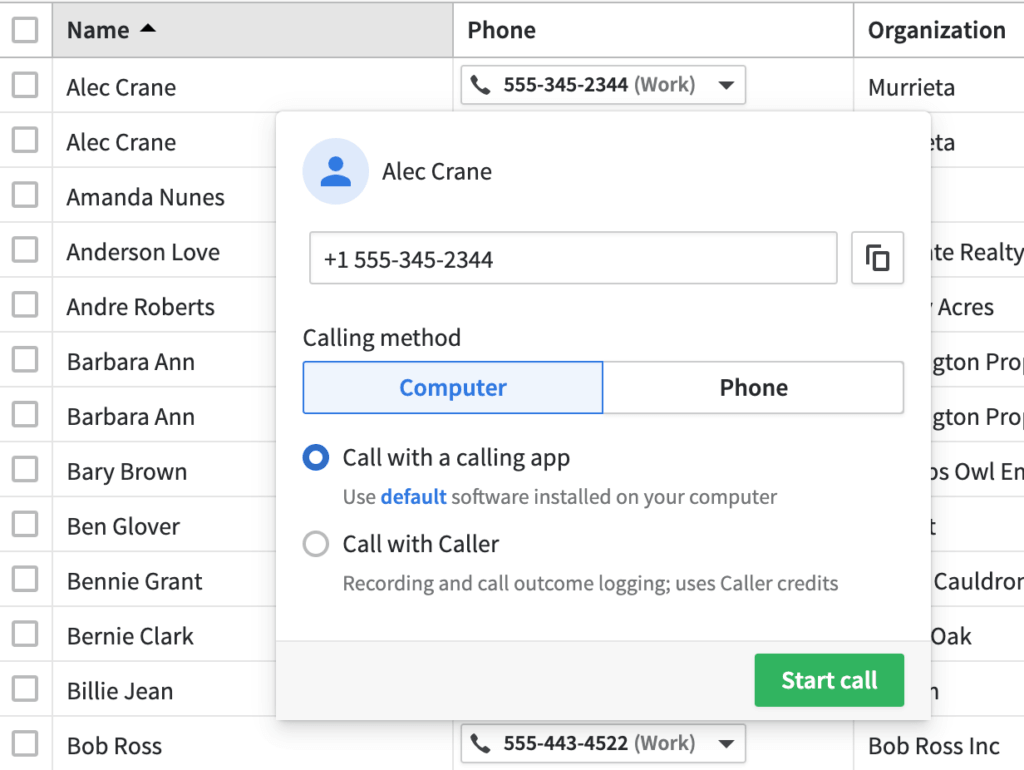
Pipedrive lets you connect your email inbox so you can manage sales conversations directly inside the CRM. You can track email opens, use templates, log messages, and connect communication history to the right person or deal.
This matters because CRM data is only useful when your team can trust it. When emails, calls, notes, and deal updates live in one place, managers get a more accurate view of the pipeline.
Workflow Automation
Pipedrive includes workflow automation tools that help reduce repetitive manual work. You can automate tasks like creating follow-up activities, sending emails, updating fields, and notifying team members when deals reach certain stages.
The automation builder is visual and approachable, so you do not need a developer to create useful workflows. For growing sales teams, this can improve consistency across reps and reduce administrative work.
⚙️ CRM Insight: Automation is most valuable when it supports your sales process rather than replacing it. Pipedrive works well because its automation is tied closely to pipeline actions.
Reporting and Sales Dashboards
Pipedrive gives you customizable dashboards and reports for tracking sales performance. You can monitor deal conversion rates, sales cycle length, activity completion, average deal size, and individual rep performance.
The reporting experience is easy to understand, which is helpful for small and mid-sized teams. However, if you need complex enterprise analytics or multi-object reporting, you may find Salesforce or HubSpot more advanced.
Pipedrive AI Features
Pipedrive now includes AI capabilities designed to help sales teams work faster and prioritize better. These tools are useful for reps who spend too much time writing emails, reviewing communication history, or deciding which deals deserve attention.
Key AI capabilities may include:
- AI Sales Assistant for deal recommendations and performance suggestions
- AI email writing to help create sales emails from prompts
- Email summarization to review long conversations faster
- Deal prioritization to help reps focus on high-value opportunities
These AI tools are not a replacement for sales judgment. They work best as a practical layer that helps your team act faster and keep the pipeline cleaner.
LeadBooster and Lead Generation Tools
Pipedrive’s LeadBooster tools help you capture and qualify new leads. Depending on your plan and add-ons, LeadBooster can support web forms, chatbot, live chat, and prospecting features.
This is useful if your team needs to turn website traffic into CRM records faster. It also helps sales reps spend less time manually collecting lead details and more time starting relevant conversations.
Smart Docs for Quotes and Proposals
Smart Docs helps sales teams create documents such as proposals, quotes, contracts, and sales agreements using CRM data. It can reduce manual copying and make document creation more consistent.
If your sales cycle depends on proposals or contracts, this feature can save meaningful time. It is especially helpful for teams that want to keep deal records, documents, and communication in one sales workspace.
Integrations and Marketplace
Pipedrive connects with hundreds of third-party tools, including popular apps for email, calendars, accounting, communication, automation, and marketing. Its marketplace now promotes more than 500 integrations, which makes it easier to connect your CRM with your existing software stack.
Common integrations include:
- Google Workspace and Microsoft 365
- Slack, Zoom, Trello, and Asana
- QuickBooks, Xero, and PandaDoc
- Mailchimp, Zapier, Make, and other automation tools
This makes Pipedrive flexible enough for teams that want a focused CRM but still need to connect sales data with the rest of their workflow.
Mobile CRM on the Go
Pipedrive’s mobile app is strong for salespeople who work outside the office. You can update deals, log calls, add notes, check your pipeline, and receive activity reminders from your phone.
This is valuable for field sales teams, consultants, agencies, and hybrid sales teams. When reps can update CRM records immediately after a meeting, your pipeline data becomes more accurate.
Data Security and Role Permissions
Pipedrive includes important security controls such as two-factor authentication, permission settings, encrypted connections, visibility controls, and user access management.
For growing teams, role permissions are especially important. They help you decide who can view, edit, export, or manage specific data, which becomes more critical as your sales organization expands.
Key Benefits
Benefits of Using Pipedrive
The biggest benefit of Pipedrive is that it helps your sales team stay focused. Instead of building a complicated CRM environment, you can create a practical sales workspace where deals, people, tasks, and communication are easier to manage.
1. Keeps Your Sales Process Organized
Pipedrive helps you turn your sales process into clear pipeline stages. You can define how deals move from first contact to closed revenue, then track progress without relying on scattered spreadsheets.
- Track each deal’s progress visually
- Set custom stages for your workflow
- Assign activities to reps or managers
- Spot stalled deals before they disappear
🔍 CRM Insight: A good CRM should make the next action obvious. Pipedrive does this well by keeping activities connected to deals.
2. Improves Follow-Up Discipline
Many deals are lost because the follow-up process is inconsistent. Pipedrive helps solve this by keeping activities, reminders, and email history tied to each opportunity.
This gives reps a clearer daily workflow and gives managers better visibility into whether the team is actually progressing deals.
3. Saves Time with Automation
Manual updates, repeated emails, and forgotten tasks can drain productivity. Pipedrive’s automation tools help you reduce repetitive work and build a more reliable sales process.
You can trigger tasks, notifications, emails, and field updates based on deal movement or customer activity.
4. Improves Sales Forecasting
Pipedrive’s dashboards and pipeline reports help you understand where revenue is likely to come from. You can track conversion rates, sales cycle length, activity volume, and deal value.
This is useful for managers who need better forecasting without building complex reports from scratch.
5. Fits Into Your Existing Workflow
With more than 500 integrations, Pipedrive can connect with many tools your team already uses. This helps you avoid replacing your entire software stack just to improve sales management.
For many small and mid-sized businesses, this is the sweet spot: a focused CRM with enough flexibility to support a modern sales workflow.
Pros and Cons
Advantages and Limitations
Positive
✅ Very easy to use
✅ Excellent visual pipeline
✅ Strong sales automation
✅ Great for small and mid-sized teams
Negative
❌ No permanent free plan
❌ Advanced features depend on higher plans
❌ Native marketing tools are limited
❌ Add-ons can raise the total cost
Before choosing any CRM, you need to understand both strengths and limitations. Pipedrive is excellent at sales pipeline management, but it is not the best choice for every business model.
✅ Pros of Pipedrive
1. Very easy to use
Pipedrive is one of the easier CRMs to adopt. The interface is clean, the pipeline is visual, and most sales reps can understand the basics quickly.
2. Excellent visual pipeline
The platform makes it easy to see where deals stand and what needs attention. This is ideal if your sales process depends on consistent follow-ups and clear stage tracking.
3. Strong sales automation
You can automate repetitive tasks, reminders, emails, and pipeline actions. This helps your team reduce admin work and maintain a more consistent sales process.
4. Great for small and mid-sized teams
Pipedrive offers enough power for growing sales teams without the complexity of enterprise-heavy platforms. It gives you structure without forcing you into a long implementation cycle.
❌ Cons of Pipedrive
1. No permanent free plan
Pipedrive does not offer a free forever plan. If you want a free CRM for a very small team, HubSpot may be a better starting point.
2. Advanced features depend on higher plans
Some important tools, such as deeper automation, advanced permissions, add-ons, and reporting capabilities, may require higher-tier plans or paid extras.
3. Native marketing tools are limited
Pipedrive is a sales-first CRM, not a full marketing automation suite. If you need advanced landing pages, nurture campaigns, and marketing attribution, you may need add-ons or integrations.
4. Add-ons can raise the total cost
The base CRM pricing can look affordable, but tools like LeadBooster, Campaigns, Web Visitors, Projects, or Smart Docs can increase your monthly spend depending on your plan.
User Experience
Pipedrive User Experience
Pipedrive gets one of the most important CRM principles right: your team is more likely to use a CRM when it feels simple. The platform is clean, visual, and built around daily sales activity rather than heavy administration.
Clean, Visual Interface
Your pipeline is the center of the experience. Deals appear in a drag-and-drop board, and you can click into each card to view contact details, notes, email history, activities, files, and deal value.
The interface is easy to understand, even for users who have never worked inside a CRM before. This lowers adoption friction, which is often one of the biggest reasons CRM projects fail.
💡 Expert Tip: Pipedrive works best when your team commits to updating activities consistently. The software is simple, but the sales discipline still matters.
Mobile App That Works Anywhere
Pipedrive’s mobile app is useful for sales reps who work between meetings, travel often, or manage field sales activity. You can update deals, log calls, add notes, and check upcoming tasks without returning to your desk.
- Manage deals from mobile
- Log calls and meeting notes
- Receive activity reminders
- Access contacts and pipeline updates
Support and Onboarding
Pipedrive offers support resources, onboarding guides, product tutorials, webinars, and a detailed help center. Support availability can vary by plan, region, and language, so it is worth checking the current support terms before choosing a plan.
For most teams, setup is faster than with enterprise CRMs. You can import contacts, build a basic pipeline, connect email, and create your first automation without a long implementation process.
Easy to Customize
Pipedrive gives you enough customization to fit your sales process without turning setup into a technical project. You can customize pipeline stages, fields, dashboards, reports, activities, and user permissions.
- Create custom deal fields
- Build multiple pipelines
- Personalize dashboard views
- Set role-based visibility controls
This balance is one of Pipedrive’s biggest strengths. It gives you control without making the CRM feel too complex.
Performance and Reliability
Pipedrive is fast in day-to-day use. Pages load smoothly, pipeline views are easy to scan, and the platform works well for teams managing active deal flows.
For very large organizations with highly complex data models, a heavier CRM may provide deeper architecture. But for most small and mid-sized sales teams, Pipedrive offers more than enough speed and reliability.
Business size fit
Pipedrive for Different Business Sizes
Pipedrive is flexible enough for solo sellers and structured enough for growing sales teams. Its strongest fit is usually small to mid-sized businesses that want a practical CRM without the cost or complexity of enterprise systems.
Larger organizations can also use Pipedrive, especially if their sales process is relatively clear and pipeline-driven. However, companies with complex enterprise workflows may need more advanced customization than Pipedrive provides.
📊 Who Is Pipedrive Best For?
| Business Size | How Pipedrive Fits |
| Solo and Small Teams | Simple setup, visual deal tracking, and useful reminders without heavy CRM administration. |
| Growing Sales Teams | Custom pipelines, workflow automation, reporting, email sync, and integrations support more structured sales operations. |
| Larger Teams | Role permissions, team visibility, API access, automation, and add-ons can support higher-volume sales workflows. |
Pricing and Plans
Pipedrive Pricing and Plans
Pipedrive now uses a newer pricing structure built around four main plans: Lite, Growth, Premium, and Ultimate. This replaced the older Essential, Advanced, Professional, Power, and Enterprise plan names.
Pricing can vary by billing cycle, region, currency, user count, add-ons, and top-ups. For the most accurate pricing, always check Pipedrive’s official pricing page before publishing or updating the article.
Pipedrive Plans at a Glance
| Plan | Actual Pricing | Best For | Key Features |
| Lite | From $14/seat/month, billed annually, or $24 monthly | Solo sellers and very small teams | Pipeline management, contact and deal management, activity tracking, mobile app, AI-powered reporting, real-time sales feed, and core CRM tools. |
| Growth | From $39/seat/month, billed annually, or $49 monthly | Small sales teams that need better automation | Email sync, email tracking, automations, nurturing sequences, meeting scheduler, contact timeline, subscription tracking, forecasts, and stronger communication tracking. |
| Premium | From $59/seat/month, billed annually, or $79 monthly | Growing teams that need more complete sales operations | Lead generation and routing, custom scoring, company data enrichment, AI email tools, contracts, e-signatures, advanced customization, permissions, and stronger reporting. |
| Ultimate | From $79/seat/month, billed annually, or $99 monthly | Larger teams with advanced requirements | Fortified account security, security alerts, IP and time-based access restrictions, phone and email data enrichment, sandbox testing, extended phone support, and broader feature access. |
Pipedrive Add-Ons and Hidden Costs
Pipedrive can be very cost-effective, but the final price depends on the features you need. Some tools are included in higher-tier plans, while others may require add-ons or top-ups.
Common add-ons and paid extras may include:
- LeadBooster for chatbot, live chat, forms, and prospecting
- Campaigns for email marketing
- Web Visitors for identifying website visitors
- Projects for post-sale project tracking
- Smart Docs for quotes, proposals, and document workflows
- Usage top-ups for specific limits such as records, automations, reports, or API usage
This is why you should evaluate Pipedrive based on your real sales workflow, not only the base seat price.
Security and Compliance
Pipedrive Security and Compliance
CRM security matters because your system holds customer details, sales conversations, deal values, and business-critical pipeline data. Pipedrive provides the essential controls most sales teams need to protect CRM information.
🛡️ Key Security Features
- Encrypted connections: Pipedrive protects data using secure HTTPS connections.
- Two-factor authentication: You can add another layer of login protection for users.
- User permissions: Admins can manage who sees, edits, and controls specific data.
- Visibility groups: Teams can limit access based on roles, regions, or departments.
- Data backups: Pipedrive uses cloud infrastructure and backup practices to help protect account data.
⚖️ Compliance Coverage
Pipedrive aligns with major privacy and security expectations for modern SaaS platforms. It states that it complies with GDPR and follows security and privacy standards such as SOC 2, SOC 3, ISO/IEC 27001, and ISO 27701.
For businesses in regulated markets, this is a strong foundation. Still, compliance is shared responsibility. Your team should configure permissions, consent practices, retention rules, and integrations correctly.
🆚 Security Compared With Larger CRMs
Compared with Salesforce, Pipedrive is generally easier to manage, but it is not as deep for enterprise security architecture. Compared with HubSpot, Pipedrive offers strong CRM security basics while staying more focused on sales operations.
For most small and mid-sized sales teams, Pipedrive provides the right level of protection without requiring a dedicated CRM admin team.
Competitor Comparison
Pipedrive vs Other CRM Software
Pipedrive is not the only strong CRM on the market. The right choice depends on whether you care most about sales pipeline visibility, marketing automation, enterprise customization, or flexible work management.
| CRM | Best For | Where It Beats Pipedrive | Where Pipedrive Is Stronger |
| Pipedrive | Sales-first teams that need pipeline clarity | Not applicable | Simple setup, visual pipeline, activity tracking, and sales usability. |
| HubSpot CRM | Teams that want CRM, marketing, and service tools together | Stronger native marketing tools and free CRM entry point. | Pipedrive feels more focused for pure sales pipeline management. |
| Salesforce | Large enterprises with complex CRM architecture | Deeper customization, advanced reporting, and enterprise ecosystem. | Pipedrive is easier to learn, faster to set up, and less admin-heavy. |
| monday CRM | Teams that want flexible workflows beyond sales | Better for cross-functional work management and custom boards. | Pipedrive is more sales-native and better for pipeline discipline. |
| Zoho CRM | Businesses that want a broad software ecosystem | Stronger suite value across sales, marketing, finance, and operations. | Pipedrive is simpler and more focused for sales reps. |
If your main goal is sales pipeline management, Pipedrive is one of the best choices. If you need an all-in-one marketing and sales suite, HubSpot may fit better. If you need enterprise customization, Salesforce is still the more advanced option.
Best Fit
Who Should Use Pipedrive?
Pipedrive is best for teams that want a CRM your sales reps will actually use. It is practical, visual, and focused on the daily actions that move deals forward.
✅ Pipedrive Is a Good Fit If You:
- Need a sales-first CRM with a visual pipeline
- Want a CRM that is easy to set up and manage
- Care about follow-ups, tasks, and activity tracking
- Need useful automation without complex implementation
- Use multiple tools and need CRM integrations
- Run a small or mid-sized sales team
❌ Pipedrive May Not Be Best If You:
- Need a permanent free CRM plan
- Want advanced native marketing automation
- Need a full customer support platform
- Require deep enterprise customization
- Need highly complex reporting across many business objects
In simple terms, Pipedrive is excellent when sales pipeline management is your priority. It is less ideal when you need a full business operating system that covers every department in depth.
Conclusion
Pipedrive Review Conclusion: Is It Worth It?
⭐ Overall Rating: 9.7/10
If you’ve made it this far, you’re clearly serious about choosing the right CRM for your business. That is a smart move, because the CRM you choose affects pipeline visibility, sales productivity, forecasting, and customer follow-up.
Choosing a solution like Pipedrive is not just about storing contacts. It is about creating a sales system your team can understand, use consistently, and improve over time.
🔍 What You’re Really Getting
Here’s a quick recap of what Pipedrive offers:
- A visual pipeline that makes deal tracking easier
- Activity management to keep follow-ups on schedule
- Workflow automation that reduces repetitive work
- Sales dashboards for better performance visibility
- AI features that help with email writing and deal prioritization
- Mobile access for sales teams working on the go
- Hundreds of integrations for connecting your sales stack
Pipedrive does not try to be the most complex CRM on the market. That is part of its strength. It focuses on helping you manage sales activity clearly and consistently.
👥 Is It the Right Fit?
If you are a solo seller, startup, or growing sales team, Pipedrive gives you a practical way to manage deals without overwhelming your team. It is especially strong if your sales process depends on calls, meetings, emails, proposals, and structured follow-ups.
If you need advanced marketing automation, enterprise-grade customization, or a full customer service platform, you may want to compare it with HubSpot, Salesforce, or Zoho CRM before making a decision.
Still comparing? Explore our full guide to the best CRM software to see how Pipedrive compares with other leading CRM platforms.
🧠 Final Word from a CRM Expert
After working with many CRM platforms, one thing is clear: the best CRM is not always the one with the longest feature list. It is the one your team uses every day.
Pipedrive succeeds because it makes sales management feel clear. Your reps can see their deals, managers can track activity, and the business can build a more predictable revenue process.
If you want a sales-first CRM that combines ease of use, pipeline visibility, automation, and scalability, Pipedrive is absolutely worth considering.
Frequently Asked Questions
Have more questions?
What is Pipedrive used for?
It is used to manage sales pipelines, track leads, organize contacts, schedule follow-ups, automate sales tasks, and monitor deal progress. It is mainly built for sales teams that want a clear and visual way to manage opportunities.
Is Pipedrive good for small businesses?
Yes. It is a strong CRM for small businesses because it is easy to set up, simple to use, and focused on practical sales activity. It gives smaller teams pipeline visibility without forcing them into a complex enterprise CRM setup.
Does Pipedrive have a free plan?
No. It does not offer a permanent free plan. However, it usually offers a free trial, allowing you to test the platform before choosing a paid plan.
What are the main Pipedrive pricing plans?
Pipedrive now uses four main plan names: Lite, Growth, Premium, and Ultimate. The right plan depends on your team size, automation needs, reporting requirements, add-ons, and usage limits.
What are Pipedrive’s main limitations?
Pipedrive’s main limitations are its lack of a permanent free plan, limited native marketing automation, possible add-on costs, and lighter enterprise customization compared with Salesforce.
Is Pipedrive better than HubSpot?
Pipedrive is often better if your main need is sales pipeline management and ease of use. HubSpot is usually better if you want a broader CRM platform with stronger native marketing, service, and free CRM features.
Can Pipedrive replace Salesforce?
It can replace Salesforce for teams that want a simpler, sales-first CRM. However, Salesforce remains stronger for complex enterprise customization, advanced reporting, and large-scale CRM architecture.
Does Pipedrive include email marketing?
Pipedrive includes email sync and sales communication tools, but advanced email marketing usually requires Campaigns or an integration with a dedicated marketing platform.
Is Pipedrive secure?
Yes. Pipedrive uses security controls such as encrypted connections, two-factor authentication, user permissions, visibility settings, and compliance practices aligned with standards such as GDPR, SOC 2, SOC 3, ISO/IEC 27001, and ISO 27701.
Is Pipedrive worth it?
It is worth it if your business needs a CRM focused on sales pipeline management, follow-up discipline, and easy adoption. It may not be the best choice if you need a free CRM or a full marketing and service platform.