
Introduction
Fulfillment is one of the most important operational decisions you make as an ecommerce brand. You can have strong products, sharp marketing, and a well-designed store, but if orders arrive late, inventory is inaccurate, or returns are difficult, the customer experience quickly suffers.
ShipBob is a global ecommerce fulfillment platform designed to help online brands outsource warehousing, picking, packing, shipping, returns, and inventory management. Instead of managing every shipment from your own space, you send inventory to ShipBob’s fulfillment network, connect your sales channels, and let the platform route and ship orders from the most relevant fulfillment location.
In this ShipBob review, you will learn how the platform works, which features matter most, how pricing is structured, where it performs well, and where it may not be the best fit. You will also see how ShipBob compares with other fulfillment and shipping solutions, so you can decide whether it fits your ecommerce operation.
ShipBob Overview and Market Position
ShipBob is best understood as a fulfillment partner with a strong technology layer, not just a shipping label tool. It combines a distributed fulfillment center network with inventory management software, order management, analytics, integrations, branded delivery experiences, and support for DTC, marketplace, B2B, and international fulfillment.
The platform is especially relevant for ecommerce brands that have outgrown manual fulfillment or basic shipping software. If your team is spending too much time packing orders, handling stock counts, chasing tracking updates, or deciding where to store inventory, ShipBob can help you move those workflows into a more scalable system.
ShipBob positions itself around several major value drivers:
- Outsourced picking, packing, shipping, returns, and storage.
- 60+ fulfillment centers across major global markets.
- Distributed inventory to reduce delivery times and shipping zones.
- Inventory and order visibility from one dashboard.
- Integrations with ecommerce platforms, marketplaces, ERPs, and APIs.
The main benefit is operational leverage. You can offer a more professional fulfillment experience without building and staffing your own warehouse network.
Software Specification
Key Features of ShipBob
Global Ecommerce Fulfillment Network
ShipBob’s biggest strength is its fulfillment network. You can store inventory across multiple fulfillment centers and ship orders from locations that are closer to your customers. This can help reduce delivery times, lower shipping zones, and support a better checkout promise.
For growing brands, this is a major advantage over fulfilling from one warehouse or office. A single warehouse may work early on, but as order volume expands across regions, distance becomes expensive. ShipBob helps you move from a single-node fulfillment model to a distributed network without signing separate warehouse contracts in each region.
The platform supports DTC fulfillment, marketplace fulfillment, B2B fulfillment, subscription orders, international shipping, and hybrid fulfillment models. That flexibility makes it relevant for brands selling through Shopify, Amazon, retail partners, wholesale buyers, and international storefronts.
Inventory Distribution and Replenishment
ShipBob gives you tools to distribute inventory across fulfillment centers, monitor stock levels, and plan replenishment. This matters because fulfillment performance is not only about shipping speed. It also depends on whether the right products are in the right locations at the right time.
With ShipBob, you can track inventory levels, see where units are stored, monitor SKU movement, and use reorder alerts to reduce stockout risk. For brands with seasonal demand, fast-moving SKUs, or region-specific customer bases, this visibility can prevent operational mistakes that are difficult to spot in spreadsheets.
ShipBob also offers inventory placement capabilities that help brands decide where stock should be stored. This is particularly valuable when you want to balance fast delivery with storage and freight costs.
Order Fulfillment and Shipping Automation
Once your sales channels are connected, orders can sync into ShipBob automatically. The fulfillment center receives the order, picks the items, packs the order, generates the shipping label, and ships it to the customer.
This workflow removes a large amount of manual work from your team. Instead of downloading orders, printing labels, checking stock, and updating tracking numbers manually, ShipBob centralizes the process.
ShipBob’s fulfillment process is built around:
- Automated order syncing from connected stores and marketplaces.
- Picking and packing handled by ShipBob fulfillment teams.
- Carrier selection based on destination, speed, and cost.
- Tracking information synced back to your sales channels.
- Shipment analytics available from the merchant dashboard.
For ecommerce teams that want to stay lean, this can replace the need for internal warehouse staff, packing stations, label printers, and manual exception handling.
2-Day Shipping and Delivery Promise
ShipBob supports fast shipping options, including 2-day shipping across the continental US for eligible orders. This is useful if your brand competes in categories where customers expect fast delivery, such as supplements, beauty, apparel, pet products, food and beverage, or home goods.
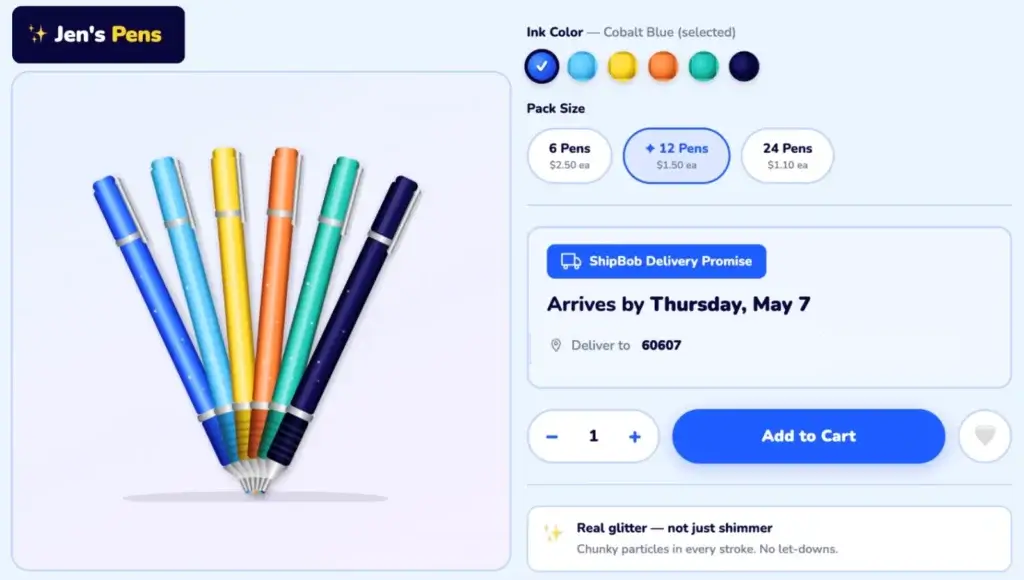
In its Spring 2026 release, ShipBob also introduced ShipBob Delivery Promise, a delivery date engine designed to show estimated delivery dates backed by real network data. The goal is to help merchants provide more accurate delivery expectations before the customer buys.
This is important because delivery expectations affect conversion. If customers see a realistic arrival date at checkout, they are more likely to trust the purchase experience. It can also reduce support tickets because customers have clearer expectations from the start.
Branded Tracking and Post-Purchase Experience
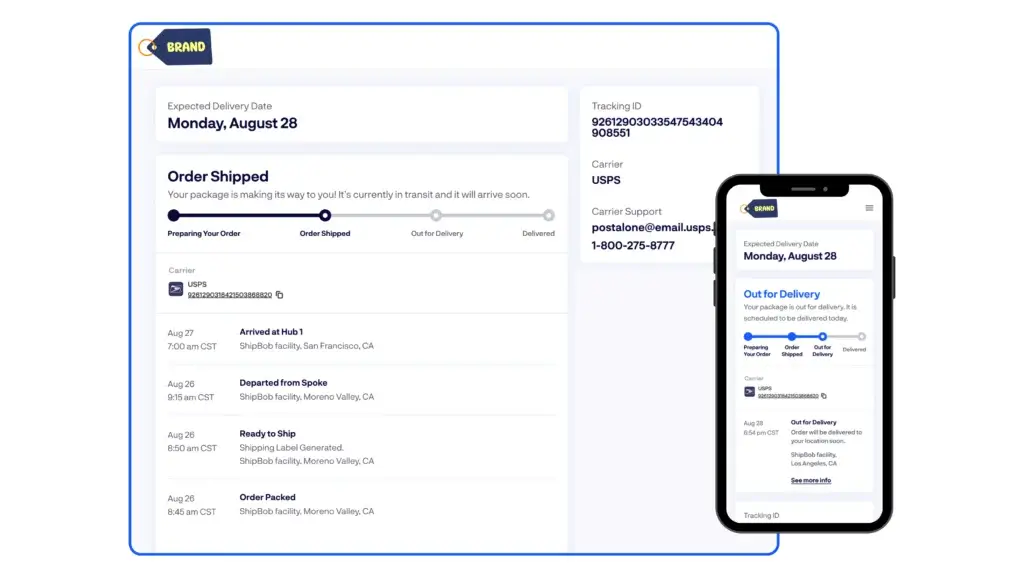
ShipBob also offers TrackBob, a branded tracking experience that gives customers a cleaner post-purchase journey than a generic carrier tracking page. This helps you maintain brand consistency after checkout.
For many ecommerce brands, the post-purchase experience is still under-optimized. Customers often leave the store and interact with carrier pages that do not match the brand. Branded tracking can improve trust, reduce “where is my order” inquiries, and create more opportunities for customer retention.
This is especially useful for brands that invest heavily in customer experience, repeat purchase behavior, and premium positioning.
Customized Packaging, Inserts, and Kitting
ShipBob is not limited to plain-box fulfillment. The platform supports customized unboxing experiences, including branded packaging, inserts, gift notes, product bundling, and kitting options.
This matters for brands that use packaging as part of their identity. If you sell beauty, wellness, apparel, gifts, or subscription products, the box itself can influence customer satisfaction, social sharing, and perceived product quality.
However, customization usually adds operational complexity and may increase costs. You should clarify custom packaging, bundling, insert, and kitting fees during the quote process before you commit.
Returns Management
Returns are a core part of ecommerce fulfillment, especially for apparel, accessories, and consumer products with sizing, preference, or fit-related return behavior. ShipBob supports returns workflows so customers can send items back and merchants can track return activity.
Return handling may include receiving returned items, restocking eligible products, and updating inventory. For brands with high return volume, this can save time and improve visibility compared with managing returns manually.
ShipBob has also been expanding returns-related capabilities, including QR return labels through supported returns partners and improved apparel return workflows. If returns are central to your category, this should be a key part of your demo questions.
Integrations and Developer API
ShipBob integrates with major ecommerce platforms, marketplaces, retail tools, ERPs, and support systems. Common integrations include Shopify, Shopify Plus, BigCommerce, WooCommerce, Amazon, eBay, Squarespace, Wix, and Square.
The ShipBob App Store is useful if you want a faster setup without custom development. For more complex operations, ShipBob also offers a developer API, which can support custom workflows, ERP connections, marketplace logic, and internal reporting needs.
This makes ShipBob suitable for two different types of merchants. Smaller teams can use prebuilt integrations, while more mature brands can connect ShipBob into a broader commerce tech stack.
Analytics, Reporting, and Inventory Visibility
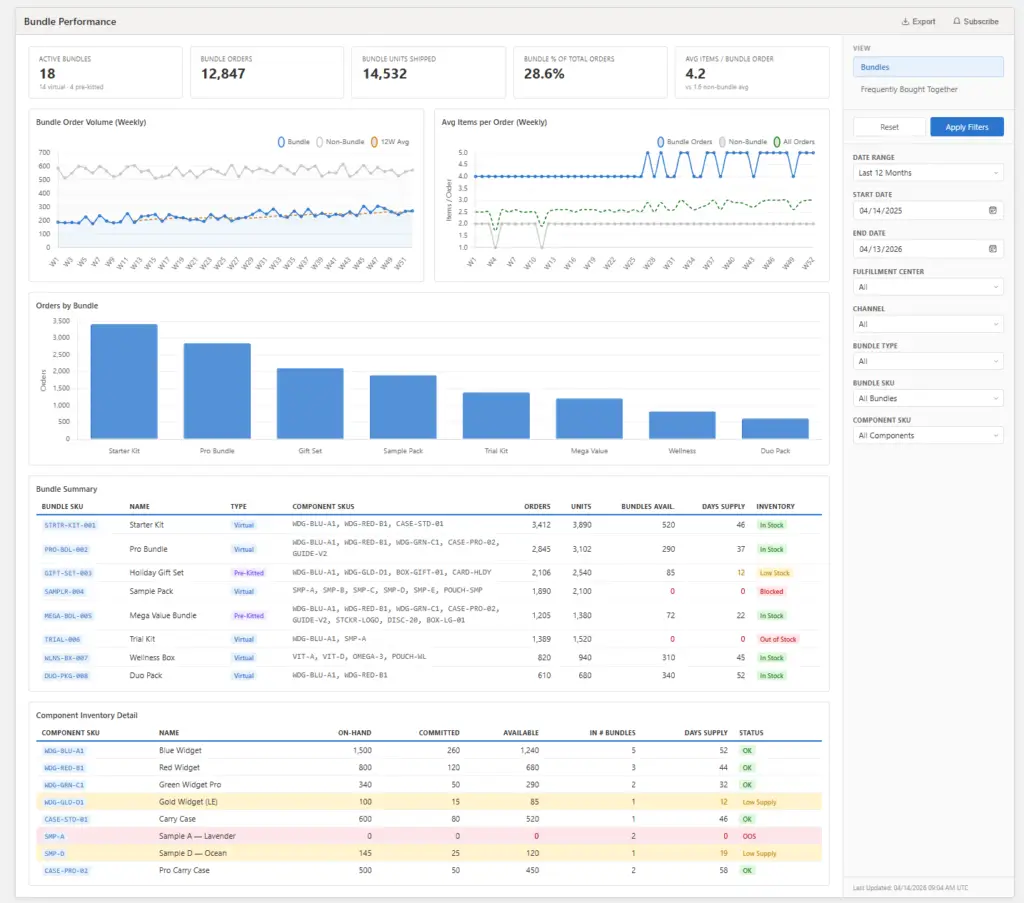
ShipBob’s dashboard gives you visibility into orders, shipments, inventory, fulfillment performance, and costs. This is one of the main reasons to choose a tech-enabled 3PL instead of a traditional warehouse provider.
From an operational perspective, reporting helps you answer practical questions:
- Which SKUs are moving fastest?
- Where is inventory sitting too long?
- Which orders are delayed or need attention?
- How are fulfillment and shipping costs trending?
- Which fulfillment centers are supporting your customers best?
This data is useful for finance, operations, customer support, and marketing teams. For example, your marketing team can avoid promoting products with low inventory, while your operations team can identify replenishment issues before they become stockouts.
Workflow & User Experience
Ease of Use and Support Options
Onboarding and Setup
ShipBob onboarding is more involved than signing up for a simple shipping label tool. That is expected because you are not only connecting software, you are moving physical inventory into a fulfillment network.
The process typically includes discussing your order volume, product dimensions, SKU count, sales channels, fulfillment locations, packaging needs, and shipping requirements. After that, ShipBob provides a customized quote and implementation path.
Once you move forward, you connect your store, import products, send inventory to ShipBob, and begin routing orders through the platform. Brands with clean SKU data and organized inventory records will usually have a smoother onboarding experience.
Dashboard Experience
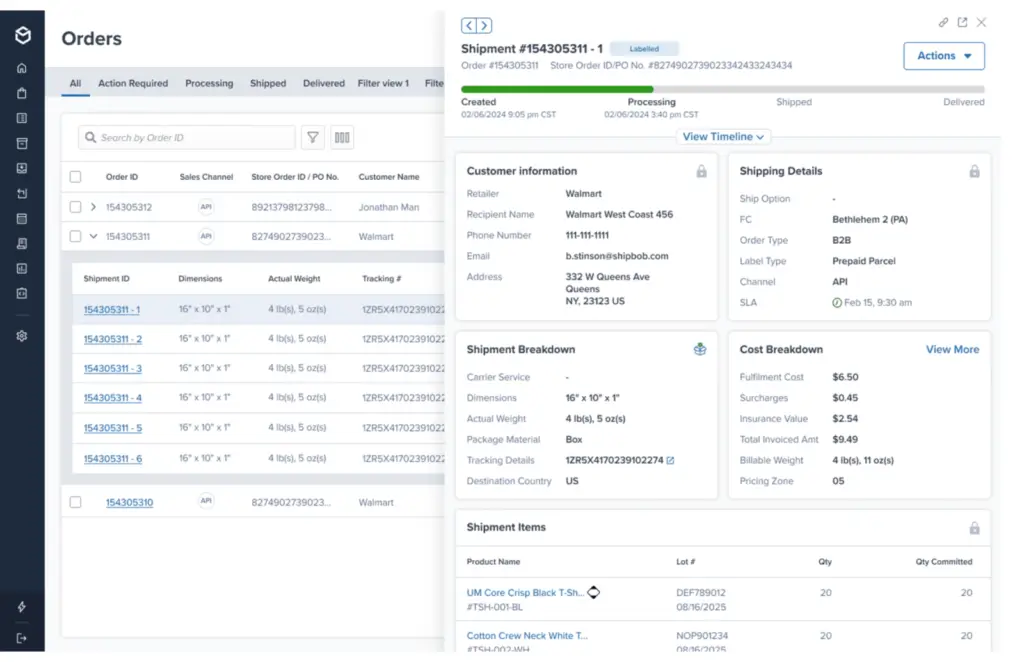
The ShipBob dashboard is designed to be the central operating layer for outsourced fulfillment. You can manage products, monitor orders, track inventory, review shipments, access billing details, and analyze fulfillment activity.
The interface is practical rather than flashy. Its value comes from replacing disconnected tools and manual warehouse updates with one operational view. For ecommerce teams that previously relied on spreadsheets, manual carrier portals, and scattered warehouse emails, this is a major upgrade.
Customer Support and Account Management
ShipBob provides support resources, onboarding assistance, and account-level help depending on your plan and operational needs. The company also highlights on-site support representatives at fulfillment centers, which can be helpful when issues require local warehouse context.
That said, support quality is one of the most important areas to evaluate with any 3PL. Fulfillment mistakes can directly affect revenue, customer satisfaction, and refund rates. During your sales process, ask how support is handled, what escalation paths exist, whether you receive a dedicated contact, and how quickly issues are typically resolved.
Best Practices for a Smooth ShipBob Setup
To get the most value from ShipBob, you should prepare your fulfillment operation before onboarding. A 3PL can improve your logistics, but it cannot fix messy product data, unclear packaging rules, or poor demand planning by itself.
- Clean your SKU catalog: Make sure product names, barcodes, dimensions, and variants are accurate.
- Clarify packaging rules: Document inserts, bundles, gift notes, and branded packaging needs.
- Audit your sales channels: Confirm which stores, marketplaces, and wholesale channels must sync.
- Estimate order volume: Share realistic monthly volume, peak season spikes, and SKU movement.
- Review return workflows: Define what should be restocked, inspected, discarded, or escalated.
- Ask about billing details: Confirm storage, receiving, pick and pack, shipping, returns, and special project fees.
- Monitor early orders closely: Review the first few weeks of shipments to catch setup issues quickly.
Pros and Cons
Advantages and Disadvantages
Positive
✅ Global fulfillment network
✅ Strong ecommerce integrations
✅ Inventory and order visibility
✅ Branded fulfillment options
Negative
❌ Custom quote pricing
❌ Not ideal for very low volume
❌ Setup requires planning
❌ Special projects can add costs
Before choosing ShipBob, it is worth looking at both the operational upside and the potential tradeoffs. ShipBob can be a strong fulfillment partner, but it is not the right solution for every ecommerce business.
✅ Pros
- Large fulfillment network: ShipBob helps you store inventory closer to customers across multiple regions.
- Strong ecommerce focus: The platform is designed specifically around online brands and omnichannel merchants.
- Useful dashboard: You can monitor inventory, orders, shipments, costs, and fulfillment performance.
- Fast shipping options: Distributed inventory can support faster delivery promises for eligible orders.
- Branded packaging support: Inserts, custom packaging, gift notes, bundles, and kitting help protect brand experience.
- Broad integrations: ShipBob connects with major ecommerce platforms, marketplaces, ERPs, and APIs.
- International support: ShipBob can support global fulfillment and international shipping use cases.
❌ Cons
- No simple public pricing tiers: You need a custom quote to understand your actual costs.
- Not built for very small sellers: Low-volume brands may find a shipping software tool more practical.
- Physical onboarding takes effort: You must prepare SKUs, inventory, packaging rules, and fulfillment logic.
- Customization may cost extra: Kitting, bundling, inserts, returns, and special projects should be priced clearly.
- Support expectations must be confirmed: Fulfillment issues are time-sensitive, so escalation terms matter.
- Less control than in-house fulfillment: Outsourcing means you depend on a third party for warehouse execution.
Pricing
How Much Does ShipBob Cost?
ShipBob does not publish simple fixed monthly plans for outsourced fulfillment. Pricing is customized because fulfillment costs depend on your products, order volume, storage needs, shipping zones, packaging rules, returns, and service requirements.
ShipBob states that standard fulfillment pricing can include implementation, receiving inventory, warehousing products, and picking, packing, and shipping each order. Its software dashboard is included for ShipBob customers, so you are not separately paying for a standalone order management tool in the same way you would with some shipping platforms.
| Cost Area | What It Usually Covers | What to Ask Before Signing |
| Implementation | Account setup, onboarding, store connection, and operational configuration. | Is implementation included, waived, or billed separately? |
| Receiving | Processing inbound inventory when your products arrive at ShipBob facilities. | Are receiving fees based on pallets, cartons, units, or labor time? |
| Storage | Warehousing inventory across ShipBob fulfillment centers. | How are bins, shelves, pallets, and long-term storage billed? |
| Pick and Pack | Picking products, packing orders, and preparing shipments. | Are additional picks, bundles, inserts, or special packaging billed separately? |
| Shipping | Carrier postage or shipping label cost based on weight, dimensions, destination, and service level. | Which carrier services are included, and how are shipping rates calculated? |
| Returns | Receiving, inspecting, restocking, or processing returned items. | What is the return processing fee, and how are damaged items handled? |
| Special Projects | Kitting, bundling, relabeling, custom inserts, packaging changes, and manual work. | What counts as a special project, and what labor rate applies? |
Pricing Tips
- Request a landed cost estimate: Compare total cost per order, not only storage or pick fees.
- Model peak season volume: Ask how Q4, promotional spikes, and storage overflow affect pricing.
- Clarify return costs: Returns can materially change your fulfillment economics.
- Check packaging fees: Branded boxes, inserts, and kitting can be valuable but should be budgeted.
- Compare by SKU profile: Small lightweight products and bulky products can produce very different costs.
My recommendation is to compare ShipBob pricing using three scenarios: your current monthly volume, your expected volume in six months, and your peak month. This gives you a clearer view of whether ShipBob scales economically with your business.
Common Use Cases
Who Should Use ShipBob? Use Cases
ShipBob is best for ecommerce brands that need more fulfillment capacity, better delivery performance, and stronger operational visibility. It is not just for large companies, but it is usually most valuable once order volume is consistent enough to justify outsourced fulfillment.
- Growing DTC brands: Useful when your team is spending too much time packing orders manually.
- Omnichannel sellers: Strong fit for brands selling across Shopify, Amazon, retail, wholesale, and marketplaces.
- Brands with national demand: Distributed inventory can reduce delivery distances and improve speed.
- Subscription businesses: Helpful for recurring fulfillment, bundles, inserts, and branded packaging.
- International expansion: Relevant for brands entering the US, Canada, UK, EU, or Australia.
- High-growth brands: Useful when internal operations cannot scale as fast as demand.
Who May Not Need ShipBob?
ShipBob may be too much if you ship only a few orders per week, sell highly customized one-off products, or prefer to keep complete control over every packaging and warehouse process. In these cases, a shipping software platform such as ShipStation, Shippo, or Easyship may be more practical.
It may also be less suitable if your products require complex handling that ShipBob cannot support, such as unusual storage conditions, heavily regulated goods, oversized freight, or custom manufacturing workflows. You should confirm category fit before starting the quote process.
Compare with Others
ShipBob vs. Competitors
ShipBob competes in a space that overlaps with both 3PL fulfillment providers and shipping software platforms. That distinction matters. ShipBob actually stores and fulfills inventory for you, while tools like ShipStation and Shippo mainly help you buy labels and manage shipping workflows.
| Feature Type | ShipBob | ShipStation | Shippo | ShipMonk | Red Stag Fulfillment |
| Primary Category | Tech-enabled 3PL fulfillment | Shipping software | Shipping software/API | 3PL fulfillment | 3PL fulfillment |
| Warehousing | Yes, through fulfillment centers | No | No | Yes | Yes |
| Best For | Growing ecommerce and omnichannel brands | Sellers managing shipping in-house | Small sellers and developers needing shipping labels | Ecommerce brands needing fulfillment and special projects | Bulky, heavy, fragile, or high-value products |
| Inventory Management | Built into fulfillment dashboard | Basic order and shipment visibility | Basic shipment-focused tools | Fulfillment-focused inventory tools | Fulfillment-focused inventory support |
| Branded Packaging | Yes, with customization options | Depends on in-house workflow | Depends on in-house workflow | Yes | Yes, depending on requirements |
| International Support | Global fulfillment and international shipping | International carrier labels | International labels and APIs | Fulfillment and shipping support | Primarily fulfillment-focused |
| Pricing Style | Custom quote | Published SaaS tiers | Published and usage-based options | Custom quote | Custom quote |
Analysis
ShipBob is the better choice when you want to outsource fulfillment, improve delivery coverage, and reduce the operational burden of running your own warehouse process. It is not a direct replacement for shipping software in every case because it changes the fulfillment model itself.
ShipStation is better if you still want to store, pick, and pack orders yourself but need better label creation, automation, and carrier management. Shippo is useful for smaller sellers, developers, or businesses that mainly need shipping rates, labels, and APIs without a full 3PL relationship.
ShipMonk is a closer 3PL competitor and may be worth comparing if you need ecommerce fulfillment with special projects and marketplace support. Red Stag Fulfillment is more relevant if you sell heavy, bulky, high-value, or fragile products where fulfillment accuracy and product handling are especially critical.
Overall, ShipBob is strongest for fast-growing ecommerce brands that want a balance of fulfillment infrastructure, technology, integrations, and global network coverage.
ShipBob Alternatives to Consider
ShipStation
Choose ShipStation if you want to keep fulfillment in-house but need a stronger shipping management platform. It is better for label printing, carrier automation, batch shipping, and marketplace order management when you are not ready to outsource warehousing.
Shippo
Choose Shippo if you need a lightweight shipping platform, discounted labels, and developer-friendly shipping APIs. It is especially useful for smaller merchants that do not yet need outsourced storage and fulfillment.
ShipMonk
Choose ShipMonk if you want another ecommerce-focused 3PL to compare against ShipBob. It is a relevant option for brands that need fulfillment, storage, subscription box support, marketplace fulfillment, and special project handling.
Red Stag Fulfillment
Choose Red Stag Fulfillment if your products are heavy, oversized, fragile, or expensive. It may be a better specialist option when product handling quality matters more than broad ecommerce network coverage.
Easyship
Choose Easyship if your biggest priority is international shipping label management, courier comparison, duty and tax visibility, and cross-border checkout options while still managing fulfillment separately.
Conclusion
Final Thoughts
ShipBob is a strong fulfillment platform for ecommerce brands that are ready to scale beyond manual shipping or a single in-house fulfillment location. Its biggest strengths are its global fulfillment network, ecommerce integrations, inventory visibility, branded fulfillment options, analytics, and ability to support distributed inventory.
The platform is particularly valuable if you want to offer faster delivery, reduce internal logistics work, expand across channels, and build a more resilient fulfillment operation. It gives you the tools to manage orders, inventory, shipments, and customer delivery expectations from one connected system.
The main limitation is pricing visibility. Because ShipBob uses custom fulfillment quotes, you need to evaluate your actual cost per order carefully. Storage, receiving, returns, special projects, and packaging requirements can all affect your total cost.
For very small sellers, a shipping software tool may be simpler and more affordable. But for growing ecommerce brands that need a serious fulfillment partner, ShipBob is one of the most capable options in the market.
Frequently Asked Questions
Have more questions?
What is ShipBob?
ShipBob is a global ecommerce fulfillment platform that helps online brands outsource warehousing, inventory management, picking, packing, shipping, returns, and fulfillment analytics.
Is ShipBob shipping software or a 3PL?
ShipBob is primarily a tech-enabled 3PL fulfillment provider. Unlike shipping software that only helps you buy labels, ShipBob can store your inventory and fulfill customer orders through its fulfillment network.
Who is ShipBob best for?
ShipBob is best for growing ecommerce brands that need outsourced fulfillment, faster delivery options, inventory visibility, branded packaging support, and integrations with ecommerce platforms or marketplaces.
How much does ShipBob cost?
ShipBob uses custom pricing. Costs can include implementation, receiving, storage, pick and pack, shipping, returns, and special projects. You need to request a quote based on your order volume, SKU profile, packaging needs, and fulfillment locations.
Does ShipBob offer 2-day shipping?
Yes. ShipBob supports 2-day shipping for eligible orders across the continental US, depending on inventory placement, carrier service, destination, and fulfillment setup.
Does ShipBob integrate with Shopify?
Yes. ShipBob integrates with Shopify and Shopify Plus, along with other ecommerce platforms and marketplaces such as BigCommerce, WooCommerce, Amazon, eBay, Squarespace, Wix, and Square.
Can ShipBob handle international shipping?
Yes. ShipBob supports international shipping and global fulfillment use cases. It can help brands ship to international destinations and use fulfillment centers in major markets such as the US, Canada, the UK, Europe, and Australia.
Does ShipBob support custom packaging?
Yes. ShipBob supports branded packaging, inserts, gift notes, product bundling, kitting, and other customization options. You should confirm the exact fees and requirements during the quote process.
Is ShipBob good for small businesses?
ShipBob can be a good fit for small businesses with consistent order volume and growth plans. Very low-volume sellers may prefer shipping software first because outsourced fulfillment can be more complex and cost-sensitive at low volume.
What are the best ShipBob alternatives?
The best ShipBob alternatives depend on your needs. ShipStation and Shippo are better for in-house shipping software, while ShipMonk and Red Stag Fulfillment are closer 3PL alternatives for outsourced fulfillment.