
Introduction
AI app builders are changing how teams create software. Instead of waiting weeks for engineering resources, you can now describe a workflow, dashboard, internal tool, or customer-facing app in plain language and let AI generate much of the structure for you.
However, not every AI app builder is designed for the same audience. Some tools are built for solo founders, hobby builders, and fast prototypes. Devs.ai takes a more enterprise-focused approach. It is designed for teams that want the speed of AI-assisted app creation, but also need governance, security, access control, model management, and IT approval built into the process.
That makes Devs.ai different from many consumer-style vibe coding tools.
Instead of positioning itself as a simple chatbot, single-model coding tool, or lightweight app generator, Devs.ai presents itself as a governed AI platform where teams can build AI-powered business applications, deploy custom agents, search company knowledge, and manage AI usage across the organization.
For business teams, this matters because the problem is no longer just “can AI build an app?” The better question is whether your team can build useful AI apps on real company data without creating shadow AI, security gaps, unmanaged software subscriptions, or disconnected workflows.
In this in-depth Devs.ai review, we’ll cover:
- What Devs.ai does and how it works
- How its AI App Builder and Agent Builder support business workflows
- The key features, security controls, and governance tools
- Devs.ai pricing and plan structure
- How Devs.ai compares with Base44, Lovable, and Emergent
- Who should use Devs.ai and where it may not be the best fit
Let’s explore whether Devs.ai is the right AI app builder for your team, especially if you need more than fast prototypes and want governed AI software creation at scale.
What Is Devs.ai?
Overview of this governed AI app builder
Devs.ai is an enterprise-grade AI platform for building AI-powered business applications and deploying custom agents in a governed environment. It helps teams move from AI ideas to working apps, agents, and workflows without relying on dedicated engineering resources for every request.
At its core, Devs.ai combines three important capabilities:
- AI App Builder – Build business applications by describing what you need in plain language.
- Agent Builder – Create custom AI agents trained on your company data, processes, and knowledge.
- Governance Layer – Manage RBAC, publishing approvals, audit trails, model access, cost controls, and IT oversight.
That combination makes Devs.ai especially relevant for companies that already see employees using public AI tools without approval. Instead of blocking AI adoption, Devs.ai gives teams a sanctioned environment where they can build useful tools while IT keeps control.
How Devs.ai Works in Simple Terms
The basic workflow is straightforward:
- You describe the business app or agent
Example: “Create an onboarding assistant that answers HR policy questions and routes unresolved requests to the right team.” - Devs.ai builds the foundation
The platform helps create the app, agent, data connections, and workflow logic based on your instructions. - Your team connects business data
Apps and agents can work with company knowledge, documents, databases, and connected systems. - IT reviews and approves usage
Governed publishing, RBAC, audit logs, and model governance help ensure the app is safe to distribute.
Devs.ai vs. Traditional App Development
Devs.ai is not meant to replace every software development project. It is strongest when you need practical business applications, internal tools, and AI agents faster than a traditional development cycle allows.
| Aspect | Devs.ai | Traditional Development |
| Development Speed | Business apps and agents can be created in days | Often weeks or months |
| Skill Required | Plain-language app and agent creation | Engineering, architecture, QA, and deployment skills |
| Governance | RBAC, approval workflows, audit trails, model controls | Depends on internal development process |
| Data Access | Built around company data and approved sources | Custom integrations required |
| Best Use Case | Governed AI apps, agents, internal tools, workflow automation | Deeply custom products, complex architecture, specialized systems |
With Devs.ai, the main value is not only speed. The stronger value is controlled speed. Business teams can build faster, while IT still has visibility into what gets created, which models are used, who can access each app, and how AI spend is managed.
Key Features
Devs.ai Features and Capabilities
Devs.ai is best understood as a governed AI application platform, not just an AI code generator. It brings app creation, agent creation, model access, enterprise search, and governance into one environment.
🧠 AI App Builder
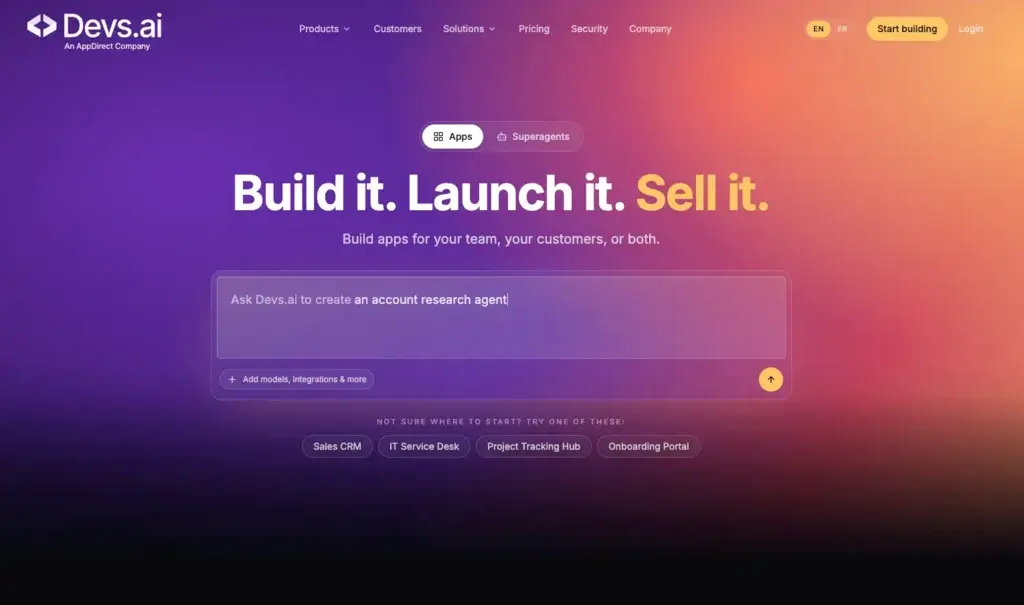
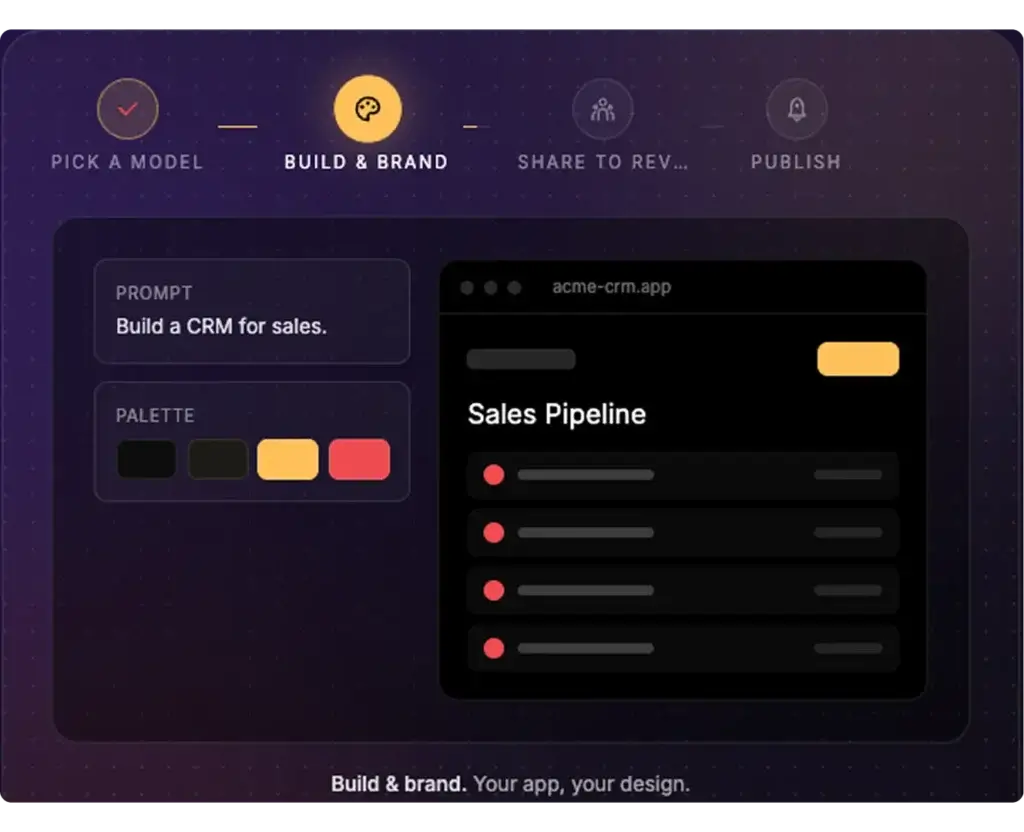
The App Builder is the feature most relevant to this review. It lets you describe a business application in natural language and turn that idea into a functioning app. This can include dashboards, CRMs, onboarding portals, process trackers, internal approval tools, knowledge apps, and other business workflows.
The platform is designed to connect apps with real data sources, enforce brand and design standards, and deploy apps into an approved environment. This is where Devs.ai differs from lighter prompt-to-app tools: it focuses on building apps that teams can actually distribute inside a company.
🤖 Agent Builder
Devs.ai also includes an Agent Builder for creating custom AI agents. These agents can be trained on company-specific data, processes, and documents, then connected to business tools and workflows.
For example, you could build an HR onboarding agent, a sales research agent, a legal intake agent, a customer support triage agent, or an internal operations assistant. The key is that these agents operate within your company’s governed Devs.ai workspace, instead of living in unmanaged public AI tools.
🧩 Model-Agnostic AI Workspace
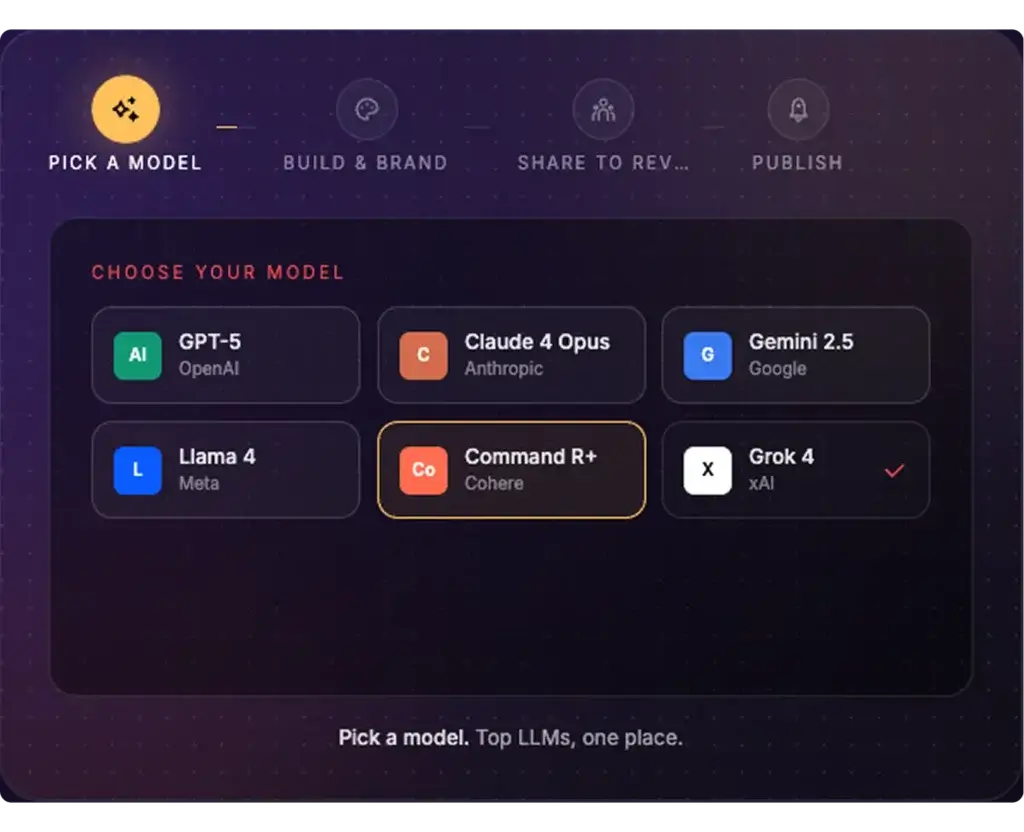
One of Devs.ai’s strongest differentiators is model flexibility. Instead of locking your team into one LLM provider, Devs.ai gives teams access to many leading AI models in a single workspace.
This is important for teams that do not want to depend on one model vendor for every use case. Some tasks may require stronger reasoning, others may require lower cost, faster responses, better research, or different data handling rules. A model-agnostic workspace gives IT and business teams more flexibility.
🔐 Role-Based Permissions and Governance
Governance is the central reason to consider Devs.ai over many consumer AI app builders. Admins can control who can build, view, edit, approve, publish, and use apps, agents, and models.
This matters because AI adoption can easily become fragmented. Without governance, employees may create workflows in separate tools, upload sensitive data into public platforms, and build automations that IT cannot monitor. Devs.ai is built to reduce that risk.
📜 Audit Trails and Admin Visibility
Devs.ai includes auditability across AI interactions, app actions, and agent outputs. This gives teams a clearer record of how AI is being used across the organization.
For companies with compliance, legal, or security requirements, this is a major advantage. You are not only building AI tools, you are creating a defensible record of who used them, what they accessed, and how they behaved.
🌐 Enterprise Search and Company Knowledge
Devs.ai is also positioned as a way to search company knowledge and connect AI outputs to internal context. This helps employees work with approved data rather than switching between disconnected tools, files, and public AI interfaces.
For example, teams can use Devs.ai to search policy documents, sales materials, onboarding guides, internal process docs, client knowledge, and other company resources.
🔌 Integrations and MCP Connectors
The platform supports integrations with business systems and workflow tools. The editorial brief specifically highlights connections to tools such as Slack, HubSpot, Salesforce, and Jira through MCP connectors.
This makes Devs.ai more useful for real workflows. An agent that only answers questions is helpful, but an agent that can interact with approved systems, retrieve context, and support business processes is far more valuable.
💰 AI Cost Controls
AI spend can become difficult to manage when teams use many model vendors, subscriptions, and agent tools. Devs.ai addresses this through AI cost controls and usage visibility.
Admins can monitor token usage, set spending guardrails, and route work to more cost-effective models when appropriate. This is especially useful for companies that want to scale AI usage without losing budget visibility.
🏪 Private AI Store
A key enterprise concept behind Devs.ai is the Private AI Store. Rather than having employees use scattered AI tools, companies can distribute approved apps and agents internally.
This gives employees a clear place to access the AI tools they are allowed to use, while IT controls what reaches the workforce. It also helps turn successful bottom-up AI experiments into governed, reusable internal products.
🎨 Brand and Design Enforcement
For larger teams, design consistency matters. Devs.ai can help enforce brand and design standards across generated apps, which is useful when multiple departments are building tools.
This prevents every team from creating a different-looking internal experience and helps maintain a more professional software environment.
Pros and Cons
Advantages and Limitations
Devs.ai has a clear advantage for companies that want to build AI apps without losing control. Still, it is not the best choice for every builder. Here is a balanced look at where it performs well and where you should evaluate carefully.
Positive
✅ Enterprise-Grade AI Governance
✅ Model-Agnostic Workspace
✅ App Builder and Agent Builder Together
✅ Strong Fit for Shadow AI Control
Negative
❌ Less Suited for Personal Hobby Projects
❌ Enterprise Features Require Planning
❌ Pricing May Scale by Seat
❌ Not a Full-Code Development Replacement
✅ Pros
1. Enterprise-Grade AI Governance
Devs.ai’s biggest strength is governance. It includes role-based permissions, approval workflows, audit trails, model controls, spending guardrails, and admin visibility. This makes it much more suitable for IT-led AI adoption than consumer AI app builders.
2. Model-Agnostic Workspace
Devs.ai gives teams access to many leading LLMs in one environment, reducing dependency on a single provider. This is valuable when different teams need different models for research, reasoning, content, coding, automation, or cost efficiency.
3. App Builder and Agent Builder Together
Many platforms focus on either app generation or AI agents. Devs.ai combines both, allowing teams to build business apps and custom agents that operate on company data and connect into workflows.
4. Strong Fit for Shadow AI Control
Devs.ai gives companies a practical alternative to unmanaged AI tools. Employees get a capable workspace for building and using AI, while IT keeps oversight through governance, permissions, publishing controls, and usage visibility.
❌ Cons
1. Less Suited for Personal Hobby Projects
If you are a solo builder creating a personal side project, Devs.ai may feel heavier than tools like Base44, Lovable, or Emergent. Its strongest value appears when governance, collaboration, data access, and company-wide usage matter.
2. Enterprise Features Require Planning
Governance is powerful, but it also requires setup. Teams need to define user roles, approval processes, model access rules, publishing workflows, and data policies before scaling Devs.ai broadly.
3. Pricing May Scale by Seat
The Personal and Business plans are priced per user per month. This is normal for enterprise software, but it means cost planning matters if you want to roll it out across many departments.
4. Not a Full-Code Development Replacement
Devs.ai can speed up business app and agent creation, but deeply custom software, complex architecture, specialized systems, or advanced engineering projects may still require traditional development teams.
⚖️ Bottom Line
Devs.ai is a strong fit for mid-market and enterprise teams that want AI app building with governance from the start. It is less compelling as a casual personal app builder, but much more compelling when security, internal approval, model flexibility, and AI usage control matter.
Performance and Accuracy
Build Speed, Governance, and Output Quality
When evaluating an AI app builder, speed alone is not enough. A fast tool that creates unmanaged apps can become a security or operational problem. Devs.ai should be evaluated across three dimensions: build speed, output usefulness, and governance quality.
🚀 Speed: From Business Need to Working App
Devs.ai is designed to help teams build apps and agents in days rather than waiting for long development cycles.
- Prompt-Based Creation: Business users can describe what they need in natural language and move quickly from idea to working app structure.
- Less Engineering Dependency: Teams can create department-level tools without opening a new engineering request for every workflow.
- Production-Oriented Workflow: Apps are intended to connect to real data sources, follow brand standards, and go through an approval process.
- Agent Deployment: Teams can build custom agents for repeatable knowledge work, research, routing, analysis, and workflow automation.
This gives Devs.ai a different performance profile than consumer vibe coding tools. It may not always be the fastest for a one-off demo, but it is stronger when the output needs to be governed and distributed across a team.
🎯 Accuracy: How Useful Are the Generated Apps?
AI-generated apps still depend heavily on prompt clarity, workflow complexity, data quality, and iteration. Devs.ai is best suited for structured business apps where the requirements are clear.
Examples include approval systems, onboarding portals, internal dashboards, knowledge search apps, business process trackers, CRM-style workflows, and department-specific agents.
Where you should be more careful:
- Highly complex applications may still need engineering architecture and QA.
- Ambiguous prompts can lead to incomplete logic or workflows that require refinement.
- Regulated workflows should go through internal review before deployment.
🧪 Governance as a Performance Feature
One of the strongest things about Devs.ai is that governance is not treated as an afterthought.
- RBAC helps define who can build, approve, and use apps.
- Audit trails help teams understand AI usage and app behavior.
- Model governance gives admins control over which models are available.
- Cost controls help keep token usage and AI spend visible.
For enterprise teams, this is part of performance. A tool that creates apps quickly but cannot be governed may create more work later.
Performance Summary
| Metric | Devs.ai Performance |
| App creation speed | Fast for business apps and internal tools |
| Agent creation | Strong fit for company-specific AI agents |
| Governance quality | Very strong compared with consumer AI builders |
| Prompt accuracy | Best when workflows are clearly described |
| Data readiness | Better when approved company data sources are connected |
| Production fit | Strong for governed internal apps, less ideal for highly custom engineering projects |
💡 Bottom Line
Devs.ai performs best when speed, governance, and business relevance matter together.
If you only want the fastest way to build a personal landing page or simple prototype, a lighter AI app builder may be faster. If you want teams to build business apps and agents on company data with IT controls, Devs.ai is the stronger fit.
User Experience
Ease of Use
Devs.ai is designed for two types of users: business users who want to build apps and agents without coding, and IT leaders who need to govern how those tools are used. This dual audience shapes the user experience.
Plain-Language App Creation
For business users, the main advantage is that you can start with a plain-language description rather than a blank technical canvas. You can describe the workflow, the data involved, the user roles, and the intended outcome.
This is especially helpful for operations, HR, finance, sales, compliance, and support teams that know exactly what process needs improvement but do not have the time or skill to build traditional software.
Built for IT and Business Collaboration
The best Devs.ai implementation is not purely bottom-up or purely top-down. Business users identify practical use cases, while IT defines the rules for safe deployment.
- Business teams build apps and agents for real workflows
- IT controls publishing, data access, and model usage
- Admins monitor cost, security, and activity
- Approved tools can be distributed through a private workspace
This makes Devs.ai easier to scale responsibly than tools that are excellent for individuals but difficult to govern at company level.
Learning Curve
The learning curve depends on your role.
- Knowledge workers need to learn how to write clear app and agent prompts.
- Managers need to identify repeatable workflows worth turning into apps.
- IT teams need to configure permissions, models, data connections, and approvals.
- Executives need to define where AI app building should reduce software spend or improve speed.
This is not necessarily a weakness. It simply means Devs.ai should be rolled out like a business platform, not treated as a casual AI experiment.
⭐ User Experience Summary
| User Type | Experience With Devs.ai | Best Use Case |
| Knowledge workers | Accessible app and agent creation | Automating repetitive work |
| Business unit leaders | Useful for building team-specific apps | Replacing manual workflows or redundant tools |
| IT leaders | Strong governance and visibility | Controlling shadow AI and model access |
| CISOs | Better security posture than unmanaged AI tools | RBAC, audit trails, SSO, and data controls |
| Solo hobby users | May feel more enterprise-focused than needed | Usually better served by lighter AI app builders |
Benefits of Using Devs.ai
The biggest benefit of Devs.ai is that it lets your team move faster with AI without giving up oversight. That balance is difficult to achieve with public AI tools or standalone app builders.
✅ Faster Business App Creation
- Build apps from plain-language instructions
- Reduce dependency on engineering queues
- Create department-specific tools quickly
✅ Governed AI Adoption
- Control who can build, approve, and use AI tools
- Track app actions, model usage, and agent outputs
- Reduce risks from unmanaged public AI usage
✅ Better Model Flexibility
- Access many LLMs from one workspace
- Avoid single-vendor dependency
- Route work based on quality, cost, or policy
✅ Stronger Internal Distribution
- Publish approved apps and agents internally
- Create reusable tools for departments
- Support a safer alternative to shadow AI
Pricing and Plans
Devs.ai Pricing in 2026
Devs.ai offers a pricing structure that starts with a free plan and scales into paid personal, business, and enterprise plans. The public pricing is simple compared with many credit-heavy AI app builders, although enterprise usage will still depend on seats, data usage, integrations, and company requirements.
| Plan | Monthly Price | Best For | Notable Features |
| Free | $0 | Getting started | Entry-level access for exploring Devs.ai |
| Personal | $15/user/month | Individual builders and knowledge workers | Useful for personal productivity, agents, and early workflow building |
| Business | $30/user/month | Growing teams | Collaboration, governance, and insights for business usage |
| Enterprise | Custom pricing | Large organizations | Advanced security, compliance, deployment, and governance needs |
What Affects the Real Cost?
The listed subscription price is only part of the evaluation. For business and enterprise teams, the real cost depends on how widely Devs.ai is adopted and how many workflows it replaces.
- Number of users and departments
- Volume of AI usage and model activity
- Connected company data sources
- Number of apps and agents deployed
- Governance, security, and support requirements
Which Plan Is Right for You?
Here’s a practical way to think about the plans:
- Free – Best for exploring the platform and understanding the workflow.
- Personal – Best for individual users who want to build apps or agents for their own work.
- Business – Best for teams that need collaboration, governance, and shared usage.
- Enterprise – Best for companies with compliance, data residency, SSO, audit, security, and custom deployment needs.
From a value perspective, Devs.ai makes the most sense when it can reduce shadow AI risk, consolidate AI model access, replace redundant SaaS workflows, or help teams build internal applications faster.
Alternatives
Devs.ai vs Competitors
Devs.ai competes in a fast-growing category, but it is not trying to solve the exact same problem as every AI app builder. Base44, Lovable, and Emergent are strong options for fast app creation and prototyping. Devs.ai is stronger when you need governed AI app building for teams, departments, and enterprise environments.
| Feature Type | Devs.ai | Base44 | Lovable | Emergent |
| Primary Focus | Governed AI apps and agents for business teams | No-code web apps from prompts | AI app and website building with strong UI workflow | Full-stack web and mobile apps through AI agents |
| Best For | Mid-market and enterprise teams needing governance | Fast MVPs and internal tools | Founders, designers, and teams building polished apps | Builders who want web and mobile app generation |
| Governance | Strong RBAC, approvals, audit trails, model controls | More builder-focused than governance-first | Team permissions on paid plans, less enterprise governance depth | Enterprise SSO available on custom plan |
| Agent Building | Yes, custom agents trained on company data | Limited compared with dedicated agent platforms | More focused on app and website creation | AI agents help design, code, and deploy apps |
| Model Flexibility | Model-agnostic workspace with many LLMs | AI model selection on higher plans | Platform-managed AI credits and model usage | Access to advanced models depending on plan |
| Pricing Starting Point | Free, paid from $15/user/month | Free, paid from $16/month annually | Free, Pro from $25/month | Free, Standard from $20/month or $17/month annually |
| Best Fit | Governed AI adoption and business app creation | Simple prompt-to-app MVPs | Design-friendly app building and collaboration | Full-stack app generation with credits |
Summary:
- Choose Devs.ai if your team needs AI app building with governance, model control, audit trails, RBAC, and company data access.
- Choose Base44 if you want a fast no-code AI app builder for MVPs, internal tools, and simple business apps.
- Choose Lovable if you care about fast app creation, UI quality, collaboration, and a polished app-building experience.
- Choose Emergent if you want AI agents to help design, code, and deploy full-stack web or mobile apps through conversation.
My recommendation: Devs.ai is the better option for business and enterprise AI adoption. Base44, Lovable, and Emergent may be better for individual builders or fast prototype creation, but Devs.ai is more complete for organizations that need secure internal distribution and oversight.
Getting Started Guide
How to Get Started With Devs.ai
Getting started with Devs.ai should begin with a clear business use case. The platform can support many types of apps and agents, but you will get better results if you define the workflow, data sources, users, and governance needs before building.
1. Choose a Practical Use Case
Start with a workflow that is repetitive, valuable, and easy to describe. Good examples include:
- Employee onboarding assistant
- Sales research and account summary agent
- Internal policy search app
- Customer support triage workflow
- Approval tracking dashboard
2. Describe the App or Agent Clearly
The quality of your first build depends on the quality of your instructions. Include who will use the app, what data it should access, what actions it should perform, and what output you expect.
Example prompts:
- “Build an HR onboarding agent that answers questions from approved policy documents and escalates unclear cases to HR.”
- “Create a sales account research app that summarizes company data, CRM notes, and recent activity before a call.”
- “Build an approval tracker for procurement requests with role-based access for requesters, managers, and finance.”
3. Connect Approved Data Sources
Devs.ai becomes more useful when apps and agents can work with approved company data. This may include documents, drives, databases, CRMs, project systems, support tools, or collaboration platforms.
Before connecting data, make sure your team defines what information the app should access and what should remain restricted.
4. Configure Governance Rules
This is where Devs.ai stands out. Before distributing apps broadly, configure the controls that keep usage safe.
- User roles – Who can build, edit, approve, and use apps?
- Model access – Which LLMs can each team use?
- Publishing rules – What requires IT approval?
- Audit logs – What actions should be reviewed?
- Cost controls – What token or usage limits should apply?
5. Test With a Small Team
Do not roll out every AI app to the entire company immediately. Start with a small group of users who understand the workflow and can provide useful feedback.
- Test whether the app produces useful outputs
- Check whether permissions work correctly
- Review logs and model usage
- Improve prompts, workflows, and data access
6. Publish Internally
Once the app or agent is approved, you can distribute it internally through the governed Devs.ai environment. This helps employees use approved AI tools instead of creating separate workflows in public platforms.
Over time, the best use cases can become reusable internal products that improve productivity across departments.
🧠 Pro Tip:
Start with one high-friction workflow that already costs your team time every week. If Devs.ai can turn that workflow into a governed app or agent, you will have a clearer business case for expanding adoption.

Security and Compliance
How Safe is Devs.ai
Security is one of the main reasons to consider Devs.ai. Many AI app builders focus on creation speed. Devs.ai focuses on creation speed plus the controls that IT and security teams usually need before approving workplace AI.
Security Controls
Devs.ai emphasizes role-based permissions, SSO, audit trails, and admin visibility. These are important controls for organizations that want to reduce unmanaged AI usage and keep sensitive data inside approved workflows.
- Role-based permissions for apps, agents, and models
- Single sign-on support for centralized identity
- Audit trails for AI interactions and app actions
- Model governance for team-level access control
- Cost controls for usage and token visibility
Recommendations for Secure Usage
If you plan to use Devs.ai for production workflows, treat setup as a security project, not only a productivity project.
- Define approved data sources before connecting systems
- Create clear roles for builders, approvers, admins, and users
- Review app and agent outputs before broad deployment
- Use audit logs to monitor sensitive workflows
- Set AI usage budgets and model access policies early
Compliance Considerations
For compliance-heavy companies, Devs.ai’s governance model is a major advantage, but you should still request current security documentation from the vendor during procurement.
- Ask about data residency and retention options
- Confirm SSO, SCIM, and identity provider requirements
- Review audit log coverage and export options
- Validate contractual, privacy, and compliance needs
Devs.ai is clearly stronger than unmanaged AI tools from a governance perspective, but buyers should still complete normal security review before using it with sensitive or regulated data.
Conclusion
Final Thoughts
⭐ Overall Rating: 9.2/10
Devs.ai is one of the more interesting AI app builder platforms because it solves a deeper business problem than simple app generation.
Yes, it helps teams build AI-powered business applications and custom agents. But its stronger value is that it gives companies a governed way to scale AI usage. That makes it especially relevant for IT leaders, CISOs, business unit leaders, operations teams, MSPs, and companies trying to control shadow AI.
Summary: Why Devs.ai Stands Out
- Governed AI app creation – Build business apps with IT oversight
- Agent Builder – Create custom agents on company data
- Model flexibility – Access many LLMs without single-vendor lock-in
- Security controls – RBAC, audit trails, SSO, model governance, and cost controls
- Business fit – Strong for internal tools, workflow automation, and AI governance
Devs.ai is not the simplest tool for personal hobby projects. It is also not a replacement for every engineering team or custom development requirement. However, for organizations that want to turn AI into real internal applications without losing control, it is a strong option.
Final Thoughts
Devs.ai is best for companies that want AI app building with enterprise discipline. It gives business teams a faster way to build what they need, while giving IT and security teams the controls they require.
If your company is already dealing with scattered AI usage, disconnected SaaS tools, and growing pressure to automate work, Devs.ai deserves serious consideration.
Have more questions?
Frequently Asked Questions
What is Devs.ai?
Devs.ai is an enterprise-grade AI platform for building AI-powered business applications and custom agents. It helps teams create apps, automate workflows, use company data, and govern AI usage from one workspace.
Is Devs.ai an AI app builder?
Yes. Devs.ai includes an AI App Builder that lets teams create business applications using plain-language instructions. It also includes Agent Builder, governance controls, model access, and enterprise AI management features.
Who is Devs.ai best for?
Devs.ai is best for mid-market and enterprise teams that need governed AI app creation, custom agents, RBAC, audit trails, model control, and a safer alternative to unmanaged AI tools.
Is Devs.ai good for non-technical users?
Yes. Business users can describe apps and agents in plain language. However, IT teams should still configure governance, user roles, data access, and publishing approvals before broad deployment.
How much does Devs.ai cost?
Devs.ai offers a Free plan, a Personal plan at $15 per user per month, a Business plan at $30 per user per month, and custom Enterprise pricing for larger organizations.
Does Devs.ai support multiple AI models?
Yes. Devs.ai is model-agnostic and gives teams access to many leading LLMs in one governed workspace. This helps reduce vendor lock-in and gives admins more control over model usage.
What can you build with Devs.ai?
You can build internal tools, dashboards, workflow apps, onboarding assistants, research agents, CRM-style apps, compliance workflows, and custom agents trained on company-specific data.
How is Devs.ai different from Base44?
Base44 is strong for fast no-code app creation and MVPs. Devs.ai is stronger for enterprise teams that need AI app building with RBAC, audit trails, governed publishing, model governance, and company-wide controls.
How is Devs.ai different from Lovable?
Lovable is a strong AI app builder for fast app and website creation with a polished building experience. Devs.ai focuses more on governed AI adoption, business apps, agents, model access, and IT-approved internal distribution.
Is Devs.ai secure enough for enterprise teams?
Devs.ai is designed with enterprise controls such as RBAC, SSO, audit trails, model governance, and cost controls. Companies should still complete their own security and compliance review before using it with sensitive data.