Introduction
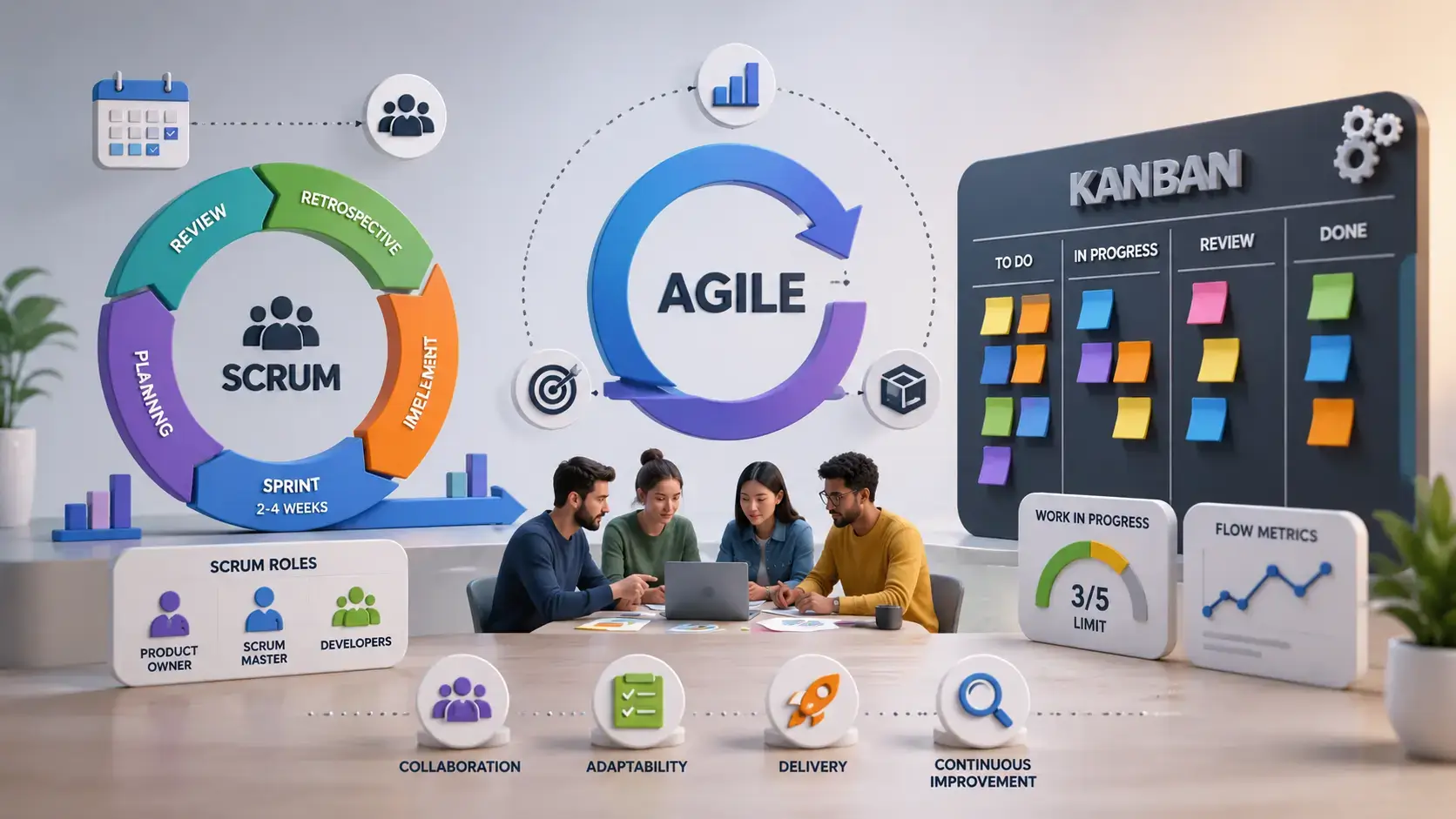
Kanban, Scrum, and Agile are often used as if they mean the same thing, but they describe different levels of project management practice. Agile is the broader mindset and set of principles for adaptive work. Scrum is a structured Agile framework built around roles, sprints, events, and artifacts. Kanban is a visual workflow method that helps teams manage work in progress, improve flow, and reduce bottlenecks.
This distinction matters because choosing the wrong approach can create unnecessary process overhead. A team that needs fast prioritization and continuous delivery may feel restricted by fixed sprints. A team that needs stronger planning, accountability, and review cycles may struggle with a loose board that has no sprint rhythm. And a company that says it wants to “be Agile” may still fail if it only adopts tools without changing how decisions, feedback, and delivery actually work.
In this guide, you will learn what Agile, Scrum, and Kanban mean, how they compare, when to use each method, how sprint planning works, and which tools are best for Kanban and Scrum teams. You will also see practical examples from platforms like monday.com, ClickUp, Trello, Linear, and Azure DevOps.
What Is Agile Project Management?
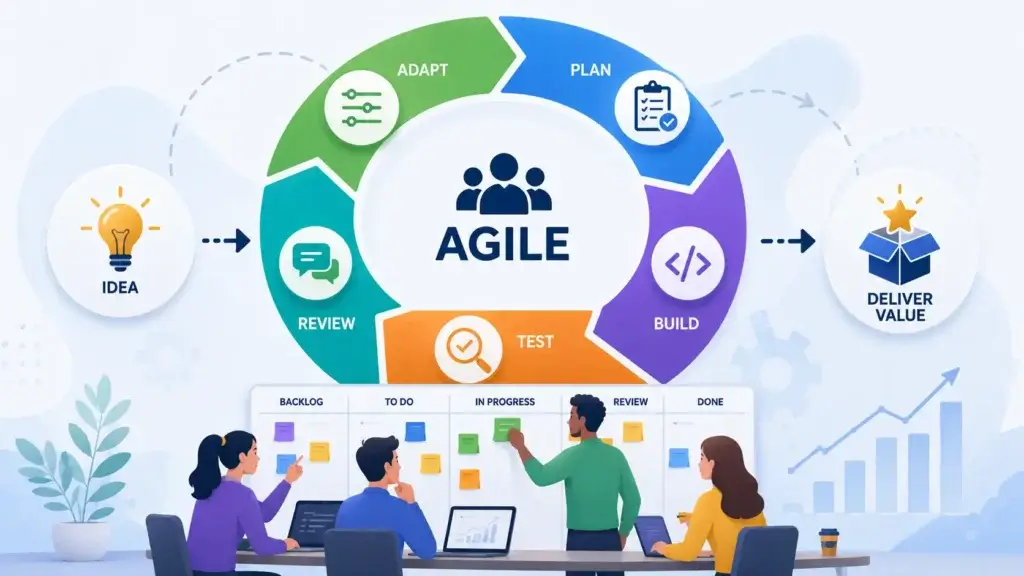
Agile project management is an approach to work that emphasizes adaptability, customer feedback, collaboration, short delivery cycles, and continuous improvement. Instead of planning every detail upfront and following a rigid sequence, Agile teams break work into smaller increments, deliver value frequently, inspect results, and adjust based on what they learn.
Agile started in software development, but the same principles are now used by product teams, marketing teams, operations teams, agencies, HR teams, design teams, and business departments that need to respond quickly to change. The core idea is simple: when work is complex and priorities change, teams need a system that supports learning, not just execution.
Agile in one sentence
Agile is a flexible way of managing work that helps teams deliver value in smaller increments, learn from feedback, and adapt as priorities change.
Agile is not one specific method
One of the most common mistakes is treating Agile as a single methodology. Agile is not the same as Scrum, Kanban, SAFe, Lean, or XP. Those are frameworks, methods, or practices that can help teams apply Agile principles in different ways.
You can think of Agile as the philosophy, Scrum as one structured way to practice it, and Kanban as another practical system for visualizing and improving work. A team can be Agile without using Scrum. A team can use Kanban without running sprints. A team can also combine Scrum and Kanban if that helps its workflow.
The core ideas behind Agile
Agile project management works best when teams focus less on heavy documentation and more on meaningful outcomes. That does not mean Agile teams ignore planning. It means they plan in a way that allows for change, inspection, and improvement.
- Deliver value in smaller, frequent increments
- Collaborate closely with customers and stakeholders
- Welcome changing requirements when they improve outcomes
- Keep teams cross-functional and empowered
- Use feedback to improve the product and the process
- Measure progress through working outputs, not only activity
- Reflect regularly and improve how the team works
In practical terms, Agile is useful when requirements are uncertain, customers need to be involved, and teams benefit from shorter feedback loops. It is less useful when work is completely predictable, heavily regulated, or dependent on a fixed sequence that cannot easily change.
Agile vs traditional project management
Traditional project management often follows a more linear path: define scope, create a plan, assign tasks, execute, test, and deliver. This can work well for predictable projects where the requirements are stable and the process is already known.
Agile is better suited for work where discovery is part of the process. For example, software products, digital campaigns, product launches, customer experience projects, and internal workflow improvements often involve uncertainty. You may know the business goal, but you may not know the best solution until your team tests, releases, learns, and adjusts.
What Is Scrum? Key Roles, Ceremonies & Artifacts
Scrum is an Agile framework that helps teams deliver work in short, time-boxed cycles called sprints. It gives teams a clear structure for planning work, building increments, reviewing progress, and improving the process. Scrum is especially popular in software development, but it can also support product management, marketing, design, operations, and other cross-functional work.
The strength of Scrum is structure. It defines specific accountabilities, events, and artifacts so teams know who owns what, when planning happens, how progress is inspected, and how feedback is turned into future work. This makes Scrum useful when a team needs discipline, delivery rhythm, and regular stakeholder alignment.
Scrum in one sentence
Scrum is an Agile framework where teams work in fixed-length sprints, use defined roles and events, and deliver a usable increment at the end of each cycle.
Key Scrum roles
Scrum uses three core accountabilities: Product Owner, Scrum Master, and Developers. These are not always job titles. They describe responsibilities within the Scrum team.
- Product Owner: Owns the product goal, backlog priorities, and value direction.
- Scrum Master: Helps the team follow Scrum and remove process obstacles.
- Developers: Build, test, design, write, analyze, or complete the sprint work.
The Product Owner decides what matters most, the Scrum Master improves how the team works, and the Developers create the actual deliverable. When these responsibilities are clear, Scrum can create strong alignment between business priorities and team execution.
Key Scrum ceremonies
Scrum ceremonies are structured events that help the team inspect, adapt, and stay aligned. The official term is “Scrum events,” but many teams still use the word ceremonies in everyday work.
- Sprint: The fixed time period where the team works toward a sprint goal.
- Sprint Planning: The session where the team selects work for the sprint.
- Daily Scrum: A short daily meeting to inspect progress and adjust the plan.
- Sprint Review: A meeting to inspect the completed increment with stakeholders.
- Sprint Retrospective: A team discussion focused on improving the next sprint.
These events are not meant to create meeting overload. Their purpose is to create a predictable rhythm for planning, delivery, feedback, and improvement. When done well, Scrum ceremonies reduce confusion because everyone knows when priorities are discussed and when progress is reviewed.
Key Scrum artifacts
Scrum artifacts make work visible. They help the team understand what needs to be done, what is being worked on, and what has been completed.
- Product Backlog: The ordered list of product work and future improvements.
- Sprint Backlog: The selected work and plan for the current sprint.
- Increment: The usable result produced during the sprint.
The backlog is especially important because it connects strategy to execution. A weak backlog creates weak sprint planning. A clear backlog helps the team focus on the most valuable work instead of reacting to every request equally.
Where Scrum works best
Scrum works best when the team can commit to a short planning cycle, collaborate frequently, and deliver a usable increment at the end of each sprint. It is especially effective for product teams that need stakeholder feedback, release planning, backlog prioritization, and repeatable delivery habits.
In my view, Scrum is usually the stronger choice when you need structure. If your team struggles with unclear priorities, inconsistent planning, or weak review habits, Scrum can introduce the discipline needed to move from busy work to predictable delivery.
What Is Kanban? Boards, WIP Limits & Flow
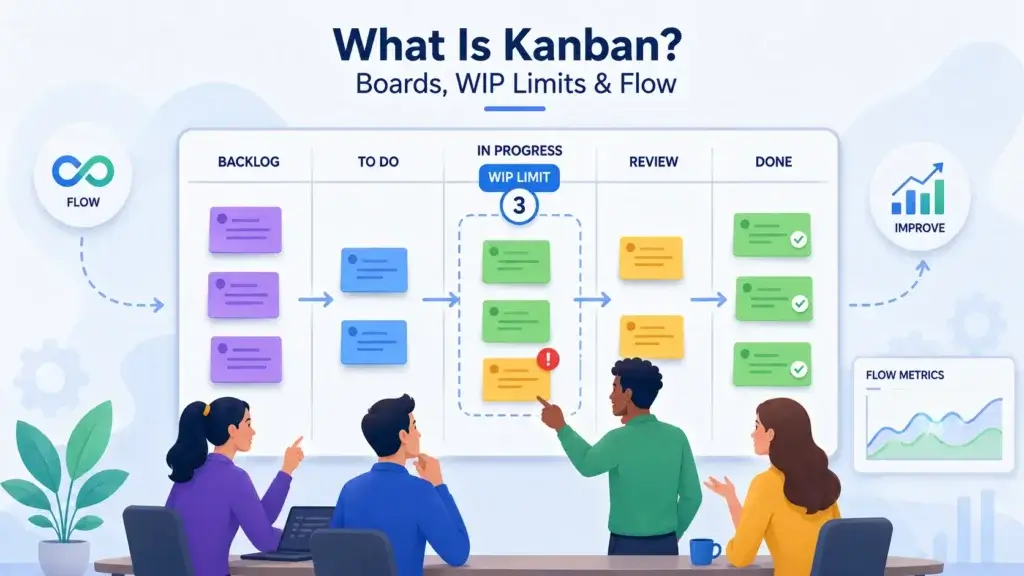
Kanban is a visual workflow method that helps teams see work, limit work in progress, manage flow, and improve delivery over time. Instead of organizing work into fixed sprints, Kanban focuses on the continuous movement of tasks through workflow stages such as To Do, In Progress, Review, and Done.
Kanban is especially useful for teams that handle continuous incoming work, shifting priorities, support requests, content production, bug fixes, operations tasks, and service delivery. It gives teams a live view of what is happening now, where work is blocked, and whether too many tasks are being started before enough are finished.
Kanban in one sentence
Kanban is a visual workflow system that helps teams manage work continuously by visualizing tasks, limiting work in progress, and improving flow.
How Kanban boards work
A Kanban board represents your workflow as columns. Each card represents a work item, and each column represents a stage in the process. As work progresses, cards move from left to right across the board.
A simple Kanban board may include four columns: Backlog, To Do, In Progress, and Done. A more advanced board may include Intake, Ready, Design, Development, QA, Review, Blocked, Approved, and Released. The right board structure depends on how your team actually works.
Why WIP limits matter
WIP stands for work in progress. A WIP limit sets the maximum number of items that can be in a workflow stage at the same time. For example, if your “In Progress” column has a WIP limit of five, the team should not start a sixth item until one of the current items moves forward.
This is one of the most important ideas in Kanban. Without WIP limits, a board can become a visual to-do list where everything is “in progress” and nothing is truly moving. With WIP limits, the team is encouraged to finish work before starting more work.
Kanban flow metrics
Kanban teams often use flow metrics to understand how work moves through the system. These metrics help teams improve delivery without relying only on status meetings or subjective updates.
- Cycle time: How long it takes to complete a task after work starts.
- Lead time: How long it takes from request to delivery.
- Throughput: How many items are completed in a period.
- Work in progress: How much active work exists at one time.
- Blocked work: How many items are waiting on dependencies.
These metrics make Kanban especially useful for operational teams, support teams, content teams, engineering maintenance teams, and any team that needs to improve speed and predictability without using fixed sprints.
Where Kanban works best
Kanban works best when work arrives continuously and priorities change often. For example, a customer support team cannot always wait for the next sprint to address urgent issues. A marketing team may need to handle new campaign requests throughout the week. An engineering team may need a continuous bug-fix workflow alongside planned product development.
In my view, Kanban is the better choice when flexibility and visibility matter more than sprint structure. It helps teams reduce overload, spot bottlenecks, and improve delivery without forcing all work into a fixed cycle.
Kanban vs. Scrum: A Side-by-Side Comparison
Kanban and Scrum can both support Agile teams, but they solve different problems. Scrum gives you a structured sprint-based framework. Kanban gives you a continuous flow system. The best choice depends on how your team receives work, plans work, and measures progress.
If your team needs a predictable planning cadence, Scrum may be the better fit. If your team needs flexibility and ongoing intake, Kanban may be more practical. If your team needs both sprint planning and flow visibility, you can combine the two.
| Comparison Area | Scrum | Kanban |
| Main purpose | Deliver work in structured sprint cycles | Improve continuous workflow and delivery flow |
| Work rhythm | Fixed sprints, often 1 to 4 weeks | Continuous flow without fixed sprint cycles |
| Planning style | Sprint Planning defines work for the sprint | Work is pulled when capacity is available |
| Roles | Product Owner, Scrum Master, Developers | No required roles |
| Meetings | Defined Scrum events | Flexible meetings based on team needs |
| Board usage | Often used to track sprint work | Core system for visualizing workflow |
| Change during work | Changes are usually added to future sprints | Changes can be pulled into flow when capacity exists |
| Work in progress | Controlled through sprint commitment and capacity | Controlled through explicit WIP limits |
| Best for | Product teams needing structure and sprint goals | Teams handling continuous work and changing priorities |
| Main risk | Too much ceremony if applied rigidly | Too little discipline if WIP limits and policies are ignored |
The simplest way to remember the difference
Scrum organizes work into sprints. Kanban organizes work into flow. Scrum asks, “What can we deliver in this sprint?” Kanban asks, “How can we keep valuable work moving through the system?”
Scrum is more prescriptive
Scrum gives your team more structure. It defines roles, events, artifacts, and sprint boundaries. This can be very helpful for teams that need stronger planning, accountability, and stakeholder review.
However, Scrum can feel heavy if your team only needs lightweight task visibility. If you add Scrum ceremonies without clear purpose, the framework may become a meeting system rather than a delivery system.
Kanban is more flexible
Kanban is easier to start because you can map your current workflow and improve it gradually. You do not need to change job titles, introduce sprints, or redesign your whole process immediately.
The risk is that some teams use Kanban boards without using Kanban discipline. A board alone is not Kanban. The real value comes from WIP limits, explicit policies, flow metrics, and continuous improvement.
Agile vs Scrum vs Kanban
The easiest hierarchy is this: Agile is the mindset, Scrum is a framework, and Kanban is a workflow method. Agile explains the values and principles. Scrum gives teams a sprint-based structure. Kanban gives teams a visual system for managing flow.
This means the question is not always “Which one is better?” A better question is: “What type of work are you managing, and what kind of control does your team need?”
When to Use Kanban vs. Scrum
The choice between Kanban and Scrum should come from the nature of your work, not from trend or preference. Some teams need sprint goals, planning discipline, and stakeholder reviews. Others need flexible intake, continuous prioritization, and better visibility into bottlenecks.
Use Scrum when you need structured delivery
Scrum is a strong fit when your team can plan meaningful work in short cycles and deliver a usable increment by the end of each sprint. It works especially well when the team has a product backlog, a clear Product Owner, and a need for regular inspection and adaptation.
- You need predictable sprint planning and delivery cycles
- You have a product backlog that needs active prioritization
- You want clear roles and team accountabilities
- You need regular stakeholder review and feedback
- Your team benefits from retrospectives and structured improvement
- You can avoid major priority changes during the sprint
Scrum is often a strong fit for product development, feature development, software releases, cross-functional product teams, and projects where stakeholders need a regular review cadence.
Use Kanban when work changes continuously
Kanban is a strong fit when work arrives unpredictably or when priorities change frequently. It is also useful when the team needs to see bottlenecks and improve throughput without committing to fixed sprint cycles.
- You handle continuous incoming work
- Priorities change often
- You need better visibility into bottlenecks
- You want to reduce multitasking and overload
- You need a lightweight process that is easy to adopt
- You want to improve cycle time and flow
Kanban is often a strong fit for support, operations, bug fixing, content production, design requests, IT service work, maintenance, and marketing workflows.
Use both when you need sprint goals and flow control
Many teams use a hybrid approach often called Scrumban. This combines Scrum’s planning rhythm with Kanban’s visual workflow and WIP limits. For example, a team may plan work in two-week sprints, but use WIP limits on the board to prevent too many items from being active at the same time.
This can work very well when Scrum gives the team helpful structure but the team also needs Kanban-style flow management. It is especially useful for engineering teams that manage both planned feature work and unpredictable support or bug work.
Practical recommendation by team type
The right method depends heavily on team function. A product engineering team may benefit from Scrum because it needs sprint goals, backlog refinement, and stakeholder reviews. A customer success operations team may benefit from Kanban because work arrives continuously and needs to move quickly.
| Team Type | Recommended Approach | Why It Works |
| Product development | Scrum | Supports sprint goals, backlog planning, and regular reviews |
| Bug fixing and maintenance | Kanban or Scrumban | Handles changing priorities and continuous intake |
| Customer support | Kanban | Improves visibility and flow for ongoing requests |
| Marketing team | Kanban or Scrum | Kanban fits ongoing campaigns, Scrum fits structured launches |
| Design team | Kanban | Helps manage requests, reviews, and handoffs |
| Operations team | Kanban | Supports continuous work and bottleneck reduction |
| Cross-functional project team | Scrum | Creates shared planning rhythm and delivery accountability |
My practical recommendation
If your team is new to Agile, start with the problem you are trying to solve. If the problem is lack of visibility, start with Kanban. If the problem is lack of planning discipline, start with Scrum. If the problem is both, use Scrum for planning and Kanban for flow control.
For most business teams outside software, Kanban is usually easier to adopt first. For product and engineering teams, Scrum is often more useful when there is a mature backlog, a clear product owner, and a need for sprint-based delivery.
Sprint Planning in Scrum: How It Works
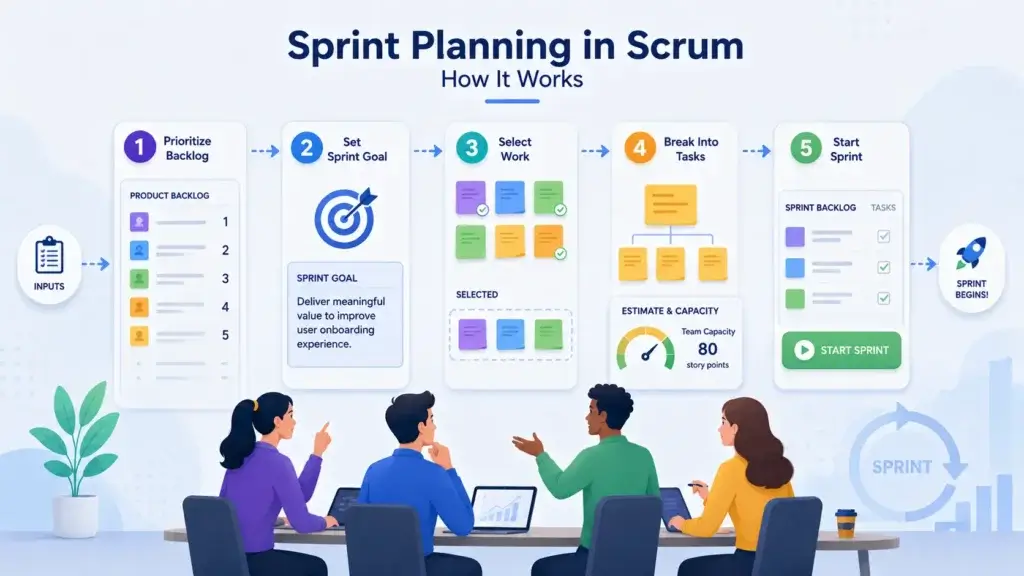
Sprint Planning is the Scrum event where the team decides what it will work on during the next sprint and how that work will be approached. It usually happens at the start of the sprint and includes the Product Owner, Scrum Master, and Developers.
The purpose of Sprint Planning is not simply to fill a sprint with tasks. The real purpose is to create a shared sprint goal, select the right backlog items, clarify what success looks like, and make sure the team has a realistic plan for delivery.
Step 1: Review the product goal and priorities
Sprint Planning starts with context. The Product Owner explains the highest-priority backlog items and how they connect to the product goal, customer needs, or business priorities. This prevents the sprint from becoming a random collection of tickets.
A strong sprint should have a clear reason behind it. For example, the goal may be to improve onboarding activation, reduce checkout friction, launch a reporting feature, or fix a specific reliability problem.
Step 2: Select backlog items for the sprint
The team reviews candidate backlog items and decides what can realistically fit into the sprint. This decision should consider team capacity, complexity, dependencies, risks, and the Definition of Done.
The Product Owner prioritizes the work, but the Developers should be involved in deciding how much work is realistic. This is important because sprint planning fails when scope is pushed into the sprint without the team’s technical input.
Step 3: Define the sprint goal
The sprint goal is a concise statement that explains the purpose of the sprint. It gives the team a shared direction and helps guide decisions if tradeoffs are needed during the sprint.
For example, instead of a sprint goal like “Complete tickets 101, 102, and 103,” a stronger goal would be “Improve the new user onboarding flow so trial users can reach their first completed project faster.”
Step 4: Break work into tasks
After selecting backlog items, the team discusses how the work will be completed. This may include technical tasks, design steps, QA activities, documentation, dependencies, acceptance criteria, and review needs.
This step is where Sprint Planning becomes practical. The team should leave the meeting with enough clarity to start work, not just a list of user stories.
Step 5: Confirm capacity and risks
Before closing Sprint Planning, the team should confirm whether the plan is realistic. Holidays, meetings, support duties, review delays, technical uncertainty, and cross-team dependencies can all affect sprint capacity.
If the plan is too ambitious, the team should reduce scope before the sprint starts. A smaller sprint plan that can be completed is better than an overloaded sprint that creates spillover, stress, and weak forecasting.
Common Sprint Planning mistakes
Sprint Planning works best when the backlog is ready, priorities are clear, and the team has enough information to make a realistic commitment. When those conditions are missing, sprint planning can become slow, vague, and frustrating.
- Starting with an unrefined backlog
- Choosing too many items for the sprint
- Skipping the sprint goal
- Ignoring team capacity and holidays
- Planning tasks without acceptance criteria
- Allowing major scope changes during the sprint
- Treating estimates as promises instead of forecasts
The best sprint planning sessions are focused, collaborative, and realistic. They help the team start the sprint with clarity instead of confusion.
Best Tools for Kanban & Scrum Teams
The best Kanban and Scrum tools help teams plan work, visualize progress, manage dependencies, automate routine updates, and report on delivery. The right tool depends on whether your team needs lightweight boards, advanced Agile reporting, product roadmaps, issue tracking, sprint planning, or cross-functional work management.
For many teams, the tool matters less than the workflow design. A simple board with clear policies, owners, and WIP limits will outperform a complex tool with poor process discipline. Still, the right software can make Agile project management much easier to scale.
monday dev: best for flexible product and work management teams
monday dev is a strong option for teams that want Agile workflows without feeling locked into a developer-only issue tracker. It supports sprints, Kanban boards, roadmaps, dashboards, automations, product workflows, bug tracking, and cross-functional collaboration.
In my view, monday dev is one of the best choices for teams that need Agile project management across product, marketing, operations, and leadership. It is especially useful when Agile work needs to connect with broader business workflows, not only engineering tickets.
Jira: best for software teams that need advanced Agile tracking
Jira is one of the most established tools for Scrum and Kanban software teams. It supports sprint boards, Kanban boards, backlogs, epics, issues, releases, workflows, reports, and integrations with development tools.
Jira is powerful, but it can become complex if the setup is not managed carefully. It is usually strongest for engineering teams that need detailed issue tracking, custom workflows, and Agile reporting. If your team wants similar capabilities with a simpler interface, you can compare options in our guide to the best Jira alternatives.
ClickUp: best for teams that want Scrum, Kanban, docs, and goals in one place
ClickUp is a flexible work management platform that supports Kanban boards, sprints, tasks, docs, goals, dashboards, whiteboards, and automation. It can work well for teams that want a single workspace for Agile execution and broader project management.
ClickUp is especially useful for teams that do not want separate tools for tasks, documents, sprint planning, and reporting. However, because it is highly flexible, teams should keep their workspace clean and avoid building overly complex hierarchies.
Trello: best for simple Kanban boards
Trello is one of the easiest tools for visual Kanban-style work management. It is simple, intuitive, and useful for small teams that want to organize tasks across lists such as To Do, Doing, Review, and Done.
Trello is not the strongest option for advanced Scrum reporting, complex dependencies, or enterprise workflow control. But for lightweight Kanban, editorial calendars, small marketing workflows, personal task management, and simple team boards, it remains one of the easiest tools to adopt.
Linear: best for modern product and engineering teams
Linear is designed for product and engineering teams that want fast issue tracking, cycles, roadmaps, projects, and clean execution workflows. It is especially popular with startups and software teams that value speed, simplicity, and a polished user experience.
Linear is not always the best fit for non-technical business teams, but it is excellent for software teams that want a cleaner alternative to heavier issue tracking tools.
Azure DevOps: best for Microsoft-centered development teams
Azure DevOps is a strong option for development teams already working in the Microsoft ecosystem. It includes Azure Boards for work tracking, plus repos, pipelines, test plans, and artifacts.
It is especially useful for engineering organizations that need Agile boards connected to source control, CI/CD pipelines, testing, and enterprise governance. For non-software teams, it may feel too technical compared with tools like monday.com, ClickUp, or Trello.
| Tool | Best For | Kanban Strength | Scrum Strength |
| monday dev | Cross-functional product and work management teams | Flexible boards, automations, dashboards, workflow visibility | Sprints, roadmaps, product workflows, reporting |
| Jira | Software development teams | Advanced issue workflows and Kanban boards | Backlogs, sprints, epics, releases, Agile reports |
| ClickUp | Teams wanting tasks, docs, goals, and Agile views together | Board views, task statuses, automations | Sprints, estimates, dashboards, workload tracking |
| Trello | Simple visual task management | Very easy Kanban boards | Limited Scrum support through templates and add-ons |
| Linear | Modern software teams and startups | Clean issue flow and project boards | Cycles, projects, roadmaps, product execution |
| Azure DevOps | Microsoft-centered engineering teams | Boards connected to development workflows | Backlogs, sprints, repos, pipelines, test plans |
Which tool should you choose?
If your team wants the best balance between Agile execution and business-friendly work management, I would start with monday dev. It is flexible enough for Scrum, Kanban, roadmaps, dashboards, and cross-functional workflows, while still being approachable for non-technical stakeholders.
If you are a software engineering team with advanced issue tracking needs, Jira or Linear may be stronger. Choose Jira for deeper workflow configuration and reporting. Choose Linear if your team values speed and a cleaner developer experience. Choose Trello if you only need a simple Kanban board. Choose Azure DevOps if your engineering stack is already built around Microsoft.
You can also explore broader options in our guide to the best project management software, especially if your Agile process needs to connect with portfolio planning, resource management, dashboards, and team collaboration.
Conclusion
Kanban, Scrum, and Agile are closely related, but they are not interchangeable. Agile is the broader project management philosophy that values adaptability, collaboration, frequent delivery, and continuous improvement. Scrum is a structured Agile framework that organizes work into sprints with defined roles, events, and artifacts. Kanban is a visual workflow method that helps teams manage continuous work, limit work in progress, and improve flow.
If your team needs structure, sprint goals, backlog discipline, and regular stakeholder feedback, Scrum is usually the stronger fit. If your team handles continuous work, shifting priorities, and frequent requests, Kanban is often more practical. If you need both planning rhythm and flow control, a hybrid approach can give you the best of both worlds.
The most important decision is not choosing the method that sounds most popular. It is choosing the method that matches how your team receives work, makes decisions, manages capacity, and delivers value. In 2026, the best Agile teams are not the ones that copy a framework perfectly. They are the teams that use the right practices to make work clearer, faster, more focused, and easier to improve.
FAQs
What’s the difference between Kanban and Scrum?
The main difference is structure. Scrum organizes work into fixed-length sprints with defined roles, events, and artifacts. Kanban manages work as a continuous flow using visual boards, work-in-progress limits, and flow improvement. Scrum is better for structured sprint delivery, while Kanban is better for continuous work and changing priorities.
Can you use Kanban and Scrum together?
Yes. Many teams combine Scrum and Kanban in a hybrid approach often called Scrumban. For example, a team may use Scrum for sprint planning, sprint goals, reviews, and retrospectives, while using Kanban boards and WIP limits to manage flow inside the sprint.
Which Kanban tools are best for visualizing work in progress?
The best Kanban tools for visualizing work in progress include monday dev, Trello, ClickUp, Jira, Linear, and Azure DevOps. Trello is best for simple boards, monday dev is strong for flexible business and product workflows, Jira is best for software teams, and ClickUp is useful when you want tasks, docs, and dashboards in one workspace.
How do sprint cycles work in Scrum?
Sprint cycles in Scrum are fixed time periods, usually 1 to 4 weeks, where the team works toward a sprint goal. Each sprint includes Sprint Planning, daily inspection through the Daily Scrum, development work, a Sprint Review, and a Sprint Retrospective. The goal is to deliver a usable increment and improve with each cycle.
Is Agile right for non-software teams?
Yes. Agile can work for non-software teams when work is complex, priorities change, and feedback matters. Marketing, HR, operations, design, finance, and customer success teams can use Agile practices to plan in shorter cycles, improve collaboration, and adapt faster. Kanban is often the easiest Agile starting point for non-software teams.