Introduction
If you run a small business, you probably know how quickly customer data can become messy. Leads come from different channels, follow-ups get delayed, and sales notes often live across inboxes, spreadsheets, and personal reminders.
That is where Act CRM can still make sense.
Act! is one of the longest-running names in CRM software. While many newer CRMs focus on sleek design and fast onboarding, Act CRM is built around something more practical: giving small businesses a central place to manage contacts, track sales opportunities, run email campaigns, and keep customer relationships organized.
In this Act CRM review, we will look at how the platform performs in 2026, including its features, pricing, user experience, integrations, security approach, pros and cons, and best use cases.
My overall view is clear: Act CRM is not the most modern CRM on the market, but it remains a strong option for contact-heavy small businesses that want CRM, marketing, and customer management in one system.
Quick Overview
Before we go deeper, here is the short version of this Act CRM review.
| Review Category | Act CRM Summary |
| Best For | Small businesses that need contact management, email marketing, sales tracking, and customer relationship history in one platform. |
| Starting Price | $30/user/month, billed annually, for Act! Advantage Standard. |
| Deployment Options | Cloud-based Act! Advantage and Act! Premium Desktop for businesses that prefer a desktop CRM setup. |
| Main Strength | Strong contact management with built-in marketing and flexible customer data tracking. |
| Main Weakness | The interface feels less modern than newer CRMs like Pipedrive, monday CRM, and HubSpot. |
| Best Alternative | monday CRM for flexible team workflows, Pipedrive for visual sales pipeline management, and HubSpot for free CRM and inbound marketing. |
Key Features
Act CRM Features
Act CRM is best understood as a relationship-focused CRM for small businesses. It helps you manage customer details, track sales conversations, send marketing emails, and keep your team aligned around follow-ups.
It is not the flashiest CRM, and it is not trying to be. Its value comes from giving you practical CRM depth without pushing you into a complex enterprise system.
Contact and Activity Management
Act CRM’s strongest area is contact management.
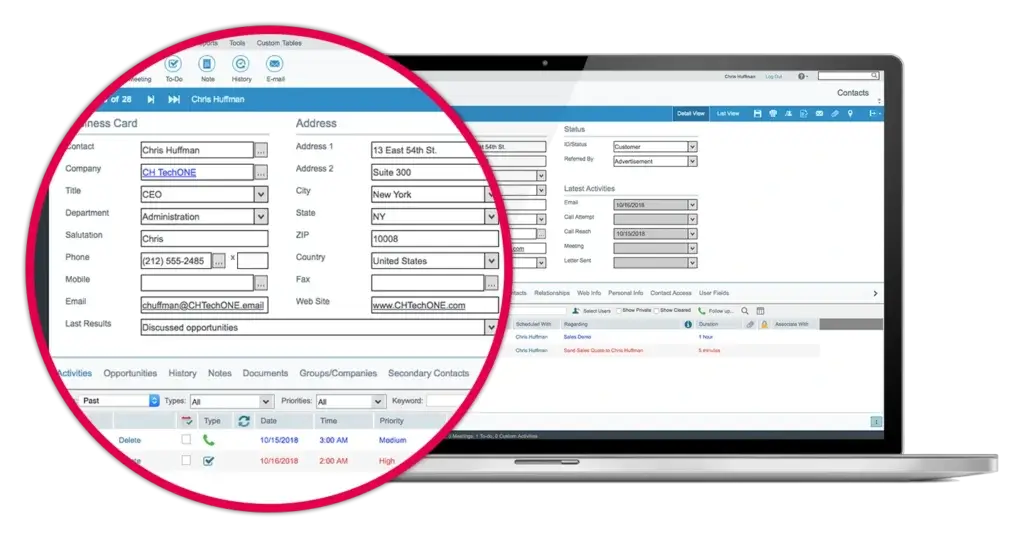
You can store detailed customer records with notes, calls, emails, meetings, tasks, opportunities, and custom fields. This is helpful when your business depends on long-term relationships rather than quick one-time transactions.
You can use Act CRM to track:
- Contact details and customer profiles
- Past calls, emails, meetings, and notes
- Follow-up tasks and reminders
- Customer groups, tags, and segmented lists
- Custom fields for industry, deal size, source, or service type
This makes Act CRM useful for consultants, insurance agencies, financial services firms, local service businesses, and B2B sales teams that need context before every conversation.
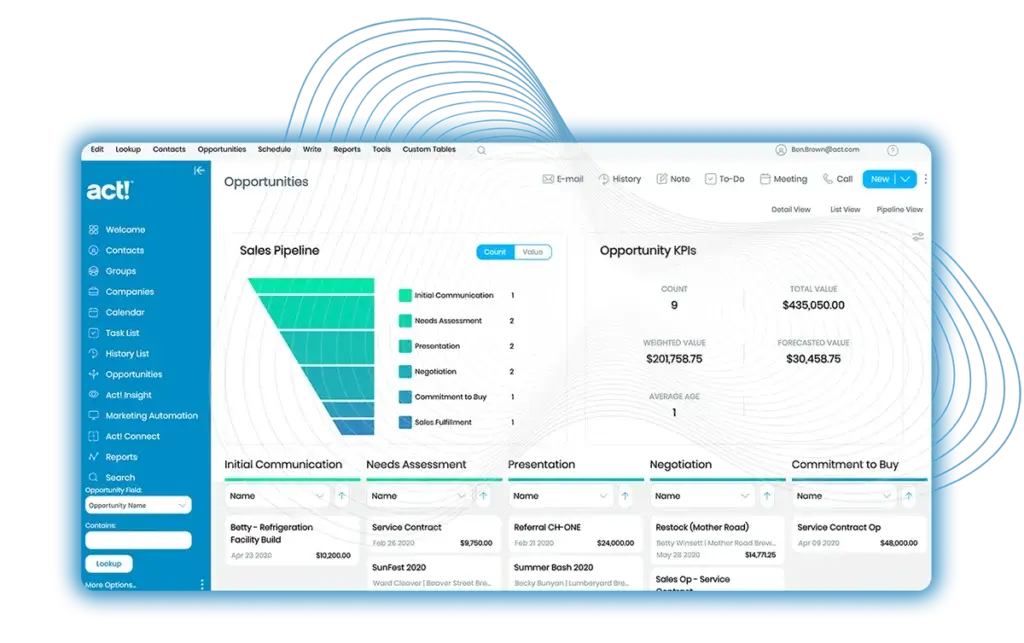
Sales Pipeline and Opportunity Tracking
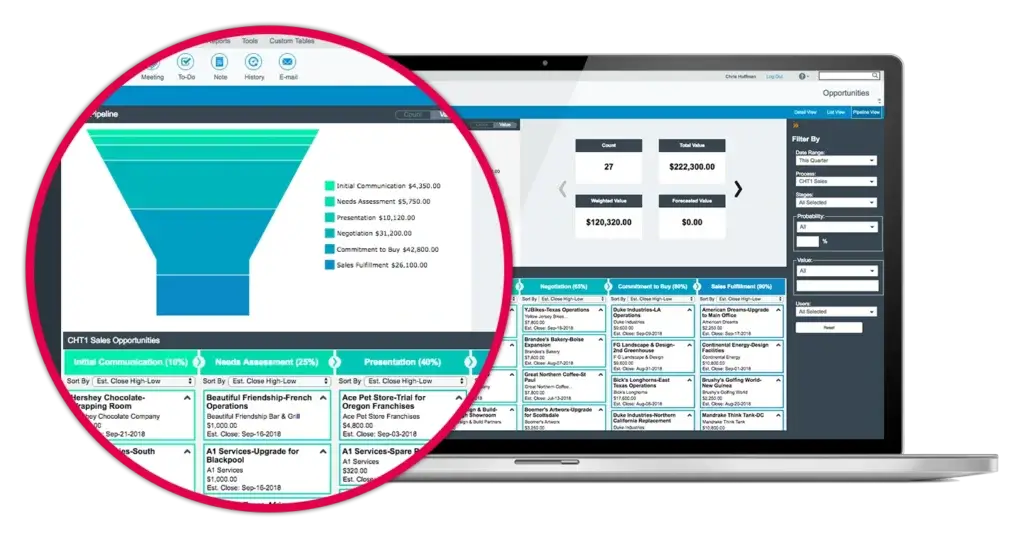
Act CRM includes opportunity management tools that help you track deals from first contact to close. You can create sales stages, assign activities, view open opportunities, and monitor expected revenue.
The pipeline experience is more traditional than visual-first CRMs like Pipedrive, but it covers the basics well.
You can use the sales pipeline to manage:
- Deal stages and probabilities
- Estimated close dates
- Opportunity values
- Sales tasks and reminders
- Pipeline reports and performance views
If you want a highly visual drag-and-drop sales CRM, Pipedrive may feel smoother. If you want sales tracking connected to detailed contact records, Act CRM is a more natural fit.
Email Marketing and Campaigns
One of Act CRM’s biggest advantages is that it combines CRM and email marketing in the same platform. This helps you avoid switching between a CRM, spreadsheet, and separate email marketing tool.
Depending on the plan, Act! includes email marketing capabilities such as email sends, templates, campaign tracking, nurture marketing, and marketing automation.
This is especially useful if you want to:
- Send newsletters to customer segments
- Build simple nurture campaigns
- Track email engagement inside contact records
- Follow up with leads based on campaign activity
- Keep sales and marketing data in one place
For small businesses, this can be a major time-saver. You do not need an advanced marketing operations team to start sending more organized campaigns.
Marketing Automation and AI Writing Assistant
Act! is not an AI-first CRM, but it now includes practical AI and automation features that make the platform more relevant in 2026.
The Professional plan includes an AI Writing Assistant, turnkey campaigns, and nurture marketing. The Ultimate plan adds full marketing automation, lead scoring, prioritized activity scheduling, progressive profiling, and more advanced customer engagement tools.
This gives Act CRM more depth than a basic contact database. You can use it to build customer journeys, not just store names and phone numbers.
That said, if you need advanced AI forecasting, predictive deal scoring, conversation intelligence, or AI-powered sales coaching, you may still prefer HubSpot, Salesforce, or monday CRM.
Quotes, Payments, Appointment Scheduling, and Customer Tools
Act! has expanded beyond classic CRM features. Depending on the plan, you can access features such as interactive quotes, payments, online appointment scheduling, forms, surveys, website chat, event management, and a customer portal.
This is important because many small businesses need not only a place to manage contacts. They also need tools to collect leads, schedule meetings, communicate with customers, and manage simple customer-facing workflows.
For businesses that want fewer disconnected tools, this broader feature set is a meaningful advantage.
Integrations and App Compatibility
Act CRM integrates with tools that many small businesses already use. Its current positioning highlights integrations with Outlook, Gmail, and Zoom, which are essential for syncing communication and calendars.
Act! also supports accounting integrations on higher plans, and Zapier can help connect the platform with other apps when native integrations are limited.
Common integration areas include:
- Outlook and Microsoft 365
- Gmail and Google Workspace
- Zoom for meetings and calendar workflows
- Accounting integrations on supported plans
- Zapier for additional app connections
- Act! Companion mobile app for iOS and Android
Its app ecosystem is not as large as HubSpot’s, but Act covers the essentials for many small teams.
Dashboards and Reporting
Act CRM includes dashboards and reporting tools to help you understand what is happening across contacts, sales activity, campaigns, and opportunities.
You can monitor sales KPIs, campaign performance, task completion, and lead activity. The reporting experience is not as modern as some newer platforms, but it is practical and customizable.
For small businesses, that is often enough. You get visibility into your pipeline and activity without needing a dedicated CRM analyst.
Security and Data Control
Act CRM gives businesses flexibility in how they manage customer data. Cloud users get hosted access, backups, and automatic updates, while Act! Premium Desktop gives you more control over your local environment.
This is one of the reasons Act still appeals to businesses that prefer more ownership over their CRM setup.
If you are in a regulated industry, you should confirm your compliance requirements directly with Act! before choosing a plan. The platform gives you useful control, but compliance depends on your configuration, internal policies, and data handling practices.
Key Benefits
Benefits of Using Act CRM
Act CRM works best when you want more than a basic sales tracker. It gives you a structured way to manage relationships, nurture leads, and keep customer history connected to your daily workflow.
All-in-One CRM and Marketing Hub
Many small businesses use one tool for contacts, another for email marketing, another for scheduling, and another for sales notes. Act helps reduce that fragmentation.
You can manage contacts, send campaigns, track engagement, and follow up from one platform. That makes it easier to keep sales and marketing aligned.
Flexible Deployment
Act stands out because it offers both cloud and desktop options. Most modern CRMs are cloud-only, which is convenient but not ideal for every business.
If you prefer cloud access, Act! Advantage is the better fit. If you want more control over your CRM environment, Act! Premium Desktop is worth considering.
Good Value for Contact-Heavy Teams
Act CRM is especially useful when you want detailed customer records without paying enterprise CRM prices. Its strongest value is not flashy automation, but reliable relationship management.
For solo users, small sales teams, consultants, and service-based businesses, that can be enough to create better follow-up habits and stronger customer relationships.
Custom Fields and Customer Segmentation
Act lets you adapt contact records to your business. You can track customer type, industry, service interest, lead source, renewal date, or any other data point that matters to your process.
This is important because not every sales cycle fits a standard CRM template.
Pros and Cons
Advantages and Limitations of Using Act CRM
No CRM is perfect. Act CRM gets a lot right for small businesses, but it also has trade-offs you should understand before signing up.
Positive
✅ Strong contact management
✅ Built-in email marketing and automation
✅ Cloud and desktop options
✅ Practical pricing for small businesses
Negative
❌ Interface feels dated
❌ Not as integration-rich as HubSpot
❌ Mobile experience is more basic
❌ Setup can take time
✅ Pros
Strong contact management
Act CRM gives you deep customer records with notes, activities, communication history, custom fields, and relationship context. This is valuable if your sales process depends on personalization and repeat interactions.
Built-in email marketing and automation
You can manage customer data and email campaigns inside the same platform. Higher plans add stronger marketing automation, lead scoring, nurture campaigns, and AI-assisted content creation.
Cloud and desktop options
Act! Advantage is available as a cloud-based CRM, while Act! Premium Desktop serves businesses that prefer a desktop CRM setup. This flexibility is increasingly rare among modern CRM vendors.
Practical pricing for small businesses
Act CRM starts at $30/user/month, billed annually, which keeps it accessible for small teams. The pricing is easier to understand than many enterprise CRM platforms.
❌ Cons
Interface feels dated
Act CRM is functional, but the interface does not feel as modern as tools like monday CRM, Pipedrive, or HubSpot. New users may need more time to become comfortable with the layout.
Not as integration-rich as HubSpot
Act covers important integrations such as Outlook, Gmail, Zoom, and accounting-related tools, but it does not offer the same large app marketplace you get with HubSpot or Salesforce.
Mobile experience is more basic
The Act! Companion mobile app is useful for checking contacts, tasks, and updates on the go. However, it is not as polished as mobile-first sales CRM tools.
Setup can take time
Act CRM becomes more valuable when you customize fields, dashboards, lists, and workflows. That flexibility is useful, but it also means setup is not always plug-and-play.
Interface and Ease of Use
Act CRM User Experience
Using Act CRM feels like using a mature business tool. It has a lot of functionality, but it does not always feel as clean or intuitive as newer SaaS CRMs.
If you are coming from a modern tool like monday CRM or HubSpot, you will notice that Act’s interface is more traditional. However, once you customize it around your process, it can become a reliable daily workspace.
Navigation and Layout
The contact record is where Act CRM feels most useful. You can see customer history, notes, opportunities, tasks, and activity in one place.
The navigation can feel text-heavy, and some screens may take longer to learn. But for users who value detail and control, the layout becomes easier with daily use.
💡 Tip: Act CRM is easier to use after you clean up your fields, create useful groups, and customize your dashboard around your real workflow.
Setup and Customization
Act CRM gives you more customization than many lightweight CRMs. You can create custom fields, lists, dashboards, sales stages, and workflows that match how your business sells and supports customers.
The trade-off is that setup takes time. If you want a CRM that feels ready in one afternoon, Pipedrive or HubSpot may feel simpler.
Act CRM is better when you want the CRM to adapt to your business, not when you want to adapt your business to the CRM.
Mobile App Experience
The Act! Companion mobile app gives you access to contacts, tasks, calendar items, and basic CRM updates when you are away from your desk.
It is useful for quick lookups, notes, and follow-ups, but it is not the strongest reason to choose Act CRM. Field sales teams that work heavily from mobile may prefer Pipedrive, HubSpot, or Salesforce.
Customer Support and Learning Curve
Act offers support resources, onboarding options, and plan-based support access. Higher plans include enhanced support options, which can be helpful if you are implementing CRM across a team.
The learning curve is moderate. Beginners can use Act for basic contact management fairly quickly, but marketing automation, reporting, and deeper customization will require more time.
For the right business, that setup effort is worth it because you end up with a CRM that reflects how your team actually works.
Business Size Fit
Act CRM for Different Business Sizes
Act CRM is not designed for every type of company. Its sweet spot is small to midsize businesses that need strong contact management, marketing tools, and practical customer tracking.
If you are a solo professional, consultant, agency, advisor, or small sales team, Act can give you enough structure without overwhelming you with enterprise complexity.
| Business Size | Fit | Why It Fits |
| Solo Entrepreneurs | ✅ Great fit | You can manage contacts, tasks, email campaigns, and follow-ups without a large tech stack. |
| Small Businesses | ✅ Excellent fit | Act CRM combines customer management, sales tracking, and marketing tools in one platform. |
| Mid-Sized Businesses | ☑️ Good fit in some cases | It can work well if your needs are relationship-focused, but fast-scaling teams may want more native integrations. |
| Large Enterprises | ❌ Usually not ideal | Enterprise teams often need deeper automation, governance, AI, analytics, and app ecosystem depth. |
Who Uses Act CRM?
Act CRM is a natural fit for businesses where customer history matters. It is especially useful when your team needs to remember past conversations, renewals, preferences, service details, or relationship context.
Good-fit use cases include:
- Insurance agencies managing policyholders and renewals
- Financial services firms tracking client relationships
- Consultants managing long-term customer accounts
- Real estate professionals tracking buyers, sellers, and referrals
- B2B service providers managing repeat customer interactions
- Small manufacturers tracking customers, quotes, and opportunities
What these businesses have in common is simple: they need a CRM that helps them build relationships over time.
💡 Pro Tip: If your team is growing quickly and needs more flexible collaboration, automation, and project-style workflows, monday CRM may be a better long-term fit.
Pricing and Plans
How Much Does Act CRM Cost?
Act CRM pricing is more straightforward than many CRM platforms. The main cloud product is Act! Advantage, which is available in Standard, Professional, and Ultimate plans.
Act! also offers Act! Premium Desktop for businesses that prefer a desktop CRM environment.
Act! Advantage Pricing
Here is the current public pricing structure for Act! Advantage plans, billed annually.
| Plan | Price | Best For | Key Features |
| Act! Advantage Standard | $30/user/month | Small teams that need core CRM and basic email marketing | CRM, mobile app, dashboards, Office 365 and Gmail integration, and 2,500 email sends/month |
| Act! Advantage Professional | $45/user/month | Teams that want stronger marketing and customer engagement tools | Everything in Standard, 25,000 email sends/month, AI Writing Assistant, nurture marketing, quotes, payments, appointment scheduling, accounting integration, and project management |
| Act! Advantage Ultimate | $60/user/month | Teams that need full marketing automation and advanced customer tools | Everything in Professional, 50,000 email sends/month, lead scoring, progressive profiling, custom industry tables, customer portal, enhanced support, and 35 GB storage |
| Act! Premium Desktop | $40/user/month | Businesses that prefer a desktop CRM setup | Desktop CRM access, networked and offline access, self-managed security, and control over updates |
Which Act CRM Plan Should You Choose?
The right plan depends on how much marketing and automation you need.
- Choose Standard if you mainly need CRM, contact management, dashboards, and basic email marketing.
- Choose Professional if you want stronger email marketing, AI writing support, quotes, payments, appointments, and customer engagement features.
- Choose Ultimate if you need full marketing automation, lead scoring, progressive profiling, and more advanced support.
- Choose Premium Desktop if your business prefers desktop CRM control instead of a cloud-first CRM setup.
In my opinion, Professional is the most balanced Act CRM plan for many small businesses. It adds the marketing, appointment, quoting, and AI writing features that make Act more than a basic CRM.
Standard is fine for simple contact management, but it may feel limited if you want to use Act as a true sales and marketing hub.
Act CRM Integrations
Connected Apps and Workflow
Act CRM supports important business integrations, especially around email, calendar, meetings, and accounting. This matters because your CRM becomes more useful when it connects to the tools your team already uses.
Act highlights integrations with Outlook, Gmail, and Zoom, which helps keep customer communication and scheduling connected to your CRM data.
Key integration areas include:
- Outlook and Microsoft 365: Useful for email, calendar, and contact-related workflows.
- Gmail and Google Workspace: Helpful for teams already using Google-based communication.
- Zoom: Useful for meeting workflows and customer communication.
- Accounting integrations: Available on supported plans for businesses that need CRM and finance context connected.
- Zapier: Useful for connecting Act CRM with additional apps when a native integration is not available.
The integration ecosystem is solid for small businesses, but it is not as broad as HubSpot or Salesforce. If integrations are your top priority, compare Act carefully against those platforms before choosing.
CRM Alternatives
Act CRM vs Pipedrive, HubSpot, and monday CRM
Act CRM is not the only strong CRM for small businesses. The best choice depends on whether your priority is relationship management, pipeline visibility, marketing, or team workflow flexibility.
| CRM | Best For | Main Strength | Main Limitation |
| Act CRM | Small businesses that need contact management and marketing tools | Strong customer records, email marketing, and deployment flexibility | Interface feels less modern than newer CRMs |
| Pipedrive | Sales teams focused on pipeline management | Clean visual pipeline and fast sales workflow adoption | Marketing and customer management depth may require add-ons |
| HubSpot CRM | Teams that want free CRM and inbound marketing tools | Large ecosystem, strong integrations, and marketing features | Costs can rise as you add advanced hubs and users |
| monday CRM | Teams that want flexible workflows and collaboration | Highly customizable boards, automation, and team visibility | May require setup work to structure your sales process properly |
My recommendation is simple: choose Act CRM if your business is contact-heavy and you want CRM plus marketing in one practical system. Choose Pipedrive if your sales pipeline is your main focus. Choose HubSpot if you want a stronger marketing ecosystem. Choose monday CRM if you want more workflow flexibility and team collaboration.
Protection for Your Data
Act CRM Security and Data Control
When you manage customer records, emails, quotes, notes, and sales activity, security matters. Act CRM gives you practical tools for controlling access and managing customer data, especially if you choose the desktop option.
The cloud plans include hosted access, backups, and automatic updates. Act! Premium Desktop gives you more control over your CRM environment, which may appeal to businesses with internal IT resources or specific data management preferences.
Key Security Considerations
For most small businesses, the key question is not whether Act CRM has every enterprise security certification. The better question is whether the platform gives you enough control for your business needs.
Important areas to review include:
- User access: Make sure team members only access the records and features they need.
- Backups: Cloud users benefit from managed backups, while desktop users need a strong internal backup process.
- Updates: Cloud plans reduce update work, while desktop users have more control over timing.
- Internal policies: Your own password, device, permission, and data retention practices still matter.
Cloud vs Desktop Data Control
Act! Advantage is the better choice if you want easier access, automatic updates, and less IT overhead. Act! Premium Desktop is better if you want more local control and are comfortable managing the technical side.
If your business is in healthcare, finance, legal services, or another regulated field, you should confirm specific compliance needs directly with Act! before implementing the software.
This keeps the decision grounded. Act CRM can support secure customer management, but your compliance position depends on setup, processes, and industry requirements.
Conclusion
Final Thoughts on Act CRM
Act CRM is a dependable CRM for small businesses that care about relationship history, organized follow-ups, and built-in marketing tools. It is not the sleekest CRM, but it remains useful for teams that want depth, flexibility, and control.
The biggest reason to choose Act CRM is its balance of contact management and marketing. You can manage customer records, track sales opportunities, send email campaigns, and build more organized customer communication from one platform.
It is best for:
- Small businesses that want CRM and marketing in one place
- Contact-heavy teams that need detailed customer records
- Consultants, advisors, agencies, and service businesses
- Companies that value desktop CRM flexibility
- Teams that want practical automation without enterprise complexity
👎 When Act CRM May Not Be the Best Fit
Act CRM may not be the right CRM if you want the most modern interface, the largest app marketplace, or advanced AI-powered sales intelligence.
If that describes your business, consider Pipedrive for pipeline-focused sales teams, HubSpot CRM for inbound marketing and integrations, or monday CRM for flexible workflows.
🏁 Bottom Line
Act CRM is worth considering if you run a small business and want a mature CRM with strong contact management, built-in marketing tools, and flexible deployment options.
It is not the most modern CRM, but it is practical, proven, and still relevant for businesses that manage long-term customer relationships.
Frequently Asked Questions
Have more questions?
What is Act CRM used for?
Act CRM is used to manage customer contacts, sales opportunities, follow-up tasks, email marketing campaigns, and customer relationship history. It is especially useful for small businesses that want CRM and marketing tools in one platform.
Is Act CRM good for small businesses?
Yes. Act CRM is a good fit for small businesses that need strong contact management, sales tracking, email marketing, and flexible customer data organization without moving to a complex enterprise CRM.
How much does Act CRM cost?
Act! Advantage starts at $30/user/month for Standard, $45/user/month for Professional, and $60/user/month for Ultimate, billed annually. Act! Premium Desktop is listed at $40/user/month, billed annually.
Is Act CRM cloud-based or desktop-based?
Act CRM offers both options. Act! Advantage is the cloud-based CRM product, while Act! Premium Desktop is designed for businesses that prefer a desktop CRM setup with more local control.
Does Act CRM include marketing automation?
Yes. Act CRM includes email marketing features, and higher plans add more advanced marketing automation capabilities such as nurture marketing, lead scoring, progressive profiling, and automated campaigns.
Does Act CRM have AI features?
Act CRM includes an AI Writing Assistant on supported plans. However, it is not an AI-first CRM, so teams that need advanced AI forecasting or sales intelligence may prefer HubSpot, Salesforce, or monday CRM.
What integrations does Act CRM support?
Act CRM supports integrations with tools such as Outlook, Microsoft 365, Gmail, Google Workspace, Zoom, and accounting-related tools on supported plans. Zapier can also help connect Act CRM with more apps.
How does Act CRM compare with Pipedrive?
Act CRM is stronger for detailed contact management and built-in marketing tools, while Pipedrive is better for visual sales pipeline management and fast sales team adoption. The better choice depends on your workflow.
Who should use Act CRM?
Act CRM is best for small businesses, consultants, advisors, insurance agencies, financial services firms, B2B service providers, and contact-heavy teams that rely on long-term customer relationships.
Is Act CRM worth it?
Act CRM is worth it if you need a mature CRM with strong contact management, email marketing, sales tracking, and cloud or desktop flexibility. It may not be ideal if you want the most modern interface or the largest app marketplace.