AI-powered CRM software is changing how sales, marketing, and customer success teams manage relationships. Instead of using a CRM only as a database, you can now use it as an intelligent system that captures data, recommends next steps, summarizes conversations, scores leads, and helps your team act faster.
This matters because customer data is now spread across emails, calls, website visits, forms, chat conversations, ads, and product activity. A traditional CRM can store this information, but your team still needs to interpret it. An AI-powered CRM helps turn that information into useful decisions.
For growing businesses, the value is practical. You can reduce manual work, improve lead follow-up, personalize communication, and make better sales forecasts without immediately adding more staff. The key is choosing the right AI CRM features for your sales process, not simply adopting AI because it sounds advanced.
In this guide, you will learn what AI CRM software does, how it differs from traditional CRM automation, which benefits matter most, how tools like monday CRM, Pipedrive, and HubSpot use AI, and how to implement AI CRM in a way that supports your team instead of overwhelming it.
What Is an AI-Powered CRM?
An AI-powered CRM is customer relationship management software that uses artificial intelligence to analyze data, automate tasks, generate insights, and support better customer interactions. It combines core CRM functions, such as contact management, pipeline tracking, and reporting, with AI capabilities like machine learning, natural language processing, predictive analytics, and generative AI.
The difference is simple. A traditional CRM helps you organize customer information. An AI CRM helps you understand what that information means and what action to take next.
How AI works inside CRM software
AI CRM software analyzes patterns across your customer data. It can review previous deals, email engagement, call notes, support tickets, website behavior, and sales activities to identify trends that would be difficult to spot manually.
Common AI capabilities inside CRM systems include:
- Machine learning for pattern detection and lead scoring
- Natural language processing for email, chat, and call analysis
- Predictive analytics for forecasting and churn risk detection
- Generative AI for email drafts, summaries, and content suggestions
- Workflow intelligence for task prioritization and next-step recommendations
Used correctly, AI becomes a decision-support layer inside your CRM. It does not replace your team’s judgment, but it helps your team work with better context and less manual effort.
AI CRM vs traditional CRM automation
Traditional CRM automation follows rules that you define. For example, you can create a workflow that sends a follow-up email when a lead fills out a form. This is useful, but it is still based on fixed instructions.
AI CRM automation is more adaptive. It can evaluate behavior, identify intent signals, summarize conversations, predict deal probability, and recommend the best next action based on patterns in your data.
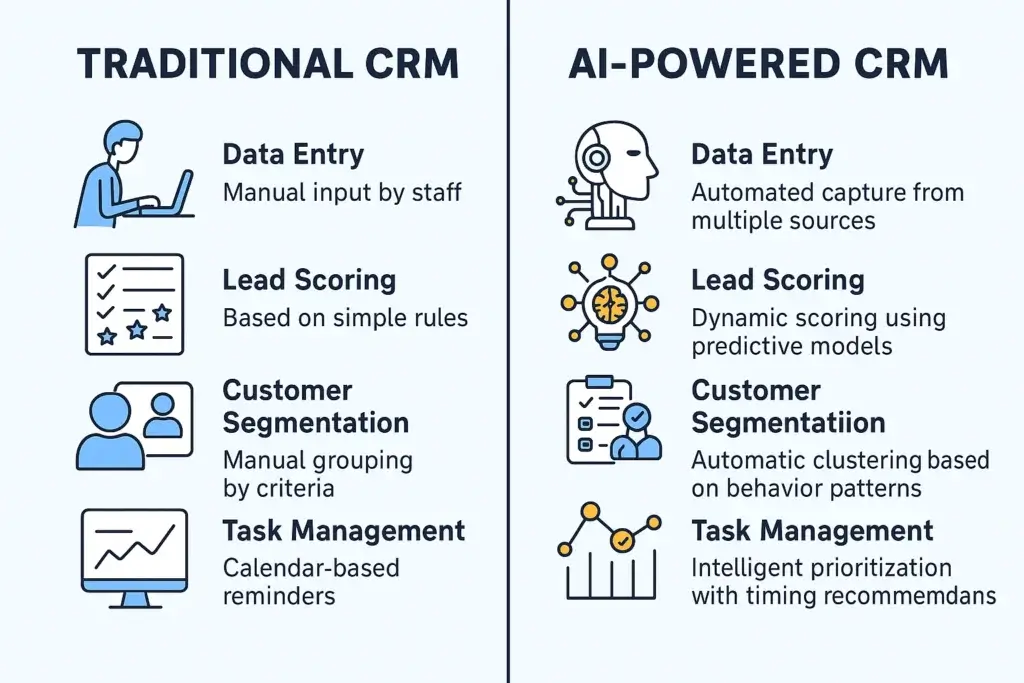
| Process | Traditional CRM | AI-Powered CRM |
|---|---|---|
| Data Entry | Manual input by staff | Automated capture from multiple sources |
| Lead Scoring | Based on simple rules | Dynamic scoring using predictive models |
| Customer Segmentation | Manual grouping by criteria | Automatic clustering based on behavior patterns |
| Task Management | Calendar-based reminders | Intelligent prioritization with timing recommendations |
| Sales Forecasting | Historical trend analysis | Predictive modeling with multiple variables |
The best way to think about it is this: traditional automation helps you execute known processes faster. AI CRM helps you improve the process itself by learning from customer behavior and sales outcomes.
Key Benefits of AI CRM Software
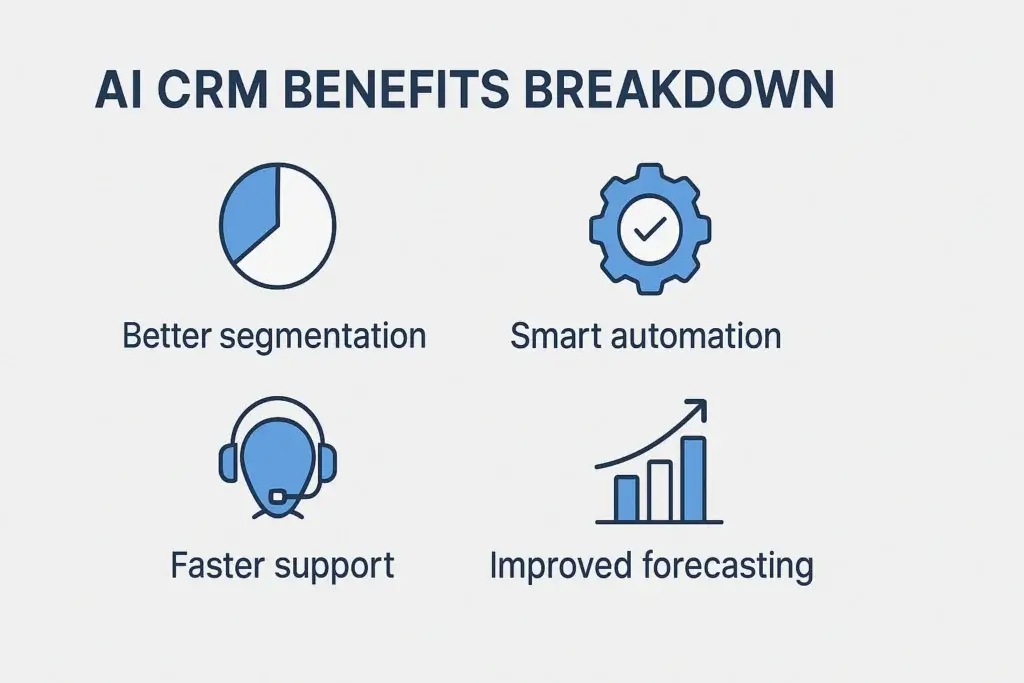
The biggest benefit of AI CRM software is not that it adds another technology layer. The real value is that it helps your team reduce busywork, identify better opportunities, and respond to customers with more relevance.
For sales teams, this can mean faster follow-up, cleaner pipelines, and better prioritization. For marketing teams, it can mean sharper segmentation and more personalized campaigns. For customer success teams, it can mean earlier churn detection and better retention workflows.
Automated data entry and cleaner customer records
Manual CRM updates are one of the biggest reasons customer data becomes unreliable. Sales reps often delay logging activities, skip fields, or enter incomplete notes because they are focused on calls, meetings, and follow-ups.
AI-powered CRM tools can reduce this friction by capturing activity automatically from emails, meetings, calls, forms, and other connected systems. Some platforms can summarize calls, update records, enrich contacts, and suggest next steps based on the conversation.
This improves more than productivity. It also improves trust in your CRM. When records are cleaner and more complete, your reports, forecasts, and automation workflows become more reliable.
Better lead scoring and sales prioritization
AI lead scoring helps your sales team focus on the prospects most likely to convert. Instead of relying only on job title, company size, or form submissions, AI can evaluate many signals together.
These signals may include website activity, email engagement, past purchase patterns, company fit, response behavior, product usage, and previous deal outcomes.
The result is a more dynamic scoring model. A lead score can change as the prospect interacts with your business, giving your team a clearer view of who needs immediate attention.
Predictive sales forecasting
Sales forecasting is often difficult because pipelines change quickly. Deals move, stall, expand, shrink, or disappear. Traditional forecasting usually depends on sales rep judgment and historical trends, which can create gaps between expected and actual revenue.
AI CRM software improves forecasting by analyzing deal activity, engagement signals, historical win rates, sales cycle length, pipeline movement, and other variables. This helps sales leaders understand not only what may close, but also why the forecast is changing.
| Forecasting Aspect | Traditional Method | AI-Powered Approach |
|---|---|---|
| Data Sources | Limited historical data | Multiple data sources including external factors |
| Update Frequency | Periodic weekly or monthly reviews | Continuous updates as new activity is recorded |
| Accuracy | Based on simple trends and rep input | Analyzes patterns human analysts may miss |
| Insights | Shows what happened | Helps predict what may happen and why |
This does not mean AI forecasting is always perfect. It still depends on data quality, consistent CRM usage, and realistic pipeline management. However, it gives sales leaders a stronger foundation than static reports alone.
More personalized customer experiences
Personalization is difficult to scale manually. Your team may understand your top accounts well, but it becomes harder to personalize every email, offer, follow-up, and support interaction as your database grows.
AI CRM tools can help by analyzing customer behavior, segmenting contacts automatically, and suggesting relevant messages. This allows you to personalize communication based on real behavior, not just broad demographic categories.
For example, an AI CRM can help identify which customers are likely to respond to a renewal offer, which leads need education before a sales call, and which accounts may need proactive support.
Faster support and better customer retention
AI CRM is not only useful for sales. It can also support customer service and retention by helping teams respond faster and identify risks earlier.
AI chatbots can answer common questions, route tickets, collect customer information, and provide support outside business hours. AI can also analyze support history and engagement signals to identify customers who may be at risk of churn.
| Support Aspect | Traditional Approach | AI Chatbot Approach |
|---|---|---|
| Availability | Limited to business hours | 24/7 continuous support |
| Response Time | Minutes to hours | Immediate responses for common questions |
| Scalability | Requires additional staff | Handles multiple conversations simultaneously |
| Data Collection | Manual documentation | Automatic interaction recording |
The goal is not to remove human support. The goal is to let AI handle simple, repetitive work while your team focuses on complex issues, emotional situations, and relationship-building moments.
Examples of AI-Powered CRM Tools to Consider
After you understand what AI CRM can do, the next step is seeing how these capabilities appear in real platforms. Not every CRM uses AI in the same way. Some tools focus on sales productivity, some focus on pipeline management, and others use AI across marketing, sales, service, and content workflows.
Below are three useful examples of how AI CRM features are being applied in practical business environments. If you are still comparing vendors more broadly, you can also review our guide to the best CRM software.
monday CRM: Best for visual sales workflows and AI-assisted deal management
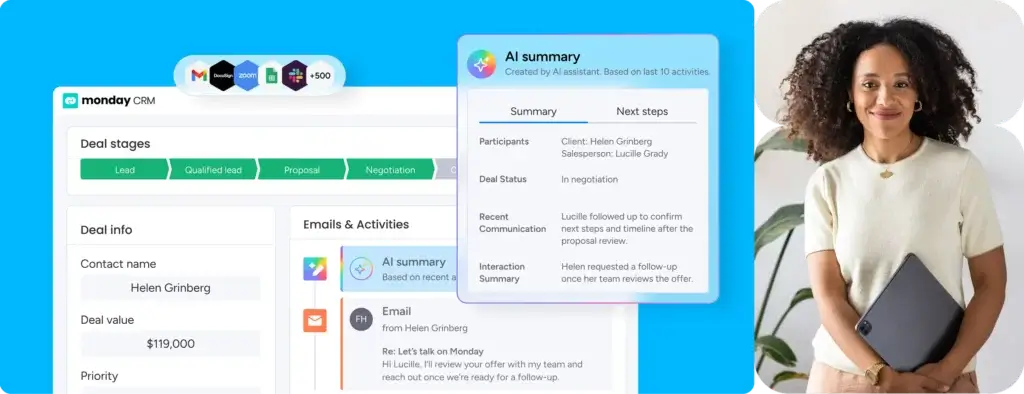
monday CRM is a strong option if you want AI features inside a visual, flexible, and easy-to-customize sales workspace. It is especially useful for teams that want pipeline visibility, automated updates, and sales collaboration without the heavy setup often associated with enterprise CRM systems.
Its AI capabilities include features such as AI Notetaker for call transcripts and summaries, deal summaries, deal prioritization, email drafting, workflow suggestions, data enrichment, and AI sales agents. These features are useful when your team needs to reduce manual updates and quickly understand which deals need attention.
The main strength of monday CRM is usability. It gives teams a practical way to combine CRM, workflow management, and AI assistance in one workspace. The main limitation is that very large enterprise sales organizations may still need deeper revenue operations controls, advanced territory management, or more complex CRM administration.
Pipedrive: Best for pipeline-focused sales teams
Pipedrive is a strong fit for sales teams that want a simple, pipeline-first CRM with practical AI support. Its AI features are designed to help reps save time, understand deal context, and focus on the right activities.
Pipedrive AI can help with sales assistance, data questions, content summaries, note creation, email generation, email summarization, and sentiment insights. This is useful for teams that spend a lot of time managing inboxes, reviewing long conversation threads, and deciding which deals need follow-up.
Pipedrive is especially relevant for SMBs and sales-led teams that want AI inside a CRM that remains easy to use. It may be less suitable if you need a broad customer platform that combines advanced marketing automation, service operations, content management, and customer data management in one ecosystem.
HubSpot: Best for AI across marketing, sales, and service
HubSpot is best suited for businesses that want AI connected across the full customer journey. Its Breeze AI tools and agents are built into HubSpot’s customer platform, supporting marketing, sales, service, content, and operational workflows.
HubSpot’s AI capabilities include Breeze Assistant, Breeze agents, AI content generation, CRM support, and prospecting workflows. The Breeze Prospecting Agent can help research qualified leads, personalize outreach, and automate parts of sales prospecting.
The advantage of HubSpot is ecosystem depth. If your team already uses HubSpot for marketing, sales, or customer service, its AI features can support a wider set of workflows than a sales-only CRM. The trade-off is that HubSpot can become more expensive and complex as you add advanced hubs, seats, automation, and reporting needs.
| CRM | Best For | Notable AI Capabilities | Best-Fit Team |
|---|---|---|---|
| monday CRM | Visual sales workflows and deal management | AI notetaking, deal summaries, prioritization, email drafting, workflow suggestions | Teams that want flexible CRM workflows with practical AI assistance |
| Pipedrive | Pipeline-focused sales teams | AI Sales Assistant, email generation, email summaries, sentiment insights | SMBs and sales teams that need simple, action-focused CRM AI |
| HubSpot | Full customer journey management | Breeze AI, prospecting agent, assistants, content generation, workflow support | Growing teams that want sales, marketing, and service AI in one platform |
For most teams, the right choice depends on your operating model. Choose monday CRM if you want visual workflows and flexible sales execution. Choose Pipedrive if your priority is a simple AI-assisted sales pipeline. Choose HubSpot if you want AI across marketing, sales, and service in one connected platform.
How to Implement an AI CRM Without Adding Staff
AI CRM implementation should start with clear business outcomes. Do not begin by enabling every AI feature available. Start with the workflows that consume the most time, create the most errors, or slow down revenue generation.
A practical implementation plan usually starts with data cleanup, then moves into automation, lead scoring, AI summaries, reporting, and customer-facing AI workflows.
Start with repetitive sales and admin tasks
Your first AI CRM use cases should be simple and measurable. Look for tasks that happen frequently and follow predictable patterns.
Good starting points include:
- Logging calls and meetings
- Summarizing email threads
- Creating follow-up reminders
- Updating deal stages
- Enriching contact records
- Assigning leads to the right owner
These use cases help your team experience value quickly. They also reduce resistance because AI is removing work people dislike rather than changing the entire sales process overnight.
Prepare your CRM data before enabling AI
AI CRM performance depends heavily on data quality. If your CRM is full of duplicate contacts, outdated deals, missing fields, and inconsistent activity history, AI recommendations will be less reliable.
Before enabling advanced AI features, review the quality of your data. Clean duplicate records, standardize fields, define lifecycle stages, update pipeline rules, and make sure your team understands what must be logged.
This step is not exciting, but it is essential. AI can only provide useful recommendations when it has useful information to learn from.
Use AI for lead qualification and scoring
AI lead scoring is one of the most valuable CRM AI use cases because it directly supports revenue efficiency. Instead of asking your team to manually decide which leads deserve attention, AI can evaluate fit and intent signals automatically.
For example, a lead that visits pricing pages, opens multiple emails, attends a webinar, and matches your ideal customer profile may receive a higher score than a lead that only downloaded one general guide.
Your team should still review AI scores, especially early in the implementation. Over time, you can refine the scoring model based on closed deals, lost opportunities, and sales feedback.
Integrate AI chatbots carefully
AI chatbots can improve availability and response speed, but they need clear limits. They are best used for repetitive questions, qualification, routing, scheduling, and simple support tasks.
For high-value deals, sensitive issues, complex complaints, or strategic accounts, human involvement is still important.
| AI Automation For | Human Touch For |
|---|---|
| Repetitive questions | Complex situations |
| Data entry | Emotional connections |
| Initial screening | High-stakes decisions |
| 24/7 simple support | Relationship building |
The best AI CRM strategy does not remove people from the process. It uses AI to handle the routine work so people can focus on conversations where trust, negotiation, and judgment matter most.
Train your team to review AI recommendations
AI CRM adoption fails when teams either ignore the AI or trust it blindly. Your team should understand how to use AI recommendations, when to challenge them, and how to improve them with feedback.
Training should cover:
- How AI scores and recommendations are generated
- Which AI outputs need human review
- How to correct inaccurate summaries or suggestions
- How to protect customer data when using AI tools
- How AI fits into your existing sales process
This helps your team treat AI as a support system, not as a replacement for professional judgment.
Monitor performance and optimize continuously
After implementation, track whether AI is improving the metrics that matter. Do not measure success only by feature usage. Measure the business impact.
Useful metrics include lead response time, conversion rate, sales cycle length, forecast accuracy, CRM data completeness, support response time, and customer satisfaction.
If the metrics do not improve, review your data quality, workflow design, user adoption, and AI configuration. AI CRM should become more valuable over time as your team learns how to use it effectively.

Common AI CRM Challenges and How to Solve Them
AI CRM software can improve productivity, but it also introduces new risks. The most common challenges are not only technical. They usually involve data quality, process design, user adoption, governance, and customer trust.
Poor data quality
Poor data quality is one of the biggest obstacles to successful AI CRM adoption. If your customer records are incomplete, outdated, or inconsistent, AI may produce weak recommendations.
To solve this, create a CRM data governance process. Define required fields, clean duplicates, standardize naming conventions, and review pipeline hygiene regularly.
You should also assign clear ownership. Sales, marketing, and customer success teams all use CRM data, but someone must be responsible for maintaining data standards.
Over-automation
Automation becomes a problem when it makes customer experiences feel generic. If every contact receives the same AI-generated email or chatbot response, the experience may feel less personal, not more personal.
Use AI to support personalization, not replace it. Let AI draft the first version, summarize context, and recommend next steps. Then allow your team to adjust messaging for important prospects and customers.
Integration complexity
AI CRM features are most useful when they connect with your real customer data. That means integrations matter. Your CRM may need to connect with email, calendar, marketing automation, support software, call tools, website forms, and data enrichment platforms.
Before choosing a CRM, check whether it integrates with the systems your team already uses. Native integrations are usually easier to manage than custom integrations, especially for smaller teams.
AI accuracy and human review
AI can summarize a meeting, score a lead, or suggest an email, but it can still make mistakes. It may miss context, misunderstand intent, or overvalue the wrong signal.
That is why human review is important. Use AI recommendations as a starting point, especially for high-value deals, sensitive customer situations, and strategic decisions.
Security, privacy, and compliance
AI CRM systems handle customer data, sales conversations, company information, and sometimes sensitive account details. This makes security and compliance important during vendor evaluation.
Before implementing an AI CRM, review permissions, data processing practices, access controls, retention policies, and compliance requirements such as GDPR or SOC 2 where relevant.
You should also define internal AI usage rules. Your team needs to know what customer data can be used with AI features and what information should never be entered into external tools.
How to Choose the Right AI CRM
The best AI CRM is not always the platform with the longest feature list. The right choice is the CRM that fits your sales process, data maturity, team size, budget, and growth plans.
Match AI features to your actual workflow
Start by identifying where your team loses the most time. If reps are overwhelmed by admin work, prioritize AI summaries, automatic logging, and workflow suggestions. If your pipeline is messy, prioritize AI lead scoring and deal prioritization. If your team manages a high support volume, prioritize AI chatbots and ticket routing.
This prevents you from buying advanced AI features that sound impressive but do not solve your immediate problems.
Compare what is included in each plan
AI features are not always included in every pricing tier. Some CRM vendors limit AI features to higher plans, require AI credits, or separate advanced AI agents from standard CRM functionality.
Before choosing a CRM, check exactly which AI features are included, which require upgrades, and whether usage limits apply. This is especially important if your team plans to use AI for high-volume email generation, call summaries, or customer support automation.
Prioritize usability and adoption
AI CRM only works if your team uses it. A powerful platform with poor adoption will not improve sales productivity.
During your evaluation, test how easy it is to use AI features inside everyday workflows. Ask whether reps can quickly understand recommendations, update records, review summaries, and take action without switching between multiple tools.
Review reporting and performance measurement
AI CRM should help you improve performance, so reporting is essential. Look for dashboards that show pipeline health, lead quality, activity trends, forecast changes, automation impact, and team adoption.
If you cannot measure the impact of AI, it becomes harder to prove ROI or decide which workflows need improvement.
Conclusion
Is AI CRM Worth It?
AI-powered CRM software is worth considering if your team spends too much time on manual work, struggles to prioritize leads, lacks reliable forecasts, or needs to personalize customer interactions at scale.
The strongest AI CRM use cases are practical. Automated data entry keeps records cleaner. AI lead scoring helps reps focus on better opportunities. Predictive analytics improves forecasting. AI summaries reduce time spent reviewing conversations. Chatbots and assistants improve response speed without forcing your team to handle every repetitive request manually.
However, AI CRM is not a shortcut for weak sales processes or poor data quality. You still need clear pipeline stages, clean customer records, team training, security controls, and human review. AI works best when it supports a well-defined process.
If you want a visual and flexible CRM with practical AI assistance, monday CRM is a strong option. If your team wants a simple pipeline-focused CRM, Pipedrive is worth considering. If you want AI across marketing, sales, and service, HubSpot is one of the strongest ecosystem choices.
The best approach is to start with one or two high-impact AI use cases, measure the results, and expand gradually. When implemented carefully, AI CRM can help your team work faster, make better decisions, and create more relevant customer experiences without adding unnecessary complexity.
FAQs
What is an AI-powered CRM?
An AI-powered CRM is customer relationship management software that uses artificial intelligence to automate tasks, analyze customer data, score leads, summarize interactions, and recommend next actions for sales, marketing, and support teams.
How is AI CRM different from traditional CRM?
Traditional CRM mainly stores and organizes customer data, while AI CRM analyzes that data and helps your team act on it. AI CRM can predict outcomes, prioritize leads, generate summaries, recommend follow-ups, and automate repetitive work.
Can AI CRM help reduce customer churn?
Yes. AI CRM can identify churn risk by analyzing engagement, support history, buying behavior, product usage, and communication patterns. Your team can then trigger retention workflows before a customer becomes inactive or leaves.
Is AI-powered CRM suitable for small businesses?
Yes. Many AI CRM tools are suitable for small businesses because they automate admin work, improve follow-up, and help smaller teams manage more leads. If you are comparing options, review our best CRM software guide for broader recommendations.
What are the most useful AI CRM features?
The most useful AI CRM features usually include automated data entry, AI lead scoring, email generation, call and meeting summaries, predictive forecasting, chatbot support, customer segmentation, and next-best-action recommendations.
Does AI CRM replace sales representatives?
No. AI CRM is designed to support sales representatives, not replace them. It handles repetitive tasks and provides insights, while your team still manages relationships, negotiations, complex objections, and high-value customer conversations.
How much data do you need for AI CRM to work?
AI CRM works best when your CRM has clean and consistent data, including contact records, deal history, activities, emails, and customer interactions. Larger datasets can improve predictions, but smaller teams can still benefit from AI summaries, automation, and assisted writing.
What are the risks of using AI in CRM?
The main risks include poor data quality, inaccurate AI recommendations, over-automation, privacy concerns, and weak human review. You can reduce these risks by cleaning your data, setting usage rules, reviewing AI outputs, and choosing secure CRM vendors.
Which CRM tools have strong AI capabilities?
monday CRM, Pipedrive, and HubSpot all offer useful AI capabilities, but they serve different needs. monday CRM is strong for visual workflows, Pipedrive is strong for pipeline-focused sales teams, and HubSpot is strong for AI across sales, marketing, and service.
Where can I compare the best CRM software options?
You can compare leading platforms in our best CRM software guide. It can help you evaluate CRM tools by features, usability, automation, AI capabilities, pricing, and overall fit for your business.