Introduction
If you are looking for a CRM that does not overwhelm a very small business with enterprise complexity, Lucro CRM is worth a closer look. The platform is built around a simple idea: give solo founders and micro teams one place to manage customers, contacts, messages, quotes, invoices, and day-to-day follow-ups without needing a complicated setup.
That positioning immediately makes Lucro different from many bigger CRM platforms. Instead of trying to serve every type of company, it focuses heavily on small and micro businesses that are still moving away from spreadsheets, inbox-based sales processes, and scattered admin work.
In this review, you will get a practical look at Lucro CRM’s key features, pricing, usability, strengths, weaknesses, and the kinds of businesses that are most likely to benefit from it. You will also see where it falls short compared with more mature CRM platforms like monday CRM, HubSpot, and Pipedrive.
Key Features
Lucro CRM’s Software Specification
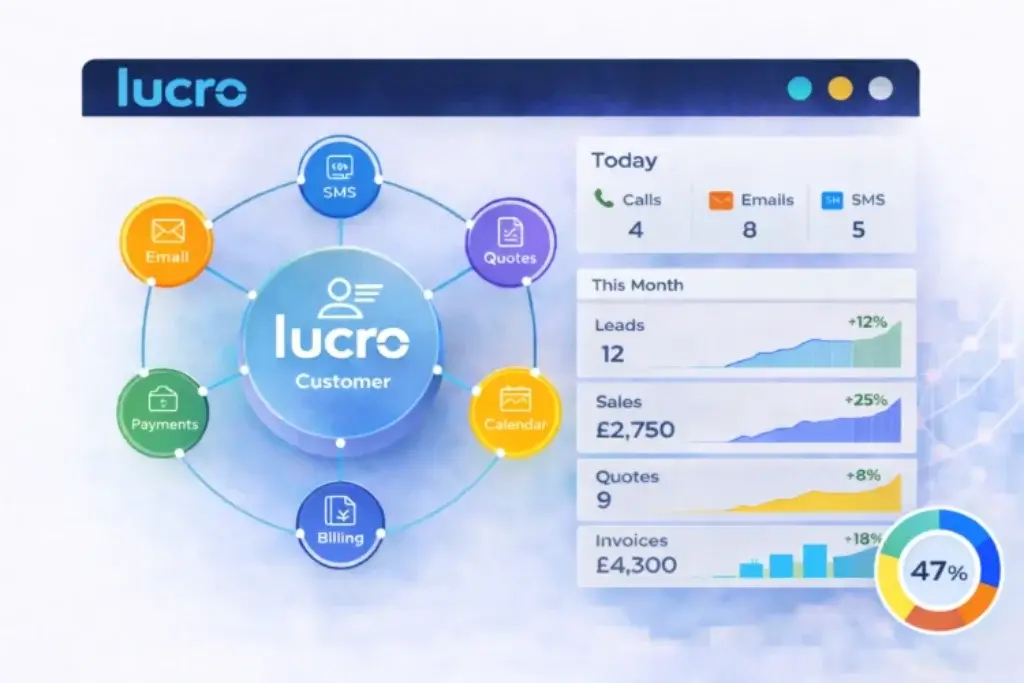
If you are evaluating Lucro CRM, the first thing to understand is that this is not a traditional heavyweight CRM aimed at complex enterprise sales operations. It is closer to a small business customer portal that combines CRM functions with admin tools, communication features, and lightweight workflow support.
That makes the product especially relevant if your business needs visibility and structure more than deep enterprise customization. Here is a closer look at the features that define the platform.
1. Customer and Contact Management
At its core, Lucro gives you a centralized place to store customers and contacts, so you can stop relying on spreadsheets, sticky notes, and scattered inbox threads.
- Keep customer and contact records accessible from any device
- Import existing data to get started faster
- Organize business information in one login and one portal
For a solo operator or a very small team, this matters more than it may sound. Once customer data is centralized, follow-ups become easier, handoffs are cleaner, and you are far less likely to lose track of opportunities.
2. Connected Communications and Follow-Ups
Lucro is clearly designed to reduce admin work around everyday customer communication. Instead of switching between inboxes, calendars, and records, the platform tries to bring that activity into one workflow.
- Connected email support through IMAP and Exchange on paid tiers
- Outlook Calendar integration for scheduling visibility
- SMS support, including 1-way and 2-way options on higher plans
This will not replace advanced sales engagement software, but for many service businesses and smaller sales teams, it can simplify the communication stack enough to save time every week.
3. Built-In AI for Small Business Content Tasks
One of Lucro’s more modern touches is the inclusion of AI assistance, even on the free plan. The product highlights AI help for social media, marketing, and web posts, which is an unusual inclusion at this price point.
- AI support for social media and marketing content
- Useful for small teams with limited marketing resources
- A practical add-on rather than a full AI sales engine
In my view, this is a helpful differentiator for tiny businesses that need support creating basic marketing content. That said, it should not be mistaken for the kind of advanced predictive AI or revenue intelligence you would expect from more developed CRM ecosystems.
4. Leads, Orders, and Basic Sales Visibility
Lucro adds more sales-oriented functionality as you move up the pricing tiers. The Essential plan introduces leads and orders, while higher tiers add reporting, activity graphs, pipeline analytics, and leaderboards.
- Lead tracking for growing teams
- Order management alongside CRM records
- Sales activity and pipeline analytics on higher plans
This is a sensible progression. The free plan is more about organization, while the paid plans are where Lucro becomes more useful as an active sales management tool.
5. Quotes, Invoices, and Payment-Related Workflow
Lucro moves beyond standard CRM territory by including business admin functionality. On higher plans, you get QuickBooks invoices and estimates, plus full card payment integration on the Advanced tier.
- QuickBooks invoices and estimates on Standard
- Full card payment integration on Advanced
- A stronger fit for service businesses that sell and bill directly
This is one of the areas where Lucro makes the most sense. If your business needs a light CRM plus practical customer admin, rather than a pure sales database, the product becomes more attractive.
6. Integrations for Real Small Business Workflows
Lucro is not trying to compete on huge app marketplace depth, but it does cover several practical connections that small businesses will care about.
- Outlook Calendar integration
- Connected email with IMAP and Exchange
- QuickBooks integration
- Webhook integration for web forms
- Call answering service integration
The recent Lucro and Answer integration is especially relevant for service-based teams that handle inbound enquiries and want those calls reflected in their customer workflow faster.
7. Customer Portal and Extended Access Features
On the Advanced plan, Lucro introduces customer login and introducer login functionality. This gives the platform more of a portal-style identity than many lightweight CRMs.
- Customer functionality and login
- Introducer functionality and login
- Useful for relationship-driven and referral-led businesses
This will not matter to every company, but for businesses that need a more collaborative, portal-like customer experience, it adds meaningful value.
Pros and Cons
Benefits of Using Lucro CRM
Positive
✅ Free plan available
✅ Designed for solo and micro businesses
✅ Helpful admin and billing tools
✅ Straightforward pricing structure
Negative
❌ Limited public review volume
❌ Not built for advanced enterprise CRM needs
❌ Smaller integration ecosystem
❌ Best suited to very small teams
Lucro CRM has a clear strength: it knows exactly who it is for. That clarity makes it easier to evaluate than many broader CRM products. Still, there are trade-offs you should consider before adopting it.
✅ Top Pros
1. Built for Very Small Businesses
Many CRM tools claim they work for small businesses, but they still feel oversized when you are a solo founder or a two-person team. Lucro feels more intentional in this area. Its messaging, pricing, and feature design are all focused on businesses that need simplicity first.
2. Useful Free Plan
The free tier is not just a trial. It gives one user access to customer and contact management, import tools, AI support for content tasks, and up to 100 companies or contacts. For businesses that are only starting to formalize customer management, that is a respectable entry point.
3. Good Blend of CRM and Admin Tools
Lucro is more than a contact database. Features like QuickBooks estimates, invoices, email integration, SMS, and payment-related functions make it practical for businesses that want one tool to support both customer relationships and operational admin.
4. Pricing Is Easy to Understand
The pricing ladder is far simpler than many CRM competitors. You can see a direct progression from Free to Essential, Standard, and Advanced without navigating dozens of add-ons and feature bundles.
❌ Key Cons
1. Limited Market Validation
This is the biggest issue for me. Lucro currently has very limited third-party review volume, which makes it harder to validate long-term customer satisfaction at scale. That does not mean the product is weak, but it does mean buyers should be realistic about the amount of external evidence available.
2. Not the Best Choice for Complex Sales Teams
If you need advanced pipeline automation, deep forecasting, extensive app marketplaces, or large-scale sales ops features, Lucro is unlikely to be the best fit. It appears much better suited to straightforward customer management and small business workflows.
3. Smaller Ecosystem Than Established CRMs
Compared with monday CRM, HubSpot, or Pipedrive, Lucro has a much smaller ecosystem. That affects everything from integrations and partner options to training resources and community visibility.
4. Some Features Are More Portal-Like Than Pure CRM
Depending on your use case, that can be either a strength or a weakness. If you want a classic sales CRM, some of Lucro’s value may feel more operational than revenue-focused.
Benefits of Using Lucro CRM
If Lucro matches your business size and workflow, the benefits are fairly easy to understand. It can reduce manual admin, centralize customer information, and replace multiple small disconnected tools with one simpler portal.
1. Better Day-to-Day Organization
For many micro businesses, the real problem is not lack of data. It is scattered data. Lucro helps by giving you one place to manage contacts, communication history, business records, and follow-up activity.
2. Less Administrative Friction
With email connection, calendar integration, customer records, and billing-related functions in one environment, Lucro can cut down repetitive admin work. That is especially valuable when the same person is handling sales, service, and operations.
3. A Clear Upgrade Path
The product scales in a practical way. You can start free, then move into lead management, reporting, QuickBooks support, SMS, and portal functions as your business grows.
4. Simpler Adoption Than Larger Platforms
Lucro’s main appeal is that it tries to reduce complexity rather than add it. For many small businesses, that is a stronger advantage than having dozens of advanced features they will never use.
User Experience
User Interface and Experience
Lucro’s user experience is likely to appeal most to businesses that want clarity more than complexity. Based on its positioning and feature set, the platform appears intentionally streamlined for smaller teams rather than designed for advanced CRM administrators.
Simple, Practical, and Small-Business Focused
The product is repeatedly described as easy to use, accessible from anywhere, and built for businesses that do not have time for complicated software. That aligns well with the rest of the offering. Lucro is not trying to impress with enterprise depth on the surface. It is trying to help a small team get organized quickly.
Accessible Across Devices
Lucro emphasizes access from anywhere and on any device. For small business owners who are moving between office work, customer communication, and field activity, that kind of flexibility is essential rather than optional.
Everyday Workflow Convenience Matters Here
The connected email, Outlook Calendar integration, SMS features, and billing-related tools are not just feature checklist items. They point to a workflow style where Lucro wants to be the place you return to throughout the day, not just a database you update occasionally.
Less Training Friction Than Bigger CRMs
For beginners, Lucro is likely easier to adopt than larger platforms. In contrast, if you already run a structured sales team with defined pipeline stages, automation rules, advanced dashboards, and reporting requirements, the interface may feel too light rather than too simple.
What Public Feedback Suggests
The challenge here is that public review volume is currently very limited. The small amount of visible third-party feedback leans positive, especially around ease of use and accessibility, but the sample size is too small to treat as broad market validation. That means I would treat Lucro as a product to demo carefully, rather than a tool you choose purely on review-site momentum.
Business size fit
Lucro CRM for Different Business Sizes
Lucro is one of those products where business fit is unusually clear. It is not trying to be all things to all companies. The platform is aimed primarily at solo founders, micro businesses, and very small teams that want better customer organization without heavy CRM overhead.
📊 Lucro CRM Fit by Business Size
| Business Size | How Lucro CRM Fits |
| Solo founders | ✔️ Strong fit for replacing spreadsheets and scattered admin ✔️ Free plan lowers adoption risk ✔️ Simple enough for one-person operations |
| Micro businesses (2-5 people) | ✔️ Best-fit segment based on Lucro’s positioning ✔️ Useful mix of CRM, communication, and billing support ✔️ Paid tiers add collaboration and reporting gradually |
| Small businesses | ✔️ Can work well if needs are straightforward ✔️ Helpful for service-led and admin-heavy workflows ❗ May feel limited versus broader CRM suites as complexity grows |
| Mid-market and enterprise | ❌ Usually not the best match for advanced sales ops ❌ Smaller ecosystem and lighter market validation ❌ Better to compare with monday CRM, HubSpot, or Salesforce |
Pricing and Plans
How much does Lucro CRM cost?
Lucro’s pricing is one of its strongest selling points. The structure is straightforward, the entry point is free, and the upgrade path is easy to understand. Prices are listed in GBP, with monthly and annual billing options, and the company advertises annual savings for upfront commitments.
For small businesses, that pricing simplicity is genuinely valuable. Many CRM platforms become confusing once you start factoring in seat limits, onboarding costs, and premium feature gates. Lucro keeps this much cleaner.
📋 Lucro CRM Plan Comparison
| Plan Name | Best For | Key Features | Starting Price |
| Free | Solo founders getting started | Customer and contact access on any device, AI help for social and marketing content, import tools, up to 100 companies/contacts, 1 user | £0 |
| Essential | Small growing teams | Leads, orders, sales graphs, connected email, team collaboration, Outlook Calendar integration, branded portal, tags, daily backups | £10/user/month monthly or £8/user/month annually |
| Standard | Businesses needing reporting and productivity tools | QuickBooks invoices and estimates, unlimited file storage, pipeline analytics, 1-way SMS, leaderboards, activity feed, more templates | £20/user/month monthly or £16/user/month annually |
| Advanced | Businesses wanting more advanced workflow capability | Card payment integration, webhook integration, 2-way SMS, customer login, introducer login, higher record limits, unlimited email templates | £35/user/month monthly or £28/user/month annually |
For value, I think Lucro is strongest when you look at it as a customer portal plus light CRM plus admin support tool. If you compare it only as a pure sales CRM, some competitors will feel deeper. But if you compare it as an affordable small business operations hub, its pricing looks more compelling.
Security and Compliance
Protection for Your Data
Security is an important area for any CRM, and Lucro highlights GDPR compliance, secure access, and automatic daily backups. While it does not present the same depth of publicly visible security documentation you often see from larger CRM vendors, the basics that matter to small businesses are clearly part of the offering.
🔒 Key Security and Reliability Signals
- GDPR compliance: Explicitly highlighted in the product messaging
- Automatic daily backups: Included as part of the platform positioning and paid features
- Secure access: Presented as a core part of the portal experience
- Cloud delivery: Accessible online from any device
For many small businesses, that will be enough to feel comfortable getting started. Still, if you operate in a highly regulated environment or need detailed compliance documentation, certifications, and procurement-level security reviews, you will likely want a deeper technical conversation before committing.
⚖️ How I View Lucro on Security
Lucro appears to provide the kind of practical, day-to-day protections that matter for small businesses, especially around secure access and data continuity. But compared with larger CRM vendors, the publicly available security information is lighter. That does not automatically make it weaker, but it does mean due diligence matters more.
Conclusion
Final thoughts
Lucro CRM is not trying to win the entire CRM market, and that is exactly why it can be useful. It is built for a specific segment that many bigger vendors overlook: solo founders, micro businesses, and small teams that want to get organized without paying for complexity they do not need.
🔍 What You’re Really Getting
With Lucro CRM, you are getting a lightweight customer management platform that blends CRM basics with operational tools that small businesses actually use every day.
- Customer and contact management in one portal
- Free entry plan with practical functionality
- Email, calendar, SMS, and billing-related workflow support
- AI help for small business content creation
- A clear upgrade path as your needs grow
That combination makes Lucro more interesting than a generic low-cost CRM. It is a focused tool for businesses that need less admin, better visibility, and a simple system they can actually keep up with.
👥 Is It the Right Fit?
Lucro is a strong option if you run a solo business, a micro team, or a service-based company that needs a simple customer portal with CRM functionality.
It is a weaker option if you need advanced sales forecasting, a broad integration marketplace, deep workflow automation, or enterprise-grade market validation. In those cases, I would lean toward monday CRM first, then HubSpot or Pipedrive depending on your budget and process complexity.
My overall take is that Lucro CRM is promising for its target market, but it is still a niche and relatively small player. That means the best buying approach is to judge it on product fit, not brand scale. If your needs are simple and practical, Lucro may be a surprisingly good fit. If your business is already operationally complex, you will probably outgrow it.
🧠 Final Word from a CRM Expert
The most important thing with a CRM is not how many features it lists, it is how likely your team is to use it consistently. Lucro understands that reality well. It appears to have been designed around actual small-business pain points: too much admin, too many tools, scattered customer information, and not enough time.
I would not place Lucro in the same tier as the most mature CRM platforms on the market. But for the right buyer, that is not necessarily a problem. If you need a lighter, more approachable, and more affordable customer management platform, Lucro deserves consideration.
Have more questions
Frequently Asked Questions
Is Lucro CRM free to use?
Yes. Lucro offers a free plan for one user with up to 100 companies or contacts, plus core customer management and AI support for marketing-related content tasks.
Who is Lucro CRM best for?
Lucro is best for solo founders, micro businesses, and small teams that want a simple way to manage customers, communication, and everyday admin without the weight of a larger CRM platform.
Does Lucro CRM include AI features?
Yes. Lucro highlights built-in AI support for social media, marketing, and web posts, including on its free plan.
Can Lucro CRM integrate with email?
Yes. Paid plans include connected email support through IMAP and Exchange, which can help centralize customer communication.
Does Lucro CRM integrate with Outlook Calendar?
Yes. Outlook Calendar integration is included from the Essential plan upward.
Does Lucro CRM work with QuickBooks?
Yes. QuickBooks invoices and estimates are included on the Standard plan, making Lucro more useful for service-oriented and admin-heavy businesses.
Does Lucro CRM support SMS?
Yes. The Standard plan includes 1-way SMS, and the Advanced plan adds 2-way SMS functionality.
Is Lucro CRM good for larger sales teams?
Usually not. Lucro appears much better suited to smaller businesses with straightforward CRM needs than to larger teams requiring deep sales operations, extensive automation, or advanced forecasting.
What makes Lucro CRM different from larger CRM platforms?
Its main difference is focus. Lucro is designed specifically for small and micro businesses and blends CRM functions with practical admin tools like invoices, customer portal features, and communication management.
Should you choose Lucro CRM over monday CRM, HubSpot, or Pipedrive?
If you want the strongest all-around CRM for scalability and workflow flexibility, monday CRM is the better choice. HubSpot and Pipedrive also offer broader ecosystems. Lucro is more compelling when your top priorities are simplicity, affordability, and fit for a very small business.