Introduction
If you are looking for a modern customer service platform that combines live chat, AI support automation, ticketing, knowledge management, and omnichannel messaging in one place, Intercom is one of the most important platforms to consider. It is designed for SaaS companies, ecommerce brands, online services, and support teams that want to handle customer conversations across chat, email, WhatsApp, phone, SMS, and social channels from a single workspace. Instead of acting as just a help desk or just a chatbot, Intercom positions itself as a customer service platform built for the AI agent era.
In this Intercom review, you will explore how the platform works, what features stand out, how much it costs, and where it still has limitations. You will also see how Intercom compares with major alternatives like Zendesk, Freshdesk, and HubSpot Service Hub, what types of businesses benefit most from it, and whether Fin AI Agent and Intercom’s omnichannel support model are enough to justify the price. If you need a support platform that blends automation, self-service, and human support in one system, this guide will help you decide whether Intercom is the right fit.
Key Features
How Intercom Works
AI-first customer service platform
Intercom is built around a shared inbox, an AI agent called Fin, and a self-service support system that all work together. Instead of treating chat, email, help center content, and automation as separate tools, Intercom connects them in one platform so support teams can manage conversations, automate repetitive work, and route more complex issues to human agents. That design is one of the reasons Intercom feels broader than a traditional help desk.
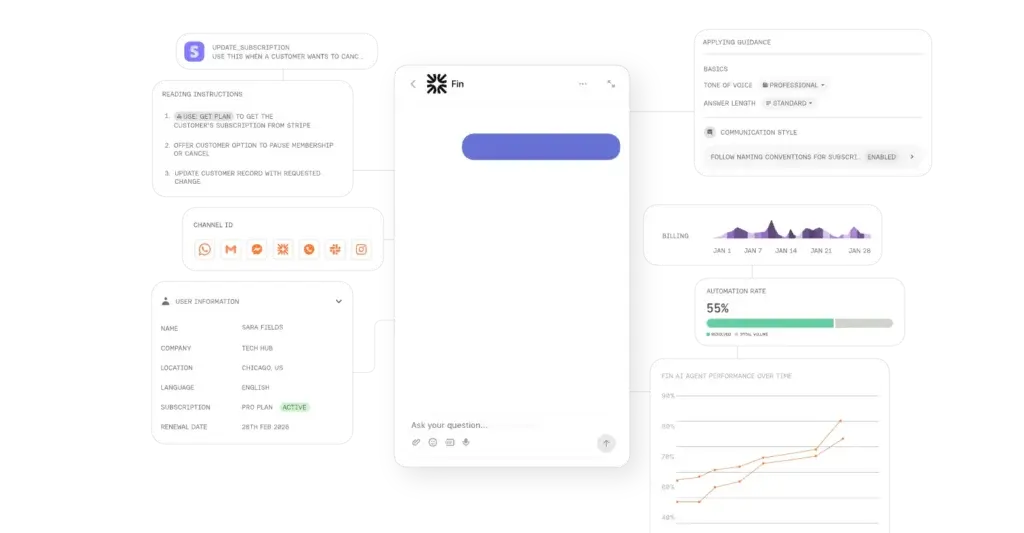
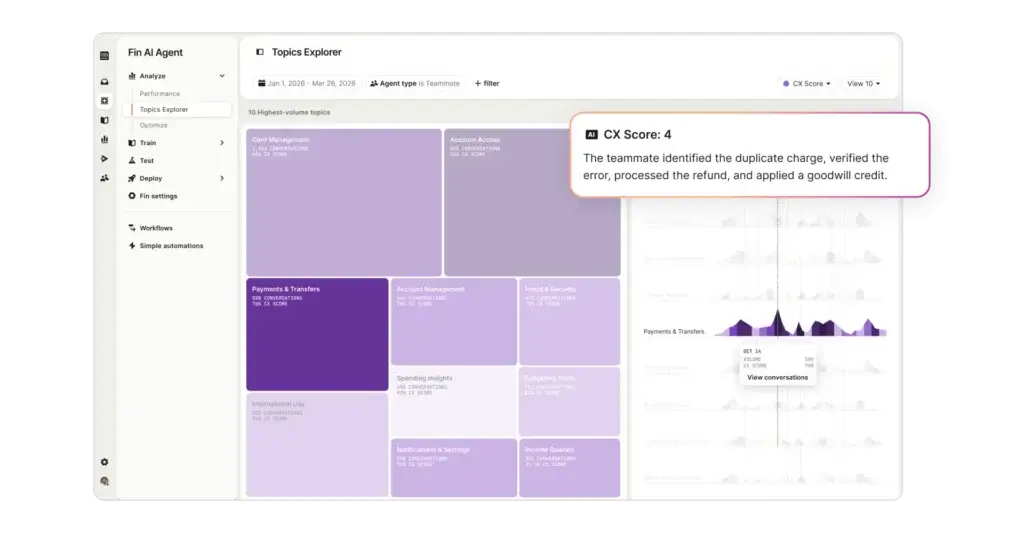
The biggest strategic shift in Intercom’s current positioning is its AI-first model. Fin is now central to the platform, not just an add-on chatbot. Intercom presents Fin as a customer service AI agent that can answer questions, follow procedures, hand off conversations when needed, and operate across multiple support channels. That makes Intercom particularly relevant for teams trying to scale support without scaling headcount at the same rate.
Omnichannel support from one inbox
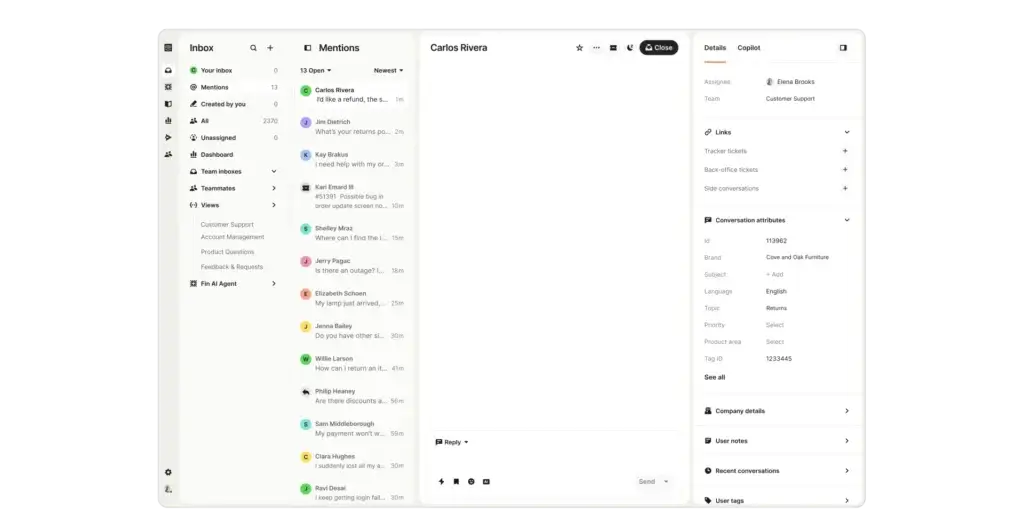
Intercom is designed to help support teams work across live chat, email, in-app messaging, phone, SMS, WhatsApp, and social channels from one inbox. That omnichannel approach is important because it keeps customer context together instead of scattering conversations across separate tools. For fast-growing companies, this can improve response quality and reduce the friction that comes from switching between systems.
This also makes Intercom more than a website chat tool. The platform is built for teams that want to centralize support operations, not just add a widget to their site. If your customers move between email, chat, mobile, and messaging apps, Intercom’s connected inbox model is one of its strongest selling points.
Knowledge, workflows, and human handoff
Intercom combines AI responses with knowledge management and workflow automation. Teams can create and manage support content in the knowledge hub, build automated workflows for routing or tagging, define SLAs on higher plans, and use Fin to either resolve issues or hand them off with context when a human agent is needed. This is where the product starts to feel like a serious customer service platform rather than a messaging layer.
In practice, the real value of Intercom comes from how these components connect. The knowledge base informs self-service and AI answers, workflows shape routing and automation, and agents work from the same customer context when intervention is needed. That unified setup is one of the main reasons Intercom remains a leading option for digital-first support teams.
Intercom’s feature set is strongest when you evaluate it as a complete customer service platform instead of a single-purpose chat or ticketing tool. Below are the areas where it stands out most.
Shared inbox and omnichannel messaging
Intercom’s shared inbox is built to centralize customer conversations from multiple channels. This includes live chat, support email, in-app chat, WhatsApp, SMS, phone, and social conversations. Teams that want agents to see the full thread and customer history in one place will find this model especially attractive.
For companies handling support across several touchpoints, this is more valuable than it may look at first glance. A unified inbox does not just help with convenience, it helps with context, consistency, and faster handoffs between automation and human support.
Knowledge hub and self-service
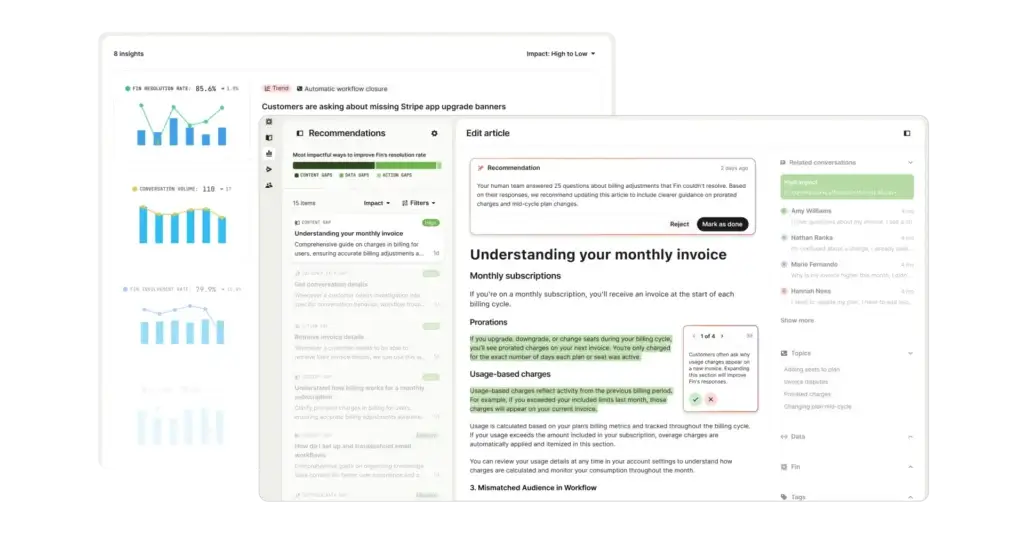
Intercom includes a knowledge management layer that helps teams create, sync, import, and organize support content in one place. This is important because strong AI support depends heavily on clean support content. It also supports classic self-service, letting customers solve issues without waiting for an agent.
The platform’s knowledge capabilities are not just a side feature. In an AI-driven support setup, they are a core operational layer. Businesses that already have a rich help center or want to invest in one can get more leverage out of Intercom than those relying only on live-agent support.
Workflow automation
Intercom supports workflow automation for tasks such as conversation routing, inbox automation, SLAs, and structured support processes. These workflows are especially relevant for teams that want to reduce repetitive manual work and create a more consistent experience across agents and channels.
Compared with lighter live chat tools, this gives Intercom more operational depth. It is one of the reasons Intercom can work for more mature support teams, not just early-stage startups.
Apps and integrations
Intercom connects with a broad ecosystem of business tools, including Salesforce, Stripe, Jira, Shopify, and many others. The official site highlights more than 350 integrations, plus APIs for more customized use cases. That gives teams more flexibility to connect support with sales, billing, product, and internal workflows.
This matters because customer service rarely operates in isolation. If you need support conversations tied to account data, billing data, orders, or engineering workflows, Intercom’s integration depth is a meaningful advantage.
Fin AI Agent
Fin is Intercom’s flagship differentiator. It is designed to answer customer questions 24/7, resolve common issues, execute procedures, and hand off conversations intentionally when needed. Intercom also positions Fin as compatible not only with Intercom’s own help desk, but with existing help desks such as Zendesk and Salesforce, which broadens its appeal for teams that want AI automation without a full migration.
From a practical standpoint, Fin is one of the strongest reasons to shortlist Intercom today. If AI support automation is high on your priority list, Intercom feels more focused and mature in this area than many traditional help desk vendors that have added AI features later.
Pros and Cons
Advantages and Disadvantages
Pros
✅ Strong AI support automation
✅ Excellent omnichannel inbox
✅ Powerful knowledge and workflows
✅ Large integration ecosystem
Cons
❌ Can get expensive quickly
❌ AI still needs oversight
❌ Best value is not on entry tier
❌ More complex than basic chat tools
Intercom is a strong platform, but it is not the cheapest or simplest option in its category. Its strengths are most obvious when you want AI, omnichannel support, and self-service to work together in one system. Its drawbacks become clearer when budget is tight or when you only need a straightforward ticketing tool.
✅ Strengths
- Strong AI support automation: Intercom has gone further than many competitors in making AI a central part of the support workflow, not just an optional chatbot.
- Excellent omnichannel inbox: The shared inbox and connected channel model are a major advantage for digital customer support teams.
- Powerful knowledge and workflows: Intercom combines help center content, workflows, and AI in a way that feels operationally cohesive.
- Large integration ecosystem: More than 350 integrations help connect support with the rest of the business stack.
❌ Weaknesses
- Can get expensive quickly: Intercom’s seat pricing is already premium on higher tiers, and Fin is charged separately per outcome.
- AI still needs oversight: Public reviews indicate that Fin can still struggle with some complex or nuanced queries.
- Best value is not on entry tier: Teams that want serious workflow depth, SLAs, or collaboration features may outgrow the entry plan quickly.
- More complex than basic chat tools: If you only want basic ticketing or live chat, Intercom may be overbuilt for your needs.
Overall, Intercom looks strongest for businesses that want to modernize support around AI, self-service, and omnichannel communication rather than simply replace an inbox.
Pricing
How Much Does Intercom Cost?
Intercom is more transparent on pricing than it used to be, but it is still important to read beyond the headline number. The platform currently offers Essential, Advanced, and Expert plans, with seat-based pricing for teammates who need full access. On top of that, Fin AI Agent is priced per outcome, and some channels or features use usage-based pricing.
Essential plan
The Essential plan starts at $29 per seat per month when billed annually. It is the entry point for teams that want Intercom’s help desk and AI-first support foundation without paying enterprise-level pricing. For smaller teams, it can be a workable starting point, but it is not the plan that shows Intercom at its full operational depth.
Advanced plan
The Advanced plan starts at $85 per seat per month when billed annually. This is where Intercom begins to look much more complete for growing support teams. It adds features such as multiple team inboxes, workflow automation, round robin assignment, a private and multilingual help center, and 20 free Lite seats for cross-functional collaboration.
Expert plan
The Expert plan starts at $132 per seat per month when billed annually. It is aimed at larger support organizations that need more collaboration, security, and control. Features highlighted on this tier include SSO and identity management, HIPAA support, SLAs, multibrand Messenger and Help Center capabilities, and 50 free Lite seats.
Fin AI Agent pricing
Fin is priced separately at $0.99 per outcome. In Intercom’s pricing model, an outcome is counted when Fin resolves a conversation or successfully executes a procedure that ends in resolution or an intentional handoff. This pricing model can make a lot of sense for teams getting meaningful automation value, but it also means costs can scale faster than expected if support volume is high.
Other usage-based charges
Intercom also uses usage-based pricing for some messaging channels and related support capabilities. Official pricing references pay-as-you-go charges for SMS, phone, product tours, WhatsApp, and some other messaging or outbound tools. That does not make Intercom overpriced by default, but it does mean you should evaluate total cost based on actual support volume and channel mix, not just seat price.
Pricing overview table
| Plan | Price | Best For |
| Essential | $29 per seat/month, billed annually | Small teams that want Intercom’s core inbox and AI-first support foundation |
| Advanced | $85 per seat/month, billed annually | Growing support teams needing workflows, multiple inboxes, and stronger help center capabilities |
| Expert | $132 per seat/month, billed annually | Larger teams needing SLAs, multibrand support, stronger security, and broader collaboration |
| Fin AI Agent | $0.99 per outcome | Teams using AI to resolve or automate a meaningful share of support conversations |
How to choose the right plan
If you mainly want the shared inbox and basic Intercom experience, Essential can work as a starting point. But if you are serious about automation, collaboration, and scaling support operations, Advanced is likely the more realistic plan to evaluate. Expert makes sense for businesses with more demanding governance, compliance, or multibrand support requirements.
Implementation tips
- Model Fin costs carefully: Outcome-based pricing can be excellent or expensive depending on your support volume and resolution rate.
- Check channel usage: If phone, WhatsApp, or SMS matter, look at the usage-based cost structure early.
- Do not judge Intercom only by Essential: Many of the platform’s strongest operational features sit higher in the pricing ladder.
- Audit your support content first: Better help content usually means better AI answers and stronger ROI from Fin.
User Experience
Ease of Use & Setup
Dashboard and overall usability
Intercom’s interface is polished, modern, and built around the idea that conversations, automation, and customer context should live together. For digital-first teams, that usually feels more intuitive than old-school ticketing systems with disconnected modules. The shared inbox, messenger, knowledge content, and AI tools all feel part of one product rather than bolted-on pieces.
That said, ease of use depends on what you are trying to accomplish. Basic live chat and inbox workflows can be fairly approachable, but a full Intercom setup with multiple channels, automation rules, knowledge sources, and AI policies is not something you configure casually in one afternoon unless your use case is simple.
Onboarding and setup process
Intercom’s setup generally starts with installing the Messenger, enabling the channels you want to support, defining workflows, and connecting knowledge sources so Fin can respond accurately. The official help center also makes clear that omnichannel support and AI readiness are part of the recommended setup process from the beginning.
If your team is disciplined about documentation and support operations, Intercom can be rolled out effectively. But if your support content is messy or your routing logic is unclear, the platform will expose those weaknesses quickly.
What may limit the experience
The biggest usability tradeoff is that Intercom is no longer just a lightweight messaging tool. It is a broader support platform, and that comes with more settings, more automation logic, and more billing complexity than smaller tools. For sophisticated teams, that complexity is often justified. For lean teams with simple needs, it can feel like more product than necessary.
Integrations & Compatibility
How Intercom Integrates with Other Tools
CRM and business integrations
Intercom’s integration story is one of its stronger assets. The platform highlights more than 350 integrations and specifically calls out tools like Salesforce, Stripe, Jira, and Shopify. This gives support teams a better chance of connecting customer conversations to account context, payment events, internal workflows, and product issues.
Support and workflow ecosystem
Intercom’s app ecosystem also helps it fit into broader customer operations. Businesses can connect support to sales systems, billing tools, analytics, product tracking, and engineering workflows. For teams running cross-functional support, this matters a lot more than a generic app count on a landing page.
Important integration perspective
Compared with smaller live chat platforms, Intercom looks strong here. Compared with the biggest ecosystem-heavy support platforms, it still holds up well. In practical terms, most businesses evaluating Intercom seriously will find the integration layer more than sufficient, especially if they already use mainstream SaaS tools.
Customer Support
How Good is Intercom Support
Support quality and customer sentiment
Intercom’s public reputation is generally strong, especially around speed, automation, and handling digital customer conversations effectively. Public review summaries frequently mention better response times, useful automation, and strong value when the platform is well implemented. This is especially true when discussing Fin and AI-powered support workflows.
Where support still needs context
At the same time, Intercom is not a low-friction product from a budgeting standpoint. Some reviewers feel the platform becomes expensive, especially as teams add seats, channels, or higher usage levels. Others note that AI still needs supervision and that setup quality affects outcomes significantly. In other words, Intercom can be excellent, but it is not the kind of tool you buy casually and forget about.
Reliability considerations
From a market perspective, Intercom is well established enough that reliability concerns are less about vendor legitimacy and more about implementation fit. The bigger questions are whether your team will maintain the knowledge layer, whether Fin will handle your support mix well, and whether the cost model still works at your scale.
Best Use Cases
Ideal Use Cases & Industries
Best use cases
Intercom makes the most sense for businesses that want modern digital support and are willing to invest in automation, self-service, and AI. The strongest use cases include:
- SaaS companies: Especially those supporting customers in-app and across multiple digital channels.
- Ecommerce brands: Teams that need fast support, order-related visibility, and scalable self-service.
- High-growth support teams: Businesses that need to improve resolution without simply hiring more agents.
- Multichannel support teams: Organizations handling chat, email, messaging apps, and other touchpoints from one place.
- AI-forward support operations: Teams that want Fin to take a serious role in handling repetitive or procedural conversations.
Industries that fit especially well
Intercom fits best in software, online services, fintech, ecommerce, education technology, marketplaces, and other digital-first industries where support volume is meaningful and customer conversations happen across several channels. It can work outside those categories as well, but its strengths are clearest in businesses with modern support expectations and a strong digital customer journey.
Alternatives & Competitors
How Intercom Compares to Alternatives
Intercom competes less with pure phone systems and more with leading customer service platforms. The right choice depends on whether you value AI and unified digital support more than lower pricing or classic ticket-centric workflows.
Zendesk
Zendesk is one of Intercom’s most direct and established competitors. Zendesk is often the safer choice for organizations that want a classic, mature support platform with broad enterprise adoption and a very established help desk model. Intercom, however, feels more opinionated around AI-first support, proactive messaging, and a more unified digital experience. If you want a modern support stack with Fin at the center, Intercom may be more compelling. If you want a more traditional enterprise help desk foundation, Zendesk may still have the edge.
Freshdesk
Freshdesk is often a more budget-friendly alternative and can be easier to justify for teams that mainly need ticketing, automation, and standard multichannel support. Compared with Freshdesk, Intercom is usually more premium, more design-focused, and more aggressive in its AI strategy. Freshdesk can be the more economical choice, while Intercom is the stronger fit if you want support, automation, and conversational engagement to feel tightly connected.
HubSpot Service Hub
HubSpot Service Hub makes the most sense for businesses already invested in HubSpot CRM, marketing, and sales tools. Its biggest advantage is ecosystem alignment. Intercom, on the other hand, generally feels more specialized and more mature as a customer messaging and AI support platform. If your company already runs on HubSpot, Service Hub may be the simpler stack decision. If support experience itself is the priority, Intercom is often the more focused product.
Intercom Alternatives Comparison Table
| Provider | Best For | Positioning | Main Advantage |
| Intercom | AI-first digital support teams that want omnichannel service, self-service, and automation in one platform | Premium customer service platform | Strongest blend of AI support automation, shared inbox, and knowledge-driven workflows |
| Zendesk | Organizations wanting a mature, widely adopted help desk and ticketing platform | Enterprise-friendly and established | Classic help desk depth and broad market maturity |
| Freshdesk | Teams looking for a more budget-friendly support platform with broad core functionality | More cost-conscious option | Solid support features at a lower entry cost |
| HubSpot Service Hub | Businesses already invested in HubSpot CRM and revenue operations | CRM-centric service platform | Strong ecosystem fit for HubSpot users |
Conclusion
Final Thoughts
Intercom remains one of the most important platforms in customer service software because it does more than deliver chat or ticketing. It combines an omnichannel inbox, strong self-service capabilities, workflow automation, and an increasingly central AI layer in Fin. For businesses that want to modernize support operations instead of just replacing an old help desk, that is a meaningful advantage.
At the same time, Intercom is not the cheapest route. Costs can rise quickly once you move beyond the entry plan and begin relying heavily on Fin or usage-based channels. It also demands stronger operational discipline than simpler support tools because AI performance depends on content quality, workflows, and ongoing oversight.
If your company wants an AI-forward support platform with a polished user experience, strong omnichannel capabilities, and room to scale digital customer support intelligently, Intercom is absolutely worth shortlisting. If your priorities are lower cost, simpler ticketing, or a more conventional help desk structure, alternatives like Freshdesk, Zendesk, or HubSpot Service Hub may be a better fit depending on your stack and budget.
Frequently Asked Questions
Have more questions?
What is Intercom?
Intercom is a customer service platform that combines live chat, a shared inbox, knowledge management, automation, and Fin AI Agent to help businesses support customers across multiple channels.
Is Intercom a help desk or a chatbot?
It is both, but it is broader than either label on its own. Intercom includes help desk functionality, omnichannel messaging, self-service tools, and AI support automation in one platform.
How much does Intercom cost?
Intercom’s current annual pricing starts at $29 per seat per month for Essential, $85 for Advanced, and $132 for Expert. Fin AI Agent is priced separately at $0.99 per outcome.
What is Fin AI Agent?
Fin is Intercom’s AI support agent. It is designed to answer customer questions, resolve routine issues, execute support procedures, and hand conversations to human agents when needed.
Does Intercom support email and chat?
Yes. Intercom supports live chat, support email, in-app messaging, and additional channels such as WhatsApp, SMS, phone, and social through its omnichannel support model.
Is Intercom good for small businesses?
It can be, especially for digital-first small businesses that want modern chat and AI-powered support. However, it is often a better fit for growing teams than for businesses that only need basic ticketing.
Does Intercom include a knowledge base?
Yes. Intercom includes knowledge management and help center capabilities, which are important both for self-service and for improving AI response quality.
What are Intercom’s biggest drawbacks?
The biggest drawbacks are pricing, the possibility of rising costs with Fin and usage-based channels, and the fact that AI still requires oversight and strong underlying support content.
Is Intercom better than Zendesk?
That depends on your priorities. Intercom is usually stronger if you want a more AI-first and conversational support experience. Zendesk may be the better fit if you want a more traditional, established help desk model.
Is Intercom worth it?
Intercom is worth it for businesses that want to invest seriously in AI-driven support, omnichannel service, and self-service operations. For simpler or lower-budget needs, a lighter alternative may offer better value.