Introduction
If you are looking for a customer service platform that can bring email, live chat, web messaging, help center content, AI automation, and voice into one workspace, Zendesk is one of the most established names in the category. It is built for businesses that need more than a basic shared inbox, but do not necessarily want to stitch together separate tools for ticketing, chat, reporting, and self-service. Instead of focusing on a single channel, Zendesk is designed as an omnichannel support system that lets teams manage conversations, automate repetitive tasks, and keep customer context in one place.
In this Zendesk review, you will explore how the platform works, which features stand out most, how pricing is structured, where Zendesk performs especially well, and where it can feel expensive or more complex than lighter support tools. You will also see how Zendesk compares with close alternatives, including Freshdesk, Intercom, Salesforce Service Cloud, and HubSpot Service Hub. If you need a scalable support platform with strong ecosystem depth and growing AI capabilities, this guide will help you decide whether Zendesk is the right fit.
Key Features
How Zendesk Works
Zendesk is strongest when you evaluate it as a scalable customer service platform rather than as a simple help desk. Below are the areas where it stands out most.
Omnichannel support from one workspace
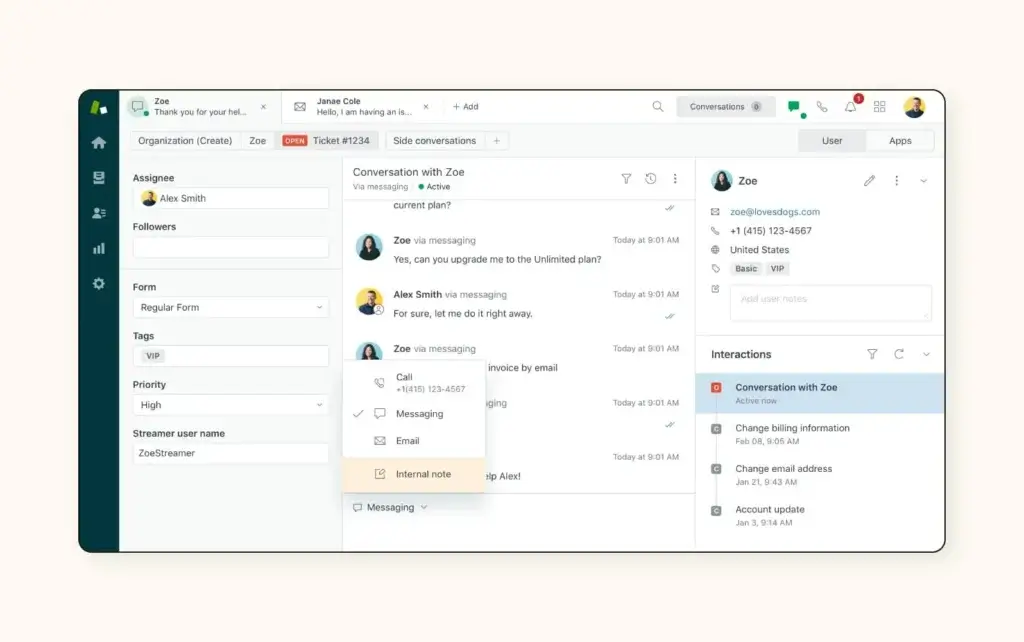
Zendesk is built around the idea that customer service should not be split across disconnected tools. It brings together email, live chat, social messaging, web messaging, help center content, and voice so agents can manage support interactions from a unified workspace. That is one of the main reasons Zendesk continues to appeal to fast-growing support teams, mid-market companies, and larger service organizations that need consistency across channels.
Instead of treating each communication channel as a separate system, Zendesk organizes them around tickets, conversations, and customer context. This makes it easier to maintain handoff history, assign work, route issues to the right team, and report on service quality at a broader level. For businesses with rising ticket volume or multiple brands, that centralized model is a major advantage.
AI agents, automation, and agent productivity tools
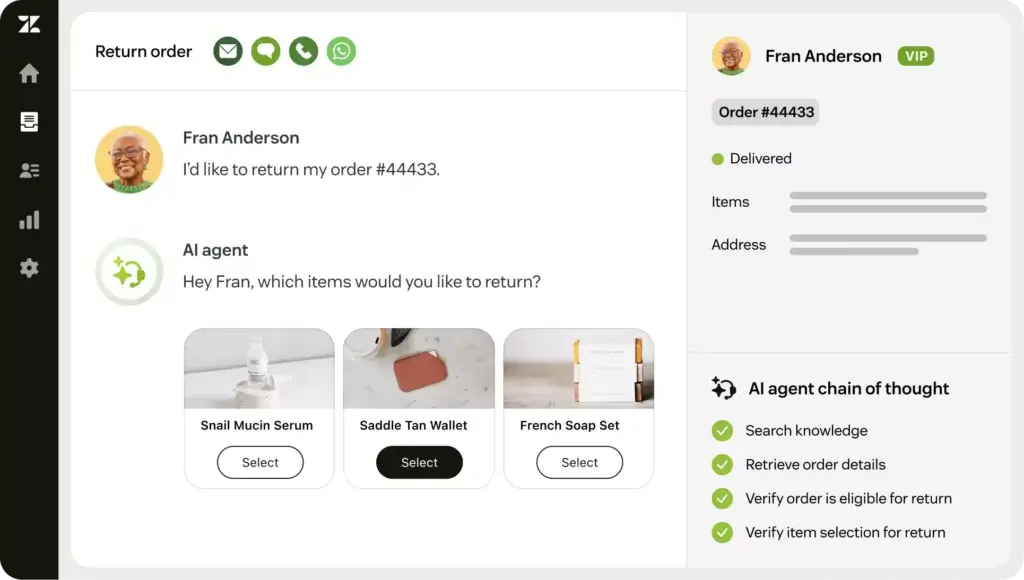
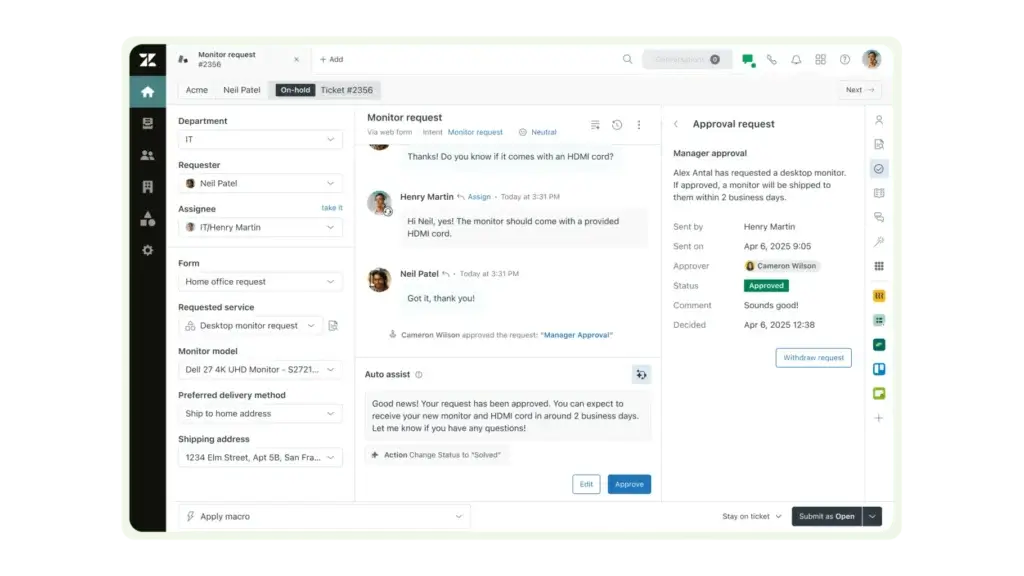
Zendesk has moved aggressively into AI, and that is now central to its product story. The platform includes AI agents for automated resolutions, generative assistance, workflow automation, and optional Copilot functionality for more proactive agent support. In practical terms, this means businesses can automate common support questions, surface suggested responses faster, and reduce the amount of repetitive manual work agents handle each day.
What makes Zendesk more compelling than a generic ticketing system is that the AI layer is not isolated from the rest of the support stack. It is designed to work across messaging, help center content, routing, and reporting. That gives Zendesk a stronger long-term automation story than many traditional help desks that added AI later as a lighter feature set.
Zendesk’s AI capabilities are now one of its biggest differentiators. AI agents are available across Suite tiers, with usage measured through automated resolutions, while Copilot is positioned as an add-on for deeper agent assistance and productivity. This gives Zendesk a more serious AI support story than many platforms that only offer basic chatbot functionality.
Help center, knowledge base, and self-service capabilities
Zendesk is not only about live support. It also puts strong emphasis on self-service through its help center, knowledge base, community forums, and customer portal capabilities. This matters because a mature support operation is not just measured by how quickly agents reply, but also by how effectively customers can solve simple issues without submitting a ticket.
For businesses that want to scale service efficiently, this part of the platform is especially important. Zendesk gives teams a way to turn internal knowledge into customer-facing support content, organize that content by brand or audience, and use it as the foundation for AI-powered assistance and deflection.
Voice and contact center expansion
Although Zendesk is primarily known as a customer service platform, it has become much stronger on voice and contact center functionality. Zendesk Voice adds calling directly inside the support environment, while the newer Contact Center add-on pushes the platform further into more advanced service operations. That gives support leaders a way to keep voice interactions inside the same system as tickets, messaging, and reporting, rather than managing a separate contact center stack.
This does not make Zendesk a pure business phone platform like RingCentral or Nextiva. Its center of gravity is still support operations. But for service teams that want voice built into the help desk rather than bolted on from another vendor, Zendesk is much more relevant today than it was a few years ago.
Ticketing and agent workspace
Ticketing is still the backbone of Zendesk. The system captures, organizes, prioritizes, and routes support requests so teams can work from a structured queue rather than a chaotic inbox. The unified agent workspace helps agents manage conversations from multiple channels without jumping between separate tools, which is a meaningful efficiency gain once ticket volume increases.
Messaging, live chat, and digital channels
Zendesk supports website messaging, live chat, social messaging, and other digital support channels as part of the broader Suite. This makes it easier for businesses to meet customers where they already communicate, while still keeping conversation history and routing logic tied to the same service environment.
Knowledge base and self-service
The help center and knowledge base features are a core reason Zendesk scales well. Businesses can create support articles, organize help content, build self-service flows, and reduce ticket volume through better documentation. When paired with AI agents, the self-service layer becomes even more valuable because it helps power automated answers and faster resolutions.
Reporting, analytics, and operational visibility
Zendesk offers reporting and analytics that become more valuable as your support operation grows. Teams can track ticket performance, channel mix, service levels, satisfaction indicators, and workflow efficiency. Higher tiers make Zendesk more compelling for managers who need custom reports, broader performance visibility, and more operational control.
Marketplace integrations and platform extensibility
One of Zendesk’s major advantages is ecosystem depth. The company highlights more than 1,800 apps, partners, and integrations through its marketplace, which helps it fit into broader CRM, e-commerce, collaboration, and internal operations workflows. This is one of the reasons Zendesk often remains on shortlists even when buyers consider cheaper alternatives.
Pros and Cons
Advantages and Disadvantages
Pros
✅ Excellent omnichannel coverage
✅ Scales well with growing support operations
✅ Strong ecosystem depth
✅ Good balance between enterprise depth and usability
Cons
❌ Pricing climbs quickly
❌ Feature depth is tier-dependent
❌ Overkill for tiny teams
❌ Not always the best fit for conversation-first support
Zendesk remains one of the most capable customer service platforms in the market, but it is not automatically the right choice for every business. Its value becomes clearer as support complexity increases, while its weaknesses become more noticeable when budget and simplicity matter most.
✅ Strengths
- Excellent omnichannel coverage: Zendesk brings together tickets, messaging, live chat, help center content, and voice more cohesively than many smaller help desk tools.
- Scales well with growing support operations: The platform is built to support higher ticket volume, multiple workflows, broader reporting needs, and more structured customer service teams.
- Strong ecosystem depth: Its marketplace and integration footprint are a real advantage for businesses that already rely on a wider SaaS stack.
- Good balance between enterprise depth and usability: Zendesk is more approachable than some heavyweight enterprise platforms, while still offering substantial power.
❌ Weaknesses
- Pricing climbs quickly: Zendesk starts reasonably for basic support, but the Suite tiers, add-ons, and advanced AI options can become expensive.
- Feature depth is tier-dependent: Many of the capabilities that make Zendesk especially compelling show up more clearly on higher plans.
- Overkill for tiny teams: Businesses with only a handful of support requests may find lighter, cheaper tools easier to justify.
- Not always the best fit for conversation-first support: Teams that prioritize chat-led engagement above traditional ticketing may prefer Intercom’s style in some cases.
Overall, Zendesk is strongest for businesses that want a mature, scalable customer service platform with a strong omnichannel structure, ecosystem depth, and meaningful AI investment.
Pricing
How Much Does Zendesk Cost?
Zendesk’s pricing is one of the most important parts of this review because the platform can look affordable at the low end, then become meaningfully more expensive once you move into full omnichannel support, advanced AI, or contact center functionality. The company offers both basic Support plans and broader Suite plans, but most businesses comparing Zendesk as a modern customer service platform should focus on the Suite.
Suite Team
Suite Team starts at $55 per agent per month when billed annually, or $69 per agent per month when billed monthly. This is the entry point for businesses that want Zendesk’s omnichannel model without committing to higher tiers immediately. It is a good starting point for small teams that already know they want more than email-only support.
Suite Growth
Suite Growth starts at $89 per agent per month annually, or $115 per agent per month monthly. This is often the tier where Zendesk starts to feel much more operationally complete, because it adds capabilities that are useful once volume rises and teams need stronger self-service, workflow structure, and broader support management.
Suite Professional
Suite Professional starts at $115 per agent per month annually, or $149 per agent per month monthly. This plan is a more realistic target for established support teams that need deeper analytics, better routing, richer collaboration, and more advanced operational control. For many scaling companies, this is the tier where Zendesk becomes most competitive.
Suite Enterprise
Suite Enterprise starts at $169 per agent per month annually, or $219 per agent per month monthly. This is aimed at larger organizations that need stronger permissions, testing environments, more advanced governance, and broader customization. If your support operation has enterprise-level complexity, this is the version of Zendesk you are most likely to evaluate seriously.
Add-ons and extra cost considerations
Zendesk’s pricing story does not stop at the Suite tiers. Copilot is offered as an add-on, and Zendesk also sells add-ons for quality assurance, workforce management, advanced data privacy, and contact center functionality. This means Zendesk can be highly capable, but also more expensive than the base price suggests once you stack advanced capabilities together. That is one of the biggest considerations for budget-conscious teams comparing Zendesk with Freshdesk or HubSpot Service Hub.
Pricing overview table
| Plan | Price (per agent/month) | Best For |
| Suite Team | $55 annually / $69 monthly | Small teams needing omnichannel support basics |
| Suite Growth | $89 annually / $115 monthly | Growing teams that need stronger workflows and self-service |
| Suite Professional | $115 annually / $149 monthly | Established support teams needing advanced reporting and routing |
| Suite Enterprise | $169 annually / $219 monthly | Larger organizations needing advanced governance and customization |
How to choose the right plan
If you are a smaller team that knows it needs omnichannel support, Suite Team is the lowest realistic starting point. If you already expect broader workflows, better self-service, or more structured service management, Suite Growth is likely the more practical entry tier. Professional and Enterprise make more sense once analytics, permissions, routing sophistication, and operational scale become major priorities.
Implementation tips
- Choose based on workflow, not just seat cost: Zendesk becomes more valuable when your service process is structured enough to use its routing, analytics, and self-service features.
- Budget for add-ons early: If you already know you need deeper AI assistance, QA, workforce management, or contact center features, account for those costs from the start.
- Prioritize rollout in phases: Zendesk is easier to adopt when you start with core channels and expand into automation, voice, and advanced reporting over time.
- Review total service stack costs: Zendesk may replace several point tools, which can offset some of the higher license costs.
User Experience
Ease of Use & Setup
Dashboard and overall usability
Zendesk’s interface is generally easier to understand than heavier enterprise service platforms, but it still has more moving parts than a lightweight shared inbox or entry-level help desk. That makes it a good middle ground for companies that want serious service capabilities without stepping all the way into a more complex enterprise CRM support stack.
The user experience is strongest when your team has a clear support process. If you already know how you want to route tickets, structure help content, organize channels, and measure performance, Zendesk gives you room to scale that process effectively. If your workflows are still loose and minimal, some parts of the platform may feel like more system than you actually need.
Onboarding and setup process
Zendesk offers a trial experience and a fairly structured setup path, including help center guidance for launching Zendesk Suite. Businesses can start with core channels first, then expand into messaging, voice, automation, help center configuration, and deeper reporting over time. That phased rollout approach is one of the smarter ways to adopt Zendesk, especially for mid-sized teams that want to avoid overbuilding from day one.
What may limit the experience
The biggest usability challenge is not that Zendesk is hard to learn, but that the platform becomes broader and more layered as you move up tiers and add more channels. For small teams with only a few agents and straightforward workflows, that can make Zendesk feel heavier than tools like Help Scout or a simpler Freshdesk setup. For larger or faster-growing teams, that same depth is often exactly the point.
Integrations & Compatibility
How Zendesk Integrates with Other Tools
Marketplace ecosystem
Zendesk’s marketplace is one of its clearest competitive strengths. The company highlights more than 1,800 apps, partners, and integrations, which makes it easier to connect Zendesk with collaboration tools, e-commerce platforms, CRM systems, data tools, internal workflows, and custom processes. That matters because support rarely lives on its own; it usually needs to connect with the rest of the business.
CRM, commerce, and team workflow connections
In practice, Zendesk fits well into broader SaaS stacks because it can sit alongside sales, marketing, internal operations, and commerce systems. For companies that already use multiple tools, this ecosystem flexibility is one of the main reasons Zendesk often beats simpler competitors, even when the headline price is higher.
API and extensibility
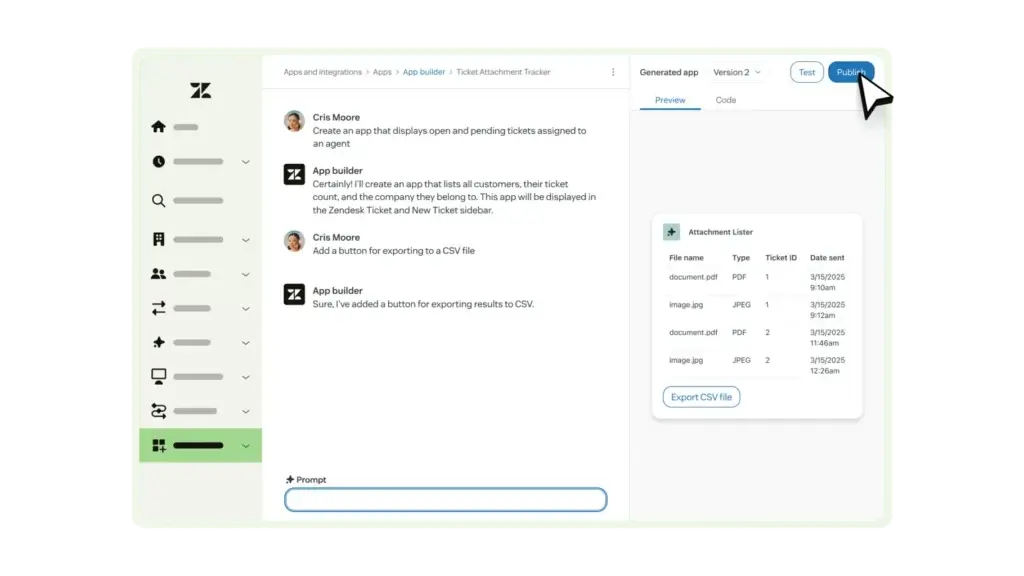
Zendesk also benefits from being a platform, not just a help desk. Businesses can extend the product through APIs and custom workflows, which is particularly valuable for teams that need service operations tailored to their own processes. That kind of extensibility is not always necessary for smaller teams, but it becomes much more important as support complexity grows.
Customer Support
How Good is Zendesk Support
Help resources and support availability
Zendesk provides access to its Help Center, on-demand training resources, community content, and global support options. That gives customers several layers of support beyond basic documentation alone. For a platform as broad as Zendesk, that matters, because implementation questions often extend beyond simple troubleshooting and into workflow design, channel setup, and operational best practices.
Professional services and higher-touch assistance
Zendesk also offers additional services for customers that need more guidance, configuration help, or hands-on implementation support. That is useful for organizations that are deploying Zendesk more strategically across multiple channels, brands, or teams. It also reinforces Zendesk’s positioning as a platform that can serve both smaller businesses and more complex environments.
Support experience in practice
In my view, Zendesk’s support reputation is tied closely to the fact that the product is mature and widely adopted. That scale is an advantage, but it also means customer expectations are high. Smaller teams may sometimes prefer a vendor that feels more high-touch by default, while larger teams often appreciate Zendesk’s broader documentation, ecosystem, and structured service resources.
Best Use Cases
Ideal Use Cases & Industries
Best use cases
Zendesk is most compelling for businesses that need a true customer service platform rather than a lightweight inbox tool. The strongest use cases include:
- Growing support teams: Companies that need structured ticketing, routing, analytics, and self-service.
- Omnichannel customer support: Businesses supporting customers across email, web messaging, chat, social, and voice.
- Teams with rising automation needs: Organizations that want AI agents, workflow automation, and higher deflection through self-service.
- Multi-brand or multi-team operations: Businesses that need more control, organization, and flexibility than simpler help desks provide.
- Companies with broader SaaS ecosystems: Teams that benefit from a large app marketplace and extensibility.
Who may want a different tool
Zendesk may be less attractive for very small teams that only need basic email support, startups that want the cheapest possible ticketing system, or businesses that prefer a chat-first customer communication model over a more structured support workflow. In those cases, a lighter or more specialized alternative may be easier to justify.
Alternatives & Competitors
How Zendesk Compares to Alternatives
Zendesk operates in one of the most competitive categories in customer communication software. The right choice depends on whether you care most about traditional service depth, conversational support, enterprise CRM alignment, or budget efficiency.
Freshdesk
Freshdesk is one of the most direct Zendesk alternatives. It competes closely on help desk and omnichannel support functionality, but it often feels more budget-friendly and simpler to adopt for smaller businesses. Zendesk usually has the stronger brand position, broader marketplace depth, and more mature ecosystem, while Freshdesk can be more attractive for teams that want solid service functionality at a lower cost.
Intercom
Intercom overlaps with Zendesk, but it approaches customer communication from a more conversation-led angle. If your business prioritizes messaging, product support, proactive engagement, and modern chat-first experiences, Intercom may feel more natural. Zendesk is usually the better choice when you want a broader, more structured support operation built around ticketing, knowledge management, and multi-channel service consistency.
Salesforce Service Cloud
Salesforce Service Cloud is the stronger fit for organizations that are already deeply invested in Salesforce and want customer service tightly connected to a wider CRM and enterprise operations environment. Zendesk usually feels easier to adopt and more focused as a service platform, while Salesforce often wins when enterprise extensibility and cross-functional CRM depth matter most.
HubSpot Service Hub
HubSpot Service Hub is most attractive for businesses already running HubSpot across marketing and sales. It offers a more unified go-to-market stack, which can be very appealing for smaller and mid-sized companies. Zendesk is still the stronger dedicated customer service platform in my opinion, especially when support operations become more complex and channel breadth matters more.
Zendesk Alternatives Comparison Table
| Provider | Best For | Starting Price Positioning | Main Advantage |
| Zendesk | Businesses needing scalable omnichannel customer service | Mid to premium | Mature platform with strong ecosystem and AI roadmap |
| Freshdesk | Teams wanting a more budget-friendly help desk alternative | Usually lower | Good value and easier entry point |
| Intercom | Messaging-led support and conversational customer engagement | Varies by usage | Strong chat-first and modern support experience |
| Salesforce Service Cloud | Enterprise teams already invested in Salesforce | Enterprise-oriented | Deep CRM alignment and extensibility |
| HubSpot Service Hub | Companies wanting service tied closely to marketing and sales | Entry to mid-market | Strong fit inside the HubSpot ecosystem |
Conclusion
Final Thoughts
Zendesk remains one of the strongest all-around customer service platforms in the market. It combines structured ticketing, omnichannel communication, help center functionality, marketplace depth, and a more serious AI direction than many traditional help desk tools. That mix makes it a strong option for businesses that want a service platform they can grow into rather than outgrow quickly.
At the same time, Zendesk is not the cheapest route into customer support software. The real value shows up most clearly when you need multiple channels, stronger workflows, better analytics, and meaningful automation. If your team only needs a very simple support setup, Zendesk may feel like more platform and more spend than you actually need.
If your priority is a mature support operation with room to scale, Zendesk deserves to stay on your shortlist. If budget, simplicity, or chat-first engagement are more important than service depth, alternatives like Freshdesk, Intercom, or HubSpot Service Hub may prove more attractive depending on your use case.
Frequently Asked Questions
Have more questions?
What is Zendesk?
Zendesk is an omnichannel customer service platform that helps businesses manage tickets, messaging, help center content, automation, AI agents, and voice support in one system.
What category does Zendesk belong to?
Zendesk is best categorized as customer service software, help desk software, or an omnichannel customer support platform.
Is Zendesk a CRM?
Zendesk has customer data and service workflow capabilities, but it is more accurately viewed as a customer service platform than as a full CRM in the same sense as Salesforce or HubSpot.
How much does Zendesk cost?
Zendesk Suite starts at $55 per agent per month billed annually for Suite Team, with higher tiers such as Growth, Professional, and Enterprise increasing substantially in price.
Does Zendesk include AI?
Yes. Zendesk includes AI agents and automation features, and it also offers Copilot and other AI-focused add-ons for deeper agent assistance and operational improvement.
Does Zendesk support voice?
Yes. Zendesk includes voice support and also offers a Contact Center add-on for more advanced call handling and service operations.
Is Zendesk good for small businesses?
It can be, especially for small businesses that already need omnichannel support and room to scale. For very small teams with simple needs, Zendesk may be more platform and cost than necessary.
What are the best Zendesk alternatives?
The most relevant alternatives usually include Freshdesk, Intercom, Salesforce Service Cloud, and HubSpot Service Hub, depending on whether you prioritize value, chat-first support, enterprise CRM depth, or ecosystem alignment.
Is Zendesk better than Freshdesk?
Zendesk is often stronger on ecosystem maturity, brand position, and service depth, while Freshdesk can be more budget-friendly and easier to justify for smaller teams.
Is Zendesk worth it?
Zendesk is worth it for businesses that need a scalable, structured support platform with strong omnichannel capabilities, ecosystem depth, and meaningful AI investment. It is less compelling when support needs are minimal and cost sensitivity is very high.